
Our readers keep the lights on and the weekend projects moving. As an Amazon Associate, I earn from qualifying purchases.
Choosing a new audio interface for your Mac workflow is more than picking a box with knobs. It’s the neural link between your performance and your Digital Audio Workstation. The wrong choice introduces noise, latency, or a brittle sound signature that forces you to mix against your gear rather than with it.
I’m Rikta — the founder and writer behind FitlyFast. I have spent years analyzing the converter chips, preamp topologies, and driver stability of audio interfaces specifically for macOS and iPadOS ecosystems, where class-compliance and Core Audio integration separate viable tools from frustrating returns.
After cross-referencing measured specs and real-world user reports across dozens of models, I built this guide to help you find the best audio interface for mac that fits your studio space, workflow, and budget without buried compromises.
How To Choose The Best Audio Interface For Mac
Picking the right interface for macOS is simpler than on Windows thanks to Core Audio, but it still demands attention to preamp quality, converter resolution, and the physical I/O you actually need for your microphones and instruments.
Preamps and EIN Ratings
The mic preamp is the heart of your interface. Look for a low EIN figure (around -129 dBu or better) for quiet, hiss-free recordings. Class-A preamp designs, like those in Audient consoles, offer a distinct warmth and clarity, while switchable impedance or Vintage modes can shape the tone before it hits your DAW.
Converter Quality and Dynamic Range
Modern interfaces all claim high sample rates, but dynamic range on the outputs (120 dB or higher) tells you how much detail you can hear during mixing. The MOTU M2 uses an ESS Sabre32 DAC for clean stereo imaging, while the SSL 2 MKII offers 32-bit AD/DA converters that preserve headroom even at moderate gain settings.
I/O Count and Expandability
If you plan to record a band, drums, or use outboard gear, invest in an interface with ADAT input or line input expandability. The Focusrite Scarlett 16i16 and Audient iD24 both offer optical inputs that allow additional preamp channels down the road, saving you from replacing the whole unit when your setup grows.
Quick Comparison
On smaller screens, swipe sideways to see the full table.
| Model | Category | Best For | Key Spec | Amazon |
|---|---|---|---|---|
| Universal Audio Apollo Solo Heritage | Premium | Near‑zero latency tracking with UAD plugins | UAD Solo DSP core | Amazon |
| Audient iD24 | Premium | Class‑A console preamps with insert points | 126 dB dynamic range | Amazon |
| Focusrite Scarlett 16i16 4th Gen | Mid‑Range | Multi‑track recording with ADAT expandability | 69 dB preamp gain | Amazon |
| MOTU M4 | Mid‑Range | High‑quality converters with on‑unit controls | ESS Sabre32 DAC | Amazon |
| Solid State Logic SSL 2 MKII | Mid‑Range | Signature SSL sound with 4K enhancement | 32‑bit AD/DA converters | Amazon |
| Focusrite Scarlett Solo 3rd Gen | Entry | Simple solo recording for beginners | Air mode switch | Amazon |
| Universal Audio Volt 2 | Entry | Warm vintage‑style preamp with USB power | Vintage preamp mode | Amazon |
| MOTU M2 | Entry | Best measured DAC performance at its tier | 120 dB dynamic range | Amazon |
| M‑Audio AIR 192×4 VSPro | Entry | Complete recording bundle for beginners | 2.59 ms round‑trip latency | Amazon |
In‑Depth Reviews
1. Universal Audio Apollo Solo USB Heritage Edition

This interface is the ultimate tool for anyone who wants to track with analog compression and EQ before the signal even touches the DAW. The built-in UAD Solo DSP core lets you run vintage Teletronix, Pultec, and UA plug-ins with near-zero latency, while Unison technology physically reconfigures the mic preamp impedance to match classic Neve, API, and Avalon designs. The headphone amplifier delivers loud, detailed monitoring with a very low noise floor.
Build quality is exceptional, with a metal chassis and premium analog components that feel years ahead of typical bus-powered interfaces. It’s fully class-compliant on macOS, so you plug it in and it works with Logic Pro, Ableton, or Pro Tools without driver downloads. The Heritage Edition’s bundled plug-in suite adds thousands of dollars in emulated hardware at no extra cost.
Installation on Mac is straightforward, but some users report needing a high-quality USB cable to avoid intermittent connection issues. It’s a bus-powered unit, so you will want to use a USB 3.0 port or an Apple USB-C power adapter for stable operation with higher-gain mics. Worth the premium for the latency-free DSP workflow.
Why it’s great
- Zero-latency UAD DSP tracking with analog hardware emulations
- Unison preamp impedance matching for authentic studio sound
- Top-tier headphone amplifier and build quality
Good to know
- Bus powered only; may need an external power adapter for demanding mics
- Limited to 2 inputs without ADAT expansion
2. Audient iD24 USB-C Audio Interface

The iD24 brings the same discrete class-A preamp circuit found in Audient’s ASP8024-HE console into a desktop form. That means ultra-low noise, low distortion, and a subtle analogue warmth that keeps vocals and acoustic instruments sounding natural. The 32-bit DAC converter technology delivers 126 dB of dynamic range on the outputs, revealing fine mix details you would miss on lesser hardware.
Its standout feature is the pair of fully balanced insert points that allow you to route external preamps or outboard compressors directly to the A/D converters, bypassing the internal preamp path entirely. The three programmable function buttons let you assign speaker switching, talkback, or polarity invert for faster workflow. ADAT input accepts up to eight additional channels when your studio grows.
Some users note that the unit runs warm even when idle, and it draws enough power that connecting through a USB 2.0 port can be unreliable — stick to USB-C or USB 3.0. The software control panel is well designed, but Mac users will appreciate that all core functions work class-compliant right out of the box.
Why it’s great
- Console-grade class-A preamps from Audient’s ASP8024-HE
- Insert points for integrating outboard gear before conversion
- 126 dB dynamic range for critical mix detail
Good to know
- Runs warm; requires reliable USB-C power
- Maximum sample rate is 96 kHz, not 192 kHz
3. Focusrite Scarlett 16i16 4th Gen USB Audio Interface
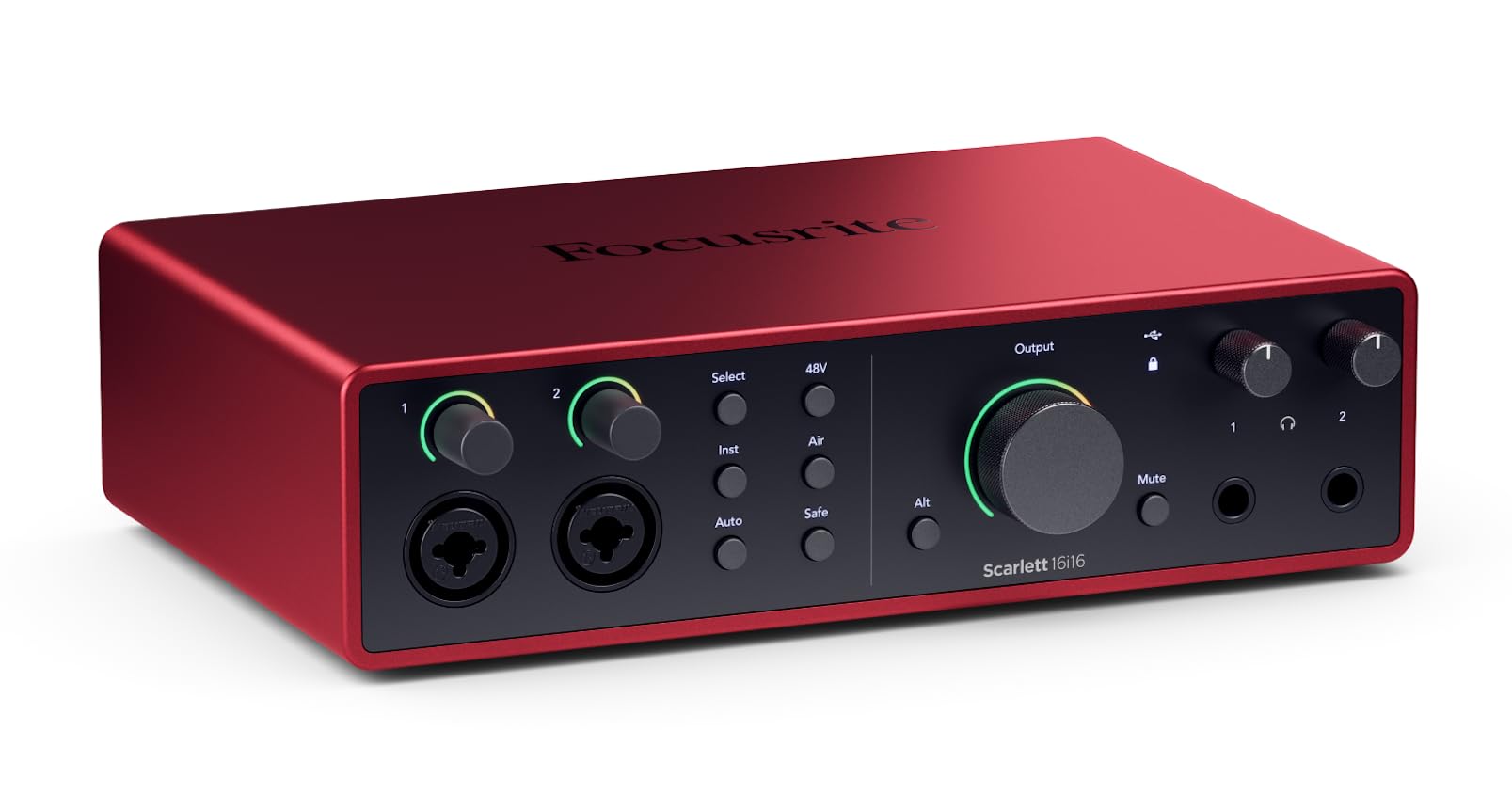
The 16i16 is the centerpiece for producers who need to record multiple sources simultaneously — drums, a full band, or multiple synth lines. With 16 inputs and 16 outputs accessible via mic, line, ADAT, S/PDIF, and MIDI, it gives you practical expansion without upgrading your whole studio. The 4th generation preamps deliver 69 dB of gain with a clean, neutral response, and the Air mode adds presence or a harmonic drive reminiscent of classic console transformers.
The Auto Gain and Clip Safe features are genuinely useful for avoiding clipped takes during loud performances. The converters borrow technology from Focusrite’s RedNet range, achieving 122 dB dynamic range on the outputs for excellent clarity. The included software bundle covers Pro Tools Intro+, Ableton Live Lite, and Cubase LE, plus the Hitmaker Expansion plugin suite.
Users moving from the older Saffire range note that the redesigned mixer software has a learning curve, and some features require the desktop app to configure. The unit requires external power, so it is not a grab-and-go mobile interface, but the I/O flexibility at this price point makes it a strong mid-range investment.
Why it’s great
- 16 inputs/outputs with ADAT and S/PDIF for expansion
- Auto Gain and Clip Safe prevent level mishaps
- 122 dB dynamic range from RedNet‑derived converters
Good to know
- Requires external power supply; not bus powered
- Mixer software requires desktop app for full control
4. MOTU M4 4×4 USB-C Audio Interface

The MOTU M4 takes the same acclaimed ESS Sabre32 DAC found in the M2 and adds two additional line outputs and an extra headphone output, making it a smarter choice for producers who need independent monitor mixes or cue feeds. The preamps are transparent with very low noise and distortion, measuring -129 dBu EIN, which keeps vocal and instrument takes clean without coloration.
The LCD display shows real-time level metering for both inputs and outputs, letting you dial in gain visually without guessing. A front-panel 48V phantom power switch per channel and a physical direct monitoring mix knob are practical touches that reduce the need to dive into software menus. Loopback is built in for streaming or podcast recording directly from your DAW output.
Some users note that the headphone amp is weaker than dedicated headphone amplifiers due to the bus power limitation, but it drives most studio headphones to adequate levels. The occasional pitch-shifted output when waking from sleep on Windows is a known quirk, but Mac Core Audio users rarely encounter it. The M4 is bus powered and works flawlessly with USB-C on MacBooks.
Why it’s great
- ESS Sabre32 DAC for excellent stereo imaging and clarity
- LCD metering and physical direct monitoring controls
- Built-in loopback for streaming and podcasting
Good to know
- Headphone amp is weaker than some external amps
- Occasional behavior quirks on Windows (rare on Mac)
5. Solid State Logic SSL 2 MKII 2×2 USB Audio Interface

The SSL 2 MKII brings the legendary SSL console sound into a compact bus-powered form factor. Its Legacy 4K Analog Enhancement button adds high-frequency sheen and subtle harmonic distortion that warms vocal and drum recordings in a way that many interfaces cannot match without plugin processing. The 32-bit AD/DA converters provide extended headroom — even moderate gain settings stay clean and artifact-free.
Voice actors and podcasters will appreciate the built-in high-pass filter that cuts rumble and low-end noise, while the zero-latency monitoring with switchable stereo source makes it easy to blend a backing track with a live mic. The headphone amplifier is powerful, clear, and surprisingly open for a 100% bus-powered unit. The metal chassis and large knobs feel substantial on a desk.
Note that the 32-bit converters are not 32-bit float recording — you can still clip the input if you push gain too high. Some users report the unit is slightly larger and heavier than comparable 2×2 interfaces, but the build quality justifies the footprint. Mac compatibility is seamless: it is class-compliant and shows up immediately in Logic, Ableton, and Pro Tools.
Why it’s great
- Legacy 4K button adds classic SSL console character
- 32-bit AD/DA converters for extended clean headroom
- High-pass filter and powerful headphone amp
Good to know
- Not true 32-bit float input; clipping still possible
- Slightly larger and heavier than other 2×2 units
6. Focusrite Scarlett Solo 3rd Gen USB Audio Interface

The Scarlett Solo 3rd Gen remains one of the most common starting points for singer-songwriters and podcasters on Mac. Its Air mode lifts the high frequencies to add presence to vocals, mimicking a console’s impedance behavior. The mic preamp is clean with 56 dB of gain, and the instrument input accepts high-output pickups without clipping.
The bundle includes Pro Tools First Focusrite Creative Pack and Ableton Live Lite, giving you two serious DAWs right away. The quick-start tool on Mac walks you through setup in minutes, and the bundled plugin suite (Softube, Focusrite Red Plug-in Suite) adds immediate mixing value. Build quality is decent plastic with a metal chassis feel, durable enough for regular desk work.
Some users report that USB connection can be slightly loose, causing the interface to disconnect if the cable is moved accidentally, and the software download process requires patience — the advertised huge plugin bundle is mostly trial or limited versions. It is a solid entry-level tool, but if your budget allows a step up, the improvement in preamp quality and converter detail is noticeable.
Why it’s great
- Switchable Air mode adds clarity and presence to vocals
- Wide software bundle including Pro Tools and Ableton Live Lite
- Simple setup on macOS with Core Audio
Good to know
- USB connection can be physically loose over time
- Bundled software includes many trial versions
7. Universal Audio Volt 2 USB Audio Interface

The Volt 2 stands out in the entry-level crowd because of its Vintage mode, which emulates UA’s classic 610 tube preamp. Engage it, and your vocal or line input takes on a slight tube saturation and warmth that sounds more polished than a flat clean preamp. The 24-bit / 192 kHz converters capture enough detail for professional demos and even final tracks with careful mixing.
Build quality feels solid and compact, with a metal enclosure and smooth knobs. It includes the award-winning LUNA DAW, which is a full-featured recording environment optimized for UA hardware, plus the UAD plugins bundle that includes several emulations of classic studio gear. On Mac, Core Audio makes it plug-and-play with Logic, GarageBand, or Ableton.
It is bus powered but requires an external power supply when used with an iPad via Lightning Camera Adapter. Home users note that the included free plugins need significant setup investment, and the vintage mode is a single button rather than adjustable. If you do not need the vintage coloration, the transparent preamps still deliver a clean, reliable signal path.
Why it’s great
- Vintage mode adds classic 610 preamp warmth
- Built solid with compact, desk-friendly size
- Includes LUNA DAW and UAD plugin bundle
Good to know
- Requires external power for iPad use
- Vintage mode is a single toggle, not adjustable
8. Motu M2 2×2 USB-C Audio Interface with XLR-XLR Cable Bundle

The MOTU M2 delivers converter performance that rivals interfaces costing three times its price. The ESS Sabre32 DAC provides 120 dB dynamic range on the outputs, which translates to extremely clean stereo playback and precise stereo field imaging during mixdown. The mic preamps measure -129 dBu EIN, making them some of the quietest in this tier, ideal for capturing soft vocals or acoustic instruments without background hiss.
The LCD screen shows input and output levels at a glance, which speeds up gain staging significantly. It includes the ESS headphone output that drives 250-ohm headphones like the DT990 Pro to satisfying levels. Mac users will find it fully class-compliant — plug in via USB-C and the system recognizes it immediately with no driver installation needed.
Some users note that the included USB cable may not be the highest quality, causing intermittent noise, but replacing it with a good USB-C cable resolves it. The loopback feature works but the software mixer can be slightly unintuitive at first. For the measured audio purity at this price point, the M2 is a straightforward recommendation for any Mac-based home studio.
Why it’s great
- ESS Sabre32 DAC with 120 dB dynamic range
- Ultra-low noise preamps at -129 dBu EIN
- Class-compliant plug-and-play on Mac via USB-C
Good to know
- Included USB cable can be unreliable; replace it
- Loopback software mixer has a slight learning curve
9. M-AUDIO AIR192x4 VSPro USB-C Audio Interface Bundle

The AIR192x4 VSPro bundle gives you everything you need to start recording immediately: a 2-in/2-out interface with 24-bit / 192 kHz resolution, a Nova condenser microphone, shock mount, XLR cable, and HDH40 headphones. The interface itself features transparent crystal preamps and low-latency USB-C circuitry with a measured 2.59 ms round-trip latency, making real-time monitoring feel instant.
The included software library is generous: MPC Beats, Ableton Live Lite, Touch Loops effects, Xpand!2, Mini Grand, and Revalver amp simulator. The bundle is designed for podcasters, vocalists, and beginner producers who want one box that does not require additional purchases. The headphone output has independent level control, and the combo inputs accept both XLR and quarter-inch sources.
Reliability reports are mixed — some early units had USB power issues or headphone output noise, though M-Audio replaced them under warranty. The bundled Nova microphone is decent for spoken word but may feel thin for serious vocal work compared to a dedicated condenser. If you prefer to buy your own mic and headphones separately, you might be better off with a standalone interface from the list above.
Why it’s great
- Complete bundle includes interface, mic, headphones, and cables
- Ultra-low 2.59 ms round-trip latency for real-time monitoring
- Generous software suite with multiple DAWs and instruments
Good to know
- Some users report USB power and noise issues
- Bundled microphone is entry-level quality
FAQ
Do I need a Thunderbolt interface for low latency on a Mac?
What is loopback and when will I use it on a Mac?
Final Thoughts: The Verdict
For most users, the best audio interface for mac winner is the Universal Audio Apollo Solo Heritage Edition because it combines near-zero latency UAD DSP tracking with Unison preamps that mimic high-end studio consoles. If you want console-grade preamps with insert points for outboard gear, grab the Audient iD24. And for a cost-effective workhorse with excellent converter specs and practical I/O, nothing beats the MOTU M4.