
Our readers keep the lights on and the weekend projects moving. As an Amazon Associate, I earn from qualifying purchases.
Stepping into PC-powered virtual reality doesn’t have to drain your bank account. The gap between entry-level and premium VR headsets has narrowed considerably, making it possible to get sharp visuals, responsive tracking, and a library of immersive titles without spending like an enthusiast. The real challenge isn’t cost—it’s knowing which specs actually matter for your specific PC setup and which headsets deliver a smooth experience versus those that leave you troubleshooting dropped frames and blurry text.
I’m Rikta — the founder and writer behind FitlyFast. I’ve spent years analyzing VR hardware benchmarks, comparing display resolutions, tracking solutions, and PC compatibility to separate genuine value from marketing noise.
After sifting through the latest models and real user feedback, I’ve built a focused guide to help you find the right balance of performance and affordability. This is the complete breakdown of the best affordable vr headset for pc options available right now.
How To Choose The Best Affordable VR Headset For PC
Choosing a VR headset for your PC is different from buying a standalone unit. You’re not just buying the headset—you’re buying into a compatibility chain that starts with your computer’s graphics card and ends with the tracking system. The most common mistake is picking a headset based on price alone without verifying whether your PC has the right ports (HDMI 2.0 vs. DisplayPort) or enough graphics horsepower to drive the resolution without stuttering.
Display Resolution and Refresh Rate
The resolution determines how crisp text and distant objects appear—a higher pixel count reduces the screen-door effect. For an affordable PC headset, aim for at least 1440 x 1600 per eye. Refresh rate matters equally: 90Hz is the baseline for comfort, while 120Hz greatly reduces motion sickness during fast-paced games. Lower-end headsets at 60Hz or 80Hz can cause noticeable flicker and fatigue.
Tracking System: Inside-Out vs. External Sensors
Inside-out tracking uses cameras on the headset to map your room and controller positions without external base stations. This is the standard for budget-friendly PC headsets because it eliminates additional hardware costs and setup time. External sensor tracking (like SteamVR base stations) offers higher precision for competitive play but requires more space and a higher budget. For most entry-level and mid-range setups, inside-out tracking is more than adequate.
PC Compatibility and Connectivity
Before buying, check the headset’s minimum GPU requirement—many affordable headsets still need a dedicated graphics card like a GTX 1060 or better. Also note the required ports: some headsets need a dedicated HDMI 2.0 or DisplayPort 1.3 connection, not just USB. If your laptop only has USB-C, you may need an adapter or a different headset entirely.
Comfort and Weight Distribution
VR sessions can last an hour or more. A headset that is front-heavy will strain your neck and break immersion. Look for models with a balanced halo-style headband or a rear-mounted battery that counterweights the front display. Also check if the headset accommodates glasses, as not all models have enough clearance for larger frames.
Quick Comparison
On smaller screens, swipe sideways to see the full table.
| Model | Category | Best For | Key Spec | Amazon |
|---|---|---|---|---|
| Meta Quest 3S 128GB | Mid-Range | Best Overall Wireless/PC Hybrid | 2064×2208 per eye, 90Hz | Amazon |
| Meta Quest 2 128GB | Mid-Range | Best Value PC-Tethered & Standalone | 4K (approx), 95° FOV | Amazon |
| Oculus Rift S | Mid-Range | Best Dedicated PC VR Sim Pit | 1440×1600 per eye, 80Hz | Amazon |
| Acer AH101-D8EY WMR | Entry-Level | Best Budget PC VR Introduction | 1440×1440 per eye, 90Hz | Amazon |
| PlayStation VR + Camera Bundle | Entry-Level | Best for PS4/PS5 Cross-Play | 1920×1080, 110° FOV | Amazon |
| PSVR + Move Controllers | Entry-Level | Best Full PlayStation VR Kit | 1920×1080, 110° FOV | Amazon |
| Oculus Quest 2 256GB Bundle | Mid-Range | Best Storage for Media Libraries | 3,888,000 pixels total, 100° FOV | Amazon |
| PlayerO PSVR Iron Man Bundle | Premium | Best PlayStation VR Complete Set | 1920×1080, 110° FOV | Amazon |
| HTC Vive Pro 2 Headset | Premium | Best Visual Clarity Upgrade Path | 2448×2448 per eye, 120Hz | Amazon |
In‑Depth Reviews
1. Meta Quest 3S 128GB

The Meta Quest 3S hits the sweet spot for PC users who want the flexibility of wireless standalone play with the option to tether via Oculus Link for higher-fidelity PC VR titles. Its dual RGB color cameras deliver full-color passthrough, making room setup and mixed-reality experiences far more intuitive than the grayscale passthrough on earlier Quest models.
Inside-out tracking is flawless in most room conditions, and the 2064 x 2208 per-eye resolution keeps cockpit instruments and distant objects sharp with minimal screen-door effect. The 90Hz refresh rate is adequate for most games, though competitive sim racers may wish for a bump to 120Hz.
Battery life averages around three hours, which is respectable for a wireless session. The renewed premium condition saves you money while still including the full accessory set—controllers, charger, and facial interface.
Why it’s great
- Sharp 2064×2208 per-eye resolution with low screen-door effect
- Full-color passthrough for mixed reality and guardian setup
- Works wirelessly or tethered to PC via Oculus Link
Good to know
- Only 90Hz refresh rate; 120Hz would be better for sim racing
- Renewed unit may show minor cosmetic wear
2. Meta Quest 2 — 128GB

The Meta Quest 2 remains the baseline for value-driven PC VR. Its OLED-like display (listed as OLED in specs) delivers deep blacks and vibrant colors, though the per-eye resolution is lower than the Quest 3S. When connected to a PC via Oculus Link or Air Link, it handles SteamVR titles smoothly thanks to its fast processor.
The 95-degree field of view is noticeably narrower than some competitors, but the overall experience is consistent and well-supported by Meta’s library. The included Beat Saber promotion adds immediate value for rhythm game fans. Hand tracking and 3D positional audio are both solid, though the default strap can feel front-heavy during longer sessions.
Comfort upgrades like the Elite Strap are common aftermarket additions, but the stock model is perfectly usable for shorter play periods. For a dedicated PC-centric buyer, the Quest 2 is a reliable entry point that doesn’t force you to choose between standalone and tethered play.
Why it’s great
- OLED-like display with excellent color and black levels
- Wireless PC streaming via Air Link works well
- Huge content library with backward compatibility
Good to know
- Narrower 95-degree FOV compared to newer models
- Default strap can be uncomfortable for long sessions
3. Oculus Rift S

The Oculus Rift S is a dedicated PC VR headset that skips standalone functionality entirely, keeping costs down and performance focused. Its 1440 x 1600 per-eye LCD panel produces a clear image with minimal screen-door effect, and the 80Hz refresh rate is adequate for most experiences, though it runs slightly below the 90Hz comfort threshold some users prefer.
Inside-out tracking via five cameras provides solid room-scale coverage without external sensors. The halo-style headband distributes weight evenly across the crown, reducing forehead pressure. Integrated audio eliminates the need for separate headphones, and the flip-up visor is handy for quick real-world checks.
One important detail—the Rift S requires a DisplayPort connection, not HDMI. Many laptops lack this port, and some users report needing a USB 3.0 PCIe card for stable power delivery. Check your PC’s port layout before buying.
Why it’s great
- Comfortable halo headband design for long sessions
- Integrated audio reduces desktop clutter
- Flip-up visor for quick real-world interactions
Good to know
- Requires DisplayPort; many laptops lack this port
- 80Hz refresh rate may cause fatigue for sensitive users
4. Acer AH101-D8EY Windows Mixed Reality

The Acer AH101-D8EY is a Windows Mixed Reality headset designed for those who want to dip into PC VR at the lowest possible entry cost. Its 1440 x 1440 per-eye LCD produces a clear image, and the 90Hz refresh rate matches the comfort standard of more expensive headsets. The 100-degree field of view is decent, though edge-to-edge clarity is noticeably softer than premium options.
Inside-out tracking eliminates the need for external sensors, making setup simple. However, the included motion controllers rely on AA batteries that drain quickly, and some users report tracking loss when controllers leave the camera’s field of view. The single-cable 13-foot tether is convenient for seated experiences but restrictive for full room-scale play.
Comfort is a mixed bag—the foam face pad compresses easily, and the nose gap can be distracting. Several users have replaced it with a third-party Vive foam pad for a better fit. Despite these quirks, it’s a legitimate way to experience SteamVR without breaking the bank.
Why it’s great
- Very low system requirements (works with GTX 1050 Ti)
- 90Hz refresh rate for comfortable viewing
- No external sensors required
Good to know
- Foam face pad compresses quickly; best replaced
- Controllers drain batteries fast; use rechargeable AAs
5. PlayStation VR + Camera Bundle

The original PlayStation VR headset is a console-native device that can also function as a PC VR headset with third-party software like Trinus PSVR or iVRy. Its 1920 x 1080 OLED display delivers vibrant colors and true blacks, though the resolution is noticeably lower than modern PC headsets, making fine text difficult to read.
The 110-degree field of view is wider than the Quest 2, but the single-cable setup is straightforward when paired with a PS4 or PS5 (with the free camera adapter). For PC use, expect some setup friction—you’ll need a compatible Bluetooth adapter and third-party drivers. The lightweight design is comfortable for long sessions.
This renewed bundle includes the camera but lacks the PlayStation Camera adapter required for PS5 compatibility, so factor in that additional purchase if you’re using a newer console. On PC, tracking quality depends heavily on your software configuration.
Why it’s great
- OLED display with excellent black levels
- Wide 110-degree field of view
- Lightweight and comfortable for extended use
Good to know
- Low 1920×1080 resolution for PC use
- PS5 requires separate camera adapter not included
6. PlayStation VR + Move Twin Pack

This bundle expands on the base PSVR by adding two PlayStation Move motion controllers, which are essential for Beat Saber and other gesture-based games. The resolution remains the same 1920 x 1080, but the Move controllers dramatically improve immersion over the standard DualShock gamepad.
The 110-degree field of view is unchanged, but the bundled camera handles head tracking reliably. The renewed condition means you’re getting the full set—headset, camera, and two Moves—at a consolidated price that beats buying each piece separately. On PC, this setup again requires third-party software and a Bluetooth adapter for the Move controllers.
The 90-day limited warranty provides some peace of mind, though the camera’s cable is a common failure point. Consider this option if you’re primarily a PlayStation user who also wants the flexibility of PC VR experimentation.
Why it’s great
- Complete kit with camera and two Move controllers
- Essential for Beat Saber and active games
- Wide FOV and lightweight headset
Good to know
- Move controllers add setup complexity on PC
- Camera is a fragile component with short cable
7. Oculus Quest 2 256GB Bundle
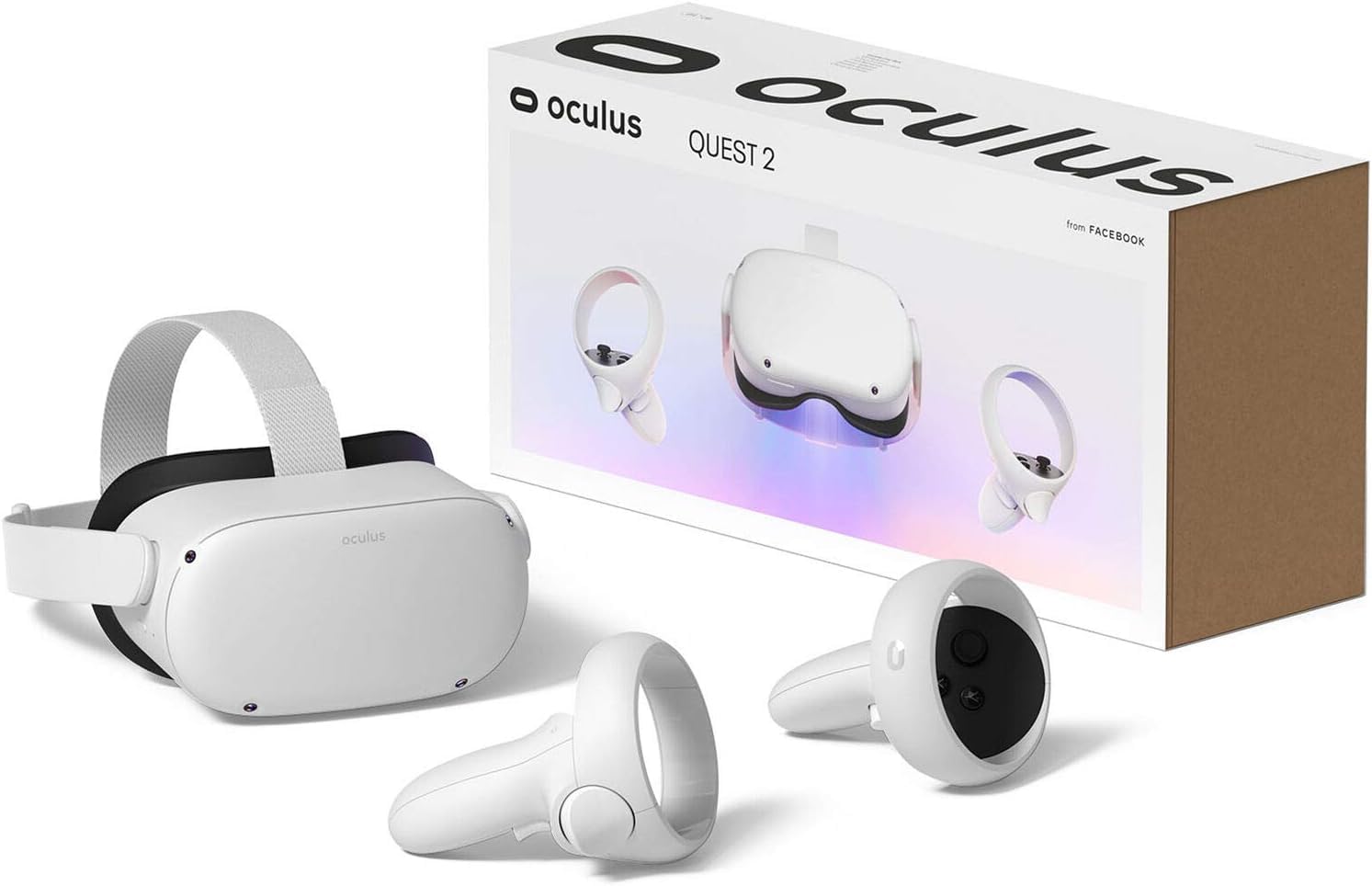
This bundle swaps the standard Quest 2 for the 256GB storage variant, which is a meaningful upgrade for users who plan to sideload media, install large PC VR titles locally, or keep a large library of standalone apps without juggling deletions. The extra storage is especially useful for 180/360-degree video files, which can exceed 20GB each.
The Quest 2’s LCD display uses a sub-pixel layout that reduces the screen-door effect compared to the original Quest, though black levels are not as deep as OLED. The 100-degree FOV and 3,888,000 total pixel count deliver a solid if not class-leading visual experience. The included microfiber cloths are a nice addition for keeping lenses clean.
As with the 128GB version, this headset works wirelessly or tethered to PC. The main trade-off is that the extra storage increases the upfront cost, and many PC VR users stream most content from their computer, reducing the need for onboard space.
Why it’s great
- 256GB storage for large media libraries
- LCD display reduces screen-door effect
- Wireless and PC link flexibility
Good to know
- LCD blacks are not as deep as OLED
- Extra storage is unnecessary if you stream PC VR only
8. PlayerO PSVR Iron Man Bundle

The PlayerO bundle packages the PlayStation VR headset, camera, two Move controllers, and a copy of Marvel’s Iron Man VR—everything needed for a complete PSVR experience out of the box. The 1920 x 1080 LED display is the same resolution as standard PSVR, but the bundled Move controllers are essential for the Iron Man title, which uses Repulsor Jet gestures.
The 110-degree FOV is generous, and the headset’s design is among the most comfortable for extended sessions due to its balanced weight distribution. However, the 60Hz refresh rate (listed in specs) is significantly lower than PC VR headsets, which can cause motion sickness for some users during fast-paced games.
Several buyers reported that the included Iron Man VR game code had expired, so verify the code’s validity immediately upon arrival. For PC use, this bundle requires the same third-party software setup as other PSVR models, but the hardware is complete and ready to go for PlayStation owners.
Why it’s great
- Complete kit including Iron Man VR game
- Move controllers for gesture-based gameplay
- Comfortable, balanced headset design
Good to know
- 60Hz refresh rate is low for PC VR standards
- Game code may be expired; verify immediately
9. HTC Vive Pro 2 Headset Only

The HTC Vive Pro 2 is the premium choice in this lineup—a headset-only purchase that leverages your existing SteamVR base stations and controllers. Its 2448 x 2448 per-eye resolution (combined 5K) delivers the sharpest image in this guide, making cockpit instruments in DCS World and Elite Dangerous crisp and legible even at a distance.
The 120-degree field of view is the widest here, creating a natural, immersive perimeter that reduces the binocular effect. The 120Hz refresh rate provides buttery-smooth motion, which is critical for fast-paced shooters and racing sims. IPD adjustment is manual and precise, minimizing eye strain.
The catch is that this is a headset only—you need existing Vive base stations (1.0 or 2.0) and controllers, adding significant cost. It also requires a DisplayPort 1.3 connection and a powerful GPU to drive its high resolution at full refresh. Users have reported a narrow sweet spot and light bloom on the fresnel lenses, so proper fitting is essential.
Why it’s great
- 2448×2448 per-eye resolution is the sharpest available
- 120Hz refresh rate for smooth motion
- Wide 120-degree FOV for natural immersion
Good to know
- Headset only; requires existing base stations and controllers
- Narrow sweet spot and light bloom on fresnel lenses
FAQ
Can I use a console VR headset like PSVR on my PC?
What GPU do I need for an affordable PC VR headset?
Is inside-out tracking accurate enough for competitive gaming?
Do I need a separate audio device for PC VR headsets?
Final Thoughts: The Verdict
For most users, the affordable vr headset for pc winner is the Meta Quest 3S because it combines a sharp per-eye resolution, full-color passthrough, and the flexibility of wireless or tethered PC play at a mid-range cost that outperforms everything near its price. If you want dedicated PC VR with the most comfortable all-day design, grab the Oculus Rift S. And for the absolute lowest entry price into SteamVR, nothing beats the Acer AH101-D8EY as a true budget gateway.