
Our readers keep the lights on and the weekend projects moving. As an Amazon Associate, I earn from qualifying purchases.
Picking a 32-inch 1440p gaming monitor is less about finding a screen and more about matching your reflexes to the right pixel response and refresh-rate ceiling. Between fast VA panels with deep contrast, crisp IPS options for color work, and OLED technology that redefines black levels, the “right” choice depends on whether you prioritize competitive frame rates or single-player immersion. This guide breaks down the best models across every panel type so you can buy with certainty.
I’m Rikta — the founder and writer behind FitlyFast. I analyze hundreds of monitor specification sheets and real user test patterns each month to separate marketing claims from measurable performance.
Whether you need blistering speed for esports or rich contrast for story-driven titles, understanding the panel trade-offs will lead you to the perfect fit. This is your complete resource for finding the best 32 inch 1440p gaming monitor that fits your setup, budget, and gaming style.
How To Choose The Best 32 Inch 1440p Gaming Monitor
The jump from 1080p to 1440p on a 32-inch screen is massive — you get nearly double the pixel density for sharper textures without the demanding GPU cost of native 4K. But not all 1440p 240Hz panels deliver the same experience. The panel type, adaptive sync implementation, and physical ergonomics matter just as much as the resolution number.
Panel Technology: IPS, VA, or OLED
IPS panels offer wide viewing angles and consistent color, making them a solid choice for mixed-use gaming and productivity. VA panels produce superior contrast — often 3000:1 or higher — which helps dark scenes pop, but older VA models can suffer from black smearing. OLED, available in both WOLED and QD-OLED variants, delivers pixel-level black levels and instant response times, though it costs more and requires some care to prevent burn-in over years of use.
Refresh Rate and Adaptive Sync
A 165Hz or 180Hz refresh rate is plenty for most gamers, offering a significant upgrade from standard 60Hz panels. Competitive players pushing high frame rates in titles like Valorant or Overwatch may prefer 240Hz or even 300Hz+ models. Pair your monitor with either G-Sync Compatible or FreeSync Premium to avoid screen tearing during frame drops. Most modern 1440p monitors support both, but double-check the certification if you plan to use an NVIDIA GPU.
Connectivity and Console Support
To hit 1440p at 165Hz or higher over DisplayPort is standard, but if you plan to use a PS5 or Xbox Series X, ensure the monitor includes HDMI 2.1. Some 1440p monitors cap at 120Hz over HDMI 2.0, while HDMI 2.1 unlocks the full refresh rate on consoles. Also check for USB-C with DisplayPort Alt Mode if you want single-cable laptop connectivity.
Quick Comparison
On smaller screens, swipe sideways to see the full table.
| Model | Category | Best For | Key Spec | Amazon |
|---|---|---|---|---|
| ASUS ROG Strix XG32WCS | Mid-Range | Immersive curved gameplay | 180Hz / 1ms / ELMB Sync | Amazon |
| LG 32GP750-B | Mid-Range | Color-accurate high speed | 165Hz / 1ms / IPS | Amazon |
| Acer Predator X27U | Premium | QD-OLED entry point | 240Hz / 0.03ms | Amazon |
| AOC Q27GAZDV | Premium | Budget QD-OLED gaming | 240Hz / 0.03ms / HDMI 2.1 | Amazon |
| Samsung Odyssey G7 G70F | Premium | Dual-mode resolution toggling | 4K 180Hz / FHD 360Hz | Amazon |
| LG 27GS93QE | Premium | WOLED pure blacks | 240Hz / 0.03ms / HDR400 | Amazon |
| Samsung Odyssey OLED G6 G61SD | Premium | QD-OLED with burn-in prevention | 240Hz / 0.03ms / FreeSync Pro | Amazon |
| ASUS ROG Strix XG32UCG | Premium | 4K/FHD dual-mode performance | 160Hz 4K / 320Hz FHD | Amazon |
| MSI MAG 271QPX QD-OLED | Premium | 360Hz extreme speed | 360Hz / 0.03ms / HDR400 | Amazon |
| KTC H32S25E | Budget | Entry-level curved speed | 240Hz / 1ms / 1000R | Amazon |
| ZZA Z32U | Budget | Highest refresh rate value | 300Hz / 1ms / 1500R | Amazon |
In‑Depth Reviews
1. ASUS ROG Strix 32” 1440P USB-C Curved HDR Gaming Monitor (XG32WCS)

The ASUS ROG Strix XG32WCS strikes the ideal balance between immersive curved design and high-speed gaming performance. Its 180Hz Fast VA panel with 1ms response time delivers fluid motion without the black-smearing artifacts that plagued older VA monitors. The 1000R curvature wraps around your peripheral vision, making fast-paced shooters feel more engaging on a 32-inch canvas.
Color reproduction reaches 90% DCI-P3, which provides punchy, saturated visuals out of the box. The ELMB Sync technology synchronizes backlight strobing with variable refresh rate, effectively eliminating ghosting during high-frame-rate gameplay. The included DisplayPort 1.4 cable supports full 180Hz at 1440p without needing compression.
Build quality is solid with a sturdy stand that offers tilt, swivel, and height adjustment. The on-screen DisplayWidget Center lets you tweak settings via mouse instead of fiddling with joystick menus. This monitor also includes a three-year warranty, adding peace of mind for long-term use.
Why it’s great
- Fast VA panel delivers deep contrast without black smearing.
- ELMB Sync eliminates ghosting with variable refresh rate enabled.
- Adjustable stand and three-year warranty add long-term value.
Good to know
- Brightness may feel low for bright room use.
- Some users report HDMI wake issues with certain consoles.
2. LG 32GP750-B 32 Inch QHD IPS Ultragear Gaming Monitor

The LG 32GP750-B is a reference-grade 32-inch IPS monitor for gamers who also need color accuracy for creative work. Its 165Hz refresh rate and 1ms GtG response time provide smooth, tear-free gameplay, while the IPS panel maintains consistent color and contrast from any viewing angle. The matte screen finish effectively diffuses overhead light, reducing reflections during long sessions.
VESA DisplayHDR 400 certification and 99% sRGB coverage mean HDR content looks noticeably richer than standard SDR, though the 1000:1 native contrast ratio can’t match VA or OLED for deep blacks. The Dynamic Action Sync feature reduces input lag further, and the Black Stabilizer helps spot enemies lurking in dark corners without washing out the entire image.
The stand supports tilt, height, and pivot adjustments, making it easy to find a comfortable ergonomic position. The mini joystick control for the on-screen display is intuitive and responsive, a small but appreciated detail during frantic setup changes.
Why it’s great
- IPS panel offers excellent color accuracy and wide viewing angles.
- Matte finish reduces glare in bright rooms.
- Full ergonomic stand with height, tilt, and pivot.
Good to know
- HDR performance is limited by 1000:1 contrast ratio.
- Anti-glare coating can appear hazy at extreme angles.
3. Acer Predator X27U W1bmiipprx 26.5″ QD-OLED Gaming Monitor

For gamers who want OLED performance without paying flagship prices, the Acer Predator X27U delivers a QD-OLED panel with a 240Hz refresh rate and a stunning 0.03ms response time. The 26.5-inch screen size is slightly smaller than the full 32-inch form factor, but the WQHD resolution remains sharp, with self-emissive pixels providing infinite contrast and no backlight bleed.
The DCI-P3 99% color gamut with Delta E<2 factory calibration means colors are both vivid and accurate straight out of the box. HDR10 support adds punch to highlights, making explosions and neon-lit scenes look spectacular. The ZeroFrame design minimizes bezel distraction, keeping the focus on the game.
Connectivity includes two DisplayPort 1.4 and two HDMI 2.1 ports, allowing full 240Hz support on both PC and current-gen consoles. The built-in speakers are functional for casual use, though serious gamers will want dedicated audio. The stand supports height, tilt, pivot, and swivel adjustments.
Why it’s great
- QD-OLED delivers true blacks and vibrant HDR colors.
- 240Hz with 0.03ms response is elite-tier speed.
- HDMI 2.1 allows full refresh rate on consoles.
Good to know
- Lower peak brightness than premium OLED models.
- Menu navigation can be complex.
4. AOC 27 Inch OLED Gaming Monitor (Q27GAZDV)

The AOC Q27GAZDV offers one of the most affordable entry points into QD-OLED gaming without sacrificing the core advantages of the technology. True blacks, infinite contrast, and 147% sRGB color coverage make this 27-inch 1440p monitor a visual treat for both gaming and media consumption. The 240Hz refresh rate paired with a 0.03ms response time ensures motion clarity is flawless.
HDMI 2.1 connectivity supports full 240Hz refresh rate on PS5 and Xbox Series X, a feature not always found at this price tier. The ergonomic stand provides height, tilt, swivel, and pivot adjustments, plus a built-in USB 3.2 hub for convenient peripheral connections. G-Sync compatibility eliminates screen tearing across a wide VRR range.
The matte coating reduces reflections effectively, though peak brightness is rated at 200 nits, which is lower than some competitors. For dimmer gaming environments, this is a non-issue, and the inky blacks more than compensate. The monitor also launches AOC’s OLED Care features to mitigate burn-in risk over time.
Why it’s great
- Most affordable QD-OLED option with strong core specs.
- HDMI 2.1 enables 240Hz on modern consoles.
- Full ergonomic stand with USB hub.
Good to know
- Peak brightness is modest at 200 nits.
- Ports on bottom are hard to access without right-angle cables.
5. Samsung 27” Odyssey G7 G70F Gaming Monitor

The Samsung Odyssey G7 G70F brings a unique dual-mode feature to the table, letting you toggle between native 4K at 180Hz for visually rich single-player titles and Full HD at 360Hz for competitive shooters. The Fast IPS panel delivers consistent color across the entire screen, and the 1ms response time keeps motion sharp at both resolutions.
HDR10 support provides brighter highlights and deeper shadows, though the IPS panel’s 1000:1 contrast ratio means black levels aren’t as deep as VA or OLED alternatives. Auto Source Switch+ intelligently changes inputs when you switch between PC and console, reducing cable-pulling hassle. The ergonomic stand offers tilt, height, and pivot adjustments for comfortable positioning.
G-Sync compatibility and AMD FreeSync Premium work together to eliminate tearing and stuttering across a wide frame rate range. The monitor is also VESA mount compatible, though you’ll need to supply your own screws. For gamers who play across different genres, the dual-mode flexibility is a genuine advantage.
Why it’s great
- Dual-mode toggles between 4K 180Hz and FHD 360Hz.
- Fast IPS panel with wide viewing angles.
- Auto Source Switch+ simplifies multi-device setups.
Good to know
- Stand feels less premium than some competitors.
- No portrait rotation on the included stand.
6. LG 27GS93QE 27-inch Ultragear OLED Gaming Monitor

The LG 27GS93QE uses LG’s WOLED panel technology, which delivers true black levels without the purple tint that some QD-OLED panels can exhibit in bright rooms. The 240Hz refresh rate with a near-instant 0.03ms response time makes motion incredibly fluid, and the VESA DisplayHDR True Black 400 certification ensures HDR content retains shadow detail in dark scenes.
Color coverage reaches 98.5% DCI-P3, and the anti-glare/low reflection coating is a matte finish that handles ambient light better than glossy OLED panels. The 1.5M:1 contrast ratio means every pixel can turn off completely, producing blacks that blend into the bezel. G-Sync Compatible and FreeSync Premium Pro support ensure smooth gameplay regardless of GPU brand.
The stand provides height, tilt, and pivot adjustments, and the included remote control makes navigating the OSD easy from across the desk. The two-year warranty covering the OLED panel is a reassuring addition, given the burn-in concerns that some users have with OLED technology.
Why it’s great
- WOLED produces perfect blacks without purple shift in bright light.
- Anti-glare matte coating is easy to clean.
- Remote control for OSD is convenient.
Good to know
- Brightness is modest, best used in darker rooms.
- Auto input switch does not work like HDMI-CEC.
7. Samsung 27” Odyssey OLED G6 G61SD

Samsung’s Odyssey OLED G6 G61SD leverages QD-OLED technology with a Dynamic Cooling System that includes a pulsating heat pipe — a first in monitor design — to actively manage heat and reduce burn-in risk over long gaming sessions. The 240Hz refresh rate and 0.03ms response time deliver the signature OLED smoothness, while the 1,000,000:1 contrast ratio ensures perfect blacks.
The Thermal Modulation System automatically adjusts brightness based on predicted surface temperature, and logo detection dims static elements to prevent image retention. Glare Free technology reduces reflections by 54% compared to conventional anti-reflection film, making the screen more usable in moderately lit rooms without losing the deep black performance.
Color gamut reaches 99% DCI-P3, and the slim metal design adds a premium tactile feel to the chassis. The included remote control makes day-to-day adjustments simple. FreeSync Premium Pro certification ensures tear-free gaming with compatible AMD GPUs, though G-Sync also works well based on user feedback.
Why it’s great
- Pulsating heat pipe cooling reduces burn-in risk.
- Glare Free screen works well in moderate lighting.
- Premium metal design with included remote.
Good to know
- Auto-brightness changes can be jarring during gameplay.
- Pixel shift cannot be disabled, leaving visible gaps.
8. ASUS ROG Strix 32” 4K HDR Gaming Monitor (XG32UCG)

The ASUS ROG Strix XG32UCG brings dual-mode versatility to a 32-inch 4K panel, letting you run at 4K 160Hz for rich detail or drop to Full HD 320Hz for extreme competitive speed. The Fast IPS panel delivers a 0.3ms minimum response time, and ELMB Sync eliminates ghosting when using variable refresh rate. This combination makes it a strong contender for gamers who play both immersive AAA titles and fast-twitch shooters.
Color reproduction covers 95% DCI-P3 with 130% sRGB, and the gray-scale tracking ensures smooth gradation without banding. USB-C with DisplayPort Alt Mode allows single-cable connection to laptops, and the DisplayWidget Center lets you adjust settings via mouse. The tripod socket on top is a unique feature for mounting a camera or webcam directly to the monitor.
G-Sync Compatible certification works well with NVIDIA GPUs, and the included DisplayPort cable handles the full 4K 160Hz bandwidth. The stand offers tilt, swivel, and height adjustment, and the semi-gloss screen adds perceived contrast without excessive reflections.
Why it’s great
- Dual-mode toggles 4K 160Hz and FHD 320Hz.
- Fast IPS with 0.3ms response and ELMB Sync.
- USB-C with DP Alt mode for laptop use.
Good to know
- Not a true 1440p native monitor.
- Stand may feel less premium at this price tier.
9. MSI MAG 271QPX QD-OLED Gaming Monitor

For competitive gamers who demand the absolute fastest refresh rate combined with OLED image quality, the MSI MAG 271QPX delivers a 360Hz refresh rate on a 3rd-gen QD-OLED panel. The 0.03ms GtG response time is effectively instantaneous, producing zero perceivable ghosting or motion blur. This is the closest a monitor can get to CRT-like motion clarity without sacrificing modern resolution.
VESA DisplayHDR True Black 400 certification ensures HDR content retains rich shadow detail, and the Delta E≤2 factory calibration means colors are accurate for both gaming and content consumption. MSI OLED Care 2.0 includes multiple features to reduce burn-in risk, including pixel shift, panel refresh, and taskbar detection.
HDMI 2.1 ports provide full 48 Gbps bandwidth, supporting 360Hz at 1440p on compatible GPUs and consoles. The stand offers tilt and height adjustments, and the sleek, thin-bezel design looks clean on any desk. A three-year burn-in warranty is included, which is a crucial consideration for OLED buyers.
Why it’s great
- 360Hz refresh rate is among the fastest at 1440p.
- QD-OLED delivers infinite contrast and vibrant colors.
- Three-year burn-in warranty provides peace of mind.
Good to know
- DSC required for 360Hz can cause slower alt-tab switching.
- VRR flicker may appear during loading screens.
10. KTC 32 Inch 240Hz Curved Gaming Monitor (H32S25E)

The KTC H32S25E proves that high refresh rate gaming doesn’t have to break the bank. Its 240Hz VA panel with a 1000R curvature wraps around your vision, creating an immersive experience that belies its entry-level price. The 1ms response time keeps motion clear in fast-paced titles, and Adaptive Sync technology eliminates screen tearing for smooth gameplay.
The 4000:1 contrast ratio is a significant advantage over budget IPS panels, producing deeper blacks and better shadow detail in dark game scenes. The 122% sRGB color gamut ensures colors are punchy and vibrant. Dual HDMI 2.0 ports and two DisplayPort 1.4 connections provide flexibility for multi-device setups, with DisplayPort supporting the full 240Hz refresh rate.
The stand offers tilt adjustment from -5° to 20°, and the frameless design minimizes bezel distraction in multi-monitor configurations. While the plastic build feels less premium than higher-end options, the core gaming performance — 240Hz, 1440p, and low response time — is genuinely impressive at this price tier.
Why it’s great
- 240Hz at 1440p at a very accessible price.
- 4000:1 contrast ratio provides deep blacks.
- 1000R curve enhances immersion.
Good to know
- Build quality is mostly plastic.
- Tilt-only stand limits ergonomic adjustment.
11. ZZA 32 Inch Curved Gaming Monitor (Z32U)
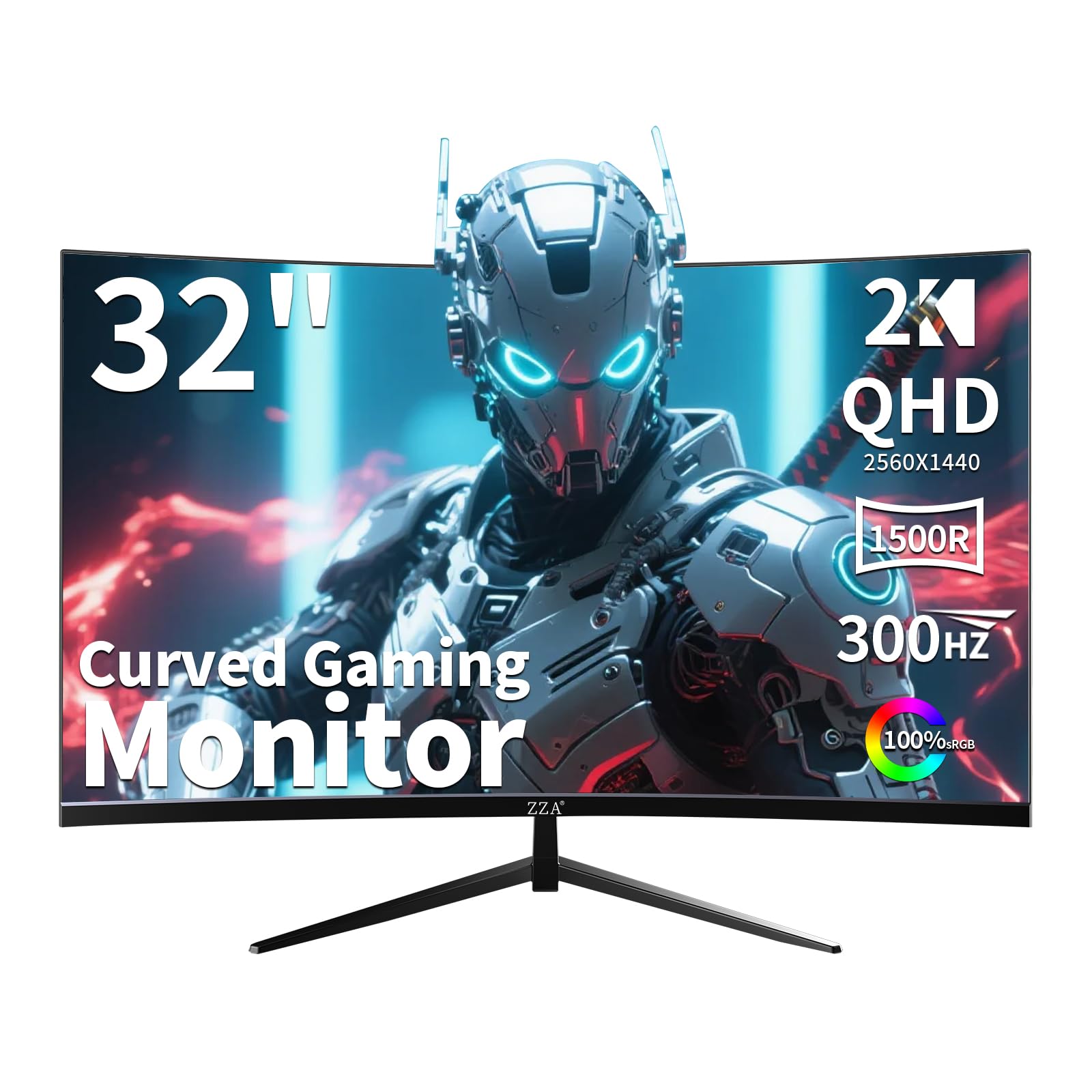
The ZZA Z32U pushes refresh rate boundaries at the budget end of the spectrum with a 300Hz VA panel that outperforms many mid-range monitors in sheer speed. The 1500R curvature is less aggressive than some competitors but still provides a noticeable wraparound effect, and the 2000:1 contrast ratio delivers solid black levels for a VA panel in this class.
Both AMD FreeSync Premium and NVIDIA G-Sync Compatible certifications ensure tear-free gameplay regardless of GPU brand. The 1ms response time keeps motion crisp, and the QHD resolution provides ample pixel density for clear, detailed visuals. The stand offers full tilt, swivel, and height adjustment, a welcome feature at this price point.
Built-in flicker-free technology and low blue light filter reduce eye strain during extended sessions, and on-screen crosshairs provide a competitive edge in shooters. While the brand is less established than ASUS or LG, the combination of 300Hz speed, adjustable ergonomics, and adaptive sync support makes this a strong value proposition for budget-conscious competitive gamers.
Why it’s great
- 300Hz refresh rate is exceptional at this price tier.
- Full ergonomic stand with tilt, swivel, and height adjustment.
- Supports both FreeSync Premium and G-Sync Compatible.
Good to know
- VA panel may exhibit minor black smearing in dark scenes.
- No built-in speakers and advertised USB port may be absent.
FAQ
Can my GPU run a 32 inch 1440p gaming monitor at full refresh rate?
Is a 32 inch monitor too big for 1440p resolution?
What is the difference between WOLED and QD-OLED in 1440p monitors?
Does HDMI 2.1 matter for 1440p gaming monitors?
How do I prevent burn-in on a 1440p OLED gaming monitor?
Final Thoughts: The Verdict
For most users, the best 32 inch 1440p gaming monitor winner is the ASUS ROG Strix XG32WCS because it combines a high 180Hz refresh rate with deep VA contrast, ELMB Sync, and a fully adjustable stand at a fair price. If you want the inky blacks and instant response of OLED, grab the Acer Predator X27U. And for pure competitive speed without OLED cost, nothing beats the ZZA Z32U with its 300Hz refresh rate and full ergonomic stand.