
Our readers keep the lights on and the weekend projects moving. As an Amazon Associate, I earn from qualifying purchases.
The difference between a sharp, clean miniature and a failed mesh of supports and blobs is often just one decision — the right printer. In resin, you fight layer lines and exposure times; in FDM, you chase vibration and warping. Each technology demands its own set of trade-offs, and the model you bring to life depends on picking the tool that fits both your material choice and your patience for post-processing.
I’m Rikta — the founder and writer behind FitlyFast. I’ve spent years analyzing printer hardware, resin chemistries, and FDM motion systems to separate genuine performance claims from marketing hype in the desktop 3D printing space.
Whether you need fine detail for tabletop miniatures or durable prototypes for functional testing, the 3d printer for models must match your specific material needs and print volume requirements to deliver consistent results out of the box.
How To Choose The Best 3D Printer For Models
Selecting a printer for models requires balancing resolution against build volume and material compatibility. Resin printers deliver unmatched surface detail for figurines and jewelry, while FDM machines offer larger part sizes and stronger engineering materials for functional prototypes. The right choice depends on what you are printing and how much post-processing you are willing to tolerate.
Resin vs FDM for model detail
Resin printers use UV light to cure liquid photopolymer in thin layers, producing models with nearly invisible layer lines and sharp edges. FDM printers melt thermoplastic filament through a moving nozzle, leaving visible ridges that typically require sanding or filler primer for display-ready surfaces. If your primary goal is miniatures, action figures, or jewelry masters, a resin printer with XY resolution at or below 50 microns will deliver the crispest results.
Build volume and part size constraints
Most desktop resin printers max out around 9 inches on their longest axis, limiting single-piece prints to objects like tabletop miniatures or small busts. FDM printers commonly offer cubic volumes of 220mm or more, allowing full-size cosplay components, drone frames, or large architectural models to be printed in one go. Measure your largest expected model before committing to a technology.
Material options and printer compatibility
Resin printers are largely limited to photopolymer resins, with specialty variants for flexible, castable, or high-temperature applications. FDM printers support a broader material range including PLA, ABS, PETG, TPU, and carbon fiber-reinforced polymers — but printing advanced materials often requires an enclosed chamber and a hotend capable of 300°C or more. Check the printer’s maximum nozzle temperature and chamber heating capability before buying for functional or engineering models.
Automatic leveling and calibration features
Manual bed leveling adds frustration and inconsistency across prints, especially for beginners. Modern resin printers offer smart mechanical sensors that detect the build plate position with one touch, while FDM machines now include strain-gauge or inductive probes that create a leveling mesh before every print. These features reduce first-layer failures and let you spend more time printing and less time tweaking.
Quick Comparison
On smaller screens, swipe sideways to see the full table.
| Model | Category | Best For | Key Spec | Amazon |
|---|---|---|---|---|
| Bambu Lab P1S | Enclosed FDM | High-speed prototypes | 500 mm/s max speed | Amazon |
| ELEGOO Centauri Carbon | CoreXY FDM | Carbon fiber parts | 320°C nozzle temp | Amazon |
| ELEGOO Mars 5 Ultra | Resin MSLA | Detail miniatures | 18 µm XY resolution | Amazon |
| Phrozen Sonic Mighty 8K | Resin MSLA | Large resin models | 28 µm XY resolution | Amazon |
| ANYCUBIC Photon Mono M7 Pro | Resin MSLA | Ultra-high detail | 16.8 × 24.8 µm XY res | Amazon |
| ANYCUBIC Photon Mono 4 Ultra | Resin MSLA | Small figurines | 17 µm XY resolution | Amazon |
| FLASHFORGE AD5M Pro | CoreXY FDM | Beginner FDM use | 600 mm/s max speed | Amazon |
| Original Prusa MK4S | Open-source FDM | Durable engineering use | Input shaping tech | Amazon |
| Creality K2 Plus Combo | Large-format FDM | Multi-color large builds | 13.78 in³ build volume | Amazon |
In‑Depth Reviews
1. Bambu Lab P1S

The Bambu Lab P1S delivers a rare combination of speed and consistency that few printers in its class can match. Its CoreXY architecture reaches 500 mm/s and 20000 mm/s² acceleration without sacrificing edge sharpness, thanks to the enclosed design that stabilizes chamber temperature for materials like ABS and ASA. The auto bed leveling system uses a strain-gauge probe to create a mesh before every print, nearly eliminating first-layer failures for both PLA and more demanding filaments.
Setup takes under 30 minutes out of the box, and the Bambu Studio software streamlines slicing with preconfigured material profiles that produce reliable parts without manual tuning. The built-in camera enables real-time monitoring and time-lapse capture, which is useful for remote print management. The AMS add-on supports up to 16 colors, but that requires the separate unit — the base printer handles single-material prints exceptionally well on its own.
TPU filament can be finicky on this machine due to the direct-drive extruder’s geometry, and the lack of a heated chamber limits performance with carbon fiber reinforced polymers. The 260mm³ build volume is generous for a desktop FDM, covering most functional prototype and cosplay needs. For users ready to move past tinkering and into reliable production, the P1S is a workhorse that earns its premium position.
Why it’s great
- Excellent surface finish with minimal layer lines right out of the box
- Fast, consistent printing with auto-leveling before every job
Good to know
- Multi-color printing requires the separate AMS unit
- TPU filament can be tricky due to extruder design
2. ELEGOO Centauri Carbon

ELEGOO’s Centauri Carbon is one of the few sub-premium FDM printers that comes truly ready to run with advanced materials. The 320°C brass-hardened steel nozzle handles carbon fiber reinforced filament without degrading, while the enclosed chamber and active cooling system keep temperatures stable for warp-prone materials like nylon and polycarbonate. The die-cast aluminum frame minimizes vibration at 500 mm/s, and automatic vibration compensation further smooths out ringing on large flat surfaces.
The 256mm³ build volume provides room for sizable functional parts, and the dual-sided build plate includes a PLA-specific surface that lowers bed temperature requirements while maintaining strong adhesion. The built-in chamber camera with dual LED lights offers real-time monitoring and time-lapse recording, though the video resolution is functional rather than cinematic. Setup is genuinely out-of-the-box: the machine arrives fully assembled and pre-calibrated, so first prints can start within 30 minutes.
Early units have shown intermittent reliability issues, with a small number of users reporting hotend communication failures within the first week. Replacement units have generally performed well, but the inconsistency is worth noting. The slicer software is intuitive and supports WiFi transfer, but complex STL files caused performance issues on older computers. For hobbyists who want to print engineering-grade filaments without upgrading components, this machine offers strong value.
Why it’s great
- Handles carbon fiber and other advanced filaments right out of the box
- Rigid die-cast frame minimizes vibration at high speeds
Good to know
- Some early units experienced hotend communication failures
- Slicer can struggle with complex STL files on older hardware
3. ELEGOO Mars 5 Ultra

The ELEGOO Mars 5 Ultra is a resin printer built specifically for high-detail model work, and it shows in every layer. The 9K monochrome LCD screen delivers an 18 µm XY resolution that renders fine armor details, facial features, and small weapon elements with almost no visible stepping. The tilt release mechanism reduces Z-axis movement time, pushing print speeds up to 150 mm/h without sacrificing the crispness that makes resin printers desirable for tabletop miniatures.
The built-in AI camera detects empty build plates and model warping during prints, sending alerts to your phone and enabling time-lapse capture for troubleshooting. The smart mechanical sensor handles one-click calibration, making bed leveling a two-second operation. WiFi cluster printing lets you network multiple Mars units on the same LAN for simultaneous print jobs, which is useful for small batch production of game pieces or collectibles.
Resin temperature is critical with this machine — users report adhesion failures when ambient room temperature drops below 67°F, so warming the resin and build plate beforehand is essential. The Chitubox slicing software has a learning curve, especially for orientation and support generation. The 6.04 x 3.06 x 6.49 inch build volume is typical for a desktop resin printer, adequate for most miniatures but limiting for larger busts or terrain pieces.
Why it’s great
- Exceptional 18 µm XY resolution produces sharp, detailed miniatures
- AI camera and smart sensor simplify monitoring and calibration
Good to know
- Requires warm resin and build plate for reliable adhesion
- Chitubox slicer has a moderate learning curve for beginners
4. Phrozen Sonic Mighty 8K

Phrozen’s Sonic Mighty 8K offers one of the largest build volumes among desktop resin printers while maintaining a sharp 28 µm XY resolution. The 10-inch monochrome LCD gives you 8.6 x 4.8 x 9.3 inches of print area, enough to produce sizable busts, action figures, or multiple miniatures in a single batch. The reinforced dual linear rails keep the Z-axis stable throughout long prints, preventing the layer misalignment that can ruin a multi-hour model.
Test prints come out nearly flawless out of the box, with fine surface details that require no post-polish for display-ready results. The printer works smoothly with both Lychee Slicer and Chitubox Pro, giving users flexibility in their workflow. Many users recommend adding a flexible magnetic build plate and a screen protector to simplify part removal and protect the LCD, but these are aftermarket upgrades rather than included features.
Customer support response times have been inconsistent, with some users reporting slow replies and unresolved adhesion issues after initial successful prints. The camera port is present but non-functional on some units, which is disappointing for a machine at this tier. The shallow pour groove on the resin vat also makes cleanup slightly messy compared to competitors. Despite these gripes, the print quality per build volume is among the best in the resin category.
Why it’s great
- Large 10-inch LCD supports bigger models or batch printing
- Stable Z-axis structure produces precise layer alignment
Good to know
- Customer support response can be slow for defect resolution
- Camera port may be non-functional on some units
5. ANYCUBIC Photon Mono M7 Pro

The ANYCUBIC Photon Mono M7 Pro pushes resin printing resolution into a new tier with its 14K monochrome LCD screen, offering 13312 x 5120 resolution and an XY pixel size of just 16.8 x 24.8 microns. This enables the printer to render holes as small as 0.3 mm in diameter, making it ideal for jewelry masters, dental models, and ultra-detailed miniatures where every micron matters. The COB LighTurbo 3.0 system combines Fresnel lenses and forward-facing reflectors to keep light angle within 3 degrees, maintaining consistent exposure across the entire 10.1-inch build plate.
The dynamic temperature-controlled resin vat automatically heats the resin to maintain optimal printing viscosity, addressing a common pain point in colder environments. The resin auto-fill and one-key recycling features reduce hands-on time during long print sessions, and the six intelligent detection systems monitor everything from build plate installation to release film lifespan. The 170 mm/h fast speed with high-speed resin keeps production moving without sacrificing the fine detail that justifies the premium price.
Long-term reliability has been mixed — some users report UV light leaks developing after months of use, though the company’s customer support generally sends replacement screens quickly. The resin auto-feeder has been finicky on some units, failing to work out of the box. At this price point, the expectation is bulletproof consistency, and the M7 Pro doesn’t always deliver it. When it works, it produces the finest detail in this lineup, but the gamble on defect-free hardware is real.
Why it’s great
- 14K resolution delivers unmatched fine detail for professional-grade models
- Temperature-controlled vat eliminates cold-weather adhesion issues
Good to know
- Some units develop UV light leaks after extended use
- Auto-feeder and other smart features can be unreliable
6. ANYCUBIC Photon Mono 4 Ultra

The ANYCUBIC Photon Mono 4 Ultra is a straightforward resin printer that focuses on delivering clean detail without unnecessary complexity. The 10K screen with 9024 x 5120 resolution and 17 µm XY pixels creates crisp surfaces on figurines and game miniatures that satisfy even picky hobbyists. The ACF release film minimizes the frosted texture that some resins leave behind, improving light penetration for more consistent layer adhesion during fast prints up to 120 mm/h.
The five intelligent detection features — auto-inspection, residual resin detection, leftover resin monitoring, failed print detection, and lifespan management — reduce the guesswork that trips up new resin users. The 4.3-inch HD touchscreen with a clean UI makes navigation simple, and the printer supports 8 languages. The 6.04 x 3.42 x 6.49 inch build volume is modest but perfectly adequate for tabletop miniatures, jewelry, and small functional prototypes.
Some users report that the printer struggles with very small or lightly-supported parts, which tend to detach during printing. Wider supports or heavier bases solve this, but it adds cleanup time. The resin odor is stronger than some competitors despite the included carbon filter, so an enclosure or dedicated ventilation is recommended. The screen protector is tricky to install without trapping bubbles, and the first print failure rate is higher than average for users who skip calibration.
Why it’s great
- Excellent 17 µm XY resolution for sharp, clean miniatures
- Five intelligent detection features simplify the printing process
Good to know
- Small or lightly-supported parts may detach during printing
- Resin odor is noticeable; ventilation is recommended
7. FLASHFORGE AD5M Pro
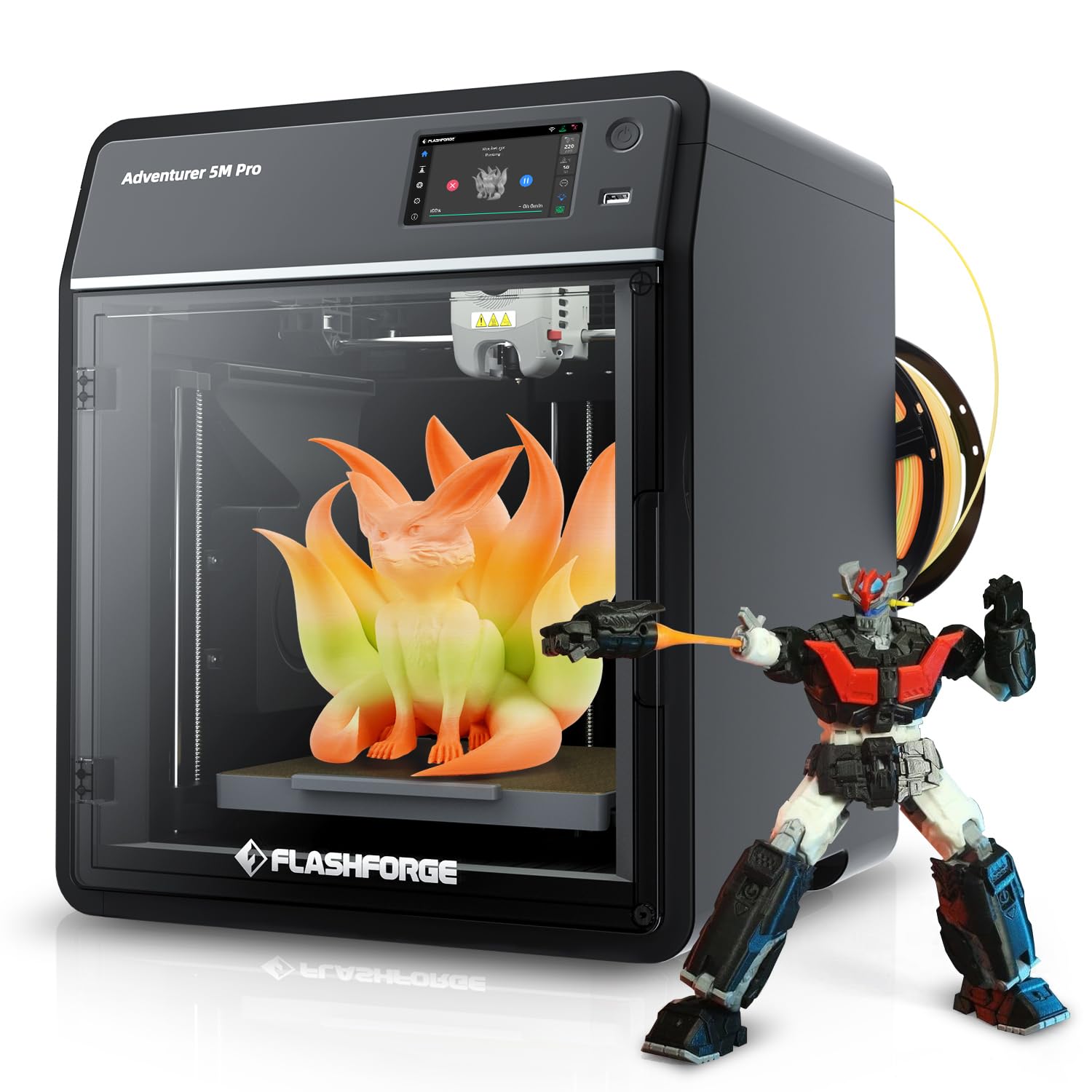
The FLASHFORGE AD5M Pro is a CoreXY FDM printer designed for beginners who want speed without a steep learning curve. It reaches 600 mm/s with a 50 dB noise level that makes it suitable for home or classroom environments, and the quick-swap hotend supports both 0.4 mm and 0.6 mm nozzles for flexible detail-to-speed adjustment. The 220mm³ build volume covers most starter projects like figurines, mechanical parts, and educational models.
Set up is genuinely beginner-friendly: the printer arrives mostly assembled, and the touchscreen interface guides through calibration in under 20 minutes. Users report that default profiles produce clean first layers, and the included 250g PLA spool lets you start printing immediately. Orca-Flashforge slicer is the recommended software, though some users have experienced update failures that require reverting to Flash Print for stability.
Reliability reports are mixed. Some units develop extruder feed failures within the first week, with filament refusing to advance despite no visible clog. WiFi connectivity issues also appear in a minority of units, preventing remote monitoring. Stringing and spiderwebbing are common complaints that require adjusting retraction settings. For the price point, the inconsistency is frustrating — when it works, it prints beautifully, but the variability between units is higher than average.
Why it’s great
- Very fast 600 mm/s printing with low 50 dB noise operation
- Quick-swap hotend works with multiple nozzle sizes for flexibility
Good to know
- Some units experience extruder feed failures within the first week
- WiFi connectivity issues can interrupt remote monitoring
8. Original Prusa MK4S

The Original Prusa MK4S represents the gold standard for reliability in open-source FDM printing. Its input shaping technology compensates for mechanical vibrations during fast movements, producing sharp corners and smooth surfaces on functional prototypes and display models alike. The 9.84 x 8.3 x 8.6 inch build volume is modest compared to some competitors, but the printer compensates with rock-solid consistency across hundreds of hours of use with PLA, PETG, and ABS.
Assembly takes a few hours for the kit version, though pre-assembled units are available for those willing to pay a premium. Prusa’s interactive assembly instructions include community comments that flag potential stumbling points, making the kit build accessible even for first-timers. The Prusa Slicer default profiles produce excellent results without manual tuning, and the printer’s open-source design means replacement parts and upgrades are widely available from third-party vendors.
The cost is significantly higher than Chinese competitors with similar advertised speeds, and the maximum print speed is slower than the Bambu Lab P1S despite the input shaping upgrade. The printer also lacks an enclosed chamber, limiting its ability to print advanced materials like nylon or polycarbonate without an aftermarket enclosure. For users who prioritize guaranteed uptime and community support over raw specs, the MK4S is the safest long-term investment in desktop FDM.
Why it’s great
- Exceptional reliability and community support for long-term use
- Input shaping produces sharp edges even at higher print speeds
Good to know
- No enclosed chamber limits advanced material printing
- Higher cost and slower top speed than some competitors
9. Creality K2 Plus Combo
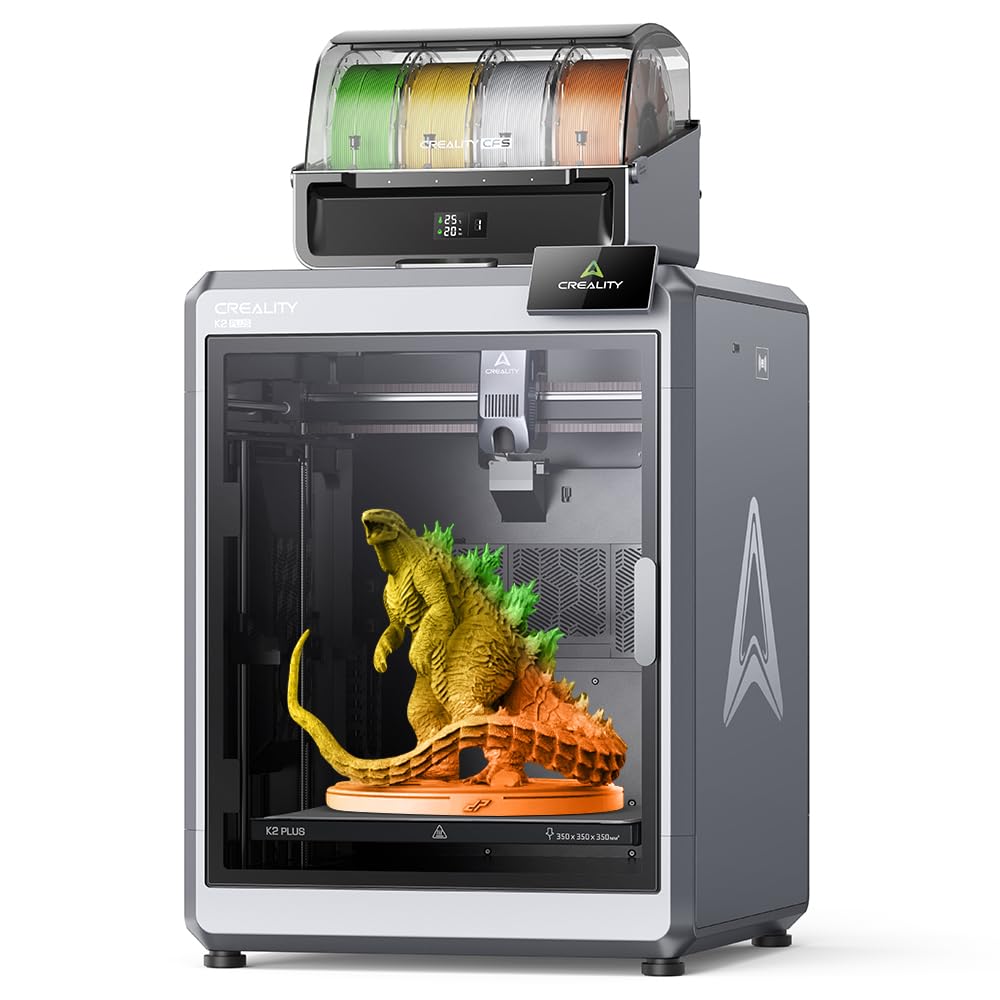
The Creality K2 Plus Combo is a beast of a machine designed for large-format multi-color printing. Its 13.78 x 13.78 x 13.78 inch build volume dwarfs most desktop FDM printers, allowing full cosplay helmets, large drone frames, and multi-part assemblies to be printed in one piece. The included CFS (Creality Filament System) supports up to 16 colors, eliminating the need for manual filament swaps during multi-material prints.
The step-servo motor system provides 32,768 controllable microsteps per revolution, delivering precise positioning across the enormous build area at 600 mm/s and 30000 mm/s² acceleration. The actively heated chamber maintains up to 60°C, making it suitable for high-end materials like ASA, polycarbonate, and carbon fiber reinforced filaments. The dual AI cameras monitor for spaghetti failures and optimize pressure advance values automatically, reducing the need for manual calibration.
At 112 pounds, this printer requires dedicated floor space and is not portable. Some users report bed warping on early units, requiring replacement or a switch to a glass bed for flatness. The assembly process takes about an hour and the manual is outdated for certain wiring steps, so checking online resources is recommended. The price is substantial, but for users who need multi-color capability and massive build volume in a single unit, the K2 Plus Combo is the only desktop option that delivers both without compromise.
Why it’s great
- Massive 13.78 in³ build volume for large single-piece prints
- Multi-color CFS system supports up to 16 colors without manual swaps
Good to know
- Heavy 112-pound unit requires dedicated floor space
- Early units may have bed warping that requires replacement
FAQ
Is a resin printer better than FDM for detailed models?
What XY resolution do I need for tabletop miniatures?
Can I print large models on a desktop resin printer?
Final Thoughts: The Verdict
For most users, the 3d printer for models winner is the ELEGOO Mars 5 Ultra because it delivers exceptional 18 µm detail at a price that doesn’t require professional justification. If you want multi-color capability and large build volume, grab the Creality K2 Plus Combo. And for reliable FDM printing with minimal tinkering, nothing beats the Bambu Lab P1S.