
Our readers keep the lights on and the weekend projects moving. As an Amazon Associate, I earn from qualifying purchases.
A cramped airplane tray table, a noisy coffee shop, or a hotel desk that’s barely big enough for your laptop — the wrong travel mouse turns portable work into a daily frustration. You need a pointer that disappears into your bag, connects without hunting for a dongle, and doesn’t die halfway through a connection delay.
I’m Rikta — the founder and writer behind FitlyFast. I’ve spent years analyzing peripheral specs, tracking real-world battery data, and comparing sensor accuracy across dozens of portable pointing devices to find the models that actually survive the road.
This guide breaks down the seven most reliable models, with a focus on silent clicks, battery endurance, and multi-device pairing — everything that separates a true bluetooth mouse for travel from a desk-bound liability that stays in your drawer.
How To Choose The Best Bluetooth Mouse For Travel
Picking the right portable mouse means weighing connectivity reliability, physical fit, and power management against the compromises that come with a smaller frame. Every millimeter of thickness and every gram of weight matters when you’re packing for a trip.
Connectivity and Multi-Device Pairing
A true Bluetooth mouse for travel should pair without a USB receiver, freeing up your laptop’s ports for a charger or external drive. Look for Bluetooth 5.0 support — it offers a more stable connection with lower power draw than older standards. If you switch between a laptop, tablet, and phone, a model that remembers three or more devices saves you the hassle of re-pairing every time you swap screens.
Battery Type and Endurance
Rechargeable mice with USB-C charging eliminate the need to carry spare AA batteries. The ideal travel companion charges quickly — think one minute of charge for several hours of use — and lasts at least a full 8-hour workday on a single charge. Models with automatic sleep modes after 5 to 10 minutes of inactivity stretch that endurance significantly.
Size, Weight, and Grip Comfort
A portable mouse should tuck into a pocket or a laptop sleeve without adding noticeable bulk. Sub-80-gram models are ideal for daily carry. However, a shape that’s too flat can cause hand fatigue during long sessions. Look for an ambidextrous or right-handed contour that supports your palm, and test whether the silent click mechanism still provides enough tactile feedback for precise work.
Quick Comparison
On smaller screens, swipe sideways to see the full table.
| Model | Category | Best For | Key Spec | Amazon |
|---|---|---|---|---|
| Logitech MX Anywhere 2S | Premium | Any-surface tracking & multi-device | Darkfield 4000 DPI sensor | Amazon |
| ESR MagMouse | Premium | Snap-to-laptop portability | Built-in USB-C cable + 4800 DPI | Amazon |
| Logitech M240 Silent | Mid-Range | Budget-friendly silent clicks | 18-month battery life (AA) | Amazon |
| XBG B15pro | Mid-Range | Tri-mode connectivity with LED screen | 500 mAh rechargeable battery | Amazon |
| Elec Space Mini Bluetooth Mouse | Mid-Range | Built-in TF card reader for data transfer | Bluetooth 5.1 + anti-lost strap | Amazon |
| FOPATO Travel Mouse | Budget | Stylish design & silent operation | 20-day battery life, 1200 DPI | Amazon |
| Generic 3-Mode Mini Mouse | Budget | Ultra-compact size for pocket carry | Weighs ~50g, 1200 DPI sensor | Amazon |
In‑Depth Reviews
1. Logitech MX Anywhere 2S

The Logitech MX Anywhere 2S remains the benchmark for portable precision. Its Darkfield sensor tracks flawlessly on glass, polished tabletops, and even fabric — so you never scramble for a mouse pad in a hotel lobby. The compact, right-handed profile fits a laptop pocket without adding noticeable weight.
Bluetooth-only connectivity keeps pairing simple: select the device from your Bluetooth menu and go. The Hyper-fast scroll wheel lets you fly through long documents or switch to click-to-click mode for precise line-by-line navigation. A three-minute charge delivers enough power for a full workday, and a full charge lasts up to 70 days with normal use.
Flow software support lets you control up to three computers with one mouse, copying text and files between them seamlessly. The seven programmable buttons cover every productivity shortcut a traveling professional needs. This is the mouse that makes you forget you’re working on the road.
Why it’s great
- Tracks on any surface including clear glass
- Hyper-fast scroll wheel saves time on long documents
- Three-minute charge powers a full day of work
Good to know
- No included USB receiver — Bluetooth only
- Micro-USB charging instead of USB-C
- Right-handed design limits ambidextrous use
2. ESR MagMouse Snap-to-Carry Bluetooth Mouse
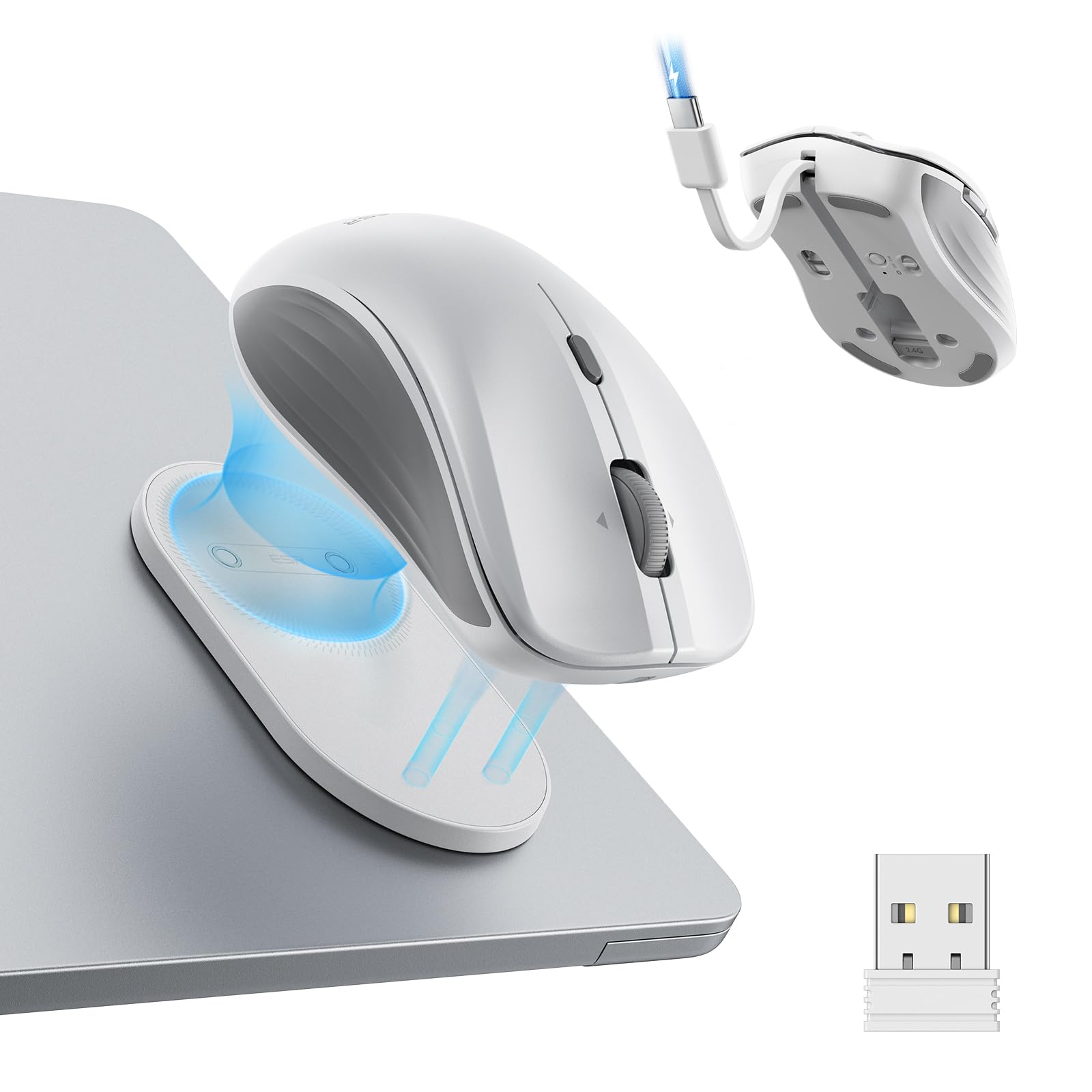
The ESR MagMouse solves the single biggest annoyance of travel mice: finding a safe spot to stow it when you pick up your laptop. A magnetic base with reusable adhesive sticks to the back of your laptop lid, so the mouse travels with the machine instead of getting lost in a bag. Snap it on and off without fumbling with cases or cords.
A built-in USB-C charging cable tucks into the mouse body — no hunting for a separate cord. One minute of charge delivers four hours of use, and a full 45-minute charge provides up to 160 hours of operation. Dual connectivity (Bluetooth 5.0 and 2.4 GHz dongle) ensures compatibility with nearly any laptop or tablet.
Six adjustable DPI levels range from 800 to 4800, giving you precise cursor speed control for everything from detailed design work to rapid scrolling. The 4-way scroll wheel tilts side-to-side for horizontal navigation through spreadsheets and timelines. Silent clicks keep hotel roommates or café neighbors undisturbed.
Why it’s great
- Magnetic mount keeps the mouse attached to your laptop
- Built-in USB-C cable means no separate charger to lose
- Fast charge: 1 minute = 4 hours of use
Good to know
- Adhesive base is permanent once applied
- Only one programmable button
- White finish shows wear over time
3. Logitech M240 Silent Bluetooth Mouse

The Logitech M240 strips away complexity and delivers reliable, silent tracking at an accessible price point. With 90% reduced click noise, it’s a strong choice for shared workspaces, libraries, or any environment where every decibel counts. The ambidextrous design accommodates both left and right hands without forcing an unnatural grip.
Bluetooth pairing takes seconds — no dongle, no port required. The slim profile slides into a laptop sleeve, and the 18-month battery life from a single AA means you can leave the spares at home. A 10-meter wireless range gives you freedom to step away from the screen without losing connection.
Compatibility spans Windows, macOS, Linux, ChromeOS, iPadOS, and Android, making it a universal backup for any device you travel with. Some users note the compact size can feel small for larger hands, and the click sound, while reduced, is not fully silent. For the price, it’s a dependable, low-fuss travel companion.
Why it’s great
- 90% reduced click noise for quiet environments
- 18-month battery life from a single AA battery
- Universal OS compatibility for multi-device users
Good to know
- No rechargeable battery; AA replacement needed
- Small size may not suit larger hands
- No on/off indicator light on the base
4. XBG B15pro Wireless Bluetooth Mouse

The XBG B15pro packs a surprising number of pro-level specs into a mid-range shell. A bright LED display on the top panel shows real-time battery percentage, DPI level, and connection mode — so you never guess whether you’re at 800 or 2400 DPI or if the battery is about to die mid-presentation. That visibility alone saves time for frequent travelers.
Tri-mode connectivity (Bluetooth 5.0, Bluetooth 4.0, and 2.4 GHz) gives you a fallback for every scenario. Switch between a laptop, tablet, and phone in under a second with a dedicated button. The built-in 500 mAh rechargeable battery powers over a month of daily use, and the Type-C port charges the mouse in a few hours.
Silent buttons preserve the click feel while keeping noise to a minimum. An ergonomic contour with a thumb rest and arched palm support reduces wrist strain during extended sessions. The smooth matte finish resists fingerprints, and the textured grip zone keeps control precise during faster movements.
Why it’s great
- LED display shows real-time battery and DPI status
- Tri-mode connectivity covers any device scenario
- 500 mAh battery offers long rechargeable life
Good to know
- Side buttons are not remappable
- Sleep timer cannot be adjusted manually
- Plastic enclosure feels less premium than metal options
5. Elec Space Mini Bluetooth Wireless Mouse
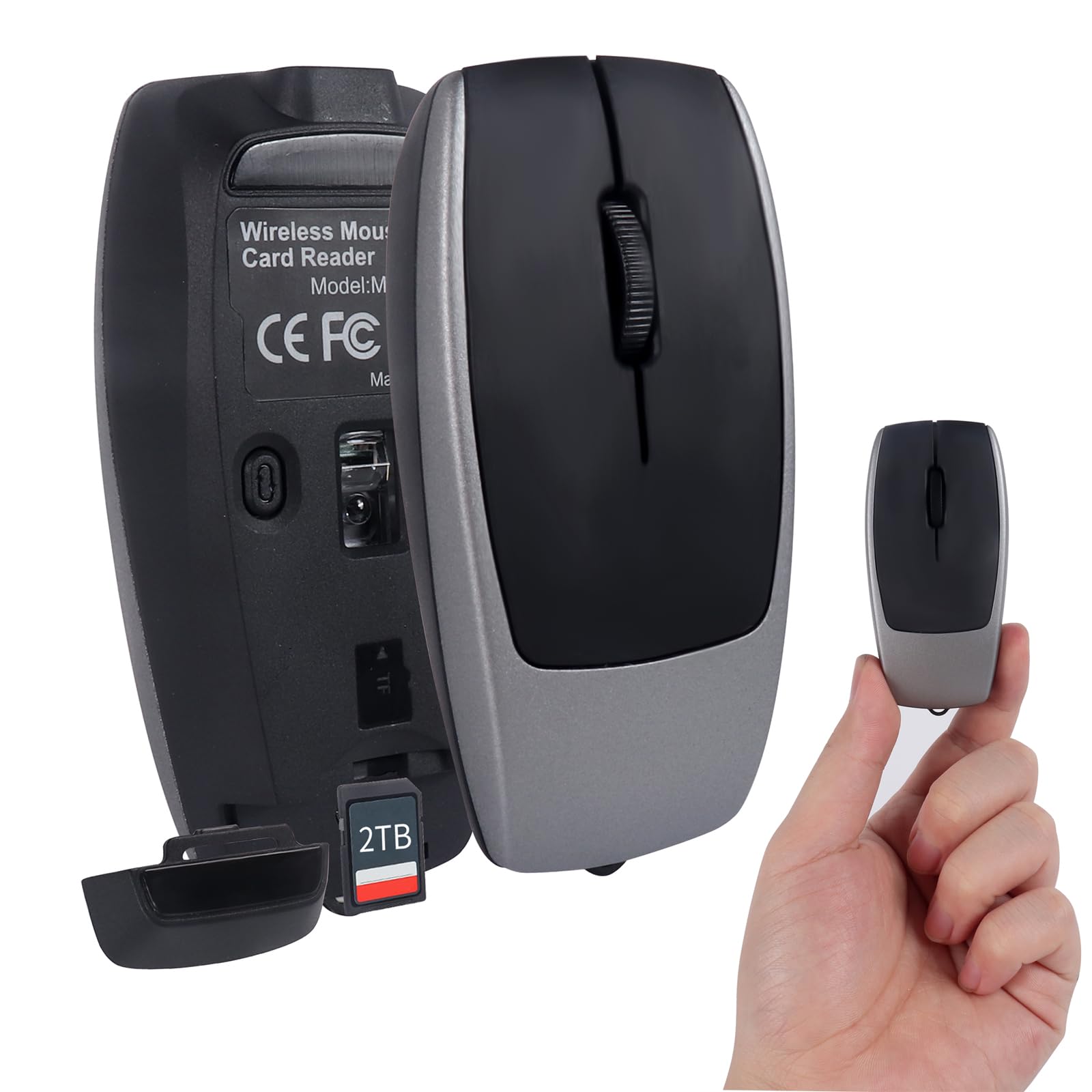
The Elec Space Mini rewrites what a travel mouse can do by integrating a full TF card reader into the chassis. Slide in a microSD card (up to 2TB) and the mouse doubles as a file transfer tool — perfect for photographers, videographers, or anyone who needs to offload footage on location. The card reader reads and writes at speeds up to 20 MB/s.
Bluetooth 5.1 provides a fast, stable connection across Windows, macOS, Android, and iOS. The rechargeable lithium battery charges via Type-C in 2-3 hours and holds enough power for multi-day trips. An anti-lost strap built into the body means you can clip it to a keychain or bag loop.
Its car-key size makes it the most pocketable mouse in this lineup, though users with larger hands note the cramped feel during extended use. Silent clicks work well for quiet environments. The automatic sleep mode kicks in after inactivity, preserving battery when you forget to turn it off.
Why it’s great
- Built-in TF card reader for on-the-go file transfers
- Ultra-compact car-key size fits any pocket
- Bluetooth 5.1 for fast, stable pairing
Good to know
- Too small for comfortable long sessions
- No DPI adjustment options
- Right-handed only design
6. FOPATO Travel Mouse, Pink Donut Design
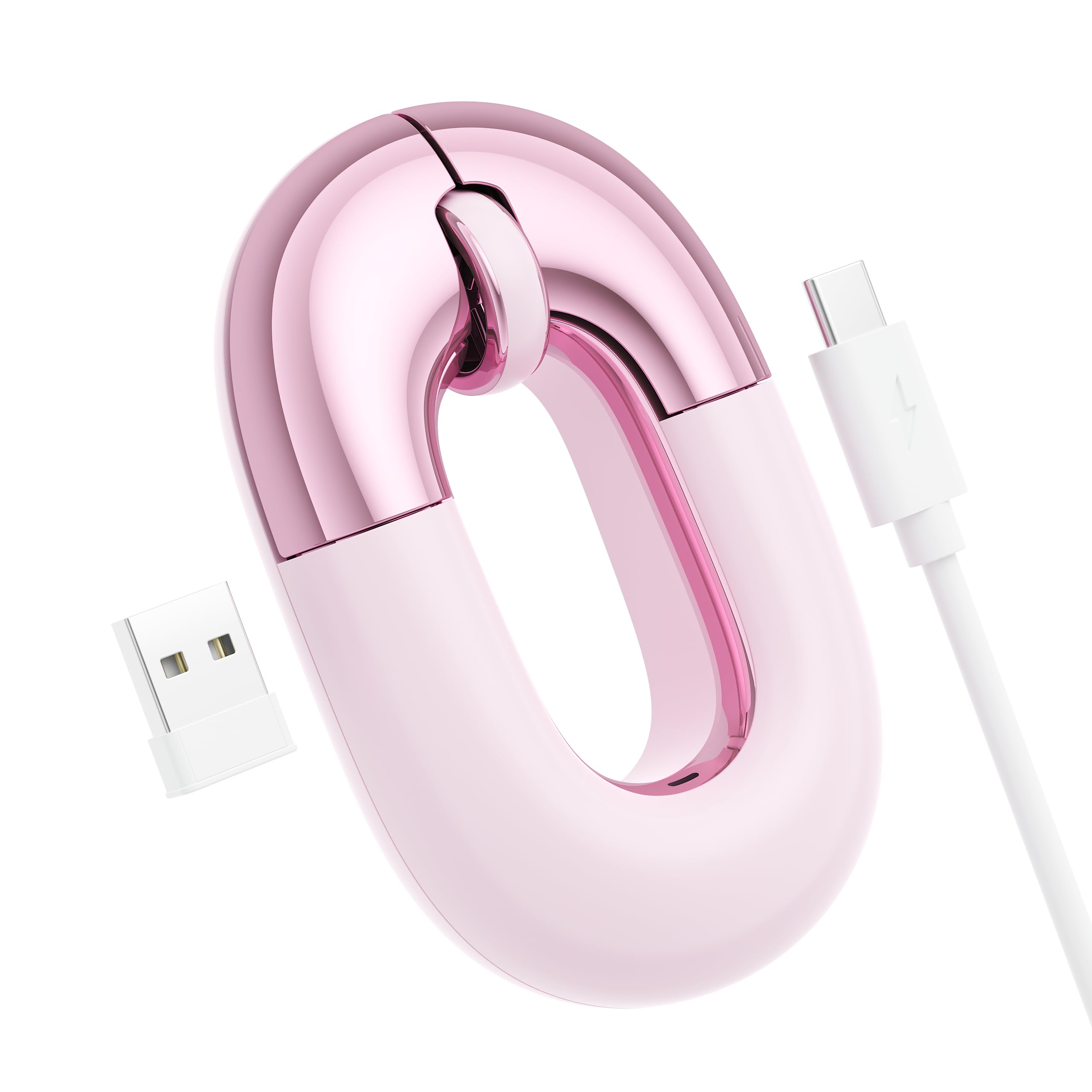
The FOPATO donut-shaped mouse proves that travel peripherals don’t have to be boring. A metallic dusty-rose pink finish and rounded silhouette make it stand out in any café or meeting room. The compact form factor is thin enough to slide into a pocket, and the lightweight 56-gram build adds no noticeable bulk to your daily carry.
Dual-mode connectivity (Bluetooth and 2.4 GHz) lets you pair with a laptop, tablet, or phone and switch between devices at the push of a button. The built-in rechargeable battery lasts up to 20 days on a single charge and supports pass-through charging, so you can keep working while it tops up via USB-C. 1200 DPI tracking feels smooth on desktops and mouse pads, though it struggles on bare glass surfaces.
Silent clicks keep the noise floor low, making it a solid choice for libraries or shared offices. Some users note the flat profile can cause wrist strain during hours-long sessions. For short bursts of travel work, the combination of style, portability, and quiet operation is hard to beat at this price tier.
Why it’s great
- Unique donut design stands out from standard mice
- Lightweight 56g build is easy to carry anywhere
- 20-day battery life with pass-through charging support
Good to know
- Flat profile may cause wrist fatigue over time
- Does not track reliably on glass surfaces
- 1200 DPI fixed sensor, no adjustable levels
7. Generic 3-Mode Mini Bluetooth Mouse
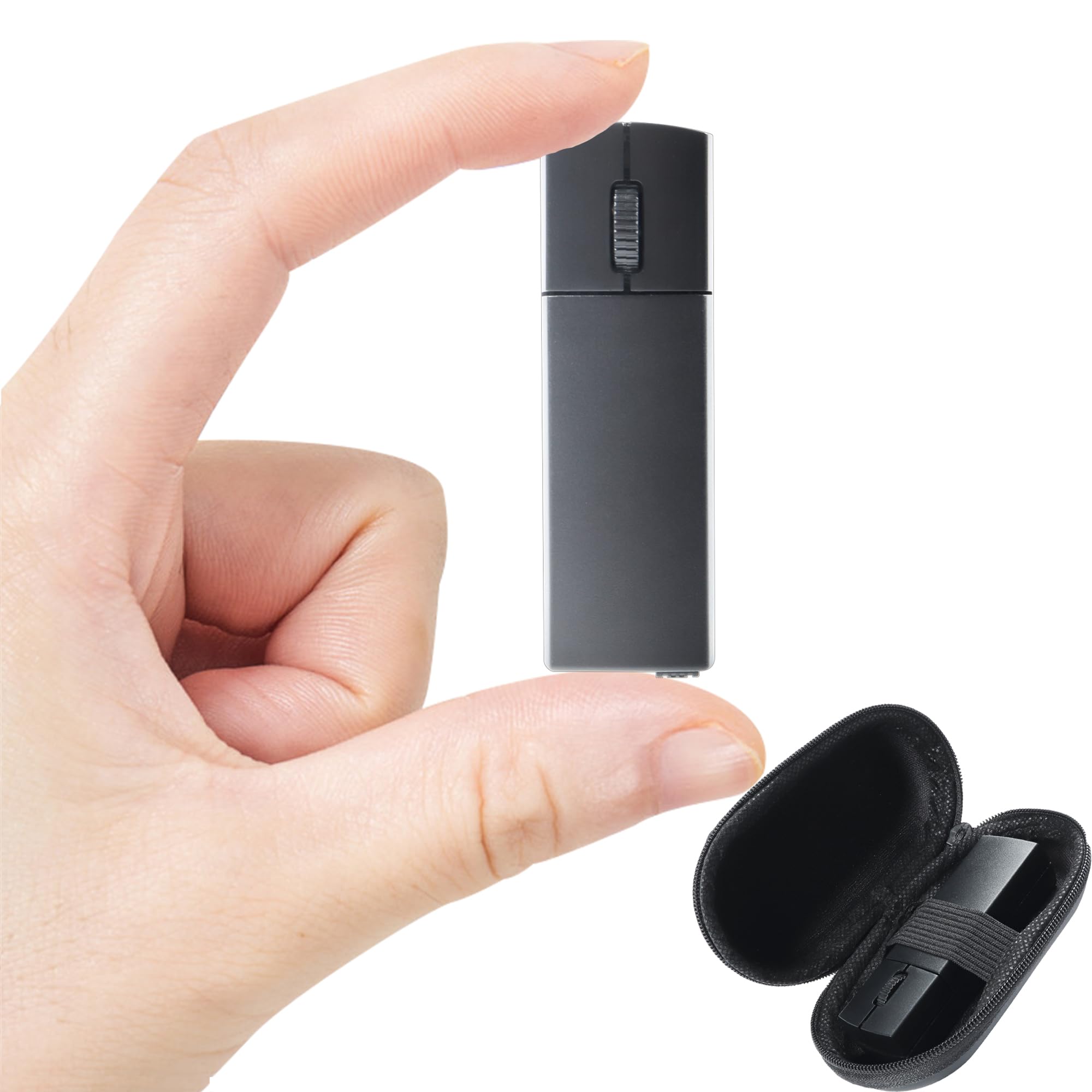
This mini mouse earns its spot for sheer portability. Roughly the size of a lighter, it disappears into a pocket, a pencil case, or the smallest compartment of a laptop sleeve. The three-mode connectivity (Bluetooth 4.0, 5.0, and 2.4 GHz) ensures compatibility with nearly any device, though older Windows 7 machines may require the USB receiver.
The 1200 DPI optical sensor delivers reliable tracking for daily office tasks and web browsing. Silent clicks keep the noise down in open-plan spaces. A Micro-USB rechargeable battery replaces the hassle of AA swaps, and an automatic sleep mode kicks in after idle periods to preserve power. The included USB receiver stores magnetically in the mouse base, so you won’t lose it mid-trip.
The small footprint is ideal for small to medium hands, but users with larger hands report that extended sessions feel cramped. The smooth plastic finish offers a comfortable grip without being slippery. For a budget-friendly backup or a secondary mouse that lives in a bag, this model delivers reliable basic performance without taking up space.
Why it’s great
- Ultra-compact lighter-size design for pocket carry
- Three connection modes cover almost any device
- Magnetic receiver storage prevents dongle loss
Good to know
- Micro-USB charging instead of modern USB-C
- Not comfortable for larger hands during long use
- Fixed 1200 DPI sensor with no adjustment options
FAQ
Can I use a Bluetooth mouse without a USB receiver on my laptop?
How long should a travel mouse battery last on a single charge?
What weight is ideal for a Bluetooth travel mouse?
Final Thoughts: The Verdict
For most users, the bluetooth mouse for travel winner is the Logitech MX Anywhere 2S because it combines the best any-surface tracking, Hyper-fast scrolling, and true multi-day battery life in a compact, proven package. If you want magnetic snap-to-laptop convenience, grab the ESR MagMouse. And for a budget-friendly entry that still delivers silent clicks and universal compatibility, nothing beats the Logitech M240 Silent.