
Our readers keep the lights on and the weekend projects moving. As an Amazon Associate, I earn from qualifying purchases.
Cutting the cord on your desktop setup is a relief that compounds every single day—no more snagging the keyboard cable on your coffee mug or feeling the mouse drag when you reach for a drink. A quality Bluetooth combo turns a cluttered workspace into a clean, flowing zone where you can shift between your laptop, tablet, and phone without reaching for a USB receiver or fumbling with a switch. The trick is finding a pair that doesn’t compromise on key feel, pointer precision, or battery discipline, which is exactly where most budget sets fall short.
I’m Rikta — the founder and writer behind FitlyFast. I’ve spent years tracking peripheral performance across dozens of daily-driver setups, analyzing how scissor-switch dampening, DPI stepping, and multi-device polling affect real workflow stamina. This guide focuses on the measurable specs that separate a set you tolerate from one you forget is even there.
Whether you’re outfitting a home office, a shared desk, or a mobile rig, the best bluetooth mouse and keyboard blends silent operation with reliable multi-device pairing and a battery cycle that doesn’t demand weekly recharging.
How To Choose The Best Bluetooth Mouse and Keyboard
Picking a Bluetooth combo means balancing connection stability, key feel, battery discipline, and physical footprint. The right set disappears into your workflow. The wrong one introduces lag, battery anxiety, or a cramped layout that slows you down. Focus on these four criteria to match the set to your actual daily use.
Connection Versatility: Bluetooth vs. 2.4 GHz vs. Tri-Mode
Pure Bluetooth sets pair easily with laptops and tablets but can introduce a slight wake-up delay. Many combos now offer a tri-mode approach—Bluetooth, a dedicated 2.4 GHz USB receiver, and a wired USB-C option. The 2.4 GHz channel delivers near-zero latency for desktop use, while Bluetooth covers mobile devices. If you juggle a work laptop, a personal tablet, and a desktop, look for a combo that remembers up to three paired devices and lets you toggle between them with a dedicated button rather than re-pairing each time.
Key Mechanism: Scissor-Switch vs. Membrane
Scissor-switch keys use a cross-shaped mechanism that provides a crisp, laptop-like feel with a shorter travel distance and lower noise. Membrane keys rely on a single rubber dome beneath each keycap, producing a softer, sometimes spongier feel that can cause early finger fatigue during long typing sessions. For quiet office environments or shared spaces, scissor-switch designs win on acoustics and consistency. Membrane boards are generally less expensive but can feel mushy after extended use.
Pointer Precision: DPI and Reporting Rate
DPI (dots per inch) determines how fast the cursor moves relative to your hand motion. For general productivity and web browsing, 1000–2400 DPI is sufficient. Adjustable DPI presets let you slow down for detail work or speed up for wide-screen navigation. The reporting rate (polling rate) matters more for cursor smoothness—125 Hz is standard for office use, while 500–1000 Hz reduces micro-stutters. Prioritize optical sensors over older laser sensors for better surface tracking without a mousepad.
Battery Life and Recharging Method
Battery life varies wildly between combos that use standard alkaline batteries and those that pack a built-in lithium cell. Expect 60–90 days of typical use from a rechargeable set with auto-sleep after 10–30 minutes of inactivity. Sets that use AAA or AA batteries can last 24–36 months but require inconvenient trips to the drawer. USB-C rechargeable models are the modern standard, but check whether both the keyboard and mouse charge via the same cable type or require separate connectors.
Quick Comparison
On smaller screens, swipe sideways to see the full table.
| Model | Category | Best For | Key Spec | Amazon |
|---|---|---|---|---|
| Logitech MK955 Signature Slim | Premium | Full-size comfort & quiet office | Scissor-switch, SmartWheel, 90% quieter clicks | Amazon |
| Logitech Pebble 2 Combo for Mac | Premium | Mac/iPad ecosystem & portability | Ultra-slim, 3-year keyboard battery life | Amazon |
| Lenovo 700 Modern | Mid-Range | Secure office with AES-128 encryption | 36-month battery, dual Bluetooth + 2.4 GHz | Amazon |
| ProtoArc KM60 | Mid-Range | Ergonomic typing with wrist rest | Leather wrist rest, 109-key full layout | Amazon |
| seenda COE401 | Mid-Range | USB-C rechargeable & metal build | Full-size with numpad, 90-day battery | Amazon |
| seenda COE203 | Budget | Compact travel & retro aesthetic | Round keycaps, 3 adjustable DPI levels | Amazon |
| Redragon S101M-KS | Budget | Entry-level gaming with RGB | 4800 DPI mouse, 300 hr battery (RGB off) | Amazon |
In‑Depth Reviews
1. Logitech MK955 Signature Slim Wireless Combo

The MK955 Signature Slim is Logitech’s answer to users who want a full-size scissor-switch keyboard with a genuine laptop-like feel, not a membrane mush. The K950 keyboard delivers a satisfying, quiet keystroke with enough travel to avoid bottoming out, while the M750 L mouse features SilentTouch technology that reduces click noise by 90 percent—a meaningful difference in shared home offices. The mouse also includes the SmartWheel, which switches from ratchet scrolling to hyper-fast free-spin with a flick, making long document navigation nearly frictionless.
Multi-device switching is handled by dedicated keys on the keyboard and a button on the mouse, supporting up to three paired devices via Bluetooth or the Logi Bolt receiver. The full layout includes a number pad and function row, and the Logi Options+ app allows deep customization of the Fn keys and mouse buttons. Plastic parts contain up to 48 percent post-consumer recycled material, which is a solid environmental note without sacrificing structural rigidity.
Battery life is excellent—the keyboard runs on two AAA cells with a multi-year lifespan, and the mouse uses a single AA. The biggest drawback is the lack of a built-in rechargeable battery; you’ll need alkaline spares on hand. The mouse is also designed for larger hands (the “L” in M750 L), so users with smaller palms may find the contour too pronounced for extended grip. Setup instructions for multi-device pairing could be clearer, but once configured, the connection holds without dropouts.
Why it’s great
- Scissor-switch keyboard feels crisp and quiet, ideal for daily typing
- SmartWheel mouse offers smooth, variable-speed scrolling
- Seamless three-device switching via Bluetooth or Logi Bolt
- Excellent battery life measured in years with standard alkalines
Good to know
- No rechargeable battery; requires AAA and AA batteries
- Mouse is sized for larger hands, less comfortable for smaller grips
- Multi-device setup instructions could be clearer out of box
2. Logitech Pebble 2 Combo for Mac

The Pebble 2 Combo is purpose-built for the Apple ecosystem, with macOS and iPadOS key labels printed directly on the keys and a slim profile that matches Magic Keyboard dimensions almost exactly. The scissor-switch keys are shallow but responsive, producing a soft, laptop-like sound that won’t carry in a quiet room. The Pebble Mouse 2 M350s is flat and compact, designed for a claw or fingertip grip, with Silent Touch Technology that delivers genuinely noiseless clicks.
Bluetooth pairing is immediate and stable across up to three devices—testers reported no re-pairing after restarting their Mac Mini or iPad. The keyboard’s 3-year battery life (on the included CR2032 cells) and the mouse’s 2-year life remove charging anxiety entirely, though both require coin-cell batteries rather than standard AAAs. The Pebble 2 lacks a backlight, which is fine for well-lit desks but frustrating for late-night typists. The Fn keys are customizable via Logi Options+, letting you bind search, screen capture, and other shortcuts.
Build quality feels premium despite the lightweight plastic construction, and the recycled plastic component (minimum 49 percent in the keyboard) is a nice touch. The mouse is ambidextrous but lacks side buttons, which power users will miss for backward/forward navigation. For anyone deep in the Mac ecosystem who wants a compact, travel-friendly set that disappears into a bag, this combo is hard to beat.
Why it’s great
- Native Mac key labels and seamless Bluetooth with macOS/iPadOS
- Amazing battery life measured in years with coin cells
- Ultra-slim, lightweight design packs flat for travel
- Quiet scissor-switch keyboard and silent-click mouse
Good to know
- No backlight for use in low-light conditions
- Flat mouse shape not suitable for palm grips
- No side buttons on the mouse for forward/back navigation
3. Lenovo 700 Modern Wireless Combo
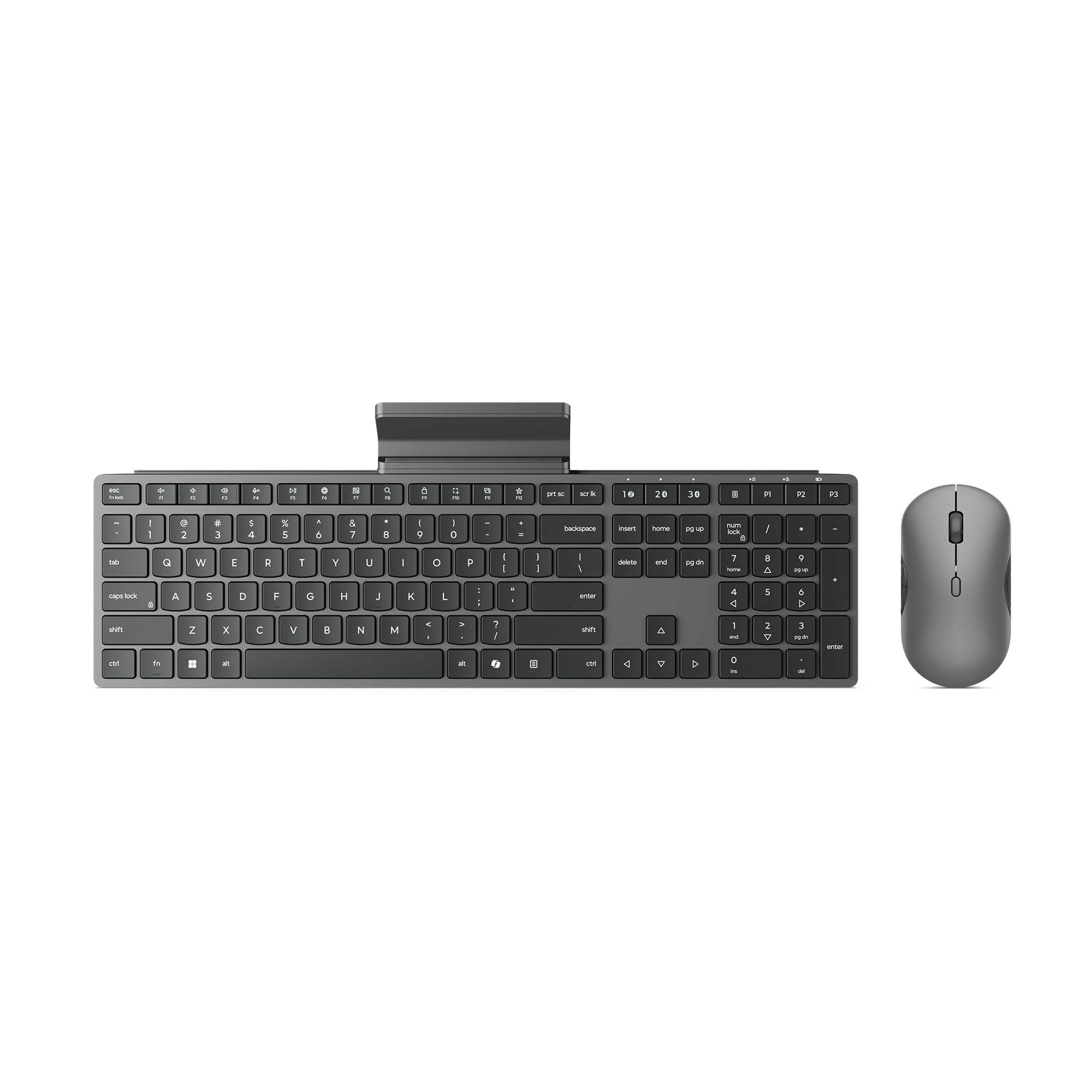
The Lenovo 700 Modern is a business-focused combo that prioritizes security and longevity without skimping on ergonomics. The keyboard uses a membrane design that feels spongier than a scissor-switch board, but the keys are quiet and the tactile feedback is consistent enough for sustained typing sessions. The standout feature is the AES-128 encryption on the wireless link, which prevents keystroke sniffing in open office environments—rare at this price tier.
Connection options include dual Bluetooth and a Lenovo Pro Unified Pairing Receiver (2.4 GHz), supporting up to three devices with quick switching via a dedicated button. The keyboard includes a detachable phone/tablet holder that slides out from the top edge, a clever space-saver for hybrid workers who want their phone visible while typing. Battery life is a claimed 36 months for both keyboard and mouse using two AAA and one AA battery respectively, which aligns with user reports of minimal drain after months of daily use.
The mouse is ambidextrous with a quiet click mechanism, though the plastic build feels a bit cheap compared to the Logitech options. The keyboard’s membrane keys, while quiet, lack the crisp return of a scissor switch—some users describe the feel as “spongy.” The integrated phone stand is a nice bonus but the rubber coating may wear over time. For corporate deployments or users who value encrypted transmission above all else, the Lenovo 700 is a solid, secure choice.
Why it’s great
- AES-128 encryption protects keystrokes in shared spaces
- 36-month battery life eliminates frequent battery swaps
- Built-in detachable phone/tablet holder saves desk space
- Quick Bluetooth and 2.4 GHz switching between three devices
Good to know
- Membrane keys feel spongy, not as crisp as scissor-switch
- Mouse build quality feels economical for the price
- Phone stand rubber coating may degrade with extended use
4. ProtoArc KM60 Ergonomic Combo
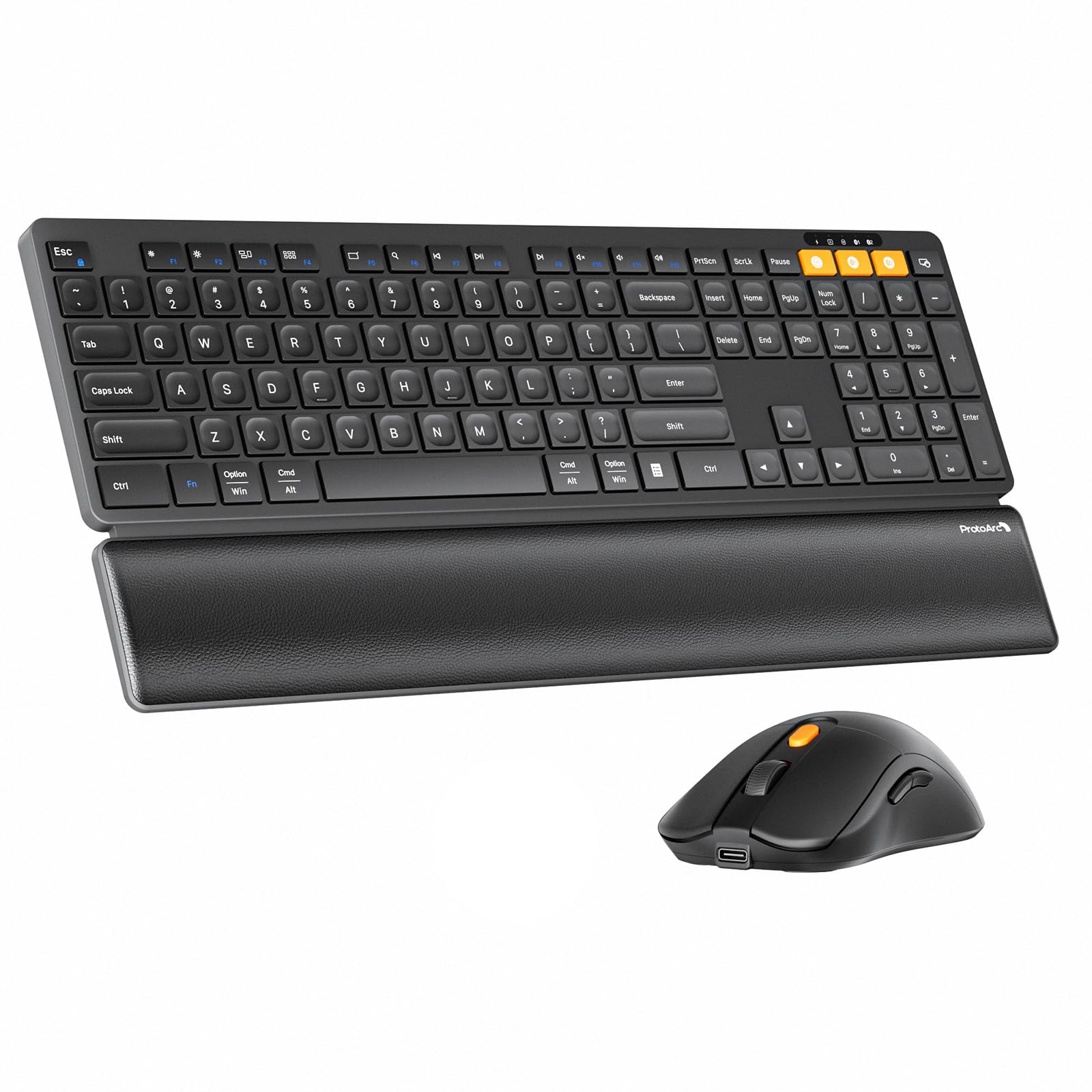
The ProtoArc KM60 punches well above its price point by including a genuine leather-textured wrist rest that attaches magnetically to the keyboard—an ergonomic bonus typically reserved for premium office boards. The scissor-switch keys are smooth, quiet, and responsive, with a low-profile design that eliminates the clackiness of a traditional mechanical board. The full 109-key layout includes a dedicated number pad and 12 multimedia shortcut keys.
Multi-device support is handled via 2.4 GHz (Windows only) and dual Bluetooth, covering Windows, macOS, Android, and iOS. The keyboard has a built-in 500 mAh battery and the mouse a 300 mAh battery, both charging via USB-C. ProtoArc claims 60 minutes of auto-sleep after inactivity, and users report charging every couple of months under moderate use. The mouse is extremely light at 63 grams, which reduces hand fatigue but may feel insubstantial to users accustomed to heavier, weighted mice.
The mouse’s device-switch button is located on the bottom, which is inconvenient for frequent switchers. The keyboard has no backlight, which is fine for distraction-free work but limits usability in dim environments. Some Mac users reported key mapping issues with the 2.4 GHz channel (CMD/Option reversed), while Bluetooth mode worked flawlessly. For the price, the combination of a comfortable wrist rest, quiet scissor-switch typing, and USB-C rechargeability makes the KM60 a standout in the mid-range bracket.
Why it’s great
- Included leather-textured wrist rest improves typing posture
- Scissor-switch keys provide quiet, laptop-like feel
- Full 109-key layout with dedicated number pad and multimedia keys
- USB-C rechargeable batteries in keyboard and mouse
Good to know
- No keyboard backlight for low-light use
- Mouse device-switch button is inconveniently placed on the bottom
- Some Mac users report key mapping issues on 2.4 GHz channel
5. seenda COE401 Wireless Combo
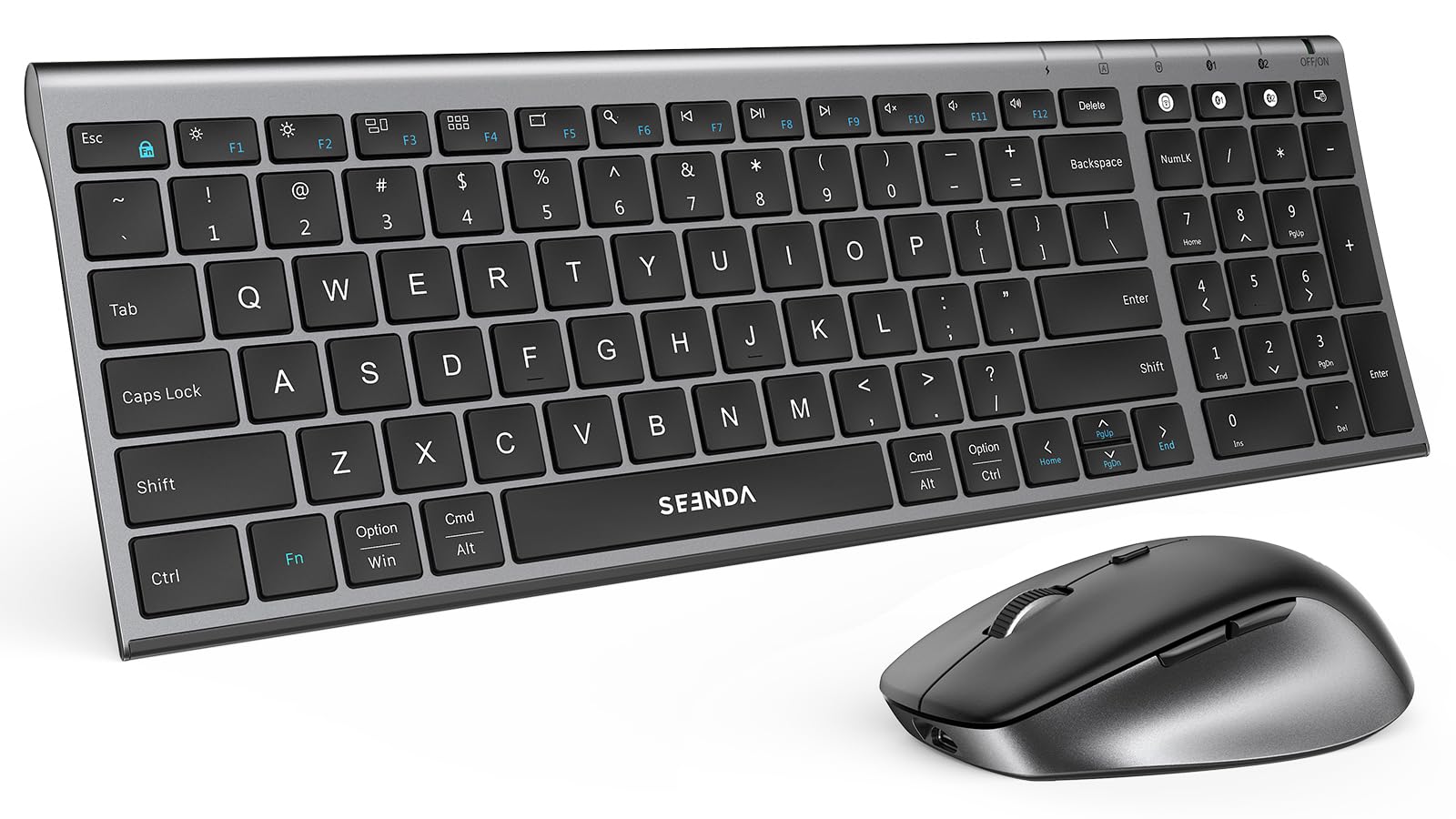
The seenda COE401 targets users who want a full-size keyboard with a number pad and a metal top plate for a premium feel without spending premium dollars. The scissor-switch keys deliver a quiet, responsive stroke that’s noticeably better than membrane boards in the same price tier. The mouse features four adjustable DPI levels (800, 1200, 1600, 2400), allowing quick sensitivity changes for different tasks.
Connectivity is tri-mode: dual Bluetooth plus a single 2.4 GHz USB receiver that handles both keyboard and mouse simultaneously. Switching between three paired devices is handled by dedicated buttons on both peripherals. The battery setup is convenient—the keyboard and mouse both charge via USB-C, eliminating the need for disposable batteries. seenda rates the battery life at up to 90 days with auto-sleep kicking in after 30 minutes of inactivity on the keyboard and 10 minutes on the mouse.
The compact full-size layout saves desk space while retaining the numpad, but the arrow keys are slightly cramped due to the reduced footprint—users accustomed to a traditional spacing may feel the difference. There’s no backlight, which some users noted as a missed opportunity given the metal build quality. The mouse is heavier than the ProtoArc KM60’s offering, which some prefer for stability but others find fatiguing over long sessions. Overall, the COE401 is a strong entry-level rechargeable set that punches above its weight class.
Why it’s great
- USB-C rechargeable eliminates disposable battery waste
- Metal top plate gives a premium, durable feel
- Four adjustable DPI levels offer good cursor control
- Single 2.4 GHz receiver handles both keyboard and mouse
Good to know
- Compact layout has slightly cramped arrow keys
- No backlight for use in dim conditions
- Heavier mouse may cause fatigue during long sessions
6. seenda COE203 Wireless Combo
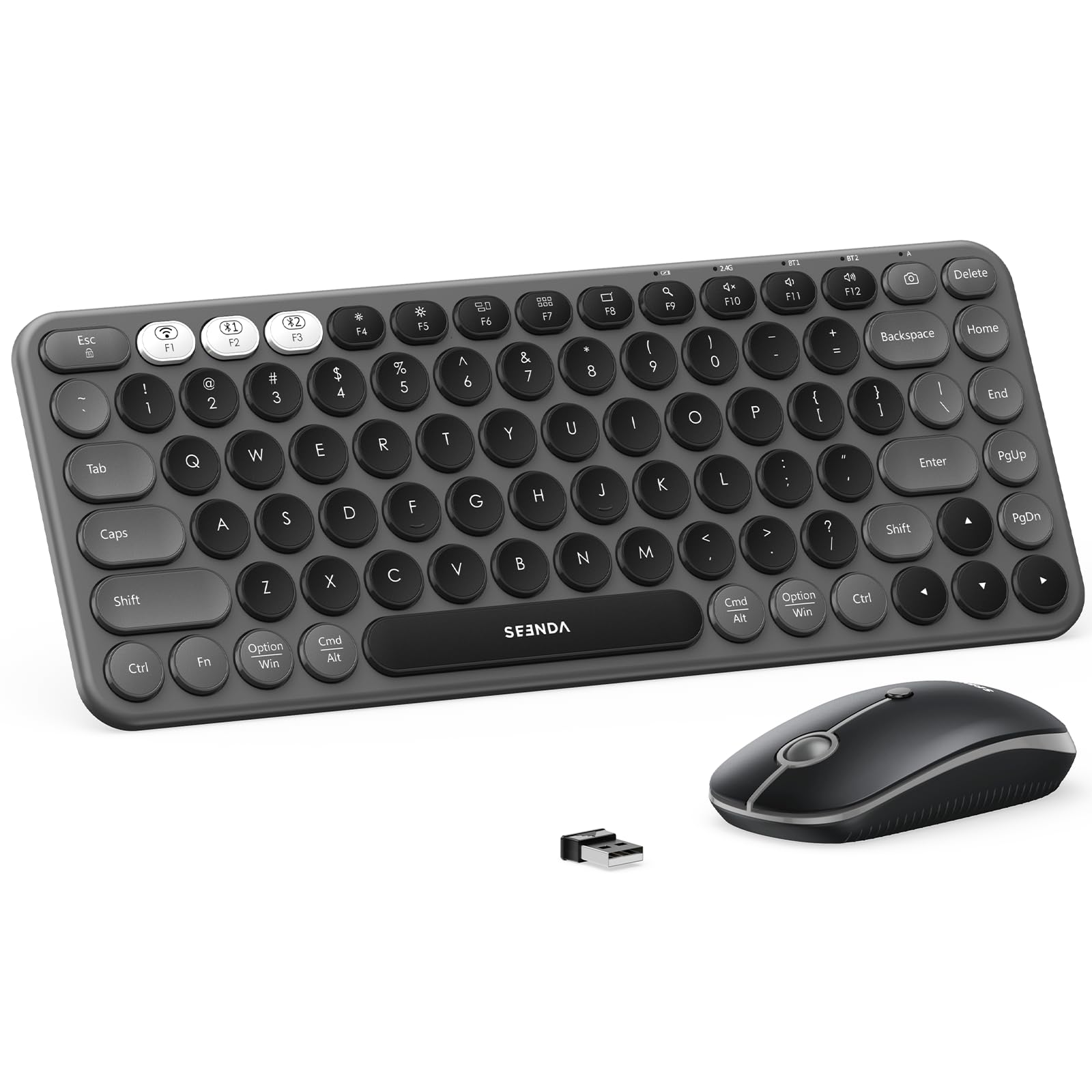
The seenda COE203 brings a distinct aesthetic to the desk with its retro round keycaps that mimic a vintage typewriter. The 84-key compact layout omits the number pad, making it a natural fit for tight workspace or mobile backpack setups where every inch of desk real estate counts. The scissor-switch mechanism under the round caps delivers a satisfying click with a short travel distance, and the keys are contoured to match fingertip shape for reduced mistypes.
Multi-device pairing works across three channels (2.4 GHz, BT1, BT2) with a single USB receiver handling both keyboard and mouse. The mouse offers three DPI levels (1000, 1600, 2400) and features silent clicks that are genuinely quiet—useful for shared offices or late-night work sessions. Power management is handled by independent switches and an auto-sleep mode that activates after 60 minutes of inactivity, waking instantly on any key press.
The compact keyboard takes some adjustment if you’re accustomed to full spacing—the lack of a number pad and condensed layout means you’ll hunt for a few keys at first. Both devices use standard batteries (keyboard: 2 AAA, mouse: 1 AA), so you’ll need to keep spares nearby. The included silicone keyboard cover protects against spills but has a tacky feel that some users remove immediately. For its price, the COE203 delivers a unique look and solid multi-device connectivity for travelers and minimalists.
Why it’s great
- Retro round keycaps offer a unique, nostalgic typing feel
- Compact 84-key layout fits easily in a backpack
- Silent mouse clicks with three adjustable DPI levels
- Includes a silicone keyboard cover for spill protection
Good to know
- No number pad; compact layout requires adjustment period
- Uses disposable AAA and AA batteries
- Mouse has no side buttons for forward/back navigation
7. Redragon S101M-KS Wireless Gaming Combo

The Redragon S101M-KS is the only gaming-oriented combo in this lineup, offering tri-mode connectivity (wired, Bluetooth, 2.4 GHz) and full RGB backlighting on both the keyboard and mouse. The keyboard uses membrane keys with a shorter travel than typical gaming boards, but they feel consistent and quiet enough for both gaming and typing. The true draw is the mouse: five DPI levels up to 4800, a 125–1000 Hz polling rate adjustable via software, and seven programmable buttons including a sniper button.
The RGB lighting offers eight backlight patterns with adjustable speed and brightness, creating a gaming atmosphere without being overwhelming. Battery life is rated at up to 300 hours with RGB turned off, which is excellent for a gaming peripheral. The keyboard includes 10 independent multimedia keys and a WIN lock function to prevent accidental desktop minimizes during gameplay. Redragon provides a 36-month warranty and downloadable software for key mapping and DPI/polling customization.
The biggest trade-off is the keyboard’s membrane feel, which lacks the crispness of a scissor-switch or mechanical board. The mouse’s lighting doesn’t match the keyboard’s RGB—the mouse uses a monochromatic red light that stands out against the keyboard’s multi-color effects. The keyboard’s sleep mode causes a 5–10 second reconnect delay when waking, which can be frustrating during a fast-paced session. For competitive gamers who need mechanical switches, this isn’t the right set. For casual gamers who want a clean, wireless aesthetic with RGB and strong mouse specs, it’s a budget-friendly option worth considering.
Why it’s great
- Tri-mode connectivity (wired, Bluetooth, 2.4 GHz) for flexible use
- 4800 DPI mouse with adjustable polling rate up to 1000 Hz
- Seven programmable mouse buttons for custom bindings
- 300-hour battery life with RGB off for extended sessions
Good to know
- Membrane keyboard lacks crisp key feel of mechanical or scissor-switch
- Mouse has monochromatic red lighting, mismatched with keyboard RGB
- Keyboard sleep mode causes 5-10 sec reconnect delay on wake
FAQ
Can I use one Bluetooth receiver for both keyboard and mouse?
How do I switch between devices on a multi-device combo?
What is the practical DPI range for office and multitasking work?
Why does my Bluetooth keyboard lag when waking from sleep?
Final Thoughts: The Verdict
For most users, the best bluetooth mouse and keyboard winner is the Logitech MK955 Signature Slim Combo because it combines a full-size scissor-switch keyboard with a genuinely quiet, responsive mouse and seamless three-device switching that works across platforms without dropout. If you want a rechargeable set with an ergonomic wrist rest that won’t break your budget, grab the ProtoArc KM60. And for deep Apple ecosystem integration in an ultra-slim travel-friendly package, nothing beats the Logitech Pebble 2 Combo for Mac.