
Our readers keep the lights on and the weekend projects moving. As an Amazon Associate, I earn from qualifying purchases.
Finding a mouse that disappears into your bag yet feels natural on a cramped café table or airplane tray is a specific kind of hunt. Most portable options force a brutal compromise: you either carry a bulky device that tracks well or a skinny slab that leaves your hand aching after twenty minutes. The real test of a travel mouse isn’t its marketing—it’s whether you still want to use it when your workspace shrinks to the size of a magazine.
I’m Rikta — the founder and writer behind FitlyFast. I’ve spent years analyzing the quiet specifications, real-world battery claims, and connection stability of travel peripherals so you don’t have to guess which model actually holds up under daily transit.
This guide cuts through the noise to rank the models that solve the real problems of mobile work. After evaluating dozens of units on portability, surface versatility, and long-haul comfort, here is my curated list of the absolute best bluetooth travel mouse options available today.
How To Choose The Best Bluetooth Travel Mouse
Choosing a travel mouse means weighing portability against ergonomics, battery convenience against weight, and connection reliability against ease of pairing. The wrong pick can leave you either with a device that cramps your hand or one that dies mid-presentation. Here are the specific factors that matter most for the mobile professional.
Form Factor and Portability
The physical design dictates how often you’ll actually bring it along. Standard compact mice are small enough for a laptop bag but still require flat storage. Foldable and sliding designs collapse into a much thinner profile that slips into a jeans pocket or the front compartment of a tablet sleeve. The trade-off is always hand comfort: a truly flat mouse offers no palm support, which becomes a problem during extended sessions. Decide whether you need deep-pocket carry or all-day ergonomics, then choose the profile that matches your primary use scenario.
Battery Type and Runtime
Travel mice use either disposable AA/AAA batteries or built-in rechargeable lithium-ion cells. Disposable batteries last longer per charge cycle (often months) and are instantly replaceable at any convenience store, but they generate ongoing waste and cost. Rechargeable models save money over time and support USB-C charging, but a dead battery means you are tethered to a cable or powerless. Look for battery life ratings in months (not hours) for realistic expectations. Also check if the mouse supports charging while in use—a feature that saves you from downtime during work hours.
Connectivity Versatility
Bluetooth-only mice pair instantly with any modern laptop or tablet without a dongle, which is ideal for travel. Dual-mode mice (Bluetooth plus 2.4GHz via a nano receiver) add compatibility with older devices or systems where Bluetooth is unreliable. The highest-tier models support multi-device pairing, letting you switch between a laptop, tablet, and phone with a button press. For a travel mouse, Bluetooth 5.0 or higher ensures strong range and low latency, while a stored receiver slot inside the mouse prevents losing the tiny dongle.
Sensor Technology and Surface Tracking
Standard optical sensors struggle on glossy desks, glass tables, or fabric surfaces—exactly the kinds of surfaces you encounter in co-working spaces and hotel rooms. Laser-based or proprietary tracking technology like Logitech’s Darkfield handles glass and polished surfaces without skipping. For travelers who work in unpredictable environments, a mouse that tracks on any surface is worth the premium. Sensor DPI adjustability (800 to 4000 or higher) also matters when switching between a high-resolution external monitor and a laptop screen.
Quick Comparison
On smaller screens, swipe sideways to see the full table.
| Model | Category | Best For | Key Spec | Amazon |
|---|---|---|---|---|
| Logitech MX Anywhere 2S | Premium | Tracking on Any Surface | Darkfield 4000 DPI sensor | Amazon |
| DELUX MF20 Pocket Mouse | Mid-Range | Ultra-Compact Sliding Design | Sliding retractable body | Amazon |
| ESR MagMouse | Mid-Range | Snap-to-Laptop Magnetic Carry | Magnetic base + 4800 DPI | Amazon |
| XBG B15pro Tri-Mode | Mid-Range | Multi-Device Office Switch | LED display + 500 mAh battery | Amazon |
| Logitech M240 Silent | Budget | Silent Clicks and Long Battery | 18-month battery life | Amazon |
| Microsoft Surface Arc (Light Grey) | Premium | Fold-Flat Design & Style | Full scroll plane touchpad | Amazon |
| Microsoft Arc (Black) | Premium | High-End Portable Minimalism | Bendable tail auto on/off | Amazon |
In‑Depth Reviews
1. Logitech MX Anywhere 2S

The MX Anywhere 2S is the definition of a no-compromise travel mouse. Its Darkfield sensor tracks on glass, glossy tables, and even marble countertops—surfaces that stop standard optical mice cold. The compact body fits a hand naturally without requiring palm support, and the hyper-fast scroll wheel lets you fly through long documents with a single flick. It is a Bluetooth-only model, so you won’t have a dongle to lose, and the included micro-USB cable charges the unit to a full day of use in just three minutes.
Logitech Flow integration is the standout productivity feature: pair this mouse with up to three computers and move your cursor between them as if they were one unified desktop. Copy-paste text, images, and files across machines without any additional software fuss. The 4000 DPI resolution covers everything from precise photo editing to fast-paced browsing, and the seven programmable buttons give power users deep customization through Logitech’s Options+ software.
The trade-offs are minor but real. The Micro-USB charging port feels dated compared to the USB-C standard found on newer competitors, and the right-handed sculpted shape excludes lefties who prefer a symmetrical design. Over years of use, the rubberized coating can show wear, but the unit’s performance remains consistent. For the traveler who demands surface-agnostic tracking and seamless multi-computer workflow, this is the gold standard.
Why it’s great
- Darkfield sensor tracks on glass and glossy surfaces flawlessly
- Hyper-fast scroll wheel with click-to-click mode toggle
- Flow technology enables seamless multi-PC cursor and file transfer
- Quick charge delivers a full day from 3 minutes of charging
Good to know
- Charges via Micro-USB, not USB-C
- Right-handed design only; not ambidextrous
- No included USB receiver for non-Bluetooth setups
2. DELUX MF20 Pocket Mouse
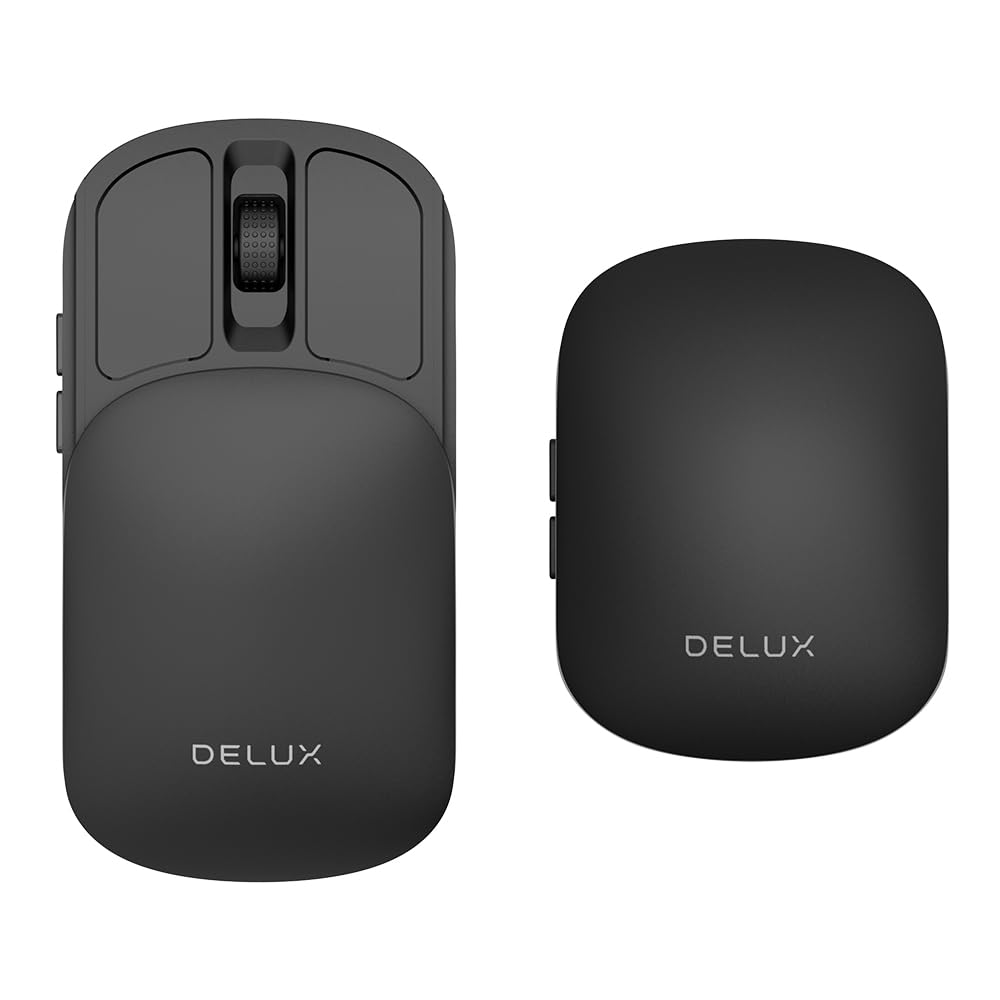
The DELUX MF20 solves the portability problem in a genuinely clever way: a sliding mechanism that retracts the mouse into a slim, pocketable rectangle. When extended, it offers a near-full-size grip that is remarkably comfortable for a device that starts at half its length. The built-in 300mAh lithium battery charges via a front-facing USB-C port that also supports pass-through charging, so you can keep working while the battery refills. Dual-mode connectivity (2.4GHz dongle plus Bluetooth 5.2) covers legacy devices and modern tablets alike.
The 4000 DPI maximum resolution is overkill for everyday work, but the five adjustable DPI levels let you dial in the perfect sensitivity for high-res monitors or fast-paced casual gaming. Side buttons provide forward/back navigation, and the quiet clicks won’t disturb a quiet coworking space. A velvet storage bag is included, protecting the mouse from scratches during transit. The sliding cover also acts as a basic sensor guard when stowed, which is a thoughtful touch for pocket carry.
Where the MF20 stumbles is in gaming scenarios: pressing the forward side button can shift the sliding cover slightly, throwing off aim in competitive shooters. Some users also report that the glossy finish shows fingerprints more than matte alternatives. For pure productivity travel—hopping between a laptop, tablet, and phone—this is easily one of the most space-efficient mice on the market.
Why it’s great
- Sliding mechanism shrinks to pocket-friendly size
- USB-C charging with pass-through use capability
- Dual-mode Bluetooth 5.2 and 2.4GHz connectivity
- Velvet storage bag protects during travel
Good to know
- Side button press can shift the sliding cover slightly
- Glossy finish attracts fingerprints quickly
- Slightly smaller than full-size mice; may feel cramped for large hands
3. ESR MagMouse

The ESR MagMouse tackles a specific travel pain point: keeping your mouse attached to your laptop so you never leave it behind. A magnetic base with reusable adhesive sticks to the lid or bottom of your laptop, and the mouse snaps on and off with a satisfying magnetic pull. The built-in USB-C cable is wound into the mouse body itself, so you never have to hunt for a charging cord. A one-minute charge delivers four hours of use, and a full 45-minute charge provides up to 160 hours of runtime—enough for weeks of daily work.
Connectivity options include Bluetooth 5.0 and a 2.4GHz dongle stored inside the battery compartment. The six DPI levels top out at 4800, giving you fine control for detailed creative work or fast-paced browsing. The 4-way scroll wheel tilts left and right, making horizontal spreadsheet navigation and timeline scrubbing effortless. Silent clicks rated for 10 million presses ensure the mouse remains unobtrusive in quiet environments. The ambidextrous shape accommodates both left and right-handed users comfortably.
The magnetic base adhesive is residue-free and repositionable, but you must carefully align it the first time—installing it upside down renders the mount useless until you peel it off. The mouse is built primarily from plastic, which keeps weight low but may feel less premium than metal-bodied competitors. For students, teachers, and road warriors who want one less thing to forget, the MagMouse’s magnetic tether is a genuinely useful innovation.
Why it’s great
- Magnetic base attaches mouse directly to laptop for safety
- Built-in USB-C charging cable eliminates cord hunting
- 1-minute charge yields 4 hours of use; full charge lasts 160 hours
- 4-way scroll wheel handles horizontal navigation
Good to know
- Adhesive base requires careful first-time alignment
- Plastic construction; not as dense or premium feeling as metal alternatives
- No rechargeable battery included; must rely on built-in cell
4. XBG B15pro Tri-Mode

The XBG B15pro packs an unusual amount of information into a compact travel mouse. Its built-in LED screen displays real-time battery percentage, active DPI level (800/1000/1200/1600/2400), and current connection mode—Bluetooth 5.0, Bluetooth 4.0, or 2.4GHz. This transparent communication eliminates guesswork during important tasks. The 500 mAh battery is larger than most travel mice, providing extended runtime between charges via the Type-C port. An automatic sleep mode activates after five minutes of inactivity to preserve power.
Tri-mode connectivity lets you pair with three separate devices and switch between them in under a second. The included 2.4GHz nano receiver stores inside the battery compartment, preventing loss during transit. Ergonomic design elements include a contoured thumb rest and arched palm support that reduce wrist strain during eight-hour workdays. The smooth matte finish resists fingerprints, while the textured grip zone on the sides provides stability during rapid movements. Silent buttons keep the noise floor low in shared spaces.
Some users note that the mouse cannot remap its six buttons through software, and the sleep timeout is not adjustable—both are minor frustrations for power users. The LED screen, while useful, adds a small amount of weight compared to simpler models. For anyone juggling multiple devices across different operating systems who wants real-time battery and DPI feedback at a glance, this mouse delivers exceptional transparency.
Why it’s great
- LED display shows battery, DPI, and connection mode in real time
- Tri-mode connectivity for three-device instant switching
- Large 500 mAh battery with USB-C charging
- Contoured thumb rest reduces fatigue during long sessions
Good to know
- Buttons are not remappable via software
- Sleep timeout duration is fixed and cannot be changed
- LED screen adds slight weight compared to simpler mice
5. Logitech M240 Silent

The Logitech M240 Silent is the no-frills, reliable companion for travelers who value battery longevity above all else. A single AAA battery powers this mouse for up to 18 months—meaning you can toss it in a bag and forget about charging for the better part of two years. The ambidextrous shape guides either hand into a natural position, and the compact dimensions slip easily into a laptop sleeve or purse pocket. Bluetooth pairing is instant and requires no dongle, so setup is as simple as turning it on and selecting it from your device list.
Logitech rates the click noise reduction at 90%, and in practice the M240 is noticeably quieter than a standard mouse. The click feel remains tactile and responsive, so you don’t sacrifice feedback for silence. The sensor works reliably on most surfaces, though it can stutter on fully transparent glass—a limitation shared by most optical travel mice. Compatibility spans Windows, macOS, Linux, ChromeOS, iPadOS, and Android, making it one of the most platform-agnostic options available.
The M240 uses disposable batteries, which some users see as wasteful, but the 18-month runtime makes replacements rare. There is no power indicator light on the bottom to confirm the on/off state, which can lead to accidental battery drain if left on in a bag. The three-button layout lacks side navigation buttons, which heavy browser users may miss. For someone prioritizing set-and-forget reliability and absolute silence over extra features, this is a solid pick.
Why it’s great
- Up to 18-month battery life from a single AAA battery
- 90% reduced click sound without losing tactile feedback
- Instant Bluetooth pairing with broad OS compatibility
- Ambidextrous design works naturally for either hand
Good to know
- No side buttons for forward/back navigation
- No power indicator light to confirm on/off state
- Standard optical sensor struggles on clear glass surfaces
6. Microsoft Surface Arc Mouse (Light Grey)

The Microsoft Surface Arc Mouse is a design statement that functions as a travel tool. Its bendable tail snaps flat for storage, becoming a slim rectangle that slides into a pocket or bag compartment without adding bulk. When you pick it up, the tail curves to form a comfortable arch that supports your palm, and the mouse powers on automatically. The innovative full scroll plane—a touch-sensitive surface instead of a physical wheel—lets you scroll both vertically and horizontally with a simple finger gesture.
At roughly half the weight of a standard mouse, the Arc is one of the lightest options in this class. It uses two AAA batteries that last approximately six months, which is shorter than disposable competitors but acceptable given the slim profile. Bluetooth pairing is straightforward on Windows 10/8.1/8 devices that support Bluetooth 4.0 or higher. The optical sensor tracks smoothly on standard desk surfaces, though it does not match the glass-tracking capability of dedicated laser sensors.
The Arc lacks a physical middle-click button, which is a dealbreaker for engineers using CAD software or users who rely on middle-click tab opening. The unique shape has a learning curve; some users find the click placement awkward until muscle memory develops. Battery compartment integration means you must replace batteries rather than recharge. For style-conscious travelers who prioritize a flat carry profile and are comfortable with touch-based scrolling, the Arc delivers an iconic experience.
Why it’s great
- Folds completely flat for ultra-slim pocket carry
- Full touch scroll plane supports vertical and horizontal navigation
- Auto power on/off when bending the tail
- Very lightweight; easy to forget in a bag
Good to know
- No physical middle-click button; CAD and heavy browsing suffer
- Uses disposable AAA batteries (non-rechargeable)
- Requires Bluetooth 4.0 or higher; not compatible with Windows 7 or many Apple devices
7. Microsoft Arc (Black)

The black variant of the Microsoft Arc shares the same iconic fold-flat DNA as its Light Grey sibling but adds a matte finish that repels fingerprints and looks more professional in business settings. The bendable tail mechanism is identical: snap flat for storage, arch for use, and the mouse automatically powers on. The full touch surface handles single-finger scrolling, two-finger gestures, and left/right clicks through pressure-sensitive zones. It folds into a form that is genuinely pocketable, even in slim-fit trousers.
Bluetooth connectivity is reliable and quick, pairing within seconds to Windows laptops and tablets. The optical sensor performs well on standard surfaces and offers consistent tracking without the stutter that plagues cheaper portable mice. Battery life from the included AAA cells is solid, with users reporting months of daily use before replacement. The matte texture provides a confident grip even with slightly sweaty hands, and the overall build quality feels dense and durable despite the plastic construction.
The same core limitations apply: no physical scroll wheel or middle-click button, and the unique ergonomics require an adjustment period. The right-hand-optimized shape is less accommodating for left-handed users than the ambidextrous Light Grey model. The high price tag positions it firmly as a luxury travel accessory rather than a value buy. For the frequent flyer who values aesthetic cohesion with a Microsoft Surface device and demands the thinnest possible carry profile, this is the polished endgame.
Why it’s great
- Folds to a flat, pocketable profile that is among the thinnest in class
- Matte finish resists fingerprints and looks professional
- Automatic power on/off via bendable tail mechanism
- Solid build quality with dense plastic construction
Good to know
- No physical scroll wheel or middle-click button
- Right-hand optimized design limits ambidextrous use
- Premium price point compared to feature-equivalent competitors
FAQ
Can I use a Bluetooth travel mouse with an iPad or Android tablet?
What does tri-mode connectivity mean on a travel mouse?
How do I choose between a foldable mouse and a compact standard mouse?
Final Thoughts: The Verdict
For most users, the best bluetooth travel mouse winner is the Logitech MX Anywhere 2S because its Darkfield sensor tracks flawlessly on any surface you encounter while traveling and its Flow multi-device workflow saves time daily. If you want a mouse that slides into a jeans pocket and still offers dual-mode connectivity, grab the DELUX MF20 Pocket Mouse. And for the ultimate fold-flat design that fits inside a passport pouch without sacrificing aesthetic cohesion, nothing beats the Microsoft Surface Arc Mouse.