
Our readers keep the lights on and the weekend projects moving. As an Amazon Associate, I earn from qualifying purchases.
An Airflow Micro ATX case exists at the intersection of footprint and firepower. You want the smaller board to reclaim desk space, but you refuse to throttle a hot GPU or a high-TDP CPU in a stuffy metal box. A case with restrictive intakes turns an otherwise capable build into a noisy thermal throttle-fest, especially when you’re gaming, rendering, or running sustained loads. The challenge is finding a chassis that breathes freely without ballooning into a full-tower footprint.
I’m Rikta — the co-founder and writer behind FitlyFast. I’ve spent years analyzing PC hardware specs and comparing chassis thermal performance to separate the mesh from the marketing fluff.
Whether you need a compact cube for a NAS-heavy workstation or a mid-tower that fits back-connect motherboards, the right airflow micro atx case keeps your components cool and your noise floor low.
How To Choose The Best Airflow Micro ATX Case
Picking the right chassis for airflow involves more than counting fan mounts. You need to balance mesh intake area, radiator support, GPU clearance, and cable routing depth — all within a footprint that actually saves desk space. Here are the three factors that separate a well-ventilated build from a hotbox.
Mesh Density and Intake Surface Area
A solid front panel with small side vents strangles airflow regardless of how many fans you install. Look for cases with full mesh front panels or panels with over 50,000 precision holes (like the ASUS AP201’s 57,000 machined holes). The mesh should be fine enough to catch dust but open enough to let fans breathe at low RPM. Avoid cases where the mesh is backed by a solid plastic or metal frame that blocks the fan hub — this creates dead zones where air doesn’t move.
Radiator and Fan Clearance for Your Build
If you plan on liquid cooling, confirm the case supports your radiator size at the top — many micro ATX cases can’t fit a 360mm radiator without blocking the motherboard or PSU shroud. Cases like the Lian Li A3 support a 360mm at the top, but only if you use a smaller PSU or mount it in the front. For air cooling, check the maximum CPU cooler height. Designs with separate PSU chambers (like the Fractal Design Node 804) allow taller coolers and cleaner GPU airflow paths.
GPU and PSU Compatibility
Modern graphics cards are long and thick. An Airflow Micro ATX case must have at least 320mm of GPU clearance (without front fans) to fit a high-end card. Also consider the PSU position: front-mounted PSU brackets (as seen on the Lian Li A3) free up space under the motherboard for bottom intake fans, pulling fresh air directly onto the GPU. Cases with bottom-to-top airflow paths tend to run cooler than designs where the PSU sits in a shroud blocking the bottom fans.
Quick Comparison
On smaller screens, swipe sideways to see the full table.
| Model | Category | Best For | Key Spec | Amazon |
|---|---|---|---|---|
| NZXT H3 Flow | Mid Tower | Clean cable management | GPU up to 377mm | Amazon |
| Thermaltake View 170 TG | Mini Tower | RGB showcase build | 3x120mm ARGB fans | Amazon |
| Montech AIR 100 ARGB | Tower | Value ARGB pack | 4 pre-installed fans | Amazon |
| JONSBO D32 PRO | Mini Tower | BTF/back-connect MB | GPU up to 365mm | Amazon |
| ASUS Prime AP201 | Mini Tower | 33L high-airflow build | 57,000+ mesh holes | Amazon |
| Lian Li A3-mATX | Mini Tower | 360mm radiator + wood | GPU up to 415mm | Amazon |
| Fractal Design Node 804 | Mid Tower | NAS/dual-chamber | 10x 3.5″ drive mounts | Amazon |
In‑Depth Reviews
1. ASUS Prime AP201

The ASUS Prime AP201 achieves the near-impossible: a 33-liter micro ATX case that fits a full-size ATX power supply, a 360mm radiator, and a 338mm GPU without feeling cramped. The entire chassis is wrapped in a mesh panel with over 57,000 precision-machined 1.5mm holes, ensuring high airflow from every fan orientation. The tool-free side panels use a clip mechanism that’s secure but easy to remove for cleaning.
Cable management is generous for the size — a 32mm gap behind the motherboard tray and strategically placed cutouts make a clean build achievable even for less experienced builders. The mesh panels also serve as dust filters on the intake faces, reducing maintenance frequency. The AP201 is available in both mesh and tempered glass variants; for maximum airflow, stick with the mesh version.
Build quality is solid with alloy steel construction, and the chassis supports up to six 120mm fans. The included rear 120mm fan provides adequate exhaust out of the box, but you’ll want to add at least two front intakes for a high-power GPU. Owners praise its spatial efficiency, with many noting it doesn’t sacrifice cooling support despite the compact footprint.
Why it’s great
- High-density mesh allows strong airflow at low fan RPM.
- Fits full ATX PSU and 360mm radiator in a 33L chassis.
- Tool-free panels and generous cable management depth.
Good to know
- Side panels are removable but clip resistance varies by unit.
- 3.5-inch drive mounting points can misalign; adapter needed for standard HDDs.
2. Lian Li A3-mATX

The Lian Li A3-mATX is a 26.3-liter collaboration with DAN Cases that brings natural aesthetics to high-airflow design. The front panel is real walnut wood, while the sides and top are steel mesh panels optimized for unrestricted intake and exhaust. Despite its small footprint, it supports GPUs up to 415mm and a 360mm radiator at the top — provided you mount the PSU in the front position.
Flexible PSU mounting is the A3’s standout feature. You can install an ATX, SFX, or SFX-L unit in the front or side orientation, which opens up space for bottom intake fans directly under the GPU. This bottom-to-top airflow path keeps GPU temperatures low even under sustained gaming loads. The modular design also lets you remove the top bracket and rear panel for easier radiator installation.
Cable management requires patience, especially with an ATX PSU mounted in the front. The case ships without any fans, so you’ll need to budget for a full set. Many users report that with Noctua or Arctic fans, the A3 runs near-silent even with high-TDP hardware. The wood front withstands normal wear well, though some may prefer a uniform metal look.
Why it’s great
- Natural walnut front panel combines ventilated mesh with premium looks.
- Flexible PSU mounts (front/side) free up bottom intake for GPU.
- Supports 415mm GPUs and 360mm radiators in a 26L package.
Good to know
- No included fans; full set required for optimal airflow.
- Cable management is tight with an ATX PSU in front position.
3. Fractal Design Node 804

The Fractal Design Node 804 is the undisputed king of storage and airflow in the micro ATX space. Its dual-chamber layout separates the motherboard and GPU from the PSU and drives, creating a dedicated airflow path for each zone. The main chamber gets a direct intake from the front and side, while the rear chamber houses up to 10 drives (8x 3.5-inch) without choking the GPU.
Three Fractal Design Silent Series R2 120mm fans are included — two in the front, one in the rear — providing neutral pressure out of the box. All intakes have removable dust filters, and the brushed aluminum front panel gives it a minimalist look that blends into a living room or office. The drive mounting system uses a unique rack design that slides out for easy maintenance, making it a favorite for TrueNAS and other NAS builds.
At 13.5 x 12 x 15.3 inches, it’s wider than a typical tower, so confirm your desk or shelf depth before purchasing. The included fans are serviceable but some owners swap them for Noctua units to achieve whisper-quiet operation. Cable management in the dual chamber is dream-level easy, with ample room to route and hide wiring behind the motherboard tray.
Why it’s great
- Dual-chamber design isolates drive heat from GPU/CPU zone.
- Fits up to 10 drives (8x 3.5-inch) for extreme storage builds.
- Aluminum front panel and dust filters keep it clean inside.
Good to know
- Cube shape is wider than a standard mid tower; check depth clearance.
- Included fans are audible on Low; aftermarket fans recommended for silence.
4. JONSBO D32 PRO

The JONSBO D32 PRO stands out for its flexible motherboard mounting system (A/B mode). In standard A mode, it supports a standard mATX board with 170mm CPU cooler clearance. Switch to B mode, and it accommodates back-connect (BTF) motherboards with 163mm cooler clearance. This makes it an excellent choice for builders who want to experiment with reverse-connector boards for ultra-clean cable management.
Despite its 24-liter volume, the D32 PRO fits a 365mm GPU, a 240mm AIO at the top, and up to three 120mm fans at the bottom. The bottom fans blow directly onto the GPU, and the rear 120mm fan position creates a diagonal exhaust path. The tempered glass side panel is hinged on the bottom, giving a clear view of the hardware. JONSBO includes a detachable PCI-E bracket that makes inserting large GPUs much easier.
An SFX PSU is recommended if you run a full-length GPU, as a standard ATX unit can interfere with cable routing in the front compartment. The top radiator support is limited to 240mm — a 280mm won’t fit. Owners consistently praise the build quality, noting that the metal panels, flush fit, and fine mesh screens feel more premium than the price suggests.
Why it’s great
- A/B mode supports both standard and back-connect motherboards.
- Bottom fan slots blow directly onto GPU, lowering core temps.
- Detachable PCI-E bracket simplifies large GPU installation.
Good to know
- ATX PSU can crowd the front compartment; SFX recommended.
- Top radiator limited to 240mm — 280mm not compatible.
5. Montech AIR 100 ARGB

The Montech AIR 100 ARGB delivers exceptional value by packing four 120mm ARGB fans out of the box, complete with a fan controller. The fine mesh front panel allows high airflow while filtering dust, and the quick-release design lets you snap the front cover off for tool-free cleaning. The side-panel is a tempered glass door that swivels open on a hinge — no screws to lose during upgrades.
Pre-installed loops and Velcro straps make cable management a breeze compared to other budget cases. The included fans perform well for air cooling, though they are a bit audible at full speed. The ARGB strip can be controlled via the case’s LED button or synced with the motherboard. The chassis interior feels sturdy, with a durable powdercoat finish that resists scratches during assembly.
GPU clearance is sufficient for mid-range cards, but owners running high-end GPUs (over 320mm) should confirm fitment. The top supports two 140mm fans for additional exhaust, and a top magnetic dust cover traps debris when not mounted. Over a year of use, many owners report no rattles or fan degradation, making the AIR 100 a strong argument for budget-oriented airflow builds.
Why it’s great
- Four ARGB fans and controller included — no extra purchase needed.
- Quick-release front mesh for easy dust filter cleaning.
- Velcro straps and pre-routed loops simplify cable management.
Good to know
- Included fans are non-PWM; fixed speed via controller.
- GPU length limited to ~320mm; may not fit top-tier cards.
6. Thermaltake View 170 TG ARGB
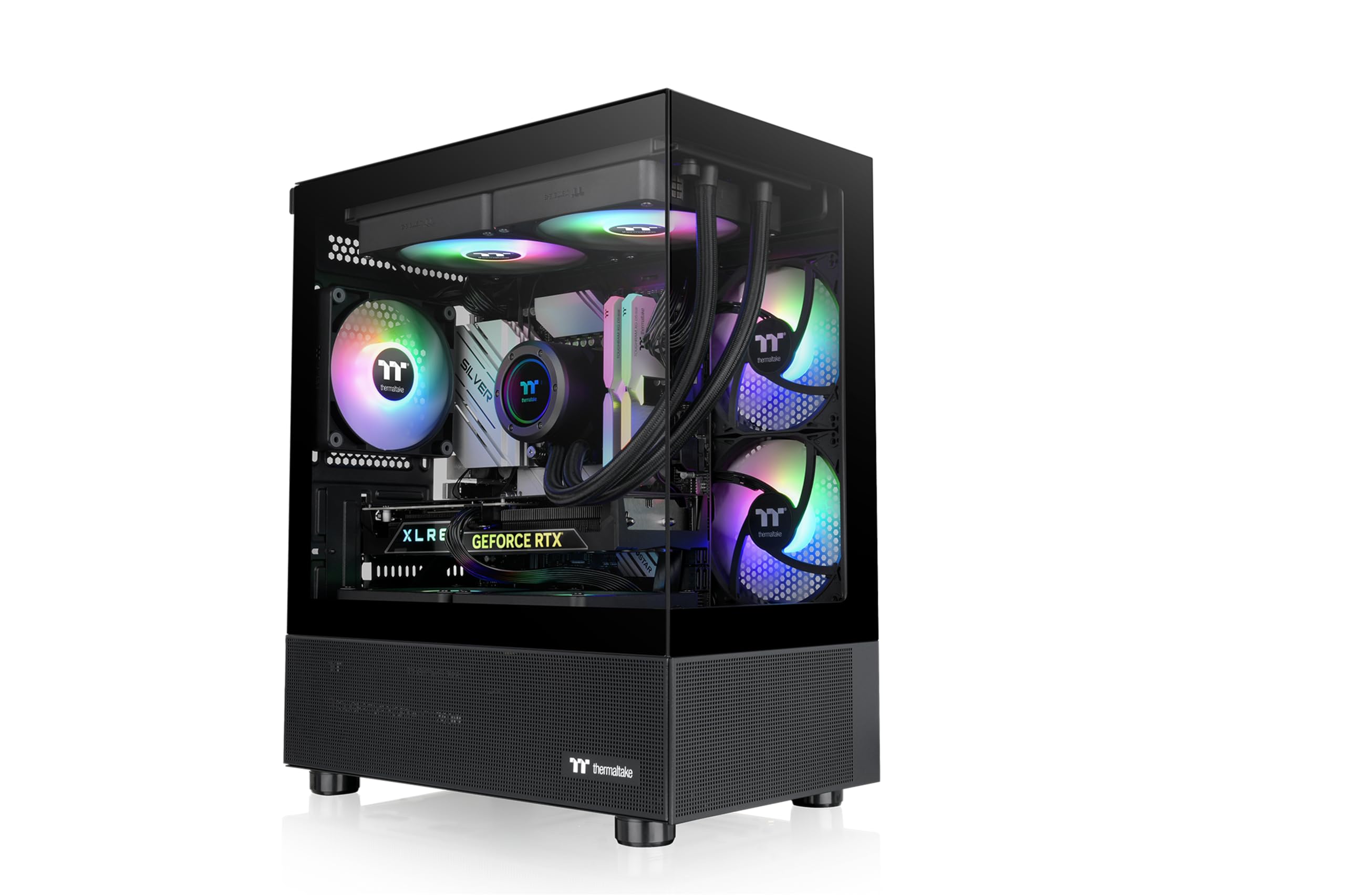
The Thermaltake View 170 TG ARGB leans into the “fish tank” aesthetic with pillarless dual tempered glass panels (front and side) that offer an unobstructed view of your hardware. Three 120mm ARGB fans are pre-installed — two in the front, one at the rear — providing decent airflow out of the box. The top supports up to a 280mm radiator, which is generous for a case in this footprint.
The mesh on the top and bottom panels helps maintain airflow despite the glass front. The included fans are addressable RGB, but there’s no built-in controller — you’ll need an ARGB header on your motherboard or a separate hub. Cable management is decent for a mini-tower, with space behind the motherboard tray for routing. The compact size means there’s minimal space between the motherboard and the bottom fans, so cable headers can be crowded.
Owners consistently note that the design is the star of the show. The glass panels are removable from the top without tools, making hardware swaps easier. The case lacks a USB-C front port, so if you use a modern motherboard with a USB-C header, you’ll need an adapter or an I/O panel pass-through. For a budget-friendly RGB showcase, the View 170 is hard to beat.
Why it’s great
- Pillarless dual tempered glass offers a near-panoramic component view.
- Supports 280mm radiator at top in a compact chassis.
- Three ARGB fans included for immediate lighting effect.
Good to know
- No ARGB controller or hub included — needs motherboard control.
- Lacks front USB-C port; GB header space limited near motherboard edge.
7. NZXT H3 Flow

The NZXT H3 Flow is a space-efficient micro ATX chassis that brings the brand’s clean aesthetic to budget-conscious builders. The ultra-fine steel mesh on the front panel and PSU shroud maximizes intake area while keeping dust out. It supports GPUs up to 377mm without front fans — enough for virtually any modern card — and fits a 280mm front radiator or a 240mm top radiator.
Cable management is straightforward, with a generous PSU basement and dedicated routing channels. The included F120Q rear fan provides quiet exhaust at idle, but you’ll want to add front intakes for heavy loads. The chassis supports back-connect motherboards if you remove the cable management bar, giving you an upgrade path for future builds. Build quality feels sturdy, with the alloy steel construction weighing in at 4.8 kg.
Some owners note that the PSU must be installed upside down (fan facing up), which can be slightly inconvenient. The cable management depth is adequate but lacks the generous channels of NZXT’s larger H5. For the price, the H3 Flow delivers exceptional build quality and excellent airflow potential, making it a strong entry-level pick for anyone wanting a no-nonsense micro ATX build.
Why it’s great
- Ultra-fine mesh panels filter dust while allowing high airflow.
- Supports back-connect motherboards with removable cable bar.
- Sturdy alloy steel construction with clean, understated design.
Good to know
- PSU mounts upside down — not the most intuitive orientation.
- Cable management channels are shallower than larger NZXT cases.
FAQ
Will an Airflow Micro ATX Case fit a full-size ATX power supply?
How many fans do I need for a high-airflow Micro ATX build?
Is a 360mm radiator worth it in a Micro ATX case?
Final Thoughts: The Verdict
For most users, the airflow micro atx case winner is the ASUS Prime AP201 because it balances compact size (33L) with full-size PSU/360mm radiator support and tool-free panel access. If you want a premium wood-accented design with bottom-to-top airflow, grab the Lian Li A3-mATX. And for an all-in-one ARGB value build, nothing beats the Montech AIR 100 ARGB with four pre-installed fans and a swivel glass door.