
Our readers keep the lights on and the weekend projects moving. As an Amazon Associate, I earn from qualifying purchases.
Spending long hours staring at a bright monitor in a dark room creates a harsh contrast that forces your eyes to constantly adjust, leading to fatigue, headaches, and reduced focus. Adding a dedicated backlight to your display solves this by balancing the luminance across your field of view, making late-night sessions far more comfortable.
I’m Rikta — the co-founder and writer behind FitlyFast. I’ve spent years analyzing monitor accessories, focusing on the light distribution, color accuracy, and build quality that actually reduce eye strain during extended use.
After researching the top contenders on the market, I’ve compiled the definitive list of the best bias lighting for monitor setups to help you choose the right match for your workspace and viewing habits.
How To Choose The Best Bias Lighting For Monitor
Not all bias lighting is created equal. Some products focus on ambient desk illumination, while others excel at dynamic screen mirroring for gaming. Understanding a few core specs will ensure you pick the right tool for your specific workflow.
Light Bar vs. LED Strip: Which form factor fits your setup?
A light bar sits on top of your monitor and casts light downward onto your desk, often with a separate rear-facing LED panel to create the actual bias effect. This design works best if you also need to illuminate your keyboard or paperwork. An adhesive LED strip attaches directly to the back edges of your monitor and only provides the backlight itself, making it ideal for pure bias lighting with no desk clutter.
Color Accuracy & CRI Rating
If you do any photo editing, design work, or color-critical tasks, a high Color Rendering Index (CRI) of 95 or above is non-negotiable. A low CRI can distort your perception of on-screen colors, leading to edits that look wrong on other displays. For gaming and general use, a CRI of 80 or higher is typically sufficient.
Control Method & Smart Features
Basic models use a wired remote or buttons on the unit itself. Mid-range options include wireless pucks, while premium setups offer app-based controls, voice assistant integration, and screen-syncing technology that reads your monitor’s content to produce matching colors in real time.
Quick Comparison
On smaller screens, swipe sideways to see the full table.
| Model | Category | Best For | Key Spec | Amazon |
|---|---|---|---|---|
| BenQ ScreenBar Halo 2 | Light Bar | Eye-care & professional work | CRI > 95, 2700K–6500K | Amazon |
| Philips Hue Gradient Strip | LED Strip | Smart home & ecosystem users | Zigbee, Multi-Color Gradient | Amazon |
| Govee Gaming Light Bars Pro | Free-standing | Immersive gaming atmosphere | Triple-Sided RGBIC, 900 Lumens | Amazon |
| Quntis Light Bar (20.1″) | Light Bar | Large monitors & color work | CRI Ra95, 88+55 LED Beads | Amazon |
| Quntis Light Bar (16.1″) | Light Bar | Value with remote control | CRI Ra95, 84 LED Beads | Amazon |
| Govee G1 Gaming Light | LED Strip | RGBIC gaming immersion | 108 LEDs, 123 Scene Modes | Amazon |
| Nanoleaf Screen Mirror Strip | LED Strip | USB-C plug-and-play | 75 RGB LEDs, Trimmable | Amazon |
In‑Depth Reviews
1. BenQ ScreenBar Halo 2

The BenQ ScreenBar Halo 2 is the pinnacle of monitor bias lighting, offering a precision-engineered dual-light system that combines an 18-degree angled front light with a wide ambient backlight. The front light uses Asym-Light technology to illuminate your desk down to 2.36 inches from the screen bezel without any reflection on your display, while the backlight reduces the harsh contrast between your screen and a dark wall. This combination is clinically proven to reduce accommodative eye strain during marathon work sessions.
Build quality is exceptional, with a full aluminum housing and a weighted, wireless desktop dial that controls brightness, color temperature (2700K–6500K), and front/back light balance. The motion sensor detects when you leave your desk and automatically turns the lights off, saving energy. With a CRI above 95, this is also a professional tool for photographers and designers who need accurate color perception without screen glare interfering with their calibration.
The clamp mounts securely on monitors from 0.17 to 2.36 inches thick, including curved screens up to 1800R, and includes a webcam accessory so your camera isn’t blocked. The “My Favorite” mode remembers your last used settings, and the auto-dimming feature adjusts brightness to ambient room light, making it a truly set-and-forget solution for daily use.
Why it’s great
- Superior glare-free optics with anti-reflective coating.
- Wide color temperature range ideal for circadian-friendly lighting.
- Motion sensor and auto-dimming for hands-free operation.
Good to know
- Requires a USB power adapter (not included).
- Premium price reflects the professional-grade build and optics.
2. Philips Hue Gradient Lightstrip

The Philips Hue White and Color Ambiance Gradient Lightstrip is designed for users already invested in the Hue ecosystem. It produces multiple colors simultaneously along its length, creating a seamless gradient that mirrors the dominant colors on your screen. When paired with a Hue Bridge and the Hue Sync desktop app, the lightstrip reacts to content in real time, offering a sophisticated bias lighting experience that enhances immersion without the harshness of single-color strips.
This strip is specifically sized for 24 to 27-inch monitors and uses flexible mounts that let you bend it cleanly around corners. The light output is rich and vibrant, with a full color gamut and tunable white temperatures. You can control it via the Hue app, Alexa, Google Assistant, or Apple HomeKit, and set automations that tie into your existing smart home routines, such as dimming when you start a movie.
The major caveat is that it requires a Hue Bridge, which is sold separately. Without the bridge, the strip functions only at default settings. Additionally, the gradient effect requires the Hue Sync app running on your PC, which uses some system resources. For those already in the Hue ecosystem, this is the most polished and reliable screen-mirroring solution available for bias lighting.
Why it’s great
- Seamless gradient lighting with multiple simultaneous colors.
- Deep integration with Hue ecosystem and smart home platforms.
- Reliable, low-latency screen mirroring via Hue Sync app.
Good to know
- Requires separate Hue Bridge purchase for full functionality.
- Only available in specific sizes for 24–27 inch monitors.
3. Govee Gaming Light Bars Pro
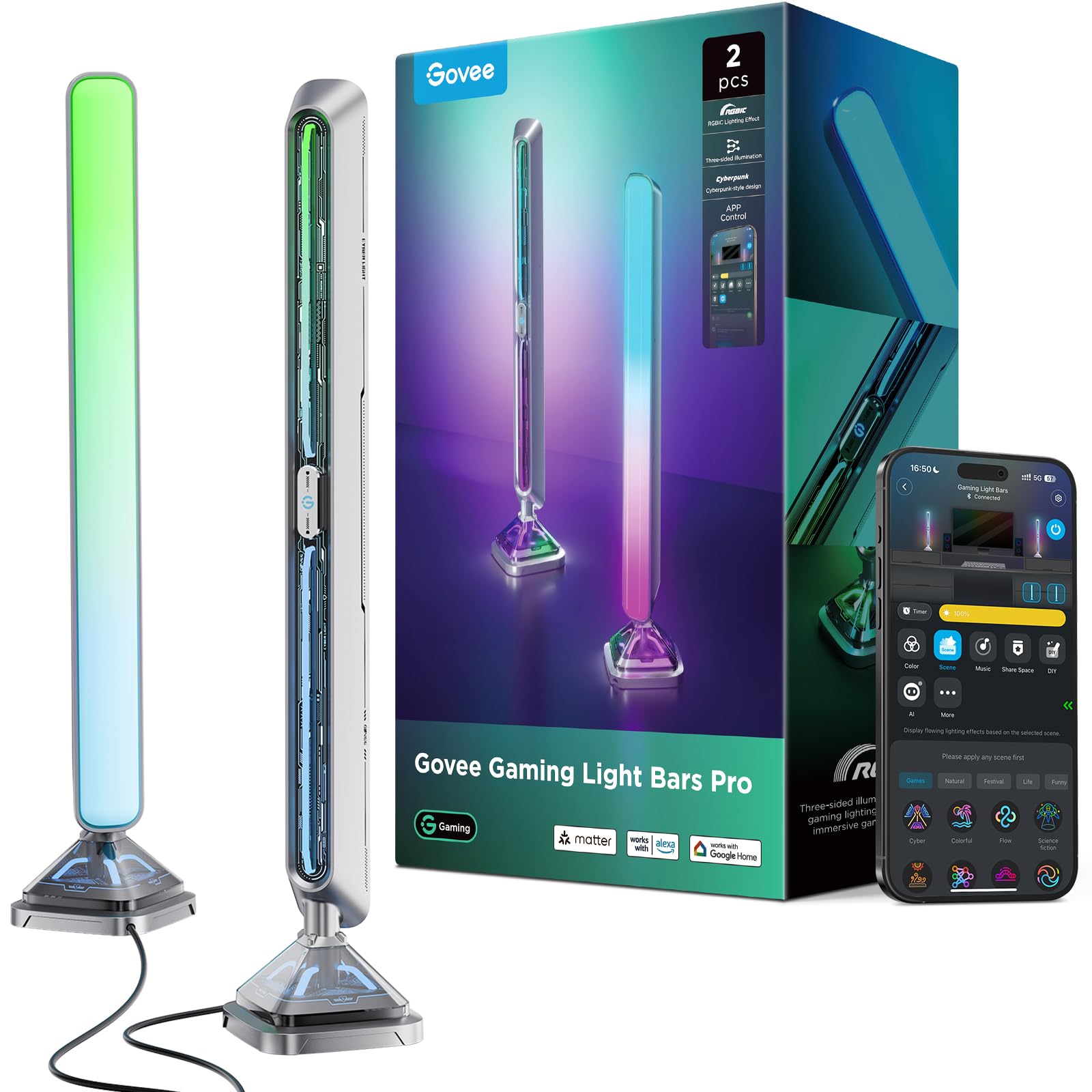
Govee’s Gaming Light Bars Pro take a different approach to bias lighting by using two free-standing 16-inch towers that sit on either side of your monitor. Each bar features triple-sided illumination — front, back, and base — for a 3D lighting effect that fills your peripheral vision. The RGBIC technology allows multiple colors to display simultaneously on a single bar, creating dynamic gradients that react to on-screen content via Govee’s Desktop app, which works exclusively on Windows.
The build quality is robust, with a cyberpunk-inspired design using metal texture spraying and a weighted base that prevents tipping. At 900 lumens each, these are bright enough to serve as room lighting as well as bias lighting. They integrate with Alexa, Google Home, and Razer Chroma, and feature a built-in microphone for music sync that works without any additional software. The Govee Home app offers over 60 scene modes and independent control of each light panel.
Setup requires a 2.4GHz Wi-Fi connection for the initial pairing, and the desktop color-matching feature can be CPU-intensive during demanding games. These are not a direct replacement for a monitor-mounted light bar, but for gamers who want to create a fully immersive ambient light field around their desk, they are unmatched in their class.
Why it’s great
- Industry-first triple-sided illumination for a 3D lighting effect.
- High brightness at 900 lumens per bar for room-filling light.
- Works with Alexa/Google Home and Razer Chroma.
Good to know
- Desktop color-matching requires Windows and can be CPU-heavy.
- Free-standing design takes up desk space on each side.
4. Quntis Monitor Light Bar (20.1″)

The larger Quntis ScreenLinear Glow Plus extends to 20.1 inches, making it an excellent match for ultrawide monitors or 32-inch displays. It integrates both a front-facing desk lamp and a rear-facing bias light in a single housing. The front light uses 88 high-quality LED beads at Ra95 CRI for accurate desk illumination, while the back features 55 additional beads to create a soft ambient glow behind the monitor, reducing eye strain during use.
The patented sliding weighted clip is a standout feature — it has two adjustable points that let you shift the clip forward or backward to ensure a secure fit on monitors of varying thicknesses and curvatures up to 1000R. The wireless remote is non-mechanical, offering stepless dimming for both brightness and color temperature (2700K–6500K). The backlight can be toggled independently, so you can use the front light alone for focused work or both for a more comfortable evening setup.
Users report that the mount is heavy and sticky, which ensures it stays put even on thick monitors. The remote requires a USB-C power cable, and the light bar itself draws up to 1.5A, so you should plug it into a powered USB port or a wall adapter. The independent backlight control is a genuinely useful feature that many competing bars lack at this size.
Why it’s great
- Wide 20.1-inch length fits large and ultrawide monitors.
- High CRI Ra95 with separate front/back light controls.
- Secure sliding clip works with curved and thick monitors.
Good to know
- Requires 5V/1.5A USB power, not just any USB port.
- Heavy clip may not suit ultra-thin portable monitors.
5. Quntis Monitor Light Bar (16.1″)
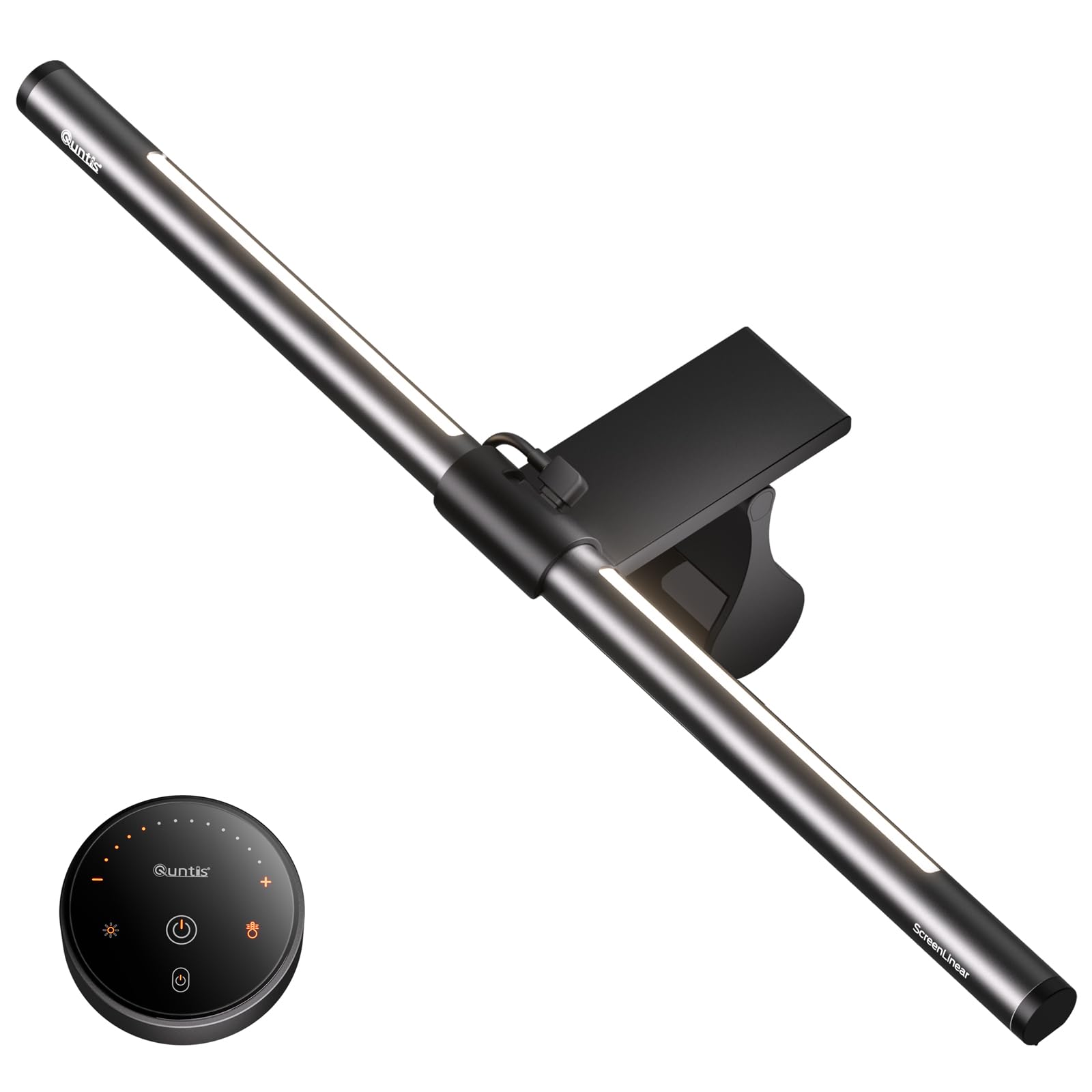
This smaller Quntis light bar is a well-rounded 16.1-inch option ideal for standard 24 to 27-inch monitors. It shares the same glare-free design philosophy as its larger sibling, using an optical hood and textured light cover to eliminate screen reflection. The 84 LED beads deliver Ra95 CRI color accuracy, making it suitable for color-sensitive tasks without the premium price tag of the BenQ.
The retractable sliding weighted clip is identical to the larger model, offering a secure fit on curved screens and ultra-thin bezels. You get three lighting modes — Work, Immersive, and Design — that adjust the balance between front desk illumination and rear bias lighting. The smart remote uses touch-sensitive buttons with a soft orange glow for locating it in the dark, and stepless dimming allows fine control over brightness and color temperature.
One neat feature is the smart memory function, which remembers your last brightness and color temperature settings even after a power outage. The backlight brightness can be adjusted independently from the front light. Some users find the backlight angle too high for their taste, but overall this is a compact, capable bar that delivers most of the premium features at a much more accessible price point.
Why it’s great
- Compact 16.1-inch size fits most standard monitors perfectly.
- Smart memory restores last settings after power loss.
- Dual protection design prevents screen glare and direct eye shine.
Good to know
- Backlight angle is fixed and may be too high for some setups.
- Less bright overall than the BenQ ScreenBar Halo series.
6. Govee Gaming Light G1

The Govee G1 is a dedicated RGBIC LED strip designed for 27 to 34-inch monitors, including curved panels. Its 108 high-density LED beads wrap around all four sides of your screen via adhesive backing, providing 360-degree color-matching through Govee’s VibraMatch technology. The result is a highly immersive bias lighting experience that reacts to in-game explosions and scene changes with vivid, low-lag color shifts.
With 123 preset scene modes and 11 music modes, this strip offers extensive customization through the Govee Home app and desktop software. It also supports Govee DreamView, allowing you to sync it with up to 10 other Govee lighting products for a coordinated room-wide setup. The strip is compatible with Razer Chroma, making it easy to integrate into existing gaming peripherals ecosystems.
The adhesive is strong and the strip fits neatly around corners, but the desktop color-matching feature can cause CPU usage spikes in demanding games like Baldur’s Gate 3, potentially affecting performance. Additionally, some streaming platforms have copyright protections that prevent screen content from being read. For gamers who want vivid, dynamic backlighting without the desktop footprint of free-standing bars, this is a top-tier choice.
Why it’s great
- Full 360-degree RGBIC coverage around the monitor bezel.
- Extensive library of 123 scene modes for varied moods.
- Compatible with Razer Chroma and Govee DreamView sync.
Good to know
- Desktop color-matching can impact CPU performance in heavy games.
- Does not include an on-strip physical control, requires app or desktop.
7. Nanoleaf PC Screen Mirror Lightstrip
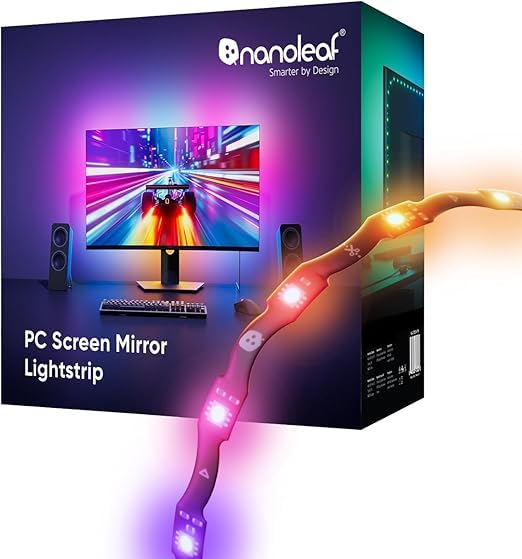
The Nanoleaf PC Screen Mirror Lightstrip offers a refreshingly simple approach to bias lighting. It connects directly to your computer via a USB-C port — no separate power adapter or hub required — and is controlled entirely through the Nanoleaf Desktop App. The 2.5-meter strip features a zig-zag design that fits behind 27 to 32-inch monitors, and it is trimmable along marked cut lines for custom sizing, with smart remapping that adjusts lighting effects to your new length.
With 75 high-density RGB LEDs, it delivers 16 million colors and tunable white temperatures from 2700K to 6500K. The screen mirroring function reads your desktop content in real time, syncing colors to games, movies, or your desktop wallpaper. The music sync feature captures direct PC audio through the desktop app, providing responsive lighting without a separate microphone. Brightness is adjustable from 1 to 100 percent.
The main drawback is the Nanoleaf software, which some users find unreliable — specifically, the lights may not turn off automatically when the PC goes to sleep, and the strip is not compatible with the Nanoleaf mobile app, limiting scheduling options. However, for users seeking a clean, camera-free screen mirroring setup with a direct USB-C connection, this is one of the most streamlined options available.
Why it’s great
- Simple USB-C power and data connection, no wall adapter needed.
- Trimmable to exact monitor size with smart remapping.
- Direct PC audio capture for responsive music sync.
Good to know
- Software integration can be glitchy; lights may not turn off with PC sleep.
- Not compatible with Nanoleaf mobile app for remote scheduling.
FAQ
Can bias lighting actually reduce eye strain?
Do I need a light bar or an LED strip for my monitor?
Will bias lighting affect my monitor’s color calibration?
Final Thoughts: The Verdict
For most users, the bias lighting for monitor winner is the BenQ ScreenBar Halo 2 because it combines a glare-free front light with a wide ambient backlight and automatic features that genuinely reduce eye strain. If you want an immersive RGBIC gaming atmosphere with screen mirroring, grab the Govee Gaming Light Bars Pro. And for a budget-friendly hybrid that works on large monitors, nothing beats the coverage of the Quntis 20.1-inch Monitor Light Bar.