
Our readers keep the lights on and the weekend projects moving. As an Amazon Associate, I earn from qualifying purchases.
Printing your own artwork at home transforms a digital file into a tangible, gallery-ready piece, but the wrong printer will crush your blacks, muddy your colors, and eat your paper budget in a week. The gap between a standard office all-in-one and a dedicated art printer is measured in color gamut coverage, ink architecture, and media handling—three specs most buyers ignore until they see a washed-out test print.
I’m Rikta — the co-founder and writer behind FitlyFast. I’ve spent thousands of hours cross-referencing pigment-versus-dye ink formulations, comparing 8‑channel and 10‑channel print heads, and mapping which roll‑feed mechanisms survive consistent fine‑art paper use.
The market is split between dye‑based photo machines for glossy snapshots and pigment‑based archival workhorses that resist fading for a century. This guide analyzes eleven models to find the best art printer for fine‑art giclée, poster production, DTF transfers, and large‑format blueprints.
How To Choose The Best Art Printer
Buying an art printer without understanding ink chemistry and print head design is a recipe for expensive regret. Three criteria separate a true giclée machine from a glorified document printer: ink type, color channel count, and media path architecture.
Pigment vs. Dye Inks
Pigment inks suspend solid color particles in a carrier fluid, producing prints that resist UV fading and moisture for 100–400 years on archival paper. Dye inks dissolve into the paper fibers and deliver a wider gamut on glossy surfaces, but fade noticeably within a decade. For fine‑art reproductions, pigment is non‑negotiable. The Canon PRO‑310 uses Lucia PRO II pigment, while the Epson P700 uses UltraChrome PRO10 with a violet channel for expanded red and purple capture.
Print Head Channels and Black Ink Switching
Standard photo printers share one black nozzle between photo black and matte black, forcing an ink purge when you switch paper types. That purge sends expensive ink to a waste tank. The Epson P700 and P900 dedicate separate nozzles to both black inks, so you can switch between glossy and matte paper instantly without a cleaning cycle. Each channel in a 10‑color system (Epson PRO10) adds a specific hue—light gray, light cyan, violet—that reduces visible grain in smooth gradients.
Media Path and Maximum Print Width
A printer that can’t feed thick fine‑art paper (up to 1.5 mm) or handle roll media limits your output options. Borderless 13×19 prints require a straight paper path or a rear feed that doesn’t bend thick stock. If you plan to sell open‑edition prints, a 17‑inch wide model like the Epson SureColor P900 lets you produce 16×20 prints with full bleed, eliminating the need for mat cutting services. For poster‑sized work up to 24 inches, the Canon imagePROGRAF TC‑21 or HP DesignJet T210 are the logical step‑up.
Quick Comparison
On smaller screens, swipe sideways to see the full table.
| Model | Category | Best For | Key Spec | Amazon |
|---|---|---|---|---|
| Epson SureColor P900 | 17‑inch Pigment | Fine‑art giclée | 10‑channel UltraChrome PRO10 | Amazon |
| Epson SureColor P700 | 13‑inch Pigment | Archival prints at 13×19 | 10‑channel with Violet | Amazon |
| Canon PRO‑310 | 13‑inch Pigment | Gallery‑quality photos | 9‑color Lucia PRO II | Amazon |
| Canon PIXMA PRO‑200S | 13‑inch Dye | High‑gloss photo prints | 8‑color dye‑based ink | Amazon |
| Canon imagePROGRAF TC‑21 | 24‑inch Dye | Posters and plotter prints | 70ml per color tanks | Amazon |
| HP DesignJet T630 | 24‑inch Dye/Pigment | CAD and poster output | Auto sheet/roll switch | Amazon |
| HP DesignJet T210 | 24‑inch Dye/Pigment | Posters and maps | Horizontal cutter | Amazon |
| Brother Sublimation Printer | Sublimation Dye | DIY apparel transfers | Artspira app support | Amazon |
| HP Color LaserJet Pro 3301fdw | Color Laser | Office color documents | 26 ppm color speed | Amazon |
| Epson Artisan 1430 | 13‑inch Dye | Scrapbooking and 12×12 | 6‑color Claria ink | Amazon |
| DSV F1080 DTF Printer | DTF Transfer | Custom garment transfers | 2880×1440 dpi DTF | Amazon |
In‑Depth Reviews
1. Epson SureColor P900

The Epson SureColor P900 is the benchmark for fine‑art giclée printing in a home studio. Its ten‑channel UltraChrome PRO10 ink set—including a dedicated violet cartridge—produces a color gamut that exceeds Adobe RGB, and the separate nozzles for Photo Black and Matte Black eliminate the waste purge that plagues older models. The 4.3‑inch touchscreen interface and built‑in roll‑feed support make it nearly as convenient as a dedicated lab printer without the floor‑standing footprint.
Owners report exceptional black density on glossy papers thanks to the Carbon Black Driver mode, and print permanence is rated at 200 years for color and 400 years for monochrome under museum conditions. The P900 accepts media up to 1.5 mm thick, including cotton rag and canvas, so you can produce editioned prints that match gallery expectations. The initial setup does send about half the starter ink to the waste tank during priming, so budget for a full cartridge set immediately.
For an independent artist or illustrator who prints regularly at 16×20 or smaller, this printer is the most reliable bridge between digital proof and sellable art. The wireless iOS printing works flawlessly with color‑managed files, and the included 24‑inch roll adapter removes the need to trim sheets manually.
Why it’s great
- Dedicated matte/photo black nozzles eliminate ink switching purge.
- Violet channel expands red and purple reproduction.
- Roll‑feed support enables borderless 16×20 prints.
Good to know
- Investment cost can be high due to ten cartridges.
- Initial priming consumes roughly half the starter ink.
2. Epson SureColor P700

The P700 is the 13‑inch sibling of the P900, sharing the same UltraChrome PRO10 ink chemistry and dedicated black nozzles. It is 23 percent smaller than the previous generation, making it the most space‑efficient route to archival pigment printing for photographers and watercolor artists who rarely exceed 13×19 output. The interior LED light helps you inspect prints as they exit, and the 4.3‑inch touchscreen simplifies media‑type selection across third‑party fine‑art papers like Moab Entrada Rag Bright.
User reports consistently praise the ink quality—particularly how the violet cartridge resolves deep shadows in floral and landscape images without shifting toward magenta. The Carbon Black Driver mode delivers glossy Dmax values that rival the larger P900. However, the included starter cartridges are barely half full, and the printer is sensitive to paper thickness settings on heavier rag papers, occasionally triggering “out of paper” errors when the rear feed misaligns.
For artists who work at tabloid‑plus sizes and demand fade‑resistant prints but don’t need 17‑inch roll capability, the P700 is the most balanced option below the premium tier. The wireless iOS print workflow is identical to the P900, and the compact chassis fits on a standard 30‑inch deep desk.
Why it’s great
- No ink waste switching between matte and photo black.
- Violet ink extends gamut beyond typical 8‑color systems.
- Compact footprint for a 13‑inch archival printer.
Good to know
- Starter ink cartridges are only partially filled.
- Thick fine‑art paper feeding can be finicky.
3. Canon imagePROGRAF PRO-310

The Canon PRO‑310 uses a nine‑color Lucia PRO II pigment system with a Chroma Optimizer clear coat that enhances gloss uniformity and scratch resistance. That optimizer layer is the key differentiator: it eliminates the bronzing effect visible on glossy papers from other pigment printers, making the PRO‑310 the best choice for artists who print on luster and metallic surfaces. The anti‑clogging system and skew correction reduce wasted paper during long print runs, and the 3.0‑inch color LCD shows ink levels per channel.
Buyers upgrading from the older Pro‑100 report significantly deeper blacks and better shadow separation, especially in fine monochrome printing. The matte black ink formulation has been revised for higher density on cotton rag papers. Wireless setup via Ethernet or Wi‑Fi is reliable, and the Canon Professional Print & Layout plugin integrates directly with Lightroom. One trade‑off is that the PRO‑310 is simplex only—no automatic duplex—so double‑sided printing requires manual flipping.
If your primary output is framed 13×19 gallery prints on luster paper, the PRO‑310’s scratch resistance and gloss uniformity make it the better pick over the Epson P700. The nine‑cartridge set costs less per replacement than the Epson ten‑cartridge system, which helps manage long‑term consumable costs.
Why it’s great
- Chroma Optimizer eliminates bronzing on glossy papers.
- Superior scratch resistance for framed prints.
- Deeper matte black density on rag media.
Good to know
- No automatic duplex printing.
- Larger and heavier than comparable 13‑inch models.
4. Canon PIXMA PRO-200S

The PIXMA PRO‑200S uses an eight‑color dye‑based ink system that produces exceptionally vibrant colors on glossy and semi‑gloss media, making it ideal for photographic prints meant for framing behind glass. The dye formulation yields a wider gamut than most pigment systems on high‑gloss paper, and the borderless printing range extends from 3.5×3.5 inches up to 13×19 inches. An A3+ borderless print completes in about 90 seconds, which is fast for the category.
Owners note that the 3.0‑inch color LCD provides clear ink level readouts, and the printer is remarkably quiet during operation. The main drawback is that dye inks are not archival: prints displayed in direct sunlight may fade noticeably within a decade. Additionally, the ink cartridges are relatively small, and heavy users report replacing cartridges every 30 to 40 full‑color 8×10 prints. The PRO‑200S is also limited to simplex printing only, with rear feed best suited for media up to 300 gsm.
For photographers who produce glossy prints for trade shows, album inserts, or gift prints that don’t require century‑long permanence, the PRO‑200S offers the best speed‑to‑gamut ratio in the 13‑inch class.
Why it’s great
- Wider gamut than pigment printers on glossy paper.
- Fast A3+ output at 90 seconds per print.
- Very quiet operation.
Good to know
- Dye inks are not archival—limited fade resistance.
- Ink cartridges deplete quickly with regular use.
5. Canon imagePROGRAF TC-21

The imagePROGRAF TC‑21 brings professional large‑format printing to a desktop chassis, handling roll media up to 24 inches wide and cut sheets through its automatic feeder. It ships with 280 ml total ink—70 ml per color—which is the highest starter volume in its class and substantially reduces the per‑ml cost compared to cartridge‑based models. The 4‑color dye system delivers crisp text and vivid poster graphics that are more than adequate for trade show signage, classroom displays, and art prints that do not require archival ratings.
The tiltable touchscreen panel simplifies media loading, and the front access design lets you replace ink tanks and paper rolls without pulling the printer away from the wall. Ethernet and dual‑band Wi‑Fi provide flexible networking, and the printer is ENERGY STAR and EPEAT Gold rated. Some architectural users report that the driver does not support 12×18 ARCH B sheets natively, requiring a workaround that introduces unprintable margins. The printer is also exclusively simplex, so any double‑sided poster requires manual intervention.
For artists and designers who need a 24‑inch poster printer at a fraction of the cost of a production machine, the TC‑21 delivers strong value. The four‑tank system keeps consumables predictable, and the generous starter ink extends the time before your first reorder.
Why it’s great
- 280 ml starter ink included.
- 24‑inch roll and sheet support in a desktop size.
- Low per‑ml ink cost due to bottle system.
Good to know
- No ARCH B sheet support without workarounds.
- Simplex only—no duplex printing.
6. HP DesignJet T630

The HP DesignJet T630 is engineered for mixed‑use environments that demand both precise line drawings and vibrant poster prints. The auto sheet feeder and roll feed switch automatically select the correct media source, so you can print a set of architectural plans from roll stock and then a 13×19 poster from cut sheets without manual intervention. The HP Click software adds PDF error checking and auto‑nesting, which reduces paper waste by arranging multiple files on a single sheet before cutting.
Crisp line quality at HP‑GL/2 resolution draws praise from architects and engineers, while the dual‑band Wi‑Fi with self‑reset minimizes connectivity drops during multi‑page plot jobs. The included media bin collects finished prints, and the automatic horizontal cutter trims roll‑fed pages cleanly. Some early units experienced persistent hardware failures, but HP’s one‑year warranty covers replacement. Ink costs are higher per ml than the Canon TC‑21 bottle system, so heavy volume users should factor that into monthly budgets.
For pros who need a single large‑format printer that handles technical CAD output and client‑facing posters equally well, the T630 is the best current‑generation option in the 24‑inch class.
Why it’s great
- Auto sheet/roll switching saves manual reconfiguration.
- HP Click software reduces paper waste through nesting.
- Sharp HP‑GL/2 line accuracy for CAD.
Good to know
- Ink cartridges are proprietary and relatively expensive.
- Some units have required warranty replacement.
7. HP DesignJet T210

The DesignJet T210 is the entry‑level 24‑inch model from HP, designed for small businesses and individual artists who need large‑format capability but rarely exceed a few prints per week. It handles technical drawings, posters, maps, and professional sewing patterns with the same HP‑GL/2 support and automatic horizontal cutter found in the T630. The main difference is the manual sheet feeding—the T210 lacks the auto sheet feeder and media bin, so you must feed cut sheets one at a time via the front slot.
Users consistently highlight the cost savings compared to outsourcing large prints; one reviewer recouped the purchase cost after printing a dozen full‑size house plan sets. The printer includes HP Click software for PDF nesting and error checking, which helps reduce wasted media. The major pain point reported is ink cartridge availability: HP 712 and 713 cartridges are not stocked in local retail stores, so you must order online and plan for shipping delays of up to a week.
If your large‑format output is occasional and you can tolerate manual sheet feeding, the T210 is a budget‑friendly gateway to in‑house poster and plan printing with reliable line quality.
Why it’s great
- Eliminates outsourced printing cost after roughly a dozen poster prints.
- HP Click nesting reduces media waste.
- Sharp line quality for plans and technical drawings.
Good to know
- No auto sheet feeder—each cut sheet must be fed manually.
- Replacement ink cartridges can take a week to arrive.
8. Brother Sublimation Printer

Brother’s dedicated sublimation printer is a turnkey solution for artists who want to transfer original designs onto polyester‑coated merchandise—mugs, T‑shirts, bags, hats, and polyester fabric panels. The printer ships with four 41 ml ink cartridges and a starter pack of sublimation paper, and it uses the Artspira mobile app for design import and editing. The Artspira library includes over 100 premade sublimation designs and a photo‑to‑poster conversion tool that simplifies on‑the‑go creation.
Prints emerge in muted tones on the transfer paper and develop into bright, saturated colors only after heat pressing at the correct temperature. Users report excellent wash fastness, with transfers remaining vibrant after multiple laundry cycles when applied to high‑polyester substrates. The self‑cleaning print head cycles during idle periods help prevent clogs, but the Artspira app is currently phone/tablet only with no desktop companion, which limits complex design work. Some buyers experienced initial Wi‑Fi connection issues that Brother support resolved through live chat.
For artists expanding into merchandise sales, this printer is a safer bet than converting a standard inkjet, as the Brother in‑factory calibration and warranty are tailored specifically to sublimation inks.
Why it’s great
- Dedicated sublimation printer with factory warranty coverage.
- Large 41 ml ink cartridges reduce per‑print cost.
- Self‑cleaning head prevents clogs during idle periods.
Good to know
- Artspira app is mobile‑only—no desktop design tools.
- A separate heat press is required for transfer.
9. HP Color LaserJet Pro MFP 3301fdw

The HP Color LaserJet Pro MFP 3301fdw is a color laser all‑in‑one that serves small offices needing fast, professional‑looking color documents, reports, and marketing materials. TerraJet toner technology delivers more vivid color than previous HP laser generations, and the print speed of 26 ppm in both black and color makes it one of the fastest options for multi‑page print runs. The auto‑duplexing and single‑pass duplex scanner with automatic document feeder streamline two‑sided copying and digital archiving.
Users praise the responsive 4‑line touchscreen and the HP Smart app for mobile printing, but the printer enforces HP’s dynamic security feature, which blocks non‑HP toner cartridges. Several reviewers reported severe print defects (streaks, missing toner) when the introductory toner depleted after roughly 50 pages, and HP support was slow to ship replacement cartridges for this new model. The white chassis and slightly smaller footprint than previous MFP generations are appreciated in space‑constrained offices.
This is not a printer for fine‑art or archival reproductions, but it is a reliable workhorse for color proofs, client presentations, and any volume printing where page‑per‑minute throughput matters more than absolute image quality.
Why it’s great
- Fast 26 ppm color speed for office productivity.
- Single‑pass duplex scanner saves time on multi‑page sets.
- Compact footprint for a color laser MFP.
Good to know
- HP Dynamic Security blocks third‑party toner cartridges.
- Introductory toner may deplete after only ~50 pages.
10. Epson Artisan 1430

The Epson Artisan 1430 is a legacy wide‑format dye‑ink printer that has maintained a loyal following among scrapbookers and party invitation designers for its ability to print borderless 12×12 pages. The six‑color Claria ink system produces bright, accurate colors on cardstock and glossy photo paper, and the CD/DVD printing tray enables direct‑to‑disc labeling for small‑run media projects. Wireless Wi‑Fi printing works with iOS and Android devices once the Epson iPrint software is installed.
The printer is compatible with continuous ink supply systems, which dramatically reduces per‑page costs for high‑volume users. Several reviewers report running the 1430 for four or more years with a CISS and cheap compatible inks, achieving print quality that rivals newer budget models. The downsides are a large footprint (24×13 inches), the lack of automatic duplex printing, and the occasional need for print head cleaning cycles to resolve minor banding. The USB‑only initial setup is also an inconvenience for modern laptop users who rely on wireless configuration.
If your primary output is 12×12 scrapbook pages, party invitations on textured cardstock, or CD labels, the Artisan 1430 remains a capable and well‑supported choice at an entry‑level buy‑in, especially when paired with a CISS.
Why it’s great
- Borderless 12×12 printing for scrapbook layouts.
- CD/DVD direct printing tray included.
- Works with inexpensive continuous ink systems.
Good to know
- No automatic duplex printing.
- Requires USB cable for initial wireless setup.
11. DSV F1080 DTF Printer
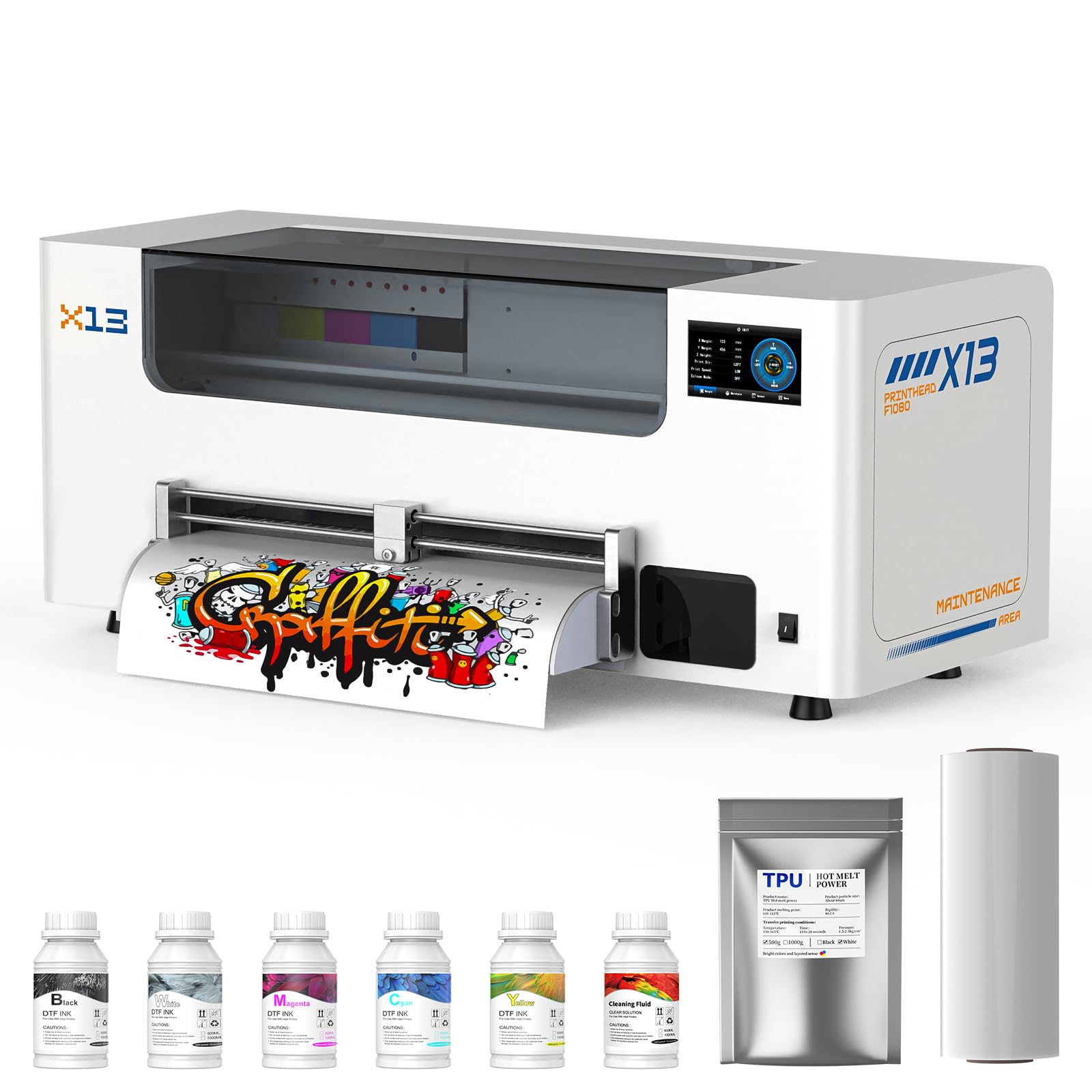
The DSV F1080 is a direct‑to‑film printer designed for high‑volume garment decoration, using an F1080 print head that achieves twice the print speed of the older L1800 class. The 14‑inch printing area supports larger DTF transfers and batch production, while the 2880×1440 dpi resolution delivers the sharp detail and saturation required for photorealistic custom T‑shirt prints. The 5‑inch LED touch panel controls the timed self‑cleaning function, which cycles automatically to prevent nozzle clogs during extended production runs.
A standout feature is the two‑year ink subscription: you receive a new set of five 250 ml ink bottles and 500 g of powder every two months for a modest shipping fee, which eliminates the traditional high upfront cost of DTF consumables. The dual‑alarm system uses color‑coded indicator lights for low ink and a separate alert for waste ink overflow, reducing the risk of mid‑run interruptions. The electric roller loads DTF film with a single button press, making media setup far faster than manual roller models.
For apparel decorators and small print‑on‑demand businesses, the DSV F1080 offers a complete direct‑to‑film ecosystem with professional support and predictable consumable costs.
Why it’s great
- Two‑year ink subscription with auto‑replenishment.
- Self‑cleaning print head reduces maintenance downtime.
- Electric film roller for quick media loading.
Good to know
- High initial investment compared to desktop DTF printers.
- Requires dedicated DTF film and powder workflow.
FAQ
What is the difference between dye‑based and pigment ink for art prints?
Why do the Epson P700 and P900 have fewer color switching issues?
Can I use third‑party ink in a dedicated art printer?
What paper weight can a desktop art printer handle?
How do I calculate the true per‑print cost of an art printer?
Final Thoughts: The Verdict
For most users, the best art printer winner is the Epson SureColor P900 because it combines a 17‑inch output, a 10‑channel ink set with dedicated black nozzles, and roll‑feed support in a compact chassis that fits a home studio. If you want the best scratch resistance and gloss uniformity for luster prints, grab the Canon imagePROGRAF PRO‑310. And for large‑format posters at 24 inches with the lowest per‑ml ink cost, nothing beats the Canon imagePROGRAF TC‑21.