
Our readers keep the lights on and the weekend projects moving. As an Amazon Associate, I earn from qualifying purchases.
Buffering during a crucial video call or lag in the middle of a game—these are the pains of a router that can’t keep up. But you don’t need to spend a fortune to get a fast, reliable connection. The trick is knowing which features actually matter and which are just marketing noise.
I’m Rikta — the co-founder and writer behind FitlyFast. I’ve spent years analyzing router specifications, tracking real-world performance data, and separating the budget-friendly gems from the Wi-Fi duds.
Whether you’re cutting your monthly ISP rental fee or upgrading from a decade-old box, finding the right cheap router means knowing exactly what specs to prioritize for your specific home setup.
How To Choose The Best Cheap Router
The trick to buying a cheap router is knowing which corners you can safely cut and which specs are deal-breakers. Many budget-priced routers cut costs by using older Wi-Fi 5 chipsets or skimping on processor power, but a handful of modern Wi-Fi 6 models now fall into the same price range. Below are the three most important factors to consider.
Prioritize Wi-Fi 6 Over Older Standards
Even on a budget, aim for a router that supports the 802.11ax (Wi-Fi 6) standard. These models handle multiple devices far better than older Wi-Fi 5 (802.11ac) routers thanks to technologies like OFDMA and MU-MIMO. The price gap between an entry-level Wi-Fi 5 router and a Wi-Fi 6 model has shrunk dramatically, making the newer standard the smarter investment for any home with more than a handful of connected devices.
Check the Processor and Ethernet Ports
A router’s tri-core or dual-core processor determines how well it can handle traffic from multiple devices. Budget routers often use weaker single-core chips that choke under load, causing lag during gaming or streaming. Also, confirm that the router has at least four gigabit Ethernet ports for wired connections to your PC, console, or TV. Many low-cost routers cut this corner with only 100-megabit ports, which will bottleneck even a modest internet plan.
Look for Beamforming and Band Steering
Beamforming focuses the Wi-Fi signal toward your devices for stronger coverage, while band steering automatically moves devices between the 2.4GHz and 5GHz bands for optimal performance. These features are common on mid-range routers but can be missing on the absolute cheapest models. If your home has more than fifteen hundred square feet, beamforming is essential—skip routers that lack it.
Quick Comparison
On smaller screens, swipe sideways to see the full table.
| Model | Category | Best For | Key Spec | Amazon |
|---|---|---|---|---|
| TP-Link Archer AX10 | Mid-Range | Budget Wi-Fi 6 Upgrade | AX1500, Tri-Core 1.5 GHz CPU | Amazon |
| Linksys Hydra 6 | Mid-Range | Mesh-Ready Home | AX2200, 1500 sq ft Coverage | Amazon |
| Tenda RX12 Pro | Mid-Range | VPN & Smart Home | AX3000, 5x 6dBi Antennas | Amazon |
| NETGEAR RAX30 | Premium | Large Home Coverage | AX2400, 2000 sq ft Coverage | Amazon |
| NETGEAR R6700AX | Premium | Compact & Efficient | AX1800, WPA3 Encryption | Amazon |
| TP-Link Archer A7 | Budget | Proven Value | AC1750, 2500 sq ft Range | Amazon |
| Amazon eero 6 | Budget | Mesh & Smart Home Hub | Wi-Fi 6, Zigbee Hub Built-in | Amazon |
In‑Depth Reviews
1. TP-Link Archer AX10 (Renewed)

The TP-Link Archer AX10 brings genuine Wi-Fi 6 performance to a price point where most competitors are still selling Wi-Fi 5 hardware. The tri-core 1.5 GHz processor is the engine here—it handles OFDMA and MU-MIMO data streams without breaking a sweat, which means less lag when you have multiple devices streaming, gaming, or video-calling at the same time.
Beamforming technology on both bands actively focuses the signal toward your devices rather than blasting it in every direction, giving you stronger coverage in a medium-sized home. As a renewed unit, it arrives in a factory-like condition with all the essential accessories, and the firmware updates easily to the latest version for security and stability.
Setup through the TP-Link Tether app is straightforward, though some users report needing to factory reset the unit first. Once configured, this router delivers near-wired speeds on a gigabit fiber connection—a testament to how capable the AX1500 spec really is. For anyone wanting the latest Wi-Fi standard without paying flagship prices, this is the pick.
Why it’s great
- Tri-core processor handles heavy multi-device traffic well
- Beamforming delivers strong, focused coverage across the home
- Real-world speeds approach wired performance on fiber plans
Good to know
- Renewed unit may require a factory reset and firmware update before use
- Setup app can be finicky; using the IP address directly is more reliable
2. Linksys Hydra 6 (AX2200)

The Linksys Hydra 6 is a Wi-Fi 6 router that uses Intelligent Mesh technology to dynamically route traffic, eliminating dead zones in homes up to 1500 square feet. The Qualcomm chipset inside keeps latency low for streaming and gaming, while the dual-band AX2200 speeds ensure enough bandwidth for up to 15 connected devices without noticeable slowdowns.
What sets this router apart in its price tier is the easy path to expand coverage—you can add additional nodes later to create a full mesh network as your needs grow. The free Linksys app handles setup in minutes, and the web-based dashboard gives you granular control over device prioritization and parental settings.
Customer feedback consistently highlights the simple installation and the immediate improvement over older routers and ISP-provided equipment. The only caveat is that existing devices may need to “forget” the old network to avoid connection hiccups. For a home that values expandability without a high upfront cost, this is a strong contender.
Why it’s great
- Intelligent Mesh tech eliminates dead zones and reduces buffering
- Expandable with additional nodes for larger homes
- Setup is quick via the Linksys app
Good to know
- Some devices may require forgetting the old network first
- Coverage may decrease in homes with thick walls or multiple floors
3. Tenda RX12 Pro (AX3000)
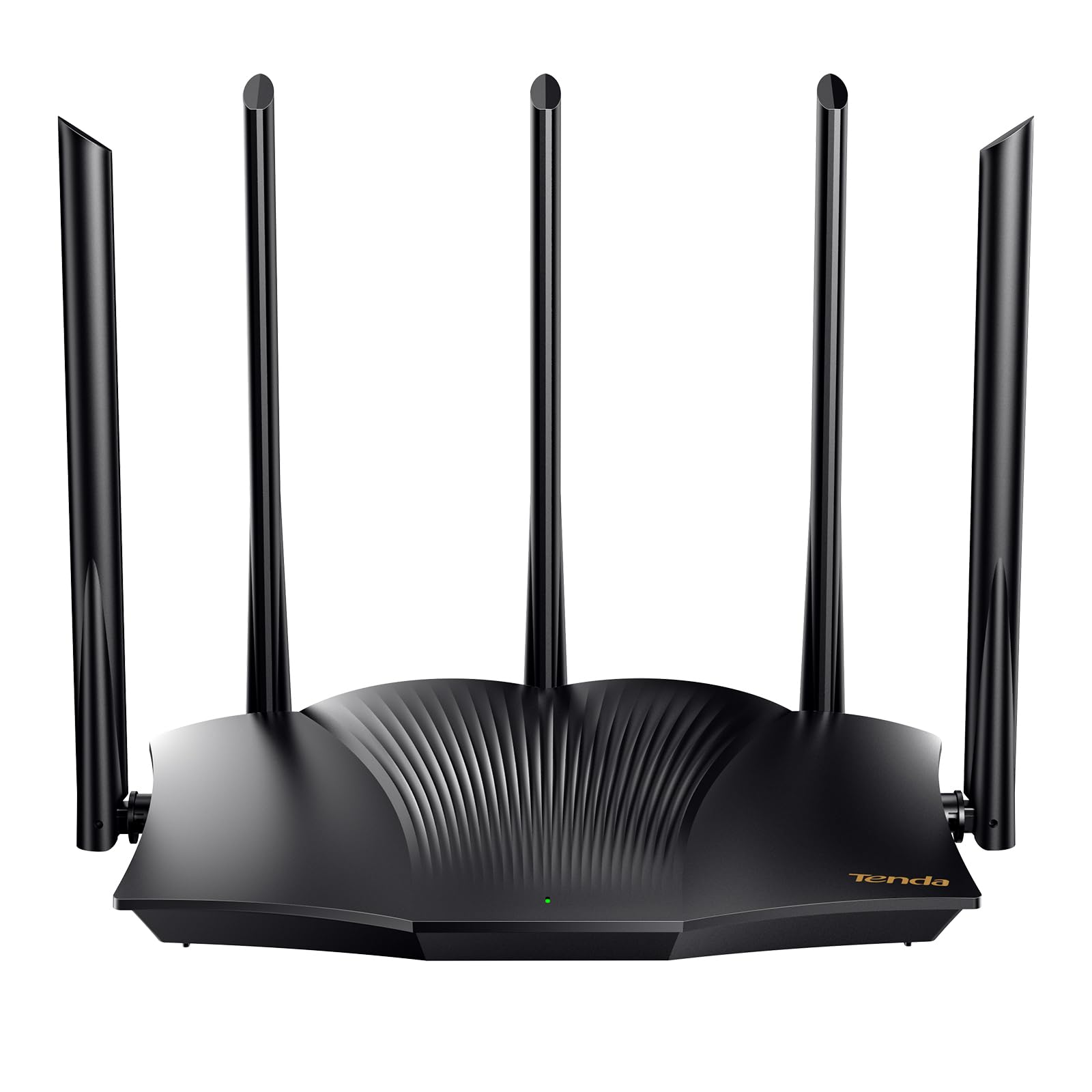
The Tenda RX12 Pro pushes the AX3000 data rate—2402 Mbps on 5 GHz and 574 Mbps on 2.4 GHz—into a price bracket usually reserved for slower hardware. The five external 6dBi high-gain antennas paired with five signal enhancement modules give this router serious range, making it a great fit for homes where the router can’t be centrally placed.
One standout feature is the built-in OpenVPN and WireGuard support, which is rare at this price level. You can set up a secure remote connection to your home network for accessing files or cameras from anywhere. The one-click intelligent diagnosis tool is a practical addition; when something goes wrong, the router can self-check and repair common network issues without requiring a tech visit.
While the setup instructions can be slightly unclear—some users report needing to restart their modem after connecting the router—the overall performance is strong once configured. The mere existence of mixed reviews around range suggests that placement matters more with this unit than with some competitors, but for the price, the feature set is hard to beat.
Why it’s great
- Five high-gain antennas deliver impressive range and signal strength
- Supports OpenVPN and WireGuard for secure remote access
- One-click diagnostic tool simplifies network troubleshooting
Good to know
- Setup may require a modem restart after initial connection
- Range performance can vary based on placement and home layout
4. NETGEAR Nighthawk RAX30 (Renewed)

The NETGEAR Nighthawk RAX30 covers up to 2000 square feet, making it the best option among budget routers for larger single-story homes or open floor plans. With AX2400 speeds and a five-stream architecture, this router handles 20 devices simultaneously, which is enough for a household with multiple gamers, streamers, and smart home gadgets.
The four gigabit Ethernet ports are a welcome feature at this price, allowing you to hardwire a console, PC, and streaming player without needing a separate switch. The renewed unit from Amazon’s Warehouse arrives in a generic box but includes all the necessary cables and power adapter. Many users report it looks and functions like new, with zero signs of previous use.
Setup is quick through the Nighthawk app, and the router’s security features—including automatic firmware updates—are enabled out of the box. The only trade-off is that the 5 GHz range can be weaker than the 2.4 GHz band in homes with multiple floors, but for a single-level floor plan, it delivers consistent speeds throughout.
Why it’s great
- Highest coverage area in this price tier at 2000 square feet
- Four gigabit ports for prioritized wired connections
- Automatic firmware updates and built-in security features
Good to know
- Renewed units may arrive in unbranded packaging with limited documentation
- 5 GHz coverage may be less consistent in multi-story homes
5. NETGEAR R6700AX

The NETGEAR R6700AX is a compact, discreet router that packs AX1800 Wi-Fi 6 speeds into a footprint that’s smaller than most competitors. It covers up to 1500 square feet and supports up to 20 devices, making it a perfect fit for condos or apartments. The internal antenna design means there’s no aggressive external look—it blends into a shelf or media console easily.
Four gigabit LAN ports give you wired options for a gaming console, PC, and streaming stick, while the separate WAN port connects directly to your modem. WPA3 encryption ensures your network is protected with the latest security standard, and automatic firmware updates keep vulnerabilities patched without any manual effort on your part.
Setup through the Nighthawk app is intuitive, with clear step-by-step guidance that even non-technical users find manageable. User reports consistently mention the speed improvement over ISP rental routers and the solid reliability over weeks of use. The only note is that the internal antennas mean this router performs best in open layouts—if your home has many walls, consider a model with external antennas.
Why it’s great
- Compact, discreet design with internal antennas
- WPA3 encryption and automatic security updates
- Quick app-based setup suitable for non-tech-savvy users
Good to know
- Internal antennas can limit range in homes with many solid walls
- Not a modem—requires a separate modem or ISP gateway
6. TP-Link Archer A7 (AC1750)

The TP-Link Archer A7 is a Wi-Fi 5 (AC1750) router that has proven its reliability over years of use. With a Qualcomm CPU at its core, it delivers consistent speeds and a range of up to 2500 square feet—more than many Wi-Fi 6 routers at twice the price. The dual-band design automatically optimizes device connections between 2.4 GHz and 5 GHz to balance speed and range.
Setup through the Tether app is simple, and the router supports Alexa voice controls for basic commands like turning the guest network on or off. The Archer A7 also features parental controls and QoS (Quality of Service) prioritization, allowing you to assign bandwidth priority to a specific device for gaming or streaming.
There are some minor setup quirks—the 5 GHz connection can occasionally fail during initial configuration—but these are easily resolved. User reviews spanning years of ownership highlight zero hardware failures and consistent performance, something many flashier routers can’t claim. If your internet plan is under 500 Mbps and you don’t need the latest Wi-Fi bells and whistles, this router delivers exceptional value.
Why it’s great
- Proven reliability over years of use in real households
- Exceptional range for a budget router at 2500 square feet
- QoS and parental controls for managing network traffic
Good to know
- Wi-Fi 5 standard lacks OFDMA efficiency of modern Wi-Fi 6
- Setup app may require multiple attempts for 5 GHz band
7. Amazon eero 6 (1-Pack)

The Amazon eero 6 takes a different approach than traditional routers—it’s a mesh system from the ground up. A single unit covers 1500 square feet, and you can add more eero nodes later to expand coverage without needing to replace the hardware. TrueMesh technology intelligently routes traffic to avoid dead spots and buffering during 4K streaming or video calls.
One of the most distinctive features is the built-in Zigbee smart home hub. This allows you to directly connect compatible smart lights, locks, and sensors to the eero without needing a separate hub or bridge for each brand. The eero app gives you complete control over your network from anywhere, including the ability to pause internet access for specific devices or profiles.
Setup is genuinely plug-and-play—the app walks through every step, and devices connect seamlessly without manual SSID switching. The router receives automatic security updates that keep your network protected against emerging threats. The only consideration is that the single-unit mesh coverage is best suited for open-plan homes; multi-story houses will benefit from adding a second eero node.
Why it’s great
- Built-in Zigbee hub eliminates the need for separate smart home bridges
- TrueMesh technology intelligently routes traffic to avoid dead spots
- Effortless setup and automatic security updates
Good to know
- Single unit may not fully cover multi-story homes without additional nodes
- Max throughput capped at 900 Mbps, limiting very high-speed plans
FAQ
Can a cheap router handle gigabit internet speeds?
Is it worth buying a renewed or refurbished router?
How many devices can a budget router handle?
Final Thoughts: The Verdict
For most users, the cheap router winner is the TP-Link Archer AX10 because it delivers genuine Wi-Fi 6 performance with a tri-core processor at a price that rivals Wi-Fi 5 hardware. If you want expandable mesh coverage and a built-in smart home hub, grab the Amazon eero 6. And for the longest range in a single unit, nothing beats the TP-Link Archer A7—a proven workhorse that keeps performing year after year.