
Our readers keep the lights on and the weekend projects moving. As an Amazon Associate, I earn from qualifying purchases.
Adding a Blu-ray drive to your PC is the single best way to unlock physical media libraries, watch 1080p movies without streaming compression, and burn backups that last decades. But choosing the right one means navigating a minefield of SATA enclosures, USB standards, and third-party software requirements that most guides gloss over.
I’m Rikta — the co-founder and writer behind FitlyFast. I’ve spent years analyzing optical drive specs, reading thousands of verified buyer reports, and cross-referencing controller chipsets and firmware quirks to separate drives that actually work from those that frustrate.
This guide cuts through the noise by reviewing the most reliable options on the market, so you can confidently buy the best blu ray player for pc that gets your discs spinning without a headache.
How To Choose The Best Blu Ray Player For PC
Picking a Blu-ray drive for your PC isn’t just about finding the cheapest option. You need to balance interface compatibility, read/write speeds, physical form factor, and software support. Here are the three factors that separate a smooth experience from a frustrating one.
Internal vs External: The Trade-Off
Internal SATA drives (like the Panasonic UJ240) offer the most stable, fastest data connection and are typically cheaper because they lack an enclosure and USB bridge. The catch is installation: you need an open 5.25-inch or slimline bay and a SATA cable. External drives and enclosures trade a bit of speed for plug-and-play convenience, making them ideal for laptops or desktops without spare internal bays. If you value portability and simplicity, an external unit is your path.
Enclosure Build Quality Matters
When buying an external enclosure to house a bare internal drive (like the Cenmate or Vantec options), pay close attention to the construction. Aluminum alloy casings dissipate heat better and dampen vibration more effectively than all-plastic shells. Check that the included power adapter provides enough juice—some budget enclosures can struggle to spin up a Blu-ray disc. Also look for screw-down feet over adhesive options if you plan to move the drive around.
Read Speed vs Real-World Use
You’ll see Blu-ray read speeds advertised as 6X, 12X, or even 16X. For watching movies, any speed above 6X is irrelevant—a standard Blu-ray movie disc plays at around 1X. Higher speeds matter only if you frequently rip or backup entire 50GB discs. A 16X drive can rip a dual-layer disc in under 15 minutes, while a 6X drive might take closer to 40 minutes. Choose your speed based on whether you’re an archivist or a casual movie watcher.
Quick Comparison
On smaller screens, swipe sideways to see the full table.
| Model | Category | Best For | Key Spec | Amazon |
|---|---|---|---|---|
| Vantec NexStar DX2 | External Enclosure | Sturdy desktop repurpose | Aluminum Alloy, fits drives up to 185mm | Amazon |
| Godbpnymu 8-in-1 | All-in-One Drive | Travel & hub functionality | 8-in-1 with card reader + USB hub | Amazon |
| BUNUD 5-in-1 | Slim Portable Drive | Lightweight movie playback | Embedded cable, USB & Type-C | Amazon |
| LLMHHKYK Portable | Budget External Drive | Entry-level Blu-ray reading | Brushed shell, USB 3.0 & Type-C | Amazon |
| MthsTec 4-in-1 | Multi-Function Desktop | Fast ripping & HDD dock | 16X BD read, built-in HDD dock | Amazon |
| Cenmate 5.25″ Enclosure | External Enclosure | Budget-friendly repurpose | Aluminum, fits drive depth up to 171mm | Amazon |
| Panasonic UJ240 | Internal Laptop Drive | Internal upgrade / archivist | 6X BD-R write, SATA 12.7mm | Amazon |
In‑Depth Reviews
1. Vantec NexStar DX2 (NST-540S3-BK)

The Vantec NexStar DX2 is the gold standard for turning an internal SATA Blu-ray drive into a reliable external unit. Its aluminum alloy casing keeps noise and vibration to a minimum, and the flexible internal SATA cable fits drives of any depth up to 185mm—so even an old desktop Blu-ray burner will slot in securely. The included 12V, 3A AC adapter ensures your drive gets stable power, avoiding the under-voltage issues that plague USB-powered enclosures.
User feedback consistently highlights the solid build quality: the case feels premium, the drive is recognized immediately on Windows 11 and Ubuntu without driver hunting, and the USB 3.0 interface delivers full read/write bandwidth for smooth Blu-ray playback. A few buyers noted the adhesive feet can loosen in a backpack, but for a desktop setup, they stay put. The power-saving function is a nice touch, spinning the drive down when the host system sleeps.
If you want a repurpose solution that feels engineered rather than bodged, this is your pick. It isn’t the cheapest enclosure, but the material quality and fitment tolerance justify every cent over bargain-bin alternatives. Pair it with a LibreDrive-compatible SATA drive for the ultimate PC Blu-ray experience.
Why it’s great
- Premium aluminum build dampens vibration effectively
- Fits any optical drive depth up to 185mm
- True plug-and-play across Windows, Mac, and Linux
Good to know
- Adhesive feet may not hold up to frequent travel
- Not cost-effective if you need to house multiple drives
2. GODBPNYMU 8-in-1 External Blu-ray Drive

This 8-in-1 unit is a Swiss Army knife for the modern laptop user. Beyond reading and burning BD (up to 6X), DVD, and CD discs, it packs two USB-C ports, one USB 3.0 port, one USB 2.0 port, and a TF/SD card reader—letting you offload camera footage while watching a movie. The slim form factor (just 0.35 inches thick) and included carrying pouch with four disc sleeves make it a genuine travel companion.
Reviewers praise the immediate plug-and-play recognition across Windows 11 and macOS, and the included USB-A to DC power cable solves the rare under-power scenario without blocking data transfer. Keep in mind that 4K disc playback is not supported, and you’ll need third-party software for any Blu-ray movie watching. The all-plastic ABS shell is lighter than aluminum alternatives, which aids portability but feels less robust for daily desktop use.
For the user who wants one peripheral to handle optical media, extra USB ports, and memory cards simultaneously, this delivers exceptional utility. The maximum burn capacity of 50GB (BD-R DL) covers the vast majority of backup needs without stepping into BD-XL territory.
Why it’s great
- Eight functions in a single slim chassis
- Includes carrying case and disc sleeves
- Dual USB-C and USB-A for broad compatibility
Good to know
- Does not support 4K Ultra HD Blu-ray playback
- ABS plastic build, not as rugged as metal
3. BUNUD 5-in-1 External Blu-ray Drive

The BUNUD drive stands out for its clever cable management: both the USB-A and Type-C cables tuck into the chassis when not in use, eliminating the cord clutter that frustrates travelers. It also supports LightScribe disc labeling, a rare feature for external drives that lets you etch labels directly onto compatible discs without a printer. Read speeds are standard (6X BD, 8X DVD, 24X CD), and the drive handles both Windows and Mac environments without driver installation.
Verified buyers confirm reliable Blu-ray playback on Windows 11 and iMac systems after installing proper playback software. The build is slim and lightweight, sliding easily into a laptop bag. A few users noted the optical tray feels slightly flimsy, and the drive can be a touch noisier than premium enclosures under load. The included power cable is for backup—most laptops can power it through USB alone.
If LightScribe is a priority, this is one of the few viable options left on the market. For everyone else, the embedded cable design alone makes it a tidy choice for minimalists who hate fumbling with separate wires.
Why it’s great
- Built-in cable storage prevents lost cords
- LightScribe labeling support included
- True plug-and-play on Mac and PC
Good to know
- Tray mechanism feels less robust than desktop drives
- Minor noise during high-speed operation
4. LLMHHKYK Portable External Blu-ray Drive

Priced to compete with standard DVD burners, the LLMHHKYK drive brings Blu-ray reading capability to the entry-level market. It reads BD discs at 6X and burns CDs/DVDs up to 24X/8X respectively. The brushed texture shell looks more expensive than it is, and the dual USB-A/USB-C cables (embedded, not detachable) broaden compatibility with modern ultrabooks. It’s one of the thinnest options at 0.75 inches, sliding easily into any bag compartment.
Customer reports are mixed but skew positive for the price point. Successful users describe smooth Blu-ray movie playback on Windows laptops after installing free software like Leawo. However, failure rates appear higher than premium drives—several reviewers received units that weren’t recognized by any operating system. The embedded cable is a double-edged sword: convenient until it frays, at which point the whole drive is compromised.
This drive makes sense as a low-cost entry point if you’re willing to accept some quality variance and a short cable tether. For critical backups or frequent use, stepping up to a more established brand reduces risk of disappointment.
Why it’s great
- Thinnest profile among budget Blu-ray drives
- Brushed shell looks more premium than cost suggests
- Dual USB-A and Type-C ports included
Good to know
- Embedded cable cannot be replaced if damaged
- Higher rate of DOA units than premium alternatives
5. MthsTec 4-in-1 External Blu-ray Drive

The MthsTec drive is built for performance. It achieves Blu-ray read speeds up to 16X, DVDs at 16X, and CDs at 40X—roughly triple the speed of standard slim drives. This makes it the top choice for anyone ripping large disc libraries. The unique 4-in-1 design includes a top-loading 3.5-inch/2.5-inch SATA HDD dock, letting you swap hard drives for direct access without a separate enclosure. A two-port USB 3.0 hub with charging support rounds out the package.
Reviewers consistently highlight the robust build quality and fast performance in real-world use. The separate AC power adapter ensures the drive and dock never suffer from USB bus-power limitations. That said, the unit is physically large and heavy, making it unsuitable for laptop bags. Compatibility issues exist with some TV systems, and the USB-C port functions only as an adapter, not a native connection. Setup requires basic computer knowledge.
If you need a desktop workstation drive that doubles as a hard drive dock and charges devices, this is a powerhouse. For portable use or simple movie watching, the extra speed and bulk are overkill.
Why it’s great
- Fastest read speeds in this roundup (16X BD)
- Built-in SATA HDD dock for easy data access
- Two-port USB 3.0 hub with fast charging
Good to know
- Large and heavy; not for travel
- USB-C is an adapter only, not native
6. Cenmate 5.25″ Blu-Ray/CD/DVD SATA Drive Enclosure
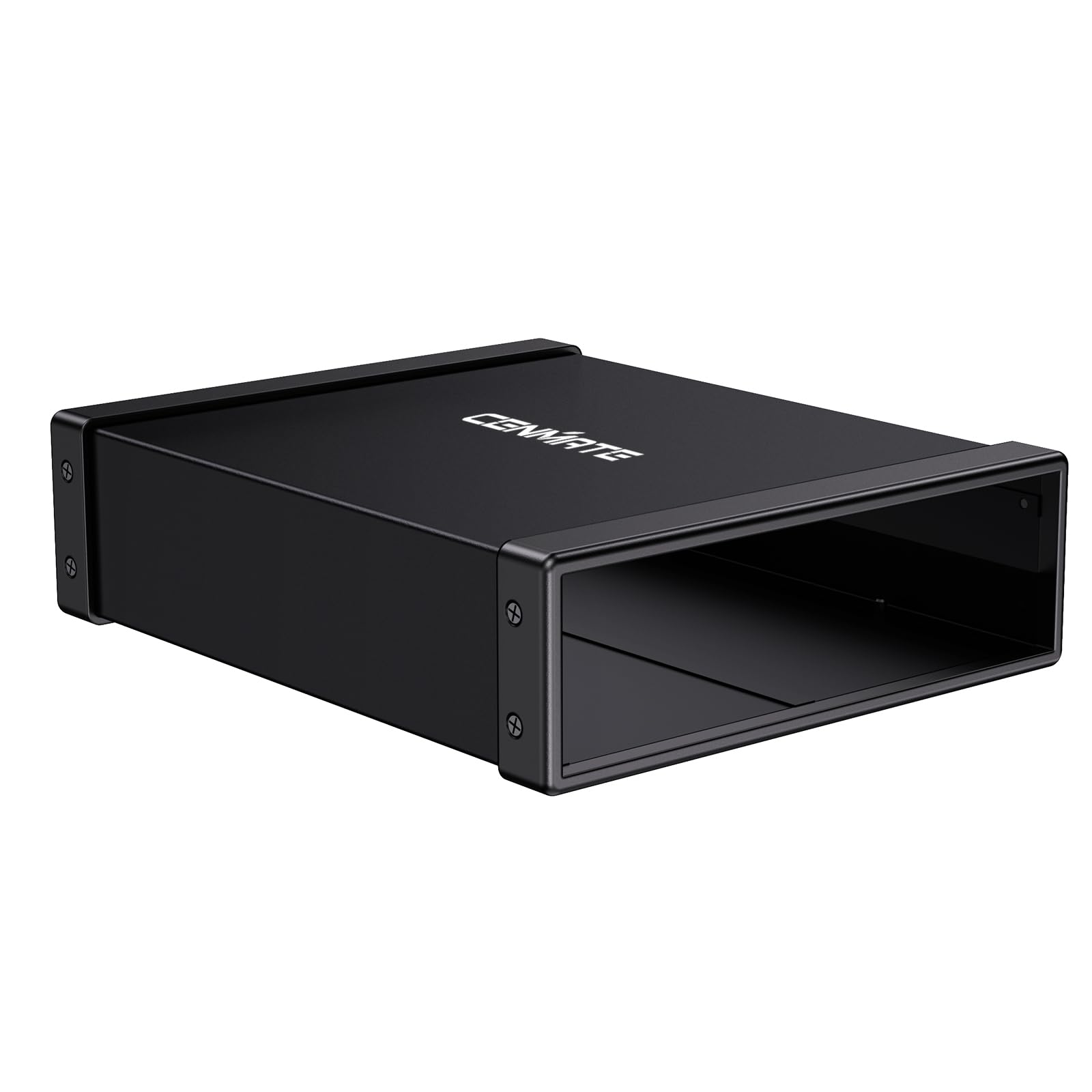
The Cenmate enclosure offers a cost-effective way to convert an old desktop SATA optical drive into an external USB unit. It fits any drive depth up to 171mm and is made from aluminum alloy for effective heat dissipation and vibration damping. The USB 3.0 interface supports 5Gbps transfers, and hot-swapping is supported for convenient plug-and-play use. The package includes a power adapter, USB cable, and user manual—everything you need except the drive itself.
Buyers report successful installations with ASUS and LG Blu-ray drives, noting that the enclosure is instantly recognized on both PC and Mac. The compact PSU delivers stable power for smooth read operations. Minor complaints include imprecise foam feet cutting and a screwdriver that is too small for standard screws, but these are trivial during a one-time install. No drivers needed for any modern OS.
If you have a salvageable SATA Blu-ray drive gathering dust, this enclosure revives it for a fraction of the cost of a new external drive. It’s not as premium as the Vantec DX2, but for budget-conscious users, it gets the job done without fuss.
Why it’s great
- Budget price for a functional metal enclosure
- Supports hot-swapping for easy disconnect
- Comes with necessary power adapter and cable
Good to know
- Included screwdriver is undersized
- Foam feet cut quality could be better
7. Panasonic UJ240 6x Blu-ray Burner (SATA)

The Panasonic UJ240 is the go-to internal upgrade for laptops and slimline desktops. It writes BD-R at 6X, DVD±R at 8X, and CD-R at 24X, with a 2 MB buffer and serial ATA interface. The 12.7mm height fits most standard laptop drive bays, and the black bezel blends with typical Dell, Acer, and Asus chassis. This is a bare drive only—no cables, mounting screws, or software included, so you’ll need to supply those separately.
Long-term user reports are exceptionally positive, with many reporting flawless operation over three-plus years of heavy use. Installation requires swapping the bezel and rear bracket from your old drive, which is straightforward with a small screwdriver. The drive is recognized automatically by Windows, but you must install third-party software (e.g., PowerDVD 12) for movie playback. Some units ship in cushioned envelopes without moisture protection, so inspect packaging upon arrival.
For DIY builders seeking a reliable internal Blu-ray burner at a fair price, the Panasonic UJ240 is a proven workhorse. It lacks the frills of external all-in-ones but delivers rock-solid SATA performance for archivists and media enthusiasts.
Why it’s great
- Proven reliability over years of heavy use
- Slim 12.7mm profile fits most laptops
- Excellent value for a bare internal drive
Good to know
- Drive only—cables, screws, and software not included
- Requires bezel swap from existing drive
FAQ
Why won’t my external Blu-ray drive play movies right out of the box?
Can I use a laptop Blu-ray drive with my desktop PC?
Do all external Blu-ray drives support 4K Ultra HD playback?
Final Thoughts: The Verdict
For most users, the best blu ray player for pc winner is the Vantec NexStar DX2 because it offers a premium build that turns any internal SATA drive into a rock-solid external unit with excellent noise dampening and compatibility. If you want an all-in-one travel companion with extra ports and storage, grab the Godbpnymu 8-in-1. And for high-speed ripping with a built-in hard drive dock, nothing beats the MthsTec 4-in-1.