
Our readers keep the lights on and the weekend projects moving. As an Amazon Associate, I earn from qualifying purchases.
Building a high-performance workstation or a future-proof gaming rig means making smart choices about memory. The move from 32GB to 48GB of DDR5 RAM isn’t just about a bigger number—it’s about eliminating the buffer bloat in demanding creative suites, avoiding page-file stutter in simulation games, and having the headroom to keep a hundred browser tabs alive while a video render runs in the background.
I’m Rikta — the co-founder and writer behind FitlyFast. I’ve spent the last four years tracking DDR5 binning trends, analyzing CAS latency scaling, and monitoring real-world kit stability across Intel XMP and AMD EXPO platforms to find which 48GB kits actually deliver on their rated specs.
With clock speeds ranging from 5600 MT/s to 8000 MT/s and timings that separate the binned Hynix M-die from the rest, finding the right kit demands attention to platform support and voltage tolerance. This guide breaks down the technical trade-offs behind the best 48gb ddr5 ram for builders who refuse to compromise on system responsiveness.
How To Choose The Best 48GB DDR5 RAM
The 48GB format is a sweet spot for modern builders. Two 24GB modules fit into a dual-channel memory topology without the signal degradation that plagues four-DIMM configurations at high frequencies. This choice delivers more total capacity than a 32GB kit while remaining easier to stabilize than a 64GB or 96GB kit at speeds above 6000 MT/s. Here’s what matters when picking your pair.
Platform Compatibility: XMP 3.0 vs AMD EXPO
Intel and AMD platforms use different memory overclocking profiles. Intel XMP 3.0 is standard on Z690, Z790, and Z890 motherboards. AMD EXPO is required for Ryzen 7000, 8000G, and 9000 series CPUs. Some kits support both profiles on the same module, giving you flexibility if you switch platforms later. Check your motherboard’s Qualified Vendor List before buying—manufacturers validate specific part numbers for signal integrity.
Primary Timings and Frequency
The raw data rate (measured in MT/s) and the CAS latency (CL) together determine memory latency. A kit at 6000 MT/s with CL30 delivers roughly the same effective latency as a kit at 6400 MT/s with CL32. The SK Hynix M-die, used in most premium 24Gb DDR5 ICs, scales voltage efficiently up to around 1.45V, which is why you see many enthusiast kits rated for CL28 or CL30 at reasonable speeds. Avoid kits with CL46 or higher unless you are building a budget workstation where stability matters more than raw throughput.
Motherboard Memory Topology
This is the single most overlooked spec. A 2-DIMM motherboard (two physical memory slots) can often run DDR5-8000 stable with the right CPU. A 4-DIMM board, even a high-end one, typically tops out around 7200–7600 MT/s for a 48GB kit. Buyers chasing 8000+ speeds must verify their board has a daisy-chain trace layout built for high-frequency operation. Running four modules at high speeds is rarely feasible with current DDR5 memory controllers.
Quick Comparison
On smaller screens, swipe sideways to see the full table.
| Model | Category | Best For | Key Spec | Amazon |
|---|---|---|---|---|
| KLEVV CRAS V RGB | Premium | AMD EXPO Gaming | 6000 MT/s CL30 SK Hynix A-Die | Amazon |
| Patriot Viper Venom RGB | Mid-Range | High-Frequency Intel Builds | 6400 MT/s CL32 XMP 3.0 | Amazon |
| Predator Hermes DDR5 | Mid-Range | Low-Latency CL28 Enthusiasts | 6000 MT/s CL28 1.4V | Amazon |
| G.Skill Trident Z5 Neo RGB | Premium | AMD 8000 MT/s Overclockers | 8000 MT/s CL40 EXPO | Amazon |
| TeamGroup T-Create Expert | Mid-Range | Air-Cooled Quiet Builds | 6400 MT/s CL32 M-Die | Amazon |
| G.Skill Trident Z5 RGB | Premium | Intel 8000 MT/s Enthusiasts | 8000 MT/s CL40 1.35V | Amazon |
| Crucial Pro 6000 MHz | Mid-Range | Workstation Stability | 6000 MT/s CL48 Micron IC | Amazon |
| TeamGroup T-Force Delta RGB | Premium | Aesthetic White Builds | 6400 MT/s CL32 M-Die White | Amazon |
| Crucial Pro 5600 MHz | Budget | Entry-Level DDR5 Upgrade | 5600 MT/s CL46 Micron IC | Amazon |
In‑Depth Reviews
1. KLEVV CRAS V RGB DDR5 48GB (2x24GB) 6000MHz CL30

KLEVV is the consumer-facing brand from Essencore, a company that distributes SK Hynix ICs directly. This CRAS V kit runs 6000 MT/s with a tight CL30-36-36-76 timing profile that matches the AMD EXPO sweet spot for Ryzen 7000 and 9000 series chips. The 44mm height clears nearly all dual-tower air coolers, and the aluminum heatsink keeps junction temps under 45°C even during extended Prime95 runs.
Users on MSI B850 and Gigabyte X670E boards report stable day-one operation with EXPO enabled. The RGB implementation uses a hollow linear light bar that works with SignalRGB and motherboard control software. Hynix A-die scales voltage well—experienced overclockers have pushed these kits to 6200 MT/s with CL30 at 1.4V without error.
The only catch is the motherboard QVL: this kit was not on every AM5 QVL at launch, but field testing shows broad compatibility. If you are building a Ryzen system and want sub-30ns latency without manual tuning, this is the 48GB kit to beat.
Why it’s great
- EXPO works flawlessly on AM5 at 6000 CL30
- Low profile fits under large air coolers
- SK Hynix A-die allows headroom for manual tuning
Good to know
- Not on every motherboard QVL at launch
- RGB requires SignalRGB for advanced effects
2. Patriot Viper Venom RGB DDR5 48GB (2x24GB) 6400MHz CL32

The Viper Venom RGB hits 6400 MT/s with a CL32-40-40-84 timing set that gives Intel builders a solid one-click XMP 3.0 experience. The kit uses SK Hynix M-die ICs, which are the same binning foundation found in many 8000 MT/s kits. However, reviewers noted that this kit did not stabilize on the Intel Z890 platform with newer Core Ultra CPUs due to aggressive chip behavior.
On Z790 and earlier Intel platforms, the kit is plug-and-play. The RGB lighting is vibrant, though it requires SignalRGB to sync with other components—it won’t sync natively with ASUS Aura Sync or MSI Mystic Light without third-party bridging. On-Die ECC is supported for additional data integrity in workstation tasks.
The biggest trade-off is platform restriction: buyers on the latest Intel socket should verify compatibility before purchase. For anyone on a proven Z790 board with a 13th or 14th Gen CPU, this is a fast, reliable 48GB kit at a reasonable mid-range tier.
Why it’s great
- XMP 3.0 hits 6400 CL32 without manual tuning
- SK Hynix M-die offers overclocking headroom
- On-Die ECC for added stability
Good to know
- Does not work reliably on Z890 platforms
- RGB requires SignalRGB for syncing
3. Predator Hermes DDR5 48GB (2x24GB) 6000MHz CL28
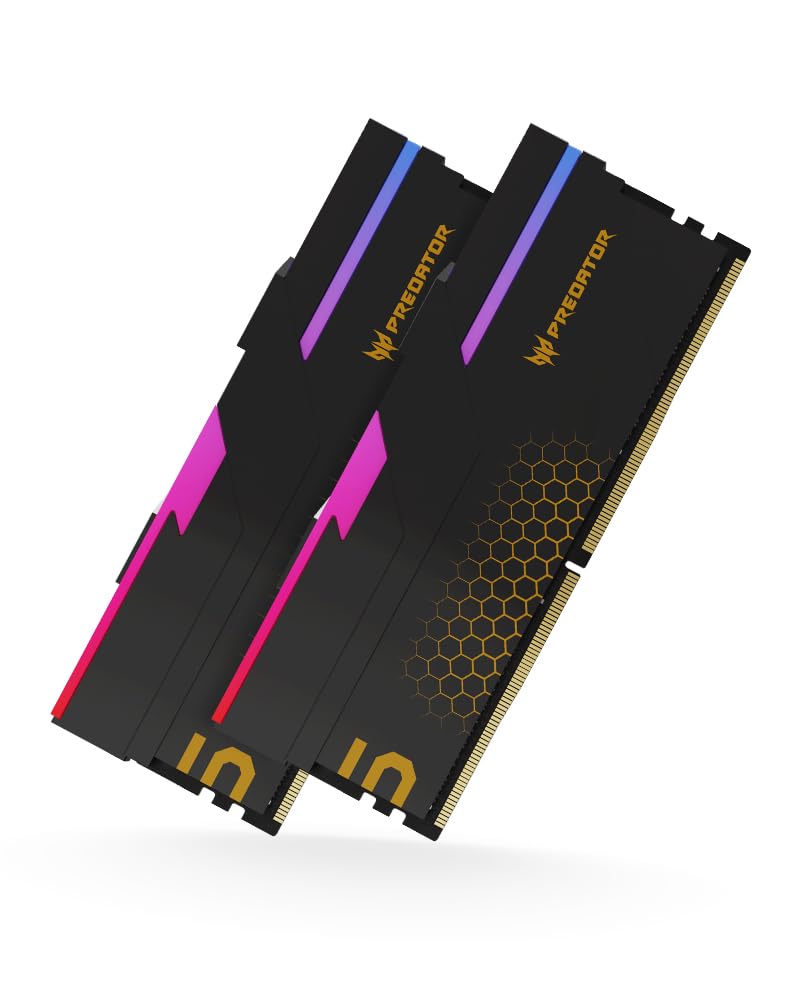
Acer’s Predator Hermes line, manufactured by Biwin, delivers the lowest primary latency we have seen on a 6000 MT/s 48GB kit at CL28-36-36-76. This translates to roughly 9.3ns of real access latency—ideal for CPU-bound simulators and compile-heavy workloads. The kit is certified for both Intel XMP 3.0 and AMD EXPO, making it platform-agnostic.
The heatsink design is notably tall. Users running large air coolers like the Noctua NH-D15 or Deepcool AK620 will need to set the front fan in a pull configuration or use a 120mm rear exhaust fan to clear the memory slots. AMD 9800X3D users report excellent compatibility with MSI X870E and ASUS ROG X670E boards.
The one catch is value positioning. Biwin sells a functionally identical kit under its own brand for less, so the Acer branding carries a premium. If you want the absolute lowest rumored latency without moving to 8000 MT/s and the associated motherboard demands, this kit is a standout.
Why it’s great
- CL28 at 6000 MT/s is top-tier latency
- Dual XMP and EXPO support
- Excellent compatibility with AM5 boards
Good to know
- Tall heatsink interferes with large air coolers
- Identical Biwin version is cheaper
4. G.Skill Trident Z5 Neo RGB 48GB (2x24GB) 8000 MT/s CL40

G.Skill’s Trident Z5 Neo RGB is designed for AMD’s 800 series chipset with Ryzen 9000 series CPUs, and this kit is rated for an extraordinary 8000 MT/s with CL40-48-48-128 at 1.40V. On compatible motherboards like the ASUS ROG X870-A, users have enabled EXPO and achieved full stability with zero manual tweaking. The SK Hynix M-die ICs are hand-binned for this speed.
There is a significant platform dependency. Reaching 8000 MT/s requires a high-quality 2-DIMM motherboard or a premium 4-DIMM board with daisy-chain layout. Some users on 4-DIMM X870 boards topped out at 7600 MT/s. The RGB lighting works well with ASUS Aura Sync, giving builders a cohesive lighting ecosystem.
The price variance has been extreme—early buyers paid below , while current pricing reflects a major premium for the binned ICs. At the current tier, only buy this kit if you have the motherboard and CPU combination proven to hit 8000 MT/s. Otherwise, a 6000 MT/s CL30 kit will deliver equal or better real-world latency for less.
Why it’s great
- Rated for 8000 MT/s on AM5
- Binned Hynix M-die for high-frequency stability
- ASUS Aura Sync RGB compatibility
Good to know
- Requires high-end 2-DIMM motherboard for 8000 MT/s
- Price has increased significantly from launch
5. TeamGroup T-Create Expert 48GB (2x24GB) DDR5-6400 CL32

The T-Create Expert line is one of the few 48GB kits specifically designed for content creators and workstation users who want zero RGB, a low-profile heatsink, and reliable operation. The 6400 MT/s CL32-39-39-79 profile is stable out of the box, and users report that it runs at lower voltage than comparable kits—1.27V instead of 1.35V—keeping ambient case temps down.
On AM5 with a 9800X3D and MSI X870E board, reviewers noted that memory training took a bit longer than expected, but after the initial boot, the system ran clean. The absence of lighting means there is no software bloat, no RGB headers needed, and no extra heat from LEDs. The heatsink clearance is standard, fitting under large air coolers without any fan position changes.
The SK Hynix M-die inside this kit is highly overclockable. One user tightened timings to CL30 and sustained stability at 1.27V. If you want a clean, no-nonsense 48GB kit that runs cool and leaves the door open for manual tuning, this is a strong mid-range choice.
Why it’s great
- No RGB for clean, minimal builds
- Runs at lower voltage (1.27V typical)
- Hynix M-die responds well to manual overclocking
Good to know
- Initial memory training can be slow on AM5
- No EXPO profile; requires manual settings on AMD
6. G.Skill Trident Z5 RGB 48GB (2x24GB) 8000 MT/s CL40

This Intel-specific version of the Trident Z5 is rated for DDR5-8000 at CL40-48-48-128 and 1.35V. It targets Z790 and Z890 platforms with a strong memory controller. Users on the Z790 Apex Encore achieved XMP I at 8000 MT/s immediately, while those on 4-DIMM boards like the ProArt Z790 hit a wall around 7200 MT/s. The kit uses hand-binned SK Hynix M-die ICs.
The heatsink is thick but effective—one user removed it and measured a 2.25mm aluminum plate with foam pressure pads. The RGB glow is bright but uses the standard rainbow pattern out of the box, requiring ASUS Aura Sync or MSI Mystic Light to customize. On 2-DIMM boards, experienced overclockers pushed these kits to 8400-8800 MT/s with minor voltage bumps.
The major downside is XMP reliability. Many buyers report that the XMP profile fails on 4-DIMM boards and even on some 2-DIMM configurations. Manual tuning is often required to reach the rated 8000 MT/s. If you have a 2-DIMM Z790 or Z690 board and are comfortable with manual timing, this kit has massive headroom. Otherwise, consider a 6400 MT/s kit with guaranteed stability.
Why it’s great
- Binned Hynix M-die overclocks to 8400+ MT/s
- Low voltage 1.35V at 8000 MT/s
- Excellent on 2-DIMM Intel boards
Good to know
- XMP often fails; manual tuning required
- 4-DIMM boards max out around 7200 MT/s
7. Crucial Pro 48GB (2x24GB) DDR5-6000 CL48

Crucial’s Pro series uses Micron’s own ICs, which operate at just 1.1V—significantly lower than the 1.35V standard of most enthusiast kits. This makes the modules run cooler and reduces strain on the motherboard’s memory voltage regulator. The rated profile is 6000 MT/s with CL48, which trades latency for thermal efficiency and system stability.
Users migrating from higher-voltage Teamgroup kits report that the lower voltage resolved random BSOD and system shutdown issues on AM5 builds. The memory controller on the Ryzen CPU runs cooler, and the Infinity Fabric clock can sit at 2000 MHz without errors. The heatsink is low-profile, ensuring compatibility with even the most restrictive air coolers.
The CL48 timing is not ideal for gaming. At 6000 MT/s, the real latency is roughly 16ns, which is noticeably higher than a CL30 kit’s 10ns. This kit is best suited for workstations, home servers, or office PCs where capacity and reliability matter more than single-cycle latency. If you need raw gaming performance, look at the KLEVV or Predator kits instead.
Why it’s great
- 1.1V operation reduces heat and VRM load
- Resolved BSOD issues on some AM5 systems
- Low-profile design fits all air coolers
Good to know
- CL48 results in high real latency
- Not ideal for gaming or latency-sensitive tasks
8. TeamGroup T-Force Delta RGB 48GB (2x24GB) 6400MHz CL32

The T-Force Delta RGB in white is a visual standout for themed builds. It uses SK Hynix M-die running at 6400 MT/s with CL32-39-39-79, delivering solid performance for both Intel and AMD platforms. The 120-degree ultra-wide RGB lighting bar diffuses evenly, and compatibility with ASUS Aura Sync, MSI Mystic Light, and Gigabyte RGB Fusion is confirmed.
On AM5 builds with a Ryzen 7800X3D, users report that DOCP or EXPO enabled immediately hit the rated 6400 MT/s without crashing. The kit was also tested on Intel Z790 with XMP 3.0 and delivered stable results. The PMIC on the module handles voltage regulation efficiently, keeping power draw consistent.
The price has fluctuated significantly—early buyers paid under , while current pricing reflects supply constraints. At the premium tier, the white aesthetic and reliable M-die performance justify the cost for builders prioritizing a consistent visual theme. If you are building a black system, the TeamGroup T-Create Expert offers similar performance without the RGB premium.
Why it’s great
- White heatsink matches themed builds perfectly
- Wide RGB lighting with full software support
- Stable 6400 CL32 on both Intel and AMD
Good to know
- Price has risen significantly since launch
- Not the best raw value for budget builders
9. Crucial Pro 48GB (2x24GB) DDR5-5600 CL46

Crucial’s most accessible 48GB kit runs at 5600 MT/s with CL46, targeting the entry-level DDR5 upgrade path. The 1.1V operation keeps the modules cool and compatible with a wide range of motherboards, including older 12th Gen Intel and first-gen AM5 boards that may not stabilize higher frequencies. The 42-year pedigree of Micron manufacturing ensures every module is tested at the component level.
Users report that the kit is truly plug-and-play—no BIOS tweaking required. On Alienware Aurora R16 prebuilts, the Crucial kit ran at 5186 MT/s by default and hit 5587 MT/s with a quick OVCL1 adjustment. The price differential versus Dell’s branded memory upgrade was substantial, making it a smart choice for prebuilt owners.
The trade-offs are obvious: 5600 MT/s is the baseline for DDR5, and CL46 means latency is high. Gaming performance will be noticeably behind a 6000 CL30 kit, especially in CPU-bound titles. This kit is best for light gaming, office work, or adding capacity to a prebuilt system without compatibility headaches.
Why it’s great
- Guaranteed plug-and-play on almost any DDR5 board
- 1.1V operation for cool, stable running
- Ideal upgrade for prebuilt systems
Good to know
- 5600 MT/s is the slowest DDR5 speed tier
- CL46 results in high real latency
FAQ
Is 48GB of DDR5 RAM worth it over 32GB?
Can I mix a 48GB kit with another 48GB kit for 96GB total?
Will 48GB DDR5 RAM fit under a large air cooler?
What does CL28 mean on a 48GB DDR5 kit?
Final Thoughts: The Verdict
For most users, the best 48gb ddr5 ram winner is the KLEVV CRAS V RGB because it delivers the ideal AM5 EXPO profile at 6000 MT/s CL30 with genuine SK Hynix A-die at a mid-range price point. If you want lower latency without moving to 8000 MT/s, grab the Predator Hermes CL28 kit. And for a clean, no-RGB workstation build where stability and low thermals matter most, nothing beats the TeamGroup T-Create Expert 6400 CL32.