
The first keyboard you buy determines whether your learning curve is a smooth climb or a frustrating plateau. Most beginners grab the cheapest option with the most buttons, only to discover the keys don’t respond to touch, the sound is thin, and the included “lessons” are just a demo button. The right choice balances feel, features that actually teach you, and room to grow without needing an immediate upgrade.
I’m Rikta — the co-founder and writer behind FitlyFast. After spending weeks analyzing user reviews and technical specifications across dozens of beginner keyboards, I’ve identified the models that genuinely help you advance rather than just sit in the corner gathering dust.
This guide breaks down the essential specs, real-world usability, and hidden pitfalls to help you choose the best beginner keyboard that matches your commitment level and musical goals.
How To Choose The Best Beginner Keyboard
Choosing a first keyboard is about matching your learning ambition to the instrument’s ability to grow with you. A model with touch-sensitive keys and lesson-focused features costs more upfront but saves you from buying a second keyboard six months later. Here are the three decisions that separate smart buys from regretful purchases.
Touch Sensitivity: The Make-or-Break Feature
Non-weighted keys play at the same volume no matter how hard or soft you press. This prevents you from learning dynamics, one of the foundational expressive techniques in piano playing. A touch-sensitive keyboard registers velocity, allowing quiet notes and loud notes. Every keyboard on this list that earns a top recommendation includes touch response because beginners who skip this feature develop a habit that’s hard to unlearn.
Learning Aids: Lighted Keys vs. App Integration
Lighted keys visually show you which note to press next, ideal for children and visual learners who get immediate feedback. App-connected keyboards (Bluetooth or USB-MIDI) offer structured lessons, ear training, and progress tracking through software like Skoove, Simply Piano, or Yamaha’s built-in curriculum. Some models combine both, giving you a layered learning path that starts with guided light patterns and progresses to reading sheet music.
Polyphony and Sound Engine
Polyphony is the number of notes the keyboard can produce simultaneously. A 32-note polyphony limit means notes will drop out as you play chords with sustain pedal. 64-note or higher polyphony prevents this dropout and makes the instrument feel more responsive, especially as you start playing two-handed pieces. The sound engine quality—whether sampled from a grand piano or synthesized—also dictates how pleasant the instrument is to practice on daily.
Quick Comparison
On smaller screens, swipe sideways to see the full table.
| Model | Category | Best For | Key Spec | Amazon |
|---|---|---|---|---|
| Yamaha PSR-E383 | Premium | Technique & learning progression | Touch-sensitive keys, Smart Chord | Amazon |
| Casio LK-S250 | Premium | Lighted key self-teaching | Key Lighting System, 400 tones | Amazon |
| The ONE Smart Keyboard COLOR | Mid-Range | App-guided learning & fun | Lighted keys, Bluetooth app | Amazon |
| Casio CT-S300 PPK | Mid-Range | All-in-one starter pack | Touch response, 400 tones | Amazon |
| Yamaha PSR-E283 | Mid-Range | Classic reliability & ear training | Quiz Mode, Portable Grand button | Amazon |
| RockJam 5061 Super Kit | Value | Complete beginner bundle | 200 tones, 200 rhythms, stand & bench | Amazon |
| JOYMUSIC 61-Key Pack | Value | Family-friendly starter package | 255 timbres, stand, stool, mic included | Amazon |
| Alesis Melody 61 MK4 | Value | Budget-friendly learning platform | 300 sounds, USB-MIDI, Skoove lessons | Amazon |
| Finger Dance Folding Piano | Specialty | Ultra-portable travel practice | Folding chassis, Bluetooth MIDI | Amazon |
In‑Depth Reviews
1. Yamaha PSR-E383

The Yamaha PSR-E383 is the gold standard for a serious beginner who intends to develop proper technique from day one. Its 61 touch-sensitive keys respond to playing velocity, letting you practice dynamics and expression that non-weighted keyboards simply cannot teach. The Touch Tutor feature actively guides you through playing at different volumes, turning a spec into a learning exercise.
Smart Chord simplifies complex jazz and pop voicings into single-finger triggers, so you can sound harmonically rich even while your left hand is still learning coordination. The built-in song library spans hundreds of titles across genres, and the Keys to Success lesson system breaks each piece into manageable steps, allowing you to learn hands separately before combining them. The 64-note polyphony ensures sustained chords won’t cut out during practice.
At just under 10 pounds with an included music rest and power adapter, the PSR-E383 is portable enough for bedroom and classroom use alike. The 6.35mm headphone jack lets you practice silently, and the USB-MIDI port opens the door to music production software when you’re ready to record. This keyboard rewards your investment with years of progression.
Why it’s great
- Touch-sensitive keys teach dynamic control from the start
- Smart Chord accelerates left-hand harmony learning
- Yamaha sound engine delivers rich, realistic piano tones
Good to know
- No lighted keys for visual note guidance
- Music rest is basic plastic; upgrade recommended for sheet music
2. Casio Casiotone LK-S250

The Casio LK-S250 combines two powerful learning tools: a Key Lighting System that illuminates the next note to press, and touch-responsive keys that teach dynamic playing. This dual approach is especially effective for younger learners and self-taught adults who need immediate visual feedback. The 4-Stage Lesson System gradually removes training wheels, progressing from note guidance to full independence.
With 400 tones and 77 rhythms, the LK-S250 offers enormous sonic variety, but the standout feature is Dance Music Mode, which lets you create and remix EDM tracks live using the keys. This keeps practice feeling creative rather than repetitive. The integrated handle makes it genuinely portable, and battery operation (six AA cells) allows outdoor or travel use without hunting for an outlet.
Users consistently praise the sound quality as crisp and clear, with velocity-sensitive keys that feel more expressive than similarly priced competitors. The USB-MIDI connection works plug-and-play with Windows and Android devices, and the included music rest holds a tablet for app-based lessons. The light system is limited to four simultaneous notes, so advanced chord-heavy pieces may outgrow it, but for the first year of learning, this keyboard is superb.
Why it’s great
- Lighted keys accelerate note recognition for visual learners
- Dance Music Mode keeps practice engaging and creative
- Integrated handle and battery power for true portability
Good to know
- Light system only illuminates up to four notes at once
- Micro-USB connection feels outdated compared to USB-C
3. The ONE Smart Keyboard COLOR

The ONE Smart Keyboard COLOR bridges the gap between a toy and a teaching instrument by integrating red LED lights above each key that guide your fingers through over 4000 pieces of sheet music via its companion app. The app’s curriculum includes instructional videos, games, and step-by-step song breakdowns, making it feel like a personal tutor lives inside the keyboard. It supports both iOS and Android through Bluetooth, with the caveat that light guidance works fully on Apple devices.
Sound is sampled from a grand piano and delivered through dual 3W speakers, producing a tone that reviewers consistently describe as “beautiful” and “comparable to expensive options.” The 61 full-sized keys are paired with 256 timbres and 64-note polyphony, giving you enough sonic range to explore different instrument voices while maintaining clean note reproduction during sustained passages. The cream white finish with glossy paneling looks more expensive than its price tier suggests.
Weighing just 7.7 pounds and running on either the included power supply or four AA batteries for up to six hours, this keyboard is genuinely portable. The 3.5mm headphone jack supports silent practice, and the USB-MIDI connectivity works with third-party production software. Some users note that the app experience is richer on iOS, so Android buyers should verify their device compatibility before purchasing.
Why it’s great
- Lighted keys and app lessons create a guided learning experience
- Grand piano-sampled sound engine punches above its weight class
- Lightweight and battery-powered for easy portability
Good to know
- Lighted keys only fully functional with iOS devices
- App subscription costs may add up over time
4. Casio CT-S300 PPK

The Casio CT-S300 PPK bundles everything a first-time buyer needs: the keyboard itself, an adjustable stand, a pair of Samson headphones for silent practice, and the power supply. This package eliminates the “what else do I need” stress that stalls many beginners. The 61-key keyboard features touch-responsive keys, 400 tones, 77 rhythms, and a Dance Music Mode that lets you create EDM tracks live—features that keep exploration fun while building fundamental skills.
The Chordana Play app extends the keyboard’s teaching capability with interactive lessons, sheet music display, and rhythm exercises that sync via USB-MIDI connection. The 50 built-in songs include parts you can mute, allowing you to play the missing melody line while the keyboard provides accompaniment—excellent ear training disguised as play-along fun. The compact dimensions and 7.3-pound weight make it easy to move between rooms or bring to lessons.
User feedback highlights the “awesome sound” and “great quality for price,” with particular praise for the Dance Music Mode’s ability to engage younger players who might otherwise lose interest. The stand is described as functional but not heavy-duty, and the included headphones are adequate for practice. The bundle value is strong, but be prepared to contact Amazon if any stand hardware is missing, as some units ship incomplete.
Why it’s great
- Complete starter pack with stand, headphones, and power supply
- Touch-responsive keys at a bundle price that undercuts competitors
- Dance Music Mode makes practice feel like game time
Good to know
- Stand hardware occasionally ships with missing parts
- Headphones are basic; serious players may want an upgrade
5. Yamaha PSR-E283

The Yamaha PSR-E283 strips away complexity and delivers what matters most for a beginner: a great sound engine and focused learning tools. The Portable Grand button instantly recalls Yamaha’s flagship piano sample, so you’re always one press away from the tone that made this brand famous. The Quiz Mode gamifies ear training with two exercises that connect sounds to keys and strengthen melodic memory, making theory practice feel like a brain game rather than a chore.
Smart Chord technology simplifies chord voicing into single-finger triggers, allowing you to sound harmonically sophisticated without needing advanced left-hand dexterity. The built-in song library spans hundreds of titles across popular hits, children’s classics, and traditional pieces, each accessible by key and tempo adjustment. The lightweight 8.8-pound chassis and included AC adapter make it easy to set up anywhere, and the 6.35mm headphone jack ensures silent practice.
Reviewers consistently praise Yamaha’s build quality, with one user noting their previous PSR model still worked after twenty years. The keys are full-sized but not touch-sensitive, which is the main trade-off at this price tier. For a child or casual learner who wants authentic Yamaha sound and a proven educational feature set, the PSR-E283 is a dependable gateway that won’t frustrate or overwhelm.
Why it’s great
- Yamaha’s legendary sound engine at an accessible price point
- Quiz Mode makes ear training interactive and rewarding
- Proven durability with decades of user testimonials
Good to know
- Keys are not touch-sensitive, limiting dynamic expression
- No lighted keys or advanced lesson integration
6. RockJam 5061 Super Kit
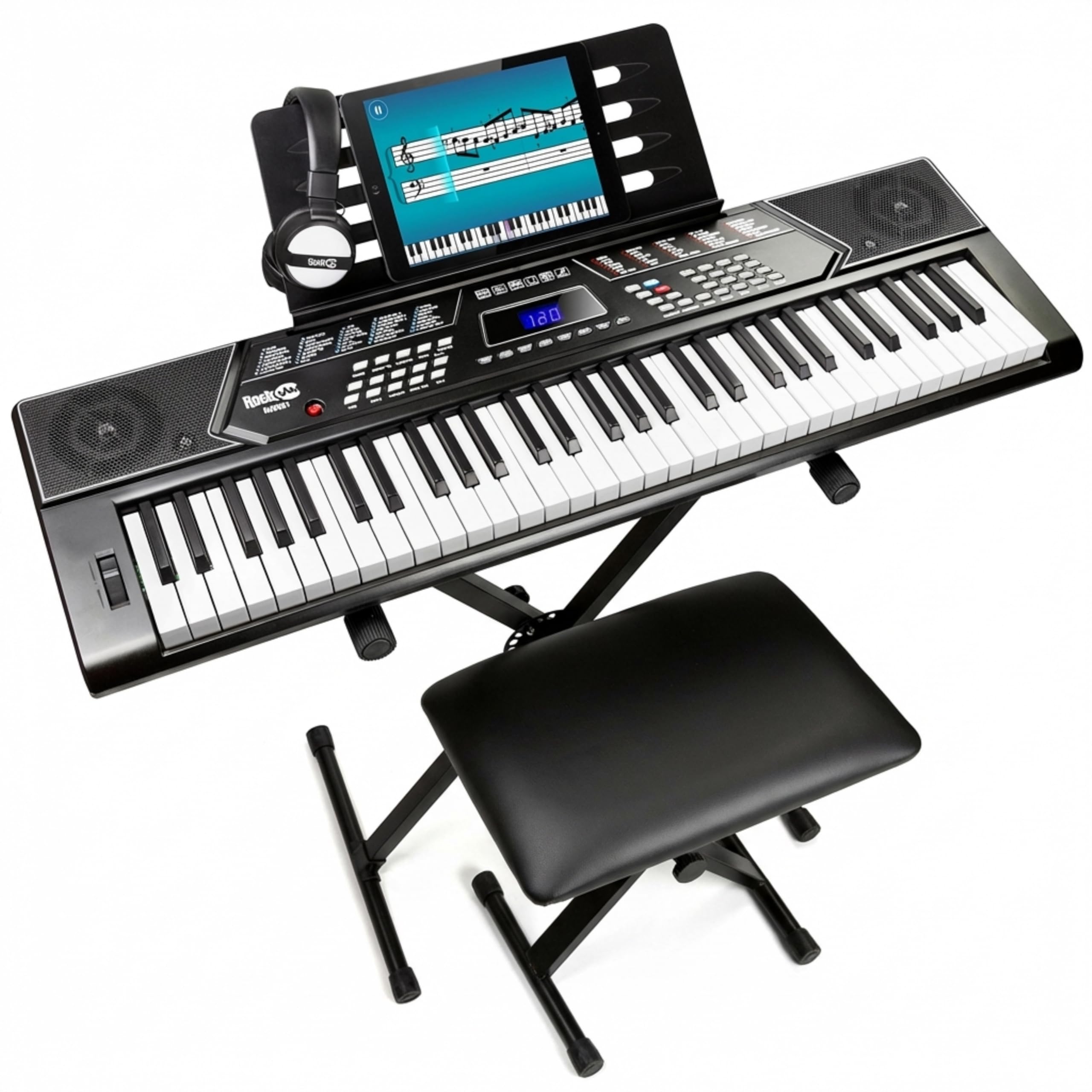
The RockJam 5061 Super Kit is the complete “open the box and start playing” bundle. It includes the 61-key keyboard, a sturdy X-style stand, a padded folding bench, headphones, keynote stickers, a sheet music stand, and access to the Simply Piano app. For a family buying their first keyboard, this package removes the guesswork of sourcing accessories separately and provides a proper playing posture from day one.
The keyboard itself features 200 tones and 200 rhythms, an LED panel that displays active functions, and record/playback capability for layering sounds. The aux input lets you play along with music from your phone or tablet, which is useful for both practice and performance. The keys are full-sized but not touch-sensitive, matching the expectations for this price tier while keeping the barrier to entry low.
Customer feedback emphasizes the “great value for beginners” and “easy assembly,” with particular praise for the Simply Piano integration that guides users through structured lessons. The padded bench and stand provide comfort for longer practice sessions, though some users note the stand’s stability is adequate rather than rock-solid. The lack of touch sensitivity means this keyboard is best viewed as a trial instrument—if your child outgrows it, you’ll know their commitment level without having invested in a premium model.
Why it’s great
- Complete bundle includes stand, bench, headphones, and app access
- Simply Piano integration provides structured lesson progression
- Record/playback feature helps review practice sessions
Good to know
- Keys are not velocity-sensitive; cannot practice dynamics
- Stand and bench are functional but not heavy-duty
7. JOYMUSIC 61-Key Pack

The JOYMUSIC 61-Key Pack is designed for households where multiple people—kids and adults—will share the instrument. The bundle includes the keyboard, a folding stand, a padded stool, headphones, a microphone, and the power supply. The LCD screen provides visual feedback that guides learners to hit the right keys, displaying twinkling markers that make the learning process feel like a game rather than a lecture.
With 255 timbres, 255 rhythms, 8 percussion sounds, and 24 demonstration songs, the sonic library is vast for the price. The keyboard supports multiple playing modes including single chord, fingered chord, and rhythm programming, giving intermediate users room to experiment with composition. The 61 full-sized keys are supported by master volume, accompaniment volume, tempo control, and fill-in functions that mirror more expensive workstation keyboards.
User reviews highlight the “great value” and “easy setup,” with grandparents and parents alike praising how quickly children start playing recognizable songs. The microphone adds a karaoke element that makes family gatherings more interactive, though purists may find the sound quality adequate rather than impressive. The stool is noted as insufficient for heavier users, so consider upgrading the seating if an adult will practice for extended periods.
Why it’s great
- Generous accessory bundle with microphone for family fun
- LCD screen with visual key guidance aids independent learning
- 255 timbres and rhythms offer huge variety for exploration
Good to know
- Keys are not touch-sensitive, limiting dynamic range
- Stool has weight capacity concerns for larger adults
8. Alesis Melody 61 MK4
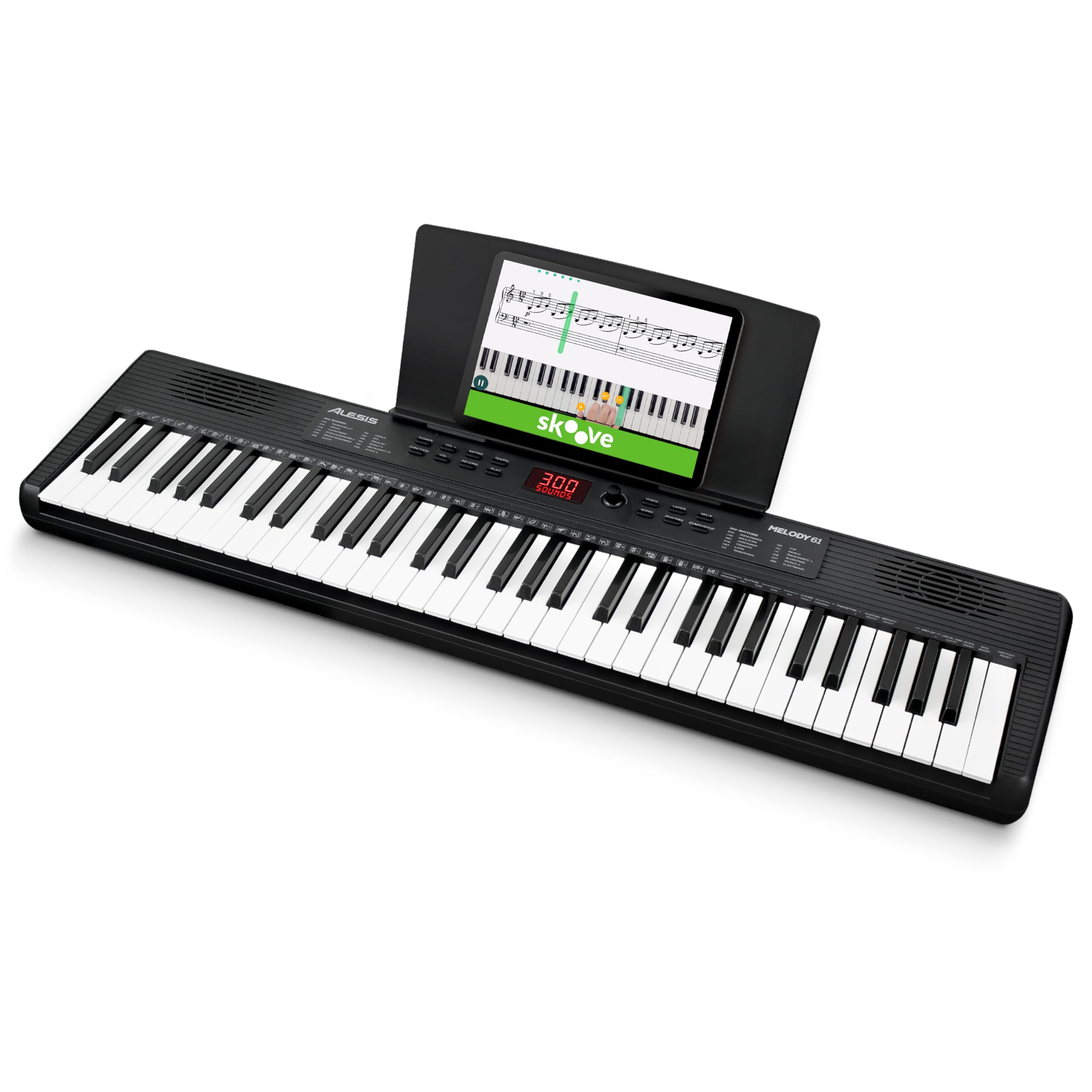
The Alesis Melody 61 MK4 is the most affordable entry point that still provides a legitimate learning path. Its 300 built-in sounds, 300 accompaniment rhythms, and 30 demo songs offer enormous variety for a sub-mid-range keyboard, and the ability to layer or split two sounds adds creative flexibility. The included access to Skoove and Melodics online lessons turns this budget keyboard into a structured learning platform, complete with interactive feedback and progress tracking.
The Record Mode lets you capture practice sessions for playback review, and the built-in metronome helps develop timing discipline. The USB-MIDI connection allows integration with educational software and recording tools, extending the keyboard’s usefulness beyond the initial learning phase. The 61 full-sized keys are paired with sustain, vibrato, and reverb FX that make simple melodies sound more polished, keeping beginners motivated.
Weighing only 6.6 pounds and capable of running on six AA batteries, the Melody 61 MK4 is genuinely portable. The 1/8″ aux input lets you play along with songs from your phone, and the headphone output mutes the internal speakers for silent practice. Users consistently describe it as “just what I was looking for” and note that kids “love it, fight over it.” The keys are not touch-sensitive, but for the price, the combination of sound library, lesson access, and portability is unmatched.
Why it’s great
- Included Skoove and Melodics lessons provide structured learning
- 300 sounds and 300 rhythms offer immense creative variety
- Lightweight design with battery power for true portability
Good to know
- Keys are not touch-sensitive, limiting dynamic expression
- Basic user manual requires downloading detailed version
9. Finger Dance Folding Piano

The Finger Dance Folding Piano solves a problem no other keyboard on this list addresses: how to practice when you’re away from home. The chassis folds 180 degrees, reducing the 61-key instrument to roughly half its length, and the included travel tote bag makes it easy to pack for trips, dorm rooms, or outdoor sessions. The built-in rechargeable lithium battery provides 8-10 hours of playtime per charge, recharging via USB-C from any power bank or laptop.
This keyboard supports both Bluetooth MIDI for connecting to learning apps like GarageBand, Perfect Piano, and Pop Piano, and audio Bluetooth for use as a standalone speaker. The imitation wood texture finish and high-quality speakers deliver “three-dimensional surround sound” with heavy bass, making it feel more substantial than its folding design suggests. The keys themselves have a slight grip texture that some users find unusual but quickly adapt to.
Reviewers consistently praise this keyboard as “perfect for travel needs” and “the best balance of portability, functionality, and convenience.” The light-up keys offer visual guidance, though they are not triggered by app-based lessons. The main compromises are a thin sound from the rear-facing speakers (headphones recommended for critical practice) and a flimsy sheet music holder. Consider purchasing a hard case for maximum protection during transport.
Why it’s great
- Folding design fits in luggage; solves travel practice problem
- Rechargeable battery delivers 8-10 hours of play per charge
- Bluetooth MIDI connects to major learning apps wirelessly
Good to know
- Rear speakers sound thin; headphones improve experience
- Soft case offers minimal protection; hard case recommended
FAQ
Do I need 88 keys or is 61 enough for a beginner?
What is the difference between touch-sensitive and weighted keys?
Can I use a beginner keyboard with iPad learning apps?
Why do some keyboards have cut-out notes when I use the sustain pedal?
Final Thoughts: The Verdict
For most users, the best beginner keyboard winner is the Yamaha PSR-E383 because it combines touch-sensitive keys with Yamaha’s excellent sound engine and structured learning features at a price that respects your budget while demanding proper technique from day one. If you want lighted keys for visual learning and creative fun, grab the Casio LK-S250. And for a family receiving their first keyboard bundle with everything included, nothing beats the all-in-one value of the Casio CT-S300 PPK.