
Our readers keep the lights on and the weekend projects moving. As an Amazon Associate, I earn from qualifying purchases.
Combining a 3D printer and scanner into a single powerful workflow unlocks a level of creative control that separate units simply can’t match. You capture a real-world object—a prototype, a replacement part, or an artistic piece—and turn it into a tangible, printed copy without ever leaving your desk. The real value lies in the closed-loop system: scan, edit, and print with a unified software ecosystem that eliminates alignment headaches and format mismatches between separate devices.
I’m Rikta — the co-founder and writer behind FitlyFast. I’ve spent years dissecting the specifications of desktop fabrication tools, focusing on how scan accuracy and print resolution interact to determine final part quality for serious makers and engineers.
This guide walks through eleven integrated setups that close the gap between the physical and digital world, helping you identify the best 3d printer and scanner kit for your workshop, studio, or garage.
How To Choose The Best 3D Printer And Scanner
Selecting a dual-purpose or complementary printer-and-scanner setup requires balancing print technology (FDM vs. resin), scan method (structured light vs. laser), and your intended output. A mismatch between scanner precision and printer resolution can waste the potential of both machines.
Scan Accuracy vs. Print Resolution
Your scanner’s accuracy—stated in millimeters or microns—defines the detail ceiling for your prints. If the scanner captures at 0.1 mm but your printer resolves at 0.05 mm layers, the limiting factor is the scan data, not the extruder. For engineering-grade parts, look for a scanner that hits at least 0.05 mm accuracy to match a high-resolution FDM or resin printer.
Material Compatibility and Environment
Not all integrated systems support the same filaments or are comfortable in the same environment. Some FDM printers handle flexible TPU and abrasive carbon fiber, while enclosed units let you print ABS and polycarbonate without warping. Meanwhile, laser scanners struggle with shiny or transparent objects unless you use scanning spray—consider structured light alternatives if you plan to scan metallic or glassy parts regularly.
Software Ecosystem and Workflow
The link between scanning and printing often lives in the software. Proprietary suites like Revopoint’s Revo Studio, Creality Print, or Shining 3D’s EXStar can auto-align mesh, repair holes, and pre-optimize geometry for printing. A clunky or buggy interface can turn a powerful scanner into a frustrating paperweight. Prioritize systems with streamlined export to OBJ, STL, or directly to the companion slicer for a frictionless pipeline.
Quick Comparison
On smaller screens, swipe sideways to see the full table.
| Model | Category | Best For | Key Spec | Amazon |
|---|---|---|---|---|
| FLASHFORGE AD5X | FDM Printer | Multi-color printing at high speed | 600mm/s, 20,000mm/s² acceleration | Amazon |
| Anycubic Kobra X | FDM Printer | Family and beginner-friendly multi-color | 600mm/s, 19-color ACE 2 Pro support | Amazon |
| ELEGOO Centauri Carbon | FDM Printer | Engineering-grade materials in an enclosure | 500mm/s, 320°C nozzle, die-cast frame | Amazon |
| Creality CR-Scan Ferret Pro | 3D Scanner | Wireless handheld scanning | 0.1mm accuracy, WiFi 6, 30FPS | Amazon |
| 3DMakerpro Seal Lite | 3D Scanner | Small-object, high-detail scanning | 0.02mm accuracy, blue LED light | Amazon |
| Revopoint INSPIRE 2 | 3D Scanner | Versatile indoor/outdoor scanning | 0.03mm precision, dual IR/laser modes | Amazon |
| Shining 3D Einstar | 3D Scanner | Full-body and hair scanning | 0.1mm point distance, 14FPS | Amazon |
| Creality K2 Combo | FDM Printer | Large-volume multi-color prints | 600mm/s, 300°C hotend, 10.24″ cube | Amazon |
| EinScan SE Desktop | 3D Scanner | Desktop fixed-scan for precision | 0.1mm accuracy, dual-mode scan | Amazon |
| Creality Raptor Pro | 3D Scanner | Metrology-grade automotive scanning | 0.02mm accuracy, 60FPS blue laser | Amazon |
| Revopoint MetroY Pro | 3D Scanner | Industrial-grade reverse engineering | 0.01mm precision, 62-line full-field | Amazon |
In-Depth Reviews
1. FLASHFORGE AD5X Multi-Color 3D Printer
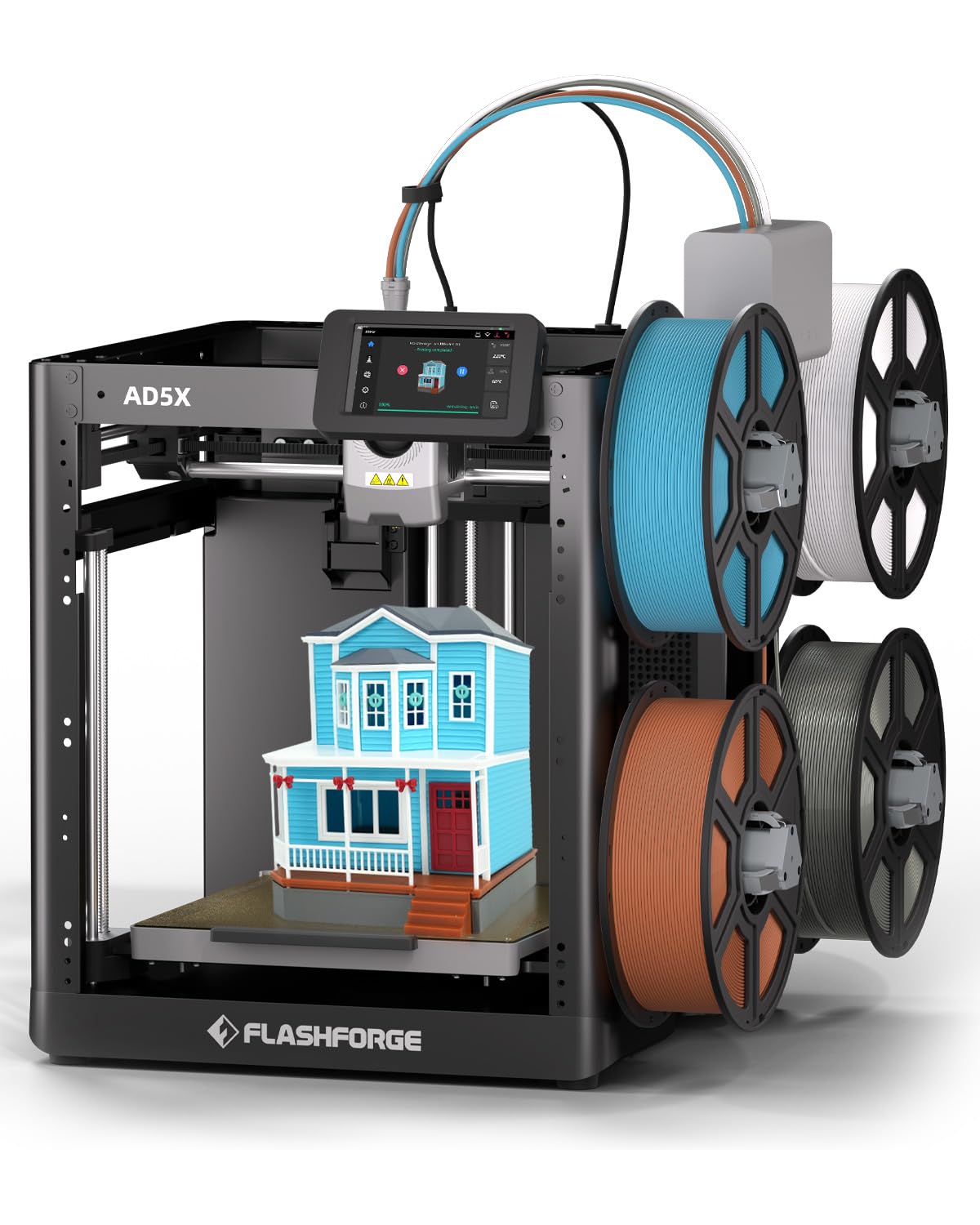
The FLASHFORGE AD5X delivers an excellent combination of multi-color capability and raw speed without requiring a second mortgage. Its Intelligent Filament System (IFS) automatically detects and reloads filament, eliminating mid-print runout failures—a critical reliability upgrade over manual-swap systems. The CoreXY architecture and 20,000 mm/s² acceleration let you push production rates without sacrificing layer consistency on PLA, Silk PLA, and TPU.
Users highlight the straightforward assembly (about one hour) and near-immediate quality prints straight out of the box. The optional enclosure kit broadens material options to include ASA and other temperature-sensitive filaments, while the companion slicer (a fork of Orca) simplifies multi-color management. The 220 mm build volume is adequate for most hobbyist projects, though power users consistently express wanting a 300 mm version for larger parts.
Both beginners and experienced makers praise the intuitive interface and reliable WiFi monitoring. The dual-spindle filament system eliminates the need for a separate AMS unit, reducing desktop clutter. If you’re building a scan-to-print pipeline, the AD5X’s broad material tolerance and high-speed output efficiently translate scanned geometry into physical objects.
Why it’s great
- Integrated 4-color filament system with IFS
- 600mm/s max speed with reliable first layers
- Strong community and software support
Good to know
- Bed size limited to 220 mm cube
- Some units reported heat calibration errors
2. Revopoint MetroY Pro 3D Scanner
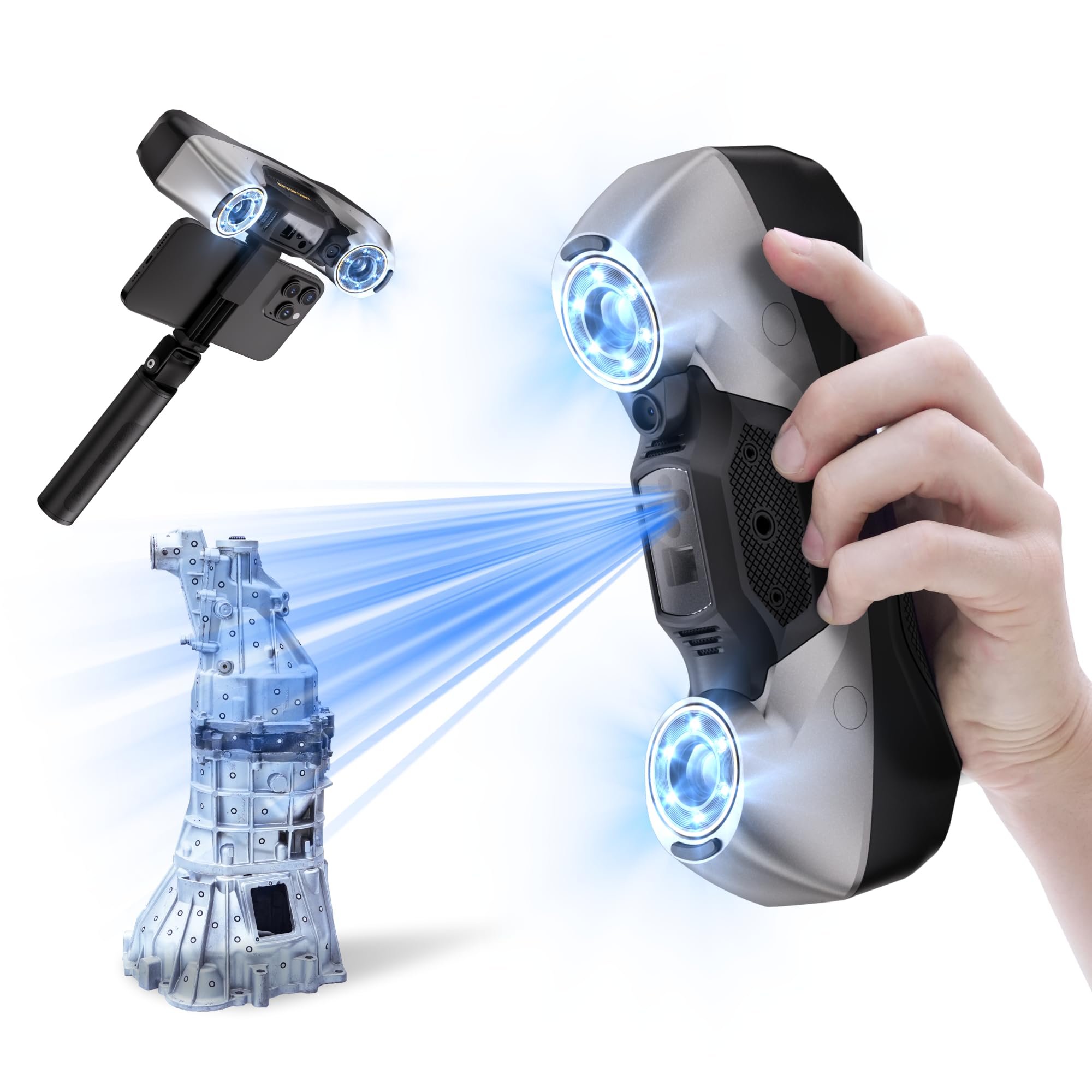
The Revopoint MetroY Pro sets a new benchmark for desktop metrology-grade scanning with its triple-laser configuration—34 cross lines, 15 parallel lines, and a single deep-hole line—plus a 62-line full-field structured light mode. This flexibility lets you rapidly capture large surfaces, zoom into fine detail, or scan deep cavities without losing tracking. The real-time temperature monitoring system actively adjusts fan speeds to prevent accuracy drift during long capture sessions.
Reviewed extensively by engineers, the MetroY Pro delivers repeatable accuracy in the 0.0005-0.003 inch range, making it suitable for reverse engineering of injection-molded parts and mechanical components. The auto turntable mode simplifies small-object capture with one-click alignment. While the included Revo Metro software is powerful, some advanced processing tasks push you toward the separate-purchase Revo Design suite for true CAD integration.
WiFi 6 connectivity streamlines your workflow by removing the tethering cable, though the connection still requires a capable PC within range—it’s not standalone. The learning curve is steeper than entry-level scanners, but users who invest the time report that the point cloud density and resolution rival professional systems at a fraction of the cost.
Why it’s great
- Industrial-grade 0.01mm precision
- Five scanning modes for any surface type
- Marker-free structured light mode
Good to know
- Requires a powerful Windows PC (i7 13th Gen, 32GB RAM)
- Mac compatibility is limited
3. Anycubic Kobra X Multicolor 3D Printer

The Anycubic Kobra X brings native multi-color printing—four colors out of the box, expandable to 19 via up to four ACE 2 Pro units—within reach of families and educational settings. The LeviQ 3.0 auto bed leveling uses a 49-point calibration routine to ensure that even beginners get a perfect first layer without manual tweaking. Combined with a hardened steel nozzle and 300°C hotend, this printer handles PLA, PETG, TPU, PVA, and ASA without component degradation.
Reviewers consistently note the quiet 45 dB operation, which makes the Kobra X suitable for shared spaces like classrooms or home offices. The reduction in purge waste—81.25% less filament travel distance versus conventional multi-material systems—cuts both material costs and print time. The integrated AI camera detects spaghetti failures and foreign objects, alerting you via the mobile app so you don’t waste an entire print run on a botched first layer.
The included cloud-based model library and dual-band WiFi add modern convenience, though the phone app could benefit from a more polished UI. A small percentage of units arrive with defective filament sensors, but Anycubic’s support generally resolves these within the Amazon replacement program. For a budget-conscious scan-to-print pipeline, this printer provides the color and speed to match most structured-light scanner outputs.
Why it’s great
- Expanded multi-color (up to 19 colors)
- Near-silent 45 dB operation
- Smart AI monitoring for failure detection
Good to know
- ACE 2 Pro not backward compatible
- Occasional quality control issues reported
4. Creality CR-Scan Ferret Pro 3D Scanner

The Creality CR-Scan Ferret Pro bridges the gap between casual “point-and-scan” devices and professional units with its anti-shake tracking and WiFi 6 bridge. It streams full-color scans at 30 FPS with 0.1 mm accuracy directly to an iPhone, iPad, or PC, eliminating the need for a bulky laptop during field scanning. The upgraded optical technology handles outdoor ambient light up to 30,000 lux, so you can digitize car parts or architectural details under direct sunlight without losing tracking.
Users find the Ferret Pro produces usable scans immediately out of the box—even complex shapes like engine brackets scan well with minimal drift. The anti-shake algorithm compensates for hand jitter, making it forgiving for newcomers. The export to OBJ, STL, or PLY integrates smoothly with any printer slicer. However, the companion software has a moderate learning curve, and the scanner struggles with highly reflective, transparent, or matte-black surfaces without additional spray.
The system requirements are reasonable: a Gen-8 i5 or later for Windows, or M-series Mac. For the price, it offers wireless freedom and reliable tracking that used to require double the investment. If you need to capture medium-sized objects and push them directly into a CoreXY printer like the Flashforge AD5X, this scanner is the perfect partner.
Why it’s great
- Wireless WiFi 6 scanning with anti-shake
- Works outdoors up to 30,000 lux
- Full-color capture at 30 FPS
Good to know
- Software learning curve can be steep
- Shiny/black surfaces require spray
5. 3DMakerpro 3D Scanner Seal Lite
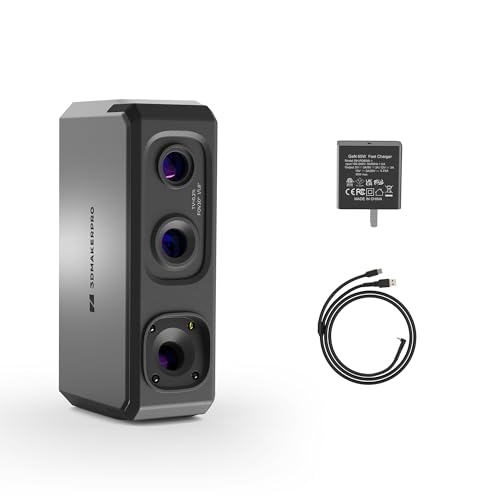
The 3DMakerpro Seal Lite targets users who prioritize fine-detail capture on small objects—jewelry, figurines, mechanical parts—where micron-level accuracy matters. The blue LED structured light source operates at a shorter wavelength (400-500 nm), projecting finer patterns that resolve tiny dents and edge textures at 0.02 mm accuracy. Its recommended working distance of 180-280 mm and scan-back anti-shake feature help stabilize data collection even during handheld operation.
JMStudio, the companion software, provides visual tracking, auto-alignment, and error correction for a beginner-friendly workflow. The free lifetime updates and export flexibility (OBJ, STL, PLY, ASC) make it compatible with any FDM or resin printer. Users warn that a powerful PC is non-negotiable—the software demands a modern multi-core CPU and at least 16 GB of RAM for smooth real-time mesh generation.
A common criticism is the steep learning curve: the included documentation can feel sparse, and the scanner fails on black or highly reflective objects without spray. Once dialed in, however, the Seal Lite produces consistently accurate scans for parts under 300 mm. For a scan-to-print pipeline focused on small, intricate objects, this scanner delivers detail that surpasses many competitors in its price bracket.
Why it’s great
- High 0.02 mm accuracy for small objects
- Blue LED structured light for fine textures
- Export to multiple formats for any printer
Good to know
- Steep learning curve for newcomers
- Requires a powerful computer with 16GB+ RAM
6. ELEGOO Centauri Carbon 3D Printer

The ELEGOO Centauri Carbon is a fully assembled, pre-calibrated CoreXY printer that skips the build-it-yourself routine, making it an immediate production tool. The rigid die-cast aluminum frame and automatic vibration compensation keep layers consistent at 500 mm/s, even on tall parts. With an enclosed chamber and 320°C hotend, this printer is optimized for carbon fiber-reinforced filaments and advanced engineering materials—drones, automotive brackets, and athletic gear all benefit from the enhanced thermal stability.
Reviewers praise the straightforward unboxing-to-print time of under an hour. The 256 mm build cube offers enough volume for helmets, large drone frames, or batch production of end-use parts. The chamber camera with dual LED lighting provides real-time monitoring and time-lapse capture, useful for documenting print progress in a professional shop. ElegooSlicer integrates well with most printers and supports WiFi file transfer for cable-free operation.
Some users report an initial defect rate—failed hotend communication or extruder jams—though ELEGOO’s support generally replaces units quickly. The printer is heavy at 38.5 pounds, so it’s best placed on a sturdy, stable surface. For a closed-loop scanning and printing workflow with engineering-grade materials, the Centauri Carbon’s enclosed build plate and high-temp capability are hard to beat at this price.
Why it’s great
- Fully assembled and pre-calibrated out of box
- Enclosed chamber for engineering filaments
- Die-cast frame for precision at speed
Good to know
- Heavy (38.5 lbs) needs stable surface
- Some reported early defects in first batch
7. Revopoint INSPIRE 2 3D Scanner

The Revopoint INSPIRE 2 combines infrared structured light and multi-line laser scanning in one 190-gram chassis, adapting to objects ranging from reflective metal parts to dark plastic housings without requiring spray. The built-in WiFi 6 module enables true wireless scanning on iOS, Android, or PC, freeing you from cable tangling during complex captures. With up to 0.03 mm precision and a high-precision calibration board that boosts point cloud accuracy by 75%, it delivers clean data for reverse engineering or direct printing.
Users consistently highlight the ease of use—many report high-quality color scans on their first try using default settings. The adjustable optical zoom (1.5x and 2x magnification) lets you focus on fine surface detail for small objects. The Revo Metro software handles alignment, hole filling, and mesh optimization in a single pipeline, though the paid Revo Design add-on is needed for full CAD workflow integration.
The INSPIRE 2 handles outdoor scanning up to 20,000 lux reliably, making it viable for on-site digitization. The tripod, mini turntable, and calibration board included in the box reduce accessory costs. Some users note the marker dots provided can lose adhesion, but replacements are inexpensive. For a portable, versatile scanner that pairs seamlessly with a mid-range CoreXY printer, this is the top all-around contender.
Why it’s great
- Dual IR structured light and laser modes
- Ultra-light 190g with WiFi 6
- Outdoor scanning up to 20,000 lux
Good to know
- Runs hot on older PC hardware
- Calibration markers can lose adhesion
8. Shining 3D Einstar Handheld 3D Scanner

The Shining 3D Einstar is a dedicated handheld scanner renowned for its detail enhancement technology, which optimizes point cloud density for full-body and hair capture—a notoriously difficult task for entry-level units. Its three infrared VCSEL projectors and two stereo depth cameras provide stable tracking even on dark or curved surfaces without scanning spray. The EXstar software includes automatic alignment and a data quality indicator that guides you to adjust distance and angle for cleaner captures.
Reviewers frequently compare Einstar scans favorably to those from the Artec Leo—a professional scanner costing over thirty times as much. The 14 FPS capture rate is moderate but produces dense, clean point clouds with accurate color texture mapping via the built-in RGB camera. Users report scanning black SUV interiors and complex automotive parts without spray, achieving output accurate to +/-0.5 mm after minimal cleanup.
The intuitive workflow and broad export support (OBJ, STL, PLY, ASC, 3MF) make the Einstar a favorite among designers and archivists. The single USB cable handles both data and power, keeping the setup minimal. A few users note occasional tracking losses on highly uniform surfaces, but the software’s backtracking feature resolves most alignment issues. For professional-grade scanning that aligns with a high-end printer like the Creality K2 Combo, the Einstar is a proven workhorse.
Why it’s great
- Detail enhancement for hair and complex textures
- Infrared projectors handle dark surfaces
- Comparable scan quality to pro-level scanners
Good to know
- Moderate 14 FPS scan speed
- Requires patient technique for best results
9. Creality K2 Combo 3D Printer

The Creality K2 Combo pairs a large-format CoreXY printer with the Creality Filament System (CFS)—a multi-spool unit that manages up to 16 colors for seamless gradient, mosaic, and multi-material prints. The K2’s 10.24-inch build cube can print full-sized helmets or multiple small parts in one run without splitting. The industry-grade three step-servo motors on the extruder and XY axes provide extrusion consistency that produces smooth multipart assemblies with no visible layer change lines.
Reviewers emphasize the robust frame construction using aerospace-grade aluminum alloy die-cast parts, which minimizes vibration at 600 mm/s speeds. The adaptive mesh leveling probes only the print area, reducing bed calibration time significantly. The chamber AI camera monitors for spaghetti failures and alerts the user via the Creality app, which also handles file transfers and print queue management.
Some early owners report a warped bed that required replacement, though quality control has improved. The default voltage set to 230V can confuse North American users, so check your unit’s setting before powering on. For a print-only system that separates scan and print processes, the K2 Combo excels when paired with a dedicated scanner like the EinScan SE—giving you a true professional production cell.
Why it’s great
- Large 10.24-inch build volume
- Supports up to 16 colors via CFS
- Motors for extrusion consistency
Good to know
- Bed warping reported in early units
- Default voltage set to 230V for some regions
10. EinScan SE Desktop 3D Scanner

The EinScan SE Desktop scanner is a dedicated stationary platform designed for precision reverse engineering and digital archiving. Its dual-mode operation lets you switch between Auto Scan (fast turntable-based capture) and Fixed Scan (single-shot detail capture) to optimize for both speed and resolution. With a single-shot accuracy of <0.1 mm and point distance of 0.17-0.2 mm, it produces watertight meshes that require minimal cleanup before slicing.
The ExScan software simplifies calibration with automatic routines, and one-click scanning reduces operator error. Users highlight the reliable output for crown molding, small mechanical parts, and figurines, with some completing entire projects (like a 30-foot CNC carving) in a single week instead of weeks of manual measuring. The scanner integrates directly with Sketchfab and a range of third-party slicers for a seamless export pipeline.
A few reports mention inconsistent performance with shiny or glass surfaces, and one unit arrived with packaging debris suggesting prior use. Overall, the EinScan SE remains a reliable desktop solution for professionals who prefer a fixed, repeatable scanning environment. Pair it with a high-resolution FDM printer like the ELEGOO Centauri Carbon for a precision print workflow from static captures.
Why it’s great
- Dual fixed and auto scanning modes
- Automatic calibration for consistent output
- Produces watertight meshes ready to print
Good to know
- Struggles with shiny or transparent objects
- Random shutdowns reported by some users
11. Creality 3D Scanner Raptor Pro
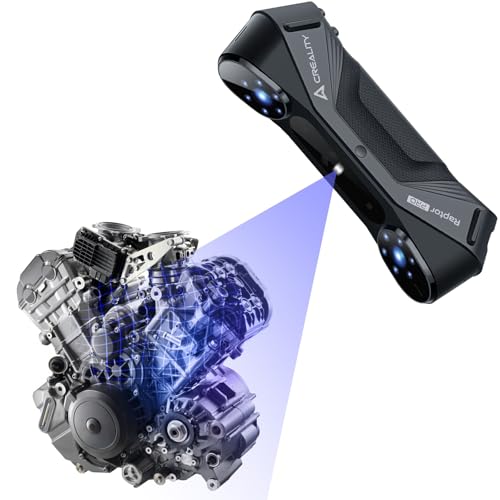
The Creality Raptor Pro is built for automotive and engineering applications where metrology-grade accuracy is non-negotiable. Its 22 cross laser lines and 7 parallel blue laser lines (each only 0.1 mm thick) capture medium-to-large objects at up to 60 FPS and 660,000 points per second. This laser configuration is engineered to reduce the need for multiple passes, saving significant scanning time on custom car bodies or large machine parts.
The anti-shaking design and One-Shot 3D imaging technology maintain stable tracking during handheld operation, even around large, complex geometries. Software integration with Geomagic Control X, Geomagic Design X, and Verisurf Inspect makes the Raptor Pro a natural fit for professional reverse engineering and quality control workflows. Users praise the lightweight 405-gram build and robust metal lens barrel for durability in shop environments.
The scanner handles outdoor conditions with strong environmental resistance, though it still benefits from markers or spray on highly reflective surfaces. The system requirements (i7 Gen-10, 32 GB RAM, 8 GB GPU) are demanding but typical for this level of scanning. For shops that need to digitize large, complex parts and feed them directly into a high-temp printer like the ELEGOO Centauri Carbon, the Raptor Pro delivers factory-floor reliability in a portable package.
Why it’s great
- Metrology-grade 0.02 mm accuracy
- Up to 60 FPS capture speed
- Seamless integration with Geomagic software
Good to know
- Requires a powerful PC (32GB RAM, 8GB GPU)
- Reflective surfaces still need spray or markers
FAQ
Can I use any handheld scanner with any printer?
What scanning spray should I use for reflective parts?
Do I need a dedicated GPU for scanning larger objects?
How do I choose between structured light and laser scanning?
Final Thoughts: The Verdict
For most users, the best 3d printer and scanner ecosystem is the FLASHFORGE AD5X paired with the Creality CR-Scan Ferret Pro—the AD5X delivers fast, multi-color printing with reliable filament management, while the Ferret Pro captures full-color scans wirelessly. If you demand metrology-grade precision for engineering work, invest in the Revopoint MetroY Pro and the ELEGOO Centauri Carbon for enclosed, high-temp materials. And for users on a budget seeking a complete entry-level pipeline, the Anycubic Kobra X plus the 3DMakerpro Seal Lite delivers remarkable detail without stretching your wallet.