
Our readers keep the lights on and the weekend projects moving. As an Amazon Associate, I earn from qualifying purchases.
The moment you plug a microphone into your computer and hear that digital hiss, latency echo, or thin, lifeless vocal track, you realize the built-in sound card isn’t going to cut it. An audio interface is the dedicated hardware that converts analog sound—your voice, your guitar, your synth—into pristine digital data your DAW can work with, and it’s the single most important upgrade for anyone serious about making music or recording content at home. Without one, you’re fighting noise floors, clipping preamps, and listening delays that kill any creative flow.
I’m Rikta — the co-founder and writer behind FitlyFast. I’ve spent the last fifteen years analyzing the home recording market, comparing preamp specs, converter quality, latency figures, and driver stability across hundreds of interfaces to separate the tools that genuinely improve your workflow from the ones that just look good on a desk.
This buying guide breaks down nine of the most reliable, performance-focused options available today, so you can choose the best audio interface for home recording that matches your input needs, computer setup, and sonic expectations without wasting money on features you don’t need.
How To Choose The Best Audio Interface For Home Recording
Selecting the right interface for your home studio comes down to matching the hardware specs to your specific microphones, instruments, and computer system. The wrong choice can introduce noise, limit your input options, or force you to buy extra gear to compensate for weak preamps.
Preamp Quality and Gain Range
The microphone preamp is the heart of any interface. Low‑noise preamps with at least 55dB of gain let you use dynamic microphones (like the Shure SM58 or SM7B) without needing a separate inline booster. Cheaper interfaces often max out around 45dB, leaving your vocal tracks quiet and noisy once you raise the level in your DAW.
Input and Output Count
Think about your recording workflow today and a year from now. A 2‑input interface works for a solo vocalist or guitarist. If you plan to record a stereo acoustic guitar, a vocalist plus a guitar simultaneously, or a small podcast with two hosts, you need at least 4 inputs. The more I/O you have, the fewer times you’ll repatch cables mid‑session.
Latency and Direct Monitoring
Latency is the delay between when you speak or play and when you hear it through your headphones. Software monitoring through your DAW introduces noticeable lag, especially on older computers. Interfaces with hardware direct monitoring route the input signal straight to your headphones with near‑zero delay, letting you perform naturally without distraction.
Connectivity and Computer Compatibility
USB‑C is the modern standard, offering enough bandwidth for high channel counts and high sample rates. Check that the interface has class‑compliant drivers for your operating system—some brands require proprietary drivers that can cause trouble on newer macOS or Windows builds. Bus‑powered interfaces are portable but may not deliver full phantom power to multiple condenser mics.
Quick Comparison
On smaller screens, swipe sideways to see the full table.
| Model | Category | Best For | Key Spec | Amazon |
|---|---|---|---|---|
| Solid State Logic SSL 2 MKII | Premium | Producers who want SSL console tone | 32‑bit / 192kHz AD/DA converters | Amazon |
| Focusrite Scarlett 2i2 Studio 4th Gen | Premium | Complete all‑in‑one studio kit | 120dB dynamic range | Amazon |
| MOTU M4 | Premium | Engineers needing low latency and loopback | 192kHz, 4‑in/4‑out USB‑C | Amazon |
| Audient EVO 8 | Mid‑Range | Multi‑instrument home studios | 4 EVO mic pres, 1 JFET instrument input | Amazon |
| Universal Audio Volt 2 | Mid‑Range | Vocalists who want vintage preamp warmth | 24‑bit / 192kHz with Vintage mode | Amazon |
| M‑AUDIO AIR192x4 VSPro | Mid‑Range | Budget conscious complete recording bundles | 2.59ms round‑trip latency | Amazon |
| PreSonus AudioBox USB 96 25th Anniversary | Value | Beginners who need everything in one box | 96kHz, M7 large‑diaphragm condenser mic | Amazon |
| Focusrite Scarlett Solo 3rd Gen | Value | Single‑mic singer‑songwriters on a budget | 192kHz, switchable Air mode | Amazon |
| Shure MVX2U | Compact | Mobile recorders and streamers | 60dB gain, zero‑latency monitoring | Amazon |
In‑Depth Reviews
1. Solid State Logic SSL 2 MKII

The SSL 2 MKII brings the legendary British console sound to your desktop with its 32‑bit / 192kHz AD/DA converters and the iconic Legacy 4K analog enhancement button. Engage that switch and your vocals and acoustic guitar instantly gain a polished, open sheen that sounds like it already went through a console channel—no plugin required. The preamps are quiet, detailed, and provide ample clean gain for most dynamic mics without needing a separate booster.
Build quality is a standout feature here: the chassis is solid stainless steel with weighted knobs that feel precise and durable. The built‑in high‑pass filter cuts rumble before it hits your DAW, and the noise meter with a numeric readout is far more useful than the vague color‑coded LEDs on competing units. Zero‑latency monitoring via the hardware mix knob keeps your takes tight, and the stereo loopback channel makes it simple to capture system audio for streaming or podcasting.
On the software side, the SSL Production Pack includes some genuinely useful plugins and samples, not just throwaway trialware. The only real nuance is that the 32‑bit conversion applies to the D/A stage, not the A/D input—you can still clip if you push the gain too hard. But for a home producer who wants professional sonics without a rack of outboard gear, this is the most complete package in its class.
Why it’s great
- Legacy 4K button adds console‑grade harmonic richness to any source
- High‑pass filter cleans up low‑end rumble before recording
- Solid steel chassis with premium knob feel and low noise floor
Good to know
- Input stage is not a true 32‑bit float recording—clipping still possible
- Slightly larger and heavier than comparable 2‑input interfaces
2. Focusrite Scarlett 2i2 Studio 4th Gen
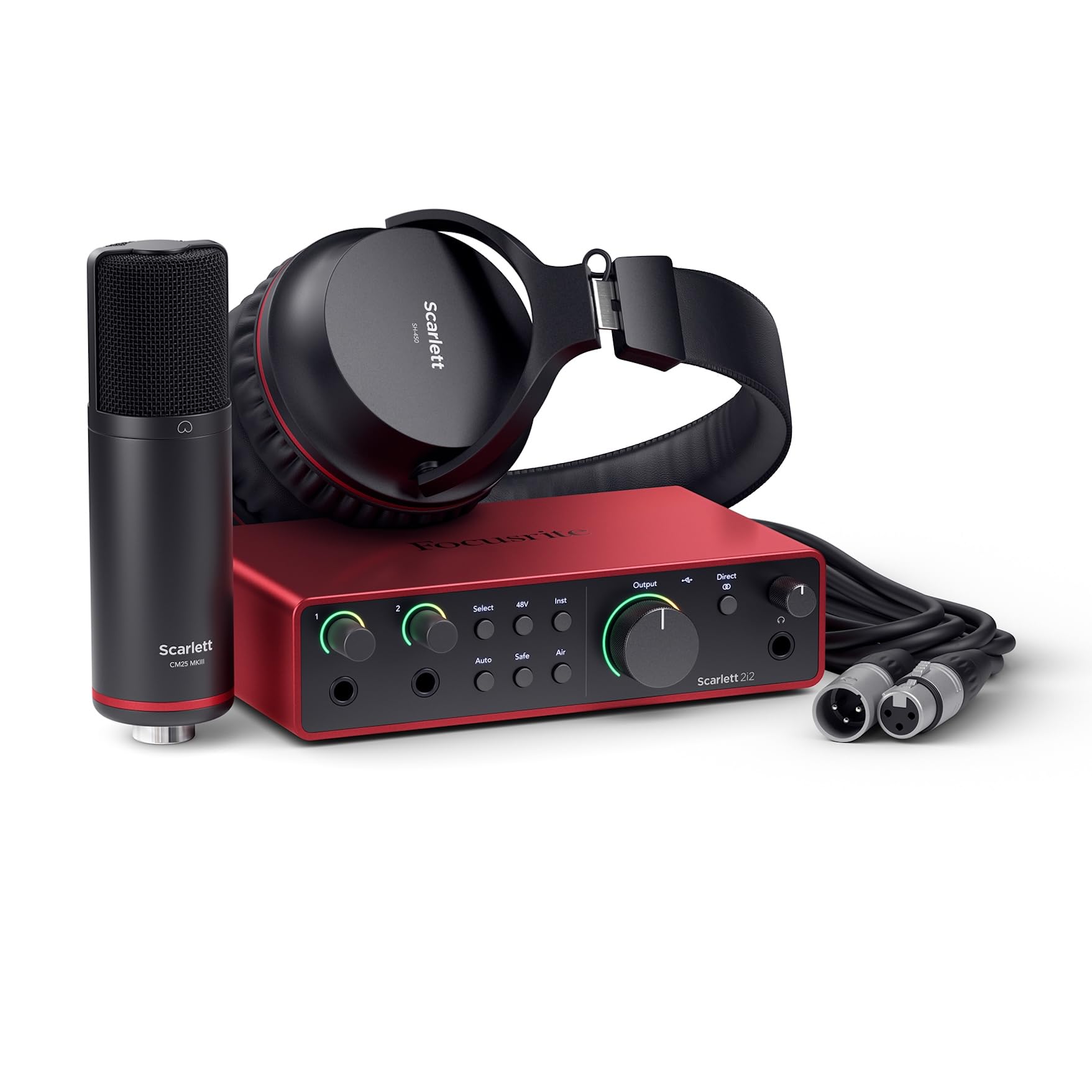
Focusrite’s fourth‑generation Scarlett 2i2 Studio is a complete recording bundle built around the upgraded 2i2 interface, the CM25 MkIII condenser microphone, and SH‑450 headphones. The interface itself now boasts a massive 120dB dynamic range, matching the converters found in Focusrite’s flagship RedNet line. That dynamic headroom means your quiet vocal passages stay clean and your loud peaks don’t instantly distort, giving you more usable range to work with in mixing.
Two smart features solve classic beginner problems: Auto Gain automatically sets your input level by playing a short reference tone, and Clip Safe continuously monitors the signal and backs off gain before clipping occurs. Air mode has been refined to add both presence and a richer harmonic drive, making dull microphones sound noticeably more open. The two instrument inputs handle guitar and bass without the dull high‑end roll‑off common in cheaper DI stages.
The included CM25 MkIII is a large‑diaphragm condenser that performs well above its bundle price point, capturing vocals with good clarity and minimal sibilance. The SH‑450 headphones offer a balanced frequency response suitable for tracking and mixing. The software bundle includes Pro Tools Intro+, Ableton Live Lite, and the Hitmaker Expansion with emulations of classic compressors and reverbs.
Why it’s great
- Auto Gain and Clip Safe prevent level mistakes before they ruin a take
- 120dB dynamic range rivals professional studio converters
- Complete bundle includes a capable mic and monitoring headphones
Good to know
- Bundle microphone and headphones are good starters but will be upgraded as skills grow
- No separate 3.5mm auxiliary input for external audio sources
3. MOTU M4 4×4 USB-C Audio Interface

The MOTU M4 is a 4‑in/4‑out USB‑C interface designed for home studio engineers who need more I/O without moving to a rackmount unit. Its two mic preamps are extremely clean and transparent—they add no coloration, which is ideal if you want to shape your sound with plugins rather than hardware character. The dedicated LCD screen shows real‑time input and output levels with precise metering, letting you dial in gain visually instead of guessing from LED colors.
Latency is among the lowest in its price bracket thanks to MOTU’s well‑optimized ASIO drivers. You can run a full session at 32 samples buffer size on a moderately powerful computer without audible glitches, which makes tracking virtual instruments and overdubbing feel immediate. The built‑in loopback channel routes your computer’s audio back into your DAW effortlessly—perfect for recording streaming audio or sampling from YouTube.
The independent monitor and headphone volume knobs are a practical touch: you can set your speaker level and headphone level separately without digging into a software mixer. The front‑panel 48V phantom power switch is dedicated and easy to access. The headphone output is adequate on bus power but slightly weaker than dedicated headphone amps; if you use high‑impedance headphones, plan to add an external amp down the line.
Why it’s great
- Extremely low latency with rock‑solid ASIO driver performance
- LCD metering provides clear, accurate level readouts for all channels
- Loopback functionality makes system audio capture seamless
Good to know
- Headphone amp is bus‑power limited and may struggle with high‑impedance cans
- Volume knobs have a dead zone in the first 25% of rotation
4. Audient EVO 8 USB Audio Interface

The Audient EVO 8 packs four EVO‑series microphone preamps and a dedicated JFET instrument input into a compact, minimalist chassis that feels much more expensive than its price suggests. The preamps are exceptionally clean and low‑noise, with a reported noise floor that rivals standalone outboard pres from a decade ago. The JFET DI input is a genuine differentiator: it emulates the input stage of a classic valve amp, so your direct‑in guitar and bass tracks sound fuller and more dynamic than typical solid‑state DI stages.
SmartGain is the killer feature here. Press a button and the interface plays a short burst of signal, then automatically sets the optimal input level for all connected microphones simultaneously. For a home studio recording multiple sources at once—like a podcast with two hosts or a singer with an acoustic guitar—this saves minutes of manual gain‑staging per session. The single control knob is intuitive, and it syncs directly with your DAW’s fader levels in supported software.
The unit is very lightweight, which is great for portability but can be a desk annoyance: the USB‑C cable’s weight can lift the front of the interface off the desk, requiring something heavy on top. The sparse physical controls mean you’ll need the EVO app for deeper routing and mix settings, but once configured, you rarely touch it. Two independent headphone outs with separate mixes make it easy for a producer and talent to hear different cue mixes.
Why it’s great
- SmartGain auto‑levels multiple inputs at once, speeding up session setup
- JFET instrument input adds warmth and punch to direct guitar recordings
- Two headphone outs with independent mix control for studio collaboration
Good to know
- Too light—USB cable weight can tip the front edge off the desk
- Advanced routing requires the EVO software app for full control
5. Universal Audio Volt 2 USB Audio Interface

Universal Audio built the Volt 2 around the same preamp circuitry found in their legendary 610 tube console, used on countless classic records. Engage the Vintage switch and the preamp instantly takes on a richer, slightly compressed character with a subtle high‑frequency sheen that flatters vocals and acoustic guitars. The clean mode is equally useful for neutral sources where you want to capture a transparent signal and shape it later.
The converters deliver up to 24‑bit / 192kHz resolution with crystal clarity, and the build quality is reassuringly solid with a metal chassis that feels premium. Included software is a strong draw: you get LUNA—UA’s own DAW that integrates with their UAD plugin ecosystem—plus a generous bundle of effects and instruments. The Vintage mode, combined with LUNA’s summed analog workflow, gives a small home setup the flavor of a much larger studio.
It supports Mac, Windows, iPad, and iPhone with USB‑C connectivity, making it a versatile tool for mobile recording as well as desktop use. The driver installation is straightforward and the interface is plug‑and‑play on most modern systems. Note that for iPad/iPhone use with the original Lightning port, you’ll need the Apple Camera Adapter and an external power supply, since bus power alone may not be sufficient for phantom‑powered condenser mics.
Why it’s great
- Vintage mode emulates UA 610 tube preamp character for instant analog warmth
- Includes LUNA DAW and a full suite of UAD‑quality plugins
- USB‑C bus powered and compatible with Mac, PC, iPad, and iPhone
Good to know
- Vintage mode is subtle—not a dramatic effect, but a musical enhancement
- Mobile iOS use requires external power for phantom‑powered microphones
6. M‑AUDIO AIR192x4 VSPro Recording Package

The M‑AUDIO AIR192x4 VSPro is a complete recording package that bundles the AIR 192|4 interface with the Nova Black condenser microphone, shock mount, XLR cable, and HDH40 headphones. At its core, the interface boasts a claimed round‑trip latency of just 2.59 milliseconds—one of the fastest in its price tier—which makes monitoring through your DAW feel responsive even on modest computers without direct hardware monitoring.
The Crystal preamps are transparent and offer plenty of clean gain, and the 24‑bit / 192kHz conversion captures detailed, high‑resolution audio. Connectivity includes one XLR+¼” combo input, a dedicated ¼” instrument input, stereo ¼” outputs, and a headphone out with independent level control. USB‑C connectivity is built in, and the box includes both USB‑C‑to‑C and USB‑C‑to‑A cables for broad compatibility.
The included Nova Black condenser microphone is a solid starter: it has a warm character with a slight presence boost, though it lacks the detail of more expensive large‑diaphragm mics. The HDH40 headphones are functional for tracking but lack the clarity needed for critical mixing. The software bundle—MPC Beats, Ableton Live Lite, and a suite of virtual instruments—provides enough tools to start recording immediately without additional purchases.
Why it’s great
- Ultra‑low round‑trip latency of 2.59ms for responsive recording
- Complete bundle includes microphone, headphones, cables, and software
- USB‑C connectivity with both cable types included for broad device support
Good to know
- Included microphone is decent for vocals but not a long‑term primary mic
- Bundle headphones are suitable for tracking, not critical mixing decisions
7. PreSonus AudioBox USB 96 25th Anniversary Studio Recording Package

The PreSonus AudioBox USB 96 25th Anniversary Studio is one of the most complete all‑in‑one solutions for someone who is buying their first recording setup and wants nothing left to shop for. The package includes the rugged AudioBox 96 interface (24‑bit / 96kHz, 2 combo inputs with low‑latency operation), the M7 large‑diaphragm condenser microphone, HD7 closed‑back headphones, a desktop mic stand, and all necessary cables.
The M7 microphone is the standout component in this bundle. It delivers a warm, rich tonal character that outperforms typical starter mics, capturing vocals with a flattering low‑mid body and smooth high end. The HD7 headphones are comfortable for long sessions and offer a balanced frequency response—they won’t be your final mixing headphones, but they’re more than capable for tracking and basic editing. The interface itself is built like a tank, with a metal chassis and robust knobs that survive being stuffed into backpacks.
Studio One Artist is included, which is a genuine full‑featured DAW rather than a stripped‑down trial. The drag‑and‑drop workflow is beginner‑friendly while still offering deep editing and mastering tools as you advance. Studio Magic adds over 1000 dollars’ worth of virtual instruments, loops, and effects. The main practical note: use the supplied USB cable, as some users report communication issues when swapping to longer or lower‑quality cables.
Why it’s great
- Complete package with interface, professional mic, headphones, stand, and cables
- M7 condenser mic offers genuinely good sound that beginners can keep using
- Studio One Artist DAW is a full production environment, not a trial version
Good to know
- 96kHz maximum sample rate is fine for most users but lower than 192kHz rivals
- Requires the specific cable provided for reliable power and data connection
8. Focusrite Scarlett Solo 3rd Gen

The Focusrite Scarlett Solo 3rd Gen is the entry‑level gold standard for a reason. It’s a simple 2‑in/2‑out interface (one XLR mic input with switchable Air mode and one high‑headroom instrument input) that delivers the same clean preamps and 192kHz converters found in the larger Scarlett models. Air mode engages an analog EQ boost around 10kHz that adds sparkle and presence to vocals and acoustic guitars, helping them cut through a mix without needing post‑processing.
The Gain Halo feature solves the biggest beginner pain point: a ring around the gain knob glows green when signal is healthy, yellow when you’re approaching clipping, and red when you’re too hot. It makes setting proper levels trivial, even if you don’t know how to read a traditional meter. The metal chassis is compact and durable, surviving years of home studio use and travel without issue. The bundle includes Pro Tools Intro+, Ableton Live Lite, and the Hitmaker Expansion plugin collection.
The instrument input is well‑designed: it accepts both guitar and bass directly and preserves the high‑end clarity that cheap interfaces tend to roll off. The two balanced ¼” outputs provide clean playback to studio monitors. The USB‑C connectivity is future‑proofed, though the included cable is USB‑C to USB‑A, so you may need an adapter for newer Macs. Focusrite’s three‑year warranty provides peace of mind for a budget investment.
Why it’s great
- Air mode adds pro‑quality high‑end sheen to vocals and acoustic instruments
- Gain Halo LEDs make level setting foolproof for beginners
- Metal build and three‑year warranty for long‑term reliability
Good to know
- Only one mic input—limits you to a single vocalist or one source at a time
- Included USB cable is USB‑A; newer computers may require a USB‑C adapter
9. Shure MVX2U XLR‑to‑USB Digital Audio Interface

The Shure MVX2U is not a traditional desktop interface—it’s a compact XLR‑to‑USB adapter that transforms any dynamic or condenser microphone into a plug‑and‑play USB device. With a staggering 60dB of clean gain built in, you can drive a demanding dynamic mic like the SM7B without any inline booster. The 48V phantom power means even a sensitive condenser like the SM81 works without an extra power supply, making this a truly versatile mobile recording tool.
Setup is instantaneous: plug the MVX2U directly onto your microphone (or use the included USB‑C cable inline), connect to your computer or iPhone via USB‑C, and you’re recording. The ShurePlus MOTIV desktop app gives you precise control over gain, EQ, compression, and limiting, and settings are saved to the device itself—so you can unplug it and use it on another computer with your preferred processing already active. Zero‑latency headphone monitoring via the built‑in 3.5mm jack means you hear exactly what the microphone captures without delay.
The dual mounting flexibility—directly on the mic or inline with a cable—adapts to different microphone stands and desk layouts. The build quality is classic Shure: solid and compact, though the metal housing has a dense weight that surprises given its 1.1‑inch diameter. Note that the maximum sample rate is 48kHz, which is fine for spoken word, podcasting, and streaming, but below the 96kHz/192kHz needed by audio purists recording acoustic music at higher resolutions.
Why it’s great
- 60dB of clean gain drives power‑hungry dynamic mics without external boosters
- Saves EQ and compression settings on‑device for consistent portable use
- Compact size and dual mounting options for flexible desk or mobile setups
Good to know
- 48kHz max sample rate is not sufficient for high‑resolution music recording
- Single‑channel input limits it to one microphone at a time
FAQ
Do I need a 192kHz sample rate for home recording?
What does direct monitoring mean on an audio interface?
Can I use an audio interface with an iPhone or iPad?
What is loopback and who needs it?
How many inputs do I need for a small home studio?
Final Thoughts: The Verdict
For most users, the best audio interface for home recording winner is the Solid State Logic SSL 2 MKII because it delivers genuine console‑grade preamp character, a useful high‑pass filter, and excellent build quality at a price that doesn’t require a second mortgage. If you want an all‑in‑one bundle that includes a capable microphone and headphones to start recording immediately, grab the Focusrite Scarlett 2i2 Studio 4th Gen. And for ultra‑portable on‑the‑go recording with a Shure dynamic mic, nothing beats the pocket‑sized Shure MVX2U.