
Our readers keep the lights on and the weekend projects moving. As an Amazon Associate, I earn from qualifying purchases.
Clearing your desk of a bulky tower and a tangle of cables is a specific kind of relief. An all-in-one Windows computer integrates the processor, storage, and display into a single, elegant unit, reclaiming precious square footage and simplifying your setup. But choosing the right one means balancing screen size, processor power, memory, and storage against your specific workflow, whether that’s remote work, online study, or home entertainment.
I’m Rikta — the co-founder and writer behind FitlyFast. I have spent countless hours analyzing product specifications, reading through hundreds of customer experiences, and comparing performance metrics across the latest all-in-one models to identify which systems deliver genuine value and which cut corners on components like RAM speed, display quality, and thermal management.
This guide cuts through the marketing noise to help you make a confident decision on your next all in one windows computer, focusing on the concrete specs that define daily usability and long-term reliability.
How To Choose The Best All In One Windows Computer
An all-in-one PC is a long-term investment in your desk space and workflow. To get the right model, you need to look past the sleek exterior and focus on the internal components that dictate performance, the display quality that affects your daily comfort, and the connectivity options that determine how you hook up peripherals.
Processor Core Count and Clock Speed
The CPU is the brain of your AIO. Entry-level models often use Intel N-series processors (N200, N100) which are fine for basic web browsing, document editing, and video streaming. For heavier multitasking, photo editing, or running multiple business applications, look for Intel Core i5/i7 or AMD Ryzen 5/7 processors. The number of cores (4 vs 6 vs 8 or more) directly correlates to how many applications you can run simultaneously without slowdowns.
Memory and Storage Configurations
RAM is your system’s short-term memory. 8GB is the bare minimum for Windows 11; 16GB is the sweet spot for smooth multitasking, and 32GB is ideal for power users who juggle large files or virtual machines. Storage should always be an SSD — never a traditional hard drive. 256GB is tight; 512GB offers comfortable space for apps and files, while 1TB gives you room for media libraries and project archives. Note the RAM type: DDR5 offers faster data transfer rates than DDR4.
Display Size, Panel Type, and Special Features
Screen size typically ranges from 21.5 to 27 inches. An IPS panel provides superior color accuracy and wider viewing angles compared to VA or TN panels. Consider refresh rate: 120Hz panels deliver noticeably smoother cursor movement and scrolling compared to standard 60Hz displays. If you share your workspace or have family members who might use the system, a touchscreen display can add an intuitive layer of interaction.
Quick Comparison
On smaller screens, swipe sideways to see the full table.
| Model | Category | Best For | Key Spec | Amazon |
|---|---|---|---|---|
| Dell Inspiron 7730 | Premium | Power users & creative pros | Intel Core 7-150U + NVIDIA MX570A | Amazon |
| Lenovo IdeaCentre 27 (i7/32GB) | Premium | Heavy multitasking & business | Intel Core i7-13620H, 32GB DDR5 | Amazon |
| HP 27 (Ryzen 7) | Mid-Range | Powerful home office | AMD Ryzen 7 7730U, 32GB RAM | Amazon |
| ASUS V470 | Mid-Range | Touchscreen versatility | 27″ Touch Display, 16GB DDR5 | Amazon |
| HP 24 Touchscreen | Mid-Range | Touch & family use | Intel N100, 16GB DDR4, 1TB SSD | Amazon |
| Lenovo IdeaCentre 27 (i7/8GB) | Mid-Range | Performance on a budget | Intel Core i7-13620H, 27″ FHD | Amazon |
| Dell 24 EC24250 | Mid-Range | Office reliability | Intel Core 3 100U, 8GB DDR5 | Amazon |
| Lenovo IdeaCentre 24 | Mid-Range | Everyday business | Intel Core i3-N305, 16GB DDR4 | Amazon |
| Acer Aspire C24 | Mid-Range | Smooth 120Hz visuals | AMD Ryzen 5 7430U, 120Hz Display | Amazon |
| Lenovo 24″ FHD | Budget | Basic office & school | Intel N100, 8GB DDR4, 256GB SSD | Amazon |
| HP 22-dg0340 | Budget | Entry-level tasks | Intel N200, 8GB RAM, 512GB SSD | Amazon |
In‑Depth Reviews
1. Dell Inspiron 7730 All in One Desktop

The Dell Inspiron 7730 sits at the top of the pyramid for a reason. It pairs a powerful Intel Core 7-150U processor with a dedicated NVIDIA GeForce MX570A graphics card (2GB GDDR6), a combination rare in the all-in-one space. This means it handles not only demanding business applications but also light video editing, 3D modeling, and even casual gaming without choking. The 32GB of DDR4 RAM ensures you can keep dozens of browser tabs, spreadsheets, and design software open simultaneously without lag.
The 27-inch FHD touchscreen display with ComfortView Plus reduces blue light emissions without washing out colors, making it ideal for long work sessions. Its four-side narrow bezels maximize the viewing area, and the innovative stand provides stable support while freeing up desk space underneath. The inclusion of WiFi 6 and a full port selection (including multiple USB-A and USB-C) rounds out a thoroughly professional package.
On the downside, some users report that the screen color balance can be tricky to calibrate out of the box, requiring manual tweaking using Dell’s utility. Also, the premium price tag puts it out of reach for casual users who just need a web browsing machine. The wireless keyboard and mouse use batteries, which is a minor inconvenience. But for a user who needs top-tier performance and a large touchscreen in one clean package, this is the definitive choice.
Why it’s great
- Dedicated NVIDIA graphics for creative workloads
- 32GB DDR4 RAM for extreme multitasking
- Large 27-inch FHD touchscreen with eye care
- Premium onsite service warranty included
Good to know
- Screen color calibration may need adjustment
- Premium price for dedicated GPU
- Keyboard and mouse run on batteries
2. Lenovo IdeaCentre 27″ (i7/32GB)

The Lenovo IdeaCentre 27 with an Intel Core i7-13620H and 32GB of DDR5 RAM is a performance beast designed for professionals who demand speed. The 10-core processor (6 performance cores, 4 efficiency cores) boosts up to 4.9GHz, handling compilation, data analysis, and virtual machines without breaking a sweat. The 27-inch FHD IPS display with 99% sRGB coverage and anti-glare coating provides a crisp, color-accurate workspace that reduces eye fatigue during extended use.
Lenovo includes a 5MP webcam with dual microphones and HARMAN speakers, making this a formidable video conferencing station. The inclusion of Windows 11 Pro adds business-grade security features like BitLocker and remote desktop capabilities. The 512GB PCIe 4.0 SSD is lightning fast, and with the DDR5 memory, app loading feels instantaneous.
However, the primary trade-off is storage. At this price level, a 1TB SSD would be expected, and 512GB fills up quickly for users with large media files or game libraries. A small percentage of users have reported “lemon” units that experience blue screens within days, though this is not widespread. Also, the graphics are integrated Intel UHD, so this machine is not for heavy gaming or GPU-accelerated rendering. For pure CPU-centric professional work, however, it’s exceptional.
Why it’s great
- Incredible 10-core i7 CPU performance
- 32GB DDR5 RAM is future-proof
- Excellent 5MP webcam and HARMAN audio
- Windows 11 Pro for business features
Good to know
- Only 512GB SSD; upgrade may be needed
- Uses integrated graphics only
- Quality control concerns reported by some
3. HP 27 inch All-in-One (Ryzen 7)

HP’s 27-inch model with the AMD Ryzen 7 7730U is a remarkable value proposition, packing 32GB of RAM and a 1TB SSD into a sleek white chassis. The Ryzen 7 processor delivers strong multi-core performance that rivals mid-range Intel Core i7 models, handling photo editing, virtual meetings, and office suites with ease. The three-sided micro-edge display offers a 90% screen-to-body ratio, giving you an expansive view in a relatively compact footprint.
The tiltable pop-up privacy camera is a great design touch—physically hiding the lens when not in use. The dual array microphones with advanced noise reduction ensure your voice comes through clearly on calls. The system feels snappy for productivity tasks, and the 1TB SSD provides ample room for file storage without needing external drives.
Where this model stumbles is in reliability reports. A notable number of customers describe a critical overheating issue that causes the computer to shut off randomly, requiring a full power reset. This appears to be a manufacturing defect in some units. Additionally, the display lacks touch capability and height adjustment, which may be dealbreakers for those used to more ergonomic setups. If you get a working unit, it’s a powerful machine; but the risk is present.
Why it’s great
- Excellent CPU power for the price
- Generous 32GB RAM + 1TB SSD standard
- Privacy-focused pop-up camera
- High screen-to-body ratio design
Good to know
- Documented overheating shutdown issues
- No touchscreen or height adjustment
- Uses integrated Radeon graphics only
4. ASUS V470 All-in-One

The ASUS V470 distinguishes itself with a 27-inch FHD anti-glare touchscreen display. The touch interface is responsive and smooth, making this an excellent choice for interactive presentations, design work, or simply navigating Windows 11 with a more tactile approach. The Intel Core i5-13420H processor with 16GB of DDR5 RAM provides a balanced, responsive experience for most home and office tasks without the premium price of an i7 machine.
The 1TB PCIe SSD ensures you won’t run out of storage space any time soon. ASUS also included Dolby Atmos speakers, a 1080p Full HD camera with AI noise cancellation, and a retractable webcam that tucks away when not in use for added privacy. The connectivity is comprehensive with WiFi 6E and Bluetooth 5.3, plus a solid array of ports including USB-C.
The primary drawbacks are the lack of height adjustment on the stand and ASUS’s tendency to pre-load bloatware, which can slow down the initial experience until you clean it up. Some users also note the wired keyboard and mouse are basic and may be swapped out for wireless alternatives. But for a touch-capable, mid-range AIO with a large and vibrant screen, the V470 is a strong contender.
Why it’s great
- Responsive 27-inch touchscreen display
- 16GB DDR5 RAM and 1TB SSD
- Retractable 1080p webcam for privacy
- WiFi 6E and Bluetooth 5.3
Good to know
- Stand is not height adjustable
- Comes with some bloatware
- Included keyboard and mouse are basic
5. HP 24 Touchscreen All-in-One

HP’s 24-inch touchscreen model strikes an excellent balance for families and home users. The touch functionality makes it intuitive for children to navigate educational apps or for adults to interact with recipes and media. The 16GB of DDR4 RAM and 1TB PCIe SSD storage configuration is generous for the price, providing smooth multitasking and plenty of room for family photos, homework files, and downloaded movies.
The 23.8-inch IPS Full HD display with anti-glare technology reduces reflections, making it usable in bright rooms. The HP True Vision 720p HD privacy camera with temporal noise reduction and integrated dual array microphones ensures clear video calls. The sleek white design fits well into modern home decor, and the included wired keyboard and mouse get you started immediately.
The Intel Processor N100 is adequate for everyday tasks like web browsing, streaming, and office work, but it will struggle with heavy multitasking or demanding applications. This is not a machine for video editing or gaming. Some users found the transition from Windows 10 to 11 challenging, but the hardware itself is reliable and performs as expected. For a family-oriented touchscreen AIO, this is a smart pick.
Why it’s great
- Intuitive touchscreen display
- 16GB RAM and 1TB SSD storage
- Clear 720p webcam with privacy shutter
- Attractive white design
Good to know
- N100 processor is entry-level for demanding tasks
- Not suitable for heavy gaming or editing
- Wired peripherals are basic
6. Lenovo IdeaCentre 27″ (i7/8GB)
This version of the Lenovo IdeaCentre 27 is an interesting hybrid: it features the same top-tier Intel Core i7-13620H processor and 27-inch FHD display as the premium model, but pairs it with only 8GB of DDR5 RAM. This makes it an excellent choice for users who need raw CPU power for intensive tasks like data crunching or coding, but don’t require massive amounts of memory for multitasking.
The 27-inch IPS display with 99% sRGB accuracy and anti-glare coating is a pleasure to work on. The 5MP webcam and HARMAN speakers deliver a premium video conferencing experience, and the Luna Grey design looks professional in any office. The included adjustable stand helps with ergonomics, a welcome feature often missing in this class.
The bottleneck is clear: 8GB of RAM in 2024 is considered entry-level and will limit how many applications you can run simultaneously. Users who keep many browser tabs open or run multiple Office apps side-by-side will find themselves hitting memory limits. The 512GB SSD is also on the smaller side. For a user who knows they need CPU grunt but works within a constrained workload, this is a smart budget-oriented choice. For everyone else, the 32GB variant is a better long-term investment.
Why it’s great
- Flagship i7 processor at a lower price point
- Beautiful 27-inch anti-glare display
- Premium 5MP webcam and speakers
- Adjustable stand included
Good to know
- 8GB RAM is restrictive for multitasking
- 512GB SSD storage is limited
- Integrated UHD graphics only
7. Dell 24 All-in-One EC24250

The Dell EC24250 is a refined office-focused AIO that prioritizes build quality and support. Powered by the Intel Core 3 100U processor, it delivers a solid performance for everyday business applications—think extensive Excel work, document editing, web research, and video conferencing. The 23.8-inch FHD IPS display features ComfortView Plus, which reduces harmful blue light without the yellowish tint of software-only filters.
Dell includes a 5MP+IR camera with HDR technology, which is surprisingly high-quality for this price tier. The dual Bluetooth speakers with Dolby Atmos provide clear, spatially immersive sound for meetings and media. The 1-year onsite service is a significant value-add, meaning Dell will send a technician to your location if an issue cannot be resolved remotely.
The system ships with only 8GB of DDR5 RAM, which is adequate for office workflows but leaves no room for heavy multitasking. Some users reported missing keyboard dongles or other accessories out of the box, requiring a return. The 512GB SSD is standard for the segment. For a professional who values service and build quality over raw spec sheet performance, the Dell EC24250 is a reliable workhorse.
Why it’s great
- Excellent 5MP HDR webcam for calls
- Dell ComfortView Plus eye care display
- Dolby Atmos speakers for clear audio
- 1-year onsite service included
Good to know
- 8GB RAM may limit multitasking
- Accessory dongle issues reported
- Moderate processor for heavy workloads
8. Lenovo IdeaCentre 24″
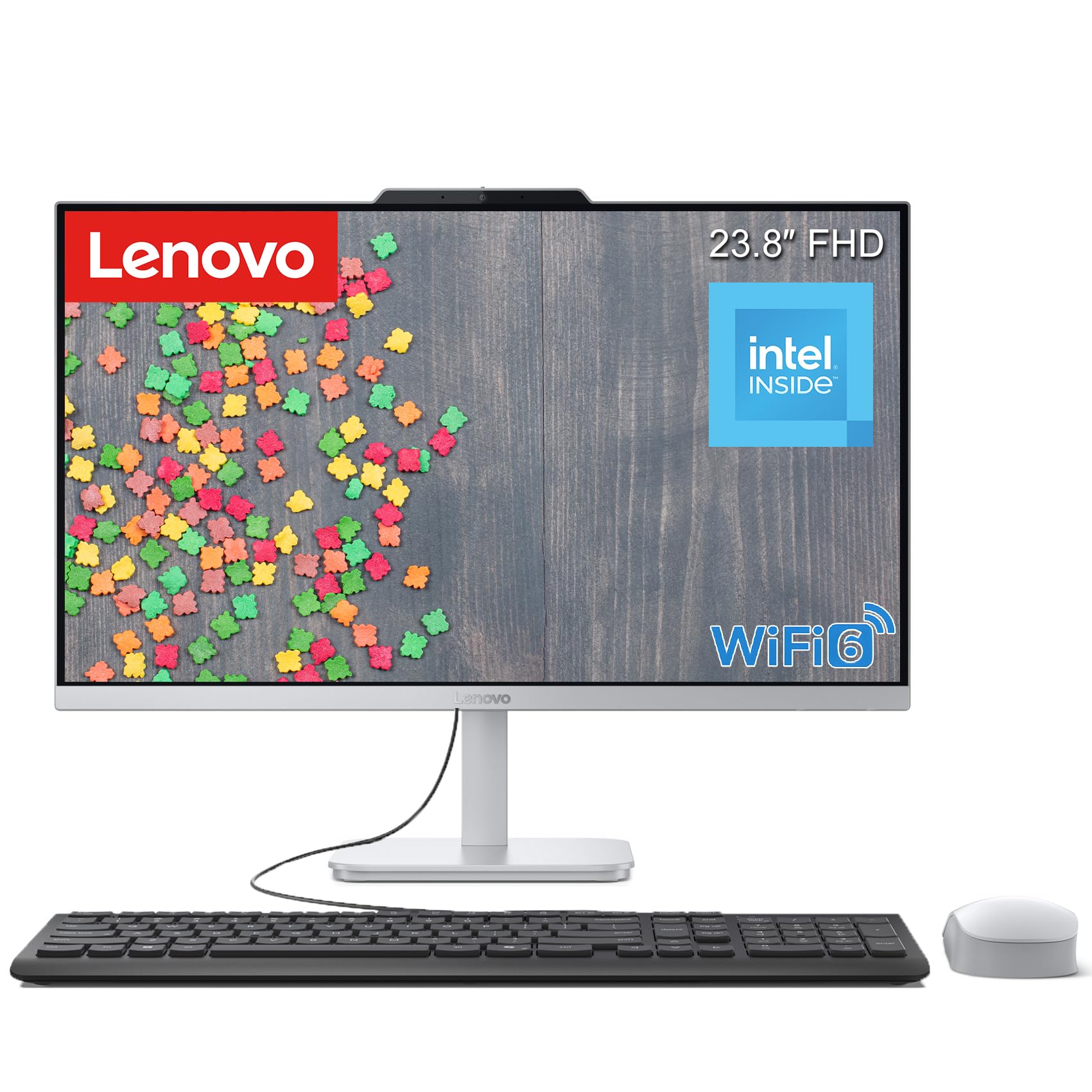
The Lenovo IdeaCentre 24 is a well-rounded mid-range AIO that gets the fundamentals right. The Intel Core i3-N305 processor, with 8 cores and speeds up to 3.8GHz, provides noticeably snappier performance than entry-level N-series chips for everyday tasks. The 16GB of DDR4 RAM and 512GB PCIe SSD ensure smooth multitasking, making this a great fit for students, remote workers, and home offices.
The 23.8-inch FHD IPS display with anti-glare coating and 99% sRGB coverage is bright and easy on the eyes during long work sessions. Users report that the system works well with dual monitor setups via the HDMI-out port. The built-in Wi-Fi 6 and Bluetooth 5.2 provide fast, stable wireless connections. The sleek snow white design with a tilt stand saves desk space and looks modern.
The camera quality is noted as being lower than dedicated Logitech webcams, and the included wired keyboard could be more premium. The integrated Intel UHD Graphics handle streaming and basic media tasks but are not suitable for gaming or graphics-heavy work. For a reliable, no-frills all-in-one that handles office work efficiently, the IdeaCentre 24 is a strong, dependable choice.
Why it’s great
- 8-core i3 processor outperforms N-series
- 16GB RAM for smooth multitasking
- Anti-glare IPS display with good color
- WiFi 6 and Bluetooth 5.2
Good to know
- Built-in camera is average quality
- Integrated graphics only
- Keyboard feels basic
9. Acer Aspire C24

The Acer Aspire C24 stands out in the mid-range category thanks to its 120Hz refresh rate display. This is a significant upgrade over the standard 60Hz panels found in most AIOs, making cursor movements, scrolling, and streaming video feel dramatically smoother and more responsive. The 23.8-inch FHD IPS panel also features Acer VisionCare technology for flickerless viewing and blue light reduction, enhancing comfort.
Under the hood, the AMD Ryzen 5 7430U hexa-core processor with AMD Radeon Graphics delivers excellent performance for a wide range of tasks, from office productivity to light creative work. The 16GB of DDR4 RAM and 512GB PCIe SSD provide ample capacity for common workloads. Connectivity is robust with Wi-Fi 6E, Bluetooth 5.2, multiple USB ports, and a USB-C port. The front I/O access is a thoughtful design touch for easy peripheral connection.
The Aspire C24 has received some criticism for its loud fan noise under load, which can be distracting in quiet environments. Some users have mitigated this by adjusting power settings to reduce fan activity. The 120Hz panel, while smooth, is not a standard feature at this price point, so make sure your work benefits from the higher refresh rate. Integrated Radeon Graphics are capable for non-gaming tasks, but this is not a gaming machine.
Why it’s great
- Exceptional 120Hz FHD IPS display
- Strong AMD Ryzen 5 hexa-core CPU
- 16GB RAM and 512GB SSD storage
- WiFi 6E and front I/O access
Good to know
- Fan can be loud under load
- No dedicated graphics for gaming
- 120Hz may not be noticeable by all users
10. Lenovo 24″ FHD All-in-One

Lenovo’s entry-level 24-inch AIO is a capable machine for basic computing needs. Powered by the Intel Processor N100, it handles web browsing, email, document editing, and video streaming without major issues. The 23.8-inch FHD IPS display is anti-glare, providing better viewing angles and color accuracy than a basic TN panel. The included wireless keyboard and mouse help maintain a clean desk setup.
With 8GB of DDR4 RAM and a 256GB PCIe SSD, this system is strictly for light workloads. It is well-suited for students, as a secondary family computer, or for a home office that only needs access to cloud-based applications. The connectivity is decent for the price, with Wi-Fi 6, Bluetooth 5.2, and a range of ports including HDMI-out and Ethernet.
The most common complaint across multiple units is keyboard mapping issues, where certain keys like the “@” symbol do not match their printed labels. This appears to be a batch-specific manufacturing defect. The 256GB SSD fills up quickly with modern applications and media. For a user who needs a very basic, space-saving machine for simple tasks and is comfortable with potential keyboard quirks, this is a budget-friendly option.
Why it’s great
- Good price for a 24-inch AIO package
- IPS display with anti-glare coating
- Wireless keyboard and mouse included
- Compact, space-saving design
Good to know
- 8GB RAM and 256GB SSD are limited
- Keyboard key mapping issues reported
- N100 processor is entry-level
11. HP 22-dg0340
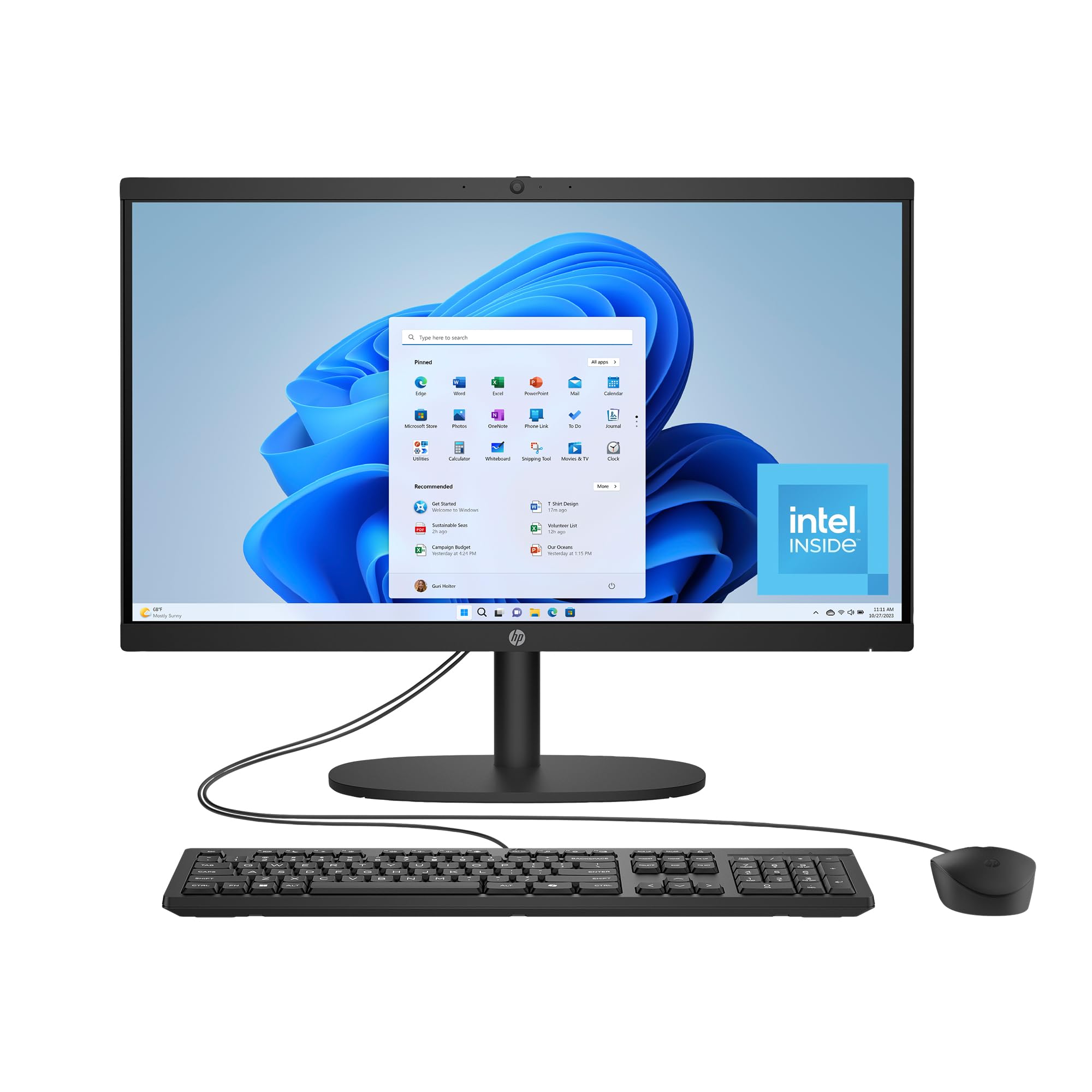
The HP 22-dg0340 is the most affordable AIO in this lineup, designed for users who just need a functional computer for the basics. The 21.45-inch FHD VA display is smaller than most, but its large screen-to-body ratio makes it feel modern. The Intel Processor N200 is a slight step up from the N100, handling light browsing, streaming, and document editing adequately.
HP has built this system with sustainability in mind, using post-consumer recycled and ocean-bound plastics. It is EPEAT Gold and ENERGY STAR certified. The system includes Wi-Fi 6 and Bluetooth 5.3 for modern wireless connectivity. A manual camera shutter protects your privacy, and the DC Dimming technology reduces flicker for comfortable viewing.
The primary trade-offs are performance and storage. 8GB of RAM is the minimum viable for Windows 11, and the 512GB SSD is acceptable but not generous. Some users have reported that the included mouse failed within weeks, and the system requires an HP software plan for support rather than standard hardware coverage. For a very price-sensitive buyer who needs a new computer for very light use, the HP 22-dg0340 is a functional choice.
Why it’s great
- Very accessible price point
- Eco-friendly construction materials
- Flicker-free display with DC dimming
- Privacy camera shutter included
Good to know
- 8GB RAM is minimal for multitasking
- Peripheral quality may be inconsistent
- VA panel not as color-rich as IPS
FAQ
Can I upgrade the RAM or storage in an All-in-One PC later?
Is an integrated GPU enough for photo or light video editing?
Why do some All-in-One PCs have loud fans?
Can I use an All-in-One as a second monitor for a laptop?
Final Thoughts: The Verdict
For most users, the all in one windows computer winner is the ASUS V470 because it combines a responsive 27-inch touchscreen, strong i5 performance, 16GB of DDR5 RAM, and a generous 1TB SSD at a compelling mid-range price. If you need raw CPU power for professional workloads, grab the Lenovo IdeaCentre 27 (i7/32GB). And for a premium powerhouse with dedicated graphics for creative tasks, nothing beats the Dell Inspiron 7730.