
Our readers keep the lights on and the weekend projects moving. As an Amazon Associate, I earn from qualifying purchases.
The 3D printing market is flooded with options, but finding a machine that delivers true speed, reliability, and print quality without demanding constant tinkering or a massive investment is a rare thing. Many so-called budget-friendly printers end up costing you more in time and frustration than they save, with failed prints, manual leveling headaches, and slow speeds that turn a weekend project into a week-long ordeal.
I’m Rikta — the co-founder and writer behind FitlyFast. My buying guides are built on deep market research and countless hours spent analyzing hardware specifications, real-world user feedback, and print quality samples to separate the hype from the genuinely capable machines in this space.
Whether you are a curious beginner or a seasoned maker looking for a reliable workhorse, this guide to the bang for your buck 3d printer will help you navigate the key specs, avoid common pitfalls, and find the perfect machine for your needs and skill level.
How To Choose The Best Bang For Your Buck 3D Printer
Finding the right 3D printer means matching the machine’s capabilities to your specific goals, whether that’s printing functional prototypes, detailed miniatures, or simple toys for the kids. The key is to prioritize features that directly impact your success rate and enjoyment, such as speed, ease of setup, and material compatibility.
Prioritize Auto Leveling and a Solid Build Plate
A printer with auto bed leveling (like the LeviQ 3.0 or a one-click system) eliminates the most frustrating manual step for beginners. Pair this with a flexible steel PEI build plate, which offers excellent adhesion during the print and pops off easily when bent—a huge upgrade over glass or tape-covered beds.
Speed and Structure: CoreXY vs. Bed-Slinger
CoreXY printers (like the Creality K1C or the ELEGOO Centauri Carbon) move the print head while the bed only moves on the Z-axis. This design allows for much higher print speeds (300–600 mm/s) and better print quality at those speeds compared to traditional bed-slingers. While entry-level bed-slingers are cheaper, the performance gap grows quickly as you push for faster prints.
Hotend Temperature and Material Versatility
A hotend that can reach 300°C or higher unlocks the ability to print advanced materials like polycarbonate (PC), nylon, and carbon fiber composites. If you only plan to print PLA and PETG, a standard 260°C hotend is sufficient. However, paying a little more for a 300°C+ hotend future-proofs your setup and lets you explore stronger, more durable filaments.
Build Volume: Bigger Isn’t Always Better
Think about what you actually want to make. The Bambu Lab A1 Mini’s 180x180x180mm build volume is perfect for small parts and miniatures and keeps the printer compact and affordable. In contrast, the Longer LK5 Pro offers a massive 300x300x400mm sculpting space that is ideal for helmets and cosplay props but takes up much more desk real estate. Choose the size that matches your typical projects.
Quick Comparison
On smaller screens, swipe sideways to see the full table.
| Model | Category | Best For | Key Spec | Amazon |
|---|---|---|---|---|
| Bambu Lab A1 Mini Combo | Multi-Color | Ease of Use & Multi-Color | Multi-color AMS Lite, 10k mm/s² accel | Amazon |
| Creality K1C | High-Speed | Carbon Fiber & Fast Prints | 600mm/s, 300°C nozzle, AI camera | Amazon |
| ELEGOO Centauri Carbon | Enclosed | Rugged Build & Advanced Materials | 500mm/s, die-cast frame, 320°C nozzle | Amazon |
| QIDI Q2 | Pro-Grade | Enclosed Pro-Level Printing | 65°C heated chamber, 370°C nozzle | Amazon |
| Anycubic Kobra X | Multi-Color | Versatile Multi-Color Printing | Up to 19-color, 600mm/s, AI camera | Amazon |
| Creality K2 SE | Beginner | Fast Beginner CoreXY | 600mm/s, CoreXY, auto-leveling | Amazon |
| FLASHFORGE Adventurer 5M | Fast Starter | Beginner Speed & Simplicity | 600mm/s, 1-click leveling, 280°C nozzle | Amazon |
| Longer LK5 Pro 3 | Large Volume | Large-Scale Models | 11.8×11.8×15.7in build volume | Amazon |
| Entina Tina2 Plus | Kid-Friendly | Kids & Total Beginners | 250mm/s, fully assembled, PEI plate | Amazon |
In‑Depth Reviews
1. Bambu Lab A1 Mini Combo

The Bambu Lab A1 Mini Combo redefines what a value-oriented 3D printer can be, packing the company’s renowned plug-and-play experience and multi-color AMS Lite system into a compact, fast, and quiet package. Its full-auto calibration handles everything from bed leveling to flow rate compensation, meaning you spend your time designing and printing, not tweaking. The active motor noise cancellation keeps operation at or below 48 dB, making it a truly unobtrusive machine for a home office or a child’s room.
Print quality out of the box is exceptional, with the 10,000 mm/s² acceleration enabling rapid prints without sacrificing detail. The AMS Lite unlocks creative multi-color and multi-material prints, though users should be aware that multi-color printing generates more waste filament. The printer is best placed on a solid, stable surface to prevent any layer artifacts at its highest speeds, and the build volume is limited to 180x180x180mm, which may not suit larger projects.
Its intuitive touchscreen and seamless integration with Bambu Studio and the Bambu Handy app make it as beginner-friendly as it is powerful. For anyone seeking a machine that simply works and delivers stunning, reliable prints without the headache of manual calibration, the A1 Mini Combo is an unparalleled value proposition.
Why it’s great
- True plug-and-play with full-auto calibration
- Multi-color AMS Lite is game-changing for the size
- Exceptionally quiet operation (≤48 dB)
Good to know
- Small build volume limits large projects
- Multi-color printing creates excess filament waste
- Must be on a very stable, solid surface
2. Creality K1C

The Creality K1C is a significant upgrade from its predecessors, designed as a high-speed workhorse that can handle demanding materials like carbon fiber composites, PLA-CF, and PA-CF right out of the box. Its CoreXY structure delivers blistering 600 mm/s speeds with 20,000 mm/s² acceleration, while the tri-metal “Unicorn” nozzle and clog-free direct extruder ensure consistent extrusion even with abrasive filaments. The enclosed chamber and built-in air purification system make it suitable for printing with higher-temperature materials in a home environment.
The addition of an integrated AI camera is a major convenience, enabling real-time print monitoring, time-lapse capture, and early detection of print failures or foreign objects. The automatic calibration system handles bed leveling and vibration compensation, and a silent mode drops noise to 45 dB for less disruptive operation. Some users note that the software and slicer integration, particularly for multi-color setups, can be less polished than the hardware, occasionally requiring firmware troubleshooting.
Despite some software quirks, the K1C’s physical design, speed, and material versatility make it a top contender for makers who want to move beyond basic PLA and need a reliable, fast machine for functional, engineering-grade parts. It represents a strong value for those ready to explore advanced filaments.
Why it’s great
- Handles carbon fiber and high-temp filaments easily
- Blazing 600mm/s speed with excellent stability
- Built-in AI camera for remote monitoring
Good to know
- Software and slicer integration can be buggy
- Multi-color with CFS needs more refinement
- Silent mode is still audible during travel moves
3. ELEGOO Centauri Carbon

ELEGOO’s Centauri Carbon takes a premium approach to value, using a rigid, integrated die-cast aluminum frame that minimizes vibrations and ensures exceptional stability during high-speed prints. This robust foundation, combined with auto vibration compensation and pressure advance, allows the CoreXY system to hit 500 mm/s speeds while maintaining smooth first layers and consistent quality. The 320°C brass-hardened steel nozzle opens the door to carbon fiber and other advanced filaments without an immediate upgrade.
The user experience is also well-considered: the printer arrives fully assembled and pre-calibrated, ready to print within minutes. A built-in camera with dual LED lighting allows for real-time monitoring and time-lapse recordings. The dual-sided build plate features a PLA-specific surface that offers strong adhesion with minimal warping, even at lower bed temperatures. Some users have reported that the unit’s high-speed printing can cause noticeable desk shaking and that initial tech support for complex issues can be slow.
For its price, the Centauri Carbon delivers a combination of build quality, speed, and material capability that is hard to beat. It is an excellent choice for users who want a sturdy, enclosed printer that can grow with their skills from PLA basics to engineering-grade composites.
Why it’s great
- Rock-solid die-cast frame for stability
- 320°C hotend ready for advanced materials
- Fully assembled and pre-calibrated out of the box
Good to know
- Heavy unit can cause desk shaking at high speeds
- Tech support response can be slow for some issues
- Layer lines may require post-processing for smooth finish
4. QIDI Q2

The QIDI Q2 is a serious contender for users who need professional-grade features without a professional price tag. Its most distinctive feature is the second-generation PTC heated chamber, reaching 65°C to eliminate warping in ABS, polycarbonate, and nylon prints—a capability usually reserved for much more expensive machines. The full-metal CoreXY structure with precision linear rails and a 1.5GT synchronous belt minimizes vibration artifacts for ultra-smooth surface finishes, while the 370°C nozzle unlocks the widest range of advanced and composite materials in this lineup.
Setup is surprisingly quick for such a capable machine, with the nozzle acting as the leveling sensor for unmatched first-layer accuracy. The triple filtration system (G3 pre-filter, H12 HEPA, and activated carbon) makes printing with higher-temperature, odorous filaments safer for indoor use. The touchscreen is responsive, and the Klipper-based firmware is open for customization. The QIDI BOX accessory allows for up to 16-color multi-material printing with dry-while-print technology, further extending its versatility.
While some users have reported early firmware issues (including a partially unlocalized UI and network connectivity hiccups), the company’s customer service is widely praised for its responsiveness. For any maker serious about printing engineering-grade materials or wanting a heated chamber for warp-free ABS, the QIDI Q2 offers exceptional value that rivals machines costing significantly more.
Why it’s great
- 65°C heated chamber for warp-free ABS and nylon
- 370°C nozzle for exotic and composite filaments
- Excellent filtration system for safer indoor use
Good to know
- Early firmware had some UI and connectivity issues
- AI spaghetti detection can have false triggers
- Some users report a long pre-print preparation time
5. Anycubic Kobra X

The Anycubic Kobra X is an impressive entry into the mid-range, offering native 4-color printing with the ability to expand to a stunning 19 colors using multiple ACE 2 Pro units. The LeviQ 3.0 auto bed leveling system uses 49-point calibration to ensure a flawless first layer, a critical feature for beginners. The hardened steel nozzle and vibration compensation allow for 600 mm/s printing speeds, completing a Benchy in just 14 minutes without sacrificing quality.
Smart features add to its appeal: an AI camera offers spaghetti and foreign object detection, while dual-band Wi-Fi (2.4G/5G) and LAN connectivity allow for remote control and monitoring through the Anycubic app. The multi-material compatibility covers a wide range of filaments from flexible TPU to high-temp PVA. The intuitive setup and user-friendly software ecosystem make it a solid choice for families and educators, though some users have reported quality control issues with filament sensors on arrival.
For the price, the Kobra X delivers a remarkable set of features, particularly its multi-color capability. It is a strong pick for users who want to experiment with vibrant, multi-filament prints and need a machine that is both fast and forgiving for beginners.
Why it’s great
- Native 4-color printing with expansion to 19 colors
- 49-point auto leveling ensures perfect first layers
- Fast 600mm/s speed with good vibration compensation
Good to know
- Some reports of defective filament sensors out of the box
- Phone app interface could be more polished
- Multi-color printing purges a lot of filament
6. Creality K2 SE
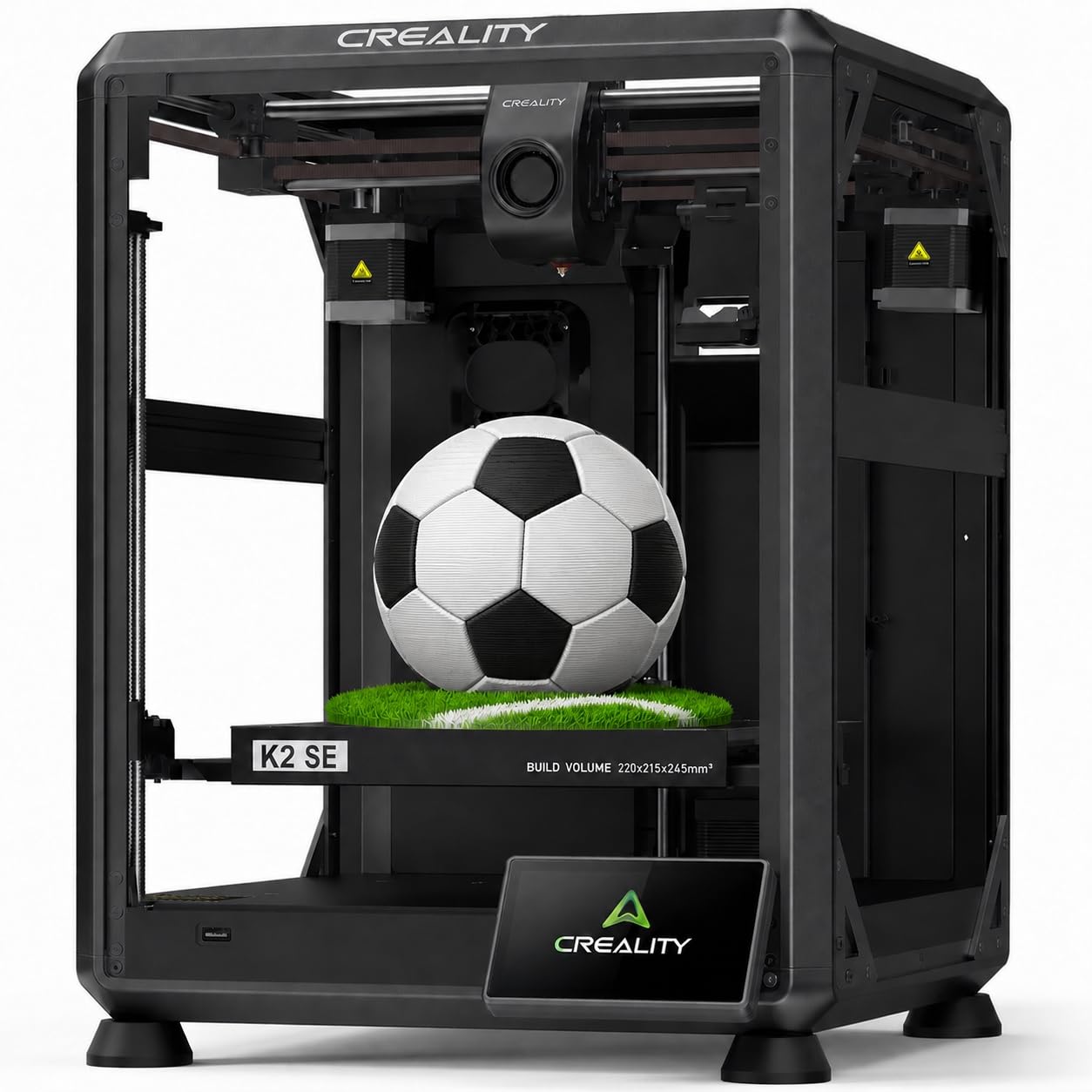
Creality brings its CoreXY speed to a more accessible price point with the K2 SE, delivering 600 mm/s travel speed and 20,000 mm/s² acceleration. The printer is designed for quick setup, coming pre-assembled and pre-tuned so you can go from unboxing to your first print in about three minutes. The auto-calibration handles bed leveling, and pre-installed damping pads help reduce vibration for more stable prints.
The tri-metal nozzle can reach 300°C and supports one-hand swaps, while the direct drive extruder with a ceramic heater handles PLA, PETG, TPU, and ABS without clogging issues. The build volume is a useful 220x215x245mm, offering more vertical space than many competitors. Users consistently praise the print quality and speed, though some note the need for a glue stick as a release agent for the build plate and suggest that using Creality’s slicer requires some learning to get the best settings.
Occasional quality control issues, such as dead touchscreens, have been reported, but the large after-sales engineering team and responsive customer service help mitigate these risks. The K2 SE is an excellent entry point for beginners who want CoreXY speed without spending more on a higher-tier model.
Why it’s great
- Fast CoreXY speed at an accessible price
- Pre-assembled and pre-tuned for quick start
- 300°C nozzle for flexible and high-temp filaments
Good to know
- Needs glue stick as a release agent
- Slicer software has a learning curve
- Some units have had touchscreen failures
7. FLASHFORGE Adventurer 5M

The FLASHFORGE Adventurer 5M is a refined high-speed printer that focuses on delivering excellent first-layer quality and consistent performance with minimal fuss. Its one-click full-auto leveling ensures a perfect first layer every time, a major relief for those tired of manual leveling. The CoreXY architecture provides up to 600 mm/s speed with a 20,000 mm/s² acceleration, and vibration compensation effectively eliminates ghosting for clean, sharp prints.
The 50W ceramic hotend heats up to 200°C in 35 seconds, and the high-flow 32mm³/s nozzle ensures consistent extrusion even at high speeds. A filament run-out sensor and power-loss recovery save long prints from unexpected interruptions. The open-frame design is suitable for well-ventilated areas and the flexible PEI steel plate offers excellent adhesion for PLA, PETG, and TPU. Some users have reported firmware freezes or early hardware failures, but FLASHFORGE’s tech support is noted as responsive.
For its price, the Adventurer 5M packs an impressive amount of speed and technology into a small footprint. It is a great choice for users who want a fast, reliable printer with excellent software support and an uncomplicated path to high-quality prints.
Why it’s great
- One-click leveling ensures perfect first layers
- Fast 600mm/s speed with excellent input shaping
- Compact footprint with plug-and-play setup
Good to know
- Some reports of firmware freezes
- Small build volume for the category
- No enclosure kit available for open design
8. Longer LK5 Pro 3

For users whose projects demand a large build volume—helmets, cosplay armor, or large prototypes—the Longer LK5 Pro 3 is a standout option with its massive 300x300x400mm print area. The stable triangular structure with reinforced inclined rods reduces error from resonance, and the upgraded 32-bit motherboard with TMC2209 drivers keeps operation ultra-quiet. The silicon carbide lattice glass platform ensures uniform bed temperature, strong adhesion, and prevents distortion in large prints.
This printer is designed with reliability features like filament depletion detection and auto-resume printing after a power outage, so you don’t lose hours of work on a long print. The fully open-source firmware and 90% pre-assembly make it appealing to both beginners and tinkerers who want to customize their machine. While the 180 mm/s print speed is slower than CoreXY competitors, it offers excellent 0.1mm precision for detailed work. The manual leveling system is a drawback for beginners and will require some patience to master.
The LK5 Pro 3 is not the fastest printer, but it offers unmatched build volume per dollar and strong reliability for large-scale, long-duration prints. It’s an ideal pick for makers who prioritize size over speed and want a quiet, upgradeable platform.
Why it’s great
- Massive 300x300x400mm build volume
- Ultra-quiet TMC2209 drivers
- Open-source firmware for tinkerers
Good to know
- Manual leveling is difficult for beginners
- 180mm/s speed is slower than CoreXY options
- All-metal frame, but a bed-slinger design has limits
9. Entina Tina2 Plus

The Entina Tina2 Plus is purpose-built for the youngest makers and absolute beginners, arriving fully assembled and ready to print in minutes. The 40-second ceramic hotend, auto-leveling, and dual Z-axis structure all work to minimize failures, making it a very forgiving first printer. The PEI spring steel build plate allows for easy print removal, and the partially enclosed frame adds a layer of safety for supervised use.
The printer uses the Poloprint Cloud app for WiFi connectivity, offering access to over 1,500 pre-loaded models and enabling simple mobile control. The compact 11.4 x 8.6 x 8.6-inch footprint fits easily on a desk or classroom shelf. However, users should be aware that the included filament sample is white and limited, and the mobile app’s library is relatively small. Some users have encountered WiFi registration issues that can be difficult to resolve without responsive customer support.
For its price, the Tina2 Plus offers the most friction-free introduction to 3D printing available. It is an ideal choice for parents wanting to introduce their children to STEM concepts without the frustration of assembly, calibration, and complex slicing software.
Why it’s great
- Fully assembled with zero setup required
- Fast 40-second ceramic hotend heating
- Compact and safe design for kids
Good to know
- WiFi app can have connectivity and support issues
- App library of models is relatively small
- Only includes a small amount of white filament
FAQ
What does bang for your buck mean when buying a 3D printer?
Is a multi-color 3D printer worth the extra cost?
Final Thoughts: The Verdict
For most users, the bang for your buck 3d printer winner is the Bambu Lab A1 Mini Combo because it delivers an unmatched combination of plug-and-play ease, multi-color capability, and exceptional print quality in a compact, quiet package. If you want an enclosed machine for advanced materials and carbon fiber, grab the Creality K1C. And for large-scale cosplay or prototype projects with a massive build volume, nothing beats the Longer LK5 Pro 3.