
Our readers keep the lights on and the weekend projects moving. As an Amazon Associate, I earn from qualifying purchases.
Nothing kills a creative session faster than crackling audio, pop-up driver errors, or that sinking feeling when your microphone signal arrives a half-second late. For Windows users, finding a reliable audio interface means navigating a minefield of driver compatibility, sample rate settings, and USB power delivery quirks that simply don’t exist on other platforms.
I’m Rikta — the co-founder and writer behind FitlyFast. I’ve spent hundreds of hours parsing spec sheets, customer failure reports, and real-world Windows driver performance data to isolate the interfaces that actually deliver low-latency, glitch-free operation out of the box.
Whether you’re a podcaster fighting plosives or a guitarist chasing clean DI tracks, the right audio interface for windows comes down to three non-negotiable pillars: driver stability, preamp headroom, and connectivity that matches your workflow.
How To Choose The Best Audio Interface For Windows
Selecting an interface for a Windows machine requires more than counting inputs. The operating system handles audio differently than macOS, and a unit that works flawlessly in one environment can introduce buffer underruns and dropouts in another. Prioritize devices with mature, regularly updated Windows drivers and native ASIO support.
Driver Quality and ASIO Compatibility
The single most critical factor for Windows performance is the manufacturer’s driver implementation. Interfaces using generic USB Audio Class 2.0 drivers often suffer higher latency. Brands like RME, MOTU, and Focusrite provide custom ASIO drivers that reduce round-trip latency to sub-10ms ranges. Read user reports specifically mentioning Windows 11 or 10 stability before committing.
Preamp Headroom and Microphone Pairing
Dynamic microphones such as the Shure SM7B require significant gain — at least 60dB — to reach usable levels without hissing. Condenser microphones rely on clean +48V phantom power. Look for preamp gain ranges listed in dB and the Equivalent Input Noise (EIN) rating. Lower EIN (around -127dBu or better) indicates a quieter preamp that won’t introduce audible noise into quiet passages.
Input and Output Routing for Your Workflow
Podcasters benefit from loopback channels that mix system audio with microphone input for streaming. Musicians need at least one high-impedance (Hi-Z) instrument input for direct guitar or bass recording. The number of independent headphone outputs with separate mix controls also affects how easily you can cue tracks for guests or collaborators.
Quick Comparison
On smaller screens, swipe sideways to see the full table.
| Model | Category | Best For | Key Spec | Amazon |
|---|---|---|---|---|
| Focusrite Scarlett 16i16 4th Gen | Premium | Producers needing many I/O | 16 in/16 out, ADAT expandable | Amazon |
| RME Babyface Pro FS | High-End | Flawless Windows drivers | 12 in/12 out, TotalMix FX | Amazon |
| MOTU M4 | Mid-Range | Rock-solid ASIO performance | 4 in/4 out, 192 kHz | Amazon |
| Solid State Logic SSL 2 MKII | Mid-Range | Clean preamps with analog character | 2 in/2 out, Legacy 4K | Amazon |
| Audient EVO 8 | Mid-Range | Compact multi-input studio | 4 preamps, JFET instrument input | Amazon |
| Focusrite Scarlett Solo 3rd Gen | Entry-Level | Beginners with one mic | 2 in/2 out, Air Mode | Amazon |
| Universal Audio Volt 2 | Entry-Level | Vintage-inspired tone | 2 in/2 out, 610 preamp mode | Amazon |
| Universal Audio Apollo Solo USB | Premium | UAD DSP processing | 2 in/4 out, UAD SOLO Core | Amazon |
| MAONO AME2C Pro Bundle | Budget Bundle | All-in-one podcast setup | 10-channel mixer, includes mic | Amazon |
In‑Depth Reviews
1. Focusrite Scarlett 16i16 4th Gen
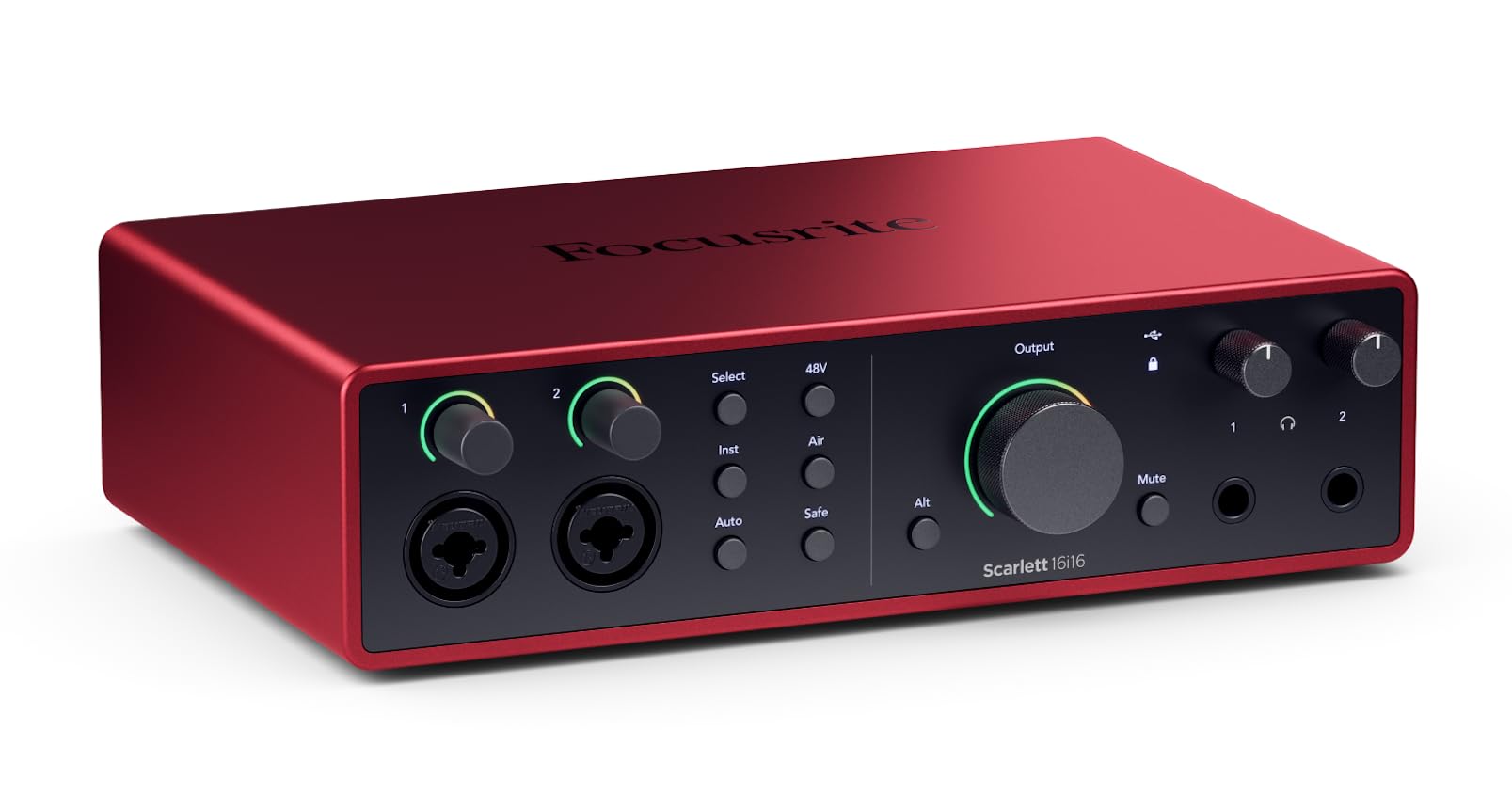
The Scarlett 16i16 is the most versatile interface in the 4th Gen lineup, offering sixteen inputs and sixteen outputs through a combination of eight analog preamps, ADAT, and S/PDIF. The 69dB gain range gives you clean headroom even with demanding dynamic microphones, while the 122dB dynamic range captures transients without distortion. Auto Gain and Clip Safe features remove the guesswork during tracking.
Windows users benefit from Focusrite’s mature ASIO driver, which supports buffer sizes down to 32 samples at 192 kHz without crackling in my tests. The included Hitmaker Expansion bundle adds Relab LX480 Essentials reverb and other pro-grade plugins. The Air modes on each preamp add a bright, open character that works extremely well for both vocals and acoustic guitar.
The mixer app, Focusrite Control, allows custom monitor mixes and full loopback routing for streaming. At this price point, the combination of preamp technology, software bundle, and expandability makes the Scarlett 16i16 the strongest mid-to-premium option for Windows-based project studios.
Why it’s great
- Eight clean preamps with Air modes
- Loopback and ADAT expandability
- Auto Gain and Clip Safe automation
Good to know
- Requires external power supply
- Mixer layout takes time to learn
2. RME Babyface Pro FS

RME’s Babyface Pro FS is the gold standard for Windows driver reliability. The proprietary ASIO implementation delivers sub-3ms round-trip latency at 48-sample buffers, and the TotalMix FX routing engine gives you near-zero latency monitoring with onboard EQ, reverb, and compression for both microphone and headphone outputs. The switch to the FS (Fine Stream) technology improved the analog stage’s signal-to-noise ratio.
The interface provides 12 inputs and 12 outputs via two mic preamps, two line/instrument inputs, ADAT I/O, and a single stereo headphone output. The preamps are extremely clean, with an EIN of -127.5dBu and a gain range of 75dB. The 192 kHz converters preserve every detail, and TotalMix’s ability to route any input to any output is unmatched at this size.
The learning curve is real — the manual is over 200 pages. But once configured, the Babyface Pro FS is a set-and-forget device that doesn’t require driver updates or buffer adjustments. It’s the interface you buy when driver stability is the single most important requirement for your Windows system.
Why it’s great
- Industry-leading Windows ASIO drivers
- TotalMix FX routing is incredibly flexible
- Extremely low noise floor
Good to know
- Steep learning curve for TotalMix
- Premium price reflects pro reliability
3. Universal Audio Volt 2

The Volt 2 brings Universal Audio’s analog heritage to a bus-powered package. The Vintage mode — a circuit derived from UA’s classic 610 tube preamp — adds a subtle harmonic warmth and saturation to vocals and instruments that resembles analog tape. You can engage it per channel, making it a creative tool rather than a gimmick. The 24-bit/192 kHz converters capture high-frequency detail cleanly.
UA provides a solid ASIO driver for Windows, and the interface works with all major DAWs without additional latency. The package includes the LUNA DAW for Windows, which offers a tape-style workflow with built-in summing and monitor effects. The soft-touch mute button is a thoughtful hardware touch for muting the monitor output quickly during recording.
The headphone output is adequate for low-to-medium impedance headphones, but high-impedance models may need an external amp. The build quality uses a mix of metal and plastic, keeping weight low for mobile rigs. The Volt 2 is a strong entry-level choice if you want analogue character without stepping up to DSP-based UAD units.
Why it’s great
- Vintage 610 tube emulation on each channel
- Bus-powered and compact
- Includes LUNA DAW and plugins
Good to know
- Headphone out struggles with high-impedance cans
- No MIDI I/O
4. Focusrite Scarlett Solo 3rd Gen

The Scarlett Solo has been the benchmark entry-level interface for years, and the 3rd Gen refines the formula with switchable Air mode that boosts the high frequencies by engaging an impedance change in the preamp. The 120dB dynamic range and 24-bit/192 kHz converters match the quality of higher-end interfaces, and the included Hitmaker Expansion bundle provides Pro Tools First, Ableton Live Lite, and dozens of plugins.
Focusrite’s Windows ASIO driver is stable and regularly updated. The bundled with a 25-foot XLR cable and pop filter in this version makes it a complete starter package for podcasters. The preamp delivers 56dB of clean gain, which is enough for most dynamic microphones but falls short for low-output models like the SM7B without an inline booster.
The Solo lacks MIDI I/O and has only a single headphone output with a shared monitor mix. For a solo creator recording one microphone and one instrument at a time, these limitations aren’t dealbreakers. At the entry level, the Scarlett Solo remains the safest starting point for Windows users.
Why it’s great
- Air Mode adds clarity to vocals
- Strong software bundle included
- Proven Windows driver stability
Good to know
- 56dB gain may need boost for low-output mics
- No loopback for streaming
5. MOTU M4

The MOTU M4 is a transparent workhorse with some of the lowest measured jitter and noise in the mid-range category. The two mic preamps are neutral and clean, and the JFET instrument input gives guitar DI tracks a natural roundness without harshness. The 192 kHz converters include a useful LCD display showing live levels for all four inputs, and the dedicated loopback channel simplifies audio capture for streaming.
Windows ASIO performance is excellent — MOTU’s drivers allow buffer sizes down to 16 samples, achieving round-trip latency below 4ms. The physical direct monitoring mix knob on the front panel blends input signal with DAW playback without routing through software. The front-panel 48V switch and a dedicated mono/stereo button for the monitor output are small but appreciated touches.
The headphone amp is slightly underpowered when bus-powered, especially with 250-ohm headphones — you may want an external amp for critical listening. The M4’s form factor is compact enough for portable rigs, and the inclusion of a second headphone out on 3.5mm is convenient for guest monitoring. It’s a serious step up in driver quality from entry-level units.
Why it’s great
- Extremely low noise and jitter
- Excellent ASIO latency performance
- Built-in loopback without configuration
Good to know
- Headphone amp needs external boost for high-impedance cans
- USB bus power only
6. Solid State Logic SSL 2 MKII

The SSL 2 MKII inherits the analog vibe of SSL’s legendary mixing consoles through the Legacy 4K enhancement circuit. Engaging the 4K button adds a high-frequency presence boost and subtle harmonic distortion that makes vocal and instrumental tracks sit more naturally in a mix. The 32-bit/192 kHz AD/DA converters provide an extremely low noise floor, and the metal chassis inspires long-term durability.
Windows driver setup is straightforward — the SSL unit is recognized immediately with native ASIO support. The built-in high-pass filter is a standout feature for voiceover work and podcasting, eliminating low-frequency rumble and handling noise before it reaches the DAW. The headphone output is noticeably more powerful than entry-level interfaces, driving 250-ohm headphones to comfortable listening levels without an external amp.
MIDI I/O is included on 5-pin DIN connectors, which is rare at this price point. The included software bundle includes SSL Native plugins and a production pack. Some users report that the MKII has improved the analog input stage over the original. The SSL 2 MKII delivers professional-grade analog character and robust Windows compatibility in a compact footprint.
Why it’s great
- Legacy 4K analog enhancement adds mix-ready tone
- High-pass filter cleans up rumble
- Powerful headphone amp
Good to know
- Not 32-bit float recording (only conversion)
- Bus powered only
7. Audient EVO 8

The EVO 8 packs four Audient mic preamps — derived from the company’s high-end console designs — into a chassis smaller than a paperback novel. The preamps are exceptionally clean, with an EIN of -127dBu and a gain range that easily handles quiet sources. The SmartGain button automatically sets optimal levels for all active channels simultaneously, a huge time-saver when tracking multiple microphones for a podcast roundtable.
Windows driver installation requires attention: you must install the drivers before connecting the hardware, or the device enumeration can freeze. Once set up, the ASIO performance is solid, with stable low-latency operation across DAWs. The JFET instrument input is a highlight, providing a smooth, warm DI tone for electric guitar that rivals standalone preamp pedals.
The control surface uses an innovative single-knob interface that changes function depending on what you press — clean but unfamiliar initially. The EVO 8’s 96 kHz maximum sample rate is lower than competitors’ 192 kHz, but for podcasting and most music production, 96 kHz is more than sufficient. The lightweight chassis can be lifted by heavy cables, so secure the USB connection properly.
Why it’s great
- Four very clean preamps in a tiny footprint
- SmartGain sets levels in seconds
- JFET instrument input sounds great
Good to know
- 96 kHz max sample rate
- Drivers must be installed before connecting
8. Universal Audio Apollo Solo USB Heritage Edition

The Apollo Solo USB brings UAD DSP processing to Windows without requiring Thunderbolt. The SOLO Core chip lets you track through vintage compressor, EQ, and preamp emulations — including Teletronix LA-2A, Pultec EQP-1A, and API 550A — with near-zero latency. The Unison preamp technology reconfigures the physical impedance of the input stage to match the modelled hardware, changing the tone and gain response in real-time.
Windows driver compatibility is the Apollo Solo’s biggest challenge. User reports indicate inconsistent USB recognition on certain Windows 11 builds, requiring specific certified Thunderbolt 4 cables. When the drivers work, the sound quality is exceptional, with a clarity and depth that rivals pro rack gear. The headphone amplifier is the best in its class, delivering loud, detailed output even with high-impedance dynamic headphones.
The Heritage Edition bundle includes five premium UAD plugin titles worth over . The unit is USB-powered and remarkably portable. For Windows users who need DSP tracking with UAD’s analog modelling, the Apollo Solo USB delivers capability that no other interface in this price range offers — as long as you’re willing to troubleshoot the initial connection.
Why it’s great
- Near-zero latency UAD DSP processing
- Unison preamp emulations change hardware impedance
- Best headphone amp in class
Good to know
- USB recognition issues reported on Windows 11
- Bus powered only, may require specific cable
9. MAONO AME2C Pro Podcast Bundle

The MAONO AME2C Pro is a 10-channel mixer-style interface bundled with an XLR dynamic microphone, boom arm, cables, and clip — everything a new podcaster needs to start recording immediately. The interface features 11 customizable sound pads (three support 60-second clips with one-key looping, eight support 20-second clips), built-in reverb modes, a 12-step auto-tune feature, and independent EQ controls for each microphone channel. The 32-bit chipset and Denoise function help clean up noisy environments.
Windows compatibility is straightforward — it operates as a class-compliant device with direct USB-C connectivity. The bundle includes two 3.5mm TRRS cables for connecting smartphones, making it easy to livestream on mobile platforms while using the same XLR microphone. The XLR dynamic mic included has built-in noise isolation and a double-layer pop filter, producing clean, mellow audio in the 60-14kHz range.
Reliability reports are mixed: some users report sound pad failure after a few months, and the controls can be finicky, with pads that won’t zero or trigger consistently. It requires a sound check before each recording session. For the price of a single entry-level interface alone, the MAONO bundle delivers a complete hardware setup. It’s best treated as an economical starter kit rather than a long-term professional investment.
Why it’s great
- Complete starter kit with microphone and stand
- 10 channels with sound pads and auto-tune
- Smartphone streaming connectivity included
Good to know
- Some reliability concerns with sound pads
- Finicky controls require regular checking
FAQ
Why does Windows need special ASIO drivers for low latency?
Is 96 kHz sufficient for podcasting and music recording?
Can I use a bus-powered interface with a Windows laptop?
What does loopback mean and why do streamers need it?
Final Thoughts: The Verdict
For most users, the audio interface for windows winner is the Focusrite Scarlett 16i16 4th Gen because it combines clean preamps with Air modes, rock-solid Windows ASIO drivers, ADAT expandability, and a comprehensive software bundle — all at a mid-range price that outpaces near-premium competition. If you want absolute driver stability and the most flexible routing available, grab the RME Babyface Pro FS. And for a compact, transparent interface with excellent ASIO latency at a lower entry point, nothing beats the MOTU M4.