
Our readers keep the lights on and the weekend projects moving. As an Amazon Associate, I earn from qualifying purchases.
The 13-inch tablet segment is the most versatile screen size category on the market — large enough to replace a laptop for drafting documents, annotating PDFs, or watching cinema-quality content, yet portable enough to carry through an airport without checking a bag. This guide breaks down the eleven most compelling options across Android and Apple ecosystems, from pure creative powerhouses to productivity-first hybrids, so you match the hardware to your actual daily workflow.
I’m Rikta — the co-founder and writer behind FitlyFast. I’ve spent hundreds of hours analyzing tablet specifications, reading through thousands of verified buyer reports, and mapping processor benchmarks, display color gamuts, battery capacities, and real-world stylus performance to build this focused comparison of the best 13 inch tablet options available today.
Screen resolution, processor architecture, operating system, stylus pressure sensitivity, and connectivity are the five specs that define whether a large tablet serves you for years or frustrates you within weeks.
How To Choose The Best 13 Inch Tablet
The 13-inch tablet market is split into three broad camps: pure productivity machines running Windows or iPadOS, Android-based creative tablets with advanced stylus support, and general-purpose media consumption devices. Your use case — whether you need a laptop replacement, a standalone drawing studio, or a large-screen extension of your phone — should dictate where you start shopping.
Operating System Ecosystem Lock-In
iOS and iPadOS offer the most refined app ecosystem for creative professionals, with applications like ProCreate and Clip Studio Paint optimized for the platform. Android 14 and 15 tablets, particularly those from Samsung and XP-Pen, give you more storage flexibility through microSD expansion and often bundle productivity accessories. Windows tablets like the Microsoft Surface Pro run full desktop applications natively but require more careful attention to ARM processor compatibility for legacy software.
Stylus Pressure Sensitivity and Battery-Free Design
For digital artists, pressure sensitivity measured in levels (8192 is the current standard, with 16384 now available on the XP-Pen Magic Drawing Pad) determines how naturally the pen responds to varying pressure. Battery-free styluses — common on Wacom and XP-Pen devices — eliminate the annoyance of charging the pen and offer more consistent tracking. Apple Pencil Pro and the Samsung S Pen both require pairing and charging but integrate seamlessly with their respective operating systems.
Display Resolution, Refresh Rate, and Color Accuracy
Resolution directly impacts how much content fits on screen without scrolling — 2K and 3K panels on 13-inch tablets offer significantly more workspace than standard 1920×1200 displays. A 120Hz or higher refresh rate makes scrolling and pen input feel fluid. For photo and video editors, color gamut coverage measured in sRGB or DCI-P3 percentages ensures on-screen colors match final output. OLED panels deliver true blacks and infinite contrast, while LCD panels offer longer battery life at a lower cost.
Quick Comparison
On smaller screens, swipe sideways to see the full table.
| Model | Category | Best For | Key Spec | Amazon |
|---|---|---|---|---|
| Apple iPad Pro 13-inch (M5) | Premium | Pro creative workflows | Ultra Retina XDR display, M5 chip | Amazon |
| Microsoft Surface Pro 13 (2024) | Premium | Full desktop replacement | 13″ OLED, Snapdragon X Elite | Amazon |
| Samsung Galaxy Tab S11 Ultra | Premium | Media & multitasking | 14.6″ AMOLED 2X, 11600mAh | Amazon |
| Samsung Galaxy Tab S10+ Plus | Mid-Range | AI-powered note-taking | 12.4″ AMOLED 2X, Galaxy AI | Amazon |
| Wacom MovinkPad Pro 14 | Premium | Professional digital art | 14″ OLED 3K, 8192 pen levels | Amazon |
| Apple iPad Air 13-inch (M3) | Mid-Range | Balanced performance | 13″ Liquid Retina, M3 chip | Amazon |
| XP-Pen Magic Drawing Pad | Mid-Range | Dedicated drawing tablet | 12.2″ 2K, 16384 pressure levels | Amazon |
| Apple iPad Pro 12.9 (2020) Renewed | Value | Budget Apple ecosystem entry | 12.9″ Liquid Retina, A12Z | Amazon |
| Lenovo Idea Tab Pro | Mid-Range | Student productivity | 12.7″ 3K LCD, Dimensity 8300 | Amazon |
| TABWEE 13.4″ Android 16 Tablet | Value | Budget bundle with accessories | 13.4″ 2K 120Hz, 10000mAh | Amazon |
| Wacom Cintiq 24 | Premium | Professional studio workstation | 23.8″ 2.5K, 8192 pen levels | Amazon |
In‑Depth Reviews
1. Apple iPad Pro 13-inch (M5)

The 2025 iPad Pro with the M5 chip is the most capable tablet Apple has ever built. The 13-inch Ultra Retina XDR display delivers extreme brightness, precise contrast, and 120Hz ProMotion, making it ideal for HDR video editing, color-critical design work, and high-refresh-rate gaming. The M5 chip includes Neural Accelerators for on-device AI tasks, and the device is remarkably thin and light at just over a pound.
Buyer feedback consistently praises the screen quality as the standout feature — reviewers compare the experience favorably against 15-inch MacBook Air displays and note that the four-speaker audio system outperforms many laptops. The 256GB base configuration is sufficient for most professionals, though the premium for the 1TB model with nanotexture glass may be excessive for many users.
Battery life comfortably exceeds two days of mixed use, and the 35W charger brings the battery from 50% to 80% in under an hour. The iPad Pro is a premium investment that delivers a laptop-grade experience in a tablet form factor, best suited for creative professionals and power users who demand the best screen and performance available.
Why it’s great
- Best-in-class Ultra Retina XDR display with ProMotion
- M5 chip delivers desktop-level performance and AI capabilities
- Remarkably thin and lightweight for a 13-inch device
Good to know
- Premium price point, especially for higher storage tiers
- One-handed use can be fatiguing due to size
2. Microsoft Surface Pro 13 (2024)

The Microsoft Surface Pro is a Windows 11 Copilot+ PC that functions as both a laptop and a tablet. The 13-inch OLED touchscreen display offers a 1M:1 contrast ratio, delivering vibrant colors and deep blacks that make photo editing and video consumption a pleasure. The Snapdragon X Elite processor with 12 cores and a powerful NPU provides desktop-class performance, and the 16GB of RAM ensures smooth multitasking across demanding applications.
Buyers note that the device requires compatible ARM64 software, as legacy x86 and x64 applications may not run. However, major productivity suites from Microsoft, Google, and most VPN providers work flawlessly. The detachable Surface Pro Flex Keyboard, sold separately, transforms the tablet into a genuine laptop replacement with a comfortable typing experience and a trackpad.
The 14-hour battery life is a significant upgrade over previous Surface models, and the 65W power supply via Surface Connect or USB-C enables fast charging. The device is an excellent choice for professionals, developers, and students who need a full desktop operating system in a portable form factor.
Why it’s great
- Full Windows 11 operating system with Copilot+ AI features
- Stunning OLED display with excellent contrast ratio
- 14-hour battery life with fast charging
Good to know
- Requires ARM64-compatible software; legacy apps may not work
- Keyboard is sold separately, adding to the overall cost
3. Samsung Galaxy Tab S11 Ultra
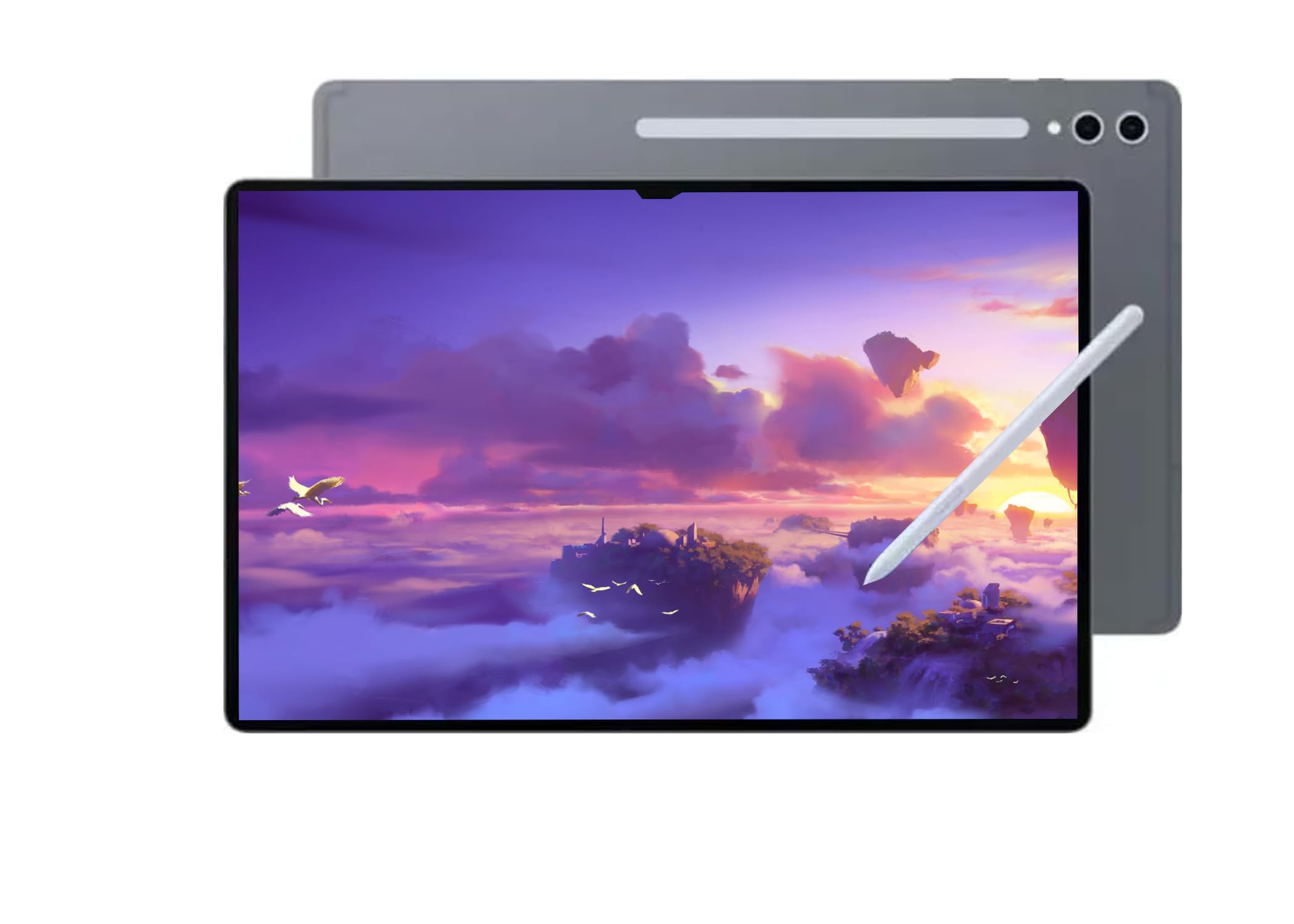
The Samsung Galaxy Tab S11 Ultra pushes the boundary of what a tablet can be with its massive 14.6-inch Dynamic AMOLED 2X display featuring a 120Hz anti-reflective panel. The 2960×1848 resolution provides a WQXGA+ canvas that rivals desktop monitors for productivity and entertainment. Powered by the MediaTek Dimensity 9400+ processor and paired with 12GB of RAM and 256GB of storage, this tablet handles multitasking, gaming, and creative work with ease.
Buyer feedback highlights the ultra-large screen as the defining feature, often described as a portable small TV for media consumption. The 11600mAh battery delivers up to 16 hours of video playback, making it one of the longest-lasting tablets in this category. The included S Pen is pressure-sensitive and integrates with Samsung Notes for seamless note-taking.
Buyers should note that this model is Wi-Fi only and does not support cellular calls or data. Additionally, some units may be intended for markets outside the US, potentially affecting warranty coverage. For those seeking a screen-first media tablet with stylus support, the S11 Ultra is an excellent choice.
Why it’s great
- Largest display in the category at 14.6 inches with AMOLED
- Exceptional 16-hour battery life
- Powerful MediaTek Dimensity 9400+ processor
Good to know
- Wi-Fi only; no cellular connectivity
- Warranty may not be valid in all regions
4. Samsung Galaxy Tab S10+ Plus

The Samsung Galaxy Tab S10+ Plus delivers a premium AMOLED 2X display at a more accessible price point than the S11 Ultra. The 12.4-inch screen provides vibrant colors and deep blacks, and the tablet is powered by the MediaTek Dimensity 9300+ processor, a powerful chip that handles intensive multitasking and gaming. The included S Pen is pressure-sensitive and integrates deeply with the Samsung Notes app for note-taking and drawing.
Buyers consistently praise the Galaxy AI features, particularly Sketch to Image for turning simple sketches into artwork, Circle to Search for instant visual lookups, and Note Assist for summarizing lectures and meetings. The 10090mAh battery delivers 8-10 hours of continuous use, and the slim, portable design makes it easy to carry for students and professionals.
The 512GB of internal storage provides ample space for apps, media, and documents, and the tablet can function as a second screen for a Samsung laptop. It is an excellent mid-range option that balances display quality, performance, and innovative AI features.
Why it’s great
- Vibrant AMOLED 2X display at a mid-range price
- Useful Galaxy AI tools for note-taking and search
- Included S Pen with low latency
Good to know
- Battery life around 8-10 hours under heavy use
- Premium price still represents a significant investment
5. Wacom MovinkPad Pro 14

The Wacom MovinkPad Pro 14 is a standalone Android drawing tablet designed for professional artists who want a distraction-free digital studio. The 14-inch OLED display delivers 3K resolution, 100% sRGB and DCI-P3 color gamut coverage, and true blacks that are critical for color-critical illustration work. The battery-free Pro Pen 3 offers 8,192 pressure levels and tilt support, providing a natural pen-on-paper feel without the need to charge the stylus.
Buyers overwhelming praise the pen performance, often stating it outperforms the Apple Pencil in responsiveness and comfort. The Snapdragon 8s Gen 3 processor with 12GB of RAM handles memory-intensive apps like Clip Studio Paint and Infinite Painter without freezing. The 256GB of internal storage is expandable via microSD, providing ample space for large project files.
The matte, anti-glare glass minimizes reflections and provides a pleasant paper-like texture for drawing. The 8-hour battery life supports long creative sessions, and the device is lightweight enough for couch or travel use. It is the best choice for independent artists who prioritize drawing quality above all else.
Why it’s great
- Best-in-class 3K OLED display for color-accurate artwork
- Battery-free Pro Pen 3 with 8,192 pressure levels
- Dedicated Android OS for focused creative work
Good to know
- Processor can struggle with heavy brush effects
- Charging speed is slower than some competitors
6. Apple iPad Air 13-inch (M3) Renewed

The Apple iPad Air 13-inch with the M3 chip offers a strong balance of performance and value. The 2048×2732 Liquid Retina display with 600 nits brightness is crisp and bright, suitable for reading, media, and productivity. The M3 processor, paired with 8GB of RAM, delivers fast and responsive performance for multitasking and creative work, making it a solid choice for students and professionals who need Apple ecosystem integration without the Pro price tag.
Buyers consistently report receiving units in near-perfect condition, often indistinguishable from new, with significant savings over retail. The 128GB base storage is adequate for most users, and the device supports the latest Apple Pencil Pro and Magic Keyboard for expanded capabilities. The 12MP rear camera supports 4K video, and the 12MP ultrawide front camera with Center Stage is excellent for video calls.
The lightweight aluminum design weighs around 617g, making it comfortable for extended handheld use. Battery life typically reaches the advertised 10 hours. It is the ideal entry point for users who want a large-screen iPad but do not require the extreme performance of the M5 iPad Pro.
Why it’s great
- Excellent price-to-performance ratio in the Apple lineup
- M3 chip provides fast, responsive performance
- Lightweight and comfortable for handheld use
Good to know
- Liquid Retina display lacks ProMotion and extreme brightness of the Pro model
- Base 128GB storage may fill quickly for heavy media users
7. XP-Pen Magic Drawing Pad

The XP-Pen Magic Drawing Pad is a standalone Android 14 drawing tablet designed for artists who want a dedicated creative tool without the premium of an iPad Pro. The 12.2-inch screen features AG-etched glass that provides a paper-like texture, and the 2160×1440 resolution with 115% sRGB color gamut delivers vibrant, accurate colors. The standout feature is the X3 Pro Slim stylus with 16,384 pressure levels — double the industry standard — and 60-degree tilt recognition, offering unprecedented precision for digital art.
Buyers compare the drawing experience favorably to the iPad Pro, noting that the textured, oil-resistant screen feels more natural than the glass of Apple displays. The stylus never needs charging and stores securely in the included case. The 8GB of RAM and 256GB of internal storage, expandable via microSD, handle high-resolution files in Clip Studio Paint and other Android art apps smoothly.
The 8000mAh battery provides 13 hours of continuous creation, and the lightweight 599g design makes it highly portable. While the Android app ecosystem lacks ProCreate, alternatives like Concepts, Sketchbook, and Infinite Painter deliver excellent results. It is a compelling choice for artists on a budget.
Why it’s great
- Industry-leading 16,384 pressure levels on the stylus
- Paper-like AG-etched screen that reduces glare
- Excellent value compared to iPad Pro for drawing
Good to know
- Android art app ecosystem is more limited than iPadOS
- Android version is not upgradeable
8. Apple iPad Pro 12.9 (2020) Renewed

The 2020 iPad Pro 12.9-inch, now available as a renewed device, offers a way to enter the large-screen Apple ecosystem at a significantly reduced cost. It features the edge-to-edge Liquid Retina display with ProMotion (120Hz), True Tone, and P3 wide color, which still holds up well against modern tablets. The A12Z Bionic chip, while several generations old, remains capable for everyday tasks, note-taking, and media consumption.
Buyers report that the renewed units often arrive in near-perfect condition with minimal cosmetic wear. The 12MP wide and 10MP ultra-wide rear cameras, along with the LiDAR scanner, enable augmented reality experiences and advanced photo capabilities. The 256GB storage configuration provides ample space for apps and media.
Potential buyers should be aware that battery health on a renewed device may be around 80%, and the A12Z chip will not match the performance of current-generation processors for demanding creative work. However, for users primarily using the tablet for browsing, email, streaming, and light productivity, this represents the most affordable path to a premium large-screen iPad.
Why it’s great
- Most affordable entry to the large-screen iPad Pro ecosystem
- 120Hz ProMotion display remains excellent
- Includes LiDAR scanner and dual cameras
Good to know
- Battery health may be degraded on renewed units
- A12Z chip is several generations behind current models
9. Lenovo Idea Tab Pro

The Lenovo Idea Tab Pro is a well-rounded Android tablet aimed at students and casual users. The 12.7-inch 3K LCD display with a 90Hz refresh rate provides sharp, clear visuals for reading, streaming, and note-taking. The MediaTek Dimensity 8300 processor delivers solid performance for multitasking, and the 8GB of RAM ensures smooth operation across productivity apps and light gaming.
Buyers praise the 11-hour battery life as sufficient for a full day of classes, and the included Tab Pen Plus is responsive for annotations and note-taking. Google Gemini AI integration provides Circle to Search and other smart features. The quad JBL speakers with Dolby Atmos provide clear audio for lectures and entertainment.
Some users note that the tablet requires a specific 45W PD charger for optimal charging speeds, and the device lacks GPS, relying on network location. The LCD panel is not as vibrant as OLED alternatives. It is a strong value proposition for students who need a large screen, pen support, and long battery life without a premium price.
Why it’s great
- Sharp 3K display and long 11-hour battery life
- Included pen for note-taking and annotations
- Excellent performance for the mid-range price point
Good to know
- Requires a specific 45W PD charger for fast charging
- No built-in GPS; relies on network location
10. TABWEE 13.4″ Android 16 Tablet

The TABWEE 13.4-inch Android 16 Tablet is an entry-level device that comes as a complete bundle including a keyboard, mouse, stylus, case, and screen protector. The 1920×1200 IPS display with a 120Hz refresh rate provides smooth scrolling and clear visuals. The advertised 24GB RAM (8GB physical plus 16GB virtual boost) aims to facilitate multitasking, and the 256GB of internal storage is expandable up to 1TB via microSD.
Buyers are generally satisfied with the value proposition, noting the large, vibrant screen and the generous bundle of accessories. The 2.2GHz octa-core processor handles basic tasks like web browsing, video streaming, and document editing without significant lag. The 10,000mAh battery offers all-day battery life for typical use.
Some reviewers have expressed concerns about the device possibly being a refurbished unit despite being sold as new, and the processor is not powerful enough for fast-paced stock trading or heavy gaming. Additionally, the 18W fast charging is slower than many competitors. It is a functional budget option for users who need a large screen and a full accessory kit at a low price.
Why it’s great
- Comprehensive bundle with keyboard, mouse, stylus, and case
- Large 120Hz display for smooth content viewing
- Expandable storage up to 1TB
Good to know
- Processor may struggle with demanding tasks and fast trading apps
- Some units may appear refurbished; verify condition upon arrival
11. Wacom Cintiq 24

The Wacom Cintiq 24 is a professional pen display designed for serious artists, animators, and designers who need a large, color-accurate workspace. The 23.8-inch IPS display with 2.5K WQHD resolution and 100% sRGB coverage provides a spacious canvas for complex projects. The Pro Pen 3 offers 8,192 pressure levels and 60-degree tilt support, and its battery-free design ensures consistent performance without charging interruptions.
Buyers consistently rate the drawing experience as the closest to perfection, citing zero anti-glare sparkle, a crisp display, and solid build quality. The included adjustable stand allows for optimal positioning, and the 75×75 VESA mount compatibility enables flexible arm setups. Connection to Windows and Mac computers is straightforward via USB-C with DisplayPort Alt Mode or Thunderbolt input.
Some users note that the Pro Pen 3 feels less premium than previous Wacom pens and lacks an eraser and accessories. The device does not include a mini-HDMI cable, which may be required for some setups. It is a premium, non-portable investment best suited for professionals who require a large, dedicated drawing surface in a fixed studio environment.
Why it’s great
- Spacious 23.8-inch canvas with 2.5K resolution
- Battery-free Pro Pen 3 with excellent pressure sensitivity
- Anti-glare glass provides a comfortable drawing surface
Good to know
- Not portable; intended for a fixed studio setup
- Pro Pen 3 may feel less ergonomic than previous models
FAQ
What is the real difference between a 13-inch tablet and a standard 11-inch tablet for productivity?
Can a 13-inch tablet replace a laptop for daily work?
Is it worth paying more for an OLED display on a 13-inch tablet?
How does stylus battery life compare between battery-free and rechargeable pens?
Final Thoughts: The Verdict
For most users, the best 13 inch tablet winner is the Apple iPad Pro 13-inch (M5) because it combines the best-in-class Ultra Retina XDR display, the powerful M5 chip, and the most mature creative app ecosystem in a remarkably thin and light package. If you want full desktop software compatibility and the flexibility of a laptop-tablet hybrid, grab the Microsoft Surface Pro 13. And for professional digital artists who need a dedicated, distraction-free drawing studio, nothing beats the Wacom MovinkPad Pro 14.