
Our readers keep the lights on and the weekend projects moving. As an Amazon Associate, I earn from qualifying purchases.
Managing a fleet of Chromebooks, tablets, or laptops in a classroom or office often means dealing with a nest of tangled charging cables, misplaced devices, and the constant worry about security. A dedicated cabinet solves this by centralizing power delivery, organizing cords, and locking everything away safely, turning chaos into a single, tidy station.
I’m Rikta — the co-founder and writer behind FitlyFast. I’ve spent hours analyzing the internal specs, build materials, and real-world user feedback on dozens of multi-device locking cabinets to identify the models that genuinely deliver on safety, capacity, and durability.
This guide breaks down the essential specs and top-tier models to help you find the best battery charging cabinet for your school, office, or shared tech environment.
How To Choose The Best Battery Charging Cabinet
Selecting the right charging cabinet requires evaluating more than just the number of slots. You need to balance physical capacity, security features, power management, and the specific environment where it will be used.
Device Capacity & Physical Fit
Start by counting the devices you need to charge simultaneously, then check the cabinet’s maximum screen size and slot thickness. Many cabinets claim to hold 14-inch laptops, but the slot width may be too narrow for devices with protective cases. Look for adjustable or removable dividers if you need to accommodate mixed device sizes.
Locking Mechanism & Build Quality
The cabinet’s security is defined by its lock type and steel construction. Combination locks offer keyless convenience, while key locks provide a physical barrier against unauthorized access. For high-traffic areas like schools, a steel gauge of at least 0.8mm is recommended for impact resistance. Always check if the lock covers both the main door and any separate charger compartments.
Power Management & Ventilation
The integrated power strip must match your device chargers’ plug size, especially for bulkier USB-C adapters. A UL-listed strip with a 10-amp or 15-amp rating is standard. Adequate ventilation—via side panels or an open-frame design—is essential to prevent heat buildup during extended charging, which can degrade battery health over time.
Quick Comparison
On smaller screens, swipe sideways to see the full table.
| Model | Category | Best For | Key Spec | Amazon |
|---|---|---|---|---|
| Plugsharge 10-Device | Open Rack | Classrooms with quick-access needs | 10 Outlets, 10 Amps | Amazon |
| POCHAR 10-Device | Open Rack | Heavy-duty daily use | 55 lbs weight capacity | Amazon |
| POCHAR C8-H (Blue) | Locking Cabinet | Smaller classrooms & wall-mounting | 8 outlets, 15 Amps | Amazon |
| POCHAR C10C-H | Open Rack | Secure accessory storage | Lockable bottom drawer | Amazon |
| Plugsharge 8-Device | Locking Cabinet | Compact locked storage | 8 outlets, fully ventilated | Amazon |
| Learniture Structure 12 | Wall-Mount Cabinet | Wall-mounted storage | 14.5” slot depth | Amazon |
| Metateel 8-Device Lock Box | Locking Cabinet | Home screen-time management | 40 lbs weight capacity | Amazon |
| Plugsharge 16-Device | Locking Cabinet | High-volume secure storage | 16 slots, combination lock | Amazon |
| POCHAR C30B-H | Rolling Cart | Large fleet management | 30 devices, circuit breaker | Amazon |
In‑Depth Reviews
1. Plugsharge 10-Device Laptop & Tablet Charging Station
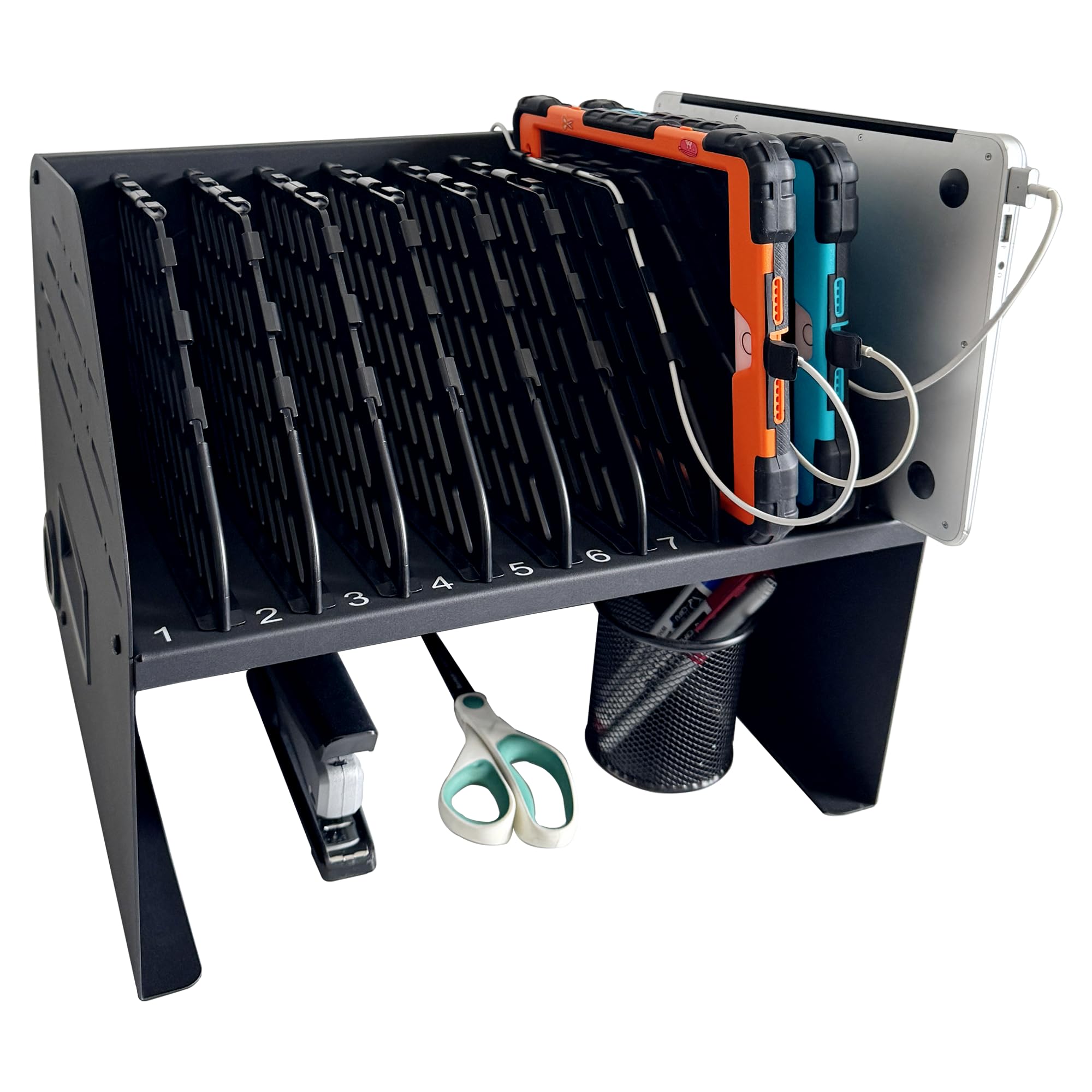
This Plugsharge model hits the sweet spot for classrooms and offices needing a balance of capacity and quick access. Its open rack design allows users to slide devices in and out without opening a door, saving time during busy transitions. The frame is constructed from alloy steel, providing a sturdy platform that reduced wobble even with ten devices plugged in.
The integrated 10-amp surge-protected power strip puts six AC outlets and four USB ports at your disposal, enough to handle a mix of Chromebooks and tablets simultaneously. Cable routing is handled by built-in clips on the back, which keeps cords off the desk and away from foot traffic. Buyers consistently note that it fits 14-inch laptops easily, with some successfully fitting 15.6-inch models depending on case thickness.
One minor downside reported by a few users is that the dividers can be dislodged if the station is bumped, though this does not affect charging. The unit ships mostly assembled, requiring only the attachment of the legs or placement on a counter. For a durable, no-fuss central charging hub that students can use independently, this is a top contender.
Why it’s great
- Sturdy steel frame holds up in high-traffic use
- 10-amp surge-protected power strip with 6 AC outlets
- Open design allows for quick device access
Good to know
- Dividers may shift if bumped
- Not lockable for overnight security
2. POCHAR 10-Device Charging Station
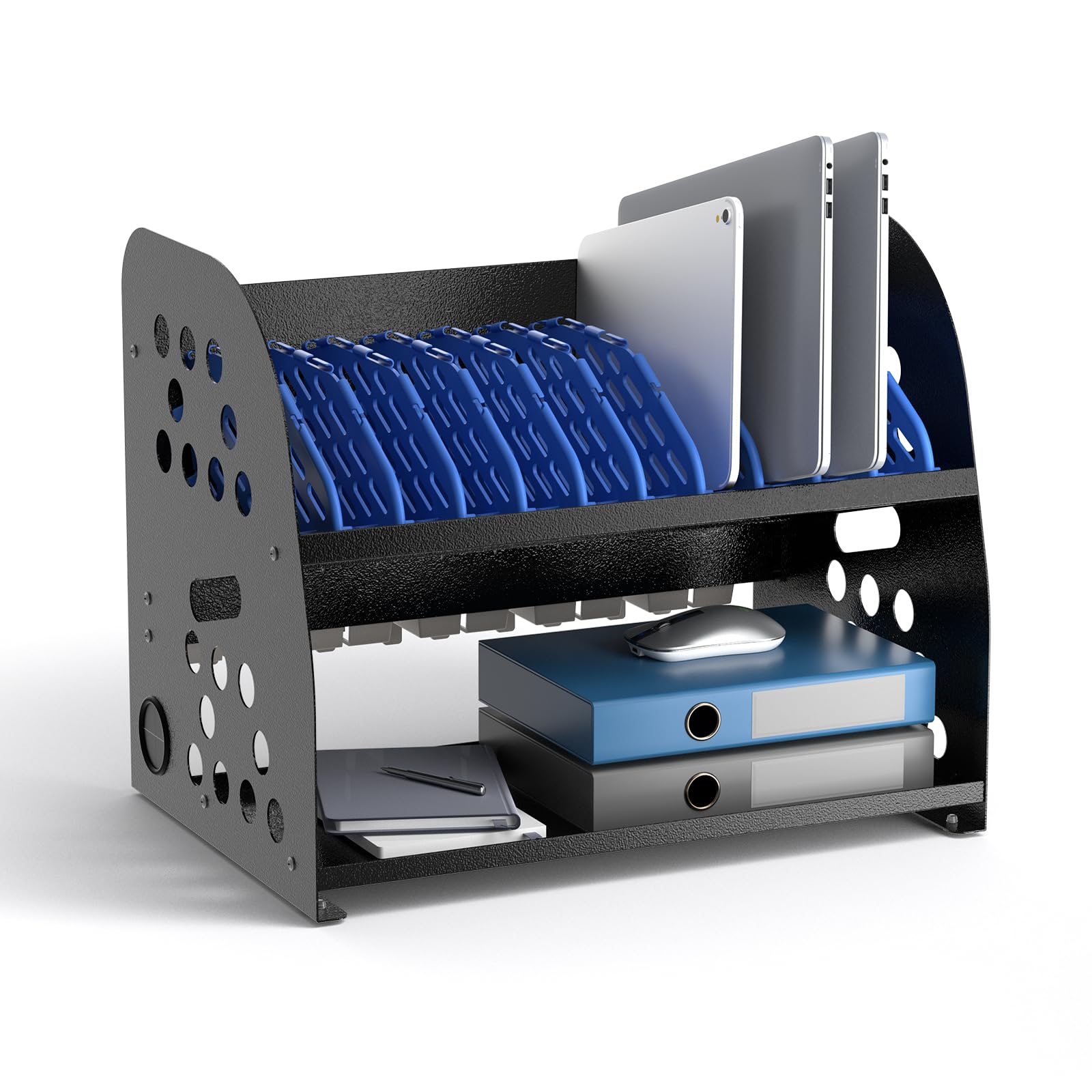
This POCHAR model differentiates itself with an open-frame design paired with a lower storage tray for chargers and accessories. The tray is a smart addition, offering a dedicated spot for power bricks and spare cables instead of leaving them dangling. The frame is built from heavy-duty steel and rated to hold up to 55 pounds, making it robust enough for frequent daily swapping in hospitals or libraries.
The unit includes a 10-outlet power strip and cable clips on the back to manage wires. The vertical slots accommodate devices up to 14 inches and 1.5 inches thick, and the open structure promotes airflow to prevent overheating during extended charging cycles. Customers mention that assembly is straightforward and the rubber feet keep the station stable on smooth surfaces.
A common observation from owners is that the built-in combination lock could be replaced with a key lock for simplicity, but the dual-lock system (one for the charger compartment, one for devices) provides good security. Some users also noted that the cable openings on the dividers could be slightly larger for very thick charging cables. Overall, this is a solid, well-ventilated solution for environments that value airflow and accessory storage.
Why it’s great
- Integrated lower tray stores chargers and cables neatly
- 55-pound weight capacity handles a full load
- Open-frame design minimizes heat buildup
Good to know
- Combination lock may not suit all users
- Cable slots on dividers are a bit tight
3. POCHAR 8-Device Chromebook Charging Cabinet (Blue)
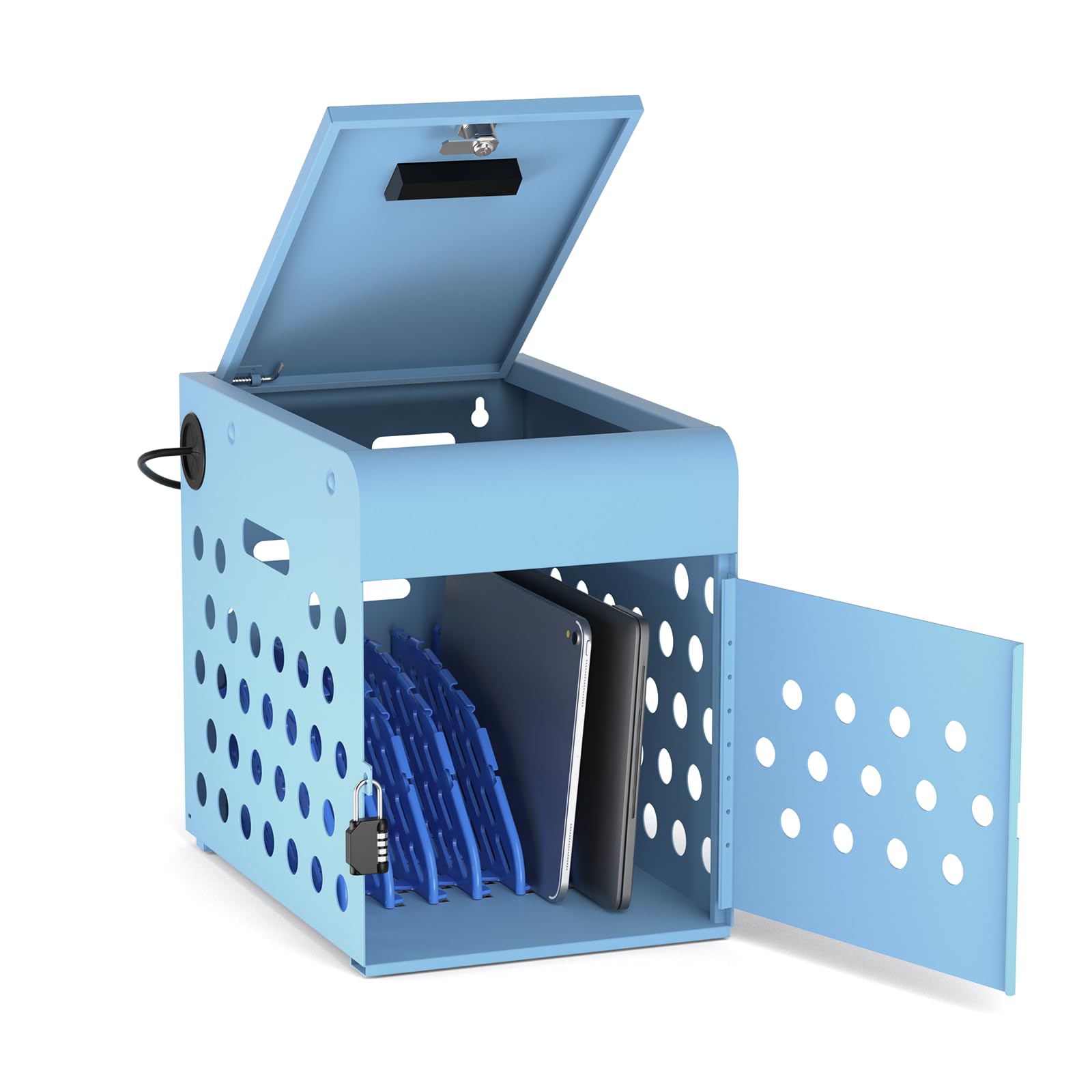
This POCHAR cabinet packs a lot of value into a compact frame. It is designed to charge and lock up to eight devices with up to a 14-inch screen, making it a natural fit for smaller classrooms or departmental storage. The cabinet weighs only 15 pounds and includes side handles, so it can be moved between rooms easily or mounted on a wall using the pre-drilled holes.
Security is handled by a combination lock on the front door and a key lock on the top compartment, giving you dual-layer protection. The unit ships fully assembled and comes with a UL-listed 8-outlet, 15-amp power strip. The top compartment includes cord management slots that keep cables separated, and the ventilated sides prevent excessive heat during charging.
Owners consistently praise its sturdy build and ease of setup, noting that the combination lock is intuitive for daily use. A few customers remarked that the plastic dividers can pop out of their slots if the cabinet is jostled, but this is a minor inconvenience given the overall build quality. For a budget-conscious buyer wanting a lockable cabinet that works immediately out of the box, this is an excellent choice.
Why it’s great
- Compact and portable with built-in handles
- Dual-lock system (combo + key) enhances security
- Fully assembled and includes wall-mount hardware
Good to know
- Plastic dividers can dislodge with movement
- Only 8 slots limit larger deployments
4. POCHAR 10-Device Open Charging Station with Lockable Drawer
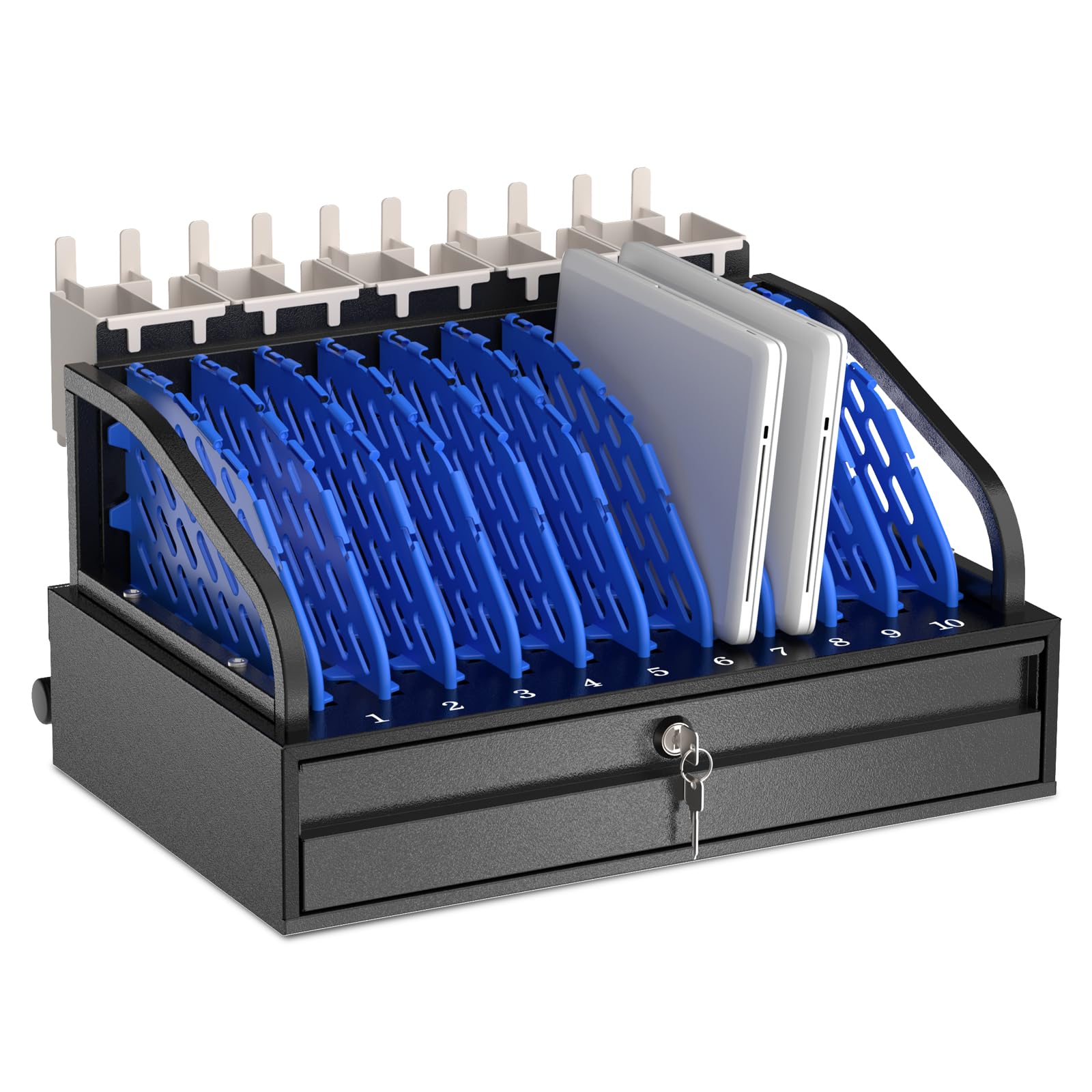
This station from POCHAR stands out with its lockable bottom drawer, a feature that adds an extra layer of security for valuable chargers, power banks, or student accessories. The open rack design holds up to ten devices with screens up to 14 inches, and the industrial-grade steel frame supports a 55-pound weight capacity. It is slightly larger than the standard 10-device rack, so measure your counter space before ordering.
Cable management is handled by rear clips, and the open-frame construction promotes airflow to keep devices cool. The unit includes a 10-outlet power strip for simultaneous charging. Owners have reported that the drawer’s lock works reliably, and the ergonomic handle makes it easy to position the station. Assembly is required, but customers say the instructions are clear and the parts fit well.
The main criticism from users is that the plastic used for some cord guides feels less sturdy than the metal frame, and the back cable routing area can be a bit cluttered if you use all ten slots. Despite that, the locking drawer is a differentiator that makes this a smart choice for settings where charger theft is a concern, such as public hospital units or open-plan offices.
Why it’s great
- Lockable bottom drawer prevents charger theft
- Heavy-duty steel frame with 55-lb capacity
- Open-frame design offers good ventilation
Good to know
- Back cable routing area can feel tight
- Some plastic components feel less durable
5. Plugsharge 8-Device Tablet & Laptop Charging Cabinet

Plugsharge delivers a lockable cabinet that balances security with a compact footprint. The steel cabinet features a single-point locking system with two keys, keeping devices secure during charging and storage. It accommodates up to eight devices with screens up to 14 inches, making it a good fit for a single classroom shelf or a reception desk.
Ventilation is handled by side panels, and the integrated 8-outlet power strip is UL-listed. The cabinet ships fully assembled, so you can place it and start charging immediately. Buyers have noted that the internal dividers are removable, allowing you to adjust the layout for thicker devices or cases. The compact dimensions also include mounting hardware for optional wall installation.
One area where this cabinet receives mixed feedback is the power cord length, which some users find too short to reach distant outlets without an extension. Additionally, the key lock system works well, but a few customers have mentioned that the keys can be difficult to turn at first. For a reliable, no-assembly locked storage solution, this is a strong mid-range option.
Why it’s great
- Lockable steel cabinet with 2 keys for security
- Ships fully assembled for instant use
- Adjustable dividers accommodate various device sizes
Good to know
- Power cord is relatively short
- Key lock mechanism can be stiff initially
6. Learniture Structure Series 12-Device Charging Station
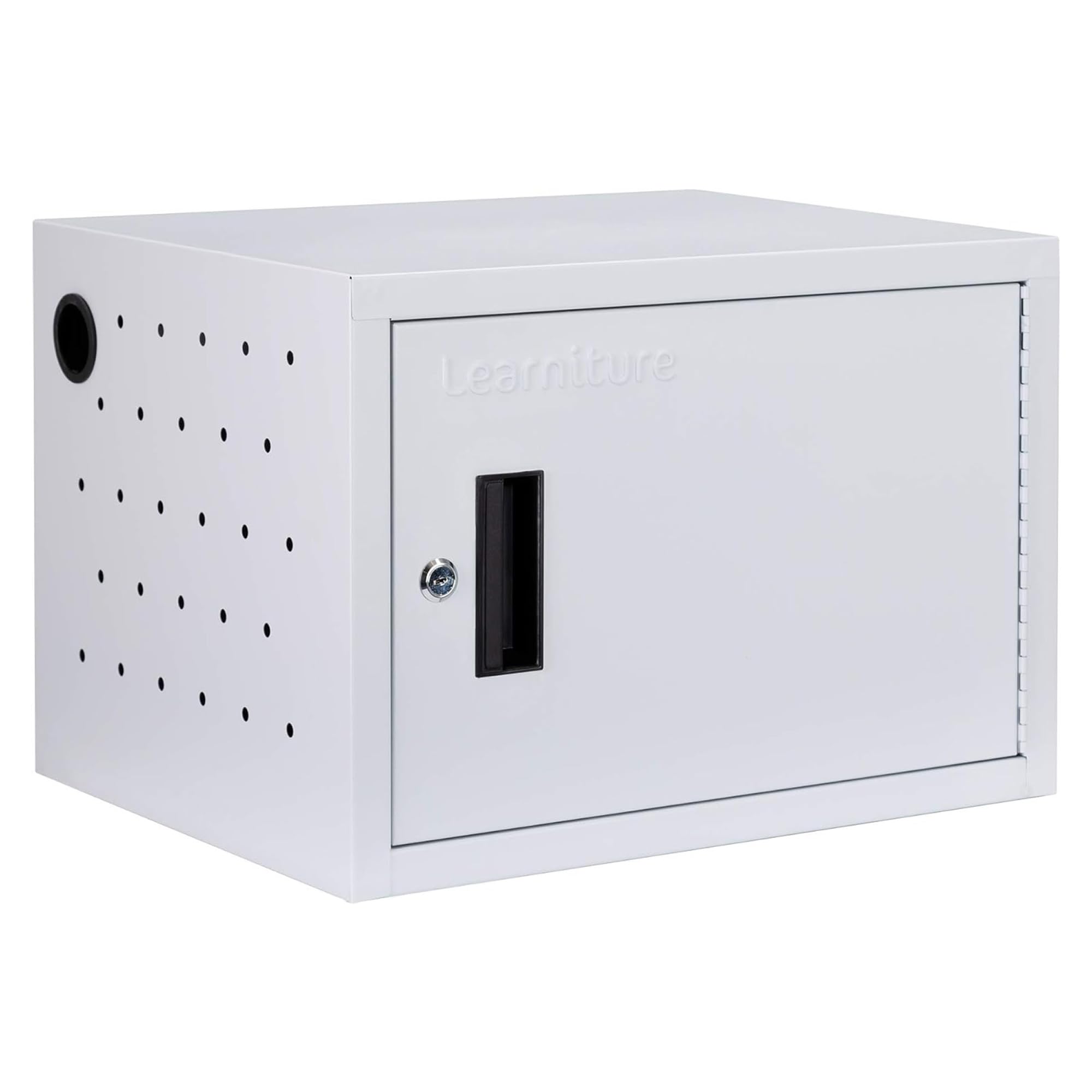
The Learniture Structure series is a premium option designed specifically for wall-mounting, using a French cleat system to free up floor and desktop space. It charges 12 devices and includes an interior 12-outlet strip with a unique rotated orientation to ensure all outlets are accessible. The cabinet is built from alloy steel with a 65-pound weight capacity, and the slots are spacious enough for most 14-inch laptops and tablets.
Cable management is handled by 12 clips on the side, keeping wires organized and tangle-free. The one-point locking system provides security, and grommet holes allow cables to pass through so devices can be charged while locked inside. The unit measures 19 inches wide, providing a larger footprint than typical 8- or 10-slot cabinets, which is something to consider if wall space is limited.
A common point of feedback is that the outlet orientation can block bulkier USB-C power adapters, requiring slim or short extension cords to fit. Some buyers have also noted that the power cord is short, making placement near an outlet important. For a school or office committed to a permanent, wall-mounted charging solution that looks professional, this is a top-tier choice.
Why it’s great
- Wall-mountable via French cleat saves desk space
- Rotated 12-outlet strip maximizes plug usage
- Sturdy steel build with 65-lb capacity
Good to know
- Outlet orientation may block chunky USB-C adapters
- Short power cord requires nearby outlet
7. Metateel 8 Tablet Charging Station Lock Box
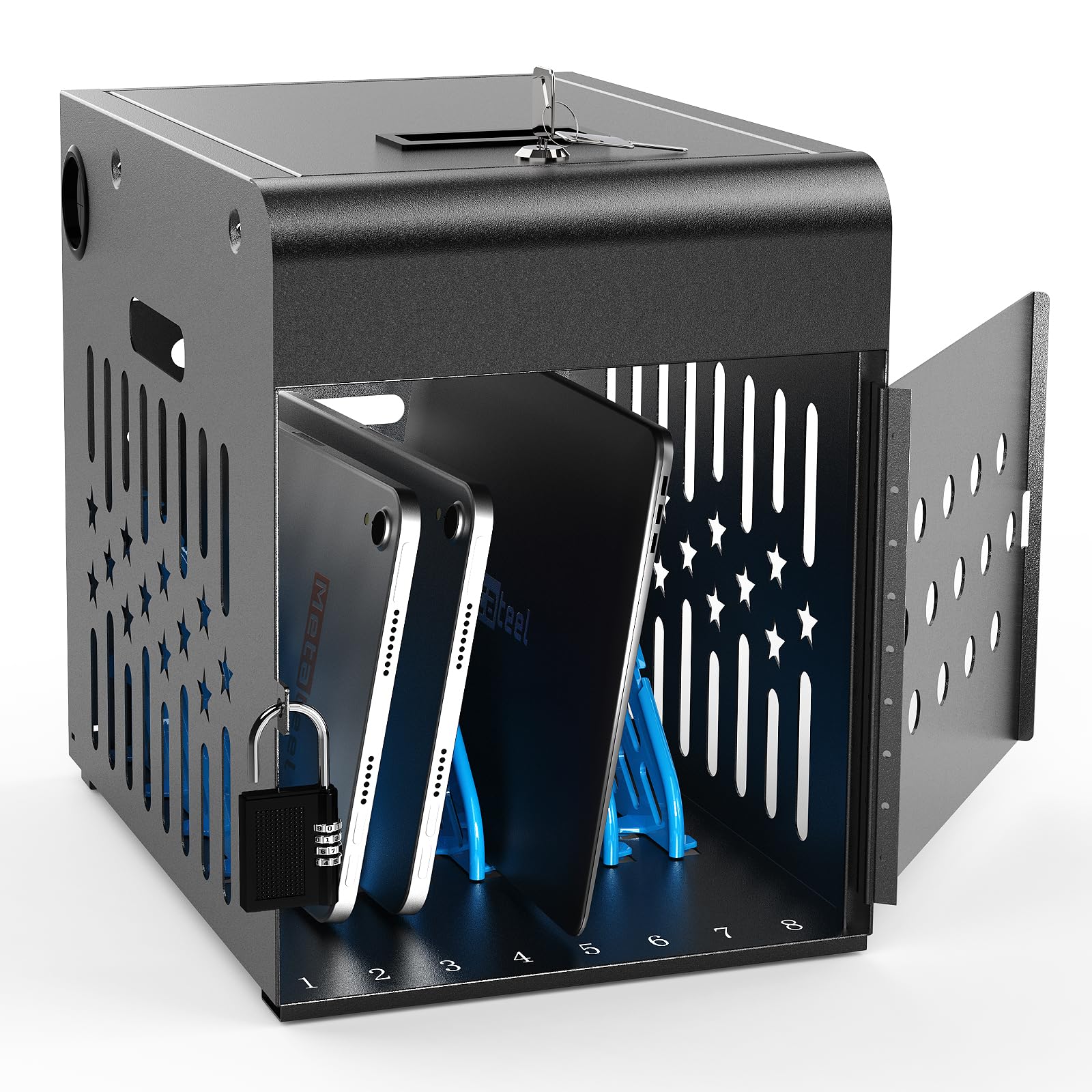
The Metateel lock box has gained a unique reputation for “dopamine detox” and screen-time management in homes. Its steel cabinet with a lockable door provides a physical barrier that helps enforce tech-free periods. The cabinet holds up to eight devices with screens up to 14 inches, and the combination lock offers a flexible security option where keys can be misplaced.
Ventilated side panels help dissipate heat, and the cabinet includes an 8-outlet, 15-amp UL-listed power strip. It arrives fully assembled and includes drywall-mounting hardware for wall attachment. Many parents report that it is solid enough to resist tampering by children, and the lock provides peace of mind.
Not all users have had a perfect experience. Several buyers reported that the lock mechanism did not work out of the box, making the cabinet unusable for its primary purpose. While these cases seem isolated, they are worth noting. For someone wanting a reliable “tech jail” for household use, this product performs well when the lock functions correctly.
Why it’s great
- Effective for enforcing screen-time boundaries at home
- Ventilated sides prevent overheating
- Fully assembled with wall-mount hardware included
Good to know
- Lock quality is inconsistent across units
- Combination lock may be less convenient than key
8. Plugsharge 16-Device Laptop & Tablet Charging Cabinet
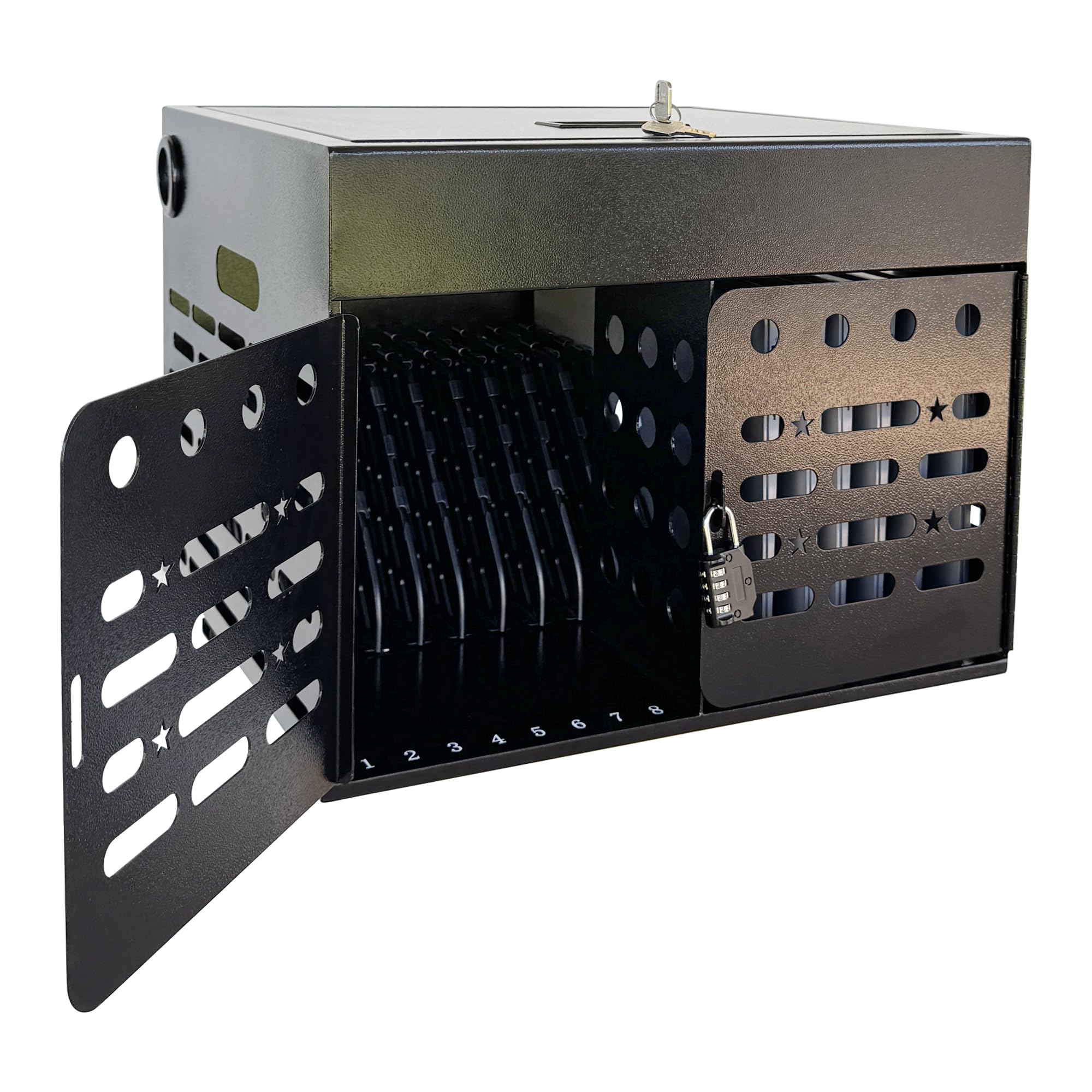
For larger deployments, the Plugsharge 16-device cabinet provides a spacious interior that can handle up to 16 laptops, Chromebooks, or tablets. The combination lock on the front door eliminates the need for keys, and the ventilated steel construction ensures airflow during long charging sessions. A dedicated upper compartment stores power adapters, keeping them separated from the devices below.
The cabinet ships fully assembled and features side handles for easy transport between rooms. Wall-mounting hardware is included for those who prefer a fixed installation. The integrated cable management system routes cords through slots, reducing the visual clutter that often accompanies high-density charging. Buyers consistently highlight the sturdiness and the convenience of the combination lock for daily classroom use.
Some users have expressed that the combination lock can be tricky to reset initially, and the cabinet’s depth may not comfortably fit very thick laptop cases without removing a divider. The 16-slot capacity is ideal for a full class set, but the cabinet’s footprint is correspondingly larger, so verify your available surface area beforehand.
Why it’s great
- 16-slot capacity suits full classroom fleets
- Combination lock removes key management issues
- Ventilated steel construction prevents overheating
Good to know
- Combination lock reset process is not intuitive
- Thick laptop cases may fit tightly
9. POCHAR Fully Assembled 30 Unit Device Charging Station (C30B-H)
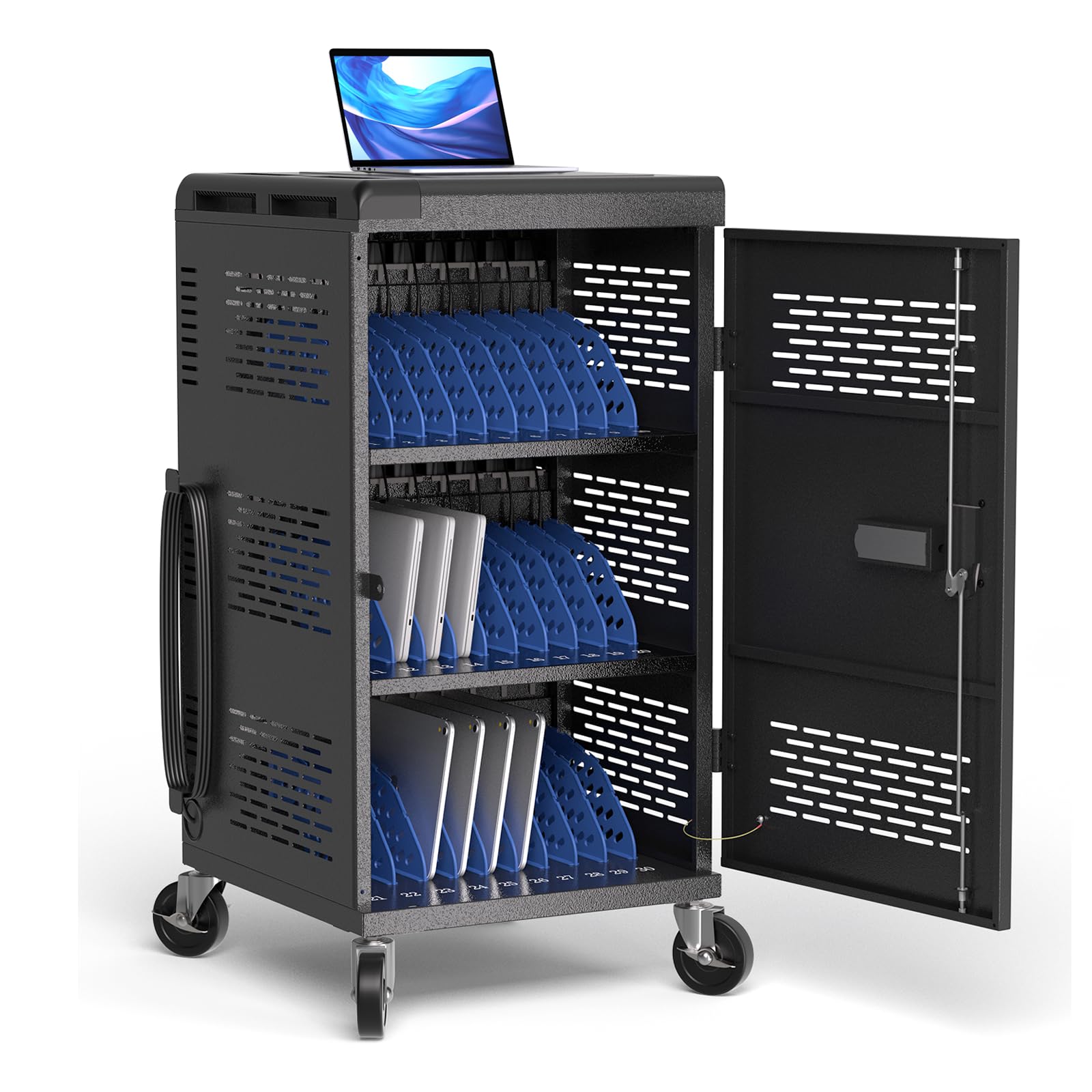
When you need to charge an entire device fleet, the POCHAR C30B-H is the heavy-duty solution. This rolling cart handles up to 30 devices with screens up to 14 inches, and it arrives mostly assembled—you just attach the wheels and wire racks. The cart includes three internal shelves with zig-zag dividers for cable management and basket containers for charger storage.
Safety features include a circuit breaker on the three power strips, ground fault protection, and ventilation panels. The electric keypad lock secures the cart, and hook pieces allow for an additional chain lock. Four heavy-duty wheels, two with brakes, make it easy to move between classrooms or departments. The removable back door simplifies initial setup and ongoing maintenance.
Owners report that the cable management system is genuinely effective at keeping cords organized, but the cart’s 96-pound weight makes it best suited for single-floor use. Some early batches had wheel durability issues, and the outlet orientation may require short extension cords for chunky power adapters. For large-scale, mobile charging in schools or conference centers, this cart is unmatched in capacity.
Why it’s great
- 30-device capacity handles full class sets
- Excellent cable management with zig-zag dividers
- Rolling design with secure keypad lock
Good to know
- Wheels may not hold up under heavy daily use
- Outlet orientation can block large adapters
FAQ
Can I charge devices in a locked cabinet overnight?
How do I know if a cabinet will fit my thick laptop cases?
Final Thoughts: The Verdict
For most users, the battery charging cabinet winner is the Plugsharge 10-Device Station because it provides a perfect blend of capacity, sturdy construction, and quick-access design for daily classroom or office use. If you want lockable security and a compact footprint, grab the POCHAR 8-Device Cabinet (Blue). And for managing a 30-device fleet with seamless mobility, nothing beats the POCHAR C30B-H Rolling Cart.