
Our readers keep the lights on and the weekend projects moving. As an Amazon Associate, I earn from qualifying purchases.
The gap between a sketch on paper and a stroke on a screen used to be a canyon — lag, parallax, and a disconnected feel that killed the flow for anyone new to digital art. A proper beginner digital art tablet bridges that gap by offering a natural, responsive surface that mirrors the muscle memory of a pencil, without the steep learning curve or the premium price tag of professional gear.
I’m Rikta — the co-founder and writer behind FitlyFast. I’ve spent hundreds of hours analyzing the technical specifications, pressure-sensitivity curves, and real-world user feedback across dozens of models to identify which tablets actually deliver a frustration-free start for newcomers.
This guide focuses on the handful of options that get the fundamentals right — from battery-free styli and low-lag drivers to screen protectors that feel like paper — so you can confidently choose your beginner digital art tablet without getting lost in spec sheets or marketing hype.
How To Choose The Best Beginner Digital Art Tablet
Most beginners over-index on resolution or pressure levels before they’ve even tested a single brush stroke. The reality is that a beginner digital art tablet’s success hinges on three interlocking factors: the stylus’s feel and autonomy, the drawing surface’s friction and parallax, and the driver’s stability across your operating system. Ignore any one of these, and you’ll be fighting the hardware instead of learning to draw.
Screenless vs. Pen Display — The Real Trade-Off
A screenless tablet (also called a pen tablet) forces you to look at your monitor while drawing on a separate pad. This hand-eye separation feels awkward for the first few hours, but it trains your arm and wrist to coordinate independently — a skill that pays off if you ever move to a larger display setup. Pen displays let you draw directly on the screen, which feels more intuitive and is generally recommended for absolute beginners who want the shortest path from idea to finished line. The trade-off is price: a decent pen display costs roughly twice as much as an equivalent screenless model.
Pressure Sensitivity and Tilt — What Actually Matters
The industry standard for entry-level tablets is 8192 levels of pressure sensitivity. That number is more than sufficient for realistic brush taper, opacity variation, and subtle line weighting. Higher numbers like 16384 are not marketing gimmicks — they allow finer gradations in pressure for delicate shading — but the difference is subtle and usually only noticeable to experienced illustrators. Tilt support (typically 60 degrees) is actually more useful early on: it enables natural pencil shading and calligraphic strokes that mimic real-world angled drawing. Prioritize tilt over raw pressure levels when comparing entry-level models.
Driver Compatibility and Build Quality
The most common beginner frustration is a tablet that works out of the box but then glitches after a system update. Check that the brand publishes driver updates regularly and that the community forums show recent activity for your operating system (Windows, macOS, or Linux). On the hardware side, battery-free styli are non-negotiable: they never need charging, they have consistent weight, and they eliminate the main failure point of older active pens. The drawing surface should have a matte texture to provide paper-like friction — without it, the pen skids and your control suffers.
Quick Comparison
On smaller screens, swipe sideways to see the full table.
| Model | Category | Best For | Key Spec | Amazon |
|---|---|---|---|---|
| XP‑Pen Artist 12 3rd | Pen Display | Beginners wanting premium screen quality | 16384 pressure levels, 99% sRGB | Amazon |
| UGEE UE12 | Pen Display | Color‑accurate drawing on a budget | 124% sRGB, full‑laminated screen | Amazon |
| VEIKK VK1200 | Pen Display | Newcomers wanting two pens included | 8192 levels, 2 pens, 28 nibs | Amazon |
| GAOMON PD1161 | Pen Display | Artists needing solid support and reliability | 11.6″ IPS, 72% NTSC, matte film | Amazon |
| XP‑Pen Deco Pro LW 2nd | Screenless | Users wanting wireless freedom and portability | 16K levels, Bluetooth 5.0, 10hr battery | Amazon |
| HUION Inspiroy 2 Large | Screenless | Budget‑focused beginners wanting a large surface | 10.5×6.56″ area, scroll wheel | Amazon |
| Frunsi RubensTab T8 | Standalone | Kids or artists needing a no‑PC option | Android 13, 8″ display, 4GB RAM | Amazon |
In‑Depth Reviews
1. XP‑Pen Artist 12 3rd Generation
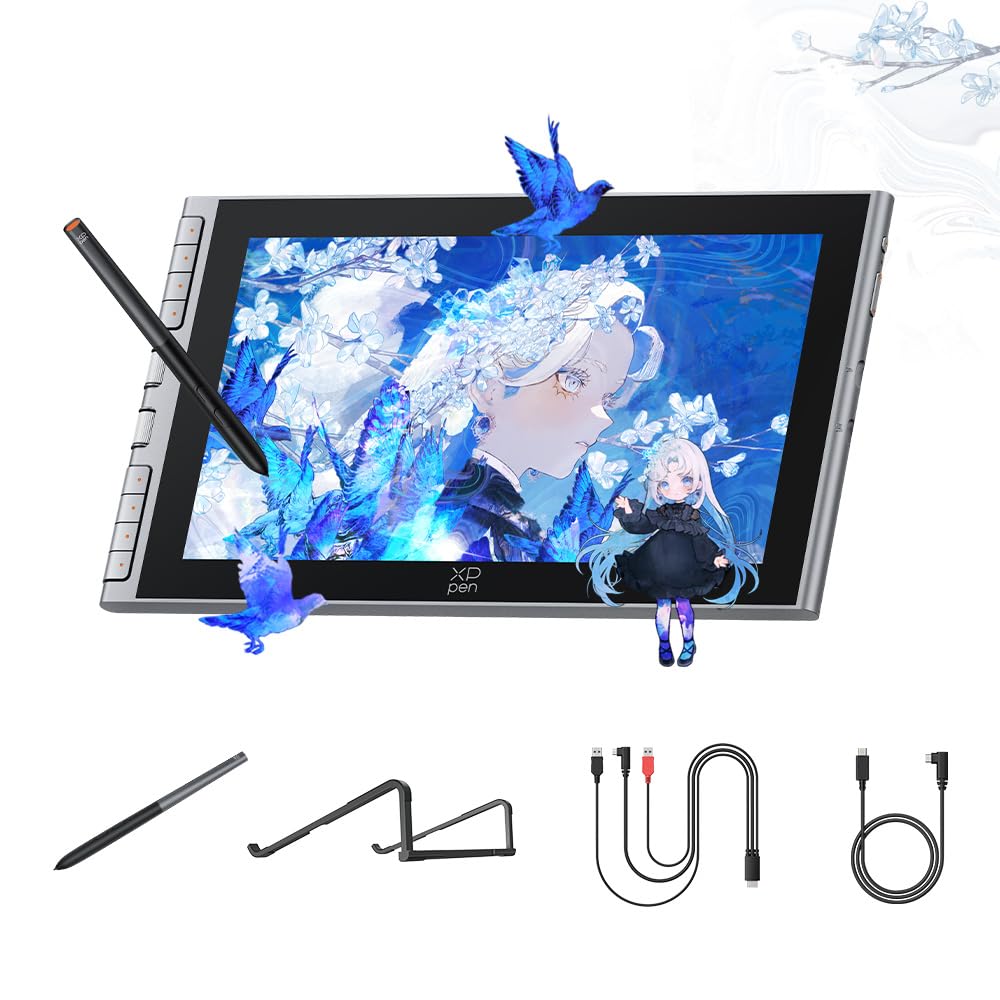
The XP‑Pen Artist 12 3rd Generation sets a new bar for what a beginner can expect from a pen display at this tier. Its 11.9-inch full‑laminated anti-glare screen delivers 99% sRGB coverage and a zero‑parallax drawing plane — the line appears directly under the nib with no gap, a feature that dramatically reduces eye‑hand confusion for newcomers. The X3 Pro stylus offers a staggering 16384 levels of pressure sensitivity, and while most beginners won’t immediately exploit that headroom, it future‑proofs the investment as your shading technique matures.
The bundled S20 foldable stand, red dial shortcut controller, and 10 replacement nibs make this the most complete package in the guide. Setup is straightforward via the full‑featured USB-C cable (one cable carries video, data, and power), and the all‑metal build feels substantial without being heavy. A few users noticed a slight driver‑driven pen misalignment on dual‑monitor setups, but a simple resolution match fixed it — a minor hiccup on an otherwise polished device.
For the beginner who wants a premium experience from day one — vivid colors, a smooth anti-glare surface, and a stylus that tracks every micro‑twitch — the Artist 12 3rd is the clear recommendation. It’s the sort of tablet that makes you want to draw more, and that’s the single most important quality for anyone starting their digital art journey.
Why it’s great
- Full‑laminated AG screen eliminates parallax for precise line placement.
- 16384 pressure levels offer more nuance than any beginner will outgrow.
- Includes stand, dial shortcut remote, and 10 extra nibs — no hidden costs.
Good to know
- Driver can misalign pen on multi‑monitor setups until both displays match resolution.
- Included glove may fit loosely on smaller hands.
2. UGEE UE12

The UGEE UE12 punches well above its price bracket by offering a full‑laminated 11.6-inch FHD screen with a remarkable 124% sRGB color gamut. Full lamination eliminates the air gap between the glass and LCD, meaning the pen tip touches the image directly — zero parallax and significantly reduced glare. For a beginner, this translates to a natural, paper‑like drawing feel that doesn’t introduce the disorienting offset common in non‑laminated budget displays.
The battery‑free stylus supports 16K‑level pressure sensitivity and 60 degrees of tilt recognition, which is enough for expressive calligraphy and pencil shading. The 8 concave‑convex shortcut keys are genuinely usable without looking, and the dual Type-C ports allow flexible cable routing. A few users reported a faint buzzing sound near the power port, but it’s only audible in a silent room and doesn’t affect performance. The screen’s color accuracy out of the box is impressive, making it suitable for photo editing and illustration work beyond just sketching.
If you’re a beginner who values color fidelity and a clean, parallax‑free drawing surface but can’t stretch to premium pricing, the UE12 is the best mid‑range compromise on the market. It skips the bundled stand and fancy extras, but the core drawing experience rivals models that cost significantly more.
Why it’s great
- Full‑laminated display with 124% sRGB for vibrant, accurate color.
- 16K pressure sensitivity and 60° tilt support for natural shading.
- Dual Type-C ports simplify cable management on a cluttered desk.
Good to know
- Nibs wear down faster than average — plan to buy replacements within a year.
- No built‑in stand or carrying case included.
3. VEIKK VK1200

The VEIKK VK1200 understands that a beginner doesn’t just need a screen — they need resilience and backup gear. This 11.6-inch pen display ships with two battery‑free pens and a staggering 28 replacement nibs, effectively removing the anxiety of wearing down the first nib before you’ve finished a single project. The 8192 levels of pressure sensitivity and 60‑degree tilt support are sufficient for learning brush control, line weight, and angle‑based shading without overwhelming complexity.
The 1920×1080 IPS screen with 72% NTSC color gamut is bright and consistent, though color accuracy isn’t in the same league as the UGEE or XP‑Pen — fine for sketching and illustration, less ideal for color‑critical work. The 6 shortcut keys are pre‑mapped to undo, zoom, and brush controls, and they’re easy to reprogram via the driver. A few users reported calibration drift on the stylus after extended use, but the majority find the VK1200 responsive and stable with apps like Krita and Clip Studio Paint.
For a beginner who wants a generous accessory pack and a worry‑free introduction to pen displays, the VK1200 delivers. It’s a solid, no‑surprises tablet that lets you focus on learning rather than budgeting for consumables.
Why it’s great
- Two pens and 28 nibs included — enough backup for years of drawing.
- 8192 pressure levels with tilt support cover all beginner needs.
- Includes an artist glove and cleaning cloth for a complete unboxing.
Good to know
- Color gamut (72% NTSC) is decent but not elite for photo editing.
- Sporadic reports of pen calibration drift requiring driver reinstall.
4. GAOMON PD1161

The GAOMON PD1161 has been a staple on the beginner scene for good reason: it combines an 11.6-inch IPS display with a pre‑installed matte protection film that delivers a satisfying paper‑texture drag without added glare. The 72% NTSC (roughly 100% sRGB) color gamut provides accurate enough color for digital painting and design, and the 8192‑level battery‑free stylus with tilt support tracks smoothly across the entire active area.
Setup requires an HDMI port and a USB connection — plus the included AC adapter if your laptop can’t supply enough power over the 3‑in‑2 cable. The 8 programmable press keys are located on the side, which right‑handed users find intuitive but left‑handed users may need to reposition. Customer support from GAOMON is widely praised; several reviews mention quick replacement of defective units without hassle. The main physical drawback is the bulky power adapter, which takes up desk space and adds to cable clutter.
For the beginner who values reliable hardware, proven driver stability, and a responsive support team over flashy extras, the PD1161 is a safe, well‑tested choice. It won’t win a spec‑sheet race, but it will still be drawing smoothly three years from now.
Why it’s great
- Pre‑applied matte film provides excellent paper‑like friction from day one.
- Responsive customer support with quick warranty replacements.
- Stable driver with broad software compatibility (Krita, Photoshop, Clip Studio).
Good to know
- Requires HDMI port and AC adapter — not ideal for ultra‑thin laptops.
- Side shortcut keys are less comfortable for left‑handed artists.
5. XP‑Pen Deco Pro LW 2nd Generation

The Deco Pro LW 2nd is a screenless tablet that throws wireless versatility into the mix — Bluetooth 5.0, a USB wireless receiver, and wired USB-C connection are all supported, with a 1000mAh battery that delivers over 10 hours of untethered drawing. At 13.1 by 10.15 inches, it offers a generous 9×6‑inch active area that roughly matches a standard A5 sketchbook, and the metal backplate helps dissipate heat during long sessions.
The X3 Pro stylus is the highlight: 16K pressure sensitivity, 60‑degree tilt, and an eraser on the rear end — a feature rare at this price point. The included Mini Key‑dial remote with 10 customizable keys adds real productivity for apps like Photoshop and Clip Studio Paint. A small number of users experienced rapid nib wear (two nibs in 10 days) and scratched the drawing surface, but XP‑Pen ships replacement nibs and a protective film. The tablet connects wirelessly to Windows and macOS but not to Android or Linux over Bluetooth, so check your ecosystem before buying.
For a beginner who wants a large, cable‑free drawing surface that doesn’t tether them to a desk, the Deco Pro LW 2nd is a thoughtful, well‑built option. The screenless form factor teaches hand‑eye coordination quickly, and the Bluetooth range is reliable even across a small room.
Why it’s great
- Bluetooth 5.0, wireless receiver, and wired modes offer total connection flexibility.
- X3 Pro stylus with eraser and 16K pressure sensitivity feels premium.
- Mini Key‑dial remote adds programmable shortcuts for faster workflow.
Good to know
- Rapid nib wear reported by heavy‑handed users; keep extra nibs on hand.
- Bluetooth wireless not supported on Android or Linux.
6. HUION Inspiroy 2 Large

The HUION Inspiroy 2 Large is the screenless tablet that proves a beginner doesn’t need to spend much to get professional‑grade specs. With an active area of 10.5 by 6.56 inches and PenTech 3.0 technology, it delivers a smooth, low‑wobble stroke that rivals tablets costing twice as much. The PW110 stylus has been redesigned with a slimmer body and silicone grip, making it comfortable for extended sketching sessions.
The standout hardware feature is the programmable scroll wheel — a rarity at this price — which you can map to zoom, brush size, or canvas rotation. The 8 customizable press keys are grouped into three sets, allowing different configurations for different apps. One caveat from user feedback is that the HUION driver on Linux (Wayland) maps the input to only the left third of the screen, and pressure sensitivity has a dead zone in the first 40% — a problem mainly for Linux users, not on Windows or macOS. The connection uses a Micro‑B port rather than USB-C, which feels a generation behind.
If your budget is tight and you’re on Windows or macOS, the Inspiroy 2 Large delivers an enormous drawing surface, a responsive pen, and a convenient scroll wheel for less than many competitors’ small models. It’s the best entry‑level screenless tablet for the price.
Why it’s great
- Large 10.5×6.56″ active area at a very low entry price.
- Scroll wheel and 8 customizable keys boost workflow efficiency.
- PenTech 3.0 pen provides smooth, low‑wobble drawing.
Good to know
- Uses Micro‑B instead of USB-C for connection.
- Linux (Wayland) driver has screen‑mapping and pressure dead‑zone issues.
7. Frunsi RubensTab T8

The Frunsi RubensTab T8 breaks the mold by being a fully standalone drawing tablet — no computer required. It runs Android 13 on a quad‑core CPU with 4GB of RAM and 64GB of storage (expandable to 256GB), and it comes with pre‑installed drawing apps and tutorials. The 8‑inch display with 1200×800 resolution is sharp enough for sketching and learning, though the 2048 pressure‑sensitivity levels are noticeably less refined than the 8192 and 16384 pens found on other tablets here.
The included detachable keyboard and stylus make it a hybrid device: you can sketch in ibis Paint X or SketchBook, then type notes or browse YouTube without switching devices. Battery life is quoted at up to 20 hours, though real‑world use in demanding drawing apps reduces that to about 3.5 hours before needing a charge. There’s no palm rejection, which can cause accidental marks during long drawing sessions. However, the build quality is solid for the price, and the pre‑loaded tutorials are genuinely helpful for absolute beginners who have never used a digital art tool before.
For a child, a traveler, or anyone who wants to draw without being chained to a laptop, the RubensTab T8 offers a complete, self‑contained ecosystem. Just be aware that the pressure sensitivity and screen resolution are a step down from the wired pen displays in this guide.
Why it’s great
- Fully standalone — draw anywhere without a computer or cables.
- Pre‑loaded with drawing apps and tutorials for a zero‑setup start.
- Includes detachable keyboard, stylus, and screen protector in the box.
Good to know
- 2048 pressure levels lag far behind the 8192 standard of competitors.
- Lacks palm rejection, leading to accidental marks during long sessions.
FAQ
Do I need a pen display or a screenless tablet as a beginner?
What is the minimum pressure sensitivity level I should look for?
Can I use a beginner digital art tablet without a computer?
Does the battery‑free stylus affect drawing performance?
How important is a matte screen protector or paper‑like surface?
Final Thoughts: The Verdict
For most users, the beginner digital art tablet winner is the XP‑Pen Artist 12 3rd because its full‑laminated anti‑glare screen, 16384 pressure sensitivity, and complete accessory bundle (stand, dial remote, extra nibs) deliver a premium drawing experience that a beginner can grow into for years. If you want professional‑grade color accuracy at a mid‑range price, grab the UGEE UE12 and its 124% sRGB display. And for a no‑computer approach that’s ideal for kids or travel, nothing beats the standalone Frunsi RubensTab T8 — just be prepared for lower pressure sensitivity and shorter battery life under load.