
Our readers keep the lights on and the weekend projects moving. As an Amazon Associate, I earn from qualifying purchases.
A basic cell phone for seniors is measured by one thing only: whether it actually lets an older adult call a family member without frustration, confusion, or a trip to the manual. The clutter of a standard smartphone—tiny touch targets, endless notifications, nested menus—becomes a barrier to connection. The right device strips away everything except the ability to talk, with physical buttons that respond under a finger that may not feel what a glass screen expects.
I’m Rikta — the co-founder and writer behind FitlyFast. I’ve spent dozens of hours researching carrier locks, button sizes measured in millimeters, speaker output quality, and battery endurance across this category to separate the phones that deliver a genuine senior-first experience from those that simply add a “senior mode” to a generic handset.
This guide breaks down the real-world trade-offs in button tactile feel, hearing aid compatibility, SIM card restrictions, and emergency response features so you can confidently pick the best basic cell phone for seniors for your specific situation.
How To Choose The Best Basic Cell Phone For Seniors
A senior phone has to solve a short list of problems: making calls, hearing them, and summoning help in an emergency. The wrong pick either requires a carrier that doesn’t serve your area, uses buttons an arthritic finger cannot press, or buries the SOS feature behind a menu. Focus on the factors below to avoid a return.
Carrier Lock and Network Compatibility
Most basic phones for seniors in the US run on T-Mobile’s network. Many models explicitly exclude Verizon, AT&T, and their prepaid subsidiaries. A phone that looks perfect on paper may be a paperweight if you or your senior lives in an area where T-Mobile coverage is weak. Check the carrier list in the spec sheet before buying — the fine print matters more than any other feature.
Button Feel and Display Readability
The single biggest failure point is a button that requires too much force or provides no tactile confirm. Look for raised, separated keys with a clean click. The font on the screen and on the keys themselves must be large enough to read without reading glasses — standard flip phones with tiny key legends fail here. A 1.8-inch display is the minimum; 2.4 inches is far better.
SOS Button and Emergency Response
A physical SOS button on the back sends a distress alert to preset contacts. The best implementations send both a text message and dial sequentially until someone answers. Some phones require a long press to prevent accidental triggers, which is a smart design choice. Avoid models where the SOS function requires navigating a software menu — during a fall or medical episode, a physical button is the only reliable interface.
Charging Dock and Battery Life
Seniors who forget to plug in a cable benefit enormously from a charging dock. Simply setting the phone into the cradle every night ensures it is ready the next day. Battery capacity across this category ranges from 1050 mAh to 5000 mAh. Higher capacity does not always mean longer usable life if the phone has a power-hungry screen, but anything above 1300 mAh usually delivers a full day of talk and days of standby.
Quick Comparison
On smaller screens, swipe sideways to see the full table.
| Model | Category | Best For | Key Spec | Amazon |
|---|---|---|---|---|
| Easyfone Prime-A1 Pro | Flip Phone | Hearing aid users & scam call block | 2.4″ + 1.44″ display, 1500mAh | Amazon |
| Easyfone Prime-T6 | Bar Phone | Dementia & memory loss users | 4 picture memory buttons, 1050mAh | Amazon |
| LIVELY Jitterbug Smart4 | Smartphone | Seniors ready for a simple touch screen | 6.7″ screen, 5000mAh battery | Amazon |
| artfone G6 Flip | Flip Phone | Hearing enhancement & large keys | 2.4″ + 1.8″ display, 1300mAh | Amazon |
| artfone C1+ 4G Pro | Bar Phone | Voice time announcement & speed dial | 1.8″ display, 1800mAh battery | Amazon |
| AGM M9 Rugged | Bar Phone | Outdoor durability & replaceable battery | IP68/IP69K, 1200mAh replaceable | Amazon |
| C8 4G Flip Phone | Flip Phone | Large screen & dock charging | 2.8″ + 1.5″ display, 1400mAh | Amazon |
In‑Depth Reviews
1. Easyfone Prime-A1 Pro

The Prime-A1 Pro earns the top spot because it solves the three biggest senior phone pain points in one package. It operates on T-Mobile’s network and comes with a SpeedTalk SIM card in the box, eliminating the guesswork about whether the phone will work out of the package. The 2.4-inch internal display shows large fonts, and the 1.44-inch external screen lets users see caller ID without flipping open the device. The dedicated red Block button is a standout safety feature — one press adds a scam caller to the blacklist without navigating a menu.
The 1500mAh battery charges through a convenient dock that prevents fumbling with cables. The phone announces each dialed digit aloud as the user presses the key, which builds confidence for seniors with mild cognitive decline. The SOS button on the back triggers a loud alert and sends sequential calls to up to five emergency contacts plus a text message. Hearing aid users benefit from the HAC rating and powerful speaker that delivers clear call audio even in noisy rooms.
A small number of units have reported external screen failures, so the build is not bulletproof. The micro USB connector is dated compared to the USB-C ports on competitors, but the dock minimizes plug wear. The phone works best with T-Mobile and its MVNOs, so Verizon or AT&T customers need to look elsewhere. Overall, it is the most thoughtful combination of accessibility, safety, and ease of use in this category.
Why it’s great
- Block button kills scam calls instantly
- Audible number announcement as you dial
- Charging dock included, micro USB cable less fiddly
Good to know
- External screen durability concerns reported by some buyers
- Operates on T-Mobile network only, excludes Verizon/AT&T
2. Easyfone Prime-T6

The Prime-T6 replaces the phonebook entirely with four large picture memory buttons on the front face. You print a photo of the contact (daughter, son, doctor), cut it to size with the included adapter, and slide it into the transparent button cover. The user just presses the face to call. This design is uniquely suited for seniors with dementia, Alzheimer’s, or severe vision loss because there is no text to read, no contact list to scroll through, and no menu to remember.
The phone runs on T-Mobile’s network and ships with a SpeedTalk SIM card that includes a ready-to-activate plan. The 1050mAh battery lasts about a week of standby with occasional calls, and the charging dock simplifies recharging for users who struggle with plugging in a cable. The SOS button sends alerts to up to five contacts in sequence and includes a loud siren. The neck lanyard keeps the phone accessible for users who misplace items frequently.
The build quality is lightweight plastic that some users describe as feeling cheap. The picture buttons can pop off if pressed roughly. Programming the non-picture speed dials requires a multi-step process that may frustrate a caregiver. The SOS button sits on the side and can be triggered accidentally by clothing or movement, leading to unnecessary emergency alerts. For its specific use case — seniors who cannot navigate a phonebook — it is the best option available.
Why it’s great
- No phonebook — calls made by pressing a photo
- Charging dock and lanyard included in the box
- Clear sound with HAC rating for hearing aid users
Good to know
- Plastic build feels less solid than the price suggests
- Picture buttons can detach with rough handling
3. LIVELY Jitterbug Smart4

The Jitterbug Smart4 is the only device on this list that uses a touch screen, but it earns a place because Lively has designed a custom simplified menu interface that strips Android down to the essentials. The 6.7-inch display with large text is ideal for seniors with significant vision loss who still want smartphone features like the camera or the ability to text. The 5000mAh battery is massive for this category, delivering full-day heavy use and multi-day standby.
The phone includes a dedicated Urgent Response button that connects directly to Lively’s 24/7 agent team for help, health questions, or emergency dispatch. Calling captioning is built in for seniors with hearing loss — real-time text of the caller’s words appears on screen during a conversation. The camera upgrade to 13MP rear and 8MP front is a meaningful improvement over previous Jitterbug models for seniors who want to share photos with family.
The catch is that the phone only works with Lively’s own wireless service, which is more expensive than prepaid MVNOs and has been criticized for throttling data after 20GB. The interface, while simple by smartphone standards, still requires touch precision that some seniors find difficult. There is no speed dial for contacts and no physical keyboard, so calling a non-favorite contact requires navigating the touch screen. It is the best choice for seniors who need a true smartphone experience but cannot manage a standard Android or iPhone.
Why it’s great
- Lively service includes 24/7 agent for emergencies
- Real-time call captioning for hearing loss
- Massive battery with fast charging support
Good to know
- Locks into Lively’s own carrier service only
- Touch screen still presents challenges for some seniors
4. artfone G6 Flip
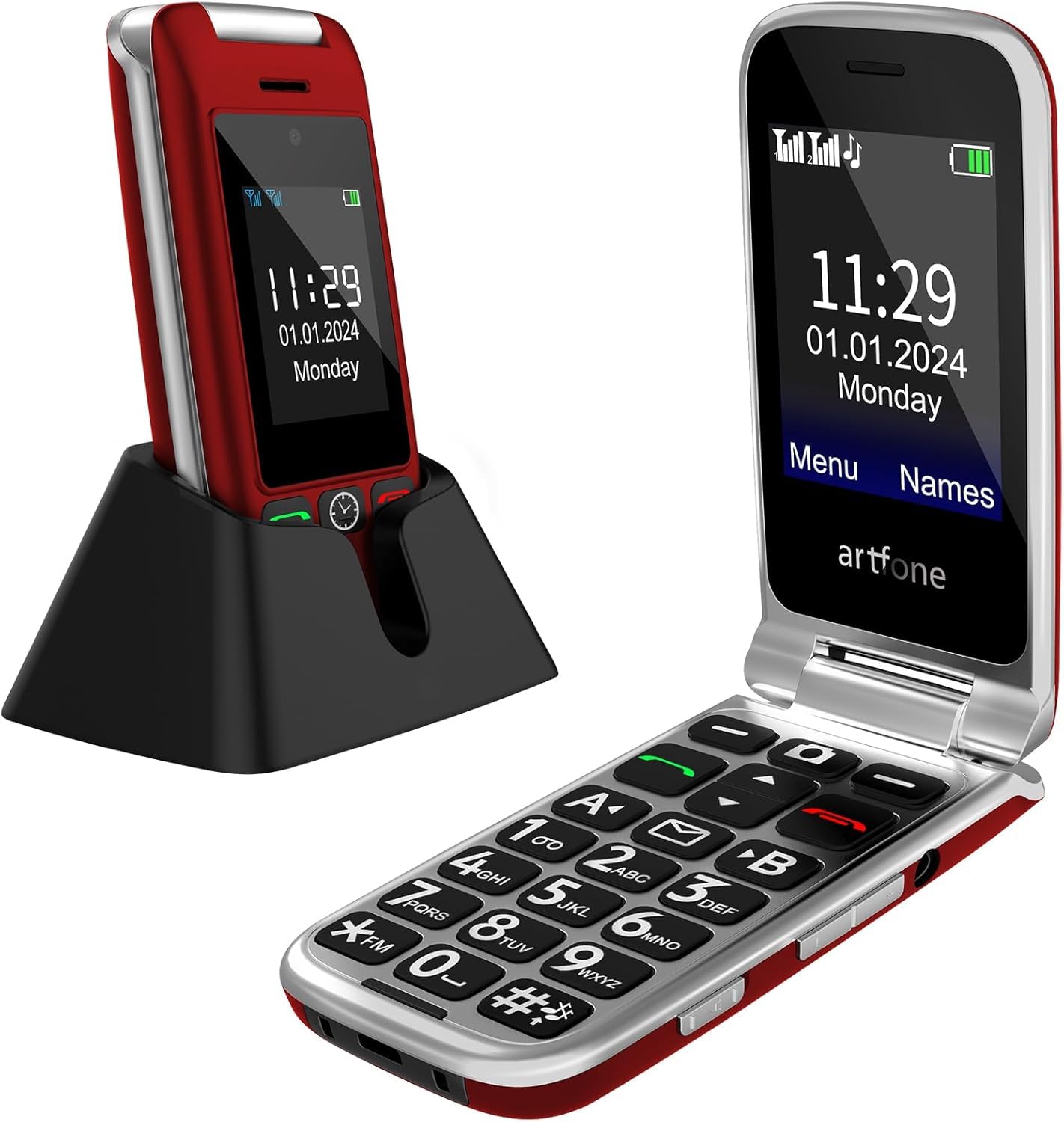
The G6 Flip differentiates itself with a built-in hearing enhancement mode that turns the phone into a personal amplifier for face-to-face conversations. Long pressing the camera button while connected to earphones or a hearing aid activates the feature, using the phone’s microphone to amplify voices in the room. This is a rare capability that makes the G6 a strong choice for seniors who struggle with hearing in social settings.
The phone has a 2.4-inch inner display and a 1.8-inch outer display, both showing large text. The 21 backlit keys are physically raised and well-separated for confident typing. The hinge has been tested for 120,000 flips and opens to 170 degrees, which is a meaningful durability metric for a flip phone. The charging dock and USB-C port make recharging flexible. The SOS button on the back sends alerts to up to five contacts with both calls and text messages.
Like most phones in this category, it is locked to T-Mobile and its MVNOs. The 1300mAh battery is adequate for a day of use but not exceptional. The camera is only 0.3MP — essentially useless for photos but fine for the occasional identification snapshot. Some users found the ringer not loud enough despite the hearing enhancement feature. For a senior who needs amplification during in-person conversations, this is the most capable tool in the group.
Why it’s great
- Real-time speech amplification for conversations
- Rugged hinge rated for 120,000 open/close cycles
- Dual displays let you see caller ID before opening
Good to know
- Ringer volume could be stronger for some users
- 0.3MP camera captures only basic images
5. artfone C1+ 4G Pro
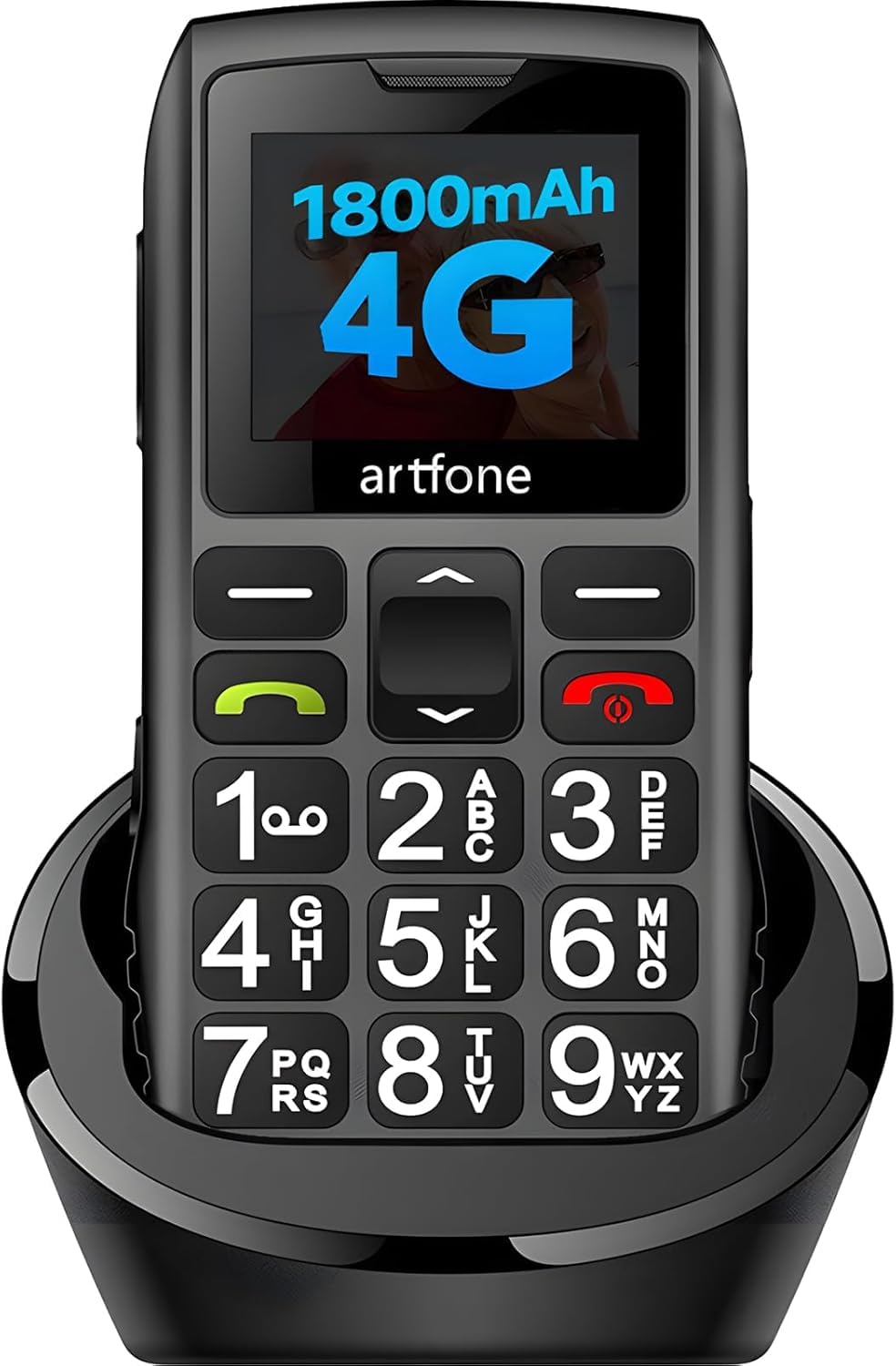
The C1+ 4G Pro is a bar-style phone built around large, backlit keys and a 1.8-inch LCD that prioritizes readability over multimedia. The standout feature is the voice time announcement — press and hold the volume-up key for three seconds, and the phone speaks the current time aloud. This is a genuinely useful tool for seniors who cannot or do not want to put on reading glasses just to check the time.
The phone stores up to 1000 contacts and supports photo caller ID on the display. The eight speed-dial slots (numbers 2 through 9 plus the dedicated A/B keys) allow fast access to most-used contacts. The 1800mAh battery is among the highest capacities in the bar-phone segment, offering 7-8 hours of talk time and days of standby. The charging dock eliminates cable struggle, and the side slider locks the keypad to prevent accidental calls in a pocket.
The carrier situation is the same as nearly every phone here — it is optimized for T-Mobile and its MVNOs, with no compatibility for Verizon or AT&T networks. Some users reported that the speed dial feature stopped working after two weeks of use, which suggests a software reliability issue. The manual is thin and does not include detailed troubleshooting steps. For a senior who wants a no-frills bar phone with extra audio feedback, it is a solid mid-range pick.
Why it’s great
- Voice time announcement reduces need for glasses
- 1800mAh battery leads the bar-phone category
- Charging dock included for simple overnight charging
Good to know
- Speed dial reliability concerns from long-term users
- T-Mobile network only, no AT&T or Verizon support
6. AGM M9 Rugged
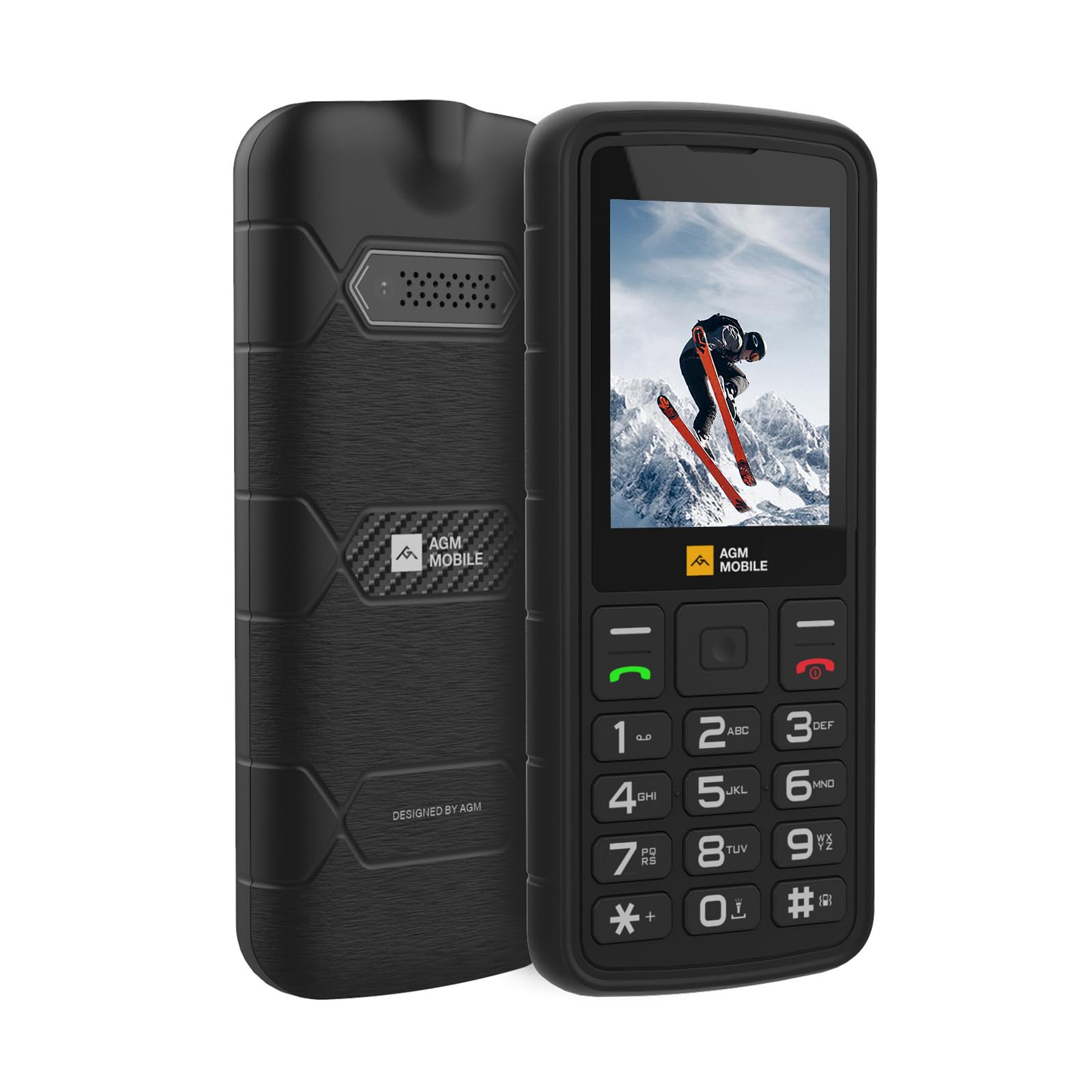
The AGM M9 prioritizes physical durability above all else. It carries IP68 and IP69K ratings for water and dust protection and can survive drops from 1.8 meters onto concrete. This makes it the best choice for seniors who work outdoors, garden daily, or are prone to dropping items. The replaceable 1200mAh battery is a rarity in modern phones — you can swap in a fresh battery instantly rather than waiting for a charge cycle.
The phone has three card slots: two for SIMs and one for a microSD card up to 128GB, making it a good dual-line option for seniors who want a work number separate from a personal number. The built-in FM radio and music player work without a data connection, and the high-intensity flashlight is bright enough for nighttime walks. The loudspeaker delivers clear volume at the ear and in hands-free mode, which helps users with mild hearing loss.
The downsides are significant for some buyers. The interface, while simple, still uses T9 text input and multi-step operations that can confuse seniors accustomed to smartphone interactions. A small number of users reported the phone abruptly stopping working after a few weeks. The AGM M9 also runs exclusively on T-Mobile, so it is not an option for Verizon households. It is a niche pick for the senior who needs a tough, water-resistant tool phone, not a minimalist companion.
Why it’s great
- IP68/IP69K certified for water and dust protection
- Replaceable battery extends the phone’s usable life
- Dedicated flashlight and FM radio for outdoor use
Good to know
- Interface complexity limits appeal for some seniors
- T-Mobile only; reliability issues reported by a few users
7. C8 4G Flip Phone
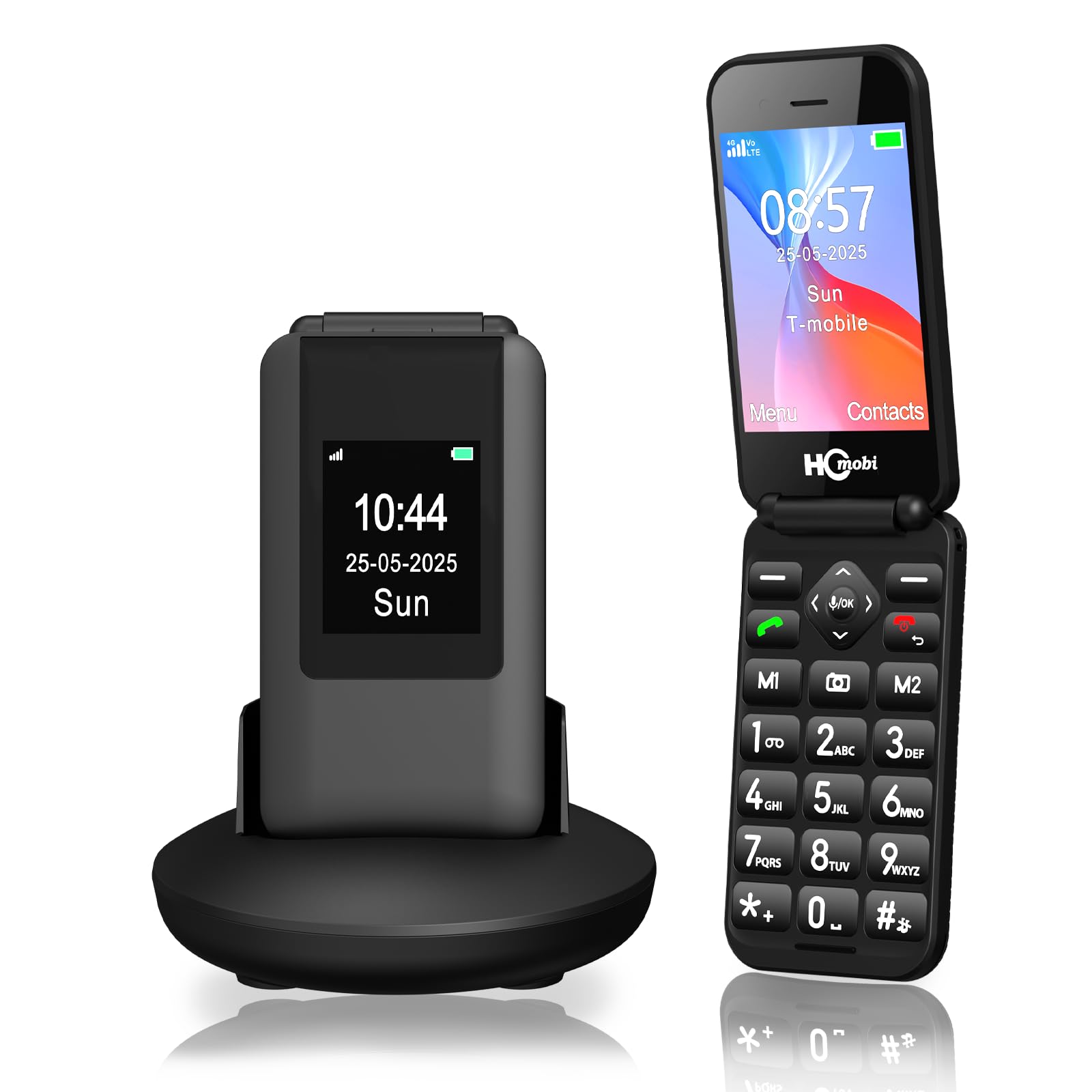
The C8 flip phone has the largest inner display of any phone on this list at 2.8 inches, and the 1.5-inch outer screen shows time and caller ID without opening the clamshell. The increased screen real estate makes a meaningful difference for seniors who need larger text to read messages or contacts. The font is adjustable to a very large size that reduces eyestrain during use.
The phone’s 1400mAh battery provides 6-8 hours of talk time, and the included charging dock encourages consistent overnight charging. The SOS button on the back triggers a sequence of calls and text messages to five preset contacts after a three-second press, which reduces accidental triggers. The M1 and M2 shortcut keys plus numbers 2-9 for speed dial make it easy to reach favorites without scrolling. The device also supports expandable storage up to 32GB for pictures and music.
Customer reports are mixed — many praise the ease of use and build quality, but a handful report units that power off randomly. Texting requires navigating to the contacts app first, and the messaging interface is not linked to the contact list, making SMS cumbersome. The camera produces fuzzy, low-resolution images that are only useful for identification. For a senior who prioritizes a large readable screen above all else, the C8 delivers, but reliability testing before gifting is advised.
Why it’s great
- Largest inner screen in the category at 2.8 inches
- M1/M2 shortcut keys for instant speed dialing
- Charging dock with adjustable font for vision support
Good to know
- Random power-off issues reported by some buyers
- Texting interface is clunky and not linked to contacts
FAQ
Can I use my existing Verizon or AT&T SIM card in a senior phone?
What does the SOS button actually do when pressed?
Which phone is best for a senior with dementia or Alzheimer’s?
Final Thoughts: The Verdict
For most users, the best basic cell phone for seniors winner is the Easyfone Prime-A1 Pro because it combines a flip form factor with audible number feedback, a dedicated scam-call block button, and a charging dock that simplifies daily use. If you want picture-based calling for a senior with memory loss, grab the Easyfone Prime-T6. And for hearing enhancement during face-to-face conversation, nothing beats the artfone G6 Flip with its built-in speech amplification mode.