
Our readers keep the lights on and the weekend projects moving. As an Amazon Associate, I earn from qualifying purchases.
Stepping into PC gaming for the first time is a mix of excitement and confusion. Budgets are tight, specs look like a foreign language, and the biggest fear is buying a machine that chokes on modern titles or dies after the return window. The entry-level market is crowded with outdated hardware dressed in RGB lighting, making a smart choice harder than the games themselves.
I’m Rikta — the co-founder and writer behind FitlyFast. This guide cuts through the noise by analyzing CPU architectures, GPU memory buses, and power supply realities across eleven prebuilt systems aimed at the first-time buyer.
After hours of spec-sheet research and real-world buyer feedback, these are the most reliable beginner gaming computer options worth your hard-earned cash.
How To Choose The Best Beginner Gaming Computer
Every prebuilt in this guide runs games, but the longevity and upgrade potential vary wildly. New buyers often chase the highest core count or largest RAM number without realizing CPU generation and GPU memory bandwidth matter far more for modern titles. A system built on a decade-old platform with a weak power supply will frustrate you long before the graphics card fails.
The GPU is Your Anchor
A dedicated graphics card is non-negotiable for 1080p gaming. The AMD Radeon RX 580 8GB is the gold standard for entry-level builds, offering enough VRAM for modern textures. Cards like the RX 550 4GB or RX 6500 XT 4GB will run esports titles but struggle with heavier open-world games. Integrated graphics (like Ryzen 5 Vega) are strictly for solitaire or very light indie games — they are not a real gaming solution.
Avoid Obsolete CPU Platforms
Intel’s 3rd and 4th generation i5/i7 processors (circa 2013) are appearing in budget prebuilts with surprisingly low prices. These older platforms lack NVMe support and efficient power management, causing performance bottlenecks and overheating issues. Aim for at least an AMD Ryzen 5 5000 series or an Intel 12th-gen or newer processor to ensure you can handle modern game engines and future upgrades.
Power Supply and Upgrade Path
The cheapest prebuilts often equip a generic, low-wattage power supply that cannot handle a GPU upgrade later. A system with a 550-watt 80PLUS Bronze power supply (like those from Thermaltake or EVGA) gives you headroom to swap in a better graphics card down the road. Check if the motherboard has an extra RAM slot — many budget builds ship with a single stick of RAM, leaving one open for an easy performance boost.
Quick Comparison
On smaller screens, swipe sideways to see the full table.
| Model | Category | Best For | Key Spec | Amazon |
|---|---|---|---|---|
| Thermaltake LCGS Quartz i1460 | Premium | Long-Term Modern Gaming | RTX 5060 8GB + i5-14400F | Amazon |
| CyberPowerPC Gamer Master | Mid-Range | 1080p Esports & Streaming | RX 6500 XT 4GB + Ryzen 5 5500 | Amazon |
| AVGPC Q-Box Series | Mid-Range | Ray Tracing Entry & Upgrade | RTX 3050 6GB + Ryzen 5 5500 | Amazon |
| ViprTech Stryker 1.0 | Mid-Range | High-FPS Fortnite / Valorant | RX 580 8GB + Ryzen 7 2700 | Amazon |
| NOVATECH Phantom | Mid-Range | 4K Media & 1080p Gaming | RX 580 8GB + Xeon E3 1230v6 | Amazon |
| Blackout Computers i7 Desktop | Mid-Range | Multi-Tasking & Medium Settings | RX 580 8GB + i7 4790 | Amazon |
| YAWYORE Gaming PC | Mid-Range | Future GPU Upgrade Platform | Vega 7 + Ryzen 5 5600GT | Amazon |
| ZER-LON Gaming PC | Budget | Complete Starter Bundle | RX 560 4GB + i5 3470 | Amazon |
| STGAubron Prebuilt PC | Budget | WiFi 6 & Light Gaming | RX 550 4GB + Core i5 | Amazon |
| abytespark Gaming PC | Budget | VR Experiments on a Tight Budget | RX 550 4GB + Core i5 | Amazon |
| suevery AMD Desktop | Budget | Office & Very Light Gaming | Vega 7 + Ryzen 5 5600GT | Amazon |
In‑Depth Reviews
1. Thermaltake LCGS Quartz i1460

The Thermaltake LCGS Quartz i1460 is the only prebuilt in this guide built around a current-generation CPU architecture. The Intel Core i5-14400F offers terrific single-core performance for gaming and modern features like PCIe 4.0 support. This platform is actually upgradeable without swapping the motherboard — a massive advantage over budget rivals.
NVIDIA’s RTX 5060 is a significant step above the RX 580 or 6500 XT found in other systems here. It provides real-time ray tracing, DLSS support, and enough grunt for 1440p gaming at medium settings. The 8GB of VRAM is the new floor for modern titles and will keep you playing comfortably for years.
Thermaltake uses an ARGB tower air cooler, a robust power supply, and a white chassis with a tempered glass side panel. Real users highlight the quiet operation and effortless Windows 11 setup. This is the one machine on the list that does not immediately need upgrades.
Why it’s great
- Current-gen i5-14400F CPU with upgrade path.
- RTX 5060 handles ray tracing and 1440p.
- 16GB DDR4 3600MHz RGB memory pre-installed.
- Whisper-quiet operation and professional cable management.
Good to know
- Premium cost relative to entry-level range.
- Only a 1TB NVMe SSD; some users may want more storage.
- Not ideal for sub budgets.
2. CyberPowerPC Gamer Master GMA3100A3

The CyberPowerPC Gamer Master delivers a balanced AMD platform with a dedicated graphics card at a price that leaves room for a decent monitor. The Ryzen 5 5500 is a solid six-core CPU that handles multitasking and modern game engines without stuttering. The AMD B550 chipset motherboard allows for future CPU upgrades.
Radeon RX 6500 XT 4GB is an entry-level card that powers through esports titles like Fortnite, Valorant, and CS2 at high settings with smooth frame rates. It will struggle with heavy textures at 1080p in AAA games, but for a beginner focused on multiplayer titles, it is a capable starting point. The PCIe 4.0 NVMe SSD makes load times snappy.
8GB of RAM is the only weak spot — you will want to upgrade to 16GB for smoother multitasking. CyberPowerPC includes a tempered glass panel, custom RGB lighting, and a 1-year warranty. Real users praise the easy setup and the value proposition, with many noting the system is ready to game right out of the box.
Why it’s great
- Modern Ryzen 5 5500 CPU on an upgradeable B550 platform.
- PCIe 4.0 SSD for fast loading times.
- Dedicated RX 6500 XT for 1080p esports.
- 1 year parts & labor warranty included.
Good to know
- Only 8GB RAM; will need immediate upgrade for AAA gaming.
- GPU memory limited to 4GB.
- Not for high-resolution or ray tracing.
3. AVGPC Q-Box Series

The AVGPC Q-Box is a unique offering in the beginner space because it includes a liquid CPU cooler — typically found in enthusiast rigs. The Ryzen 5 5500 processor stays cool under load, allowing for sustained performance without thermal throttling. This system comes with a genuine Windows 11 license and a full keyboard and mouse set.
The RTX 3050 6GB graphics card is the entry point to NVIDIA’s RTX ecosystem. It can run games with DLSS enabled for better frame rates and supports ray tracing in lighter titles. The 6GB VRAM buffer is an improvement over 4GB cards, making it more viable for modern open-world games at medium detail.
Buyers report fast customer service from AVGPC and smooth performance in games like Minecraft and League of Legends. The 500GB SSD is a bit small, but there is space inside for adding a second drive. The front mesh panel and RGB fans create a slick gaming aesthetic that looks more expensive than it is.
Why it’s great
- Liquid CPU cooler for quieter, cooler operation.
- RTX 3050 offers DLSS and entry-level ray tracing.
- Spacious case for easy upgrades.
- Free lifetime technical support from assembler.
Good to know
- 500GB SSD fills quickly with modern games.
- Only 8GB RAM by default (upgrade recommended).
- RGB lighting not fully customizable out of box.
4. ViprTech Stryker 1.0
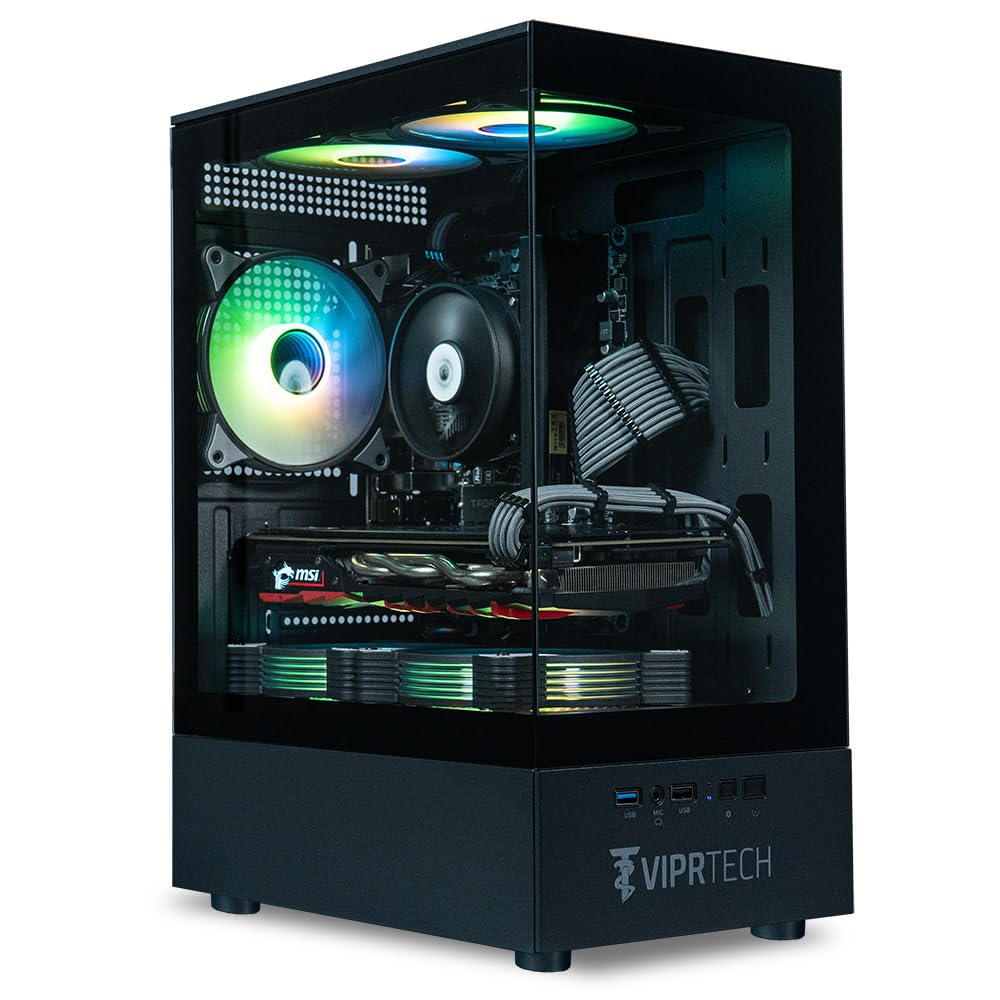
The ViprTech Stryker 1.0 combines an 8-core Ryzen 7 processor with an RX 580 8GB graphics card, creating a combo that excels in CPU-heavy esports titles. Fortnite, Valorant, and Overwatch will run at high frame rates (over 100 FPS) when paired with a 1080p monitor. The 16GB DDR4 RAM is the sweet spot for multitasking while gaming.
ViprTech builds each PC by hand in the USA and stress-tests every unit before shipping. The grey braided cable extensions give the interior a clean, custom look. The 700-watt power supply provides enough headroom to drop in a modern GPU upgrade later — a major plus for a beginner planning to grow.
Customer feedback is largely positive, with users praising the build quality and performance. Some units have reported minor issues with Bluetooth or Wi-Fi adapters, but ViprTech’s customer service team is responsive. The case features a built-in RGB lighting button for effect control without software conflicts.
Why it’s great
- Eight-core Ryzen 7 CPU handles multitasking easily.
- RX 580 8GB is proven for 1080p gaming.
- 700W PSU leaves room for future GPU upgrades.
- Hand-built and stress-tested in the USA.
Good to know
- CPU is older Zen+ architecture.
- Some reports of Wi-Fi/BT adapter issues.
- No documentation for motherboard BIOS settings.
5. NOVATECH Phantom

The NOVATECH Phantom uses a server-grade Intel Xeon E3 1230v6, which is essentially an i7-7700 equivalent at a lower price point. When paired with the AMD RX 580 8GB, this system delivers solid 1080p gaming performance — users report 70 FPS in GTA 5 and over 100 FPS in Minecraft. This is a strong combination for high-definition gaming and 4K media playback.
The 512GB M.2 SSD ensures fast boot times and quick level loads in most games. Windows 11 Pro is pre-installed, which is a nice bonus for a beginner who might appreciate the extra security features. The case uses a stylish design with RGB fans and a tempered glass panel that looks premium on a desk.
One caveat is the DDR3 RAM — the platform is limited to slower memory, which can bottleneck the fastest CPUs. Several buyers report it runs warmer than newer builds, so good ventilation is important. A few users have reported reliability issues over long periods, so a solid warranty is a must.
Why it’s great
- Excellent 1080p gaming performance with RX 580 8GB.
- Sleek RGB case looks more expensive than it is.
- Windows 11 Pro included at no extra cost.
- Quiet operation and cable management.
Good to know
- DDR3 RAM limits upgrade potential.
- Xeon CPU is not replaceable with consumer chips.
- Some reports of heat buildup under load.
6. Blackout Computers i7 Desktop
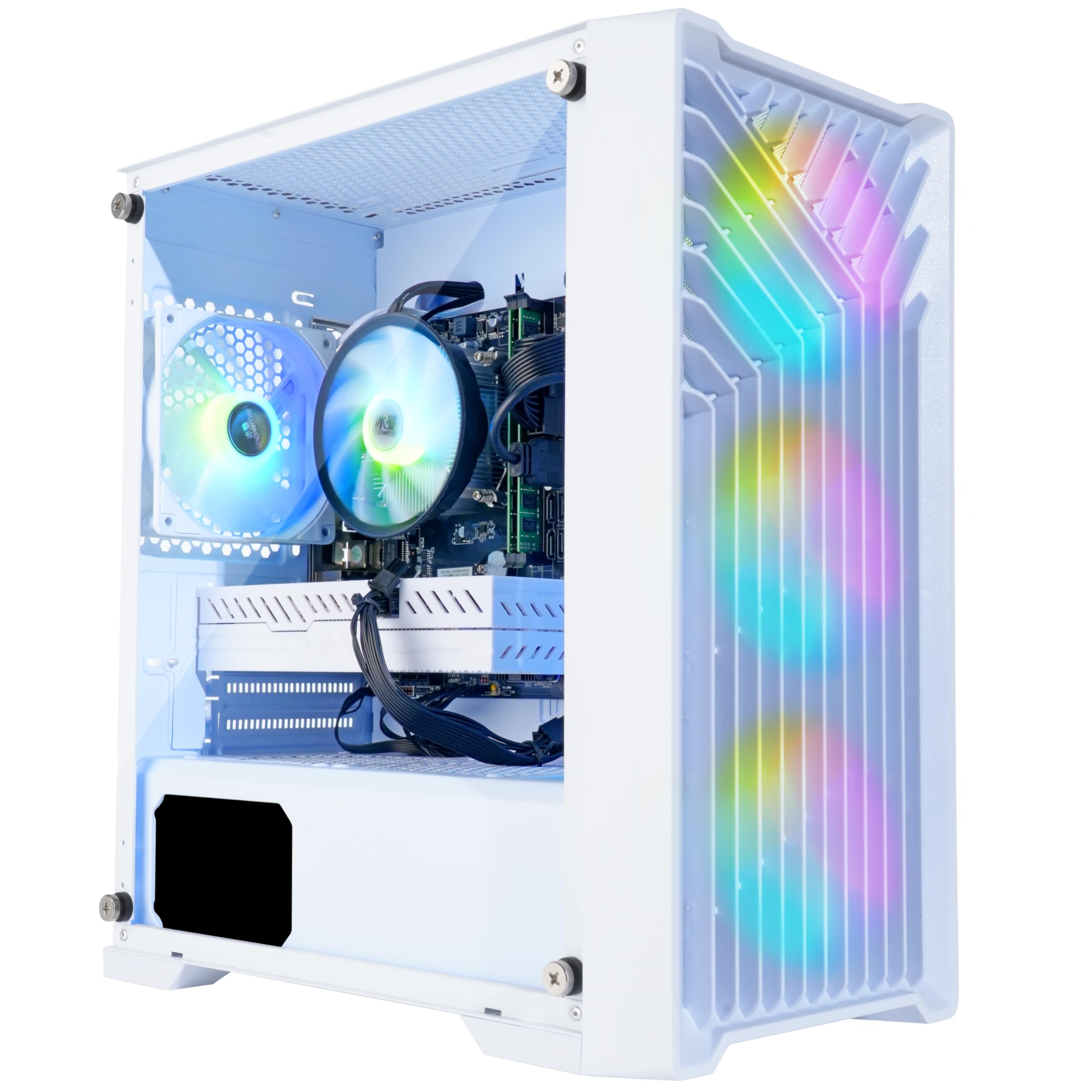
The Blackout Computers desktop brings a massive 1TB NVMe SSD to the entry-level table — a rare find at this tier. The Intel Core i7 4790 is an older Haswell chip (2014), but it still holds its own in games that rely on single-core speed. The AMD Radeon RX 580 8GB is the real star, offering enough VRAM for high-resolution textures.
Blackout advertises this as VR ready, and with the RX 580 8GB, it can handle entry-level VR headsets like the Oculus Rift. The 4 RGB fans and front mesh panel provide excellent airflow, keeping temperatures down during long sessions. The case’s Eclipse Edition styling is minimal and aggressive.
Customer support from Blackout is consistently praised in reviews, with quick resolution of initial setup issues. The 1TB SSD is a huge plus for beginners who want to install a library of games immediately. Understand that the i7 4790 platform is end-of-life — RAM upgrades will be expensive DDR3, and the CPU cannot be upgraded without a new motherboard.
Why it’s great
- 1TB NVMe SSD provides massive out-of-box storage.
- RX 580 8GB handles VR and 1080p gaming well.
- Excellent airflow with 4 RGB fans.
- Assembled in the USA with responsive support.
Good to know
- CPU is from 2014, no upgrade path on this board.
- Uses older DDR3 RAM.
- Not for high-end new releases at max settings.
7. YAWYORE Gaming PC

The YAWYORE system is built around the AMD Ryzen 5 5600GT, a powerful APU with integrated Radeon Vega 7 graphics. Out of the box, it will run Fortnite at around 30 FPS and handle indie games well. The real value here is the platform itself — an MSI A520M motherboard, 16GB of DDR4 3200MHz RAM, and a 550W 80PLUS Bronze power supply.
Buyers report that adding a used graphics card (like an RX 580 or GTX 1070 Ti) transforms this machine into a legitimate 1080p gaming rig. The 1TB M.2 NVMe SSD provides fast storage, and the 5 ARGB case fans keep everything cool. The built-in Wi-Fi and Bluetooth make setup cable-free.
This is not a ready-to-play gaming PC; it is a gaming PC waiting for a graphics card. For a beginner who is comfortable installing a GPU (a simple process), this represents a smart way to get a modern platform and save money. The system is quiet and well-built, with good heat management.
Why it’s great
- Modern AM4 platform with upgrade potential.
- Plenty of ARGB fans and great airflow.
- 1TB NVMe SSD and 16GB RAM standard.
- 550W 80PLUS Bronze PSU can handle a new GPU.
Good to know
- No dedicated graphics card for serious gaming.
- Integrated Vega is limited to 1080p low settings.
- GPU power cable is tucked tightly inside the case.
8. ZER-LON Gaming PC Desktop
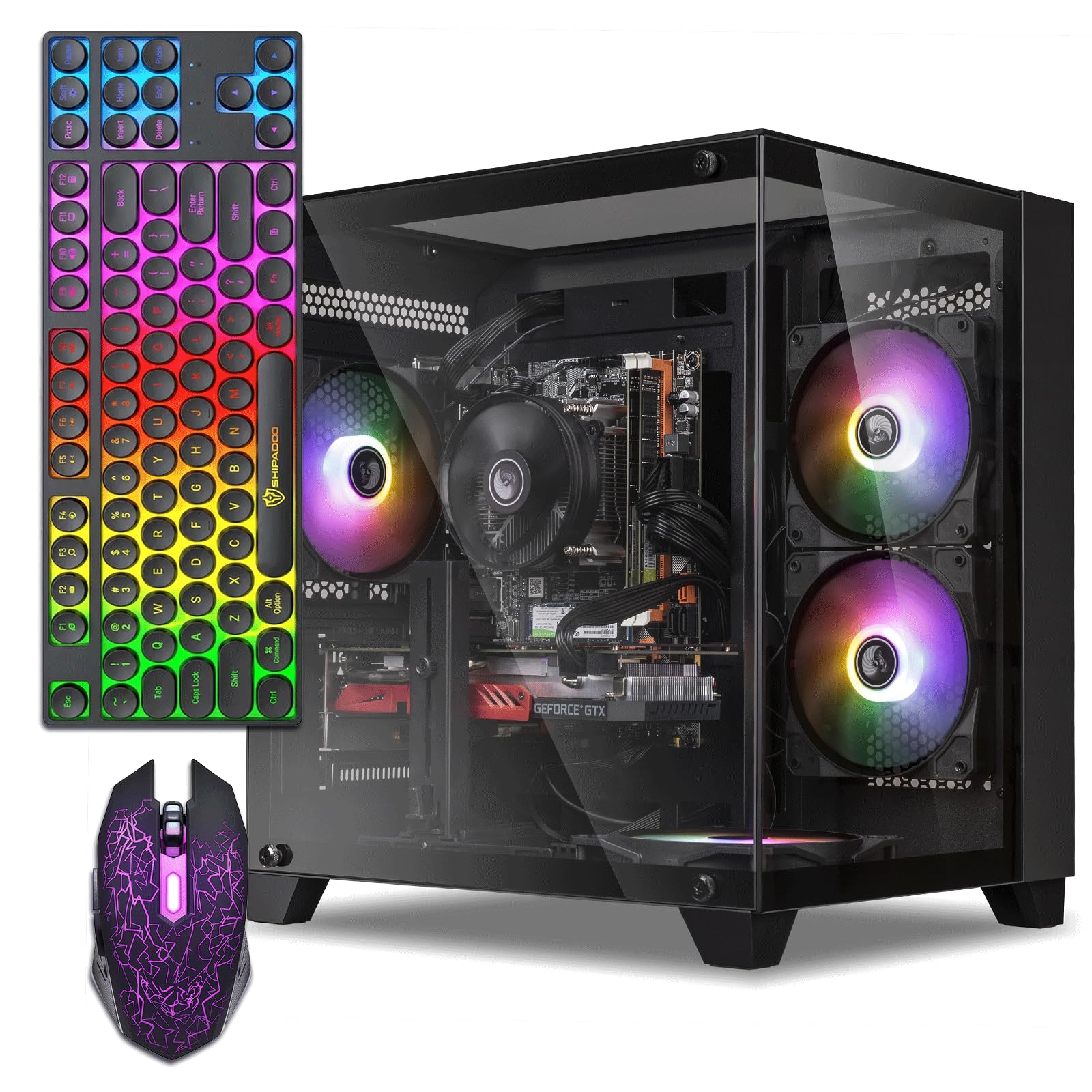
The ZER-LON system is designed to impress a new gamer with its all-inclusive package. It ships with a gaming keyboard, gaming mouse, mouse pad, and 5 RGB fans — everything needed to start playing immediately. The Intel Core i5 3470 and AMD Radeon RX 560 4GB are a well-matched pair for light esports gaming at medium settings.
With 16GB of RAM and a 512GB SSD, this machine boots fast and handles basic multitasking without lag. Users report it runs Fortnite, Roblox, and Minecraft well for a first-time gamer. The white-and-black design looks clean, and the glass side panel shows off the RGB lighting nicely.
The elephant in the room is the CPU — the i5 3470 is from 2012. It lacks modern instruction sets and cannot be upgraded without replacing the entire motherboard. Some users have reported overheating issues due to an undersized power supply. Consider this a temporary gaming starter, not a long-term investment.
Why it’s great
- Complete setup with keyboard, mouse, and pad.
- 16GB RAM and 512GB SSD for smooth multitasking.
- RGB fans create an impressive gaming aesthetic.
- Affordable entry point for young gamers.
Good to know
- Very old CPU with no upgrade path.
- Power supply may be undersized for the system.
- RX 560 4GB is weak for modern AAA titles.
9. STGAubron Prebuilt Gaming PC

The STGAubron prebuilt stands out with its inclusion of WiFi 6 and Bluetooth 5.0 — modern wireless standards that are rare in this price bracket. The Core i5 processor and RX 550 4GB graphics card are entry-level components, but they reliably run indie games and older titles without issues. The system ships with Windows 11 Home 64-bit pre-installed.
Buyers report that it works well for children getting into gaming, running Roblox and Diablo smoothly. The included RGB gaming mouse and keyboard are functional and match the aesthetic. The 512GB SSD provides decent storage for a game or two plus schoolwork.
The RX 550 is the weakest GPU on this list — it lacks modern features and will not run many new titles at acceptable frame rates. Customer reviews mention mixed reliability, with some units experiencing hardware failures after a few months. The lifetime tech support is a welcome safety net, but this is best for very light use.
Why it’s great
- WiFi 6 and Bluetooth 5.0 for modern connectivity.
- Windows 11 Home pre-installed and ready.
- RGB keyboard and mouse included.
- Free lifetime technical support.
Good to know
- RX 550 4GB is a very weak GPU.
- Older CPU with limited upgrade potential.
- Reliability reports are mixed over long term.
10. abytespark Gaming PC

The abytespark tower uses a striking white-and-transparent Sea View design with 5 RGB fans that create a beautiful light show. The Intel Core i5 and AMD Radeon RX 550 4GB provide enough horsepower to run older titles and indie games at 1080p. A user even reported running BONEWORKS in VR, which is impressive for the budget tier.
This system comes with a complete accessory bundle including a gaming keyboard, mouse, and mouse pad. The 512GB NVMe SSD ensures fast load times, and the 16GB of RAM keeps things snappy for everyday use. Setup is straightforward, with Windows 11 Home pre-installed.
Critical scrutiny reveals a common pattern: the system advertised as a 2025 model contains hardware from 2013 (i7-4770) and lacks Bluetooth and NVMe support. The Windows 11 installation may use an unsupported bypass, meaning future updates could be blocked. This is a risky buy for anyone expecting a modern, upgradeable platform.
Why it’s great
- Eye-catching Sea View design with RGB fans.
- Includes full accessory bundle (keyboard, mouse, pad).
- Fast NVMe SSD for quick loading.
- Can run some VR titles on low settings.
Good to know
- Contains very old hardware despite marketing claims.
- Windows 11 may have bypassed system requirements.
- No Bluetooth without a separate adapter.
11. suevery AMD Desktop
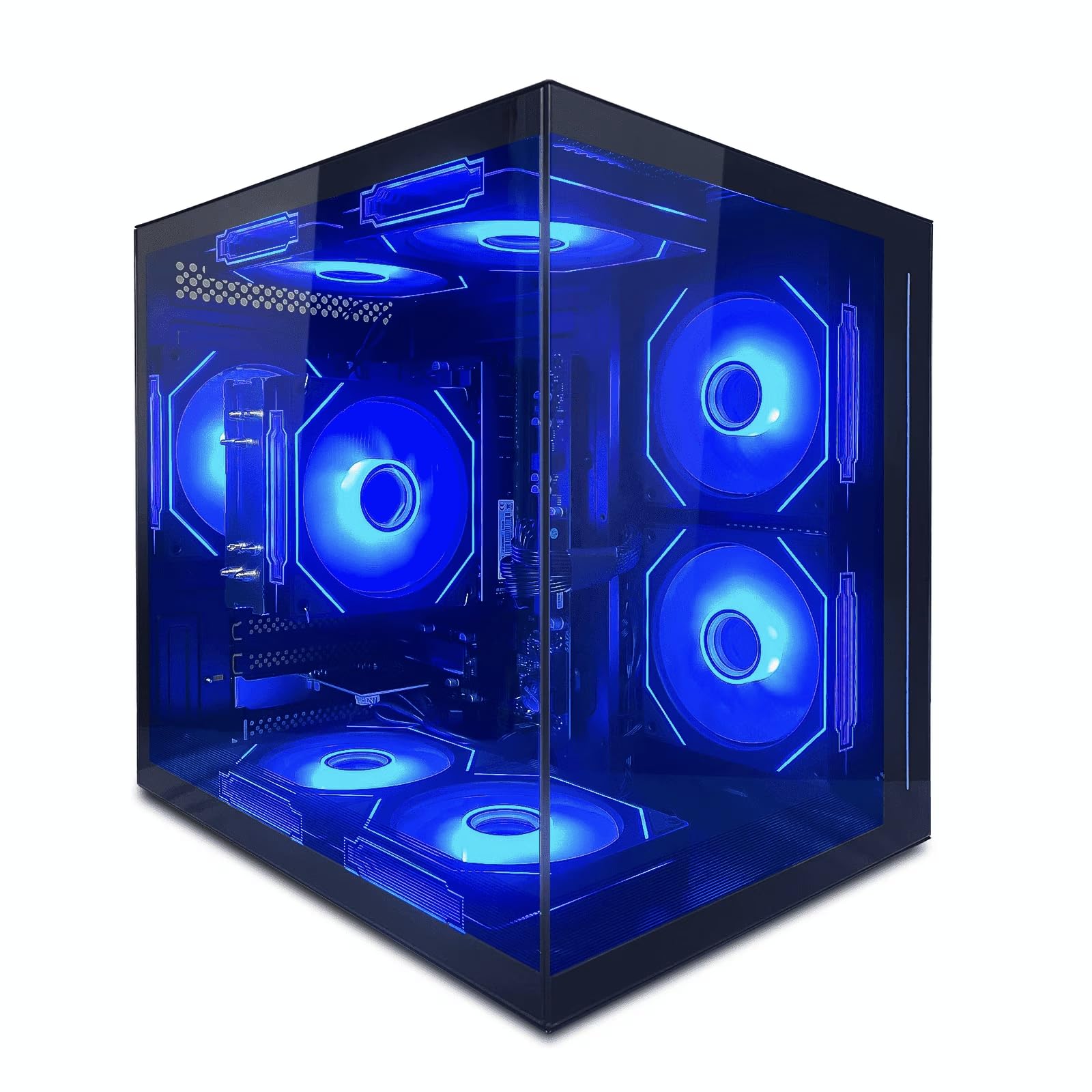
The suevery AMD Desktop is the most affordable entry point into the Ryzen 5 5600GT ecosystem. This APU-based system relies entirely on integrated Radeon Vega 7 graphics for display output. It is perfectly suited for homework, streaming, office tasks, and older indie games like Stardew Valley or The Sims 4 without heavy mods.
The build includes 16GB of DDR4 RAM and a 512GB SSD, making it responsive for daily use. Five RGB fans and a tempered glass panel create an attractive desk presence. It runs quietly and stays cool, making it a good fit for a bedroom or dorm room.
There is no dedicated graphics card here, so forget about running modern AAA games or even Fortnite at decent settings. Several users reported that the GPU (integrated Vega) was not detected by Windows, requiring a manual BIOS setting or a new graphics card. Treat this as a high-end office PC with gaming aspirations, not a dedicated gaming machine.
Why it’s great
- Modern Ryzen 5 5600GT processor with upgrade path.
- Quiet operation and attractive RGB design.
- Good for productivity, streaming, and light indie games.
- Affordable entry price for a new platform.
Good to know
- No dedicated graphics card — integrated GPU only.
- Vega graphics struggle with most modern games.
- Some units require BIOS tweaks for GPU detection.
FAQ
Can a beginner gaming computer with integrated graphics play modern games?
Is an older used gaming PC with more RAM better than a new budget prebuilt?
What power supply wattage should a beginner gaming computer have?
How much storage and RAM do I really need for a first gaming computer?
Can I upgrade a budget beginner gaming computer later?
Final Thoughts: The Verdict
For most users, the beginner gaming computer winner is the Thermaltake LCGS Quartz i1460 because it delivers a current-generation platform and an RTX 5060 GPU that will handle gaming and future upgrades with zero compromises. If you want a dedicated 1080p machine with an upgrade path, grab the ViprTech Stryker 1.0. And for the tightest budgets where a dedicated GPU matters most, nothing beats the value of the Blackout Computers i7 Desktop with its RX 580 8GB and 1TB SSD.