
Our readers keep the lights on and the weekend projects moving. As an Amazon Associate, I earn from qualifying purchases.
The difference between a good round and a perfect punish often comes down to the controller in your hands. Whether you are grinding ranked sets in Street Fighter 6 or revisiting arcade classics on MAME, the wrong stick introduces latency, missed inputs, and hand fatigue that sabatoge your execution.
I’m Rikta — the co-founder and writer behind FitlyFast. My buying guides focus on deep spec analysis and market research, comparing latency figures, switch types, and build materials to separate genuine performance from marketing hype.
For competitive play or casual arcade sessions, the right arcade controller for pc eliminates input ambiguity and delivers the tactile feedback you need to execute consistently.
How To Choose The Best Arcade Controller For PC
Selecting an arcade controller is about matching the hardware to your game genre and physical preferences. A leverless stick with optical switches excels for modern fighters like Tekken 8, while a traditional joystick feels more authentic for shmups and beat-em-ups. Focus on latency, switch type, and form factor rather than flashy aesthetics.
Layout: Leverless vs. Traditional Joystick
Leverless controllers replace the joystick with four directional buttons, reducing travel distance and enabling faster inputs like SOCD shortcuts. Traditional sticks with an 8-way gate offer tactile feedback for 360-degree motions and are preferred by players who grew up in arcades. Your choice depends on whether you prioritize execution speed or muscle memory comfort.
Switch Type and Latency
Optical switches, found in premium models like the Razer Kitsune, register inputs with zero debounce delay and last longer than mechanical switches. Sanwa parts are the gold standard for traditional sticks, offering a crisp, responsive feel with proven durability. Budget controllers often use generic switches that feel mushy or develop inconsistency over time.
Build Quality and Weight
A controller that slides across your desk during intense matches destroys your consistency. Heavier units with rubberized bases stay planted, while compact lightweight sticks require a desk surface or lap pillow for stability. Materials matter too — aluminum top plates resist flex, while acrylic builds can creak under pressure.
Quick Comparison
On smaller screens, swipe sideways to see the full table.
| Model | Category | Best For | Key Spec | Amazon |
|---|---|---|---|---|
| Razer Kitsune | Leverless | Pro Tournament Play | Low-profile optical switches | Amazon |
| Qanba N3 Drone 2 | Traditional | PS5 & PC Cross-Platform | Qanba OV7 Omron switch lever | Amazon |
| MAYFLASH F300 Elite | Traditional | Multi-Console Compatibility | Sanwa JLF joystick & buttons | Amazon |
| GuileKeys GK-18 | Leverless | Customizable Budget Leverless | Kailh Choc low-profile switches | Amazon |
| 8Bitdo Retro Arcade Stick | Traditional | Wireless Retro & Switch Play | Bluetooth/2.4G/Wired connectivity | Amazon |
| Sehawei Haute42 G16 | Leverless | Entry-Level Leverless Value | Hot-swappable mechanical switches | Amazon |
| HORI Fighting Stick Mini | Traditional | Compact Portable Travel Stick | V-cut housing micro lever | Amazon |
In‑Depth Reviews
1. Razer Kitsune

The Razer Kitsune sets the benchmark for leverless controllers with its low-profile linear optical switches that actuate at just 1.2mm, nearly eliminating input delay. Its slim aluminum frame measures only 0.76 inches thick, making it easy to slip into a backpack for tournament travel, while the removable top plate allows custom vinyl wraps for personalization.
The quad-movement button layout replaces a joystick with four directional buttons, enabling SOCD shortcuts and precise charge partitioning. The cable security clasp and tournament lock switch physically disable side buttons so you never accidentally pause mid-round. Chroma RGB lighting matches your setup without being distracting during play.
Some users note the matte finish attracts fingerprints and oils easily, requiring regular wiping. The price reflects its Pro-grade components, but cheaper alternatives exist that lack the same optical response and build rigidity. Firmware updates have expanded SOCD compatibility beyond Street Fighter 6.
Why it’s great
- Zero debounce optical switches for instant input registration
- Ultra-slim aluminum design for maximum portability
- Tournament lock prevents accidental button presses
Good to know
- Matte surface attracts fingerprints and dust
- Premium price compared to mechanical alternatives
2. Qanba N3 Drone 2

The Qanba Drone 2 is an officially licensed Sony peripheral, guaranteeing seamless plug-and-play compatibility with PS5, PS4, and PC. It uses a Qanba OV7 Omron switch joystick that delivers a crisp, clicky feedback loop — the audible clicks help players develop rhythm-based muscle memory for moves like Mishima wavedashes in Tekken 8.
Its 30mm Qanba B30 buttons provide a responsive, mechanical feel without the hollow echo of cheaper sticks. The full control panel includes a touchpad and a 3.5mm microphone input with mute control, making it a complete console-ready package. The 3.9-pound weight keeps it planted during aggressive play.
The non-detachable USB cable limits portability and creates a snag risk if you travel frequently. The lever is notably loud — satisfying in solo play but potentially disruptive in shared spaces. The button quantity of two listed in specs is misleading; the unit includes eight action buttons plus the Omron stick.
Why it’s great
- Official Sony license means zero compatibility headaches
- Clicky Omron lever aids timing and muscle memory
- Good weight distribution for desk stability
Good to know
- USB cable is permanently attached
- Lever is very loud during gameplay
3. MAYFLASH F300 Elite

The MAYFLASH F300 Elite comes pre-loaded with genuine Sanwa JLF joystick and OBSF buttons — the industry-standard components used in most arcade cabinets. This means you get the same precise 8-way gate feel and responsive actuation found in competitive venues right out of the box, with no upgrade needed.
It supports an enormous range of platforms: Switch, PS4, PS3, Xbox Series X/S, Xbox One, PC, macOS, Steam Deck, and Android. The internal layout is designed for modding enthusiasts, with a screw-free access panel that lets you swap the joystick plate and buttons easily. The F300 Elite ships with a square gate installed, but octagonal gates are widely available.
Console compatibility requires plugging in a supported controller for authentication, which can be annoying if you don’t have one handy. The form factor is slightly smaller and lighter than full-size sticks like the Drone 2, so it may slide on smooth surfaces without a grip pad.
Why it’s great
- Genuine Sanwa JLF joystick for tournament-grade feel
- Supports nearly every modern console and PC
- Easy access interior for button and stick modding
Good to know
- Requires controller pass-through on consoles
- Compact size may feel unstable on bare desks
4. GuileKeys GK-18
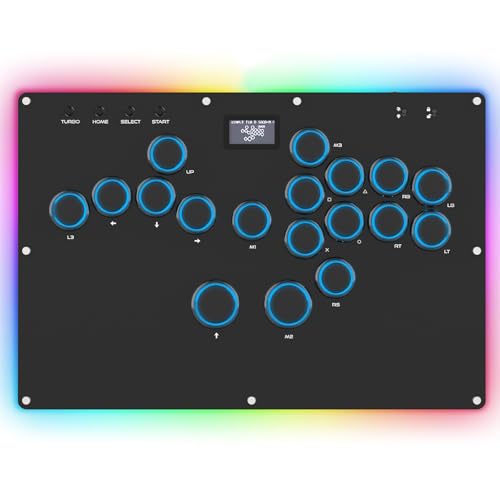
The GuileKeys GK-18 punches well above its price point by pairing Kailh Choc low-profile switches with the GP2040-CE firmware — the same open-source board found in premium custom builds. Input latency sits below 1ms across all modes, and the 18-button layout gives you extra keys for macros or game-specific binds without crowding.
The acrylic case features per-key RGB with 14 colors and 5 lighting modes, plus a small OLED screen that shows your current input mode and button layout. Hot-swappable switches allow you to swap out the stock Kailh Choc switches for different tactile or clicky variants without soldering. The built-in web configurator lets you remap every button and adjust SOCD cleaning modes.
The included PS4/PS5 adapter has been reported to disconnect intermittently, requiring a separate Brook Wingman adapter for reliable console use. The acrylic body can creak slightly under heavy hand pressure, though it does not feel fragile. The RGB lights are bright and may be distracting during dark tournament environments.
Why it’s great
- GP2040-CE firmware for sub-1ms latency
- Hot-swappable Kailh Choc switches for easy customization
- Per-key RGB and OLED display for at-a-glance status
Good to know
- Included console adapter may have disconnection issues
- Acrylic case can creak under heavy use
5. 8Bitdo Retro Arcade Stick

8Bitdo’s Retro Arcade Stick offers the rare convenience of wireless connectivity via Bluetooth and 2.4G, alongside a wired USB-C option — perfect for players who prefer a clutter-free desk or couch play. It delivers up to 40 hours of battery life on 2.4G and 30 hours on Bluetooth, with a 4-hour recharge time.
The dynamic button layout automatically changes its visual mapping when you switch between Switch and PC X-Input modes, removing guesswork. Two dedicated macro buttons (P1/P2) let you map complex sequences like supers or EX moves to a single press using the 8BitDo Ultimate Software. The universal joystick mounting plate supports Sanwa JLF and other popular stick replacements.
Stock buttons feel slightly cheap and unresponsive to some users, though they are replaceable with standard 30mm/24mm arcade buttons. The overall size is good for lap use, but the plastic body lacks the heft of premium all-metal or Sanwa-equipped sticks. It is best suited for casual play and retro emulation rather than high-level competitive matches.
Why it’s great
- Bluetooth and 2.4G wireless with long battery life
- Dedicated macro buttons for one-press combos
- Swappable joystick and buttons for easy modding
Good to know
- Stock buttons feel mushy and cheap
- Plastic body is lightweight and may slide
6. Sehawei Haute42 G16

The Sehawei Haute42 G16 packs 16 hot-swappable mechanical buttons into a compact transparent acrylic case with vibrant RGB backlighting. It supports five controller modes (X-input, D-input, PS3, PS4, Switch, Keyboard) and includes multiple SOCD cleaning modes to ensure your directional inputs behave predictably in competitive fighters.
The 40nm process node controller achieves a 1ms delay with over 95% frame consistency, making it a responsive option for players transitioning from keyboard to leverless. The embedded web configuration allows deep customization of button layouts, turbo settings, and lighting without installing separate software. The OLED screen clearly displays the current input mode and settings.
The compact size works well for portability but may feel cramped for players with medium or large hands, as the buttons are spaced tightly. The included keycaps are basic ABS plastic and feel cheap compared to aftermarket options. The SOCD cleaning modes are functional but the firmware cannot be updated by end users.
Why it’s great
- Hot-swappable switches allow custom feel without soldering
- Web configurator for easy on-the-fly adjustments
- Multiple SOCD cleaning modes for tournament legality
Good to know
- Button spacing is tight for larger hands
- Included keycaps feel cheap and low-quality
7. HORI Fighting Stick Mini

The HORI Fighting Stick Mini is the most portable option in this guide, measuring just 5.91 x 8.27 x 3.43 inches and weighing under a pound. Its V-cut housing joystick delivers accurate 8-directional input in a small footprint, making it a natural fit for players with smaller hands or children learning fighting games.
The 8-button layout covers all essential face and shoulder inputs, and the 8-foot cable gives plenty of reach for living room setups. It is officially licensed by Sony, so it works out of the box with PS5, PS4, and PC without any driver configuration. The compact size fits easily into a laptop bag for on-the-go play.
The Mini is too lightweight to stay put on a bare lap or desk — it slides and tips during intense inputs unless you brace it against something. There is no touchpad button, so accessing PS5 menus requires a separate controller. The small chassis offers no wrist rest, leading to hand strain during longer sessions.
Why it’s great
- Ultra-portable design fits in laptop bags
- Officially licensed Sony product for plug-and-play
- Great ergonomic fit for smaller hands and children
Good to know
- Too light to stay stable on lap or desk alone
- No touchpad button limits PS5 menu navigation
FAQ
What is the difference between leverless and a traditional joystick for PC fighting games?
Do I need SOCD cleaning on my arcade controller?
Final Thoughts: The Verdict
For most users, the arcade controller for pc winner is the Razer Kitsune because its low-profile optical switches and slim aluminum build set the standard for competitive leverless play. If you want a traditional stick with genuine Sanwa parts and multi-platform support, grab the MAYFLASH F300 Elite. And for the best value in a leverless controller with hot-swappable switches, nothing beats the GuileKeys GK-18.