
Our readers keep the lights on and the weekend projects moving. As an Amazon Associate, I earn from qualifying purchases.
That moment when a single audio cue — a faint footstep, a reload click, a distant ability cast — can decide the outcome of an entire ranked match. Yet most gamers run a single headset plugged directly into their PC, leaving them unable to balance Discord chat against game volume, clean up mic hiss, or route audio to a stream without tabbing out mid-fight. An audio mixer for gaming changes that entirely by putting every sound source under dedicated physical controls, letting you prioritize the noises that win rounds.
I’m Rikta — the co-founder and writer behind FitlyFast. I’ve spent the last several weeks deep in the spec sheets, customer review histories, and real-world performance data of over a dozen gaming-focused audio mixers to separate the handful that genuinely improve your in-game awareness from the ones that just add a row of knobs to your desk.
Whether you’re a competitive Valorant player needing crystal-clear comms or a streamer juggling game audio, alerts, and a live microphone, this guide to the audio mixer for gaming market walks through the seven models that earned their spot through measurable preamp gain, noise floors, routing flexibility, and build quality — not flashy RGB alone.
How To Choose The Best Audio Mixer For Gaming
The right audio mixer for gaming depends first on whether you need to process a single microphone input with game/chat balance or route multiple audio sources independently. Entry-level units typically offer a single XLR preamp with phantom power, a 3.5mm aux input, and a USB connection — enough to upgrade a USB mic to an XLR dynamic while retaining volume control. Mid-range mixers add separate faders, submix routing, and loopback for streaming, while premium units feature motorized faders, per-app software control, and advanced routing tables that eliminate the need for virtual audio cables entirely.
Preamp Quality and Gain Range
For gaming, the microphone is the most critical input. A mixer’s preamp determines how much clean gain it can apply before introducing audible hiss. Look for a gain range of at least 55dB to 70dB if you plan to use a dynamic microphone like the Shure SM7B or a budget dynamic. Condenser microphones require 48V phantom power — without it, they simply won’t work. Units that advertise sub-0.2% Total Harmonic Distortion (THD) and Signal-to-Noise Ratio (SNR) above 90dB will keep voice comms crisp even in the middle of loud in-game explosions.
Channel Count and Routing Flexibility
A simple 2-channel mixer is enough for a solo streamer running one mic and a PC feed, but competitive gamers and co-streamers benefit from 4+ channels so they can isolate game audio, voice chat, music, and alerts across separate faders. The ability to create submixes — one mix for your headphones and a different mix for your stream — is the feature that separates basic USB mixers from full streaming consoles. If you run a dual-PC setup, look for mixers with dedicated line outputs and USB connectivity that can bridge the two machines cleanly.
Virtual Surround and Game/Chat Balance
Positional audio in games like Valorant, CS2, and Apex Legends depends on accurate spatial cues. Some gaming mixers include a built-in virtual 7.1 surround sound processor, but the implementation varies widely — a good one will simulate directional audio convincingly through standard stereo headsets. The game/chat balance dial is arguably more important: it lets you tune the ratio between in-game sounds and Discord or TeamSpeak without alt-tabbing and digging through Windows audio settings. A dedicated hardware knob for this is a major convenience advantage.
Quick Comparison
On smaller screens, swipe sideways to see the full table.
| Model | Category | Best For | Key Spec | Amazon |
|---|---|---|---|---|
| BEACN Mix Create | Premium | Dual-PC streamers | App-based routing with 5″ display | Amazon |
| Focusrite Scarlett Solo 3rd Gen | Pro Interface | High-fidelity recording & gaming | 120dB dynamic range, 192kHz | Amazon |
| FIFINE AmpliGame SC8 | Mid-Range | XLR mic upgrade with game/chat dial | Virtual 7.1, 75dB SNR | Amazon |
| Focusrite Vocaster One | Mid-Range | Solo podcasters & streamers | 70dB gain, Auto Gain button | Amazon |
| Behringer XENYX 802S | Analog Board | Multiple source monitoring | 8 input channels, USB interface | Amazon |
| MAONO MaonoCaster AME2 | All-in-One | Podcasters & live streamers | 10 channels, 11 sound pads | Amazon |
| FIFINE AmpliGame KS5 Bundle | Value Bundle | First-time XLR upgrade | Includes dynamic mic & XLR cable | Amazon |
In‑Depth Reviews
1. BEACN Mix Create

The BEACN Mix Create is a software-driven audio mixer designed specifically for streamers running complex multi-source setups. Instead of physical faders, it uses a 5-inch full-color display and smooth push-button encoders — each knob can control a different app, from game audio to Discord to Spotify, and paging through sources unlocks virtually unlimited channels. The real strength is the submix routing: you can send a clean mix to your stream while hearing alerts and chat in your own headphones, all without virtual audio cable software.
The hardware build is extremely light at just 65 grams, which makes it easy to reposition on a cluttered desk. Setup requires the BEACN software running on PC or Mac — without it, the device is purely decorative. The USB-C connectivity simplifies dual-PC configurations dramatically; users report solving two-machine audio routing in about 20 minutes. Customer reviews consistently praise the customer support and the ability to save profiles that persist across reboots with a red dot indicator confirming the active profile.
The unit does not include a microphone preamp or any audio inputs — it is a control surface for software routing, not a traditional mixer with XLR ports. This makes it ideal for streamers who already have a separate audio interface or USB microphone. It pairs well with the BEACN Mic but can route any USB audio source. Reviews note that using it with third-party USB mics can occasionally introduce robotic artifacts, though firmware updates have reduced this issue over time.
Why it’s great
- Unlimited per-app routing with intuitive physical knobs
- Dedicated submix button for separate stream headphone mixes
- Excellent dual-PC workflow — far fewer cables than GoXLR alternatives
Good to know
- Completely useless without the BEACN software running
- No XLR input or mic preamp — requires external interface
- Some USB mics may need the BEACN Mic for full compatibility
2. Focusrite Scarlett Solo 3rd Gen

The Focusrite Scarlett Solo 3rd Gen is not a full-featured gaming mixer, but for gamers who demand the absolute cleanest microphone preamp and the ability to record gameplay commentary at studio resolution, it remains the gold standard. The single XLR input provides 56dB of gain with a low noise floor, and the switchable Air mode boosts the high frequencies for added presence — a noticeable improvement for voices that sound muffled through other interfaces. The instrument input handles guitar or bass for streamers who also record music.
The hardware is built around a metal chassis that feels substantially more durable than most mixers in this range. Gain Halos — green for good level, red for clipping — eliminate guesswork when setting input volume. The 24-bit/192kHz conversion ensures that recordings retain every detail, useful for voice-overs and highlights clips. However, the Scarlett Solo lacks any game/chat balance dial, loopback for streaming, or multi-channel faders. It is purely a single-input audio interface with two monitor outputs.
For competitive gamers who already have a software-based routing solution (like Voicemeeter or the Elgato Wave Link), the Scarlett Solo provides the best possible input quality. The included software bundle — Pro Tools Intro, Ableton Live Lite, and the Hitmaker Expansion — adds significant value for those who also produce content. Customer reviews highlight the three-year warranty and durability; many units still perform flawlessly after years of daily use. The single-channel limitation means streamers running multiple mics will need a larger interface.
Why it’s great
- Exceptional preamp clarity with Air mode for voice presence
- Rugged all-metal construction proven over years of use
- Included Pro Tools and Ableton Live Lite software suite
Good to know
- No game/chat balance, loopback, or multi-channel mixing
- Only one XLR input — not suitable for co-streamers
- Lacks any built-in voice changing or sound effects
3. FIFINE AmpliGame SC8
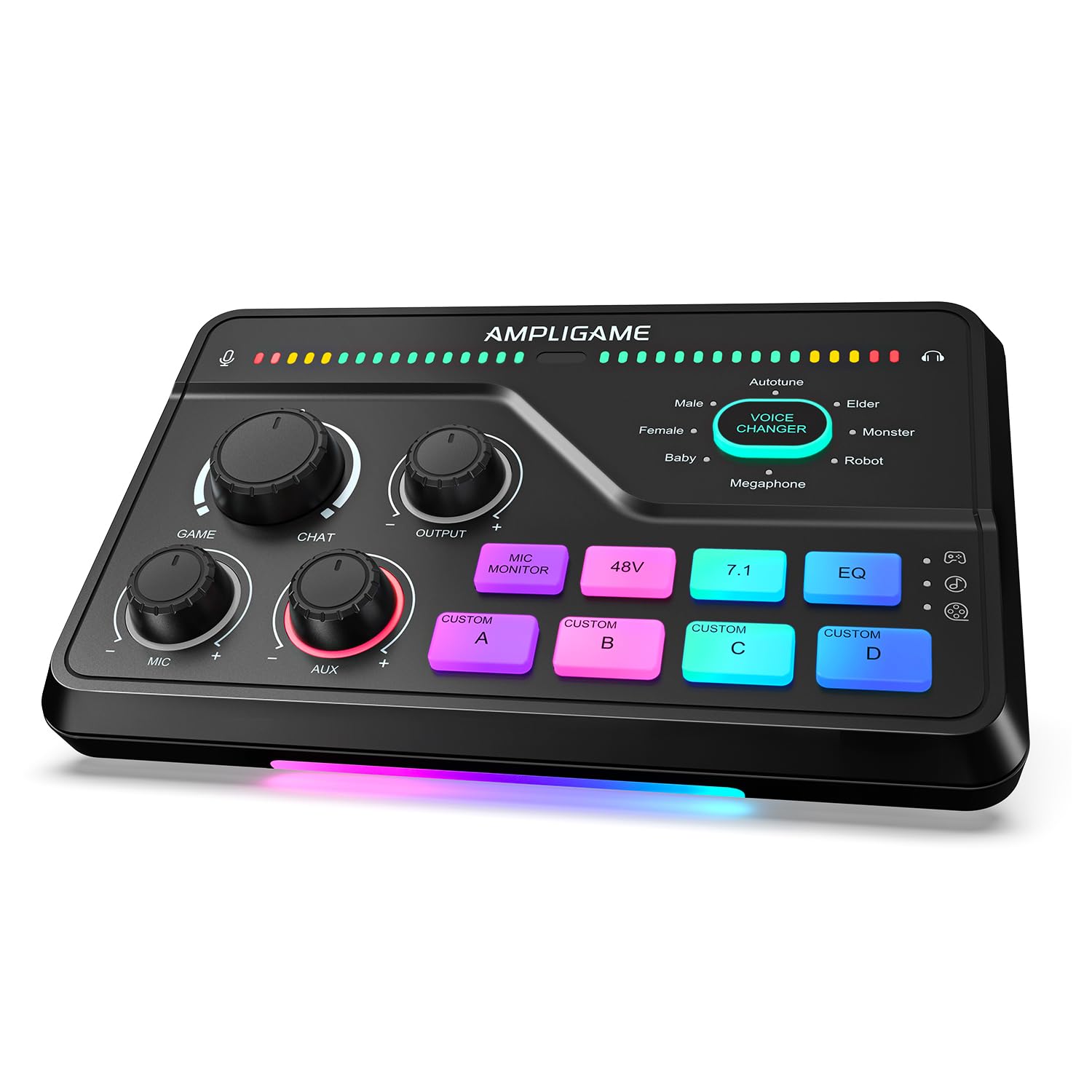
The FIFINE AmpliGame SC8 hits the sweet spot between feature density and price, offering a dedicated XLR preamp with 48V phantom power, a game/chat balance dial, and virtual 7.1 surround sound — all in one compact chassis. The preamp delivers up to 50dB of gain with less than 0.2% distortion and a 75dB SNR, which is sufficient for most dynamic microphones and entry-level condensers. The built-in voice changer with eight morphing modes (Demon, Robot, Megaphone, among others) adds a fun, tactical layer for party games and variety streaming.
Physical controls include three smart push-to-mute knobs for mic, game, and background audio, plus a dedicated game/chat balance dial that lets you shift priority without touching software. The three EQ presets (Game, Music, Movie) tune the headphone output for different content types, and the virtual 7.1 surround sound adds convincing spatial separation for hearing footsteps and ability cues. The RGB lighting syncs to audio peaks, reinforcing the visual feedback of the mixer’s activity.
The SC8 is not compatible with USB microphones — it requires an XLR mic or a 6.35mm dynamic mic. An XLR cable is not included, so factor that into your total spend. The unit supports multi-platform connections via optical AUX for consoles, 3.5mm aux-in, and USB-C for PC, PS5, Switch, and mobile. Customer reviews consistently praise the ease of setup and the clean preamp with minimal hiss. The 1-year warranty covers manufacturing defects, and FIFINE support has been noted as responsive in replacing units with minor issues.
Why it’s great
- Game/chat balance dial + virtual 7.1 surround for positional audio
- Clean XLR preamp with 75dB SNR at an entry-level price point
- Built-in voice changer and 4 customizable sample buttons
Good to know
- Not compatible with USB microphones — XLR only
- XLR cable not included in the box
- Virtual 7.1 is less effective for music but works well for games
4. Focusrite Vocaster One

The Focusrite Vocaster One is an audio interface purpose-built for solo podcasters and solo streamers who want to simplify the setup process without sacrificing audio quality. Its headline feature is the Auto Gain button: press it, speak at your normal recording volume, and the interface sets the ideal input level in seconds. For gamers who don’t want to fiddle with gain staging during a live stream, this alone justifies the purchase. The mic preamp delivers 70dB of gain — enough to drive low-output dynamics like the Shure SM7B without an additional Cloudlifter.
The hardware includes a TRRS phone input for taking calls on stream, a camera line-out for sending audio directly to a DSLR or mirrorless camera, and stereo loopback for capturing PC audio. The Enhance feature applies one of four voice presets (Clean, Warm, Bright, or Radio) that subtly tune EQ and compression. The mute button is a physical push-to-mute for the microphone — a simple but genuinely useful feature that users highlight as a game-changer for virtual meetings as well as gaming.
The plastic chassis is lighter than the Scarlett’s metal build but feels rugged enough for portable use. The unit can even be powered by an iPad or iPhone for on-the-go recording. Some users report the USB cable included in the box being short and occasionally failing — a quality aftermarket cable is a worthwhile upgrade. The Vocaster One does not offer multi-channel mixing, game/chat balance, or voice effects, so it is best paired with software routing for full gaming audio control. The free Focusrite control software provides basic EQ and reverb.
Why it’s great
- Auto Gain eliminates manual level setting for live streaming
- 70dB preamp gain drives dynamic mics without external boosters
- TRRS phone input for taking calls and interviews on stream
Good to know
- No multi-channel mixing or dedicated game/chat balance
- Plastic build feels less premium than metal alternatives
- Included USB cable is short and can be unreliable
5. Behringer XENYX 802S

The Behringer XENYX 802S is a pure analog mixer with USB streaming capability, slotting into a workflow where physical faders and EQ knobs are preferred over software-based control. With 8 input channels (2 mono with XENYX preamps, 2 stereo channels), it can handle multiple microphones, game consoles, and secondary audio sources simultaneously — ideal for a co-streamer setup or a gaming desk with a PC, TV, and phone all feeding audio. The built-in USB interface streams the main mix directly to your computer with low noise.
The preamps on the mono channels are notably quiet, with customer reviews reporting zero hum or white noise even at moderate gain levels. Each mono channel has a 3-band EQ, and the stereo channels offer 2-band EQ. The main mix controls are straightforward: channel faders, a master fader, and aux send controls for monitoring. The analog nature means there is zero latency for the direct signal — no need to worry about buffer sizes for live gaming. The chassis is built around a metal frame with a rugged powder-coated finish.
The trade-off is the lack of any digital features: no game/chat balance, no virtual surround, no voice changer, and no saved profiles. The USB output only sends the master mix (post-fader), so you cannot route independent submixes to your stream versus your headphones without additional hardware. The unit is also physically larger than most desktop mixers, with dimensions approaching 20 inches deep. For gamers who want a traditional mixing desk to centralize all their audio sources, the XENYX 802S is a budget-friendly workhorse that prioritizes reliability over bells and whistles.
Why it’s great
- 8 input channels allow multiple mics and sources simultaneously
- Ultra-low noise analog preamps with clean gain staging
- Physical EQ and fader control with zero latency
Good to know
- No game/chat balance, virtual surround, or voice effects
- USB output only sends master mix, not individual channel submixes
- Large footprint — requires significant desk space
6. MAONO MaonoCaster AME2

The MAONO MaonoCaster AME2 is an all-in-one production console that packs more features per square inch than most mixers at its tier: 10-channel mixing, two XLR inputs with 48V phantom power and 60dB gain, Bluetooth connectivity, and 11 customizable sound pads. For a gamer who also produces a podcast or streams variety content, the AME2 nearly eliminates the need for external soundboards. The sound pads support up to 60 seconds of audio each for three of them and 20 seconds for the remaining eight — enough for sound effects, intro jingles, and call-and-response clips.
The audio processing features include a 12-step auto-tune (useful for musical streams), six reverb modes, and independent treble/mid/bass tone controls for each microphone input. The sidechain, music-only, and loopback switches give streamers control over when game audio ducks under the microphone. The unit outputs to two devices simultaneously via USB-C and the LIVE-OUTPUT jacks, which simplifies streaming to a phone while recording on PC. The guitar input with high headroom works well for bass and electric guitar without tone loss.
Customer feedback is mixed on long-term reliability — some units have failed after a year due to USB-C port issues. The headphone monitoring mix does not always match the final stream output, requiring some adjustment during setup. The learning curve is steeper than simpler mixers like the SC8, but the MAONO user manual and online tutorials help flatten it. For creators who want sound pads, vocal effects, and dual-output streaming in one box, the AME2 delivers an impressive feature set that competes with units costing significantly more.
Why it’s great
- 11 customizable sound pads with up to 60-second recordings
- 12-step auto-tune and 6 reverb modes for creative vocal effects
- Dual-output streaming to phone and PC simultaneously
Good to know
- Some users report USB-C port failure after extended use
- Headphone monitoring mix may not match stream output exactly
- Not compatible with USB microphones — XLR/6.35mm/3.5mm only
7. FIFINE AmpliGame KS5 Bundle

The FIFINE AmpliGame KS5 Bundle packages a dynamic XLR/USB hybrid microphone with a dedicated 4-channel gaming mixer, providing everything a beginner needs to move from USB headset audio to XLR-quality voice capture. The bundled microphone can operate in USB mode directly or connect via XLR to the mixer for cleaner analog signal paths. The mixer itself features individual mute controls, a headphone monitoring output, and a volume fader for each channel, plus five RGB lighting effects that sync to the gaming setup theme. This is the only product on this list that includes an XLR cable in the box.
The mixer does not include built-in virtual surround sound, game/chat balance, or advanced voice processing — its feature set is focused on basic input/output routing. The voice changer effects are present on the mic’s USB mode but not available when connected via XLR to the mixer. The RGB lighting on both the mic base and the mixer adds visual cohesion to a gaming desk without requiring additional software. The plastic construction is lightweight and expected at this tier, but the mic stand feels solid with a stable weighted base.
Customer reviews note sporadic mixer reboots on some units, and the voice changer modes are hit-or-miss (the elder and baby modes sound convincing, while the robot and girl modes receive criticism). The mic itself delivers a clear upgrade over typical gaming headset microphones, with adjustable sensitivity via a gain knob. For a streamer or gamer who wants one box with everything needed to start using XLR audio without separate purchases, the KS5 bundle offers a low-friction entry point. The bundle format also saves desk space by keeping mixer and mic in the same brand ecosystem.
Why it’s great
- Complete starter kit with dynamic mic, mixer, and XLR cable included
- Mic works in USB standalone mode or XLR mode via mixer
- RGB lighting syncs across both mic and mixer for unified aesthetics
Good to know
- Mixer lacks voice changer, virtual surround, and game/chat balance
- Some units experience random reboots during extended use
- Plastic build expected at this tier — not as robust as metal alternatives
FAQ
Can I use a USB microphone with these gaming mixers?
What is the difference between an audio interface and a gaming mixer?
Do I need virtual 7.1 surround for competitive gaming?
Will a gaming mixer reduce audio latency compared to USB headsets?
Final Thoughts: The Verdict
For most users, the audio mixer for gaming winner is the FIFINE AmpliGame SC8 because it delivers an XLR preamp, game/chat balance dial, virtual 7.1 surround, and a voice changer all in one compact, plug-and-play unit that does not require a second mortgage. If you want studio-grade microphone preamp clarity and already use software-based routing, grab the Focusrite Scarlett Solo 3rd Gen. And for dual-PC streamers who need per-app software routing with physical encoders, nothing beats the BEACN Mix Create for workflow flexibility without the cable mess of traditional mixing consoles.