
Our readers keep the lights on and the weekend projects moving. As an Amazon Associate, I earn from qualifying purchases.
A work mouse that drags, stutters, or screams with every click will tank your focus faster than any notification. The difference between a productive flow and a frustrating day often comes down to a smooth scroll wheel, a silent actuator, and a connection that doesn’t drop during a video call. This guide isolates the models engineered for eight-hour shifts, travel bags, and multi-device workflows.
I’m Rikta — the co-founder and writer behind FitlyFast. I’ve spent weeks analyzing connectivity protocols, battery chemistries, and ergonomic contours across dozens of computer mice to find the ones that genuinely pull their weight in a work environment.
Whether you need to toggle between a laptop and tablet in seconds or scroll through a spreadsheet without waking the whole office, the right peripheral transforms your desk into a command center. This review covers the best bluetooth mouse for work across every realistic use case — from slim travel companions to premium productivity powerhouses.
How To Choose The Best Bluetooth Mouse For Work
A work mouse is a daily driver, not a spare part. The wrong pick leads to hand fatigue, missed pairing windows, and desk clutter that slows you down. Focus on four pillars: connection stability, ergonomic shape, battery strategy, and the sensor’s tracking surface capability.
Connection Protocol & Multi-Device Switching
Bluetooth 5.0 and 5.2 offer lower latency and better power efficiency than older versions. If you work across a laptop, a tablet, and a personal computer, look for a mouse that remembers at least three paired devices and lets you switch with a dedicated button. Some models pair a 2.4GHz dongle alongside Bluetooth for a fallback connection in case a USB port is available and the Bluetooth stack glitches.
Ergonomics for Extended Sessions
An eight-hour workday amplifies design flaws. A flat, low-profile mouse forces your palm into a claw grip, which fatigues the extensor tendons. Look for an arched palm support and a contoured thumb rest if you are a right-handed user. Ambidextrous shapes work for both hands but often sacrifice the thumb shelf that long-session users rely on. Weight also matters — a mouse over 100 grams provides a planted feel, while sub-60 gram builds suit travel but can feel insubstantial on a desk.
Battery Life & Charging Method
Rechargeable lithium-ion batteries eliminate recurring costs and electronic waste, but they tie the mouse to a charging cable for a few hours every month. A 500 mAh cell can run 30 to 70 days depending on usage and DPI setting. Models that use standard AA or AAA batteries offer instant replacement without downtime, but the long-term cost adds up. USB-C charging is the modern standard — micro-USB still appears on older designs and adds one more cable to your bag.
Tracking Surface & DPI Sensitivity
Not all optical sensors track on glass or glossy desks. Darkfield technology from Logitech handles transparent surfaces, while standard red LEDs struggle. DPI settings between 800 and 4000 cover most office work — 1600 DPI is a sweet spot for 27-inch monitors, while 4000 DPI and above suits ultra-wide or 4K displays where fine cursor control requires higher counts per inch. A DPI switch on the mouse is more convenient than diving into system settings.
Quick Comparison
On smaller screens, swipe sideways to see the full table.
| Model | Category | Best For | Key Spec | Amazon |
|---|---|---|---|---|
| Logitech MX Master 3S | Premium Ergo | Power users needing 8K DPI and app-specific macros | 8000 DPI sensor, USB-C, 70-day battery | Amazon |
| Logitech MX Anywhere 2S | Premium Compact | Travelers who need glass tracking and Flow | 4000 DPI, micro-USB, 70-day battery | Amazon |
| Apple Magic Mouse | Mac Ecosystem | Mac users who rely on multi-touch gestures | Multi-Touch surface, USB-C, 30-day battery | Amazon |
| Dell MS700 | Ultra-Portable | Frequent travelers wanting a twist-to-stow design | 4000 DPI, 2xAAA, 56.9 grams | Amazon |
| NYIEFADA Arc Mouse | Foldable Travel | Road warriors needing a flat-storing companion | Tri-mode, 360° rotation, 60-hour battery | Amazon |
| DELUX MF20 Pocket | Sliding Compact | Ultra-minimalists needing a retractable slider | 4000 DPI, USB-C, 300 mAh, 2-in-1 slider | Amazon |
| XBG B15 Pro | Budget All-Rounder | Budget shoppers wanting LED screen and silent clicks | 500 mAh, USB-C, tri-mode, LED display | Amazon |
In‑Depth Reviews
1. Logitech MX Master 3S

The MX Master 3S sets the benchmark for a productivity-focused Bluetooth mouse. Its 8000 DPI Darkfield sensor tracks on glass surfaces without a mousepad, which solves the biggest friction point for workers who shift between desk, coffee shop, and home office. The MagSpeed electromagnetic scroll wheel free-spins through thousands of rows in seconds or clicks into ratchet mode for line-by-line precision — and the wheel is nearly silent in both modes.
Logitech’s Flow software lets you drag files across three computers as if they were a single display, and the Logi Options+ app unlocks per-application button mapping for tools like Photoshop, Excel, or Premiere Pro. The seven-button layout includes a thumb wheel for horizontal scrolling, which spreadsheet users will appreciate immediately. Build quality is dense at roughly 141 grams, giving a planted feel that reduces micro-adjustments during detailed work.
The quiet clicks are 90 percent quieter than standard switches, which matters in shared workspaces and open-plan offices. The rubberized graphite finish resists fingerprints and feels neutral to the touch even after a full day. The only compromise is the non-replaceable battery, but a 70-day lifespan per charge means you charge it about five times a year. For users who need a single mouse that handles everything from CAD work to email triage, this is the pick.
Why it’s great
- Darkfield sensor tracks on glass and glossy surfaces without a pad
- MagSpeed electromagnetic scroll wheel offers free-spin and ratchet modes
- Seven buttons with per-app macro customization via Logi Options+
- USB-C charging provides a full day from a three-minute top-up
Good to know
- Non-replaceable battery requires eventual device replacement
- Left-handed users need the left-hand SKU; the standard version is right-handed
- Logi Bolt receiver sold separately; Bluetooth works fine without it
2. Logitech MX Anywhere 2S

The MX Anywhere 2S shrinks the MX-series DNA into a compact shell that disappears into a pocket or bag sleeve. It retains the Darkfield sensor that tracks on glass — a rare feature among sub-100-gram mice — and supports Logitech Flow for cross-computer file transfer. The 4000 DPI sensor is overkill for most work displays, but it ensures pixel-perfect tracking on high-resolution monitors without acceleration artifacts.
The micro-USB charging port is the only notable concession to the 2S’s age — newer models have moved to USB-C. A three-minute charge delivers enough power for a full day, and a full charge lasts up to 70 days. The Hyper-Fast scroll wheel toggles between free-spin and click-to-click with a button press, which makes long document review much faster than with detent-only wheels.
This is a Bluetooth-only edition, meaning it ships without a USB receiver. That simplifies pairing but can be a limitation if you prefer the lower latency of a 2.4GHz dongle. The compact profile works well for small to medium hands, but users with larger palms may find their ring and pinky fingers dragging on the desk surface. For road warriors who need one mouse for a laptop, a tablet, and a phone, the Anywhere 2S remains a very strong choice.
Why it’s great
- Darkfield sensor eliminates the need for a mousepad on glass tables
- Hyper-Fast scrolling dramatically reduces time in long documents
- Flow cross-computer control works across Windows and macOS
- Weighs only 106 grams for effortless portability
Good to know
- Micro-USB charging instead of USB-C; an extra cable for modern bags
- No USB dongle included; Bluetooth pairing only
- Compact curved profile may not fill a large hand comfortably
3. Apple Magic Mouse

The Magic Mouse is the only peripheral in this list that replaces a scroll wheel with a full-surface Multi-Touch panel. Swiping between virtual desktops, scrolling in any direction, and double-tapping to zoom are all fluid gestures that feel native because they are — Apple engineered the driver integration at the OS level. For macOS users who rely on trackpad gestures but prefer the wrist posture of a mouse, the Magic Mouse splits the difference perfectly.
The current iteration charges via USB-C and pairs instantly with any Mac with a silicon chip. The rechargeable battery lasts about a month between charges, and the low-battery notification appears in the Bluetooth menu well before the mouse dies. The optimized foot design glides across wood, plastic, and metal desks with minimal drag — no mousepad necessary.
The ergonomic profile is the main trade-off. The low, flat shape forces a palm-down posture that can cause wrist strain during marathon editing sessions. The charging port remains on the bottom, which means you cannot use the mouse while it is plugged in. Neither issue is a dealbreaker for short bursts, but power users who sit at a desk for eight straight hours should test the shape before committing. For native macOS gesture navigation, no third-party mouse matches the Magic Mouse’s seamlessness.
Why it’s great
- Multi-Touch surface replaces the scroll wheel with gesture navigation
- Instant pairing with any modern Mac; no Bluetooth menu digging
- USB-C charging aligns with the latest Apple ecosystem cables
- Glides smoothly across most desk surfaces without a pad
Good to know
- Flat ergonomic profile can cause wrist fatigue over long sessions
- Charging port on the bottom prevents use while plugged in
- Limited to two buttons plus gestures; no programmable side buttons
4. Dell MS700 Bluetooth Travel Mouse

The Dell MS700 is engineered for the road — it twists flat for storage and stows in a laptop sleeve without creating a bulge. Weighing just 56.9 grams, it is the lightest mouse in this guide, and the twist-to-turn-off mechanism eliminates the need for a power switch. When you twist it open, the mouse automatically powers on and reconnects to the last paired device via Bluetooth 5.0.
The touch scroll strip replaces a mechanical wheel, and it supports both vertical and horizontal scrolling on Windows machines with Dell Pair or Microsoft Swift Pair. The 4000 DPI optical sensor tracks accurately on most surfaces, though it does stutter on fully transparent glass. The MS700 connects to up to three devices, and the pairing button sits on the bottom with clear LED indicators for each slot.
The battery runs on two AAA cells, which you can swap instantly when they drain — no downtime for charging. The trade-off is ongoing replacement costs and the environmental footprint of disposable batteries. The compact shape works well for travel but feels small for extended desktop use; users with larger hands may find their palm hovering. The Dell MS700 is a specialized travel tool, not a daily desktop driver, and it serves that role exceptionally well.
Why it’s great
- Twist-to-stow design folds flat for ultra-thin storage in a laptop sleeve
- Weighs only 56.9 grams; the lightest travel option in this list
- Touch scroll strip supports vertical and horizontal navigation
- AA batteries provide instant swap without charging downtime
Good to know
- AAA batteries not rechargeable; long-term cost adds up
- Compact size causes palm fatigue during multi-hour desktop sessions
- Does not track reliably on clear glass surfaces
5. NYIEFADA Arc Mouse
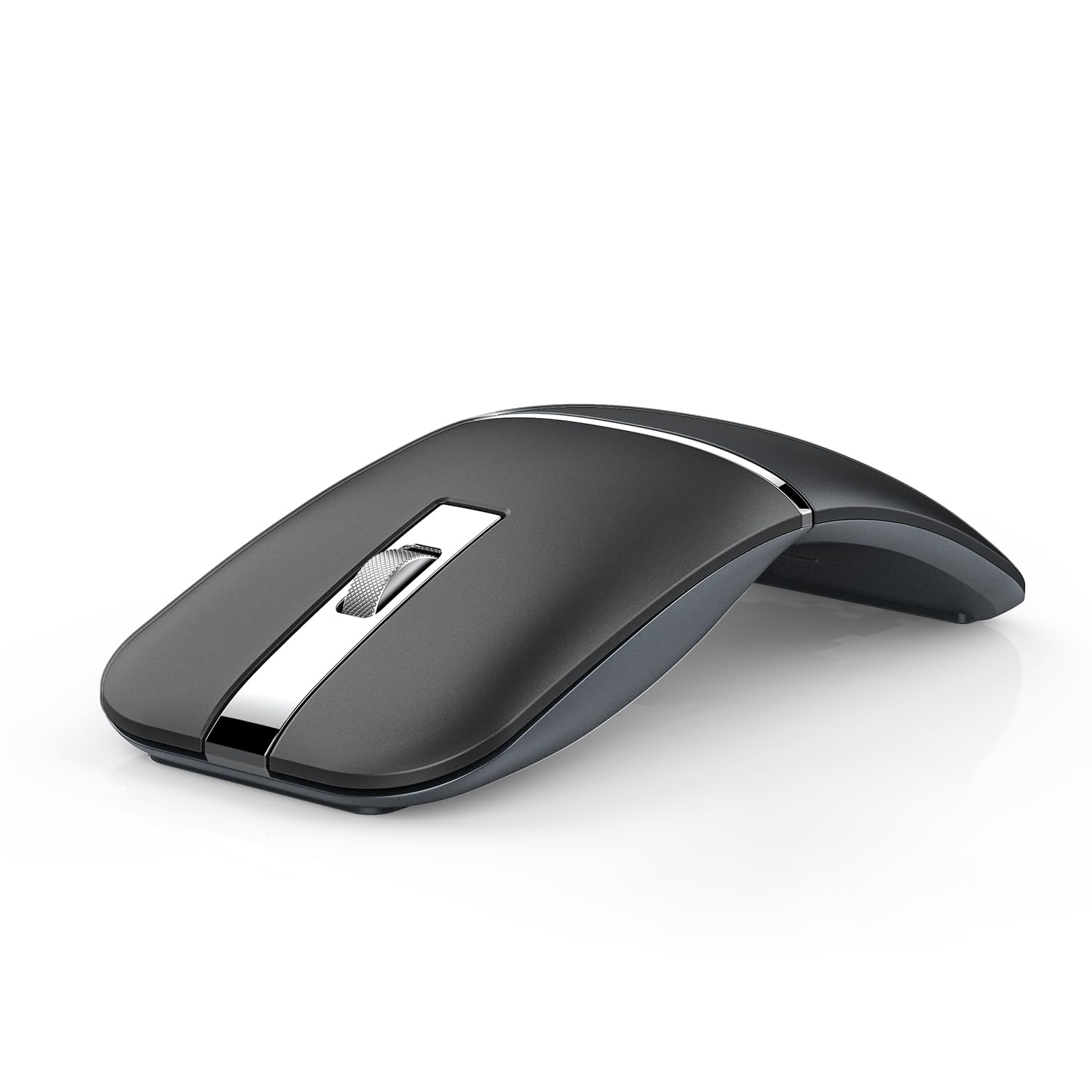
The NYIEFADA Arc Mouse tackles the same problem as the Dell MS700 — how to carry a full-size mouse in a pocket — but solves it with a 360-degree rotating hinge that snaps the mouse flat. When opened, the arched shape provides reasonable palm support for a travel mouse, and the soft, silent clicks produce almost no audible feedback. It connects to three devices simultaneously via Bluetooth 5.0, Bluetooth 4.0, and the included 2.4GHz dongle.
The built-in rechargeable battery runs for roughly 60 hours per charge, and the micro-USB port handles refueling. The DPI switches between four preset levels (800/1200/1600/2400), though the button sits on the bottom, making mid-session changes inconvenient. The optical sensor tracks smoothly on fabric, wood, and matte plastic surfaces but slips on high-gloss finishes.
The hinge mechanism feels sturdy after repeated folding cycles, and the included storage bag protects the mouse in transit. The right-handed contoured shape limits ambidextrous use. The Arc Mouse works well for occasional travelers who want a silent, rechargeable option that takes up almost no bag space, but heavy daily users may find the build quality less refined than premium options from Logitech.
Why it’s great
- 360-degree rotation folds the mouse completely flat for pocket storage
- Tri-mode connection supports two Bluetooth channels and a 2.4GHz dongle
- Silent click mechanism keeps library and office environments quiet
- Rechargeable battery eliminates disposable cell replacement
Good to know
- Micro-USB charging instead of USB-C; slow fill compared to modern standards
- DPI switch located on the bottom; requires lifting the mouse to adjust
- Right-handed contouring excludes left-handed use
6. DELUX MF20 Pocket Mouse
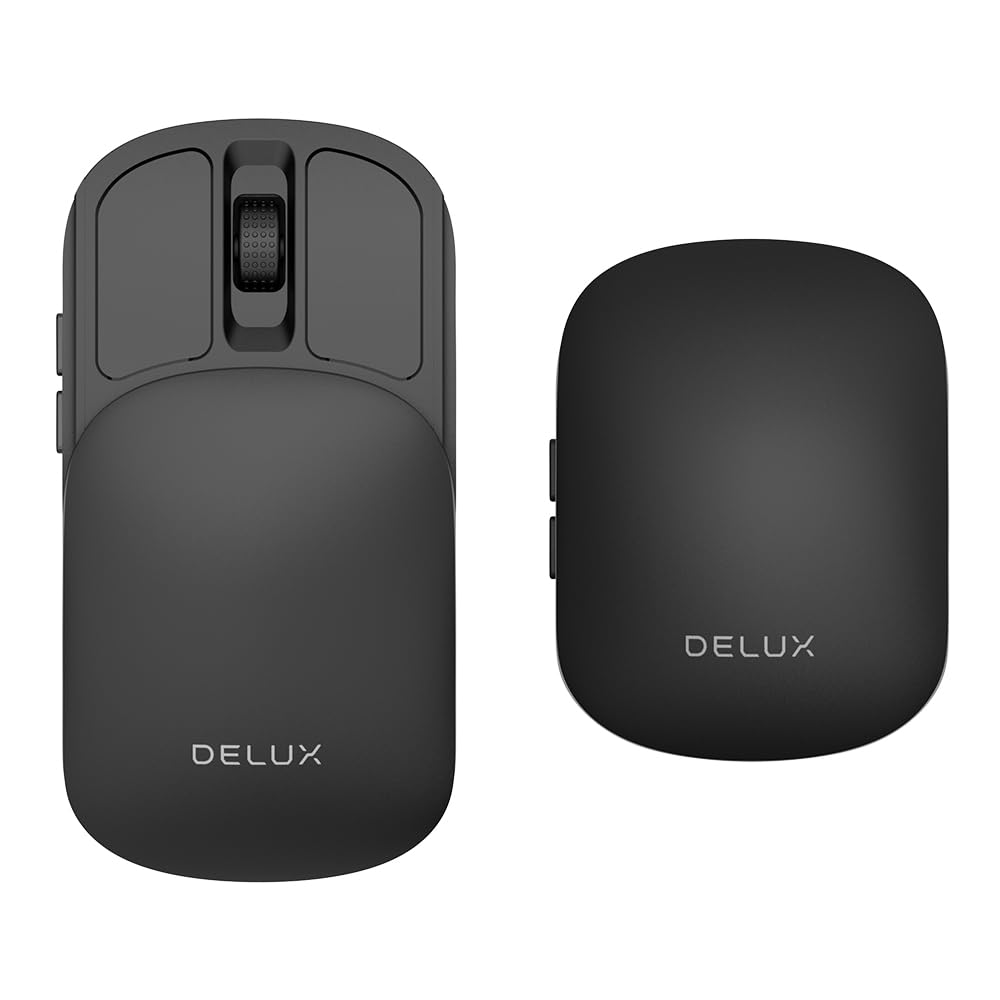
The DELUX MF20 uses a retractable sliding mechanism rather than a hinge or twist. The top half of the shell slides forward to extend the mouse to a usable length, then slides back to protect the sensor and buttons when stored. This 2-in-1 approach produces a very slim carry profile — about the thickness of a smartphone — while still offering a full-width click surface when deployed.
The built-in 300 mAh battery charges via a front-facing USB-C port, and the mouse supports both Bluetooth 5.2 and a 2.4GHz dongle for dual-mode connectivity. Five DPI steps top out at 4000, and the bottom-mounted switch lets you cycle through them. The clicks are nearly silent, and the scroll wheel has defined tactile detents that provide feedback without loud ratcheting.
The sliding mechanism introduces a minor issue during heavy use: pressing the side buttons can nudge the slider back slightly, which can misregister input in fast-paced tasks like gaming. For office work — document navigation, web browsing, spreadsheet editing — this is rarely a problem. The smooth plastic finish picks up fingerprints more readily than matte alternatives. At the mid-range price point, the MF20 delivers a genuinely innovative form factor for users who prioritize pocketability above all else.
Why it’s great
- Retractable slider design collapses to smartphone-like thickness for carry
- USB-C charging port allows use while charging
- Bluetooth 5.2 offers the latest low-latency wireless standard
- Five adjustable DPI levels from 800 to 4000 cover most work setups
Good to know
- Side button pressure can shift the slider during use
- Glossy finish shows fingerprints and smudges quickly
- No programmable button remapping available in software
7. XBG B15 Pro

The XBG B15 Pro packs an LED status screen into a budget-tier package — a rarity in this price range. The display shows real-time battery percentage, current DPI level, and active connection mode, removing the guesswork that plagues less expensive mice. With tri-mode connectivity (Bluetooth 5.0, Bluetooth 4.0, and 2.4GHz), it pairs with up to three devices and switches between them in under a second.
The 500 mAh battery is the largest in this guide by capacity, and the USB-C charging port aligns with modern laptop and phone cables. The B15 Pro enters sleep mode after five minutes of inactivity, which extends battery life well beyond the rated one-month average. The six-button layout includes forward and back navigation keys that work natively in browsers and file managers without additional software.
The ergonomic contour includes a thumb rest and arched palm support that reduces wrist strain during full workdays, though the plastic shell feels less dense than premium alternatives. The optical sensor tracks accurately on fabric and wood, but glossy desk surfaces cause occasional skipping. Silent buttons retain tactile feedback without the high-pitched click that bothers colleagues. For users who need a full-featured work mouse at a budget price, the B15 Pro delivers exceptional value with its unique LED display and large battery.
Why it’s great
- Built-in LED screen shows battery level, DPI, and connection mode clearly
- 500 mAh battery is the largest capacity in this comparison
- Tri-mode connection works with Bluetooth 5.0, 4.0, and a 2.4GHz dongle
- Silent buttons keep click noise minimal in open-plan offices
Good to know
- Plastic build feels less substantial than mid-range and premium options
- Sensor struggles with high-gloss and mirrored desk surfaces
- No software for remapping buttons or adjusting sleep timing
FAQ
Can a Bluetooth mouse track on a glass desk without a mousepad?
What DPI setting should I use for a 27-inch 4K monitor?
Is Bluetooth 5.0 fast enough for productivity work or do I need a dongle?
Final Thoughts: The Verdict
For most users, the bluetooth mouse for work winner is the Logitech MX Master 3S because its 8000 DPI Darkfield sensor, MagSpeed scroll wheel, and per-app macro support cover every office scenario from spreadsheets to CAD work. If you want ultimate portability with glass tracking, grab the Logitech MX Anywhere 2S. And for macOS users who need seamless gesture navigation, nothing beats the Apple Magic Mouse.