
Our readers keep the lights on and the weekend projects moving. As an Amazon Associate, I earn from qualifying purchases.
The difference between a good typing session and a frustrating one often comes down to how well you can see the keys and how reliably the connection holds. A backlit wireless keyboard solves the low-light struggle, but the real challenge is finding one with consistent battery life, crisp key feedback, and a backlight that actually illuminates the legends rather than just the gaps around them.
I’m Rikta — the co-founder and writer behind FitlyFast. My workflow revolves around dissecting connectivity protocols, battery capacities, and key switch designs to separate the well-engineered models from those that rely on flashy marketing.
This guide breaks down the specific specs and real-world trade-offs that determine whether a backlit wireless keyboard is a daily driver or a desk ornament. Here is the full breakdown for finding the best backlit wireless keyboard that matches your typing style and workspace demands.
How To Choose The Best Backlit Wireless Keyboard
Choosing a backlit wireless keyboard means balancing light quality, typing feel, and battery endurance. The best pick depends on whether you need a full desk setup, a travel companion, or a keyboard that matches a specific operating system.
Backlight Type and Brightness Control
Not all backlights are created equal. Single-color white LEDs are easier on the eyes and consume less power, while RGB offers 7 to 8 dynamic modes but drains the battery faster. Look for adjustable brightness levels — at least three — so you can tune the light for dim conference rooms versus dark home offices. Keycap transparency matters too: models where the light shines through the lettering (rather than just around the key edges) provide better legibility.
Battery Life and Charging Method
A rechargeable keyboard with a 1600mAh or larger battery can last weeks with backlighting off, but expect 5 to 10 days of moderate use with lights on. USB-C charging is a convenience standard because you can share cables with your phone or laptop. Models that enter sleep mode after inactivity (15 to 60 minutes) preserve charge without requiring manual power-downs.
Connectivity and Multi-Device Support
Wireless connections come in three flavors: 2.4GHz via a USB dongle offers the lowest latency and no pairing hassle; Bluetooth 5.0 or 5.1 allows switching between a laptop, tablet, and phone; tri-mode models give you both plus a wired USB-C option for uninterrupted use while charging. If you work across multiple screens, Bluetooth with at least three device channels will save you constant re-pairing.
Key Switch Feel and Noise Level
The key switch determines the typing experience. Scissor-switch keys found in ultra-slim models are quiet and require less force, ideal for shared offices. Low-profile mechanical switches offer tactile feedback without the full travel of traditional mechanicals. Membrane keyboards are soft and silent but can feel mushy over time. If you type long documents or code, prioritize key stability over thinness.
Quick Comparison
On smaller screens, swipe sideways to see the full table.
| Model | Category | Best For | Key Spec | Amazon |
|---|---|---|---|---|
| Redragon S101M-KS | Wireless Gaming Combo | Gamers seeking tri-mode connectivity | 4800 DPI mouse, 8 RGB patterns, 300h battery (lights off) | Amazon |
| ProtoArc K110-A | Mac-Specific Aluminum | Mac setup with premium aluminum build | 3-level white backlight, 1800mAh, 0.4-inch profile | Amazon |
| MOFII Ergonomic | Ergonomic RGB | Ergonomics with natural curve design | Tri-Mode BT/2.4G/USB-C, 8 RGB modes, curved body | Amazon |
| GEEZER White Crystal | Transparent RGB | Style-focused multi-platform use | 8 dynamic rainbow modes, 150-day standby, tri-mode | Amazon |
| TopMate Ultra Slim | Slim Office Combo | Quiet office with scissor-switch keys | 7-color backlight, 1600mAh, 2400 DPI mouse | Amazon |
| VEILZOR Combo | RGB Desktop Set | Budget-friendly RGB set with wrist rest | 9 RGB effects, 3-level brightness, ergonomic wrist rest | Amazon |
| ProtoArc XK01 Plus | Foldable Travel | Portable travel with full-size layout | 3-level white backlight, 105 keys, 150-day standby | Amazon |
In‑Depth Reviews
1. Redragon S101M-KS Wireless Gaming Keyboard and Mouse

The Redragon S101M-KS earns the top spot because it delivers tri-mode wireless flexibility — 2.4GHz, Bluetooth, and USB-C — without compromising key feel or battery life. The keyboard offers 8 distinct RGB backlight patterns with adjustable speed and brightness, and the battery holds up to 300 hours with the lights off, which is exceptional for a mid-range wireless set. The 4800 DPI mouse adds five adjustable sensitivity levels and seven programmable buttons, making this a true dual-purpose combo for work and play.
Typing feels crisp with good key stability and minimal wobble. The included 10 independent multimedia keys give quick access to volume, playback, and brightness controls. The mouse features an ergonomic shape and adjustable weights that improve precision during long sessions. Reviewers consistently praise the build quality and tactile response, with several noting that it outperforms other budget gaming brands in key durability.
The main trade-off is that the mouse charges more frequently than the keyboard. Additionally, the mouse uses monochrome red lighting rather than full RGB, which creates a slight aesthetic mismatch. The keyboard’s sleep mode introduces a 5-to-10-second wake-up delay, but this is standard for wireless models in this class.
Why it’s great
- Tri-mode wireless offers flexibility for gaming and office use
- Full-size keyboard with 10 dedicated multimedia keys
- Adjustable DPI up to 4800 with programmable buttons
Good to know
- Mouse uses red-only backlighting, not RGB
- Keyboard sleep mode causes a brief reconnect delay
- Mouse battery depletes faster than keyboard
2. ProtoArc K110-A Aluminum Bluetooth Keyboard for Mac
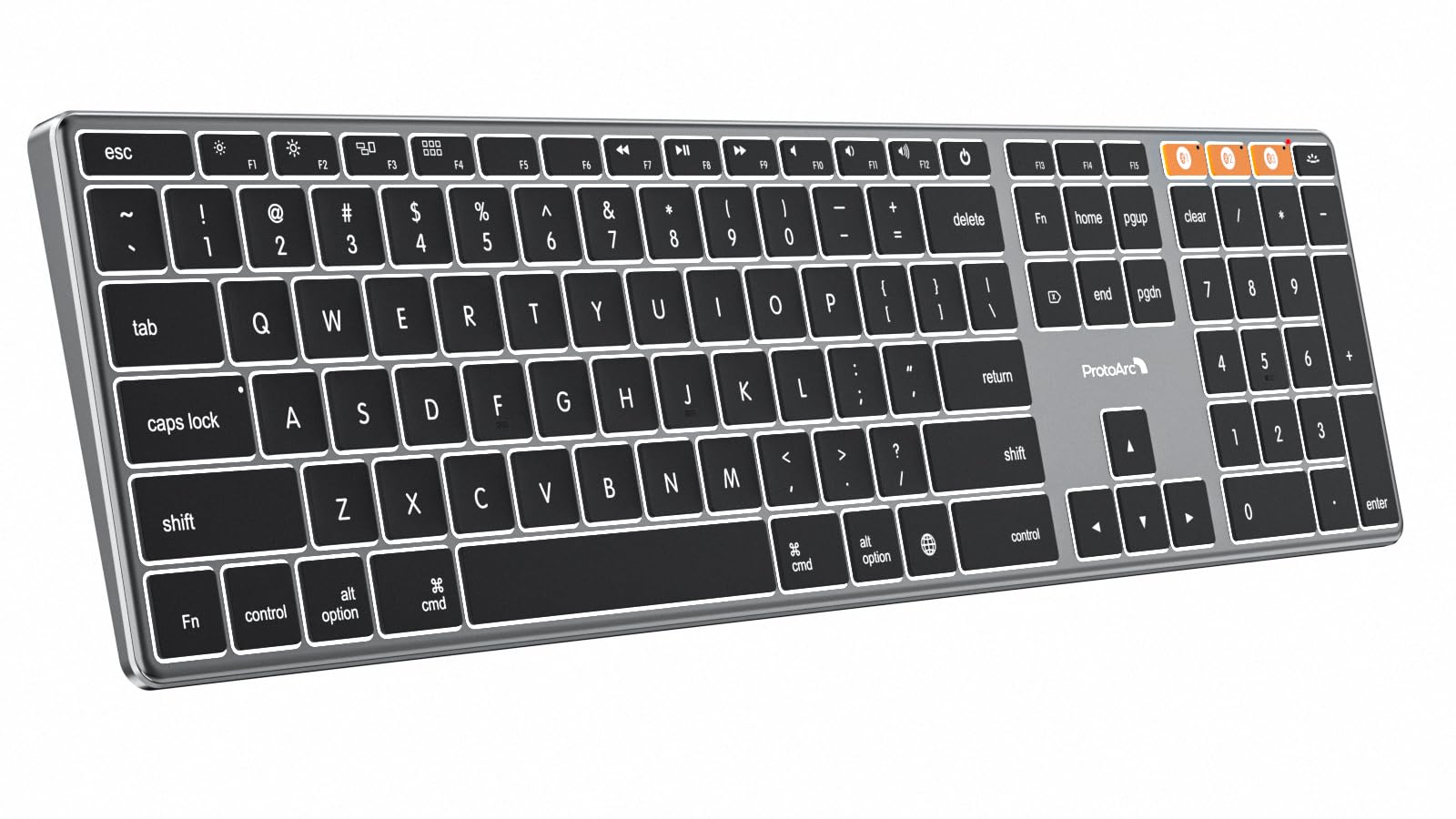
The ProtoArc K110-A is built specifically for macOS and iPadOS, so every modifier key, shortcut, and media command matches Apple’s native layout. The aerospace-grade aluminum unibody is only 0.4 inches thick but feels dense and premium, resisting flex even under fast typing. A soft white backlight with three brightness levels illuminates the key legends cleanly, and the 1800mAh battery supports weeks of mixed use between charges.
Bluetooth 5.1 allows seamless switching between three devices — say an iMac, a MacBook, and an iPad — using physical buttons on the top edge. The key travel is shallow but responsive, similar to Apple’s Magic Keyboard but with a quieter bottom-out sound. A silicone protective cover is included, which helps keep dust out of the scissor-switch mechanisms without dulling the backlight.
The keyboard is strictly Bluetooth-only; there is no dongle or wired mode for systems without Bluetooth. It also lacks adjustable tilt legs and does not include Touch ID, so Mac users who rely on fingerprint login will need to reach for their laptop. The full-size layout demands desk space, so it is not suited for tight setups or travel.
Why it’s great
- Mac-native layout with correct modifier keys and shortcuts
- Aluminum chassis resists scratches and provides stability
- Three-device Bluetooth switching is fast and reliable
Good to know
- No tilt adjustment or Touch ID integration
- Only works with macOS, iOS, and iPadOS
- No USB dongle or wired connection option
3. MOFII Upgraded Wireless Ergonomic Keyboard
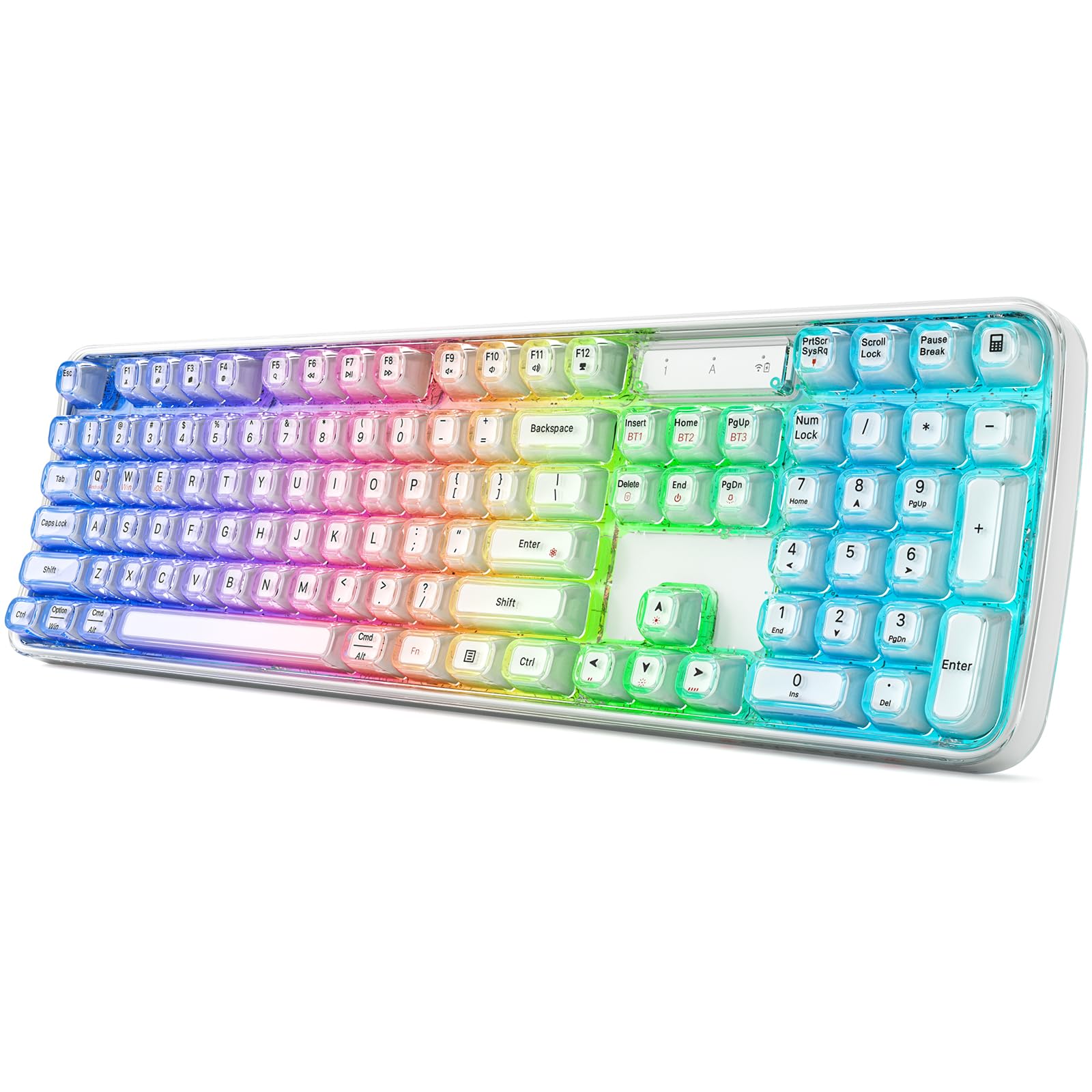
The MOFII Ergonomic Keyboard uses a precision-engineered curved body that mirrors the natural resting angle of your hands, reducing wrist extension during extended typing sessions. It supports Bluetooth 5.0 with three independent pairing channels, 2.4GHz via a dongle, and USB-C wired mode, so you can jump between a desktop, laptop, and tablet without re-pairing. The RGB backlight offers eight dynamic lighting modes that enhance key visibility in dim environments.
The key switches produce a thocky sound with a soft landing, which many reviewers describe as satisfying without being disruptive in an open office. The raised front lip reduces the effort needed for each keystroke, and the non-slip silicone pads keep the keyboard planted during fast typing. The built-in rechargeable battery eliminates battery swaps, and the keyboard is compatible with Windows, Mac, Android, and iOS.
Some users report that the curved arc feels unusual if you are accustomed to flat keyboards, and a separate wrist rest may be needed for full forearm support. A few isolated reviews mention squeaking after a day or two of use, though this is not widespread. The RGB lighting can be distracting for those sensitive to rapid color changes.
Why it’s great
- Ergonomic curve reduces wrist strain during long sessions
- Tri-mode connectivity with three Bluetooth channels
- Soft key feel with thocky sound profile
Good to know
- Curved design may require adjustment for flat-keyboard users
- Some units develop squeaky keys after short use
- RGB lights can be overwhelming in dark rooms
4. GEEZER White Crystal Transparent Keyboard
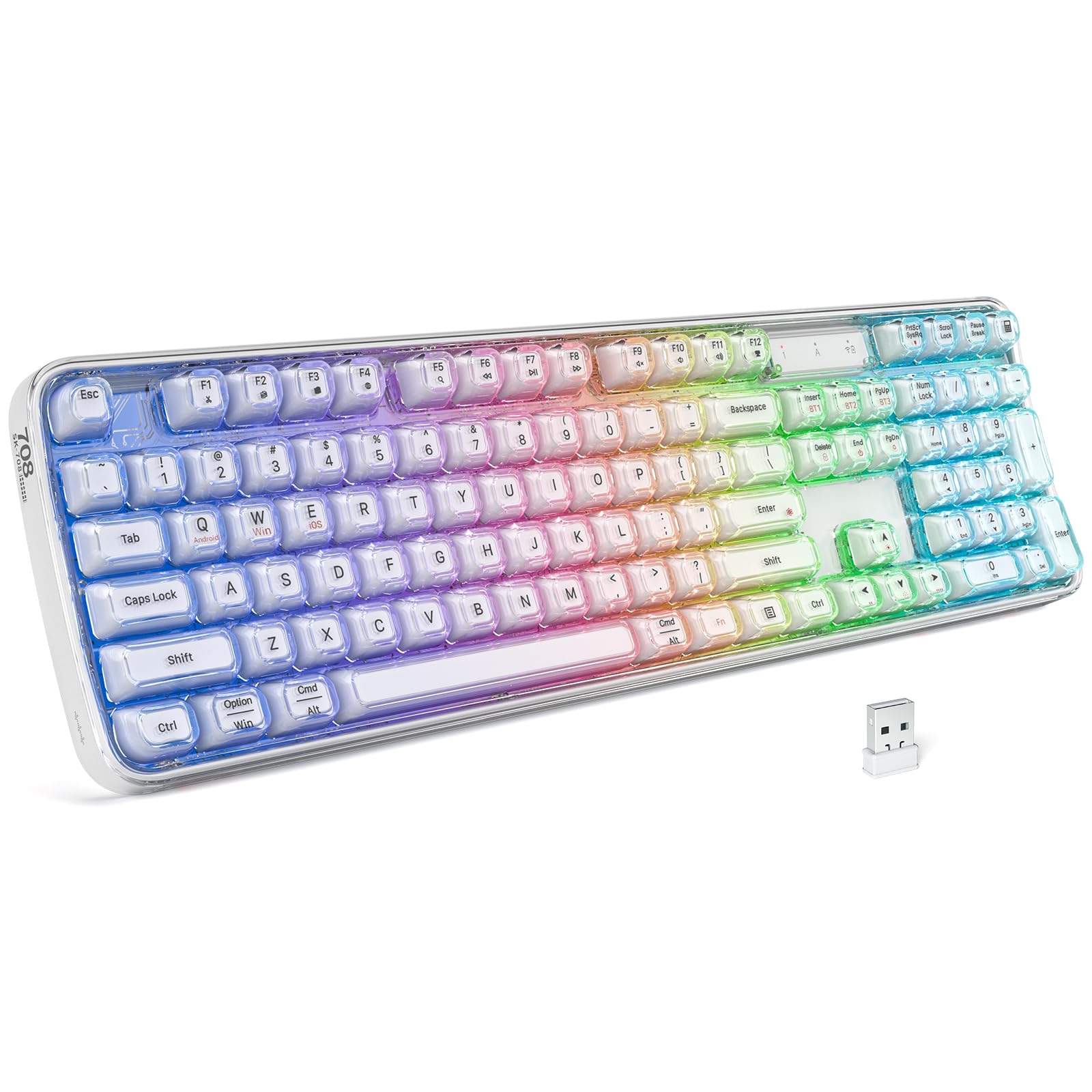
The GEEZER White Crystal stands out with its transparent keycaps and metal base, creating a visually striking setup where eight rainbow backlight modes fully penetrate the housing. The keyboard supports Bluetooth 5.0, 2.4GHz wireless, and USB-C wired connectivity, so you can use it across a PC, Chromebook, Mac, or smart TV. The ergonomic stepped key layout and degree input angle promote a natural hand position, reducing fatigue over extended periods.
The keycaps produce a creamy sound profile with short nails and a quieter feel with long nails, making the typing experience adaptable to personal preference. The built-in large-capacity battery lasts up to 150 days on a single two-hour charge with backlighting off. The full-size layout includes a number pad, which is useful for data entry and spreadsheet work.
The plastic enclosure does not feel as premium as aluminum alternatives, and the transparent design shows dust and fingerprints easily. Some users report a slight lag in Bluetooth mode, though the 2.4GHz connection eliminates this issue. The keycaps are not universally compatible with standard mechanical switches, limiting customization.
Why it’s great
- Unique transparent design with vibrant rainbow backlighting
- Tri-mode connectivity covers all modern devices
- Long standby time with efficient battery management
Good to know
- Plastic body feels lighter than metal alternatives
- Transparent surface shows dust and smudges easily
- Minor Bluetooth latency compared to 2.4GHz mode
5. TopMate Ultra Slim Backlit Keyboard and Mouse Combo
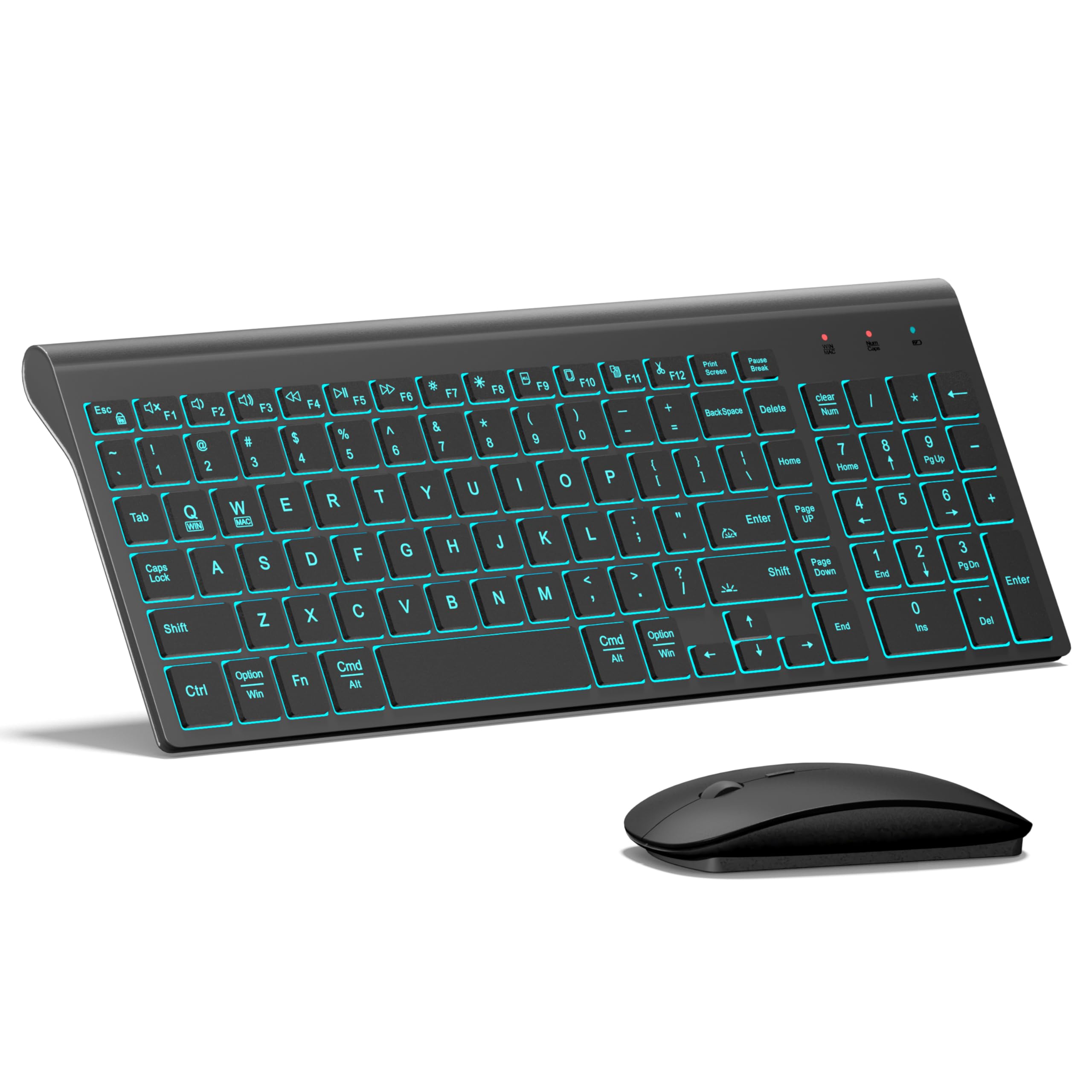
The TopMate Ultra Slim Combo pairs a scissor-switch keyboard with a 2400 DPI silent mouse, making it an ideal choice for quiet office environments or late-night work sessions. The keyboard features seven switchable backlight colors with off, low, medium, and high brightness levels, so you can match the lighting to your ambient conditions. The built-in 1600mAh rechargeable battery delivers up to 350 hours of use with the backlight off, which is impressive for an ultra-slim design.
The keyboard uses a dual-system layout that switches between Windows and Mac modes via FN+Q or FN+W, and it retains a full numeric keypad alongside 12 function keys for quick media access. The mouse offers five adjustable DPI levels up to 2400 and includes a AAA battery that lasts 3 to 5 months. The set connects via a single 2.4GHz Nano receiver with a Type-C adapter, providing a stable 10-meter range.
Some users report that the mouse suffers from connectivity issues, including cursor unresponsiveness, which may require re-pairing. The included key protector is thick and can hinder typing, though it is removable. The keyboard is not backlit in the traditional through-keycap style; the light glows around the edges rather than through the legends, reducing legibility in complete darkness.
Why it’s great
- Ultra-slim profile saves desk space while retaining full layout
- Long battery life with efficient power management
- Dual-system layout works with Windows and Mac out of box
Good to know
- Mouse can have intermittent connectivity issues
- Key protector hinders typing feel if left on
- Backlight illuminates key edges, not legends directly
6. VEILZOR Wireless Keyboard and Mouse Combo

The VEILZOR Combo provides nine RGB backlight effects with three lighting modes and three brightness levels, giving you extensive customization for a budget-friendly price. The keyboard includes an ergonomic wrist rest and adjustable tilt legs, which improve comfort during long typing sessions. The 2.4GHz wireless connection uses a shared USB-A/C receiver stored on the back of the keyboard, and the 10-meter range allows flexible desk placement.
The keyboard features key stabilizers that reduce noise, making it suitable for shared workspaces. The mouse includes a contoured shape with a thumb rest and three DPI settings (800/1200/1600) for cursor speed control. Both devices recharge via USB-C, eliminating the need for disposable batteries, and the set lasts weeks between charges with moderate use.
Some users note that the backlight is not bright enough to clearly illuminate keys in very dark rooms, as the light sits around the key edges rather than through the legends. A few reports mention key sticking over extended use, though customer support has been responsive in providing replacements. The mouse wheel on some units may not function correctly out of the box.
Why it’s great
- Extensive RGB customization with nine distinct effects
- Wrist rest and tilt legs improve typing ergonomics
- USB-C rechargeable set eliminates battery waste
Good to know
- Backlight brightness is modest for very dark environments
- Some units may have key sticking over time
- Mouse wheel can be unresponsive on arrival
7. ProtoArc XK01 Plus Foldable Bluetooth Keyboard

The ProtoArc XK01 Plus folds into a compact 8.46 x 4.68 x 0.78-inch package but unfolds to a full 105-key layout with a number pad, making it the only portable option that does not sacrifice key count. The white LED backlight has three adjustable brightness levels, allowing comfortable typing in dim coffee shops or airplane cabins. Bluetooth 5.1 connects up to three devices, and the keyboard switches between them instantly via dedicated channel keys.
The tri-fold design uses a sturdy metal hinge mechanism that feels durable despite the thin profile. The included PU leather carry pouch and phone stand make it a true travel kit. Battery life supports up to 150 days of standby, and the USB-C rechargeable battery charges quickly. The key spacing feels natural for a full-size keyboard, and the quiet switch action does not disturb nearby passengers.
The keyboard does not have built-in tilt legs, so you cannot adjust the typing angle for ergonomic preference. The hinge connectors, while durable, can feel slightly flimsy when typing with excessive force. The foldable design also means the keyboard is not stable on soft surfaces like a bed or couch cushion.
Why it’s great
- Full 105-key layout in a compact foldable form
- Three-device Bluetooth pairing with instant switching
- White backlight with adjustable brightness for low-light travel
Good to know
- No tilt adjustment for ergonomic typing angle
- Hinge feels slightly delicate under heavy pressure
- Not stable on soft or uneven surfaces
FAQ
Does a backlit wireless keyboard drain battery faster than a non-backlit model?
Can I use a backlit wireless keyboard with a Mac and a PC on the same day?
What is the difference between 2.4GHz and Bluetooth for wireless keyboards?
How often do I need to recharge a backlit wireless keyboard?
Final Thoughts: The Verdict
For most users, the best backlit wireless keyboard winner is the Redragon S101M-KS because it combines tri-mode connectivity, a 4800 DPI mouse, and 8 RGB patterns in a single wireless set that works for both gaming and office use. If you want a premium typist experience on macOS, grab the ProtoArc K110-A. And for a portable full-size layout that travels anywhere, nothing beats the ProtoArc XK01 Plus.