
Our readers keep the lights on and the weekend projects moving. As an Amazon Associate, I earn from qualifying purchases.
The gap between a good prototype and a useless mesh often comes down to a few tenths of a millimeter. For anyone working in 3D printing, reverse engineering, or hobbyist design, a budget 3D scanner that loses tracking or delivers distorted data is worse than having no scanner at all — it wastes time and material. The challenge is finding a unit that balances resolution, texture capture, and reliable tracking without exceeding your budget.
I’m Rikta — the co-founder and writer behind FitlyFast. I’ve spent hundreds of hours analyzing sensor specs, real customer experiences, and software ecosystems across the current crop of affordable handheld and desktop 3D scanners to separate the tools that actually work from those that just look good on paper.
After reviewing nine models ranging from entry-level desktop units to feature-rich handhelds, these recommendations represent the best value buys in the category. This guide will help you navigate the options to find the best 3d scanner under $500 that meets your specific project needs without hidden compromises.
How To Choose The Best 3D Scanner Under $500
Selecting the right scanner in this price range means understanding that trade-offs are inevitable. No sub-$500 scanner will match a industrial unit, but the right pick can still deliver professional-grade results for small to medium objects. Focus on three core areas: the type of light source, the stated accuracy and resolution, and the software ecosystem that supports the hardware.
Light Source and Scanning Technology
Structured light (blue or white LED) scanners offer high detail for small objects but struggle with shiny or dark surfaces. Infrared laser scanners handle challenging materials better and often support larger scan volumes, but may sacrifice fine detail. In this budget tier, a dual-module scanner that combines both technologies gives you the most flexibility without forcing you to buy a second device.
Accuracy vs. Real-World Repeatability
A scanner may claim 0.02 mm accuracy, but that number is usually measured under ideal lab conditions. In practice, factors like hand steadiness, object geometry, and tracking drift reduce effective accuracy. Look for scanners with anti-shake features, multiple tracker modes (marker-based vs. feature-based), and a track record of consistent output across user reviews rather than just the headline spec.
Quick Comparison
On smaller screens, swipe sideways to see the full table.
| Model | Category | Best For | Key Spec | Amazon |
|---|---|---|---|---|
| 3DMakerpro Seal Lite | Handheld | Small detailed objects | 0.02 mm accuracy | Amazon |
| Revopoint INSPIRE 2 Standard | Handheld | Versatile indoor/outdoor use | 0.03 mm precision | Amazon |
| Creality CR-Scan Ferret | Handheld | Mobile scanning with Android | 0.1 mm accuracy | Amazon |
| Creality CR-Ferret SE | Desktop | Budget-friendly desktop use | 0.1 mm accuracy | Amazon |
In‑Depth Reviews
1. 3DMakerpro Seal Lite
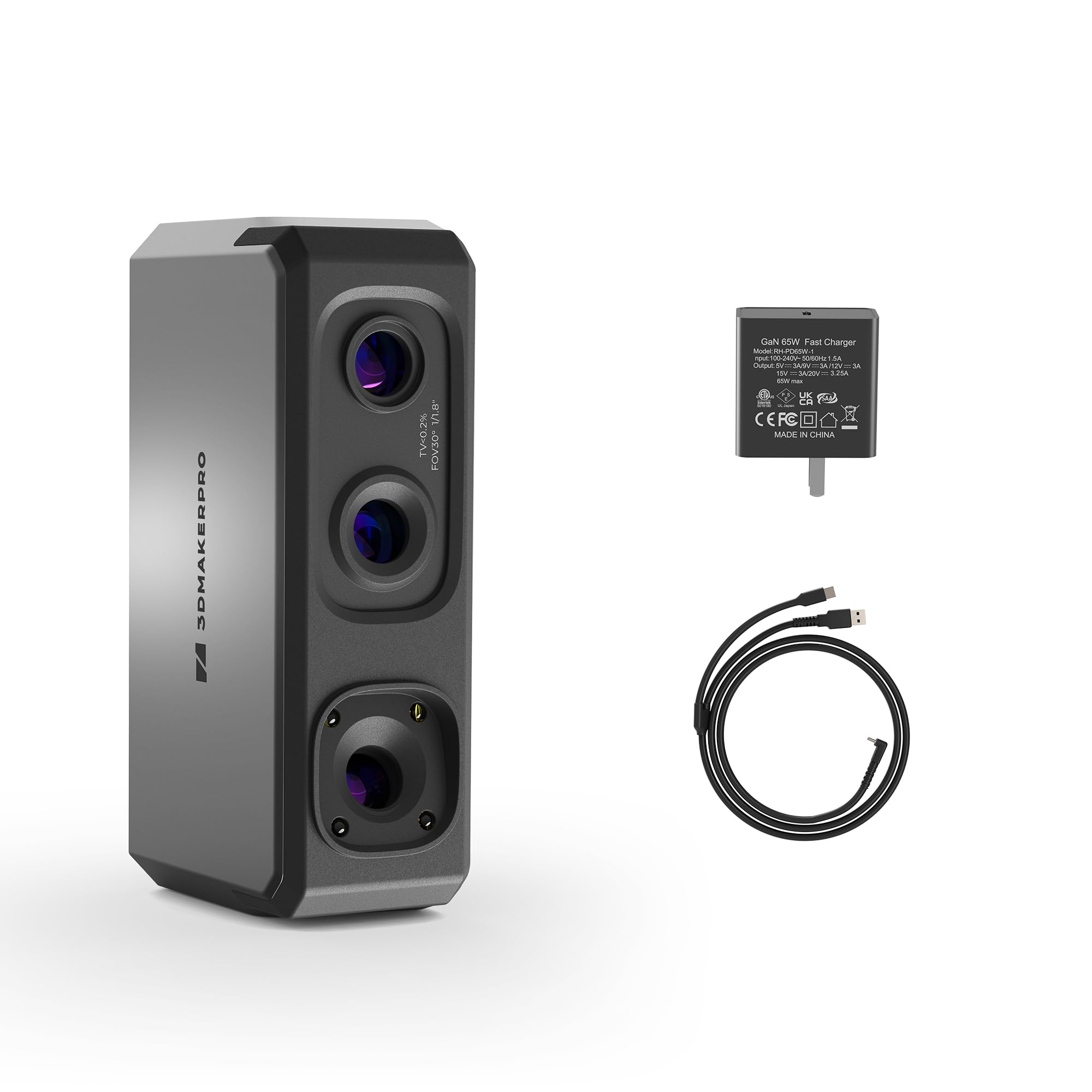
The 3DMakerpro Seal Lite uses a blue LED light source with a short wavelength (400–500 nm) to project structured light that captures extremely fine detail. It achieves a stated accuracy of 0.02 mm, making it the most precise scanner in this budget range for small objects between 10 mm and 300 mm. The recommended working distance of 180–280 mm means you can get very close to your subject without losing focus, which is critical for capturing tiny dents, edge textures, and intricate surface features.
It includes scan-back and anti-shake features for more stable results, though the frame rate sits at 10 fps — slower than some competitors but acceptable for stationary or turntable-assisted scans. It captures mono texture only, so if you need full-color scanning, this is not the right choice. The unit is plastic-bodied and lightweight, and it requires a powerful PC (65W wall power, not USB) to run properly.
Real users report a steep learning curve, especially around positioning the scanner relative to the object. The software, JMStudio, provides visual tracking, error correction, and auto-alignment, and supports export in OBJ, STL, PLY, and ASC formats. It struggles with shiny or dark materials — you will need scanning spray for those cases. Despite the learning curve, those who invest the practice time report results approaching much more expensive units.
Why it’s great
- Best-in-class 0.02 mm accuracy for the price bracket
- Blue LED structured light captures very fine surface details
- Free JMStudio software with lifetime updates and multiple export formats
Good to know
- Mono texture only — no full-color capture
- Requires tethering to a high-performance PC with 65W power
- Significant learning curve; not a plug-and-play device
2. Revopoint INSPIRE 2 Standard

The Revopoint INSPIRE 2 Standard brings dual scanning modules — infrared structured light and multi-line laser — into one handheld device. This combination lets you switch between scanning modes depending on the material and environment. The laser mode handles reflective and dark surfaces without spraying, while the structured light mode provides high-speed capture for less challenging objects. Accuracy is rated up to 0.05 mm, with a precision of 0.03 mm, supported by a high-precision calibration board that boosts point cloud accuracy by 75 percent.
It features built-in Wi-Fi 6 for wireless scanning and interactive streaming to a PC or mobile device, which adds flexibility for scanning awkward or large objects. The adjustable optical zoom (1.5x and 2x magnification) lets you focus on smaller details or wider coverage without physically moving the scanner. The unit weighs only 190 grams and uses an aerospace-grade aluminum alloy front panel for durability. Outdoor scanning is supported up to 20,000 lux, making it usable in shaded or semi-bright conditions.
The included Revo Metro software offers advanced scan settings and post-processing tools, with one-click import to Revo Design (sold separately) for a full scan-to-CAD workflow. Some users report that the provided sticky dots for calibration are subpar and recommend having backup markers. While the learning curve is real, the versatility of dual modules and wireless operation makes this a strong mid-range contender for those who need to scan a variety of object types and sizes.
Why it’s great
- Dual scanning modules handle both reflective and dark surfaces without spray
- Wi-Fi 6 enables wireless scanning and real-time streaming to PC or mobile
- Adjustable optical zoom for capturing details on mixed-geometry surfaces
Good to know
- Included sticky dots for calibration often require replacement
- Demands a high-end PC (i7 13th Gen or Ryzen 7 5800 with 16GB+ RAM)
- Revo Design software for CAD workflow is paid and Windows-only
3. Creality CR-Scan Ferret

The Creality CR-Scan Ferret is powered by an ASIC deep computing chip that delivers up to 60 fps image processing and up to 30 fps point cloud capture. That processing speed translates to smoother real-time tracking and less lag during handheld scanning. It supports dual-mode scanning — wide-range mode offers coverage up to 560 by 820 mm per scan, while high-accuracy mode achieves 0.1 mm precision and 0.16 mm resolution. This flexibility lets you scale between capturing a full bike helmet and focusing on a small mechanical part.
A major differentiator is its compatibility with Android devices for mobile scanning. The scanner can be powered via a 5V power bank or a compatible Android phone, making it genuinely portable for fieldwork. The built-in high-resolution RGB camera captures full-color textures, preserving the original appearance of objects. The latest firmware upgrades improve tracking stability and output quality, especially for smaller objects that previously caused tracking loss.
Users consistently note that it requires a relatively powerful computer for PC-based scanning, and mobile scanning is limited to Android (no iOS support). Some users report that the device loses tracking on featureless or highly reflective surfaces, and the software experience can be finicky. Despite these quirks, for the price, it offers fast processing and mobile flexibility that few competitors match. It is a good entry point for users who already own a compatible Android phone and want to scan on the go.
Why it’s great
- ASIC chip delivers fast 30 fps point cloud capture for smooth tracking
- Android mobile scanning and power bank support for true portability
- Full-color texture capture with built-in RGB camera
Good to know
- No iOS mobile scanning support — Android only
- Loses tracking on reflective or featureless surfaces
- Requires a strong PC for optimal desktop performance
4. Creality CR-Ferret SE

The Creality CR-Ferret SE is a desktop-oriented 3D scanner that focuses on steady, beginner-friendly operation. Its key feature is anti-shake technology, designed to counteract hand tremors during scanning, which is particularly helpful for users who are new to handheld scanning and don’t yet have a steady technique. It uses one-shot 3D imaging to ensure smooth and accurate scanning even when the operator’s hands are not perfectly stable. The scanner also captures 24-bit full-color data using a built-in 2 MP resolution camera.
One of the standout claims is the ability to scan black and metallic objects without scanning spray, which simplifies the workflow for automotive parts, tires, and metal components. The unit is extremely lightweight at 105 grams, making it comfortable for extended scanning sessions. It also supports Wi-Fi 6 wireless connectivity for data transfer. However, it is important to note that the Ferret SE does not support mobile phone scanning — it requires a computer connection via Windows or macOS, with specific hardware requirements including an i5 Gen 8 or newer processor and at least 8 GB of RAM.
User reviews are mixed. Some report excellent results with careful, slow scanning, while others describe significant software installation hurdles and tracking loss after a few seconds. The phone app is described as broken, but the desktop software is functional. The learning curve is present, and users with older or weaker computers may struggle. For the budget-conscious beginner willing to invest time in setup and practice, the SE offers a low-cost entry point into 3D scanning, provided they have the right hardware.
Why it’s great
- Anti-shake technology helps beginners achieve steadier scans
- Lightweight design at 105g reduces fatigue during long sessions
- Can scan black and metal objects without spray
Good to know
- No mobile scanning — must be tethered to a computer
- Software installation can be problematic; some users report tracking loss
- Requires a reasonably powerful PC; older hardware may fail
FAQ
Can I scan shiny or transparent objects without spray?
What computer specs do I actually need for these scanners?
Final Thoughts: The Verdict
For most users, the 3d scanner under $500 winner is the 3DMakerpro Seal Lite because of its exceptional 0.02 mm accuracy and blue LED structured light that captures fine surface detail for small objects. If you need versatile scanning across different materials and environments, grab the Revopoint INSPIRE 2 Standard for its dual-module flexibility and wireless operation. And for true mobile scanning on a budget, nothing beats the Creality CR-Scan Ferret with its Android compatibility and fast ASIC processing.