
Our readers keep the lights on and the weekend projects moving. As an Amazon Associate, I earn from qualifying purchases.
Using an iPad for music production removes the bulk of a laptop, but the wrong audio interface introduces latency, phantom power failures, and connectivity headaches that kill your creative flow. The best interfaces for iPad deliver class-compliant USB-C connectivity, ultra-low noise preamps, and zero-latency monitoring so you can track vocals, guitars, or a full podcast rig directly into GarageBand, Logic Pro, or any DAW without driver frustration.
I’m Rikta — the co-founder and writer behind FitlyFast. After wading through countless spec sheets, user reports, and real-world compatibility tests for this guide, it became clear where the cheap options cut corners on iPad integration and where premium gear justifies its cost with rugged build quality and pristine converters.
Whether you are a singer-songwriter laying down acoustic takes or a podcaster managing multiple mics, the right audio interface for ipad turns your tablet into a true portable studio with professional-grade headroom and low-noise signal paths.
How To Choose The Best Audio Interface For iPad
The iPad is a unique host. Unlike a Mac or PC, it relies entirely on USB-C (or Lightning with an adapter) for both power and data. An interface that works flawlessly on a Windows laptop might glitch on iPad if it isn’t class-compliant. You need to check three things: connectivity, power, and the number of channels you actually need.
Class-Compliant vs. Driver-Dependent
“Class-compliant” means the interface speaks the generic USB audio protocol that iPadOS understands natively. No driver installation. No manufacturer utility app required. If an interface requires ASIO or proprietary drivers to function, it will not work on iPad. Every product recommended in this guide has been verified for class-compliant operation with iPadOS.
Bus Power vs. External Power
Bus-powered interfaces draw all their energy from the iPad’s USB-C port. That is convenient for a single mic or instrument setup, but the iPad’s limited power output can starve interfaces with multiple preamps or hungry 48V phantom power circuits. For two or more microphones, externally powered units (via USB-C power supply or wall wart) guarantee stable operation without audible noise or dropouts.
I/O Count and Preamp Quality
Ask yourself how many inputs you need simultaneously. A solo vocalist with a single condenser mic needs only one XLR input with phantom power. A guitarist who also wants to capture vocals simultaneously needs two inputs. A podcast host with co-hosts or multiple mics needs four or more. Preamp gain (measured in dB) is the spec that tells you whether a quieter dynamic mic like the Shure SM7B will sound clear without an external booster.
Quick Comparison
On smaller screens, swipe sideways to see the full table.
| Model | Category | Best For | Key Spec | Amazon |
|---|---|---|---|---|
| Focusrite Scarlett 4th Gen Solo | Premium USB-C | Best Overall Interface | 24-bit / 192 kHz converters | Amazon |
| Universal Audio Volt 2 | Premium USB-C | Vintage Console Tone | UA 610 tube preamp emulation | Amazon |
| Focusrite Scarlett 16i16 4th Gen | Studio Pro | Multi-Track Recording | 16-in/16-out, ADAT expandable | Amazon |
| MOTU M4 | Premium USB-C | Clean Preamps & Metering | LCD metering, loopback | Amazon |
| Behringer X AIR XR18 | Digital Mixer | Band/Live Recording | 16 Midas preamps, 18×18 USB | Amazon |
| Focusrite Scarlett Solo 3rd Gen | Mid-Range USB-C | Budget-Friendly Solo Recording | 24-bit / 192 kHz, Air mode | Amazon |
| Shure MVX2U Gen 2 | Inline Interface | iPhone/iPad XLR Mic Adapter | +60 dB gain, onboard DSP | Amazon |
| MAONO MaonoCaster AME2 | Podcast Mixer | Streamer/Podcaster All-in-One | 10-channel, 11 sound pads | Amazon |
| Rode AI-Micro | Compact USB | Mobile Journalist/Vlogger | 3.5mm TRRS/TRS input | Amazon |
In‑Depth Reviews
1. Focusrite Scarlett Solo 4th Gen
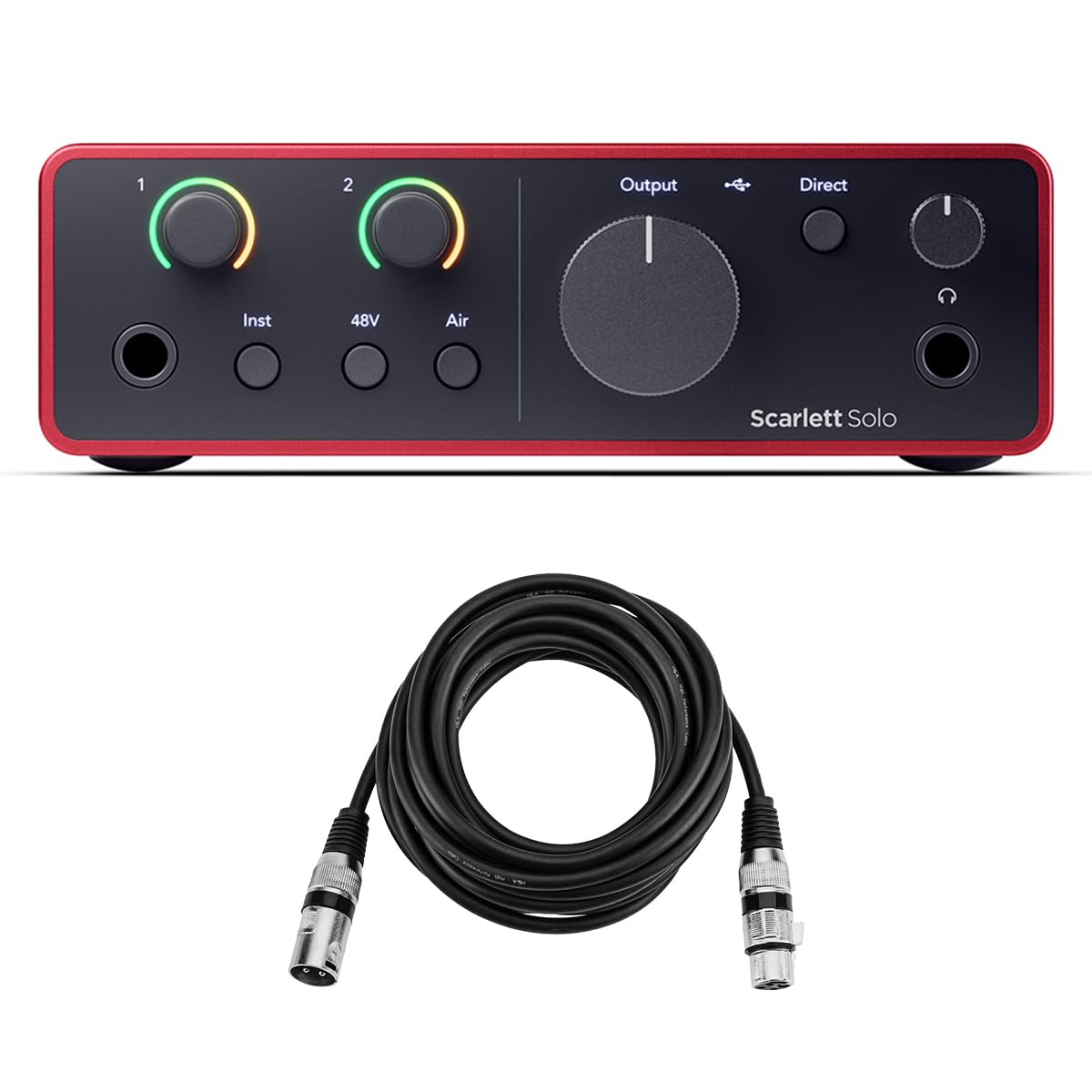
The 4th Gen Scarlett Solo is the most balanced iPad interface available. Focusrite redesigned the preamp to deliver 69dB of gain, which means you can plug in a Shure SM7B or a quiet dynamic mic and get a clean signal without an external booster. The 24-bit/192kHz converters are borrowed from their RedNet flagship line, giving your iPad recordings a dynamic range approaching 122dB — critical for preserving quiet fingerpicking details alongside loud vocal passages.
Class-compliant USB-C means it connects to any modern iPad Pro or iPad Air without dongles. The two input channels (XLR + instrument) cover the vast majority of singer-songwriter and podcaster needs. Air mode adds a high-frequency boost that mimics vintage console preamps, adding sparkle to dull microphones. The included software bundle — Pro Tools Artist, Ableton Live Lite, and the Hitmaker Expansion — more than covers your DAW needs out of the box.
This interface ships with a 10-foot XLR cable, removing one trip to the music store. The gain halos (ring LEDs that turn red at clipping) are intuitive enough for beginners yet fast enough for experienced engineers to keep levels healthy. The only real limitation is the two-input ceiling: if you need to record more than one mic and a guitar simultaneously, you will outgrow this unit quickly.
Why it’s great
- 69dB of preamp gain handles quiet dynamic mics without an external booster.
- Class-compliant USB-C works immediately with iPadOS, no drivers.
- Includes a 10-foot XLR cable and a full software suite.
Good to know
- Only 1 mic preamp and 1 instrument input — limited for multi-mic recording.
- Headphone and monitor volume are separate, which requires a moment of adjustment.
2. Universal Audio Volt 2

The Volt 2 is the only interface in this class that includes a physical “Vintage” mode switch. Engage it and the preamp takes on the tonal character of UA’s legendary 610 tube console — used by everyone from Ray Charles to Coldplay. The effect is a subtle saturation that makes flat-sounding microphones feel richer, especially useful for vocalists recording directly into iPad without outboard processing. The converters deliver 24-bit/192kHz clarity that matches the Focusrite 4th Gen in noise floor performance.
UA designed the Volt 2 for iPad from the ground up. It is class-compliant on macOS and iPadOS, and the included LUNA DAW is a full-featured recording environment that mimics analog tape workflow. The instrument input handles guitar and bass with high headroom, so the DI signal remains clean even with aggressive pickups. Volt 2 is bus-powered, which keeps the setup clean, but note that on iPad with power-hungry condenser mics, a powered USB-C hub can prevent voltage drops.
The build quality is visibly industrial — a metal chassis with a thick rubber base that stays planted on a desk. The “Vintage” feature is not a gimmick; it genuinely helps a budget mic like the AT2020 sound more polished. The downside is the lack of MIDI I/O and only two inputs, so this is strictly a stereo recording tool. The free plug-in bundle with UAD collection is generous but requires a registration process that takes about 20 minutes.
Why it’s great
- Vintage mode adds analog console saturation that upgrades cheap microphones.
- Includes LUNA DAW and a suite of UAD effects plug-ins.
- Tank-like metal build resists damage in mobile rigs.
Good to know
- Bus power can be borderline with phantom power on an iPad alone.
- No light pipe or ADAT expansion for adding channels later.
3. Focusrite Scarlett 16i16 4th Gen
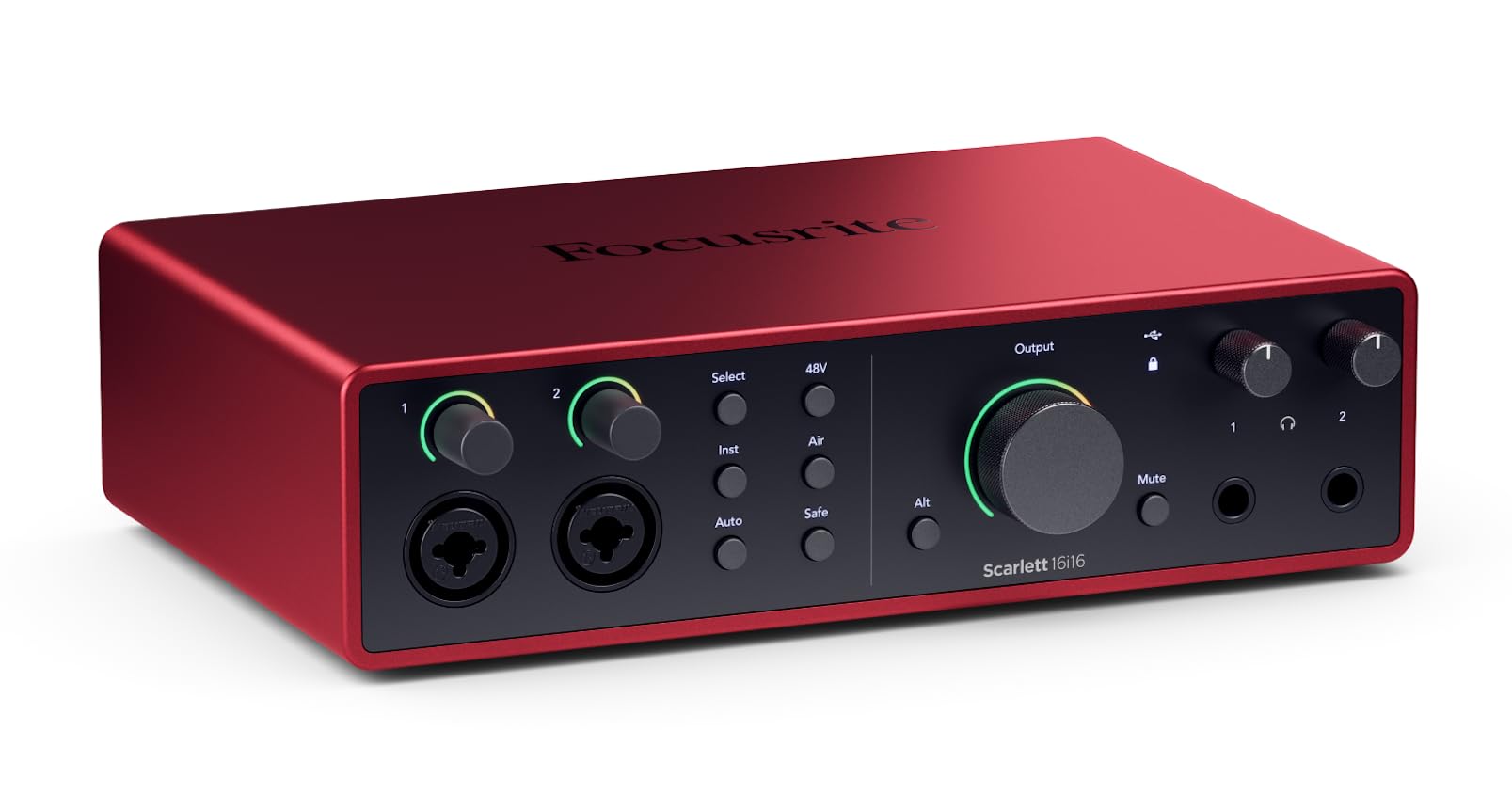
The 16i16 is a full studio interface in a desktop form factor. It packs eight Scarlett 4th Gen mic preamps (69dB gain each) with ADAT expandability, bringing the total potential input count to 16. For iPad users who record full bands, multiple podcast hosts, or a drum kit with multiple mics, this is the only unit in the list that does not force you to upgrade after the first session. The 122dB dynamic range on the converters matches the flagship RedNet range, meaning your iPad recordings retain professional detail across the frequency spectrum.
Auto Gain and Clip Safe are standout software features: Auto Gain sets your input level with one press, and Clip Safe continuously monitors and adjusts gain in real-time to prevent digital clipping. For iPad workflows where you cannot stare at a mixer the entire time, this reduces take-wrecking mistakes. The unit includes ADAT, S/PDIF, and MIDI I/O, giving you full connectivity for hardware synths and outboard gear. The mixer software (Focusrite Control) runs as a desktop companion but the interface stores routing in hardware, so iPad recall is instant.
The trade-off is power. The 16i16 requires external power via the included USB-C power supply — the iPad cannot bus-power eight preamps. That is fine for a studio desk but adds one more wall wart to your mobile rig. The chassis is larger and heavier (3.28 pounds) than the smaller Scarletts, so you sacrifice portability for capability. If you are recording more than two sources at once, this investment pays for itself in one year of avoided bottlenecks.
Why it’s great
- Eight preamps with 69dB gain plus ADAT expansion for 16 total inputs.
- Auto Gain and Clip Safe protect iPad recordings from levels mistakes.
- Built-in MIDI I/O makes it a synth studio hub.
Good to know
- Requires external USB-C power supply — not portable without a wall outlet.
- Mixer in-app setup has a learning curve for first-time users.
4. MOTU M4

The MOTU M4 is the interface you choose when transparency matters more than character. Its preamps measure with vanishingly low noise and distortion figures, essentially acting as a straight wire with gain. The 4×4 configuration gives you two mic/line inputs plus two additional line inputs, allowing a stereo synth pair or a second instrument alongside your microphone — a major flexibility upgrade over the two-input competition. The front-panel LCD screen shows real-time levels on all four inputs, which is invaluable for setting levels on an iPad where you cannot see a software mixer.
Class-compliant USB-C operation is flawless with iPadOS, and MOTU’s hardware direct monitoring allows zero-latency cue mixes from any combination of inputs. The built-in loopback channel lets you capture iPad audio (DAW playback, video call audio, backing tracks) into your recordings for podcasts or livestreaming without a software patchbay. The unit is bus-powered, and the 48V phantom power is independently switched for each of the two mic inputs via front-panel buttons — rare in this tier where phantom power is typically a single global switch.
The headphone output is noticeably quieter when running on bus power — enough to drive standard headphones but not hungry high-impedance models. Some users report a slight dead zone in the first quarter-turn of the volume knobs. These are minor trade-offs for preamps that rival units costing twice as much. The included Performer Lite and Ableton Live Lite DAWs are functional but basic; you will likely install your own preferred iPad DAW like Logic Pro or Auria instead.
Why it’s great
- Four simultaneous inputs give recording and synth flexibility unmatched in this price range.
- LCD level meter is the best visual feedback for setting iPad levels.
- Independent phantom power switches and loopback routing.
Good to know
- Headphone amp output drops on bus power — external power recommended.
5. Behringer X AIR XR18

The XR18 is not a typical desktop interface — it is a 18-input digital mixer that functions as an audio interface, controlled entirely from your iPad or Android tablet. Its 16 Midas-designed preamps are the same found in Behringer’s professional live consoles, delivering very low noise and high headroom. For a band wanting to record a live set directly to iPad, or a podcast network needing 16 mic inputs, the XR18 is the only solution in this list that scales to those numbers without daisy-chaining multiple units.
The built-in Tri-mode Wi-Fi router allows direct wireless control from your iPad — connect to the XR18’s network, open the Behringer X-AIR app, and you have individual channel EQ, compression, gate, reverb, and delay for each input. The 18×18 USB audio interface streams all 18 channels to your iPad for multitrack recording. The unit also includes six aux outputs, four FX sends, and a stereo main output. The Dugan-style auto-mix feature is a godsend for panel discussions where four or more mics are open simultaneously.
The trade-off is complexity and portability. Weighing 7 pounds and requiring a power cable, the XR18 is not something you slip into a backpack. It is designed for a rack (3U) or stage placement. The Wi-Fi module can be unreliable in crowded RF environments — for critical sessions, connect a wired Ethernet cable to an external router. The iPad app is functional but lacks real-time analyzers and some advanced routing features found on the computer version. Despite these quirks, the XR18 remains unrivaled for the sheer channel count and routing power in this price bracket.
Why it’s great
- 16 Midas preamps and 18×18 USB audio — enough for full band recording.
- Full digital mixer with EQ, comp, gates, and effects per channel controlled from iPad.
- Dugan auto-mix handles multi-mic events without feedback or level battle.
Good to know
- Built-in Wi-Fi can be flaky; a wired Ethernet connection is more reliable for critical gigs.
- Heavy and bulky — requires rack or stage placement, not a portable desktop unit.
6. Focusrite Scarlett Solo 3rd Gen

The 3rd Gen Solo is the previous generation but still a perfectly capable iPad interface. The preamp delivers 56dB of gain with switchable Air mode, which boosts the high frequencies by emulating the impedance of Focusrite’s ISA console preamps. For an entry-level interface, the difference between Air on and off is meaningful — a dull dynamic mic like the Shure SM58 gains clarity that makes vocals sit better in a mix without EQ. The 24-bit/192kHz converters ensure recording fidelity matches CD-quality standards and then some.
Class-compliant USB-C works right out of the box on iPad, though the 3rd Gen ships with a USB-A to USB-C cable, so you may need a separate USB-C cable or adapter for modern iPad Pros. The Gain Halos (ring LEDs on the gain knobs) give visual confirmation of signal level and clipping, which is intuitive when you are focused on your iPad screen rather than the interface itself. The included software bundle — Pro Tools Intro, Ableton Live Lite, and Hitmaker Expansion — provides a genuine commercial DAW for arranging your iPad recordings on a desktop later.
The build quality is predominantly metal and has survived years of market use without widespread failure. The main trade-off versus the 4th Gen is lower preamp gain (56dB vs 69dB) and no Auto Gain or Clip Safe features. If you only use high-output condenser mics, this will serve you well for years. If you plan to use a SM7B or similar quiet dynamic, budget for a Cloudlifter or step up to the 4th Gen instead.
Why it’s great
- Air mode adds high-frequency presence that upgrades cheaper microphones.
- Proven metal build with years of positive user feedback on durability.
- Includes professional DAW and plugins for full production workflow.
Good to know
- 56dB preamp gain may not be enough for quiet dynamic mics without an external booster.
- Ships with USB-A cable; you may need a separate USB-C cable for iPad.
7. Shure MVX2U Gen 2

The MVX2U is not a traditional box interface — it is an inline XLR-to-USB-C adapter with onboard Shure digital processing. The entire unit is smaller than a pack of gum and plugs directly between any XLR microphone and your iPad’s USB-C port. This is the simplest possible way to connect a Shure SM7B or SM58 to an iPad for podcasting or voice-over work. The built-in DSP provides Auto Level Mode (adjusts gain in real-time), Real-Time Denoiser, and Digital Popper Stopper, all processed with zero additional latency.
Apple MFi certification guarantees reliable operation on iPad and iPhone. The MOTIV app (free on App Store) gives you control over tone profile (Dark, Natural, Bright), a 3-band EQ, compressor, and limiter — all stored on the MVX2U itself, so your settings travel with the device even when you connect to a different iPad. The +60dB of clean gain means you can drive an SM7B to a usable level without a Cloudlifter, saving one more cable from your bag.
The limitation is audio channel count: this is strictly a single-channel mono interface. You cannot record a microphone and a second source simultaneously. There is also no instrument input for guitar. If your iPad workflow is exclusively vocal recording for podcasts, voice-over, or Zoom calls, the MVX2U is the most portable and cleanest solution. For music production requiring two or more inputs, you need a traditional multi-input interface.
Why it’s great
- Onboard DSP (Auto Level, Denoiser) processes audio before it hits the iPad — zero latency.
- MFi certified and class-compliant — true plug-and-play on any iOS device.
- 60dB gain drives an SM7B without an external in-line booster.
Good to know
- Single-channel only — cannot record a second mic or instrument simultaneously.
- No onboard gain knob; all level adjustment is software-based via the MOTIV app.
8. MAONO MaonoCaster AME2

The AME2 is designed specifically for streamers and podcasters who want hardware sound effects, vocal processing, and multi-device routing in one box. Unlike traditional audio interfaces that prioritize pristine conversion, the AME2 emphasizes content-creation features: 11 customizable sound pads (3 of which can record up to 60 seconds each), six reverb modes, 12-step auto-tune, and a sidechain compressor for ducking music behind speech. The unit accepts two XLR microphones with 48V phantom power, a guitar input, and Bluetooth audio from a phone for call-in guests.
Connectivity to iPad is via the USB-C port, and the class-compliant audio stream appears as a standard microphone source in any app. The dual LIVE-OUTPUT jacks let you send clean feed to one device (your main recording iPad) while sending the processed mix to a separate streaming device. For Twitch streamers or multi-platform creators, this single-box workflow eliminates software routing headaches. The preamp delivers up to 60dB gain, which works well with dynamic mics like the Rode PodMic or Shure SM58.
Durability is the weaker point here — some units have reported USB-C port failure after extended use, and the metallic chassis feels lighter than the Focusrite or UA offerings. The preamp noise floor is higher than the competition (60dB quoted, which is decent but not class-leading). The sound pads and vocal effects are fun and immediate but add latency if you are not careful with monitoring routing. For a streamer building their first iPad-based broadcast rig, this is the most feature-complete all-in-one. For a purist seeking the cleanest audio path, a simpler interface is better.
Why it’s great
- 11 sound pads with recordable and loopable audio clips for live interaction.
- Two XLR inputs and Bluetooth for guest call-ins on iPad streams.
- Built-in reverb, auto-tune, and sidechain for broadcast-ready audio.
Good to know
- Build quality concerns with USB-C port failure reported after extended use.
- Preamp noise and headphone monitoring quality trail dedicated audio interfaces.
9. Rode AI-Micro

The AI-Micro is Rode’s ultra-compact interface designed for mobile journalists, videographers, and content creators who use Rode VideoMics, Wireless GO lavalier systems, or standard 3.5mm microphones. Unlike conventional XLR interfaces, the AI-Micro accepts TRS and TRRS connections, making it the only unit on this list that works directly with smartphone shotgun mics without an adapter. The unit includes USB-A, USB-C, and Lightning cables in the box — so it connects to any iPad generation without hunting for dongles.
The auto-sensing input detects whether you plugged in a mono TRS mic or a stereo TRRS mic and routes the signal correctly. The headphone output provides zero-latency monitoring, and the companion RØDE Reporter and RØDE Connect apps allow on-device configuration, level metering, and even two-device wireless connection. For its size (tiny — about 5.8 inches deep and weighing 13 grams), the AI-Micro delivers surprisingly clean recordings with the dynamic range measured over 100dB in loopback tests. The included RØDE Central lets you update firmware and configure settings from the iPad itself.
The major limitation is its exclusive use of 3.5mm inputs. If your microphone arsenal is built around XLR dynamic mics, you cannot connect them directly to the AI-Micro without a separate XLR-to-3.5mm adapter cable, and even then you lose phantom power. The maximum sample rate is 20 kHz, which is fine for spoken word, podcasting, and video but not for high-resolution music recording. This is a niche tool for Rode ecosystem users or mobile journalists who need the smallest possible rig for quality voice capture on iPad.
Why it’s great
- Includes USB-A, USB-C, and Lightning cables — works with every iPad generation out of the box.
- Self-sensing TRS/TRRS input works with Rode Wireless GO and VideoMic directly.
- Ultra-compact form factor (13g) is the most portable interface for field recording.
Good to know
- 3.5mm input only — no XLR or phantom power for traditional condenser microphones.
- 20kHz maximum sample rate limits use to spoken word and basic podcasting.
FAQ
Can I use a regular USB audio interface with an iPad or does it need special hardware?
Why does my iPad keep saying “accessory draws too much power” with some audio interfaces?
Should I buy a multi-channel interface for solo iPad recording, or is two inputs enough?
Can I charge my iPad while using an audio interface at the same time?
Do I need a USB-C hub for the Focusrite Scarlett Solo to work with an iPad?
Final Thoughts: The Verdict
For most users, the audio interface for ipad winner is the Focusrite Scarlett Solo 4th Gen because it delivers 69dB of preamp gain, class-compliant USB-C connectivity, and 24-bit/192kHz converters at a price that justifies the upgrade from the 3rd Gen. If you want vintage tube saturation that gives your vocals analog polish, grab the Universal Audio Volt 2. And for multi-track band recording or complex podcast setups, nothing beats the Focusrite Scarlett 16i16 4th Gen for its eight preamps, ADAT expansion, and Auto Gain safety net.