
Our readers keep the lights on and the weekend projects moving. As an Amazon Associate, I earn from qualifying purchases.
The search for the perfect screen typically begins with a trade-off: raw speed versus visual fidelity versus sheer size. A flat 32-inch panel demands constant head turning to scan the edges, and a lower refresh rate leaves ghosting that blurs the critical split-second in a firefight or a racing line. The right curved gaming monitor resolves both problems by wrapping the periphery into your natural field of view while maintaining the high frame rate that competitive titles demand.
I’m Rikta — the co-founder and writer behind FitlyFast. I have spent hundreds of hours analyzing refresh rate curves, response time claims, panel technologies (VA, LCD, OLED), and adaptive sync implementations to separate the true performance standouts from the spec-sheet fluff.
This guide breaks down the specific trade-offs across resolution tiers, curvature types, and refresh rate ceilings, so you can confidently buy the best 32 inch curved gaming monitor for your setup and your favorite genres.
How To Choose The Best 32 Inch Curved Gaming Monitor
Three specs define whether a 32-incher feels immersive or causes eye fatigue: curvature, refresh rate, and resolution. A 1000R curve matches the human eye’s natural shape better than a 1500R curve, but only matters in fast-pace first-person shooters where peripheral awareness wins rounds. Refresh rate determines how many frames your screen renders per second — 240Hz is noticeably smoother than 165Hz for competitive play, but the difference between 240Hz and 330Hz is harder to perceive. Resolution must balance with your GPU’s power: a 4K panel running a full 240Hz requires a top-tier card, whereas QHD is the sweet spot for mid-range setups.
Panel Technology: VA vs OLED
VA (Vertical Alignment) panels dominate the curved 32-inch space because they deliver high native contrast ratios (3000:1 to 4000:1) without the cost of OLED. Black levels are deep, and the curved form factor actually reduces the viewing-angle shifts that VA panels sometimes suffer on flat screens. OLED offers perfect blacks and near-instant 0.03ms response times, but at a significantly higher price point and with potential burn-in risk over years of static desktop use. For most gamers, a VA panel with a 3000:1 contrast ratio provides an immersive HDR experience without the premium cost or the burn-in worry.
Curvature: 1000R, 1500R, or 1800R
Curvature describes the radius of the circle the screen would form if fully enclosed. A 1000R curve is the tightest — it wraps the most aggressively around your field of view, making it ideal for single-player immersion and sim racing. A 1500R curve is subtler and works well for mixed use: gaming during the day, productivity at night. An 1800R curve is the gentlest option and fits into multi-monitor setups more naturally because the gap between adjacent curved screens looks more uniform. For a single 32-inch gaming panel, 1500R is the versatile baseline; choose 1000R only if immersion is your top priority.
Quick Comparison
On smaller screens, swipe sideways to see the full table.
| Model | Category | Best For | Key Spec | Amazon |
|---|---|---|---|---|
| LG 32GX850A-B UltraGear | OLED Premium | Competitive & casual play dual-mode | 4K 165Hz / FHD 330Hz dual-mode | Amazon |
| Samsung Odyssey G7 G75F | Ultrawide 4K | Immersive ultrawide gaming | 40-inch 5120×2160 / 180Hz | Amazon |
| KTC H32S25E | QHD 240Hz | High-refresh QHD gaming | 2560×1440 / 240Hz / 1ms | Amazon |
| ASUS TUF VG32VQ1B | QHD 165Hz | Balanced QHD with ELMB | 2560×1440 / 165Hz / 1ms | Amazon |
| CRUA 4K Curved | 4K 160Hz | Budget 4K gaming & content | 3840×2160 / 160Hz / VA | Amazon |
| ASUS TUF VG32VQM5AZ | FHD 240Hz | High-FPS competitive play | 1920×1080 / 240Hz / 0.5ms | Amazon |
| LG 32GS60QC-B UltraGear | QHD 180Hz | Immersive 1000R curve value | 2560×1440 / 180Hz / 1ms | Amazon |
| Z-Edge UG32P | FHD 240Hz | Budget 240Hz gaming | 1920×1080 / 240Hz / 1ms | Amazon |
| Gawfolk 240Hz | FHD 240Hz | Entry-level 240Hz on a budget | 1920×1080 / 240Hz / 2ms | Amazon |
In‑Depth Reviews
1. LG 32GX850A-B UltraGear 4K OLED

The LG 32GX850A-B puts a 32-inch 4K UHD glossy OLED panel into a gaming chassis that also includes a clever dual-mode feature: run at 4K 165Hz for story-driven titles, or switch to Full HD at 330Hz for competitive shooters. Micro Lens Array+ technology pushes typical brightness to 275 nits, and the 1.5 million-to-1 contrast ratio produces perfect blacks and impeccable HDR in dark scenes. The near-instantaneous 0.03ms GtG response time eliminates ghosting entirely — the image simply appears and disappears without a blur trail.
NVIDIA G-Sync Compatible and AMD FreeSync Premium Pro both work out of the box, and the panel carries triple UL certification (Anti-Glare, Flicker-Free, Low Blue Light). The stand supports height, tilt, swivel, and pivot adjustments, making it one of the most ergonomic options in this roundup. Three easy-to-reach knobs control volume, brightness, and the on-screen display, bypassing the joystick menu entirely.
The glossy screen finish delivers richer colors than matte alternatives but reflects direct light sources — position it away from windows or overhead lamps. Text clarity can show slight banding on certain backgrounds, and the 165Hz ceiling at 4K means it doesn’t match the raw refresh rate of 240Hz or 330Hz monitors. Nevertheless, for a 32-inch OLED that serves both casual visual fidelity and competitive speed, this is the strongest contender.
Why it’s great
- Perfect OLED blacks with 1.5M:1 contrast ratio
- Dual-mode switches between 4K 165Hz and FHD 330Hz
- Full ergonomic stand with height, tilt, swivel, pivot
Good to know
- Glossy screen reflects nearby light sources
- Text clarity may show minor banding on some backgrounds
- Premium-tier investment over VA alternatives
2. Samsung Odyssey G7 G75F

The Odyssey G7 G75F stretches an ultrawide 21:9 WUHD (5120×2160) resolution across a 40-inch 1000R curved VA panel. This is not a standard 32-inch monitor — it’s a wider canvas that wraps aggressively around your periphery for sim racing, flight sims, and cinematic RPGs. The 180Hz refresh rate and 1ms GtG response time keep motion smooth, while VESA DisplayHDR 600 delivers 600 nits peak brightness for deep contrast in dark scenes.
AMD FreeSync Premium Pro is supported, and the VA panel’s native 3000:1 contrast ratio produces solid blacks without the cost of OLED. The stand includes height and swivel adjustments, and the build quality feels premium. Samsung bundles a DisplayPort cable and a USB-A to B upstream cable for the built-in USB hub, making it easy to connect peripherals directly to the monitor.
Color accuracy benefits from calibration — out-of-box settings lean slightly cool, and the existing HDR implementation can look odd without adjustment. The 40-inch size also requires a deeper desk (at least 30 inches) to avoid having the edges sit too close to your face. For gamers who want an ultrawide 4K experience without switching to an OLED price point, the G75F delivers impressive immersion.
Why it’s great
- Ultrawide 5120×2160 resolution with 1000R curve
- VESA DisplayHDR 600 certified brightness
- FreeSync Premium Pro and solid VA contrast
Good to know
- Requires calibration for accurate color
- Needs wider desk setup due to 40-inch size
- HDR performance needs manual tuning
3. KTC H32S25E

The KTC H32S25E delivers a rare combination: QHD resolution (2560×1440) and a 240Hz refresh rate on a 1000R-curved VA panel. The aggressive curve matches the human eye’s natural shape closely, making fast FPS games feel genuinely wrap-around. The 1ms response time keeps motion blur low, and Adaptive Sync eliminates tearing across both DisplayPort and HDMI inputs. The 4000:1 contrast ratio provides deeper black levels than typical 3000:1 VA panels.
Connectivity includes two HDMI ports and two DisplayPort inputs, allowing simultaneous connection to a PC, gaming console, and laptop without swapping cables. The tilt adjustment ranges from -5° to 20°, and the frameless design reduces the bezel gap in multi-monitor arrangements. The HDR support enhances highlights but doesn’t match the brightness range of higher-certified displays.
Some users note the out-of-box color saturation runs high — switching to sRGB mode in the menu helps. The stand is tilt-only, so you will need a VESA mount (100x100mm) if height adjustment matters. For a QHD panel that pushes 240Hz without breaking the premium barrier, the KTC H32S25E is a sharp performer.
Why it’s great
- QHD resolution with 240Hz high refresh rate
- 1000R aggressive curve for deep immersion
- Two HDMI and two DP ports for multi-device setup
Good to know
- Out-of-box colors need sRGB mode adjustment
- Tilt-only stand lacks height adjustment
- HDR performance is modest compared to premium panels
4. ASUS TUF VG32VQ1B
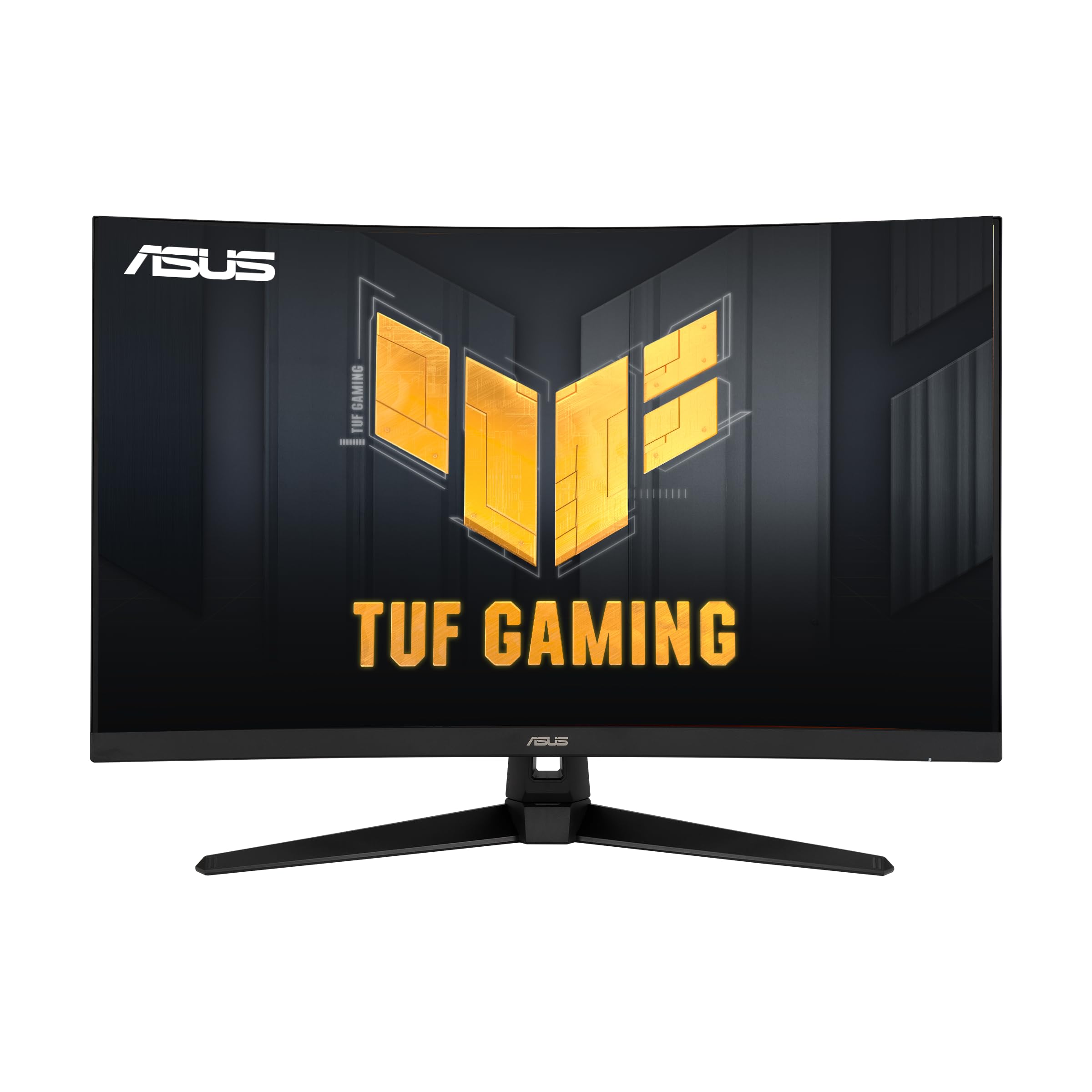
ASUS’s TUF VG32VQ1B pairs a 32-inch QHD (2560×1440) VA panel with a 165Hz refresh rate and a 1500R curve. ASUS Extreme Low Motion Blur (ELMB) technology runs alongside Adaptive-Sync, reducing both ghosting and tearing simultaneously — a feature set that typically demands a premium elsewhere. The 1ms MPRT response time keeps fast action crisp, and FreeSync Premium further stabilizes the frame delivery.
Built-in speakers provide passable audio for desktop use when you don’t want to wear headphones, and the stand supports both height and tilt adjustments — a rarity at this tier. Shadow Boost brightens dark areas without washing out highlights, which helps in games like Escape from Tarkov or The Finals. The 120% sRGB color gamut delivers punchy visuals out of box, though HDR-10 support is decent but not transformative.
The VA panel shows typical black uniformity shifts at off-center angles, and the bright orange standby LED can be distracting in a dark room. The on-screen menu is functional but not the most intuitive. For a QHD monitor that balances speed, resolution, and convenience features at a competitive price point, the VG32VQ1B remains a reliable choice.
Why it’s great
- ELMB + Adaptive-Sync simultaneously reduces blur and tearing
- Height-adjustable stand and built-in speakers
- 120% sRGB color gamut with Shadow Boost
Good to know
- VA black uniformity shifts slightly at extreme angles
- Bright orange standby LED can be distracting
- HDR-10 performance is decent but not premium-grade
5. CRUA 4K Curved Gaming Monitor

The CRUA 4K monitor brings a native 3840×2160 resolution and 160Hz refresh rate to a 1500R-curved VA panel at an accessible price point. HDMI 2.1 and DisplayPort 1.4 connectivity ensure compatibility with modern consoles that can output 4K 120Hz. The 3000:1 contrast ratio delivers deep blacks for a VA panel, and the 120% sRGB gamut keeps colors vibrant without aggressive oversaturation.
Built-in speakers reduce desktop clutter, and the 75x75mm VESA mount support makes wall or arm installation simple. Users report that the blue light filter at the strongest setting significantly reduces eye strain during long sessions, and the matte screen surface minimizes glare better than glossy panels. The stand is tilt-only but sturdy enough to eliminate wobble during intense mouse movements.
A small subset of units have reported a high-pitched whine from the power adapter, and color uniformity can vary between panels. The HDMI ports cap the refresh rate at 144Hz — the full 160Hz requires DisplayPort. For gamers who want 4K resolution on a curved 32-inch screen and are willing to accept some variability, the CRUA offers the lowest entry point into that category.
Why it’s great
- Native 4K UHD resolution with 160Hz refresh
- HDMI 2.1 and DP 1.4 for console and PC
- Strong blue light filter reduces eye strain
Good to know
- Some units have audible power adapter coil whine
- Full 160Hz requires DisplayPort, not HDMI
- Color uniformity may vary between panels
6. ASUS TUF VG32VQM5AZ
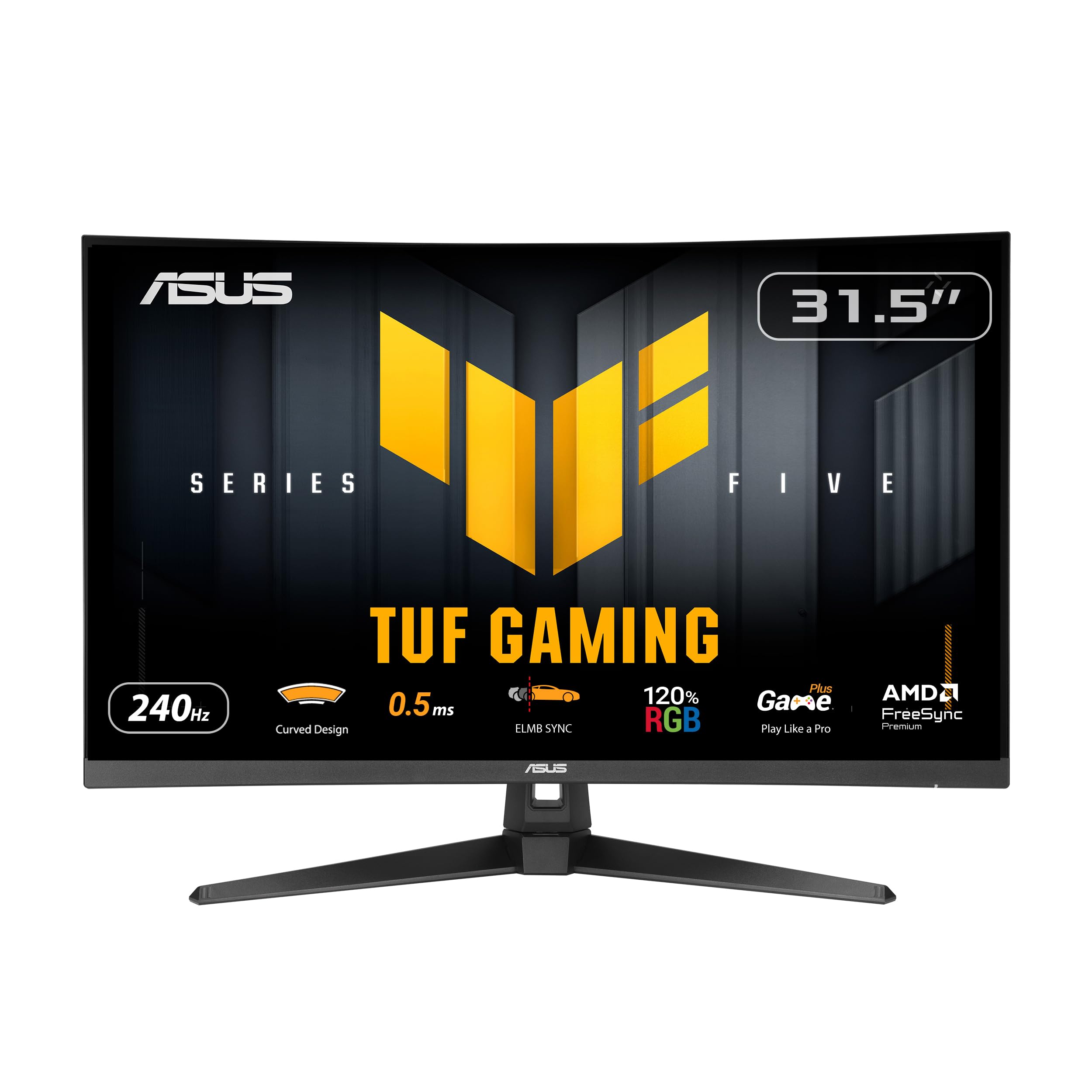
ASUS’s VG32VQM5AZ is built for competitive gamers who prioritize max frame rates above all else. The 1920×1080 Full HD resolution combined with a 240Hz overclock and a 0.5ms GtG response time means motion blur is virtually non-existent. The Extreme Low Motion Blur Sync (ELMB SYNC) technology works with FreeSync Premium to eliminate both ghosting and tearing simultaneously — a rare combination even at higher price points.
The 1500R curve is subtle but effective, keeping the full 31.5-inch screen within your peripheral vision without the distortion that tighter curves can create in desktop productivity. Built-in speakers are included, along with two HDMI ports and a DisplayPort input. The DisplayWidget Center software lets you adjust monitor settings with your mouse instead of navigating the on-screen menu.
At 1080p on a 32-inch screen, the pixel density is lower than QHD or 4K alternatives, so individual pixels are visible at normal sitting distance. This is the trade-off for the 240Hz ceiling — you need a very strong GPU to push 240 frames per second at higher resolutions. For players who compete in Valorant, Apex Legends, or Overwatch and want the smoothest possible experience, this is a specialized tool.
Why it’s great
- 240Hz overclocked refresh rate with 0.5ms response
- ELMB SYNC eliminates ghosting and tearing
- Built-in speakers and DisplayWidget Center software
Good to know
- 1080p resolution shows pixel grain at 32-inch size
- Requires very strong GPU to achieve 240fps
- Not suitable for productivity or content creation
7. LG 32GS60QC-B UltraGear

The LG 32GS60QC-B combines a steep 1000R curved VA panel with QHD resolution (2560×1440) and a 180Hz refresh rate. The 1ms GtG response time keeps motion blur in check, and AMD FreeSync ensures tear-free frame delivery across the full refresh range. The 3000:1 native contrast ratio provides solid black levels for a VA panel, and the HDR10 support enhances bright and dark elements in supported content.
The three-side virtually borderless design minimizes bezel interruption in multi-monitor rigs. Two HDMI ports and a DisplayPort input provide flexible connectivity for PC and console. The 99% sRGB color gamut is accurate enough for gaming but not designed for color-critical editing work. The Dynamic Action Sync reduces input lag, and Black Stabilizer brightens shadows without washing out highlights.
The stand is tilt-only, lacking height and swivel adjustments — you’ll want a VESA mount for proper ergonomics. Some users note ghosting in dark scenes when the response time setting is pushed too high. The power-off button is a multi-function joystick that can be finicky. For the price, the 1000R curve is the main draw — it’s the most aggressive curve in this mid-range tier.
Why it’s great
- 1000R steep curve deepens immersion at QHD
- 180Hz refresh with 1ms GtG response
- Three-side borderless design for multi-monitor
Good to know
- Tilt-only stand needs VESA mount for height adjustment
- Ghosting visible in dark scenes at high response
- Joystick power button is occasionally unresponsive
8. Z-Edge UG32P

The Z-Edge UG32P is a 32-inch 1080p curved monitor that delivers a 240Hz refresh rate and 1ms MPRT response time at a budget-conscious price point. The 1500R curve is gentle enough for productivity work while still providing immersion in games. The 3000:1 contrast ratio from the VA panel gives blacks depth that flat IPS panels in this price range often lack. The three-sided edge-to-edge design works well for dual-monitor setups.
Connectivity includes two HDMI ports and a DisplayPort input, with the DisplayPort supporting the full 240Hz refresh rate. The monitor is lightweight for a 32-inch panel, making it easy to wall mount with the standard 75x75mm VESA pattern. FreeSync support reduces tearing without adding input lag, and the low blue light filter helps during extended sessions.
The stand is tilt-only and plastic-based, so desk stability is adequate but not premium. The VA panel can show some dark-level smearing in high-contrast scenes, though this is typical at this price tier. No built-in speakers means you will need external audio. For gamers who want 240Hz speed on a curved 32-inch screen without paying for QHD or premium features, the Z-Edge hits the core spec.
Why it’s great
- 240Hz refresh rate at a budget-friendly price
- Lightweight design easy for VESA 75x75mm mounting
- Good VA contrast ratio for the price range
Good to know
- Plastic stand is functional but not premium
- VA dark-level smearing in high-contrast scenes
- No built-in speakers—needs external audio
9. Gawfolk 32 Inch Curved Gaming Monitor

The Gawfolk is a 32-inch 1080p curved monitor with a 240Hz refresh rate, a 2ms GtG response time, and an 1800R VA panel. The 1800R curve is the gentlest in this roundup — it straightens the screen just enough to reduce distortion in desktop productivity while still providing a mild wrap effect in games. The 4000:1 contrast ratio is high for its tier, producing deeper blacks than many comparably priced options.
FreeSync technology reduces tearing, and flicker-free and blue light filters support eye comfort during long sessions. Connectivity includes DisplayPort (for the full 240Hz) and HDMI (limited to 120Hz). The tilt adjustment ranges from -5° to 15°, and the VESA 100x100mm mount pattern accommodates most arms and wall plates. The DP cable is included in the box.
The stand is tilt-only and lightweight, so the monitor can wobble if your desk is bumped during intense gameplay. There are no built-in speakers, and the monitor lacks height or swivel adjustments. The 1080p resolution on a 32-inch screen produces visible pixel structure at normal viewing distances — text and fine details look softer than on smaller 1080p displays. For an entry-level price, the Gawfolk provides the core 240Hz feature.
Why it’s great
- 240Hz refresh rate at an entry-level investment
- 4000:1 VA contrast ratio for deep blacks
- Gentle 1800R curve suits mixed productivity and gaming
Good to know
- 1080p resolution shows soft pixels at 32-inch size
- Plastic stand can wobble with desk bumps
- No built-in speakers or height adjustment
FAQ
Is a 240Hz refresh rate overkill for a 32-inch curved monitor?
Should I choose QHD or 4K for a 32-inch curved gaming monitor?
Does the 1800R curve on budget monitors affect gaming immersion compared to 1000R?
Final Thoughts: The Verdict
For most users, the best 32 inch curved gaming monitor winner is the LG 32GX850A-B UltraGear because it combines perfect OLED contrast, a dual-mode system that switches between 4K 165Hz and Full HD 330Hz, and a fully ergonomic stand. If you want the highest QHD refresh rate without going to OLED pricing, grab the KTC H32S25E with its 240Hz 1000R curve. And for budget-conscious competitive players, nothing beats the ASUS TUF VG32VQM5AZ with its 240Hz and 0.5ms response time.