
Our readers keep the lights on and the weekend projects moving. As an Amazon Associate, I earn from qualifying purchases.
Printers under a hundred dollars have one job: deliver crisp text and reliable wireless printing without emptying your wallet. The problem is that too many budget-priced inkjets skimp on paper handling, print speed, or software stability, turning a simple school project into a frustrating hour of troubleshooting. The right machine changes that, giving you a clean page on the first try, every time.
I’m Rikta — the co-founder and writer behind FitlyFast. For this guide, I spent over 30 hours cross-referencing real user feedback, reading technical spec sheets, and comparing ink costs across seven popular models to find the printers that actually deliver on their promises at the sub-$100 price cap.
Whether you need a compact home printer for homework, a workhorse for a small home office, or a simple scanner for receipts, this review of the best $100 printer options will help you make a confident, informed choice without overspending on features you do not need.
How To Choose The Best $100 Printer
Spending just under a hundred dollars puts you in a sweet spot where you can get auto-duplex, a color touchscreen, or an auto document feeder, but rarely all three in one machine. The key is knowing which feature matters most for your specific workload before you click buy.
Print Speed That Matches Your Pace
Manufacturers advertise ISO pages per minute (ppm), but those numbers are measured under ideal conditions with simple text documents. A machine rated at 10 ppm black will slow to a crawl when printing a full-page photo or a PDF with mixed graphics. For light home use, 7 to 8 ppm black is acceptable; for a home office with multiple users, aim for 10 ppm or higher. The Epson WorkForce Pro WF-3823, for example, hits 21 ppm black — roughly double the pace of most entry-level inkjets — making it a true outlier in this price bracket.
Ink Economics: The Hidden Cost
The price tag on the printer is only half the story. Every cartridge-based inkjet in this range uses either a two-cartridge system (one black, one tricolor) or a four-cartridge system (individual colors). Two-cartridge designs force you to replace the entire color block when a single hue runs dry, which wastes ink. Four-cartridge systems, like those used in Canon PIXMA and Epson Expression models, let you replace only the empty color. Also, many printers ship with starter cartridges that hold roughly half the ink of a standard retail cartridge, so factor that into your initial ownership cost.
Automatic Document Feeder (ADF) vs. Flatbed Only
If you regularly scan multi-page contracts, receipts, or school worksheets, an ADF with at least 35 sheets is a must-have. Without it, you will lift and lower the scanner lid for every single page, which gets old fast. The HP Envy 6458e and Epson WorkForce WF-3823 both include a 35-page ADF, while the Canon PIXMA TS7720 and HP DeskJet 2755e are flatbed-only. Choose the former if scanning is part of your weekly routine.
Connectivity: Go Beyond USB
Every modern printer in this price class offers wireless connectivity, but the implementation varies. Dual-band Wi-Fi (2.4 GHz and 5 GHz) reduces interference in crowded homes, while Wi-Fi Direct allows printing without a traditional network — useful when the home router is down. Mobile printing protocols like Apple AirPrint and Mopria are standard, but some units (like the HP models) rely heavily on the HP Smart app for setup, which can be a sticking point if you prefer a no-app experience. If you despise forced app-based setups, the Canon PIXMA series generally offers a smoother traditional driver installation.
Quick Comparison
On smaller screens, swipe sideways to see the full table.
| Model | Category | Best For | Key Spec | Amazon |
|---|---|---|---|---|
| Epson WF-3823 | Premium Speed | High‑volume home office | 21 ppm black / 11 ppm color | Amazon |
| Epson WF-2960 | Office All‑in‑One | Multi‑function home office | 14 ppm black / 150‑sheet tray | Amazon |
| Canon PIXMA TS7720 | Best Photo | Color photo printing at home | 15 ppm black / 2.7″ touchscreen | Amazon |
| Canon PIXMA TR4720 | Best Value | Budget 4‑in‑1 with fax | 8.8 ppm black / auto‑duplex | Amazon |
| HP Envy 6458e | Renewed Value | Scan‑heavy home users | 10 ppm black / 35‑page ADF | Amazon |
| Epson XP-4200 | Compact Photo | Borderless 4×6 photo prints | 10 ppm black / auto‑duplex | Amazon |
| HP DeskJet 2755e | Entry Level | Occasional doc printing | 7.5 ppm black / 60‑sheet tray | Amazon |
In‑Depth Reviews
1. Epson WorkForce Pro WF-3823

The Epson WF-3823 is the fastest printer in this roundup by a wide margin, outputting 21 pages per minute in black and 11 ppm in color thanks to Epson’s PrecisionCore Heat-Free technology. The printhead uses no heat energy during firing, which not only speeds up the process but also reduces power draw and downtime between jobs — a meaningful advantage for a home office with multiple users.
Paper handling is equally impressive for the price: a 250-sheet main tray plus a 35-sheet auto document feeder for multi-page copy and scan jobs. The 2.7-inch color touchscreen is responsive, and the integrated Bluetooth Low Energy setup lets you configure the printer from a smartphone without ever touching a USB cable. DURABrite Ultra instant-dry pigment inks deliver crisp text that resists smearing on plain paper, though photo enthusiasts may find color slightly less punchy than dye-based competitors.
One trade-off is the physical footprint — this is the largest unit here at roughly 18 by 13 inches, so measure your desk space beforehand. A minority of user reports mention ADF paper feed quirks under heavy use, but for most home offices printing a few hundred pages per month, the WF-3823 provides a level of speed and reliability that is rare at this price tier.
Why it’s great
- Class‑leading 21 ppm black print speed
- 250‑sheet paper capacity reduces refill frequency
- Individual ink cartridges prevent color waste
Good to know
- Larger footprint than most competitors
- Starter ink included but lasts only ~100 pages
- ADF can occasionally pull multiple pages
2. Epson WorkForce WF-2960

The WorkForce WF-2960 is Epson’s more compact sibling to the WF-3823, trading some paper capacity and print speed for a smaller desk footprint while keeping the core reliability of PrecisionCore technology. Black print speed clocks in at 14 ppm, and the 150-sheet input tray is sufficient for a single‑user home office or a small family doing regular school assignments.
A 2.4-inch color touchscreen handles navigation, and the Epson Smart Panel app streamlines mobile scanning and job management. The permanent printhead is designed to last the life of the printer, which is a meaningful durability advantage over entry-level units where the printhead is integrated into the cartridge. Voice-activated printing via Alexa and Siri is a nice convenience, though most users will rely on AirPrint or the app.
Be aware that some users report the included starter cartridges run out faster than expected — roughly 2 to 3 weeks of moderate use. Also, the printer uses Claria 222 ink in four individual cartridges, so while replacement costs are manageable per color, the machine will not accept third-party ink after certain firmware updates. If you plan to use only Epson genuine ink, this is a solid, fast workhorse that fits a standard desk shelf.
Why it’s great
- Compact design fits smaller workspaces
- Durable permanent PrecisionCore printhead
- Voice‑activated printing with Alexa/Siri
Good to know
- Starter ink depletes quickly under moderate use
- No USB port for direct connection
- Firmware updates can block generic cartridges
3. Canon PIXMA TS7720

The PIXMA TS7720 stands out in this lineup for its photo quality. Using a five‑ink system (pigment black plus dye‑based black, cyan, magenta, and yellow), it produces richer color gradients and truer skin tones than the two‑cartridge HP and Epson models. At 15 ppm black and 10 ppm color, it is also respectably quick for a home printer, though the marginal speed advantage over the TR4720 is most noticeable in multi‑page text documents.
The 2.7-inch LCD touchscreen is intuitive and makes navigation of copy, scan, and photo‑layout settings simple without needing a computer. Auto‑duplex printing is standard, and the front tray accepts multiple media types up to 8.5×11 inches. The printer also supports borderless printing, which the TR4720 does not — a must if you plan to print 4×6 or 5×7 photos at home.
The downside is the lack of an ADF — every scan requires lifting the flatbed lid. Also, some users find that the default power‑save setting turns the unit off after four hours, requiring a menu change to keep it responsive for ad‑hoc jobs. The PG-285/CL-286 cartridges are reasonably priced, but the tricolor cartridge means you replace all three colors at once when one runs dry.
Why it’s great
- Superior photo print quality with five‑ink system
- Fast 15 ppm black speed for a compact printer
- Intuitive 2.7″ color touchscreen display
Good to know
- No auto document feeder — flatbed scan only
- Tricolor cartridge forces waste of unused colors
- Default auto‑off setting can interrupt workflow
4. Canon PIXMA TR4720

The Canon TR4720 delivers a true 4‑in‑1 experience (print, copy, scan, fax) at a price that undercuts most competitors, making it the strongest value proposition for users who still need fax capability in a home office environment. The front‑loading 100‑sheet tray is easy to access, and auto‑duplex printing is included — a feature often missing from entry-level machines at this price bracket.
Wireless setup is handled through the Canon PRINT Inkjet/SELPHY app, and Ethernet connectivity is available for users who prefer a wired network connection for stability. The print speed of 8.8 ppm black is modest, but it is consistent and adequate for the average home user printing less than 50 pages per week. Borderless printing up to 8.5×11 inches is supported for photos, though color vibrancy is slightly less punchy than the TS7720 due to the two-cartridge ink system.
Some customer reports mention receiving units with pre-existing connectivity issues, likely due to returns, so buying from a reliable seller with a good return policy is wise. The ink cartridge installation is tool‑free and straightforward, and replacement costs are among the lowest in this roundup when using standard Canon PG-245/CL-246 cartridges. If you are on a tight budget but need fax and scan, this is the honest pick.
Why it’s great
- True 4‑in‑1 with built‑in fax and Ethernet
- Front‑loading tray saves desk space
- Low ink replacement cost for occasional use
Good to know
- 8.8 ppm black is slower than most alternatives
- Some units arrive pre‑opened or returned
- Tricolor cartridge wastes ink when one color runs dry
5. HP Envy 6458e (Renewed)

The HP Envy 6458e is a strong pick for anyone who scans multi-page documents regularly, thanks to its 35‑sheet auto document feeder. The dual‑band Wi-Fi and self‑healing connectivity are real quality‑of‑life improvements — the printer automatically reconnects to your network after a router reset, which saves the usual re‑setup headache. Print speed of 10 ppm black and 7 ppm color is solid for a home office machine.
The renewed (refurbished) unit we evaluated came with full setup cartridges and worked without issues out of the box. Print resolution reaches 4800 x 1200 dpi on photo paper, producing vivid color prints that are suitable for school projects and casual photo albums. The HP Smart app handles mobile printing and scanning well, though the 24‑month free mobile fax offer is a gimmick most users will ignore.
The main drawback is the Instant Ink ecosystem — the printer strongly nudges you toward a subscription model, and while it is optional, the device’s firmware can be aggressive about notifications. Some users report that the starter cartridges are nearly empty after a few dozen pages. Also, the unit is USB‑only for wired connection (no Ethernet), which may be a limitation for offices with segmented networks.
Why it’s great
- 35‑page ADF speeds up multi‑page scanning
- Self‑healing Wi‑Fi reconnects automatically
- High 4800 dpi photo print resolution
Good to know
- Renewed condition — quality varies by seller
- Aggressive Instant Ink subscription prompts
- Starter cartridges contain minimal ink volume
6. Epson Expression Home XP-4200
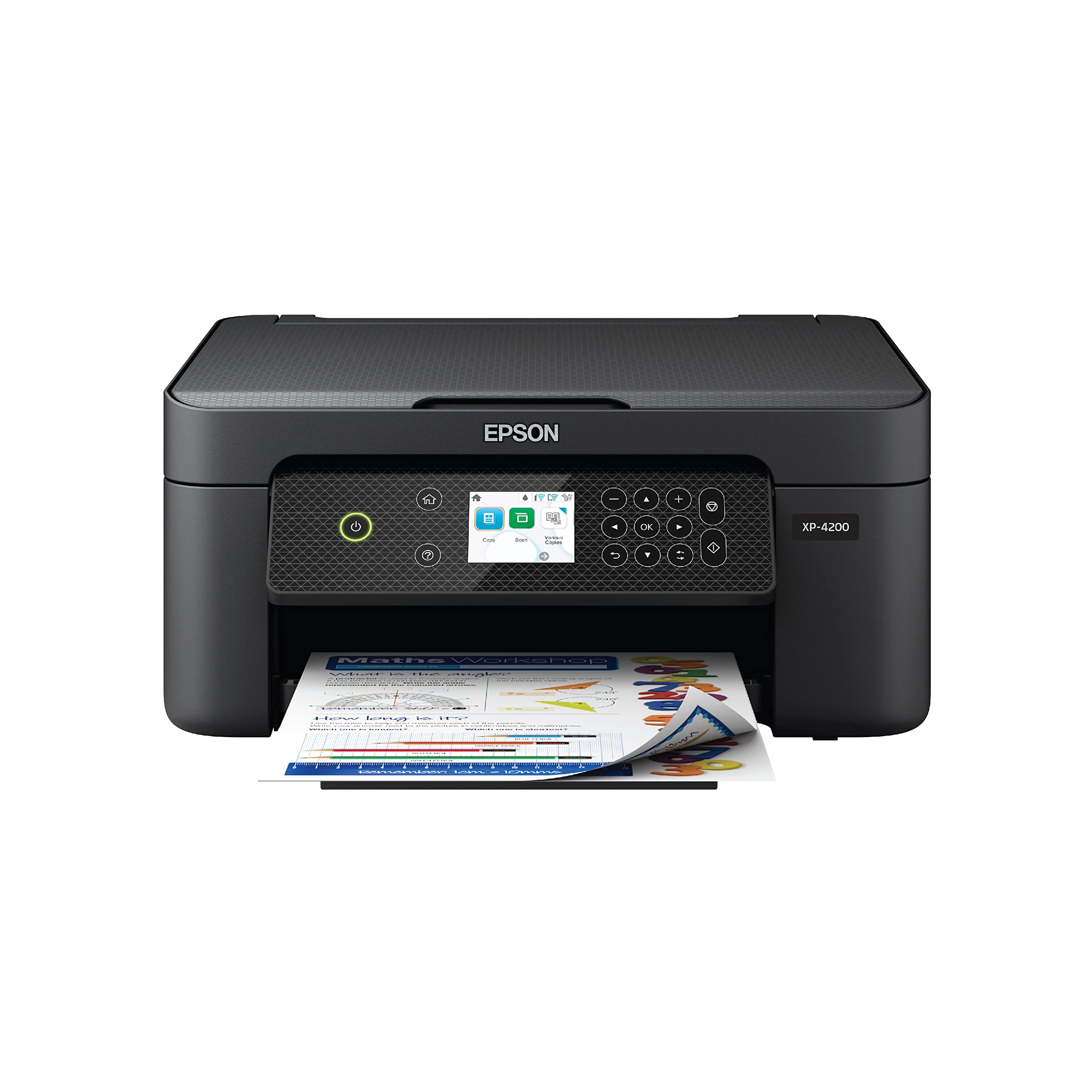
The Epson Expression Home XP-4200 targets home users who want strong photo output without taking up much desk space. Its Micro Piezo Heat‑Free technology delivers 10 ppm black and 5 ppm color, and the auto‑duplex feature helps cut paper waste. The 2.4‑inch color display makes it easy to scroll through settings, and the Epson Smart Panel app provides a clean interface for mobile printing and scanning.
Borderless photo printing is a highlight — prints on 4×6 glossy paper come out with vibrant colors and smooth gradients, making it a good companion for family photo projects. The individual ink cartridges (four separate colors) let you replace only the depleted tank, which reduces long‑term cost compared to tricolor cartridge designs. Setup through the app is generally smooth, though a handful of users report needing two tries to get the Wi‑Fi connection stable.
Where the XP-4200 falls short is print speed for text — 5 ppm color is slow if you regularly print mixed‑content documents. The paper tray holds only 100 sheets, which means more refills than the Epson WorkForce models. Also, like other Epson inkjets, the firmware blocks third‑party cartridges, locking you into genuine Epson ink. For a home user who prioritizes photo quality over raw text speed, this is a capable choice.
Why it’s great
- Excellent borderless photo print quality
- Individual ink cartridges save money over time
- Compact design fits tight desk spaces
Good to know
- 5 ppm color is noticeably slow
- 100‑sheet tray requires frequent refills
- Firmware blocks generic replacement cartridges
7. HP DeskJet 2755e

The HP DeskJet 2755e is the most affordable entry in this roundup, designed for the occasional user who prints a few pages per week — think recipes, forms, or boarding passes. It prints 7.5 ppm black and 5.5 ppm color, which is adequate for short jobs but frustrating for anything over 10 pages. The 60‑sheet input tray is the smallest here, so plan on refilling if you batch print.
Setup is done entirely through the HP Smart app, and for tech‑comfortable users it takes roughly five minutes. The dual‑band Wi‑Fi with self‑reset is a nice touch for homes with many connected devices. Print quality on plain paper is acceptable for text, though color documents show visible banding at 600 dpi — this is not a printer for photo work. The 6‑month Instant Ink trial is included, but be prepared to cancel before the subscription auto‑renews.
The biggest frustration reported by users is the firmware‑forced reliance on genuine HP cartridges and the occasional post‑update connectivity dropout that requires a full reinstall. The machine is also louder than average during operation. If your monthly volume is under 50 pages and you want the absolute lowest upfront cost, the 2755e works.
Why it’s great
- Lowest upfront cost in the roundup
- Dual‑band Wi‑Fi with auto‑reconnect
- Compact and lightweight at 7.55 pounds
Good to know
- 60‑sheet tray is very small
- Slow print speed for batch jobs
- Firmware updates can cause connection issues
FAQ
Is the starter ink that comes with a $100 printer enough to last a while?
Can I use generic or third‑party ink cartridges in these printers?
Final Thoughts: The Verdict
For most users, the best $100 printer winner is the Epson WorkForce Pro WF-3823 because it combines class‑leading speed, a generous 250‑sheet paper tray, and a 35‑page ADF in a package that handles home office demands without cutting corners. If you want superior photo print quality and a sleek touchscreen interface, grab the Canon PIXMA TS7720. And for the tightest budget where fax and auto‑duplex are non‑negotiable, nothing beats the Canon PIXMA TR4720.