
Our readers keep the lights on and the weekend projects moving. As an Amazon Associate, I earn from qualifying purchases.
Most laptop cameras still deliver grainy, washed-out video that makes you look like you’re calling from a basement. A dedicated 1080p webcam fixes that instantly — sharp skin texture, accurate colors, and smooth motion whether you’re in a home office, a dim studio, or a bright conference room.
I’m Rikta — the co-founder and writer behind FitlyFast. I’ve spent countless hours analyzing sensor specs, autofocus systems, microphone arrays, and low-light correction algorithms to separate the true HD performers from the upscaled fakes.
This guide cuts through specs and marketing claims to deliver the definitive list of the best 1080p webcam options for real-world video calls, streaming, and recording.
How To Choose The Best 1080p Webcam
A 1080p webcam is only as good as its sensor, lens, and microphone system. Many budget cameras advertise “1080p” but use tiny 2MP sensors that deliver soft, noisy footage. Knowing what to check before you buy will save you from a blurry call.
Sensor and True Resolution vs. Interpolated Specs
True 1080p requires a native 2MP sensor. Some webcams claim higher resolutions through software interpolation, which adds pixels but not detail. Look for the physical sensor size (1/2.7” or larger) and check that the 1080p output is native, not upscaled from 720p.
Autofocus or Fixed Focus?
Autofocus keeps you sharp as you lean in or move back, but some fixed-focus models offer a deep depth of field that stays clear across a wider range. For presenters who gesture and shift position, PDAF (phase-detection autofocus) is ideal. For static desk workers, a well-tuned fixed focus at 12-20 inches works fine and avoids hunting.
Low-Light Performance and Backlight Correction
Most home offices have mixed lighting — a sunny window on one side and a lamp on the other. A webcam with automatic low-light correction (sometimes called WDR or HDR) balances shadows and highlights to avoid blown-out windows or a dark face. Check if the webcam uses a physical IR filter or relies purely on software gain, which introduces noise.
Microphone Quality and Noise Cancellation
Dual omnidirectional microphones with active noise cancellation can filter out keyboard clicks and air conditioning hum. Single-mic webcams often pick up too much room echo. For professional calls, look for stereo mics or at least two noise-reducing capsules.
Field of View and Privacy Cover
A 70-90° field of view is standard for single-person calls. Wider angles (95°+) can show more of the room but may distort edges. A physical sliding privacy cover is non-negotiable for security — it blocks the lens physically rather than relying on software disables.
Quick Comparison
On smaller screens, swipe sideways to see the full table.
| Model | Category | Best For | Key Spec | Amazon |
|---|---|---|---|---|
| Anker PowerConf C200 | Mid-Range | Professional calls & low-light rooms | 2K sensor with AI noise cancellation | Amazon |
| Logitech HD Pro C920 | Mid-Range | Reliable all-day 1080p recording | 3x digital zoom, 78° FOV | Amazon |
| NexiGo N930AF | Mid-Range | Autofocus with software customization | Autofocus from 7cm, dual noise-canceling mic | Amazon |
| EMEET C960 | Mid-Range | Budget-friendly with dual mics | 90° FOV, auto low-light correction | Amazon |
| Galyimage 4K Webcam | Premium | Built-in ring light & TOF autofocus | TOF autofocus, 3-color dimmable ring light | Amazon |
| N newline 4K Webcam | Premium | Fast PDAF autofocus for movement | PDAF 1s focus, 79° FOV, dual noise-canceling mics | Amazon |
| SVPRO 1080P Telephoto | Premium | Manual focus telephoto for close-ups | 5-50mm varifocal CS-mount lens | Amazon |
In‑Depth Reviews
1. Anker PowerConf C200

The Anker PowerConf C200 uses a native 2K sensor — not interpolated — which delivers noticeably sharper facial detail and text clarity compared to standard 1080p webcams. The AI noise cancellation separates vocal frequencies from keyboard clicks and ambient hum, making it one of the best for open-plan offices.
Low-light performance is handled by automatic correction that adjusts gain without washing out skin tones. The adjustable field of view (65°, 78°, or 95°) lets you frame your shot through software, while the physical privacy cover slides over the lens when not in use.
Setup is true plug-and-play across Windows and macOS. The dual microphones pick up clear audio within a 360° radius, though the sound stage is slightly compressed compared to a dedicated desktop mic. The USB-A cable is permanently attached, which limits cable management.
Why it’s great
- 2K sensor provides visibly sharper video than 1080p competitors
- AI noise cancellation removes background chatter effectively
- Three software-selectable FOV options for flexible framing
Good to know
- No USB-C option — fixed USB-A cable
- Autofocus can hunt slightly in very dim conditions below 50 lux
2. Logitech HD Pro Webcam C920

The Logitech C920 is the benchmark that every other 1080p webcam is compared against. Its native 1080p sensor with H.264 encoding delivers smooth 30fps video without taxing your CPU, and the Carl Zeiss-certified optics produce accurate color reproduction across most lighting conditions.
The autofocus locks on reliably between 10 cm and infinity, which means crisp close-ups of documents and clear full-body shots. RightLight 2 technology automatically adjusts exposure to compensate for backlit windows or dim corners — a feature that remains competitive even years after release.
The built-in stereo microphones pick up sound with decent clarity, though they capture room echo in untreated spaces. The 3x digital zoom is useful for framing but reduces resolution when zoomed in. The mount clips securely onto any monitor thickness and folds flat for travel.
Why it’s great
- Proven image quality with Carl Zeiss-certified optics
- RightLight 2 handles backlight exposure admirably
- Sturdy, universal monitor mount with foldable design
Good to know
- Maxes out at 30fps at 1080p — no 60fps option
- Stereo mics can introduce reverb in hard-walled rooms
3. NexiGo N930AF

The NexiGo N930AF brings true autofocus to the budget-friendly tier, with a starting focus distance of just 7 cm for close-up detail. The 2MP CMOS sensor delivers 1080p at 30fps with automatic exposure that handles mixed lighting reasonably well for the price point.
Its noise-canceling microphone does a respectable job filtering out low-frequency hum, though it compresses higher frequencies compared to dual-mic setups. The physical privacy cover is built into the lens housing and slides smoothly without catching.
The included webcam software allows manual adjustments to brightness, contrast, and saturation — a rarity at this tier. The 6.5-foot USB cable provides ample reach for desk setups, and the foldable design fits easily into a laptop bag. The clip holds firmly on monitors up to 1.5 inches thick.
Why it’s great
- True autofocus with 7 cm minimum distance for sharp close-ups
- Dedicated software for manual image tuning
- Generous cable length and secure monitor clip
Good to know
- Microphone audio quality is serviceable but not studio-grade
- Autofocus may hunt briefly when moving in and out of frame
4. EMEET C960

The EMEET C960 delivers 1080p video with automatic low-light correction that adjusts gain in real time. The 5-layer anti-glare lens minimizes lens flare from overhead lights, and the fixed-focus design keeps everything between 11.8 and 118.1 inches acceptably sharp without the hunting behavior of cheap autofocus.
The standout feature here is the dual omnidirectional noise-reduction microphones, which outperform single-mic budget webcams by a significant margin. Background keyboard sounds and air conditioning are suppressed while vocal clarity remains intact, making it a solid choice for conference calls.
The 90-degree wide-angle lens accommodates two to three people in frame without barrel distortion. The privacy cover is removable rather than sliding, which some users find less convenient. Setup is driverless on Windows, macOS, and Linux, and it works with Zoom, Teams, Google Meet, and FaceTime out of the box.
Why it’s great
- Dual microphones with effective background noise suppression
- 90° FOV fits small groups without fish-eye distortion
- Works across Windows, macOS, Linux, and Android TV
Good to know
- Fixed focus requires you to stay within 11.8–118.1 inches
- Low-light performance drops noticeably below 100 lux
5. Galyimage 4K Webcam with Ring Light
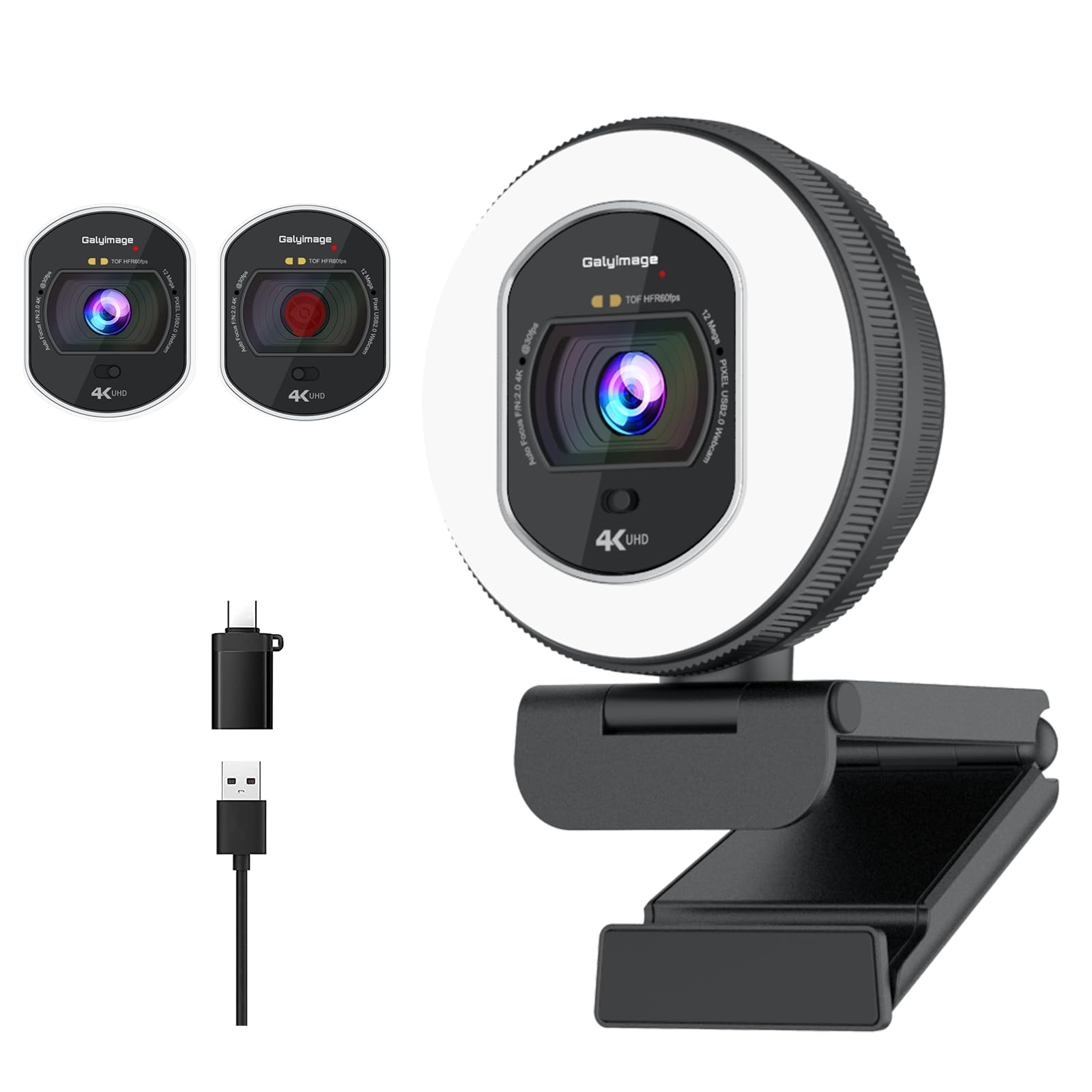
The Galyimage webcam combines a 4K-capable sensor with a built-in ring light that offers three color temperatures (white, natural, warm) and stepless dimming via a rotary dial on the side. This eliminates the need for separate desk lighting, especially useful for streamers and late-night workers who want consistent face illumination.
The TOF (Time of Flight) autofocus locks onto faces faster than contrast-based systems, maintaining focus even when the subject moves quickly. At 1080p it runs at 60fps for smooth motion, while 4K maxes out at 30fps — the flexibility lets you choose between sharp detail and fluid movement.
Dual noise-canceling microphones reduce ambient hiss and low-frequency rumble. The sliding privacy cover is built into the chassis and operates with a thumb push. The white finish is cosmetic but prone to showing smudges. Plug-and-play works on Windows, macOS, and Linux without additional drivers.
Why it’s great
- Built-in ring light with adjustable color temperature and brightness
- TOF autofocus tracks moving subjects with minimal latency
- 1080p at 60fps for smooth video, plus 4K option
Good to know
- White casing shows fingerprints and smudges easily
- Ring light brightness may not be sufficient for very large rooms
6. N newline 4K Webcam

The N newline webcam uses a Sony 1/2.5” sensor with PDAF (Phase Detection Autofocus) that achieves focus lock within approximately one second — faster than most contrast-based systems in this tier. At 1080p it supports 60fps with MJPEG compression, which keeps motion smooth for head-tracking in sim racing or fast-paced presentations.
Automatic light correction balances highlights and shadows in mixed lighting, which is why it works well for creators who move between bright windows and dim corners. The 79° field of view is slightly narrower than average, which helps reduce background clutter without distorting facial proportions.
Dual noise-canceling microphones capture clear voice within a 9.8-foot radius, filtering out ambient office noise. The built-in privacy cover slides closed physically. Setup is driverless on Windows and macOS. A minor gripe: the included USB-A cable is short at about 5 feet, which may require an extension for some setups.
Why it’s great
- PDAF autofocus locks focus in roughly one second
- Sony sensor delivers accurate color and good dynamic range
- 1080p at 60fps with MJPEG for smooth motion tracking
Good to know
- USB cable length is shorter than most competitors
- 79° FOV may feel tight for showing desks or demos
7. SVPRO 1080P Telephoto Webcam

This is not a general-purpose webcam. The SVPRO 1080P features a CS-mount 5-50mm varifocal lens that you manually adjust for aperture and focal distance, giving you control over depth of field typically reserved for DSLR cameras. The 1/2.7” CMOS 2710 sensor delivers 1080p at 30fps with MJPEG or YUY2 output.
Because autofocus and auto-exposure are absent, this webcam excels in fixed-position applications where you set focus once and leave it — such as document scanning, macro product shots, Raspberry Pi machine vision, or multi-camera video setups. The manual aperture ring lets you control background blur for a cinematic look.
The all-aluminum housing feels robust, with a 1/4-inch tripod screw mount at the base and an included metal stand. It supports Windows, macOS, Linux, and Android via USB 2.0 UVC (driverless). The 3-meter USB cable offers excellent reach for wall-mounted or ceiling-mounted installations.
Why it’s great
- 5-50mm telephoto lens provides optical zoom and depth-of-field control
- All-aluminum body with dual mounting options (tripod and wall plate)
- UVC-compliant driverless operation on multiple operating systems
Good to know
- No autofocus or auto-exposure — requires manual adjustment
- Packaging feedback suggests fragility; handle outer box with care
FAQ
Is 1080p resolution enough for professional video calls?
Why does my new 1080p webcam look grainy indoors?
Should I get a webcam with a built-in ring light?
Does a 4K webcam give better 1080p video than a native 1080p webcam?
Can I use a 1080p webcam with gaming streaming software like OBS?
Final Thoughts: The Verdict
For most users, the best 1080p webcam winner is the Anker PowerConf C200 because it combines a sharp 2K sensor with AI-powered audio and adjustable FOV at a competitive price. If you want a proven workhorse with rock-solid 1080p reliability, grab the Logitech HD Pro C920. And for creators needing built-in lighting and smooth 60fps, the Galyimage 4K Webcam offers exceptional value with its integrated ring light and TOF autofocus.