
Our readers keep the lights on and the weekend projects moving. As an Amazon Associate, I earn from qualifying purchases.
An Android keyboard is either your most-used tool or a frustrating bottleneck. A cheap membrane slab with mushy, unresponsive keys can turn a simple email into a workout, while the wrong layout leaves you hunting for the backslash key. The real challenge isn’t finding a keyboard that works — it’s finding one with the right switch type, connectivity, and form factor for how you actually use your tablet, phone, or TV box.
I’m Rikta — the co-founder and writer behind FitlyFast. I’ve spent dozens of hours cross-referencing switch types, Bluetooth versions, battery specs, and real user feedback from verified buyers to separate the fast typers from the disappointing alternatives in this category.
Whether you need a portable folding companion for travel, a mechanical workhorse for your desk, or a wireless solution for your living room setup, the right android keyboard comes down to matching key feel, connectivity options, and build quality to your daily routine.
How To Choose The Best Android Keyboard
Picking an Android keyboard goes beyond matching colors. The three factors that matter most are switch type for feel, connectivity for reliability, and layout for ergonomics. A poor choice in any of these areas tanks the typing experience.
Switch Type: Membrane vs. Scissor vs. Mechanical
Membrane keyboards are quiet and cheap but lack tactile feedback — keys feel mushy and require bottoming out. Scissor-switch designs (common in folding keyboards) offer a snappier bounce and shorter travel, making them ideal for portable use. Mechanical switches, particularly linear (red) or tactile (brown), provide the most consistent actuation and are preferred for heavy daily typing. If you type more than a few paragraphs a day, mechanical or quality scissor switches justify the higher cost.
Connectivity and Multi-Device Pairing
Bluetooth 5.0 or higher ensures stable connections up to 30+ feet. Keyboards with memory for 2-3 paired devices allow instant switching between an Android tablet, phone, and laptop without re-pairing. Some models also include a USB dongle for environments where Bluetooth is unreliable or when connecting to a PC or TV box. Check that the OS version of your devices is supported — older Android tablets may need a keyboard with broader backward compatibility.
Layout and Portability
Full-size keyboards (including a numeric keypad) provide the most comfortable typing for desk use but sacrifice portability. Tenkeyless (TKL) designs save desk space while keeping arrow keys and the function row. Foldable keyboards collapse to a palm-sized package, ideal for travel, but may feature split spacebars or smaller-than-standard keys. Consider your primary use case: stationary desk work demands a full-size or TKL, while mobile users benefit from a foldable or compact wireless model.
Quick Comparison
On smaller screens, swipe sideways to see the full table.
| Model | Category | Best For | Key Spec | Amazon |
|---|---|---|---|---|
| Keychron C1 | Mechanical TKL | Desktop productivity & gaming | Gateron G Pro Red switches (linear) | Amazon |
| Satechi SM3 | Mechanical Full-Size | Office & multi-device work | Low-profile brown tactile switches | Amazon |
| TECKNET Foldable | Foldable Wireless | Travel & on-the-go typing | 99-key with numeric keypad | Amazon |
| Logitech K400 Plus | Touchpad Combo | TV & media center control | Built-in touchpad + 33 ft range | Amazon |
| Samsers KF08S | Foldable Bluetooth | Ultra-portable travel typing | Full-size foldable 6-row keys | Amazon |
| MoKo Universal Case | Tablet Case Combo | Tablet protection & typing | Removable Bluetooth keyboard | Amazon |
| Jeazans Android 16 | Tablet Bundle | Budget all-in-one setup | 10.1″ tablet + Bluetooth keyboard | Amazon |
In‑Depth Reviews
1. Keychron C1 Wired Mechanical Keyboard
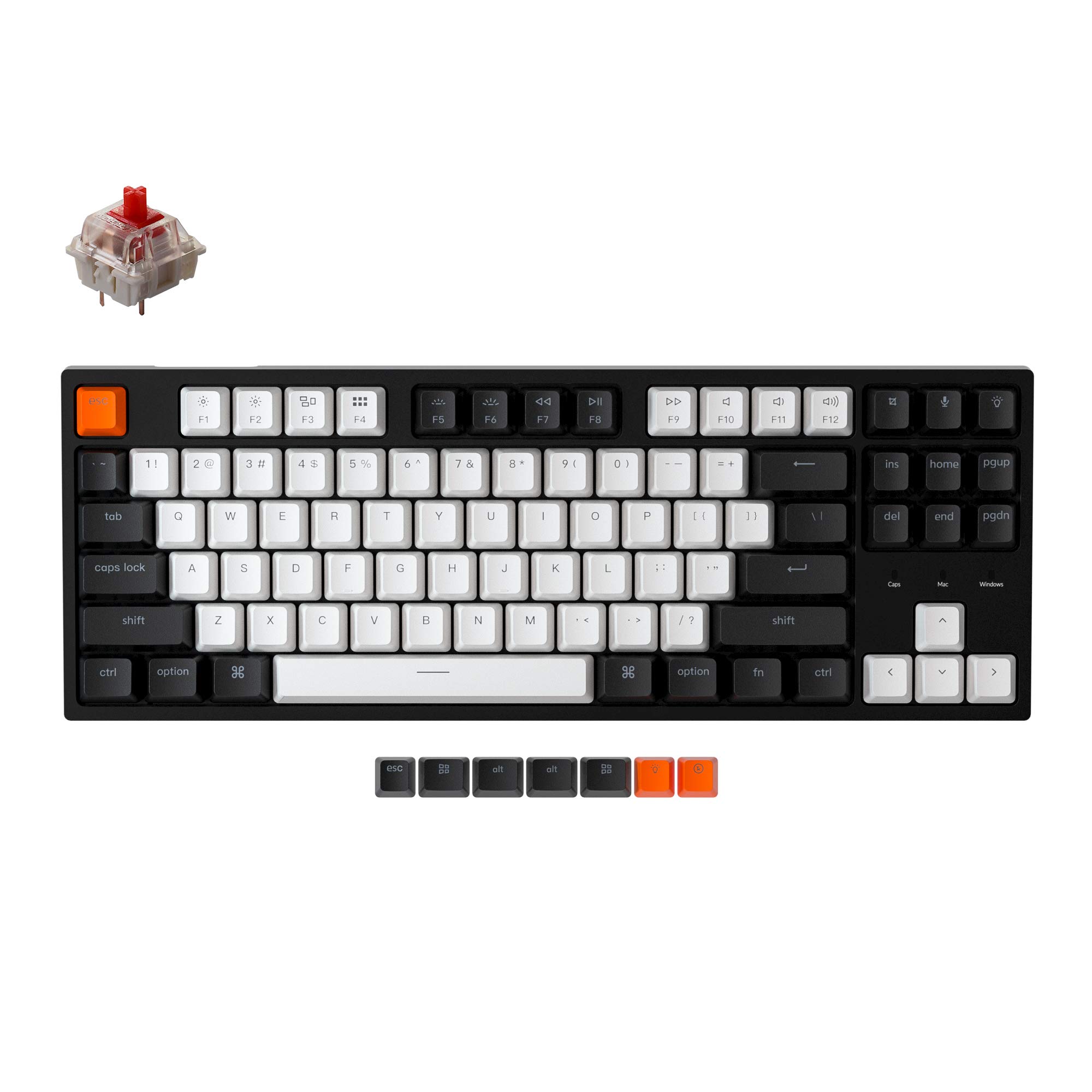
The Keychron C1 delivers a true mechanical typing experience at a price that undercuts most gaming-brand offerings. Its Gateron G Pro Red linear switches provide a smooth, consistent keystroke with a satisfying bottom-out that feels far superior to membrane boards. The tenkeyless (TKL) layout saves desk space while retaining the arrow keys and function row — a smart compromise for both coders and gamers who don’t need a numpad.
Hot-swappable switch sockets let you experiment with different 3-pin or 5-pin MX-style switches without soldering, extending the keyboard’s lifespan. The white backlighting is bright enough for dim environments, and the double-shot ABS keycaps resist shine better than printed alternatives. Build quality is solid for the weight class — no creaking or flex during aggressive typing.
The wired USB-C connection ensures zero latency, making it equally suitable for gaming and office work. The included Type-C cable comes with a Type-A adapter, and the package even includes keycap and switch pullers. For anyone seeking a reliable desktop Android keyboard with genuine mechanical feel, the C1 is hard to beat.
Why it’s great
- True mechanical feel with linear Gateron switches
- Hot-swappable — customize switches without soldering
- Sturdy build and bright white backlighting
Good to know
- White backlight only — no RGB color options
- ABS keycaps may develop shine over extended use
2. Satechi SM3 Mechanical Keyboard

The Satechi SM3 is a full-size mechanical keyboard that feels built for a decade of daily use. Its low-profile brown switches deliver a tactile bump with quieter operation than traditional clicky switches, making it office-friendly without sacrificing feedback. The aluminum chassis adds heft without being overly heavy, giving it a premium desk presence.
Triple connectivity — dual Bluetooth 5.0 channels, a 2.4 GHz USB receiver, and wired USB-C — means it can handle any Android device, tablet, PC, or TV box. Switching between devices is instant, and the 2,500 mAh battery keeps the backlit white LEDs running for weeks on a single charge. The 14 backlight patterns and three brightness levels offer plenty of visual customization.
Reviewers consistently praise the quiet yet satisfying “thock” sound and the accurate, fast typing feel. The included Windows keycaps and a lengthy USB-C cable add versatility. For professionals who need a full-size numpad and multi-device flexibility, the SM3 justifies its premium price with real build quality and typing comfort.
Why it’s great
- Tactile low-profile brown switches with quiet operation
- Triple connectivity (Bluetooth, 2.4G, wired)
- Aluminum build with excellent battery life
Good to know
- Bluetooth input lag may occur on some PCs (use dongle or wire)
- Keycaps can feel slightly chalky to some users
3. TECKNET Wireless Foldable Bluetooth Keyboard
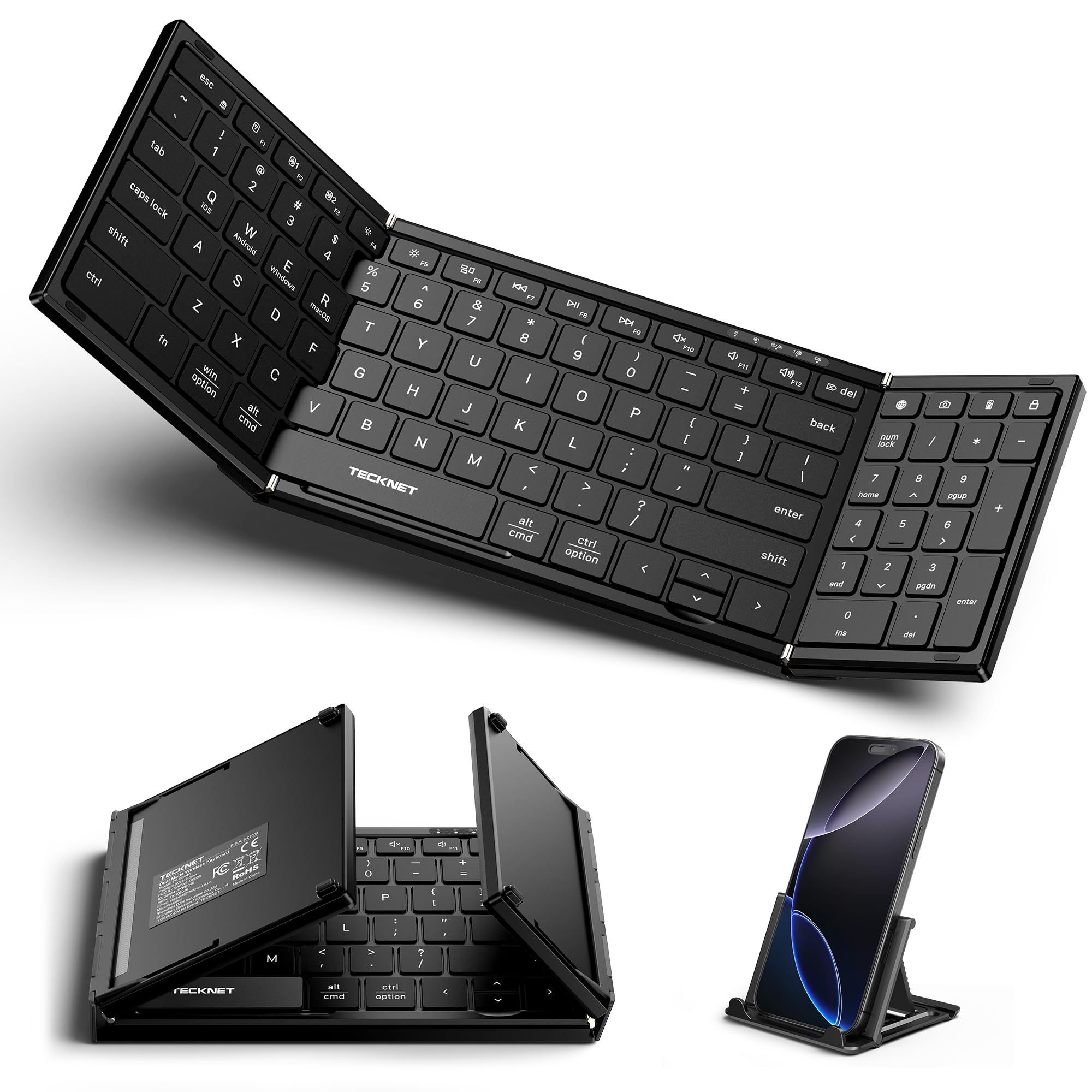
The TECKNET foldable keyboard manages a rare trick: fitting a full 99-key layout with a numeric keypad into a tri-fold chassis that stows away in a jacket pocket. The scissor-switch keys are quiet enough for a library, and the aluminum hinge is rated for over 100,000 folds. Dual Bluetooth 6.0 chips plus a 2.4 GHz USB receiver let you connect to three devices simultaneously and switch with a single key press.
Battery life is a standout — the auto-sleep function pushes standby to 275 days, and the USB-C charging is quick. The included device stand makes it a turnkey mobile office. Reviewers note the Bluetooth memory holds channels reliably, and the tri-fold design feels flat and solid when open, unlike some budget folding boards that rock or flex.
The main compromise is ergonomics: the keyboard sits completely flat with no tilt feet, which can strain wrists during long typing sessions. The up/down arrow keys are also quite small. For travel and short bursts of typing, however, this is one of the most complete foldable options available for Android users.
Why it’s great
- Full 99-key layout including number pad in a foldable body
- Triple device connectivity with reliable Bluetooth memory
- Excellent battery life and compact travel form
Good to know
- No tilt feet — completely flat typing angle
- Arrow keys are tiny; not ideal for spreadsheet work
4. Logitech K400 Plus Wireless Touch TV Keyboard

The Logitech K400 Plus solves a specific problem: navigating a smart TV or Android TV box from the couch without juggling a separate mouse and keyboard. The integrated touchpad is large enough for smooth cursor control on a 50-inch screen, and the 33-foot wireless range means it works from across the room. The unifying USB receiver provides plug-and-play simplicity on any device with a USB port.
The membrane keys are quiet and comfortable for occasional typing — searching YouTube, entering passwords, composing quick emails. Battery life is rated at up to 18 months on two AA batteries, and the spill-resistant design offers peace of mind for living room use. It also works with Android tablets via a USB-A to USB-C adapter, though it lacks native Bluetooth.
Reviewers praise its reliability and ease of setup, but note that the touchpad is not precise enough for heavy use and there are no caps lock or num lock indicators. The K400 Plus is a purpose-built media companion rather than a productivity keyboard. If your primary need is controlling a big screen from the sofa, this is the most practical option available.
Why it’s great
- Integrated touchpad eliminates need for separate mouse
- Excellent wireless range and long battery life
- Spill-resistant and durable for living room use
Good to know
- No native Bluetooth — requires USB dongle
- Touchpad is imprecise for extended use
5. Samsers Full-Size Foldable Bluetooth Keyboard (KF08S)
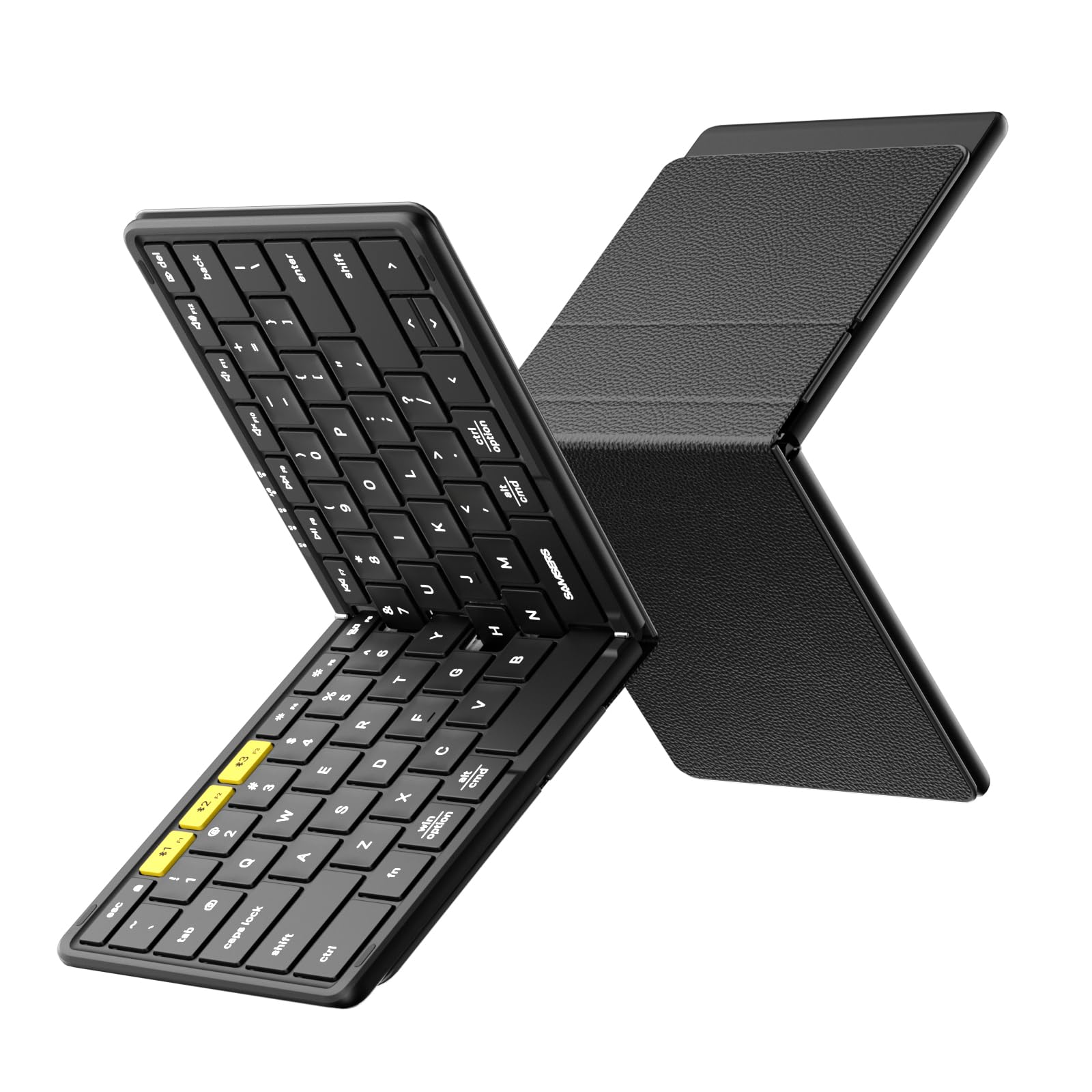
The Samsers KF08S folds into a palm-sized package when closed, yet unfolds to a full-size keyboard with standard 0.65-inch laptop-like keys. The six-row layout includes a separate Escape key and Fn lock, avoiding the annoying key combos many folding boards force. The scissor-switch mechanism provides a snappy bounce that supports touch typing surprisingly well for a portable device.
Bluetooth pairing is instant, and it can store connections for up to three devices — switch between your tablet, phone, and laptop with a single button. The PU leather back cover protects the keys and doubles as a stand, and the included velvet pouch and phone holder add genuine value. Battery life is impressive: two hours of charging yields up to 120 days of standby.
The split spacebar is a design choice that some reviewers found awkward at first but said becomes unnoticeable after a few hours of typing. The build feels solid, with metal hinges that keep all keys the same size. For travelers who need a full typing experience without the bulk, the KF08S is a capable and well-accessorized option.
Why it’s great
- Full-size key spacing in a foldable, portable form
- Separate Esc key and Fn lock for faster operation
- Excellent battery standby with included accessories
Good to know
- Split space bar may feel unusual initially
- Keys feel slightly flimsy compared to non-folding alternatives
6. MoKo Universal Tablet Case with QWERTY Keyboard
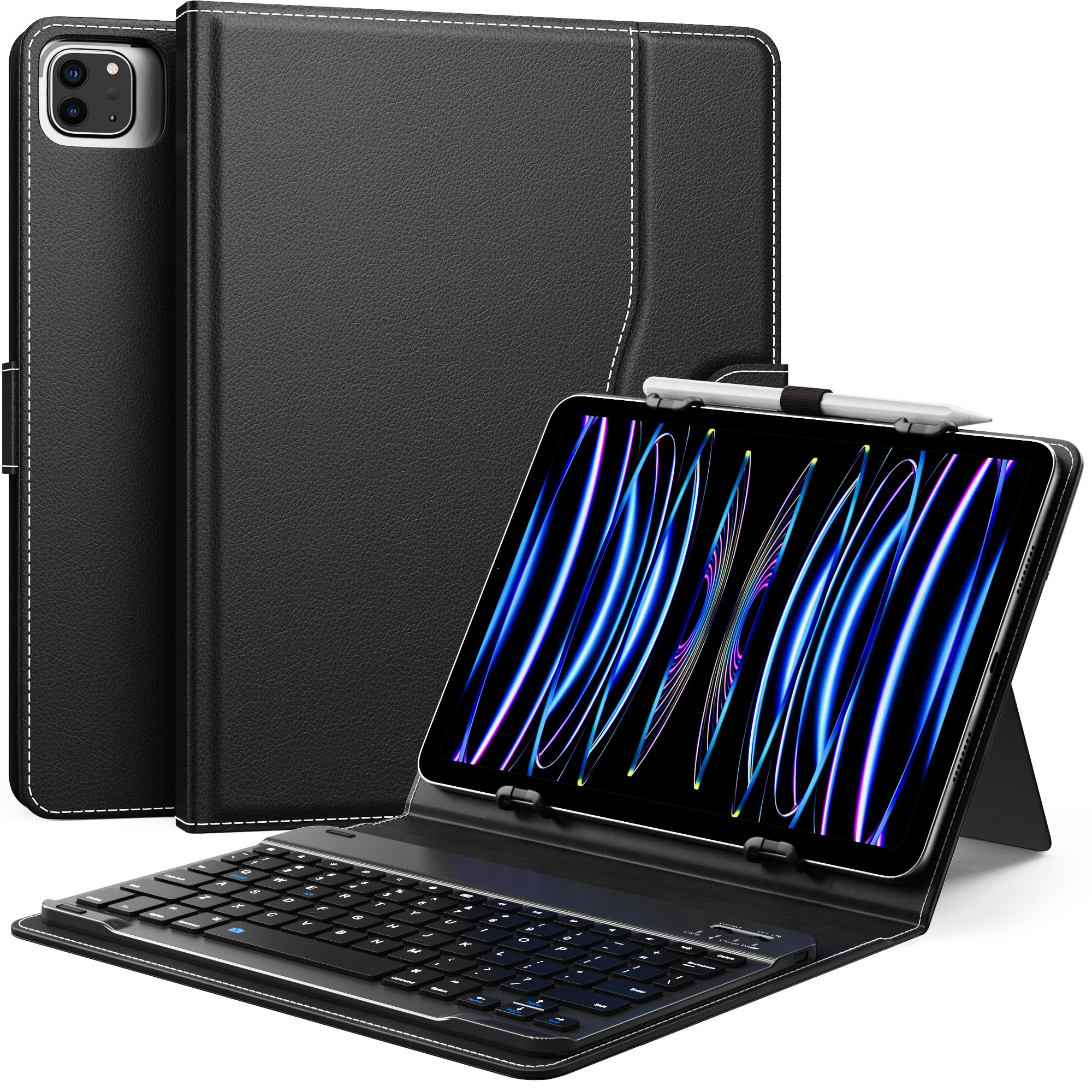
The MoKo case-keyboard combo turns any compatible 9-11 inch Android tablet into a laptop-like workstation. The Bluetooth keyboard is removable, so you can leave the protective case on your tablet and only attach the keyboard when needed. The built-in kickstand and pen loop add practical touches for note-taking and media viewing. Connection is seamless — reviewers report instant pairing with Android tablets, including Amazon Fire models.
The magnetic attachment keeps the keyboard secure during transport, and the faux leather cover provides decent drop protection. The 78-key keyboard is compact but includes all essential keys, and the rechargeable battery supports extended wireless use. The side pocket can hold a charging cable or stylus, reducing desk clutter.
The kickstand feels somewhat flimsy and can tip if the tablet is heavy. The camera cutout may not align with every device, so measure your tablet’s dimensions and camera position before ordering. This is a practical solution for users who want an all-in-one protective case with typing capability, rather than a separate keyboard they have to carry.
Why it’s great
- Combines tablet protection with a detachable keyboard
- Simple Bluetooth pairing and magnetic attachment
- Includes kickstand, pen loop, and side pocket
Good to know
- Kickstand can be unstable with heavier tablets
- Camera cutout may not align with all tablet models
7. Jeazans Android 16 Tablet Bundle
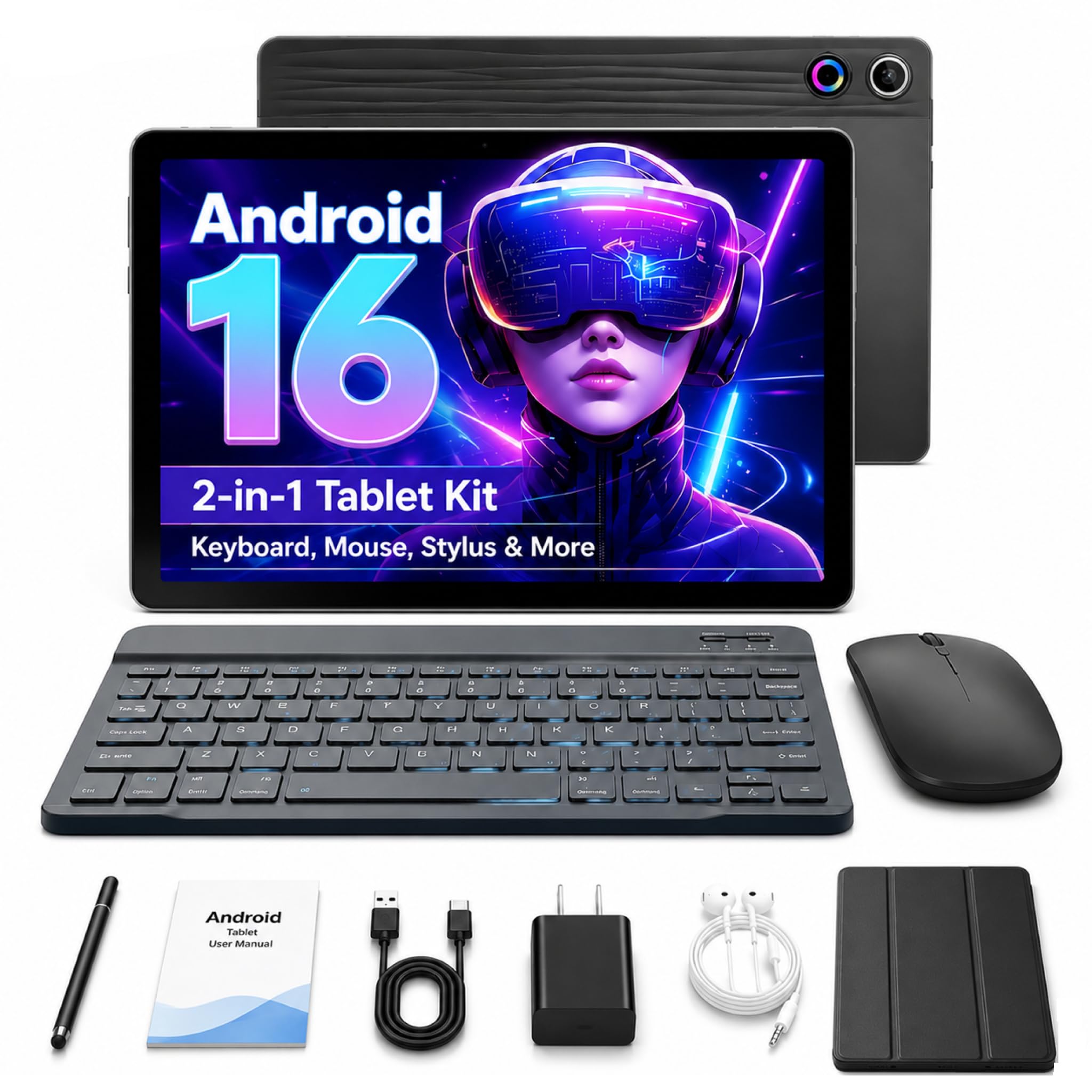
The Jeazans bundle is a budget-friendly entry point for users who need a complete Android setup — tablet, keyboard, mouse, stylus, and case — in one package. The 10.1-inch LCD display is adequate for note-taking, browsing, and streaming, and the Android 16 OS provides standard modern features. The included Bluetooth keyboard is basic but functional for light typing tasks like email and classroom notes.
The bundled accessories add genuine convenience: a wireless mouse for desktop-like control, a capacitive stylus for sketching, and a leather case that holds everything together. The tablet supports expandable storage up to 1TB via microSD, which is useful for offline media. Many reviewers found the bundle exceeded expectations for the price, citing smooth performance for everyday use.
Quality control is inconsistent — a few reviewers reported Wi-Fi issues, camera problems, or spontaneous screen cracks. The keyboard has noticeable typing delay for some users, making it unsuitable for fast touch typing. This bundle is best suited for students or casual users on a strict budget who prioritize having a full accessory set over top-tier performance.
Why it’s great
- Complete bundle includes keyboard, mouse, stylus, and case
- Expandable storage up to 1TB for media and files
- Very accessible price for a full Android setup
Good to know
- Keyboard can have significant typing lag
- Inconsistent quality control reported by some buyers
FAQ
Can I use any Bluetooth keyboard with my Android tablet?
What is the difference between mechanical and scissor-switch keyboards for Android?
How do I connect a foldable keyboard to my Android phone?
Final Thoughts: The Verdict
For most users, the android keyboard winner is the Keychron C1 because it delivers genuine mechanical feel with hot-swappable switches at a price that undercuts most alternatives. If you want a premium multi-device keyboard with a full numpad, grab the Satechi SM3. And for portable on-the-go typing with a number pad, nothing beats the TECKNET Foldable.