
Our readers keep the lights on and the weekend projects moving. As an Amazon Associate, I earn from qualifying purchases.
A 75% keyboard drops the number pad and a few navigational keys, giving you back a full forearm’s worth of mouse-swinging space without losing a single function row or arrow cluster. That space-saving trade-off means nothing if the keystrokes feel hollow, the wireless drops mid-game, or the keycaps shine after three months. The real challenge is picking a board that sounds satisfying out of the box, supports hot-swappable switches for future tuning, and has a wireless connection you can actually trust. This guide breaks down seven of the most compelling options in the category right now, focusing on the build quality, acoustic layering, and connectivity specs that actually separate a daily driver from a returns pile.
I’m Rikta — the co-founder and writer behind FitlyFast. I’ve spent hundreds of hours parsing through switch actuation force specs, gasket-mount acoustic reports, and real battery-life claims across dozens of 75% boards to find the ones that genuinely deliver on their promises.
Whether you need a creamy typing sound for all-night writing sessions, a low-latency wireless link for competitive gaming, or a programmable layout that adapts across Windows and macOS, the right 75% keyboard makes your desk feel more intentional and your typing more accurate.
How To Choose The Best 75% Keyboard
Every 75% board hits roughly the same shape, but the internal structure, switch quality, and connectivity stack are what separate a typing joy from a desk ornament. Focus on these three areas first.
Build & Sound Dampening
Gasket-mount boards with multiple foam layers (Poron, IXPE, PET) absorb plate vibrations and reduce hollow echo, producing the creamy or thocky sound prized in this category. Entry-level boards often skip these layers, resulting in a pingy, metallic clack. Check for the number of dampening layers and whether the spacebar has its own silencing foam.
Switch Options & Hot-Swap Support
Pre-lubed switches save you hours of manual work. Linear switches (like Cream or Greywood) deliver a smooth, quiet keystroke ideal for gaming, while tactile switches provide a bump for typists. A hot-swappable PCB that accepts both 3-pin and 5-pin switches future-proofs your board and lets you experiment with different feels without soldering.
Wireless Reliability & Battery Capacity
2.4 GHz wireless offers the lowest latency and works seamlessly with a USB dongle, while Bluetooth 5.x allows multi-device pairing. Look for a battery capacity of at least 4000 mAh if you plan to use RGB backlighting regularly. AES encryption on the wireless link matters if you share a workspace or prioritize security.
Quick Comparison
On smaller screens, swipe sideways to see the full table.
| Model | Category | Best For | Key Spec | Amazon |
|---|---|---|---|---|
| ASUS ROG Azoth | Premium | Enthusiast customization & pro gaming | Gasket mount, OLED screen, 2000+ hr battery | Amazon |
| EPOMAKER Galaxy100 | Premium | Aluminum build & numpad workflow | Aluminum shell, 8000 mAh, QMK/VIA | Amazon |
| Corsair K65 Plus | Mid-Range | Quiet gaming with long battery life | Pre-lubed MLX Red, 266 hr battery | Amazon |
| AULA S75 Pro | Mid-Range | Compact desk with screen & knob | LCD screen, side-print PBT, 5-layer foam | Amazon |
| AULA F87 | Mid-Range | Creamy sound on a budget | Greywood V3 switches, 4000 mAh | Amazon |
| RK ROYAL KLUDGE R75 | Value | Travel-friendly daily driver | Cream switches, 4000 mAh, QMK/VIA | Amazon |
| Womier M87 Pro | Value | Retro look with OLED display | OLED screen, 3-layer foam, hot-swap | Amazon |
In‑Depth Reviews
1. ASUS ROG Azoth

The ASUS ROG Azoth is the gold standard for enthusiasts who want a premium wireless 75% board that sounds incredible out of the box. Its silicone gasket mount and three layers of dampening foam eliminate pinging and deliver a consistent, flex-free typing feel that rivals custom builds. The pre-lubricated ROG NX Snow linear switches are buttery smooth and thocky, requiring no break-in period.
Wireless connectivity is rock-solid thanks to ROG SpeedNova technology, offering 2.4 GHz low-latency gameplay and Bluetooth for up to three devices. The 2-inch OLED screen shows CPU/GPU stats, media info, and customizable animations, while the multi-function knob gives tactile volume and lighting control. The included professional lubricant kit, switch opener, and lube station make this a complete DIY platform for beginners and modders alike.
The battery life exceeds 2000 hours with OLED and RGB disabled, so you can go weeks between charges even with heavy daily use. The PBT doubleshot keycaps resist shine, and the aluminum top plate adds a weighty premium feel without being overly heavy. It supports both Windows and macOS natively, with a physical toggle for the operating system.
Why it’s great
- Exceptional out-of-box sound with gasket mount and 3-layer foam
- Includes full lubrication kit, switch opener, and lube station
- 2000+ hour battery life with OLED and RGB off
- OLED screen with system stats and customizable GIFs
Good to know
- Premium price reflects the build and included accessories
- Armoury Crate software can be buggy on some systems
- No hall-effect switches for competitive FPS gaming
2. EPOMAKER Galaxy100

The EPOMAKER Galaxy100 breaks the 75% mold by adding a full numpad while keeping the compact footprint, making it ideal for data-entry pros who can’t sacrifice the tenkey. The aluminum alloy shell gives it a satisfying, weighty feel that aids typing stability, while the gasket-mount design with five dampening layers produces a creamy, thocky sound signature. The pre-lubed Marble White linear switches are smooth and quiet, with a gentle thud that won’t disturb coworkers.
QMK/VIA support unlocks endless macro and layering possibilities, and the 8000 mAh battery is one of the largest in any 75% board, giving you weeks of use with RGB on. Tri-mode connectivity includes 2.4 GHz for zero-latency gaming, Bluetooth for multi-device productivity, and USB-C for wired use. The south-facing RGB LEDs are bright from the typist’s angle, and the PBT dye-subbed keycaps resist fading and shine.
The hot-swappable PCB accepts both 3-pin and 5-pin switches, and the included 2-in-1 puller makes switch swaps tool-free. The metal volume knob is programmable and can be reassigned to control zoom, brightness, or any custom function. Some users note a brief connection delay on wake-up in wireless mode, and the lack of dongle storage is a minor inconvenience.
Why it’s great
- Aluminum shell with gasket mount and 5-layer dampening
- QMK/VIA support for deep customization
- 8000 mAh battery offers exceptional wireless endurance
- Includes full numpad in a compact layout
Good to know
- Initial connection delay on wake-up with Bluetooth and 2.4 GHz
- No integrated storage for the wireless dongle
- Keycaps are not shine-through, making legends harder to see in low light
3. Corsair K65 Plus Wireless

The Corsair K65 Plus delivers a premium typing experience with a focus on silence and battery longevity. The pre-lubricated MLX Red linear switches are incredibly smooth and quiet, making this board ideal for shared workspaces or late-night gaming sessions. The robust polycarbonate and silicone enclosure feels solid and durable, and the PBT dye-sublimated keycaps resist fading, wear, and the dreaded greasy shine over years of use.
Wireless connectivity is versatile and secure: you can connect via low-latency 2.4 GHz with AES encryption, Bluetooth 5.x for up to three devices, or USB-C wired mode. The battery life is a standout at 266 hours with RGB disabled, so you can game or work for weeks without reaching for a cable. The multi-function rotary dial and FN shortcuts give you tactile control over volume, media, and lighting presets.
The 84-key layout keeps the function row and arrow cluster while saving desk space, and the included keycap puller makes customization simple. The iCue software allows for per-key RGB customization and macro creation, though it lacks on-board memory for saving profiles without the software running. The default keycaps are not shine-through, so aftermarket caps may be needed if you want legends lit in the dark.
Why it’s great
- 266-hour battery life with RGB off, lasting weeks per charge
- MLX Red switches are pre-lubed and exceptionally quiet
- AES-encrypted wireless for secure connections
- Sturdy construction with fade-resistant PBT keycaps
Good to know
- iCue software required for macros; no on-board memory
- Keycaps are not shine-through, limiting RGB visibility at night
- Some users report battery life shorter than the 266-hour claim
4. AULA S75 Pro
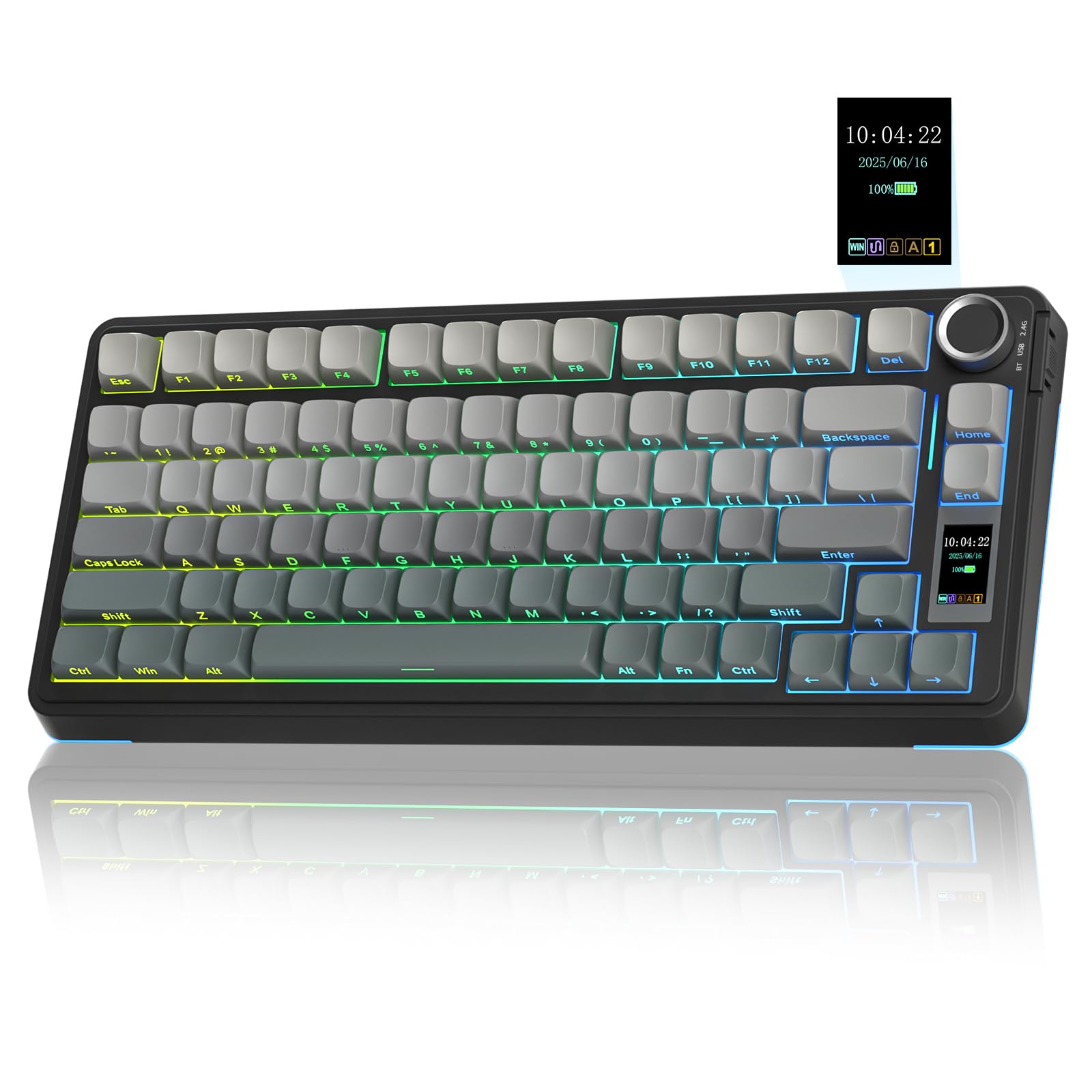
The AULA S75 Pro brings flagship features like a customizable LCD screen and multi-function knob to a mid-range price point. The display shows battery status, date, time, operating system, and custom GIF images, while the knob lets you adjust volume, switch connection modes, and cycle through RGB effects without touching software. The side-engraved PBT keycaps are a smart design choice — they resist fading and look clean while keeping legends readable from above.
Internally, the S75 Pro uses an advanced gasket-mount structure with an extended silicone pad and five layers of sound-dampening material. This produces a creamy, thocky sound that rivals boards costing twice as much. The hot-swappable PCB supports 3-pin and 5-pin switches, and the pre-lubed linear switches (often Star Vector or similar) are smooth and require no break-in. The 80-key 75% layout saves desk space while keeping the arrow keys and function row intact.
Tri-mode connectivity includes Bluetooth 5.0 for up to five devices, 2.4 GHz for gaming, and USB-C wired mode. The battery lasts roughly 20 hours with full RGB brightness, and up to a week with sleep mode enabled. The south-facing LEDs ensure backlight shines through the keycaps clearly. The driver software supports macro customization but is only available on Windows and can feel basic compared to premium alternatives.
Why it’s great
- LCD screen with customizable GIFs and real-time system info
- Creamy, thocky sound from 5-layer foam and gasket mount
- Side-engraved PBT keycaps resist wear and look unique
- Multi-function knob for quick volume, mode, and RGB control
Good to know
- Driver software is Windows-only and limited in features
- Battery life drops to ~20 hours with RGB at full brightness
- Screen configuration requires Windows and wired mode
5. AULA F87

The AULA F87 has become a community favorite for delivering a creamy, marbly, thocky sound at an entry-level price. The pre-lubed LEOBOG Greywood V3 linear switches are light and smooth, and the five-layer sound-dampening structure with PCB single-key slotting eliminates hollowness and reverb. The plastic case actually aids the acoustics — it’s lightweight for portability and doesn’t introduce metallic pings like some budget aluminum boards.
Tri-mode connectivity includes Bluetooth 5.0 for up to three devices, 2.4 GHz for gaming, and USB-C wired mode. The 4000 mAh battery provides weeks of daily use with RGB turned off, and several days with moderate backlighting. The 87-key layout (TKL) saves 25% desk space while retaining the function row and arrow keys, and the PBT keycaps are sweat- and slip-resistant for long typing sessions.
One common note is that the stock keycaps are opaque and block RGB, making the backlighting mostly visible as underglow rather than through the legends. Some units ship with north-facing LEDs, which can cause interference with certain Cherry-profile aftermarket keycap sets. The Greywood switches may feel too light for heavy typists who prefer more resistance, but they can be swapped out easily thanks to the hot-swappable PCB.
Why it’s great
- Excellent creamy/marbly sound from 5-layer foam and PCB slotting
- Pre-lubed Greywood V3 switches are smooth and responsive
- 4000 mAh battery lasts weeks with RGB off
- Hot-swappable PCB supports 3-pin and 5-pin switches
Good to know
- Opaque keycaps block RGB, limiting backlight visibility
- Greywood switches may be too light for heavy typists
- Some units have north-facing LEDs incompatible with certain Cherry-profile caps
6. RK ROYAL KLUDGE R75

The RK Royal Kludge R75 punches above its price point with a gasket-mount design and five layers of sound-absorbing material that produce a creamy, satisfying typing sound. The pre-lubed Cream switches are known for their smooth, linear feel and quiet operation, making this board a great choice for both late-night gaming and open-office typing. The 68-key layout is one of the most compact 75% options, easily fitting into a backpack or travel bag.
Tri-mode connectivity with Bluetooth 5.1, 2.4 GHz, and USB-C gives you flexibility across PC, laptop, tablet, and smartphone. The 4000 mAh battery delivers at least seven days of mixed use with RGB on, and longer with backlighting disabled. The CNC metal volume knob is hot-swappable and programmable, allowing you to reassign it to control zoom, brightness, or any other function through the RK software.
The R75 supports QMK/VIA, giving you deep control over keymaps, macros, and layers — a rare feature at this price level. The doubleshot PBT keycaps resist shine and fading, and the south-facing RGB backlight provides good legend visibility. Some users note that the key legends don’t light up perfectly due to the opaque top, and the plastic case, while sturdy, doesn’t have the same heft as premium aluminum boards.
Why it’s great
- QMK/VIA support for professional-level keymap customization
- Cream switches are smooth, quiet, and pre-lubed for a satisfying feel
- Compact 68-key layout fits most travel cases
- CNC metal volume knob is hot-swappable and programmable
Good to know
- Key legends do not light up clearly due to opaque keycap tops
- Plastic case lacks the weight of premium aluminum builds
- Software can be finicky on macOS
7. Womier M87 Pro

The Womier M87 Pro stands out with its retro-inspired aesthetic and a smart OLED color display that shows custom GIFs, caps lock status, connection mode, and battery level. The screen is easy to read and adds a personality-driven touch that few boards in this price range offer. The built-in mechanical knobs let you adjust volume, connection mode, system platform, and RGB settings without diving into software.
Tri-mode connectivity includes Bluetooth 5.1, 2.4 GHz, and USB-C wired mode. The keyboard uses Outemu White switches — a tactile option that produces a satisfying, audible thunk rather than the quiet linear feel of most competitors. The hot-swappable PCB supports 3-pin and 5-pin switches, so you can experiment with different switch types down the line. The triple absorption layers (EVA foam, IXPE pad, and sponge case foam) reduce vibration and improve key sound quality, giving each keystroke a clean, thumpy acoustic profile.
The 87-key layout is a true TKL with no wasted space, and the RGB backlighting has 19 modes and 9 color options that can be controlled via the knob. The retro grey color scheme and included replacement keycaps give it a unique look. Potential downsides include a reported intermittent key defect in some units (though customer service typically resolves it), lack of a tilt stand, and fast battery drain with RGB on, lasting roughly 2-2.5 days.
Why it’s great
- OLED display with customizable GIFs and real-time status
- Retro design with Outemu White tactile switches and satisfying thunk
- Triple-layer foam dampening for a clean acoustic profile
- Knob-controlled RGB and system settings
Good to know
- Some units may have intermittent key defects; keep packaging for potential return
- Battery drains fast with RGB on (2-2.5 days)
- No tilt stand for adjustable typing angle
FAQ
What does 75% mean in a keyboard?
Are 75% keyboards good for gaming?
Why does gasket mount matter for keyboard sound?
Can I replace the switches on a hot-swappable keyboard?
Final Thoughts: The Verdict
For most users, the 75% keyboard winner is the ASUS ROG Azoth because it delivers the best out-of-box sound, an OLED screen with real-time system monitoring, a complete lubing kit for enthusiasts, and over 2000 hours of battery life. If you want the creamy, thocky typing feel of a premium build at a mid-range price, grab the AULA S75 Pro for its LCD screen, gasket mount, and satisfying acoustics. And for a compact travel companion that supports QMK/VIA customization without breaking the bank, nothing beats the RK Royal Kludge R75.