
Our readers keep the lights on and the weekend projects moving. As an Amazon Associate, I earn from qualifying purchases.
The reality of owning a desktop fabrication tool often means choosing between hours of calibration or accepting mediocre layer lines. An at-home 3D printer should be a creative outlet, not a second job spent tweaking bed springs and fighting with warped surfaces. The current generation of machines has finally moved past the hobbyist tinkering phase, delivering reliable, fast, and remarkably precise output right out of the box.
I’m Rikta — the co-founder and writer behind FitlyFast. My approach to evaluating these machines involves dissecting the mechanical architecture, firmware capabilities, and real-world material handling across hundreds of user reports and technical specifications to separate marketing claims from actual bench performance.
Whether you need detailed miniatures for tabletop gaming or functional prototypes for a workshop project, finding a dependable at home 3d printer requires understanding how build volume, print speed, and automatic calibration work together to deliver consistent results.
How To Choose The Best At Home 3D Printer
Three core decisions define your experience: technology type, build volume, and automation features. Resin printers deliver unmatched detail for small objects, while FDM machines offer larger build areas and material versatility. The right choice depends entirely on what you plan to create and how much time you are willing to invest in post-processing.
FDM vs Resin: A Material Decision
Fused Deposition Modeling (FDM) uses spools of thermoplastic filament and is ideal for functional parts, large objects, and durable prototypes. Resin printers use liquid photopolymer cured by UV light, producing smooth surfaces with intricate detail perfect for miniatures, jewelry molds, and dental models. Resin requires ventilation and cleanup with isopropyl alcohol, while FDM is generally less messy.
The Importance of Auto Bed Leveling
Manual bed leveling is the single largest source of frustration for new users. A machine with automatic leveling uses a sensor to map the print surface and compensates for any unevenness in real time. This feature alone transforms the experience from constant fiddling to reliable, repeatable printing and is now a standard expectation rather than a luxury.
Max Print Speed and Acceleration
Speed ratings like 500mm/s or 600mm/s are common, but real-world throughput depends on acceleration values and volumetric flow rate. A machine with 20,000 mm/s² acceleration reaches its top speed quickly and decelerates smoothly, reducing stringing and ghosting. Look for active flow rate compensation or pressure advance algorithms that ensure consistent extrusion during rapid direction changes.
Quick Comparison
On smaller screens, swipe sideways to see the full table.
| Model | Category | Best For | Key Spec | Amazon |
|---|---|---|---|---|
| Bambu Lab P1S | FDM Enclosed | Multi-color reliability | Up to 16 colors (AMS) | Amazon |
| ELEGOO Centauri Carbon | FDM Enclosed | Carbon fiber printing | 320°C hotend nozzle | Amazon |
| Anycubic Kobra X | FDM Open | Multi-color value | 19 colors with 4 ACE units | Amazon |
| Creality K2 Combo | FDM Enclosed | 16-color production | 420mm³/s volumetric flow | Amazon |
| Bambu Lab A1 | FDM Open | Beginner simplicity | ≤48 dB noise level | Amazon |
| FLASHFORGE Adventurer 5M | FDM Open | Fast setup | 600mm/s max speed | Amazon |
| ANYCUBIC Photon Mono 4 Ultra | Resin | High-resolution jewelry | 17µm XY pixel size | Amazon |
| ELEGOO Mars 5 Ultra | Resin | Fast miniature printing | 150mm/h tilt release | Amazon |
| Creality Ender 5 Max | FDM Open | Large format objects | 400mm³ build volume | Amazon |
In‑Depth Reviews
1. Bambu Lab P1S 3D Printer

The Bambu Lab P1S represents a turning point for home additive manufacturing by offering an enclosed CoreXY system that rivals industrial-grade reliability at a consumer-friendly price point. Its fully enclosed design stabilizes chamber temperature for advanced materials like ABS and ASA, while the automatic bed leveling and filament runout sensor remove the most common friction points for new users. With support for up to 16 colors via the optional AMS unit, this machine transforms single-material workflows into vibrant multi-material productions.
Print quality is consistently excellent across PLA, PETG, TPU, and even PA filaments, with layer lines so minimal that post-processing is often unnecessary. The 500mm/s top speed combined with 20,000 mm/s² acceleration means a standard benchy completes in under 20 minutes without sacrificing surface finish. The Bambu Studio slicer provides intuitive controls and remote monitoring via the app, making it easy to check print progress from anywhere in the house.
Owners consistently report that this printer dramatically shortens their design-to-part cycle compared to earlier open-frame machines. The setup process is around 30 minutes, and the machine has proven reliable for continuous daily use with minimal maintenance. For anyone serious about producing functional parts or detailed multi-color prints at home, this is the benchmark against which other FDM printers are measured.
Why it’s great
- Enclosed chamber enables ABS/ASA printing with minimal warping.
- Multi-color AMS expands creative possibilities significantly.
- Auto-leveling and filament detection reduce downtime dramatically.
Good to know
- AMS unit is sold separately.
- Not recommended for carbon fiber reinforced materials.
2. ELEGOO Centauri Carbon 3D Printer

The ELEGOO Centauri Carbon is purpose-built for users who need to print advanced engineering-grade materials without upgrading components later. Its brass-hardened steel nozzle rated for 320°C enables reliable extrusion of carbon fiber reinforced filaments, polycarbonate, and other high-temperature polymers straight out of the box. The integrated die-cast aluminum frame minimizes vibrations even at maximum acceleration, producing clean overhangs and sharp corners that require little post-processing.
Setup is genuinely plug-and-play with the machine arriving fully assembled and pre-calibrated. The built-in chamber camera supports remote monitoring and time-lapse capture, while the dual-sided PEI plate features a specific PLA surface that delivers excellent adhesion at lower bed temperatures. The CoreXY kinematics achieve 500mm/s print speeds with 20,000 mm/s² acceleration, making it a strong contender for both prototyping and small-batch production runs.
User feedback highlights the intuitive ElegooSlicer software and seamless WiFi file transfer as major conveniences. While the initial unit had minor quality control issues for some early adopters, the replacement units have proven reliable for hundreds of hours of PETG and PLA+ printing without jams or adhesion failures. The 256mm³ build volume is generous for a fully enclosed machine in this tier.
Why it’s great
- 320°C nozzle unlocks carbon fiber and high-temp materials.
- Die-cast frame ensures stability at high speeds.
- True plug-and-play with minimal setup effort.
Good to know
- Some early units experienced cable connector issues.
- Tech support response can be slow for international users.
3. Anycubic Kobra X Multicolor 3D Printer
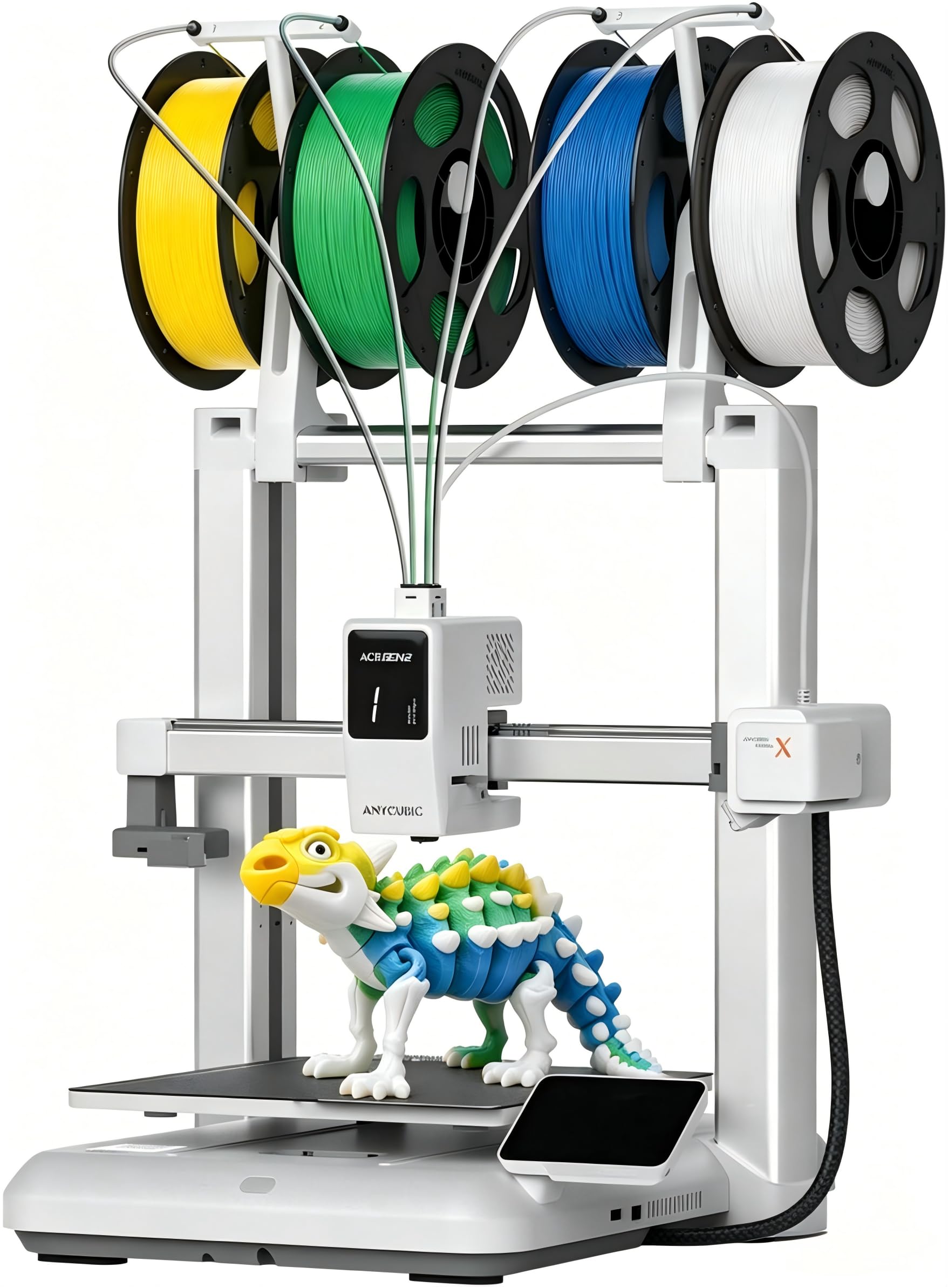
The Anycubic Kobra X redefines multi-color accessibility by bundling a native 4-color printing system that can expand to 19 colors with additional ACE Pro units, all while maintaining a sub-premium price point. Its LeviQ 3.0 auto-leveling system uses 49-point calibration to guarantee a perfect first layer every time, which is critical for beginners who have struggled with bed adhesion on older machines. The hardened steel nozzle and vibration compensation ensure clean layer lines even when pushing 600mm/s speeds.
One of the standout engineering decisions is the reduced purge waste achieved by shortening the filament travel path by 81.25%, meaning less material is wasted during color changes compared to competing systems. This directly addresses the common complaint about multi-color printing being wasteful and expensive. The top-mount spool holder frees up desk space, and the 260mm³ build volume provides ample room for large projects or multiple smaller prints on a single plate.
Community feedback over hundreds of print hours confirms reliable performance with PLA, PETG, TPU, and even PVA support materials. The integrated AI camera monitors for spaghetti failures and foreign object detection, sending alerts through the Anycubic app. While a small number of units have arrived with bed adhesion issues, the majority of users report flawless operation straight out of the box, making this a strong recommendation for families and makerspaces.
Why it’s great
- Native 4-color printing without needing a separate module.
- Reduced purge waste saves material and time.
- 49-point auto leveling ensures reliable first layers.
Good to know
- ACE Pro and ACE 2 Pro are incompatible with each other.
- Phone app interface could be more polished.
4. Creality K2 Combo 3D Printer

The Creality K2 Combo targets users who want a complete multi-color production system without piecing together third-party components. It ships with one CFS unit capable of four colors and supports up to four CFS units for a total of 16 colors, making it ideal for complex models that would otherwise require painting. The step-servo motors dynamically adjust torque within milliseconds, enabling consistent extrusion at high speed while keeping noise levels comparable to a typing laptop.
Smart auto leveling only probes the specific area where the print will occur, reducing calibration time to seconds rather than minutes. The AI camera monitors for spaghetti failures and idle time, though some users report it occasionally misses errors. The included dry box within the CFS keeps hygroscopic filaments like PETG and ABS in optimal condition during long prints, a thoughtful addition for humid environments.
Setup requires about an hour due to the screen installation and CFS configuration, which is longer than some competitors but reasonable given the multi-material complexity. Early adopter feedback praises the print quality and multi-color capabilities while noting that the proprietary slicer is necessary for full feature access. The printer ships with spare parts and clear multilingual instructions, and most users report no clogs or adhesion failures even during 16-color prints.
Why it’s great
- Up to 16 colors with four CFS units for maximum creativity.
- Step-servo motors provide silent operation and precise flow.
- Smart leveling probes only the print area for faster setup.
Good to know
- CFS does not accept standard spools without printed adapters.
- Some users report pricing inconsistency between channels.
5. Bambu Lab A1 3D Printer

The Bambu Lab A1 distills the company’s high-end engineering into a compact open-frame design that prioritizes ease of use and quiet operation. With noise levels at or below 48 dB, it can run overnight in a bedroom without disturbing sleep, thanks to active motor noise canceling algorithms. The full-auto calibration handles Z-offset, bed leveling, and flow rate compensation automatically, so users can focus on design rather than setup.
Print quality is exceptional for an open-frame machine, with active flow rate compensation ensuring consistent extrusion during rapid direction changes. The 1-Clip quick swap nozzle makes maintenance and material changes effortless, and the 256mm³ build volume accommodates a wide range of projects. Multi-color printing is possible with the optional AMS Lite, though this is sold separately.
Beginners consistently praise the Bambu Handy app for simplifying the entire workflow from model selection to print monitoring. The machine has proven reliable for long prints with PLA and PETG, and the auto-resume feature handles power outages gracefully. Some users note that the filament feed tube can be finicky and that 5G mesh WiFi networks may cause connectivity issues, but overall this remains one of the most beginner-friendly FDM printers available.
Why it’s great
- Near silent operation suitable for shared living spaces.
- Full auto calibration eliminates manual tweaking.
- Quick swap nozzle enables fast material changes.
Good to know
- AMS Lite for multi-color is an extra purchase.
- Some users experience filament feed tube issues.
6. FLASHFORGE Adventurer 5M 3D Printer

The FLASHFORGE Adventurer 5M focuses on reducing the time between unboxing and first print with a one-click auto-leveling system that produces a perfect first layer every time. Its CoreXY kinematics achieve 600mm/s top speeds with a 20,000 mm/s² acceleration rate, meaning the machine reaches peak velocity in just 0.025 seconds. The dual-sided PEI coating plate provides excellent adhesion for PLA, PETG, and TPU, and the quick-detachable 280°C nozzle makes maintenance straightforward.
Vibration compensation eliminates ghosting even during high-speed prints, and the 50-watt heater brings the nozzle to 200°C in 35 seconds. The filament runout sensor pauses the print automatically when the spool runs empty, and power loss recovery resumes from the exact layer where the interruption occurred. These features collectively reduce waste and frustration for users printing large or complex models overnight.
User reports over a full year of daily use highlight the machine’s reliability as a single-color workhorse. The 220mm³ build volume is smaller than some competitors, but the print quality is consistently excellent with PLA and PETG. Some users note that the manual positioning instructions could be clearer and that the touchscreen interface is sensitive, but the active community and responsive tech support address most issues quickly.
Why it’s great
- Ultra-fast acceleration from zero to 600mm/s in 0.025 seconds.
- Fully automatic leveling eliminates first layer failures.
- Filament runout and power loss protection for long prints.
Good to know
- Smaller build volume at 220mm³.
- Multicolor printing requires external solutions.
7. ANYCUBIC Photon Mono 4 Ultra Resin 3D Printer

The ANYCUBIC Photon Mono 4 Ultra delivers a 7-inch 10K monochrome LCD with a stunning 17-micron XY pixel resolution, making it capable of reproducing micro-details that FDM machines cannot match. The COB light source combined with Fresnel lenses ensures light uniformity above 90%, reducing dimensional errors across every printed layer. This precision is critical for applications like jewelry casting patterns, dental models, and highly detailed tabletop miniatures.
The new generation ACF film accelerates print speed to 120mm/h while minimizing the frosted texture common on resin prints. Intelligent detection features include printer auto-inspection, residual resin detection, failed print detection, and intelligent lifespan management, all accessible through the 4.3-inch UI. The 8mm diameter T-type screw rod and precision guide rails maintain stable Z-axis movement, ensuring consistent layer stacking even for tall models.
User feedback emphasizes the stark resolution improvement over previous resin printers, with details so crisp that sanding is often unnecessary. The setup is straightforward for anyone familiar with resin systems, though the strong odor of the resin means a dedicated enclosure and ventilation are strongly recommended. Some users note that the FEP film can be fragile and that the plastic spatula provided can damage the build plate surface if used aggressively.
Why it’s great
- 10K resolution with 17µm XY pixels for extraordinary detail.
- COB light with Fresnel lens ensures uniform curing across the build area.
- Five intelligent detection systems reduce operational errors.
Good to know
- Resin odor requires a well-ventilated area or enclosure.
- FEP film is delicate and may need periodic replacement.
8. ELEGOO Mars 5 Ultra Resin 3D Printer
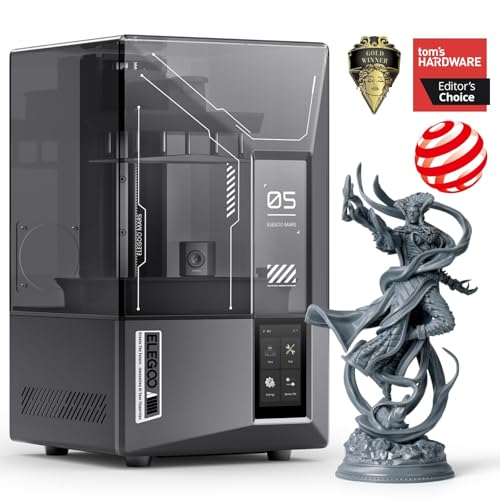
The ELEGOO Mars 5 Ultra combines a 9K monochrome LCD with an innovative tilt release mechanism that peels the model from the release film at an angle, enabling print speeds up to 150mm/h without sacrificing detail. The 7-inch screen with 18-micron XY resolution faithfully reproduces intricate textures, and the smart mechanical sensor detects resin shortages and leveling failures before they ruin a print. This machine is designed for users who want consistently reliable results without constant manual intervention.
The built-in AI camera monitors each print in real time, detecting empty build plates, model warps, and other common failures. While the detection results can vary depending on ambient lighting and model geometry, the feature significantly reduces wasted resin and time for unattended prints. WiFi cluster printing allows control of multiple Mars 5 Ultra units from a single device, a major productivity boost for small businesses.
Users upgrading from older resin printers report a dramatic improvement in print success rates and surface quality, noting that the self-check and automatic leveling functions make the first print possible within minutes of unboxing. The integrated drip tray and wireless printing capability are appreciated conveniences. A small number of users experienced LCD or vat failures after extended use, but the majority report hundreds of successful prints with minimal maintenance.
Why it’s great
- Tilt release technology enables blazing 150mm/h print speeds.
- AI camera provides real-time failure detection and alerts.
- WiFi cluster printing for managing multiple units efficiently.
Good to know
- Camera resolution can be too low for detailed monitoring.
- Some units have reported LCD or vat durability issues.
9. Creality Ender 5 Max 3D Printer
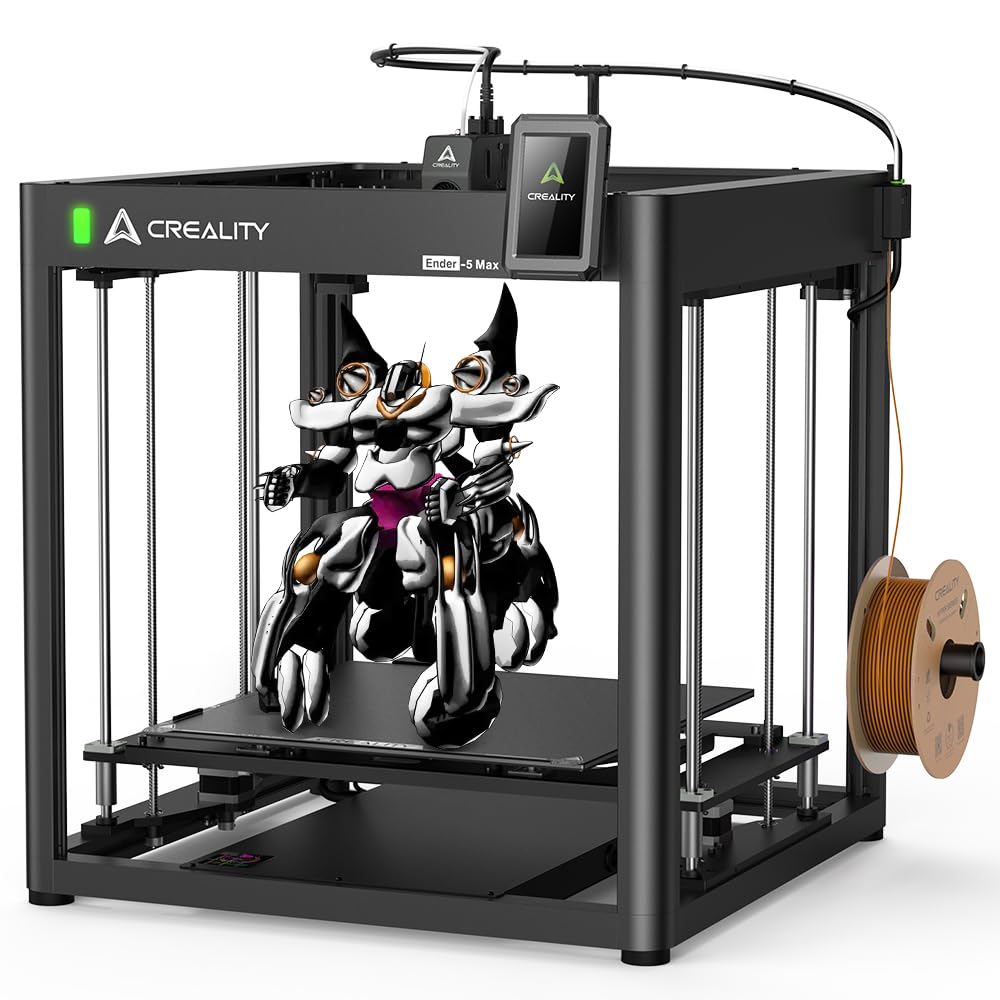
The Creality Ender 5 Max addresses the single biggest limitation of most home printers by offering a massive 400mm³ build volume capable of printing storage boxes, large household items, and big prototypes that would otherwise require multiple assembled parts. The 700mm/s maximum printing speed is powered by 42-76 stepper motors that drive the X/Y axis with high torque, while the 36-point auto leveling system ensures a solid first layer across the entire bed. The dual Z-axis with independent motors and linear rods prevents the heavy gantry from sagging during fast movements.
The 300°C high-temperature extruder uses hardened gears tested for 500 hours of continuous extrusion, making it suitable for 24/7 production runs. The robust die-cast aluminum frame and precise linear rail on the X-axis minimize vibrations that would otherwise cause layer shifting on such a large format machine. A three-color status indicator light visible from up to 10 meters away lets you check the printer’s state at a glance without walking to the workshop.
Community feedback confirms excellent print quality at 0.2mm layer height, though the machine requires careful setup and is not recommended for users who want a completely hands-off experience. Assembly takes around two hours, and some users find the bundled software more intuitive than alternatives like Cura. The magnetic bed provides good adhesion but wears over time, and replacement sheets are inexpensive. For users who need the largest possible build volume at a reasonable entry point, this machine delivers exceptional value.
Why it’s great
- 400mm³ build volume enables printing full-sized household items.
- High-torque stepper motors enable 700mm/s peak speeds.
- Dual Z-axis prevents gantry sag on large prints.
Good to know
- Assembly takes about two hours and requires mechanical know-how.
- Magnetic bed may need replacement after extended use.
FAQ
What safety precautions do I need for a resin printer at home?
How often do I need to replace the nozzle on my FDM printer?
Final Thoughts: The Verdict
For most users, the at home 3d printer winner is the Bambu Lab P1S because the enclosed CoreXY design paired with multi-color AMS support delivers professional-grade prints in a package that beginners can set up in under an hour. If you need a machine that can print carbon fiber and other engineering materials right out of the box, grab the ELEGOO Centauri Carbon. And for budget-friendly multi-color printing that opens up creative possibilities for the whole family, nothing beats the Anycubic Kobra X.