
Our readers keep the lights on and the weekend projects moving. As an Amazon Associate, I earn from qualifying purchases.
You need to balance panel technology, refresh rates, HDR support, and smart platform responsiveness to ensure the screen you bring home doesn’t become a source of frustration the first time you watch a dark scene or plug in a gaming console.
I’m Rikta — the co-founder and writer behind FitlyFast. I’ve spent countless hours analyzing market data, comparing panel specs, and cross-referencing real user feedback to separate the TVs that genuinely perform from those that just look good on paper.
This guide cuts through the marketing noise to deliver a focused, data-driven look at the top contenders for your living room, helping you find the best 4k tv under $500 that fits your specific viewing habits and space.
How To Choose The Best 4K TV Under $500
At this price ceiling, you are entering the sweet spot where entry-level models hit their stride and premium features like Mini-LED backlighting and native 120Hz panels begin to appear. Prioritizing the wrong spec can leave you with a washed-out picture or a sluggish interface.
Panel Technology: QLED vs Mini-LED vs Standard LED
Standard LED backlighting is the baseline, but QLED (Quantum Dot) layers a phosphor film to boost color volume and brightness, making it far better for HDR content. Mini-LED takes this further by packing hundreds of tiny LEDs into dimming zones, enabling deep black levels and high contrast without the burn-in risk of OLED. Within this budget, Mini-LED and QLED models from brands like TCL, Amazon, and iFFALCON offer the best value.
Refresh Rates and Motion Handling
A native 60Hz panel is fine for movies and casual TV, but if you play fast-paced games or watch sports, a native 120Hz or 144Hz panel with Variable Refresh Rate (VRR) prevents motion blur and screen tearing. Be wary of marketing terms like “Motion Rate 480” — those are often achieved through frame insertion rather than native panel speed.
HDR Performance and Brightness
Dolby Vision and HDR10+ are the two main dynamic HDR formats. Dolby Vision is more widely adopted in streaming, but both improve contrast scene-by-scene. Peak brightness in nits is the real differentiator: aim for at least 400 nits for decent HDR, while models pushing 600+ nits (or even 1,400 nits) offer a transformative experience that makes HDR content truly pop.
Quick Comparison
On smaller screens, swipe sideways to see the full table.
| Model | Category | Best For | Key Spec | Amazon |
|---|---|---|---|---|
| Amazon Ember 55″ Mini-LED | Mini-LED / QLED | High-end contrast and gaming | 512 Dimming Zones, 1,400 nits | Amazon |
| TCL 55″ T7 QLED | QLED / 120Hz | Smooth sports and gaming | 120Hz Native Panel | Amazon |
| iFFALCON 55″ MiniLED | Mini-LED / 144Hz | Next-gen console gaming | 144Hz VRR, FreeSync Premium Pro | Amazon |
| Sony BRAVIA 2 II 50″ | LED / Google TV | PS5 gaming and upscaling | 4K Processor X1 | Amazon |
| Sony BRAVIA 2 II 43″ | LED / Google TV | Compact PS5 companion | 4K Processor X1 | Amazon |
| Amazon Ember 50″ QLED | QLED / Fire TV | Alexa-centric smart home | 4K QLED, Wi-Fi 6 | Amazon |
| Roku 55″ Plus Mini-LED | Mini-LED / QLED | Ease of use and free content | Mini-LED, Dolby Vision | Amazon |
| Samsung M70H 43″ Mini LED | Mini-LED / 60Hz | Compact Mini-LED picture | Mini-LED, Pure Spectrum Color | Amazon |
| VIZIO V-Series 43″ | LED / 60Hz | Budget-friendly entry point | Dolby Vision, IQ Active Processor | Amazon |
In‑Depth Reviews
1. Amazon Ember 55″ Mini-LED Series

The Amazon Ember 55″ Mini-LED Series sits at the very top of this budget range, and it earns that position with a 512-zone dimming array and a peak brightness of 1,400 nits. That kind of luminance and local dimming density is rare under $500, and it delivers a picture quality that approaches entry-level OLED in contrast while keeping SDR content punchy and vibrant. The QLED layer adds a billion-plus color palette, making HDR10+ and Dolby Vision IQ content look genuinely cinematic.
Gamers will appreciate the native 144Hz panel paired with AMD FreeSync Premium Pro certification. This combination eliminates tearing and stutter in supported titles, and the 2.1-channel Dolby Atmos audio system rivals budget soundbars for immersion. The new Fire TV interface with Alexa+ offers hands-free voice control and Omnisense sensors that wake the display when you enter the room, though some users report occasional interface lag after extended use that can be remedied with an external streaming stick.
This is the most future-proofed television you can buy within the budget, offering premium gaming features and high-end contrast that most competitors can’t touch. If your priority is deep blacks, fluid motion, and a bright HDR experience, this is the definitive pick.
Why it’s great
- 1,400-nit peak brightness with 512 dimming zones
- Native 144Hz panel with FreeSync Premium Pro
- Excellent out-of-the-box color and contrast
Good to know
- Fire TV interface can slow down over time
- Occasional random reboots reported by some owners
2. TCL 55″ T7 QLED

The TCL T7 series brings a true 120Hz native panel to the mid-range, making it a standout for sports fans and console gamers who prioritize smooth motion. The QLED quantum dot layer covers nearly the entire DCI-P3 color space, delivering rich reds and deep blues that make HDR10+ content feel vivid and natural. The AIPQ Pro processor handles upscaling of 1080p content impressively well, adding texture and reducing noise in older streams.
Input flexibility is generous with four HDMI ports including one eARC, supporting 4K@120Hz for Xbox Series X and PS5 without compromise. The Google TV interface is snappy and responsive, and the included voice remote supports Alexa, Google Assistant, and Apple HomeKit. The built-in speakers are functional for casual viewing, but the Dolby Atmos support shines when paired with an external soundbar for movies and gaming.
For the price, the T7 offers the best balance of native high-refresh-rate performance and quantum-dot color accuracy. It’s a strong alternative to the Amazon Ember if you prefer Google TV and need that 120Hz panel for competitive gaming.
Why it’s great
- Native 120Hz panel with VRR support
- Excellent QLED color volume and HDR brightness
- Google TV interface is fast and clean
Good to know
- Requires internet setup before HDMI input use
- Standard LED backlight, not full-array local dimming
3. iFFALCON 55″ MiniLED
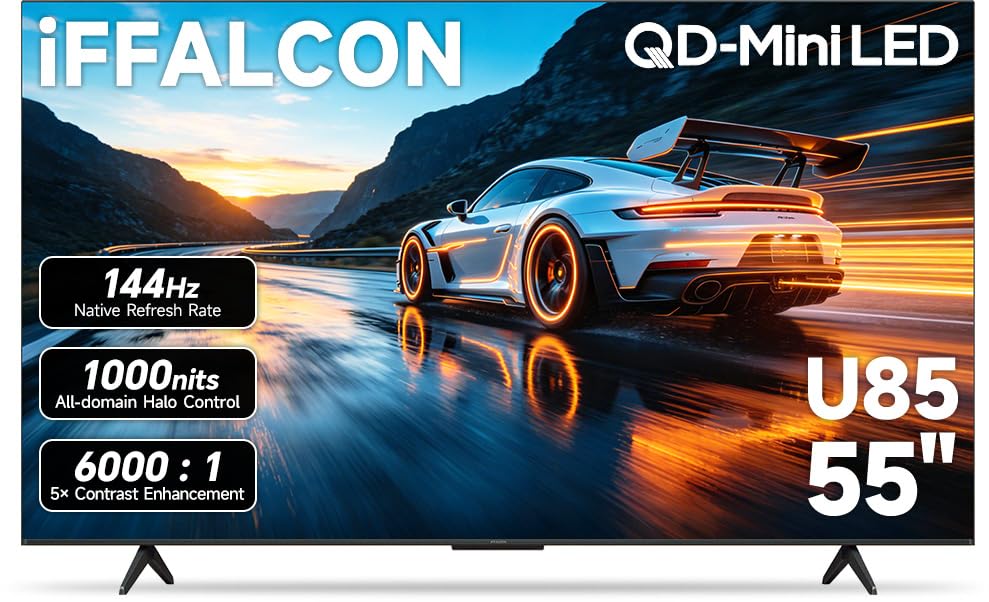
The iFFALCON 55U85 packs a native 144Hz Mini-LED panel with a contrast ratio of 6,000:1 and VRR support up to 240Hz, delivering performance that rivals gaming monitors at this price tier. The inclusion of four HDMI 2.1 ports — two dedicated to 4K@144Hz and two for 4K@60Hz — means you can connect a PS5, Xbox Series X, PC, and soundbar simultaneously without swapping cables. Auto Low Latency Mode (ALLM) kicks in automatically, eliminating the need to dig through menus when switching from movies to a gaming session.
Dolby Vision Gaming support ensures console titles look their best with auto-scene adjustment, while the 2.1-channel 50W speaker system with DTS Virtual:X provides room-filling sound for movie nights. The Google TV interface is praised by users for its smoothness, often described as faster than competitors from LG and Samsung at similar price points. This model also includes commercial features like hotel mode and IP control, making it a versatile option for both home and business set-ups.
If you own multiple gaming consoles and want a TV that handles high frame rates without input lag, the iFFALCON is the best pure gaming choice in this lineup.
Why it’s great
- 4x HDMI 2.1 with two 144Hz ports
- Deep 6,000:1 contrast and local dimming
- Fast Google TV interface and hotel mode
Good to know
- Thicker chassis compared to ultra-slim models
- Peak brightness can be surpassed by premium Mini-LED units
4. Sony BRAVIA 2 II 50″

The 50-inch Sony BRAVIA 2 II brings the brand’s renowned processing expertise to a larger screen size within the budget. The 4K Processor X1 excels at upscaling lower-resolution content, adding back lost texture and detail that standard budget TVs blur over. Motionflow XR technology ensures sports and action films stay clean, making this a great choice for cable TV, streaming, and Blu-ray playback where native 4K source quality varies.
Exclusive PS5 integration is the headline feature here: Auto HDR Tone Mapping and Auto Genre Picture Mode automatically optimize picture settings when you connect a PlayStation 5, delivering calibrated HDR without manual tweaking. The Game Menu consolidates all gaming picture settings into one dashboard, a quality-of-life upgrade that competitive players will appreciate. The Google TV smart platform with Chromecast built-in offers broad app support and Apple AirPlay 2 for iOS sharing.
The LED panel lacks local dimming, so contrast in dark scenes won’t match Mini-LED competitors, and the 60Hz refresh rate limits its appeal for high-frame-rate gaming. But for movie lovers and PS5 owners who prioritize image processing and color accuracy over raw brightness, the Sony delivers a refined viewing experience.
Why it’s great
- Excellent 4K upscaling and motion handling
- PS5 exclusive auto-optimization features
- Clean, bloatware-free Google TV interface
Good to know
- 60Hz panel limits gaming to 60fps
- Standard LED backlight without local dimming
5. Sony BRAVIA 2 II 43″
Identical in processing and software to its 50-inch sibling, the 43-inch Sony BRAVIA 2 II is purpose-built for smaller rooms, dorms, or dedicated gaming desks. The 4K Processor X1 remains the star of the show, handling upscaling of 1080p and 720p content with a level of sophistication that makes standard cable broadcasts look markedly better than on competing LED panels. The inclusion of Sony’s exclusive PS5 features ensures latency stays low and HDR mapping is automatic.
At 43 inches, the 60Hz refresh rate is less of a drawback because viewing distances are typically shorter, and the pixel density feels sharper than larger screens at the same resolution. The form factor also makes it easy to integrate into bookshelf setups or bedroom entertainment centers. The Google TV interface remains responsive, and the remote is well-regarded for its tactile buttons and ergonomic design, though some users find it too small for larger hands.
It’s a specialized pick: the best choice for someone who needs a compact, reliable screen with top-tier image processing and doesn’t require the high brightness or variable refresh rates of larger Mini-LED models. For a bedroom or secondary gaming station, it’s fantastic.
Why it’s great
- Superior 4K upscaling from Sony processing
- Native PS5 HDR and picture mode support
- Compact size fits small spaces perfectly
Good to know
- 60Hz panel and standard LED backlight
- Small remote can be awkward for some users
6. Amazon Ember 50″ QLED Series

The Amazon Ember 50″ QLED Series bridges the gap between entry-level and premium by combining a 4K QLED panel with Dolby Vision and HDR10+ Adaptive support, all wrapped in the latest Fire TV ecosystem. The quad-core processor with Wi-Fi 6 ensures fast app loading and smooth navigation, and the Omnisense technology wakes the screen as you enter the room — a convenience feature that feels genuinely futuristic. The QLED panel delivers punchy colors that make HDR content pop in a well-lit room.
Alexa integration is the deepest among Fire TV models here, allowing hands-free voice control even when the screen is off. You can ask to play shows, set timers, or check smart home cameras without reaching for a remote. The interface does serve up Amazon ads and content recommendations prominently, which can feel intrusive if you prefer a clean home screen. Some users report occasional audio sync issues and menu stuttering on the Fire TV platform.
This is the best pick for households already invested in the Amazon ecosystem, offering seamless Alexa control and an easy setup experience. If you value a minimalist interface, you might prefer a Google TV or Roku alternative.
Why it’s great
- Deep Alexa hands-free integration with Omnisense
- QLED panel with vibrant Dolby Vision HDR
- Wi-Fi 6 support for faster streaming
Good to know
- Fire TV interface shows prominent Amazon ads
- Occasional audio sync issues reported
7. Roku 55″ Plus Series Mini-LED

The Roku Plus Series brings Mini-LED backlighting and QLED color to the table, but its defining feature is the smart platform. Roku OS is celebrated for its simplicity, speed, and lack of bloatware — there are no ads pushing rentals before you select an app, and the home screen is fully customizable. The enhanced voice remote includes a lost remote finder and personal shortcut buttons, small touches that make daily use frictionless.
Picture quality is strong for the price: the Mini-LED panel delivers deep blacks and bright highlights, while AI-powered Roku Smart Picture Max automatically optimizes color and sharpness scene by scene. The built-in subwoofer and Dolby Atmos processing produce surprisingly full sound for a flat-panel TV, with clear dialogue and a noticeable low-end presence that reduces the need for a soundbar in smaller rooms. Bluetooth headphone mode is a welcome addition for late-night viewing.
If interface ease-of-use is your top priority, the Roku Plus Series is the most enjoyable TV to live with day-to-day. The picture quality is good but not class-leading against the Amazon Mini-LED or TCL T7, making it a better fit for casual viewers than hardcore gamers.
Why it’s great
- Clean, bloatware-free Roku OS interface
- Built-in subwoofer for rich audio
- Mini-LED backlight for solid contrast
Good to know
- 60Hz panel, no high-refresh-rate gaming
- Picture quality isn’t as bright as top Mini-LED rivals
8. Samsung M70H 43″ Mini LED

The Samsung M70H is a 43-inch Mini-LED television that packs premium backlighting into a compact form factor. The Mini-LED Processor 4K delivers brighter highlights and deeper blacks than traditional edge-lit LED panels, and the Pure Spectrum Color technology reproduces over a billion shades with impressive accuracy. The result is an HDR image that feels vibrant and dimensional, especially for a 43-inch screen in this price range.
Samsung’s smart interface is feature-rich, offering access to Samsung TV Plus with hundreds of free channels, plus Gaming Hub integration for cloud streaming. The Motion Xcelerator + DLG 120Hz is a frame-doubling technology, not a native 120Hz panel, but it improves clarity for sports and games. Some users find the remote and interface frustrating — the remote lacks a dedicated input button, and the TV often defaults to streaming instead of the last-used HDMI source, which is a genuine annoyance for live TV or console users.
This is a niche pick: the best option for someone who wants a 43-inch screen with Mini-LED contrast and Samsung’s color science, and is willing to navigate a less intuitive smart platform. If the interface quirks bother you, the Sony BRAVIA 43″ is a safer bet.
Why it’s great
- Mini-LED backlight with deep contrast
- Excellent pure spectrum color accuracy
- Lots of free content via Samsung TV Plus
Good to know
- Smart interface doesn’t remember last HDMI input
- Remote has limited input controls
9. VIZIO 43″ V-Series

The VIZIO V-Series is the budget anchor of this list, offering a 4K LED panel with Dolby Vision HDR support and a Full Array LED backlight at a price that leaves room for a soundbar or streaming subscription. The IQ Active Processor handles basic upscaling and navigation, while AMD FreeSync support provides a degree of gaming compatibility you don’t always see at this price point. Bluetooth 5.2 connectivity for headphones is a thoughtful inclusion for private listening.
The biggest trade-off is the smart platform. VIZIO’s Smart TV interface defaults to a streaming menu on power-up, even for users who primarily use an antenna or HDMI input for live TV. Some reviews describe the experience as requiring fifteen-plus button presses just to reach antenna TV, making it a poor choice for cord-cutters relying on broadcast channels. The missing Ethernet port on the 43-inch model also forces reliance on Wi-Fi, which can be unstable with hidden SSID networks.
If you plan to use streaming apps almost exclusively and want a functional 4K display at the lowest cost, the V-Series gets the job done. It’s not the one to buy if you need a simple live-TV experience or prefer a wired internet connection.
Why it’s great
- Most affordable Dolby Vision 4K TV in the list
- Bluetooth headphone support with low latency
- AMD FreeSync for smoother gaming
Good to know
- Smart interface defaults to streaming, not live TV
- No Ethernet port on 43-inch model
FAQ
Is Mini-LED worth it over QLED under $500?
Can a 60Hz TV still be good for PS5 or Xbox Series X?
How important is Dolby Vision at this price point?
Final Thoughts: The Verdict
For most users, the winner of the 4k tv under $500 category is the Amazon Ember 55″ Mini-LED Series because it delivers 1,400 nits of brightness, 512 dimming zones, and native 144Hz gaming performance at a price that undercuts the competition meaningfully. If you want a smoother 120Hz panel with the Google TV interface you already trust, grab the TCL 55″ T7 QLED. And for a compact desk setup or secondary room with Sony’s superior image processing, nothing beats the Sony BRAVIA 2 II 43″.