
Our readers keep the lights on and the weekend projects moving. As an Amazon Associate, I earn from qualifying purchases.
Staring at a single laptop screen while juggling spreadsheets, Slack messages, and a browser with thirty tabs is a daily efficiency killer. A dedicated second monitor transforms that cramped workflow into a fluid, dual-screen command center, letting you keep your primary task full-screen while reference materials, communication tools, or monitoring dashboards live on the adjacent panel.
I’m Rikta — the co-founder and writer behind FitlyFast. I’ve spent countless hours dissecting panel technologies, refresh rate specs, and ergonomic builds to identify which monitors deliver a genuine productivity lift without introducing eye fatigue or desk clutter.
Whether you are pairing with a laptop or a desktop, the right second monitor depends on matching resolution, connectivity, and physical footprint to your actual workspace — a mismatch here can actually slow you down.
How To Choose The Best Second Monitor
Selecting a secondary display is different from choosing a primary gaming or creative monitor. You are optimizing for seamless integration, consistent color output, and ergonomic fit rather than peak frame rates or absolute color accuracy. The goal is a monitor that complements your existing setup without introducing friction.
Resolution and Pixel Density
The single most impactful decision is resolution. For a 24-inch panel, 1080p provides adequate sharpness for emails, documents, and web browsing. At 27 inches, however, the same 1080p resolution results in noticeably larger pixels and less screen real estate. A 27-inch 4K monitor offers four times the pixel density, making text razor-sharp and allowing you to fit significantly more content on screen — ideal for code, design tools, or financial models.
Refresh Rate and Motion Clarity
A 60 Hz panel is perfectly functional for static office work, but a 100 Hz or 120 Hz refresh rate dramatically improves the perceived smoothness of scrolling through documents and web pages. The reduced motion blur makes cursor movement feel more responsive and reduces eye strain during prolonged reading. If you also use the second monitor for occasional gaming or video playback, the higher refresh rate becomes a tangible upgrade.
Connectivity and Workspace Integration
Modern laptops, especially MacBooks and ultrabooks, increasingly rely on USB-C for video, data, and power delivery. A monitor with a USB-C port that delivers 90W or more of power simplifies your desk to a single cable. If your laptop lacks USB-C, ensure the monitor includes HDMI or DisplayPort inputs. Also consider whether you need built-in speakers for video calls or basic audio, and whether a VESA mount pattern allows you to use an arm for a cleaner, more adjustable setup.
Quick Comparison
On smaller screens, swipe sideways to see the full table.
| Model | Category | Best For | Key Spec | Amazon |
|---|---|---|---|---|
| ASUS ProArt PA279CRV | Premium 4K | Color-critical design work | 99% DCI-P3 / ΔE < 2 | Amazon |
| LG 27UP850K-W | Premium 4K | USB-C single-cable setup | USB-C 90W PD / HDR400 | Amazon |
| Dell S2725QS | Premium 4K | All-day productivity + 120Hz | 4K 120Hz / FreeSync Premium | Amazon |
| LG 27US500-W | Mid-Range 4K | Affordable 4K upgrade | 4K IPS / HDR10 | Amazon |
| ViewSonic VA2456A-MHD | Mid-Range 1080p | Smooth scrolling at 120Hz | 1080p 120Hz / IPS | Amazon |
| Acer SB273 G0bi | Mid-Range 1080p | 27-inch value with 120Hz | 27″ 1080p 120Hz / 1ms VRB | Amazon |
| Dell SE2725HM | Mid-Range 1080p | Enterprise reliability | 27″ 1080p 100Hz / IPS | Amazon |
| Samsung S36GD | Budget Curved | Immersive curved secondary | 24″ Curved 100Hz / 1800R | Amazon |
| Amazon Basics 24-inch | Budget Flat | No-frills dual monitor | 24″ 1080p 75Hz / IPS | Amazon |
In‑Depth Reviews
1. ASUS ProArt Display PA279CRV

The ASUS ProArt PA279CRV sets the standard for a color-accurate second monitor. Its 27-inch 4K IPS panel covers 99% of both DCI-P3 and Adobe RGB, with factory calibration targeting a Delta E of less than 2. This level of precision makes it a natural companion for photographers, video editors, and designers who need a secondary display that matches their primary monitor’s color output.
Connectivity is equally impressive. The USB-C port delivers 96 watts of power delivery, enough to charge a MacBook Pro or high-end Windows laptop while carrying a 4K video signal. The stand offers full ergonomic adjustment — tilt, swivel, pivot, and height — and the VESA mount pattern is dead-center for balanced arm attachment. The included HDMI, DisplayPort, and USB-C cables mean you can plug and play immediately.
The 60 Hz refresh rate is adequate for productivity and video playback but not designed for fast-paced gaming. Some users note the factory calibration report is genuinely trustworthy, making this a rare out-of-the-box solution for color-critical work. For professionals who demand uniformity across both screens, the PA279CRV is the definitive choice.
Why it’s great
- Factory-calibrated Delta E < 2 ensures consistent color between monitors
- USB-C 96W PD simplifies desk to a single cable
- Full ergonomic stand with VESA compatibility
Good to know
- 60 Hz only — not for high-refresh gaming
- Premium price reflects professional-grade color accuracy
2. LG 27UP850K-W Ultrafine

The LG 27UP850K-W is optimized for the modern laptop user who values a clean, single-cable desk. Its 27-inch 4K IPS panel covers 95% of the DCI-P3 color gamut and supports VESA DisplayHDR 400, delivering bright, vibrant visuals that elevate photo editing and HDR video playback. The USB-C port provides 90 watts of power delivery, charging most laptops while transmitting the display signal.
Ergonomics are a strong suit here. The stand allows height, tilt, and pivot adjustments, and the VESA mount pattern is fully accessible for monitor arms. The built-in stereo speakers with Waves MaxxAudio offer usable sound for video calls and casual media, reducing the need for external speakers. Two additional USB 3.0 ports on the back serve as a simple hub for peripherals.
The 60 Hz refresh rate and 5ms response time are standard for productivity-oriented 4K panels. Mac users report seamless compatibility with M-series chips, and the white finish matches the aesthetic of Apple hardware. If you prioritize a one-cable workflow with strong color performance, this LG model is a top contender.
Why it’s great
- USB-C 90W PD delivers single-cable charging and video
- 95% DCI-P3 with DisplayHDR 400 for vibrant color
- Full ergonomic stand with height and pivot adjustment
Good to know
- 60 Hz refresh rate limits gaming potential
- White stand and back may not suit all desk setups
3. Dell S2725QS

The Dell S2725QS is a rare 4K monitor that delivers a 120 Hz refresh rate at a mid-premium price point. Its 27-inch IPS panel offers 99% sRGB coverage and a 1500:1 contrast ratio, producing deep blacks and punchy colors that make text pop and video look rich. The ComfortView Plus feature reduces blue light emissions to 35% or less without shifting the display to a warm tint, preserving color accuracy for all-day work.
AMD FreeSync Premium support ensures tear-free motion, which benefits both productivity scrolling and casual gaming. The stand provides full ergonomic adjustment — height, tilt, swivel, and pivot — making it easy to align with a primary monitor. Integrated speakers have been redesigned for wider frequency response, delivering more depth than typical built-in monitor audio.
The ash white finish and ultra-thin bezels create a modern, minimalist look. Some users report a faint yellow tint on certain units, so checking the panel upon arrival is wise. For anyone wanting a 4K second monitor that feels fast and fluid, the S2725QS delivers exceptional day-to-day smoothness.
Why it’s great
- 4K 120Hz combines sharpness with smooth scrolling
- Full ergonomic stand with height and pivot adjustment
- FreeSync Premium for tear-free motion in games and apps
Good to know
- Occasional color uniformity variation between units
- Not ideal for competitive FPS gaming due to ghosting
4. LG 27US500-W Ultrafine

The LG 27US500-W brings 4K resolution to the second monitor category at a price that undercuts most competitors. Its 27-inch IPS panel delivers 3840 x 2160 pixels with a 1000:1 contrast ratio and support for HDR10 content, covering up to 90% of the DCI-P3 color gamut. The result is sharp text, detailed imagery, and vibrant colors that make multitasking on spreadsheets or design tools significantly more comfortable.
The ergonomic stand offers tilt adjustment only, but the monitor is VESA compatible for those who want to mount it on an arm. The Onscreen Control software allows you to split the display into custom zones, which is useful when managing multiple reference windows. Connectivity includes HDMI and DisplayPort, though it lacks USB-C or a built-in USB hub.
At 60 Hz, this monitor is strictly for productivity and media consumption. Mac users particularly appreciate the crisp font rendering at 200% scaling. If you want the clarity of 4K for reading and data work without stretching your budget, this LG is the entry point that delivers genuine pixel density gains.
Why it’s great
- 4K resolution provides razor-sharp text and more screen real estate
- 90% DCI-P3 gamut delivers vibrant, accurate colors
- VESA compatible for flexible mounting options
Good to know
- 60 Hz panel limits motion smoothness
- Basic stand offers tilt only; no height or pivot adjustment
5. ViewSonic VA2456A-MHD

The ViewSonic VA2456A-MHD proves that a second monitor doesn’t need to be expensive to feel responsive. Its 24-inch 1080p IPS panel runs at 120 Hz, making every scroll through documents, web pages, and code editors noticeably smoother than a standard 60 Hz panel. The SuperClear IPS technology ensures consistent brightness and color from wide viewing angles, so the display remains legible even when positioned at the edge of your desk.
Connectivity is generous for the price tier: HDMI, DisplayPort, and VGA inputs cover nearly any source device. Adaptive Sync (FreeSync compatible) eliminates screen tearing during light gaming sessions. The monitor also includes built-in speakers, though they are best reserved for system sounds rather than critical audio work. The stand offers tilt adjustment and is VESA compatible.
Reducing eye strain is a focus here, with Flicker-Free technology and a Blue Light Filter that can be activated for extended work sessions. The thin bezels make it a good match for a multi-monitor setup where you want minimal bezel gap. For budget-minded buyers who prioritize motion clarity, this ViewSonic is a standout performer.
Why it’s great
- 120Hz refresh rate makes scrolling feel fluid and responsive
- IPS panel offers consistent color from all viewing angles
- Multiple input options including HDMI, DP, and VGA
Good to know
- Basic stand has tilt adjustment only; no height or pivot
- Built-in speakers are adequate but not high-fidelity
6. Acer SB273 G0bi

The Acer SB273 G0bi offers a 27-inch 1080p IPS panel with up to a 120 Hz refresh rate and a 1ms visual response boost, creating a large-screen secondary display that feels responsive without costing a fortune. The zero-frame design minimizes bezel distraction, allowing it to sit flush next to another monitor for a nearly seamless dual-screen experience.
Adaptive Sync support (FreeSync compatible) matches the monitor’s refresh rate to your graphics card, eliminating stutter during video playback or light gaming. The 250-nit brightness is adequate for indoor office lighting, and the 100,000,000:1 dynamic contrast ratio helps maintain readability in mixed-content workflows. A VGA port is included alongside HDMI for compatibility with older systems.
The stand provides tilt adjustment only, so you may want to budget for a VESA arm if height alignment with your primary monitor is critical. Some early units shipped with insufficient packaging padding, so inspecting the box upon delivery is wise. For anyone wanting a large, smooth-scrolling secondary display at a reasonable price, the Acer SB273 delivers.
Why it’s great
- 27-inch 1080p with 120Hz provides smooth motion on a large screen
- 1ms VRB reduces ghosting for clearer fast-moving content
- Adaptive Sync prevents tearing during games and video
Good to know
- 1080p on 27 inches results in lower pixel density than 4K alternatives
- Basic stand with tilt only; no height adjustment
7. Dell SE2725HM

The Dell SE2725HM is built for the enterprise user who values consistent color, reliable build quality, and eye comfort over raw specs. Its 27-inch 1080p IPS panel runs at 100 Hz, offering smoother scrolling than the traditional 60 Hz office monitor without the price hike of gaming-oriented displays. The ComfortView Plus technology is TÜV Rheinland 3-star certified and reduces harmful blue light emissions while maintaining color accuracy.
The anti-glare matte coating effectively cuts reflections, making this monitor comfortable in brightly lit offices or near windows. The compact stand features a built-in cable holder and a small footprint, freeing up desk space. VESA compatibility allows for arm mounting, and the power supply is integrated into the monitor, eliminating an external brick.
Connectivity is limited to HDMI and VGA — there is no DisplayPort or USB-C, which may require an adapter for modern laptops. The panel’s 1000:1 contrast ratio and 250-nit brightness are standard for the category. If you are outfitting a corporate workspace or need a reliable secondary display with excellent anti-glare performance, the SE2725HM is a sensible choice.
Why it’s great
- ComfortView Plus reduces blue light without color shift
- Compact stand with cable management saves desk space
- 100Hz refresh rate improves scrolling smoothness
Good to know
- No DisplayPort or USB-C inputs limit modern connectivity
- Basic stand offers tilt only; no height or pivot adjustment
8. Samsung Essential S3 S36GD
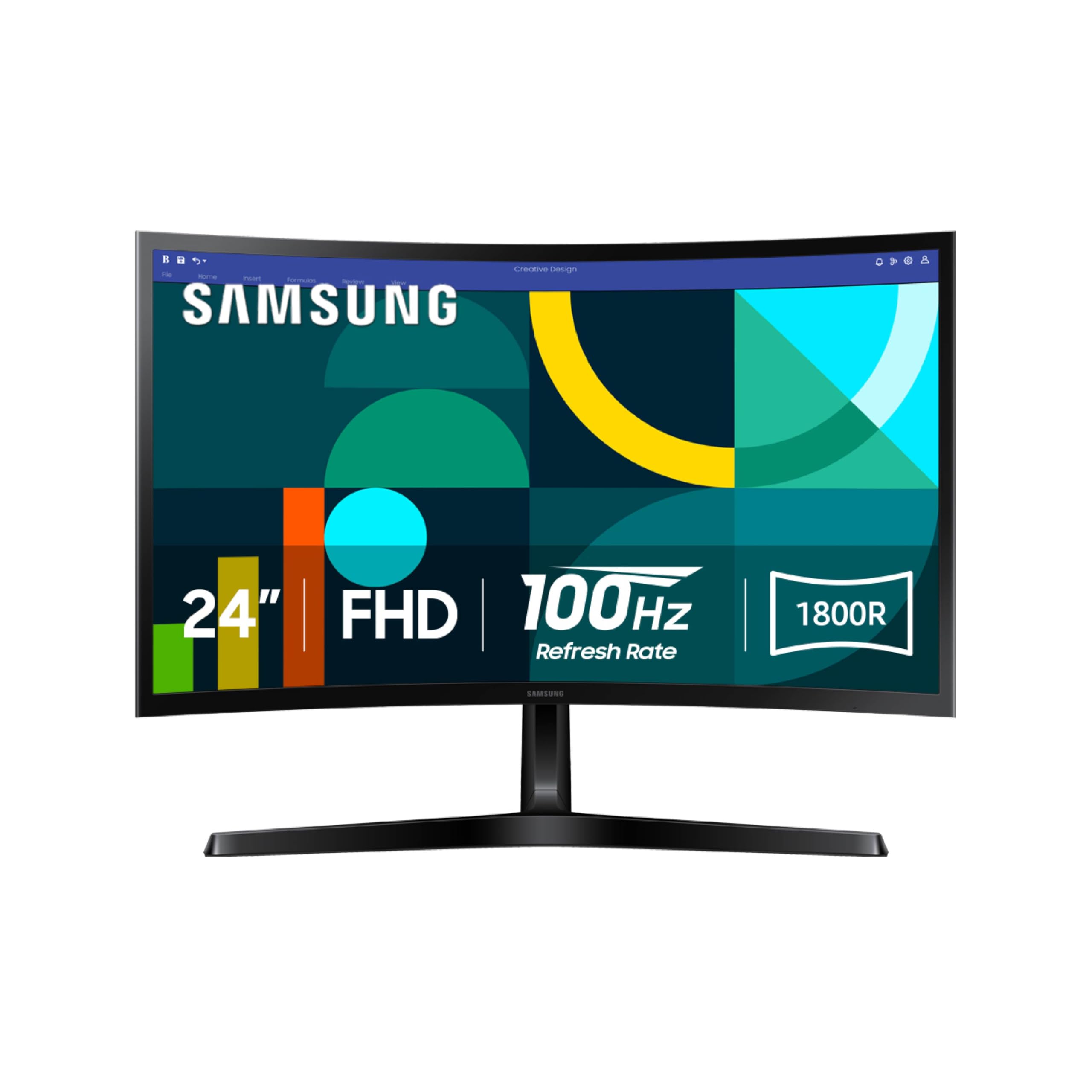
The Samsung S36GD brings a 24-inch 1800R curved VA panel to the second monitor market, providing enhanced peripheral engagement that can make a secondary display feel more integrated into your field of view. The 100 Hz refresh rate and 3000:1 contrast ratio deliver deep blacks and smooth motion, making this a strong choice for media consumption and general productivity.
Game Mode optimizes color and contrast settings dynamically, which is useful if you occasionally use the second monitor for console gaming or streaming. Advanced Eye Comfort technology, certified by TÜV, reduces blue light and flicker for prolonged sessions. Connectivity includes HDMI and D-Sub (VGA) ports, though there is no DisplayPort.
The stand is fixed with no height or tilt adjustment, so the monitor’s position relies entirely on your desk setup or a VESA arm (100x100mm pattern is supported). Users report that the curve is subtle enough not to distort spreadsheet grids or document layouts but noticeable enough to reduce glare from side windows. For a budget-friendly secondary display with an immersive curve, this Samsung model is a unique option.
Why it’s great
- 1800R curve improves peripheral immersion in dual setups
- 100Hz refresh rate and FreeSync for smooth motion
- High 3000:1 contrast ratio delivers deep blacks
Good to know
- Stand has no tilt or height adjustment
- VA panel may show color shift at extreme viewing angles
9. Amazon Basics 24-inch

The Amazon Basics 24-inch monitor represents the entry point for adding a second screen with minimal complexity. Its 24-inch 1080p IPS panel offers the wide viewing angles and consistent color that IPS technology is known for, at a price that undercuts most branded alternatives. The 75 Hz refresh rate is a small but noticeable step above standard 60 Hz, making scrolling feel slightly more fluid.
The monitor includes HDMI, DisplayPort, and VGA inputs, plus four USB 3.2 ports on the back that function as a basic hub for peripherals — a rare feature at this price point. Built-in speakers are present but deliver tinny audio suitable only for system beeps and alerts. The stand offers tilt adjustment and the monitor is VESA 100x100mm compatible for arm mounting.
Energy Star certification ensures low power consumption, which matters for a monitor that may run for eight hours a day. The thin bezels and matte black finish look clean in an office setting. If your budget is tight and you need a functional, reliable secondary display that covers the basics without fuss, the Amazon Basics 24-inch delivers dependable performance.
Why it’s great
- IPS panel delivers consistent color from wide angles
- Built-in USB 3.2 hub adds peripheral connectivity
- 75Hz refresh rate improves scrolling over standard 60Hz
Good to know
- Built-in speakers are low quality
- 1080p resolution limits screen real estate for text
FAQ
Should my second monitor match my primary monitor’s resolution?
What is the ideal size for a second monitor?
Can I use a curved monitor as a second display?
Why do some second monitors have poor built-in speakers?
Final Thoughts: The Verdict
For most users, the second monitor winner is the LG 27UP850K-W because it combines 4K sharpness, USB-C 90W power delivery, and full ergonomic adjustment at a price that makes sense for a long-term productivity upgrade. If you need professional-grade color accuracy for creative work, grab the ASUS ProArt PA279CRV. And for a budget-friendly entry with smooth 120Hz scrolling, nothing beats the ViewSonic VA2456A-MHD.