
Our readers keep the lights on and the weekend projects moving. As an Amazon Associate, I earn from qualifying purchases.
Fighting games on PC demand split-second reactions, and the wrong input device can mean the difference between a perfect parry and a whiffed punish. Whether you’re grinding ranked matches in Street Fighter 6, entering tournaments for Tekken 8, or revisiting arcade classics on MAME, your fight stick or leverless controller directly governs your ability to execute complex motion inputs and consistent combos. A mushy joystick gate, high-latency buttons, or an unstable lap form factor can sabotage hours of practice.
I’m Rikta — the co-founder and writer behind FitlyFast. I’ve spent dozens of hours analyzing the competing PCB chipsets, switch types, and ergonomic layouts across every major arcade controller subcategory to separate the tournament-ready hardware from the casual novelties.
This guide breaks down the best options by form factor, latency performance, and customization depth so you can find the perfect arcade joystick for pc that matches your playing style and budget.
How To Choose The Best Arcade Joystick For PC
Choosing between a traditional joystick and a leverless controller is the first major fork in the road. Traditional sticks with an 8-way gate excel at games that rely on circular motion inputs (Zangief’s 360 SPD, for instance), while leverless controllers with WASD-style directional buttons eliminate gate-riding errors and enable instant dash inputs in titles like Tekken 8. Your choice should be guided by the genre you main and the precision you need for execution.
PCB Chipset and Input Latency
The controller chip determines how fast your button press becomes an on-screen action. Budget-tier sticks often use generic HID controllers with 4–8ms of added latency. Premium and mid-range units increasingly adopt the Raspberry Pi RP2040 chip running GP2040-CE firmware, which delivers sub-1ms latency. For competitive play, prioritize a controller that advertises sub-1ms input lag, especially if you play frame-tight fighters like Street Fighter or Guilty Gear.
Switches and Button Feel
Arcade buttons come in two broad families: Sanwa OBSF-style (the gold standard for responsiveness with a light 50g actuation force) and mechanical keyboard switches (Kailh Choc low-profile, Cherry MX). Hot-swappable sockets let you change switch feel without soldering. Leverless controllers benefit from low-profile switches that reduce finger travel time, while traditional sticks benefit from Sanwa joysticks with a short throw and precise spring tension.
Form Factor and Build Materials
Weight and surface material affect stability during intense play. Lightweight acrylic controllers (under 1 kg) can slide on a desk or tip during aggressive motions unless anchored by a non-slip rubber base. Heavier aluminum or steel frames (1.5 kg+) stay planted but sacrifice portability. Consider your playing surface — lap play requires a wide, contoured base, while desk play rewards heavy builds with rubber feet. Detachable wrist rests and internal cable compartments add comfort for longer sessions.
Quick Comparison
On smaller screens, swipe sideways to see the full table.
| Model | Category | Best For | Key Spec | Amazon |
|---|---|---|---|---|
| Qanba Sapphire S1 Juri | Premium Leverless | Tournament-grade PS5/PC | 18 adj. throw buttons; Cherry MX compatible | Amazon |
| MAYFLASH F300 Elite | Traditional Stick | Multi-platform with Sanwa | Sanwa 4-way joystick + 9 buttons | Amazon |
| Haute42 C16 | Premium Leverless | Custom artwork & low latency | RP2040; <1ms latency; magnetic panel | Amazon |
| Sehawei Haute42 T16 Pro V2 | Leverless | Budget all-button entry | 16 hot-swap buttons; 1ms delay | Amazon |
| 8Bitdo Retro Arcade Fight Stick | Traditional Stick | Wireless retro & modern fighters | Bluetooth/2.4G/wired; 40h battery | Amazon |
| GuileKeys GK-18 | Leverless | Feature-rich value leverless | 18 keys; OLED screen; RP2040 | Amazon |
| HORI Fighting Stick Mini | Compact Traditional | Portable travel stick | 8-button layout; 8ft cable | Amazon |
In‑Depth Reviews
1. Qanba Sapphire S1 Juri Edition
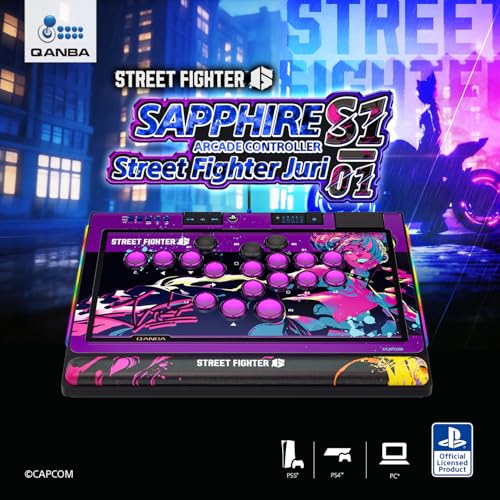
The Qanba Sapphire S1 is an officially licensed PlayStation leverless that works plug-and-play on PC. Its 18 adjustable-throw buttons accept Cherry MX switch series, allowing you to dial in actuation distance from ultra-short to standard. The memory foam wrist rest and detachable shoulder strap make tournament travel practical, while the rubber bottom grips any desk surface during heated sets.
The RP2040-based PCB delivers sub-1ms latency, and the button map profile switch lets you save multiple layouts for different characters. The built-in 3.5mm headphone jack is a thoughtful addition for tournament setups. Every button is hot-swappable without soldering, and the white Juri artwork is UV-printed on a durable polycarbonate top plate.
This controller eliminates the joystick gate entirely, which benefits players who prefer instant left/right dashes and SOCD cleaning for precise neutral. For PC players who also compete on PS5, this is the most affordable officially licensed leverless option available. The plastic shell feels slightly less premium than full-metal alternatives, but the customization and comfort features outweigh that trade-off at this price tier.
Why it’s great
- Officially licensed PS5/PC with sub-1ms latency
- 18 adjustable-throw buttons with Cherry MX compatibility
- Memory foam wrist rest and detachable strap for travel
Good to know
- Plastic construction feels lighter than aluminum alternatives
- Rubber feet may require cleaning after extended use
2. MAYFLASH F300 Elite
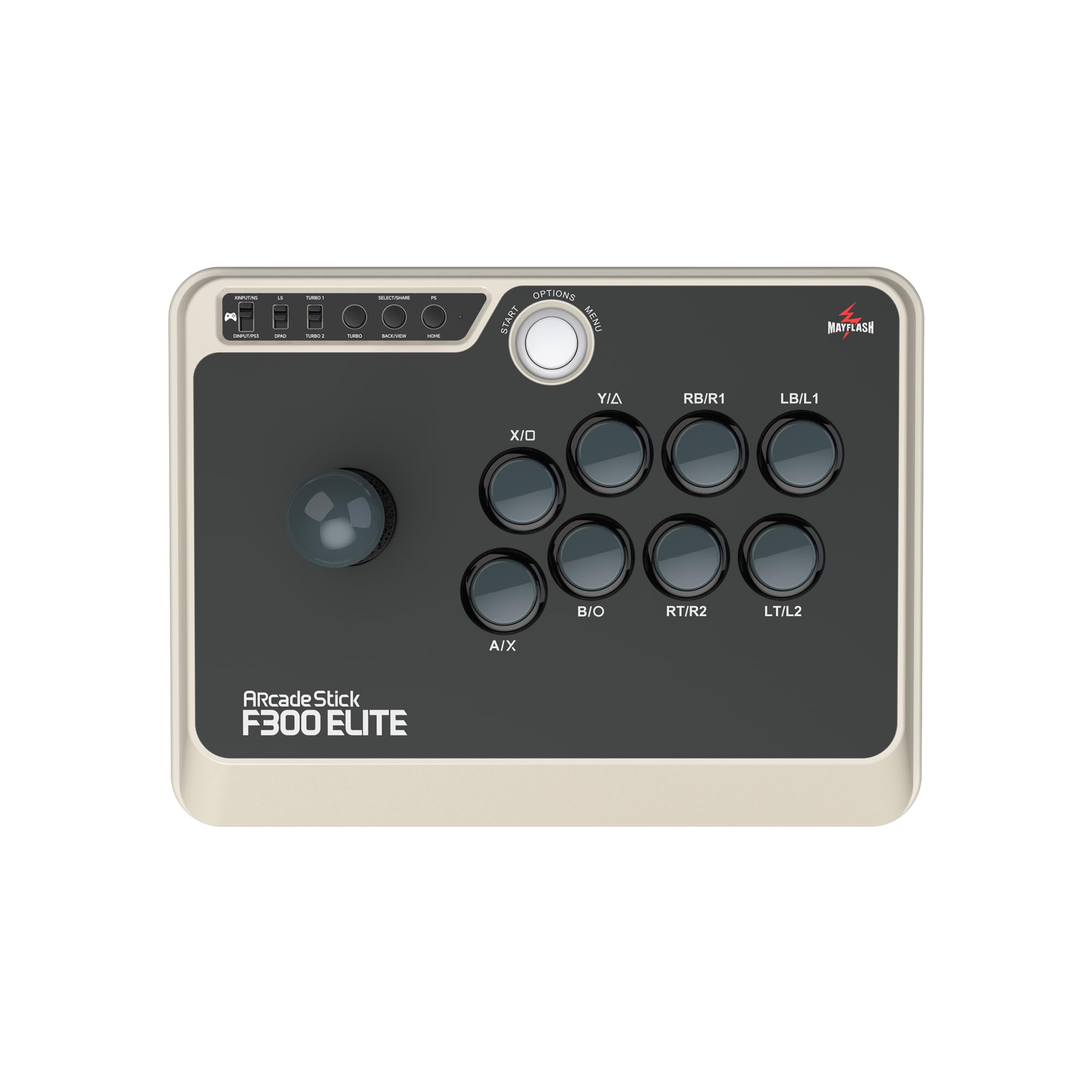
The F300 Elite ships with genuine Sanwa OBSF-30 buttons and a Sanwa JLF-TP-8YT joystick — the same components found in many arcade cabinets. The 4-way gate is square by default, which pair naturally with Street Fighter charge characters and games that require precise diagonal inputs. Compatible with Xbox Series, PS4, Switch, and PC via XInput or DInput, it’s one of the broadest multi-platform sticks available.
Internally, the F300 is built for modding: a screwdriver opens the shell to reveal a standard wiring harness that accepts any 30mm/24mm button layout. The 2.5 kg weight gives it excellent desk stability during aggressive play. The USB cable is 3 meters long, sufficient for tournament setups where the console sits below the monitor. Turbo functionality is built-in, though tournament rules may restrict its use.
The trade-off is that console support for PS5/Series X requires the MAYFLASH Magic-S adapter, adding cost and a slight complexity. On PC, however, it’s pure plug-and-play with no driver installation required. The joystick spring tension is medium-light, making it beginner-friendly, but experienced players may want to swap in a 2 lb spring for faster return-to-center. Overall, it’s the most versatile traditional stick in this price range for PC and console crossover.
Why it’s great
- Genuine Sanwa joystick and buttons out of the box
- Tool-free modding and easy access to internals
- Multi-platform support including Switch 2 and Series X
Good to know
- PS5/Series X requires separate Magic-S adapter
- Stock spring tension may feel light for advanced players
3. Haute42 C16

The Haute42 C16 introduces a magnetic top panel that lets you swap artwork without screws or tools. The brushed aluminum top plate is paired with an acrylic bottom, giving it a premium feel while keeping the weight at 1.09 kg. The flush-mounted buttons have slim rim gaps that reduce friction when sliding from button to button, a subtle but important ergonomic detail for fast SOCD inputs.
Inside, the RP2040 chip running GP2040-CE delivers the industry-standard sub-1ms latency. The tournament lock switch physically disables extra buttons, preventing accidental pauses during matches. RGB ring lighting around each button offers 15 illumination modes, and all switches are hot-swappable. The browser-based configuration tool at 192.168.7.1 allows full remapping without installing software.
The 0.53-inch thin profile makes it highly portable, fitting easily into a backpack sleeve. The recessed USB-C port protects the cable connector during transport. It lacks analog triggers, making it strictly for digital-input games, but for fighting titles this is not a limitation. The magnetic panel retention is strong enough that the controller can be lifted by the panel edge without it detaching. Great for players who want a thin, customizable leverless without moving to a full metal chassis.
Why it’s great
- Magnetic top panel for tool-free artwork swaps
- Flush button rims for smooth finger sliding
- RP2040 with GP2040-CE and browser config
Good to know
- No analog triggers; digital-only input
- Network configuration requires donation for private subnet
4. Sehawei Haute42 T16 Pro V2

The Haute42 T16 Pro V2 is the 16-button sibling to the 18-button models, offering a more compact layout that suits smaller hands or those who prefer a tighter button spread. The transparent acrylic build shows off the RGB LEDs beneath each button, and the included OLED display shows current input mode and SOCD cleaning setting. The 40nm processor achieves sub-1ms latency with over 95% frame retention on PC.
Compatibility covers Windows 10+, Steam Deck, PS3, PS4, Switch, and Android via wired USB-C. The EXT port is explicitly labeled for extension functions — not for console connection — which avoids a common setup mistake. The M1/M2 macro keys and turbo function are programmable through the embedded web configurator. The buttons use low-profile Kailh Choc-style switches that have a faster pre-travel distance than standard Sanwa OBSF buttons.
At 0.7 kg, the T16 is light enough for easy transport but may shift on a smooth desk during aggressive play. The acrylic bottom panel can develop micro-scratches over time, though this doesn’t affect function. The square gate equivalent (WASD layout) removes gate-riding errors entirely, making it ideal for players who struggle with inconsistent diagonals on traditional sticks. For PC-only players who want affordable leverless performance, this delivers the core RP2040 experience in a lighter package.
Why it’s great
- 16-button layout with OLED display for mode visibility
- Hot-swappable low-profile switches for customization
- Sub-1ms latency with RP2040 chipset
Good to know
- Lightweight build slides on smooth desks
- Acrylic shell is prone to surface scratches
5. 8Bitdo Retro Arcade Fight Stick
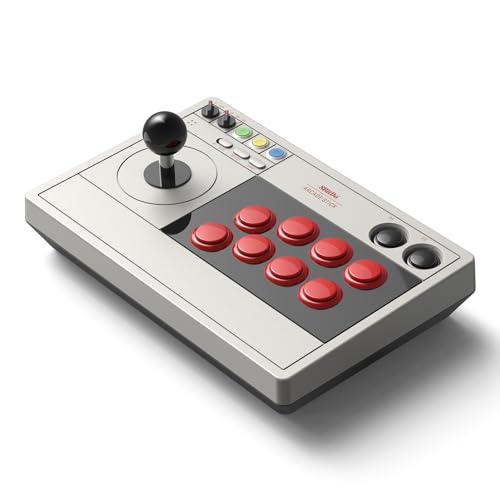
The 8Bitdo Retro Arcade Fight Stick prioritizes wireless convenience without sacrificing core arcade feel. It connects via Bluetooth, 2.4GHz, or wired USB-C, with 40 hours of battery life on 2.4G and 30 hours on Bluetooth. The 8-direction joystick has a square gate with tactile microswitches that click audibly, confirming directional inputs — helpful for charge characters like Guile or Balrog.
The 12-button layout includes two dedicated macro buttons (P1/P2) that can store any button combination via the 8BitDo Ultimate software. The dynamic button layout automatically remaps when switching between Switch and PC X-Input mode. The universal joystick mounting plate accepts Sanwa JLF, Seimitsu LS-32, and most other common sticks, making it a modding-friendly platform out of the box. The 2.4GHz receiver stores in a hidden compartment under the battery cover.
The stock buttons feel slightly spongier than premium Sanwa switches, which may bother competitive players. However, swapping in 30mm and 24mm replacements is straightforward. The 2.44 kg weight provides excellent desk stability, and the rubber base prevents sliding during wireless play. For PC players who want a reliable stick for both retro emulation and modern fighters without a cable tether, this is the top wireless pick.
Why it’s great
- Tri-mode wireless with exceptional 40-hour battery
- Universal mounting plate accepts all common sticks
- Dedicated macro buttons for custom combos
Good to know
- Stock buttons feel less responsive than Sanwa switches
- Wireless adds slight input delay vs. wired-only sticks
6. GuileKeys GK-18
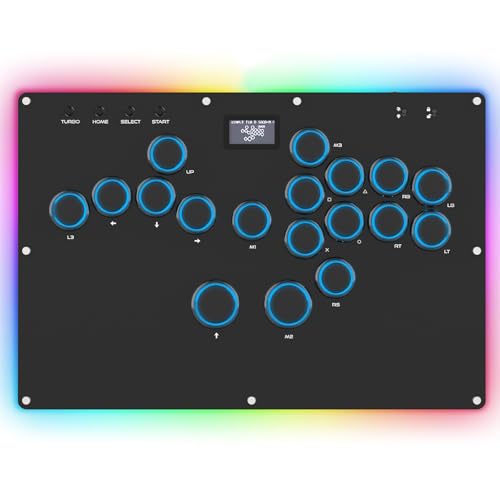
The GuileKeys GK-18 packs an 18-key layout with an integrated OLED screen that displays active input mode and button layout. The RP2040 controller chip with GP2040-CE firmware keeps input latency under 1ms across all modes. The Kailh Choc low-profile switches have a pre-travel distance that enables faster double-taps than taller mechanical switches, which is a specific advantage for Korean backdash cancel or wavedash execution in Tekken.
The all-button layout with four-direction movement buttons (WASD positioning) eliminates joystick gate errors. The 15-mode RGB backlighting with per-key color control offers deeper personalization than typical single-zone LEDs. The M1/M2 custom macro keys and tournament lock switch are physically located on the top edge, preventing accidental presses during play. The 5 input modes cover XInput, DInput, Switch, PS3, and PS4, though PS4/PS5 require a separate adapter.
The acrylic build has a slight creak when twisted, but the construction feels solid for the price tier. The included USB-C cable is braided, adding durability. One reviewer noted that the included PS4 converter had intermittent disconnection issues, recommending a Brook Wingman adapter for reliable console use. However, for pure PC play, no adapter is needed. The extra horizontal space between directional and action keys makes the layout more comfortable for larger hands compared to some 16-key competitors.
Why it’s great
- 18-key layout with OLED screen and per-key RGB
- Kailh Choc switches with fast pre-travel for quick inputs
- Extra side spacing improves comfort for large hands
Good to know
- Acrylic chassis creaks under torsional pressure
- Included console adapter may disconnect on some systems
7. HORI Fighting Stick Mini

The HORI Fighting Stick Mini is officially licensed for PlayStation and PC, packing an 8-button layout and a V-cut joystick housing into a wildly portable 5.91 x 8.27-inch footprint. The joystick uses a square gate with HORI’s own spring mechanism, offering tactile click feedback for each cardinal direction. The 8-foot cable is generous for a travel stick, allowing comfortable couch play with any USB-A compatible PC setup.
The miniature form factor works best for smaller hands, children, or players who need a stick that fits in a carry-on bag. The buttons are responsive and the HORI V-cut joystick registers all eight directions cleanly, making it suitable for platformers and casual arcade titles like Celeste or Hollow Knight. The weight is only 467 grams, so it’s genuinely pocketable for a fight stick.
The drawbacks are significant for competitive use: the light weight causes it to slide on smooth surfaces or tip during fast dash motions in 2D fighters. It lacks any wrist rest, so lap play can cause forearm fatigue over extended sessions. The absence of a functioning touchpad button means PS5 menu navigation still requires a regular controller. For PC-only casual play, these limitations are manageable, but serious tournament players should look at heavier options. It remains an excellent entry point for those curious about fight sticks without a large investment.
Why it’s great
- Ultra-portable 467g design fits in travel bags
- Officially licensed for PS4/PS5 and PC
- V-cut joystick housing with clean 8-way registration
Good to know
- Light weight causes sliding and tipping during fast fighters
- No wrist rest; uncomfortable for extended lap use
FAQ
What input latency should I aim for in a PC fight stick?
Is a leverless controller better than a traditional joystick for all fighting games?
Can I use any arcade stick wirelessly on PC without added lag?
Final Thoughts: The Verdict
For most users, the arcade joystick for pc winner is the Qanba Sapphire S1 Juri Edition because it combines sub-1ms latency with 18 adjustable-throw buttons and a memory foam wrist rest in an officially licensed package. If you want a traditional joystick with genuine Sanwa parts and broad console compatibility, grab the MAYFLASH F300 Elite. And for players who prioritize ultra-thin portability and tool-free artwork customization, nothing beats the Haute42 C16.