
Our readers keep the lights on and the weekend projects moving. As an Amazon Associate, I earn from qualifying purchases.
Muffled game comms, desynced video audio, and the constant hum of ground loops ruin any PC-based production. A dedicated audio mixer for PC solves these issues by providing a central hardware hub for latency-free monitoring, physical volume control, and crystal-clear signal routing without relying on your computer’s internal sound card.
I’m Rikta — the co-founder and writer behind FitlyFast. I’ve spent hundreds of hours analyzing the internal pre-amps, sample rates, and connectivity protocols of PC audio mixers to cut through the marketing noise and show you which hardware actually delivers silent, high-headroom sound for streaming, recording, and content creation.
Whether you’re a podcaster juggling multiple mic inputs or a streamer who needs real-time game audio and chat mixing, this guide breaks down the channel counts, phantom power specs, and USB streaming features that define the best audio mixer for pc for your specific workflow.
How To Choose The Best Audio Mixer For PC
Selecting the right mixer for your PC rig isn’t about picking the box with the most knobs. The real decision hinges on matching the mixer’s channel topology, pre-amp quality, and USB routing capabilities to your specific use case—whether that’s live streaming, podcasting, or multi-track recording.
Channel Count and Input Types
Count your sources: one XLR mic, a stereo instrument, and a computer audio return already require a minimum of three input channels. Look for mixers with XLR combo jacks (accepting both XLR and 1/4″ TRS cables) to avoid adapter hell. Mono channels are for mics and instruments; stereo channels are for line-level sources like synthesizers or media players.
USB Audio Interface Capabilities
The integrated USB interface is the core of a PC mixer. Check the sample rate (48 kHz is common, 192 kHz is premium) and the number of USB playback channels—a 2×4 interface (2 inputs to PC, 4 outputs from PC) allows you to blend computer audio with your live mix for streaming without extra cables. Loopback functionality is essential for broadcasting PC sound alongside your mic.
Pre-amp Quality and Phantom Power
Low-noise pre-amps (under -129 dB EIN) prevent hiss when recording quiet sources. Individual +48V phantom power switches let you plug in condenser mics without powering dynamic mics unnecessarily, avoiding signal leakage. High-headroom pre-amps accommodate loud sources without clipping.
EQ, Effects, and Monitoring
Per-channel 3-band EQ allows voice shaping and feedback control. Built-in DSP effects (reverb, delay) add polish without external pedals. Dedicated headphone outputs with independent mix control enable zero-latency monitoring—critical for vocalists and streamers.
Quick Comparison
On smaller screens, swipe sideways to see the full table.
| Model | Category | Best For | Key Spec | Amazon |
|---|---|---|---|---|
| Mackie ProFX6v3+ | Analog/Digital Hybrid | Streaming & Home Studio | 24-bit / 192 kHz USB-C | Amazon |
| Behringer FLOW 8 | Digital Mixer | Mobile DJs & Small Gigs | 6 mono + 2 stereo channels | Amazon |
| Focusrite Scarlett Solo | Audio Interface | Guitarists & Vocalists | 2 in / 2 out + Air mode | Amazon |
| Pyle PMXU46BT | Analog Mixer | Live Performers | 12-Segment LED meter | Amazon |
| Behringer XENYX 802S | Analog Mixer | Multi-Source Monitoring | Ultra-low noise XENYX pre-amps | Amazon |
| Pyle PMX406ST | Analog Mixer | Desktop Podcasting | Built-in DSP effects | Amazon |
| Mackie Mix5 | Compact Analog | Simple Stereo Miking | 2-band EQ per channel | Amazon |
In‑Depth Reviews
1. Mackie ProFX6v3+
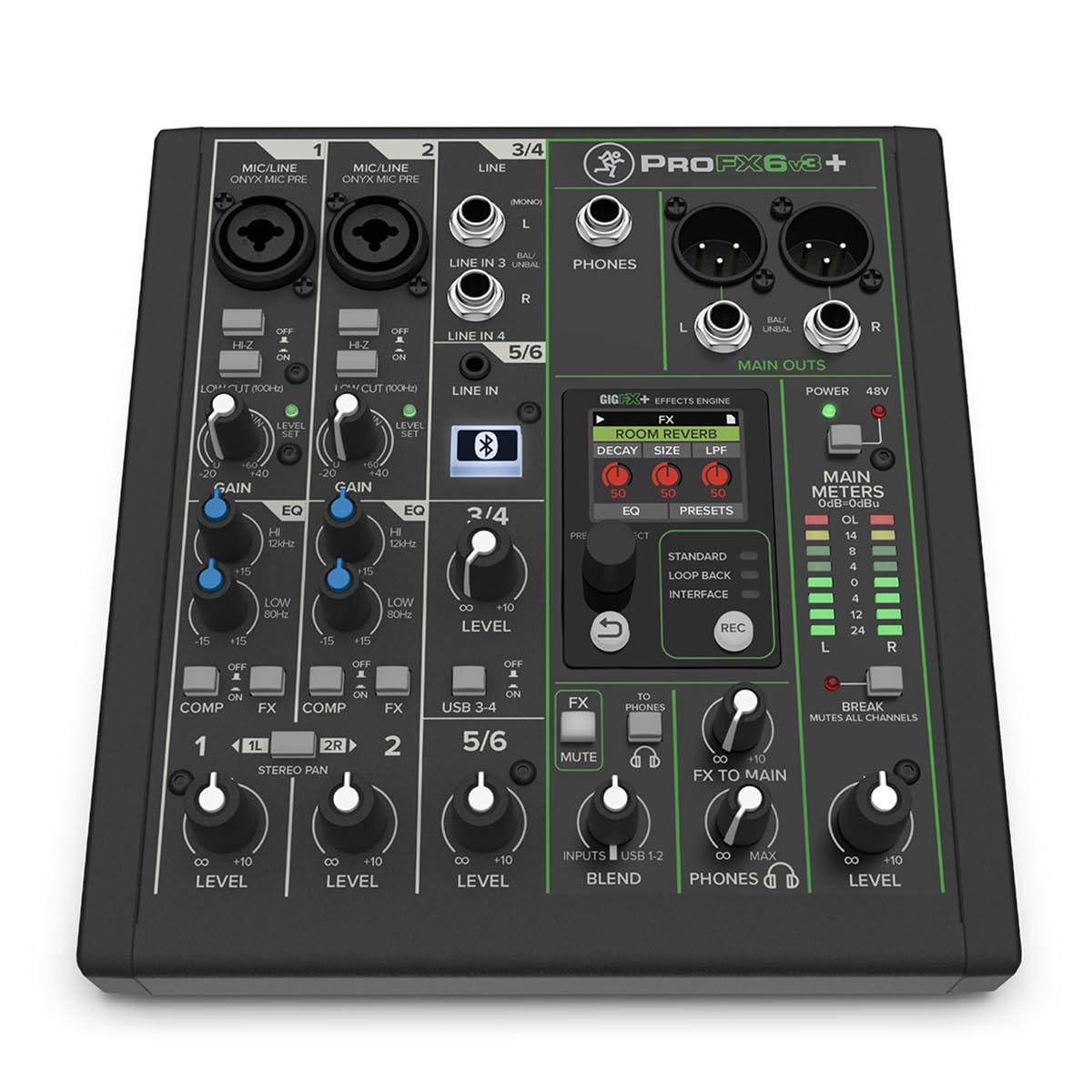
The Mackie ProFX6v3+ stands at the top of this list because it bridges analog warmth with digital precision better than any other mixer in this roundup. Its 6-channel analog frame houses Onyx mic preamps known for their low noise floor and high headroom, but the real star is the GigFX+ effects engine with a color LCD screen—letting you tweak reverb and delay presets visually without a computer. The 2×4 USB-C interface supports three recording modes: Standard for full mix capture, Loopback for streaming PC audio alongside your mic, and Interface mode for raw channel 1-2 recording.
For streamers, the dedicated Bluetooth channel with Mix Minus automatically removes the host’s audio from the phone call feed, preventing feedback loops—a feature usually reserved for broadcast consoles. Every channel gets 3-band EQ, a 100 Hz low-cut filter, and one-button compression, making voice clarity adjustable without menu diving. Users consistently report zero hiss or hum, even when cranking the master volume, which speaks to the quality of the internal power supply and shielding.
The trade-off is the lack of a second physical output bus for independent monitor mixes—you’ll need to step up to the larger ProFX10v3+ for that. Also, the onboard effects, while good, are preset-based rather than fully editable. However, as a centerpiece for a home studio or streaming desk where pristine USB audio and wireless call integration are critical, this mixer delivers professional-grade reliability.
Why it’s great
- Pristine Onyx pre-amps with switchable compression
- Loopback USB streaming with zero-latency monitoring
- Bluetooth Mix Minus for seamless phone-in calls
Good to know
- No secondary physical output bus for separate monitor mixes
- Windows requires driver install for full USB channel routing
2. Behringer FLOW 8

The Behringer FLOW 8 is the only purely digital mixer on this list, and its architecture changes what a compact PC mixer can do. Instead of analog pots and summing, it uses 60 mm channel faders and a master rotary encoder with an LED collar—giving you visual feedback on levels even in low light. The two Midas-designed mic preamps offer programmable gain and 48V phantom power, and the EZ-Gain function analyzes your input signal and sets the optimal level automatically, a huge time-saver during live setup.
Its Bluetooth connectivity goes beyond simple streaming; the FLOW App for iOS and Android allows you to control EQ, compression, and effects wirelessly from your phone or tablet, making it ideal for mobile DJs or performers who adjust their mix from the stage. The unit packs two independent FX processors with reverb, delay, and modulation, plus a 3-band EQ on every input. USB bus power means you can run it from a power bank or laptop battery for true portability, and it functions as a 4×4 USB audio interface.
The headphone amp is notably weaker than the main outputs, so monitoring with high-impedance headphones may require an external headphone amp. The micro USB port for data feels less durable than USB-C, and channels 3-4 introduce slightly more noise than the premium Midas channels 1-2. Still, for its price, the digital flexibility and remote control capability are unmatched.
Why it’s great
- Full wireless mixing via mobile app
- Midas mic preamps with automatic gain setting
- USB bus-powered for portable streaming
Good to know
- Weak headphone output for high-impedance monitors
- Micro USB connection feels less durable than USB-C
3. Focusrite Scarlett Solo 3rd Gen

The Focusrite Scarlett Solo is technically an audio interface, not a full mixing console, but its simplicity and exceptional pre-amp quality make it the top pick for solo creators. The single XLR/1/4″ combo input features Focusrite’s third-generation pre-amp with switchable Air mode, which emulates the high-frequency lift of the classic ISA pre-amp—adding clarity to vocals and acoustic guitars. The dedicated instrument input accepts high-impedance sources like electric guitars and basses directly, with a Gain Halo LED ring that turns green when signal is clean and red when you’re clipping.
With 2 balanced line outputs and a dedicated headphone jack, the Scarlett Solo acts as a high-fidelity sound card replacement. The 24-bit/192 kHz converters produce recordings that retain detail even in dense mixes. Users report seamless setup with Mac and Windows, as well as compatibility with virtually any DAW. The bundled software suite—Pro Tools Intro, Ableton Live Lite, and the Hitmaker Expansion—provides enough processing tools to start recording immediately.
The key limitation is the single mic input: if you need to record two speakers or a stereo mic pair, you’ll need the Scarlett 2i2 or a different mixer entirely. Also, the USB-C to USB-A cable is included, but no USB-C to USB-C cable for modern laptops. For solo podcasters, vocalists, or guitarists who prioritize pre-amp clarity over channel count, the Scarlett Solo delivers studio-grade audio in a pocket-sized form.
Why it’s great
- ISA-inspired Air mode brightens recordings noticeably
- Gain Halo provides instant visual clipping feedback
- Industry-leading bundled software value for beginners
Good to know
- Single XLR input limits dual-mic recording
- No included USB-C to USB-C cable
4. Pyle PMXU46BT

The Pyle PMXU46BT is a 4-channel analog mixer built for performers who need a physical fader-based workflow with Bluetooth convenience. The 4-channel frame includes 2 XLR/1/4″ combo inputs with individual +48V phantom power, plus stereo line inputs on channels 3-4. The standout feature is the 12-segment LED output meter (-30 to CLIP), which provides real-time visual feedback of your stereo bus level—a professional monitor that many mixers at this size omit. The included Bluetooth receiver lets you stream backing tracks from a phone directly into the mix.
Build quality is robust: the metal chassis and smooth faders withstand regular transport, and the 1/4″ send/return jacks allow integration with external effects pedals. The 3-band EQ on each channel (high, mid, low) gives adequate tonal shaping for vocals and instruments. The USB interface functions as a 2×2 interface for PC recording, and the control room output lets you monitor the mix without affecting the main outs.
Some users report the USB connection occasionally requires re-insertion on wake from sleep, and the phantom power is a global switch rather than per-channel, meaning you can’t mix condenser and dynamic mics without a workaround. Also, the headphone output level is fixed and tied to the control room volume, not independently adjustable. For live sound reinforcement and small venue performances where Bluetooth streaming and tactile control matter, this mixer offers excellent value.
Why it’s great
- 12-segment LED meter for accurate level monitoring
- Built-in Bluetooth for wireless backing track streaming
- Rugged metal chassis with smooth faders
Good to know
- Global phantom power switch, not per-channel
- Headphone volume is linked to control room output
5. Behringer XENYX 802S

The Behringer XENYX 802S brings an 8-input topology to the mid-range, even though it operates as a 5-channel mixer (2 mono, 2 stereo, plus stereo USB return). This configuration is perfect for users who need to juggle multiple line-level sources like a PC game audio feed, a microphone, and a podcast guest’s phone line simultaneously. The ultra-low noise XENYX pre-amps deliver an EIN of -130 dB, meaning background hiss is effectively absent even with the gain staged high.
The USB streaming interface handles 2×2 audio with direct mixing of PC/gaming sounds into the streaming output—ideal for streamers who want to capture console audio and microphone in one clean USB signal. The 3-band EQ on the mono channels provides effective frequency shaping, and the RCA tape input/output allows connection to external recorders. Users consistently praise the clarity of the main outputs and the lack of any hum or ground loop noise, even in complex setups with multiple power sources.
The main limitation is the absence of built-in effects or DSP, so you’ll need software-based reverb or external hardware. The channel layout can be confusing at first glance: it accepts 8 inputs but only has 4 channel faders. Also, the phantom power is switched globally across both mic inputs. For pure, uncolored analog mixing with USB connectivity at a reasonable investment, the 802S delivers dependable performance.
Why it’s great
- Ultra-low noise pre-amps with -130 dB EIN
- 8-input topology for multi-source PC setups
- Clean USB streaming directly from the mixer
Good to know
- No onboard effects or DSP processing
- Phantom power is a single global switch
6. Pyle PMX406ST
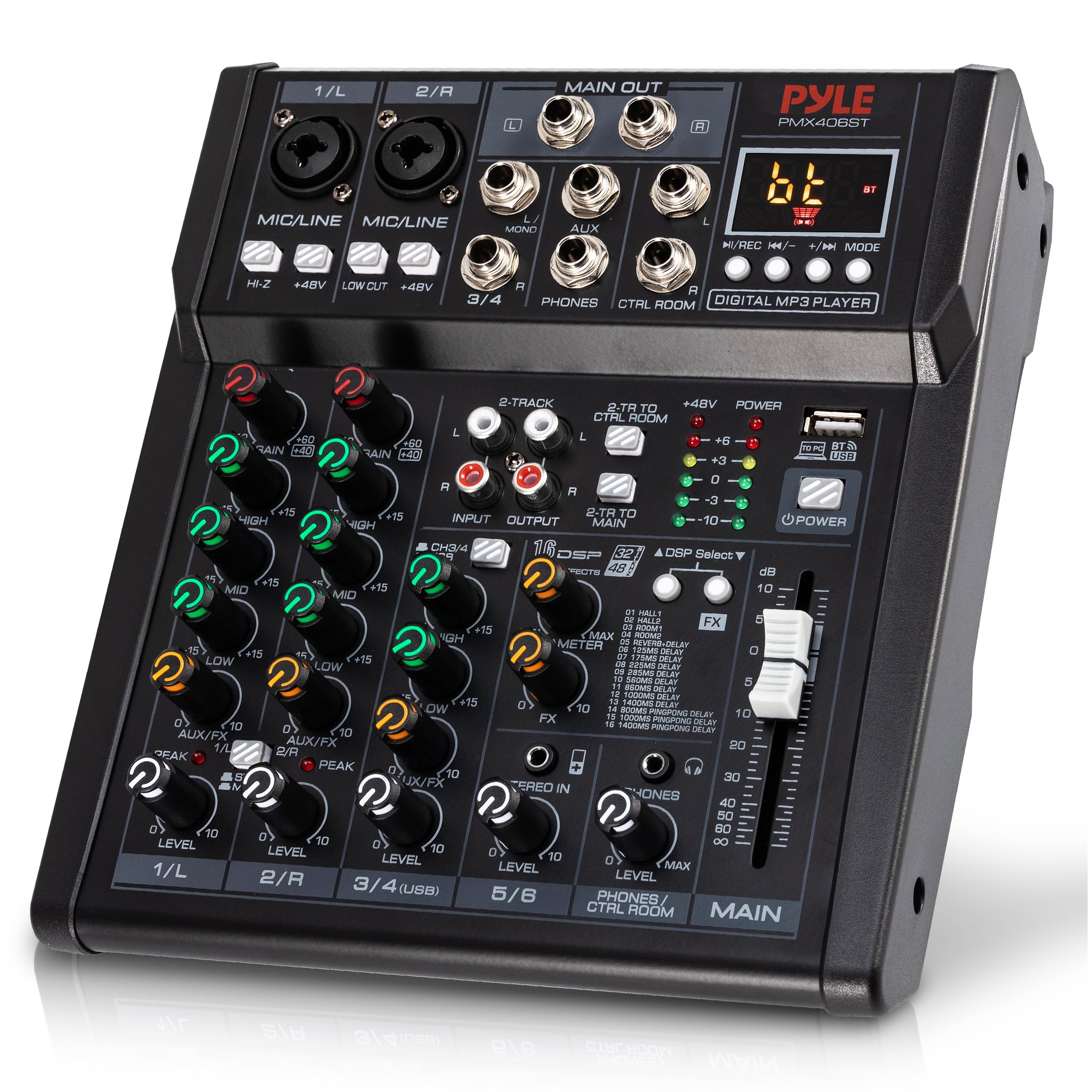
The Pyle PMX406ST is a 6-channel mixer that packs unusually deep features for its category, including a built-in DSP multi-effects processor with reverb and delay presets. Each of the two XLR/mic/line combo inputs has individual +48V phantom power switches and Hi-Z mode for instrument inputs, plus a low-cut filter to remove rumble. The real standout is the per-channel faders—rare at this level—giving you smooth level control that rotary knobs simply can’t match for precision fades.
The built-in digital MP3 player via USB drive and Bluetooth streaming capability mean you can integrate backing tracks or intermission music without occupying a mixer channel. The control room output and independent headphone volume allow private monitoring while the main output plays a different mix. The 3-band EQ on every channel (high, mid, low) is a significant upgrade over the 2-band EQ found on comparable budget mixers, enabling better vocal shaping.
The Bluetooth connection occasionally shows minor latency when used as an input channel, making it less ideal for real-time performance lip-syncing. The power is provided via a standard 12V DC adapter, not USB-C, so you’ll need a wall outlet. The unit size is compact but slightly taller than ultra-slim interfaces. For podcasters and content creators who want a complete desktop mixing solution with effects and multi-source inputs, the PMX406ST delivers surprising utility.
Why it’s great
- Built-in DSP reverb/delay effects for vocal polish
- Per-channel faders for precise level adjustment
- Individual +48V phantom switches on both mic inputs
Good to know
- Bluetooth latency may be noticeable for live syncing
- Requires a wall power adapter (no USB bus power)
7. Mackie Mix5

The Mackie Mix5 is the most compact and affordable entry point into quality PC audio mixing. Despite its small footprint (roughly the size of a paperback), it houses Mackie’s proven high-headroom, low-noise circuit architecture—the same engineering found in their professional consoles. The single XLR mic input with 2-band EQ and phantom power delivers studio-level clarity for a single condenser microphone, while the two stereo 1/4″ line inputs allow connection of a PC, game console, or media player output.
Dedicated stereo RCA inputs and outputs provide simple playback and recording routing without adapters, and the main L/R outputs feed studio monitors or a powered PA. Users report that the Mix5 eliminates static and back-feeding noise when switching between multiple computer audio sources, a common issue with direct sound card connections. The build quality is solid, with metal jacks and a compact metal chassis that survives desk moves and travel.
The absence of USB connectivity means this mixer cannot act as an audio interface—it’s purely analog, so you’ll need a separate sound card or interface to get audio into your computer. The headphone output volume is not independent from the main volume, making it less flexible for silent recording sessions. Also, the 15V phantom power (instead of standard 48V) limits compatibility with certain studio condenser mics. For a reliable, no-complications analog mixer for live hosting or simple mic mixing, the Mix5 is a durable starting point.
Why it’s great
- Legendary Mackie pre-amp design for low-noise audio
- Ultra-compact footprint fits any desktop setup
- Dedicated RCA I/O for simple stereo integration
Good to know
- No USB interface; analog signal only
- 15V phantom power limits full condenser mic compatibility
FAQ
Can I use a PC audio mixer as my computer’s only sound card?
What does loopback mode do for streaming?
How many channels do I need for a podcast with two hosts?
Is a digital mixer like the Behringer FLOW 8 better than an analog mixer for PC use?
Final Thoughts: The Verdict
For most users, the best audio mixer for pc winner is the Mackie ProFX6v3+ because it combines pristine Onyx pre-amps, flexible Loopback USB-C streaming, and Bluetooth Mix Minus for live calls in a single compact unit. If you want a lightweight, app-controlled digital mixer for portable gigs, grab the Behringer FLOW 8. And for solo creators who need a simple, high-fidelity interface for a single mic and guitar, nothing beats the Focusrite Scarlett Solo.