
Our readers keep the lights on and the weekend projects moving. As an Amazon Associate, I earn from qualifying purchases.
A color laser printer for the home solves a very specific frustration: inkjet cartridges that dry out, smear on important documents, and run empty at the worst possible moment. With a laser engine, you get crisp text, vibrant graphics, and toner that stays ready even after weeks of idle time. The challenge is finding a model that balances print speed, scan and copy functionality, and long-term running costs without overwhelming your desk space.
I’m Rikta — the co-founder and writer behind FitlyFast. My research for this guide involved cross-referencing print speeds, page yields, connectivity protocols, and real-world owner feedback across multiple price tiers to isolate the models that actually deliver for a home environment.
After analyzing dozens of units, eight all-in-one color laser printers earned a spot in my final assessment, and this guide breaks down exactly why each one matters. Here is your definitive look at the best all in one color laser printer for home use.
How To Choose The Best All In One Color Laser Printer For Home Use
A home color laser printer is a long-term investment. Unlike disposable inkjets, you will likely live with this machine for years, so the choices you make about speed, toner economics, and connectivity directly shape your daily experience. Below are the four factors that separate a great fit from a frustrating one.
Print Speed and First-Page-Out Time
Pages per minute (ppm) tells you how fast the engine runs once it gets going, but first-page-out time matters just as much for short home print jobs. A 19 ppm printer is perfectly adequate for occasional use, while 26 to 35 ppm models reduce waiting during multi-page school reports or work documents. If you frequently print double-sided, confirm the printer has automatic duplex — manual flipping is tedious and rarely aligns correctly.
Toner Economics and Replacement Cost
Every color laser printer ships with starter cartridges that yield far fewer pages than standard or high-yield replacements. Before buying, check the price of a full set of genuine replacement toners (black, cyan, magenta, yellow). Some printers command a premium per page even if the hardware is cheap, while others like Brother models offer super high-yield cartridges that drive the cost-per-page below inkjet levels. Budget for toner, not just the printer.
Paper Handling and Physical Footprint
A 250-sheet input tray suits most home needs, but families printing multiple projects in one session may prefer a 550-sheet option or an expandable cassette. The multipurpose tray should handle envelopes, card stock, and labels without jamming. Also measure the depth and width of the printer plus clearance for the rear paper path — many laser printers are deeper than they look in product photos and require breathing room for warm air exhaust and paper exit.
Wireless Reliability and Mobile Integration
Home printers rely heavily on Wi-Fi, so dual-band (2.4 GHz and 5 GHz) support is important. Some models lose connection after entering sleep mode and require a full power cycle, a headache if the printer is across the house. Look for models that include Wi-Fi Direct for router-free printing, and check that the companion app supports scanning to your phone without a middleman computer. Apple AirPrint and Mopria certifications ensure seamless iOS and Android compatibility.
Quick Comparison
On smaller screens, swipe sideways to see the full table.
| Model | Category | Best For | Key Spec | Amazon |
|---|---|---|---|---|
| Canon MF662Cdw | All-in-One | Balanced home office speed | 26 ppm color, 5″ touchscreen | Amazon |
| Canon MF751Cdw II | High-Speed MFP | Fast multi-user households | 35 ppm, 50-sheet ADF | Amazon |
| Brother MFC-L8930CDW | Business Pro | High-volume scanning | 33 ppm, 7″ touchscreen, NFC | Amazon |
| Xerox C325dni | High-Speed MFP | Fast home office output | 35 ppm, 4.3″ touchscreen | Amazon |
| HP Color LaserJet Pro 3201dw | Wireless MFP | Compact office desktop | 26 ppm, auto-duplex, TerraJet toner | Amazon |
| Xerox C235dni | Entry MFP | Budget-minded home setup | 24 ppm, starter toner included | Amazon |
| Brother HL-L3300CDW | 3-in-1 MFP | Homeschooling and family use | 19 ppm, 250-sheet tray | Amazon |
| Brother HL-L3220CDW | Print Only | Print-only with no scanning needs | 19 ppm, automatic duplex | Amazon |
In‑Depth Reviews
1. Canon Color imageCLASS MF662Cdw
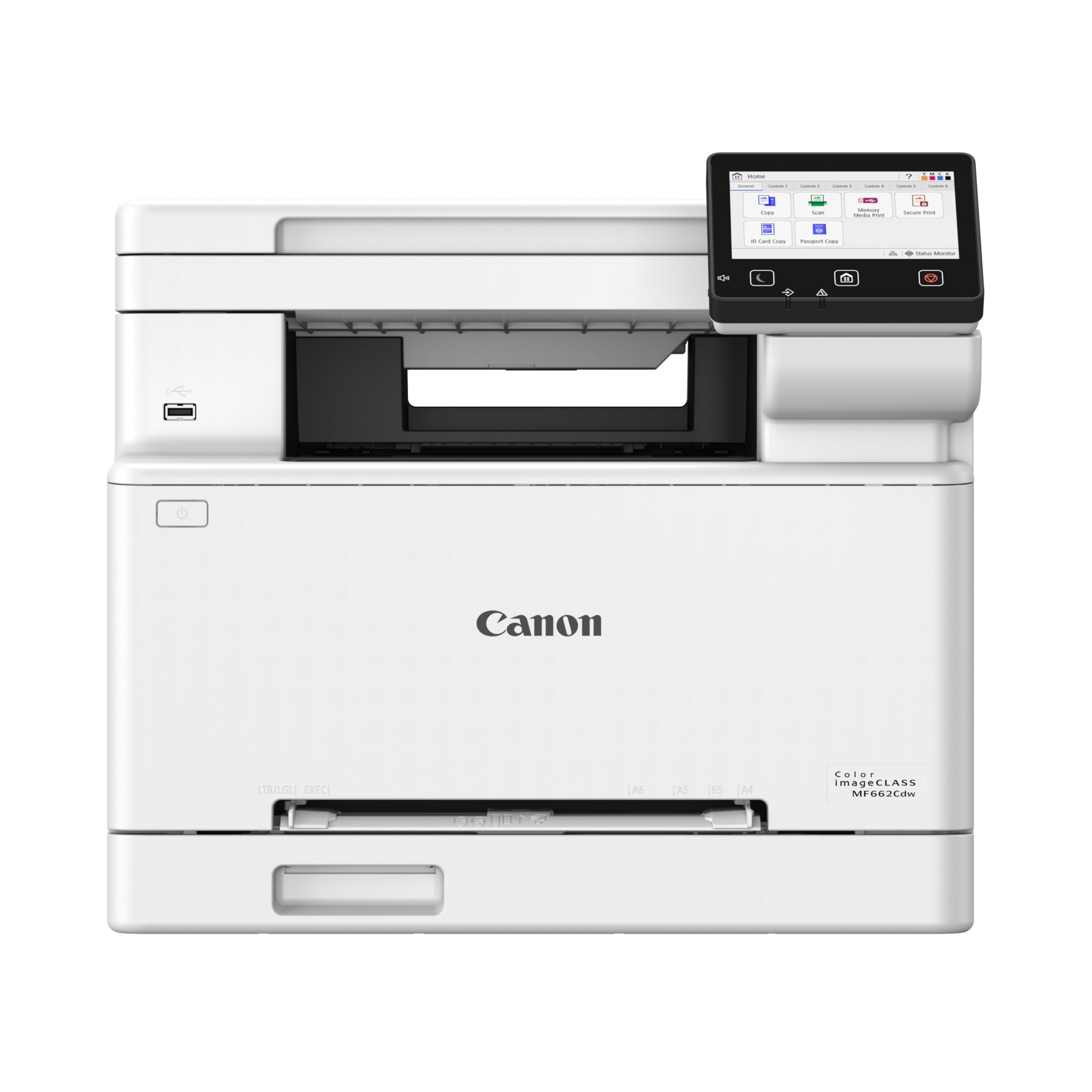
The Canon MF662Cdw delivers an exceptional middle ground for home users who need scan, copy, and fast color output without stepping into business-class pricing. Its 26 ppm print speed in both color and monochrome is noticeably quicker than the entry-level 19 ppm class, and the 5-inch color touchscreen with Application Library makes shortcut access genuinely useful. Owners consistently praise the crisp text and vibrant graphics, and the 3-year limited warranty provides confidence that is rare at this price point.
Setup is straightforward for the tech-comfortable, though the printer cannot stay connected to Wi-Fi after entering deep sleep — several owners resolved this by switching to a wired Ethernet connection. The bundled starter toner yields are acceptable, but replacement 075 cartridges run about each, meaning a full set costs roughly what you paid for the printer itself. That is not unusual for mid-range color laser, but it is worth factoring into your long-term budget.
Where this printer truly shines is output quality and speed. Duplex printing works reliably, photo handling on glossy paper is better than most lasers, and the scanner produces clean, well-exposed copies. If you can hardwire it or live with a periodic reconnection dance, the MF662Cdw is a balanced, fast, and well-supported choice for the home office.
Why it’s great
- Fast 26 ppm color and mono printing
- Intuitive 5-inch color touchscreen with customizable shortcuts
- 3-year limited warranty provides peace of mind
Good to know
- Wi-Fi can drop after sleep; best used with Ethernet
- Replacement toner is expensive (about per color)
- Heavy at 55 pounds; needs a sturdy desk
2. Canon Color imageCLASS MF751Cdw II

The MF751Cdw II is the flagship of Canon’s current home-office color laser lineup, pushing print speed to 35 ppm in both black and color with a first-page-out time of roughly 7 seconds. That makes it one of the fastest all-in-one units available for the home, and the 50-sheet automatic document feeder (ADF) gives it genuine multi-page scanning capability rarely seen in this price tier. The 5-inch color touchscreen mirrors the MF662Cdw interface but the processor feels snappier when navigating menus and previewing scans.
Owner feedback is split on wireless reliability — AirPrint sometimes refuses to discover the printer despite Bonjour being enabled, requiring the Canon PRINT app as a workaround. Mac users also report that the printer loses connection after sleeping and needs a power cycle. The 250-sheet standard cassette can be expanded with an optional 550-sheet cassette, which is a welcome flexibility for busier households. Toner replacement uses the 069 series, and high-yield cartridges are available to lower cost per page, though starter yields are modest (1,100 pages per color, 2,100 for black).
Print quality is excellent across plain paper, card stock, and envelopes, and the scan-to-email and cloud features work well once configured. If you value raw speed and a robust ADF for scanning school packets or work documents, this is the unit to beat. Just plan on using a wired connection or be prepared for occasional Wi-Fi hiccups.
Why it’s great
- Class-leading 35 ppm speed in color and mono
- 50-sheet ADF for multi-page scanning
- Expandable paper capacity with optional cassette
Good to know
- AirPrint connectivity can be unreliable
- Mac users report sleep-mode disconnections
- Starter toner yields are moderate; budget for high-yield replacements
3. Brother MFC-L8930CDW

Brother’s MFC-L8930CDW is built for the power-user home office that scans almost as much as it prints. The 80-page automatic document feeder supports double-sided scanning at up to 104 images per minute, and the legal-size glass bed means you can archive large documents without folding. The 7-inch color touchscreen is the largest in this comparison, and it supports up to 64 customizable shortcuts — a genuine time-saver for recurring scan-to-email or scan-to-SharePoint tasks.
Print speed of 33 ppm puts it near the top of the heap, and the included toner (3,000-page black, 1,800-page color) is generous compared to the starter cartridges from Canon and HP. Super high-yield TN635XXL replacements push black yield to 7,500 pages and color to 6,500, making the cost-per-page competitive with any inkjet. Triple Layer Security with an integrated NFC card reader may be overkill for most homes, but it signals the build quality and firmware support you get with a business-class machine.
The downsides are weight — 71 pounds makes it a two-person installation — and the premium upfront cost. Some Mac users found that Firefox displays scanned PDFs as gray blobs (resolved by switching to Foxit Reader), but that is a software quirk rather than a hardware flaw. If your home workflow involves frequent scanning, high-volume printing, and you value low long-term toner costs, this Brother is the most capable machine on the list.
Why it’s great
- 80-sheet ADF with 104 ipm duplex scanning
- Generous 7-inch touchscreen with 64 custom shortcuts
- Low cost-per-page with super high-yield toner
Good to know
- Very heavy at 71 pounds; plan for two-person setup
- Must use Foxit Reader on some systems for proper PDF rendering
- Security features like NFC may not be needed at home
4. Xerox C325dni

The 4.3-inch color display is smaller but still responsive, and the built-in Ethernet and dual-band Wi-Fi gave owners a reliable connection in testing — fewer sleep-mode complaints than some competitors. Starter toner includes 1,500-page black and 1,000-page color cartridges, which is decent for getting started.
Print quality on plain paper and card stock draws praise from owners, and the duplex scanner handles double-sided originals without issue. The web-based interface is functional but clunky, and setting up scan-to-network folders requires navigating a few menus. Some users found that the printer consumed toner faster than the rated page yields, though that may depend on print coverage and driver settings. The compact footprint relative to its speed is a plus for smaller desks.
If you need 35 ppm speed with a solid feature set and are comfortable with a slightly less polished software experience, the C325dni delivers. Just be aware that genuine Xerox toner does not come cheap, and the starter yields are not generous enough to delay your first replacement set for long.
Why it’s great
- Fast 35 ppm color and black speed
- Reliable dual-band Wi-Fi with fewer sleep issues
- Compact for a high-speed laser MFP
Good to know
- Web interface feels dated and scan setup requires patience
- Replacement toner is expensive and starter yields are moderate
- Some owners report higher toner consumption than rated page yields
5. HP Color LaserJet Pro 3201dw

HP’s Color LaserJet Pro 3201dw is the lightest full-featured color laser on this list at 33 pounds, making it one of the easier units to move into position. Print speed hits 26 ppm in both color and black, and the TerraJet toner technology delivers genuinely vivid color output that owners describe as a step above older HP laser engines. The integrated dual-band Wi-Fi includes a self-reset feature that automatically reconnects after network interruptions — a thoughtful touch that addresses the most common home-printing complaint.
Owner satisfaction is high during the first few months, but reports of trouble after the initial toner runs out are common. Replacement HP 218a cartridges have been criticized for producing faded or unreadable prints, and some owners found that third-party cartridges with the correct chip still did not work. HP’s firmware update policy blocks non-HP circuitry, leaving you locked into OEM toner that costs as much or more than comparable Brother or Canon cartridges. The scanner also requires the HP Smart phone app, which surprised some buyers expecting a traditional scan-to-PC workflow.
The 3201dw is a well-built, fast printer that fits comfortably on a home desk. If you are comfortable with HP’s cartridge ecosystem and plan to stick with genuine supplies, the initial output quality and wireless reliability are hard to beat. Just factor the replacement toner cost into your decision.
Why it’s great
- Lightweight and compact at 33 pounds
- TerraJet toner produces vivid, professional color
- Self-resetting Wi-Fi handles network drops gracefully
Good to know
- Replacement 218a toner is expensive and some batches produce poor results
- Firmware locks out non-HP cartridges
- Scanner requires phone app; no direct scan-to-PC via button
6. Xerox C235dni

The Xerox C235dni is the most affordable all-in-one color laser in this roundup, and it does not skimp on the essential functions: print, scan, copy, and fax in a single chassis. Print speed of 24 ppm splits the difference between budget and mid-range, and the starter toner (500-page yield) is enough to get through the first several weeks of moderate use. Owners consistently note that the setup app streamlines the process compared to traditional driver installations, and the wireless connection holds reliably once configured.
The main trade-off is in scanner quality. Several owners report that scans and copies come out noticeably light even after adjusting darkness settings, and the Windows driver installation can fail if you do not have an optical drive (the SmartStart utility sometimes fails to discover the printer on newer Windows 11 systems). Xerox support response times are a common complaint. On the positive side, paper handling for card stock and envelopes is solid, and switching to higher-quality paper like Hammermill Premium solved the light print issue for some users.
For the home user who prints occasionally and wants a capable all-in-one without a large upfront investment, the C235dni is a reasonable choice. If scanning quality is critical, you may want to step up to the Canon MF662Cdw or Brother MFC-L8930CDW.
Why it’s great
- Lowest entry price among all-in-one color lasers
- 24 ppm is respectably fast for occasional home use
- Setup app simplifies the wireless installation process
Good to know
- Scanner produces light copies; requires darkness adjustments or premium paper
- Windows SmartStart driver fails for some users on Windows 11
- Xerox customer support has slow response times
7. Brother HL-L3300CDW (Renewed Premium)
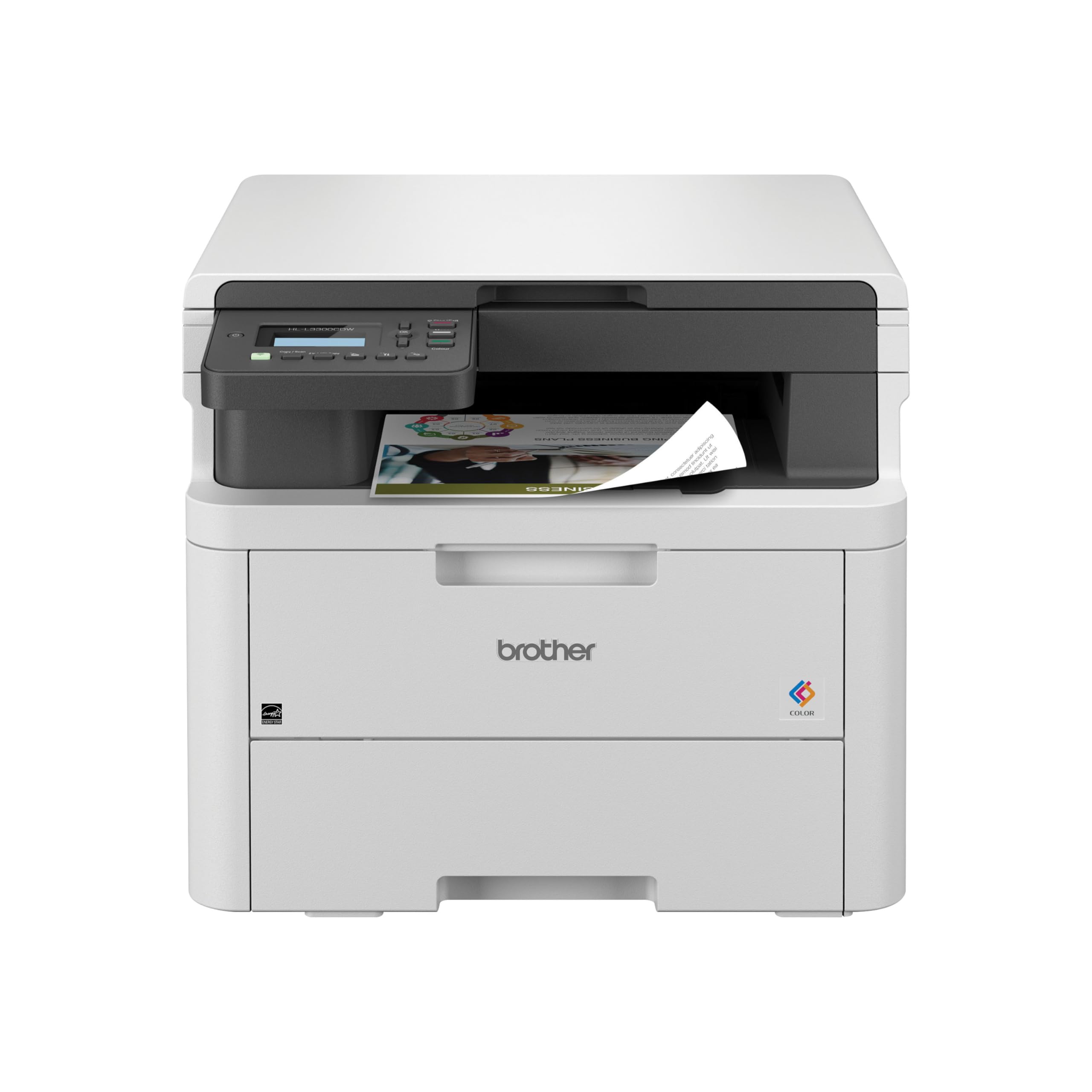
The Brother HL-L3300CDW arrives as a renewed premium unit, meaning it is a certified refurbished model that has been tested and comes with a warranty — often at a discount versus new. It is a 3-in-1 with flatbed scan and copy, print speeds of 19 ppm, and a compact footprint that fits easily on a home desk. Brother’s strength in reliability is on full display here: owners report that the factory toner still lasts a year under moderate use, and wireless setup via the Brother Mobile Connect app is straightforward.
The print quality is identical to Brother’s new units — crisp text, bright color, and solid card stock handling. The 250-sheet tray is adequate for a family and the manual feed slot handles envelopes without jamming. However, this is a renewed product, so cosmetic condition may vary, and some owners received units with slightly higher page counts than expected. The forced ink subscription tie-in that some Brother units push through the app is annoying, but you can decline it and continue using standard cartridges.
If you are price-sensitive and want Brother’s legendary reliability without paying new pricing, this renewed model is a smart buy. Just confirm the warranty terms before purchasing, and be prepared that a small minority of units have had setup issues with macOS.
Why it’s great
- Reliable Brother print engine with long-lasting starter toner
- Compact size fits small home desks
- Renewed pricing offers significant savings over new
Good to know
- Renewed condition; cosmetic imperfections possible
- Subscription upsell in the app can be annoying
- Some macOS users report wireless setup challenges
8. Brother HL-L3220CDW

The Brother HL-L3220CDW strips away the scanner and copier to deliver a pure print experience at a lower price point. For home users who already own a document scanner or simply do not need copying, this eliminates a failure point while keeping the same reliable color laser engine found in Brother’s all-in-one models. Print speed is 19 ppm in both color and black, and the automatic duplex printing works without complaint — owners consistently praise the paper handling and jam-resistant design.
The HL-L3220CDW is the most compact color laser on this list, and the included high-yield toner cartridges mean you can print hundreds of pages before needing replacements. Setup is straightforward on Windows via USB or Wi-Fi, but macOS users have reported a frustrating certificate-based connection issue that requires creating a self-signed certificate and trusting it in Keychain — a non-trivial step for casual users. Once configured, however, the print quality is excellent, with reviewers calling out crisp text and vibrant color reproduction.
This printer is ideal for a home that prints frequently but has no need for scanning or copying at the device. If you can handle the macOS setup quirks or are on Windows, the HL-L3220CDW offers Brother’s best value in a pure print unit.
Why it’s great
- Compact design saves desk space
- High-yield starter toner included with long page life
- Reliable auto-duplex with minimal jams
Good to know
- No scan or copy function; print-only
- macOS setup requires manual certificate configuration
- Heavy for its size at ~50 pounds
FAQ
How long does starter toner last in a color laser printer?
Can a color laser printer print on card stock and photo paper?
Why does my color laser printer lose Wi-Fi connection after sleeping?
How much does it cost to replace all four toner cartridges on a home color laser?
Final Thoughts: The Verdict
For most users, the best all in one color laser printer for home use winner is the Canon MF662Cdw because it delivers a fast 26 ppm engine, a responsive 5-inch touchscreen, and an impressive 3-year warranty at a mid-range price point. If you need maximum speed and a powerful automatic document feeder for heavy scanning, grab the Canon MF751Cdw II. And for the home office that scans high volumes and wants the lowest long-term toner cost, nothing beats the Brother MFC-L8930CDW.