
Our readers keep the lights on and the weekend projects moving. As an Amazon Associate, I earn from qualifying purchases.
A cramped desk forces a diagonal mouse position mid-firefight, and that split-second of adjusting aim often costs the round. The 65% layout solves this by shaving off the number row and function cluster, giving your mouse arm the horizontal room it needs without sacrificing dedicated arrow keys or the tilde key. This form factor has become the default for competitive FPS players who value uninterrupted mouse swipes over seldom-used keys.
I’m Rikta — the co-founder and writer behind FitlyFast. I’ve spent hundreds of hours analyzing switch actuation curves, PCB flex-cut patterns, and polling rate architectures to identify which 65% models actually deliver on their speed and durability claims.
This guide breaks down the mechanical and magnetic switch options, gasket vs. tray-mounted builds, and sound-dampening layers that define the modern 65% gaming keyboard landscape, so you can pick a board that feels precise rather than cramped.
How To Choose The Best 65% Gaming Keyboard
A 65% keyboard drops the number row, function row, and navigation cluster, keeping only the alphanumeric keys plus dedicated arrow keys. This makes every square inch of desk space count, so the internal construction — switch type, mounting style, and sound dampening — becomes the deciding factor in whether a board feels solid or hollow. Buyers new to this form factor often overlook the PCB mounting style, assuming all compact boards feel the same.
Switch Technology: Mechanical vs. Hall Effect vs. Optical
Traditional mechanical switches use metal leaf contact to register a keypress, typically rated for 50-80 million presses. Hall Effect switches use magnets and sensors to detect actuation without physical contact, enabling adjustable actuation points (0.1mm to 3.8mm) and rapid trigger functionality that resets the switch the moment you lift your finger. Optical switches sit between the two — faster than mechanical because they use light interruption, but without the analog adjustability of magnetic switches. For competitive FPS and rhythm games, Hall Effect boards offer the fastest repeatable inputs.
Mounting System: Gasket vs. Tray vs. Integrated Plate
A gasket-mounted PCB floats between layers of silicone or foam, isolated from the case, which absorbs vibration and produces a deeper, thockier sound profile. Tray-mounted boards screw directly into the bottom case — they are cheaper to manufacture but transmit more key-bottom-out harshness to your fingertips. Flex-cut polycarbonate plates, often found in higher-tier gasket boards, create a springy feel under the fingers that reduces fatigue during long sessions. Most budget 65% boards are tray-mounted, which is fine for casual use but noticeable during rapid, repeated keystrokes.
Sound Dampening Layers
Decent boards include at least one layer of foam between the PCB and the case to absorb pinging and hollow reverberations. Premium models stack four or five layers — Poron foam, IXPE switch pads, PET sound enhancers, and bottom silicone pads — to eliminate metallic clatter and create a creamy, controlled acoustic signature. The number of layers directly correlates with how much case resonance you hear; three layers is the practical minimum for a satisfying stock sound.
Quick Comparison
On smaller screens, swipe sideways to see the full table.
| Model | Category | Best For | Key Spec | Amazon |
|---|---|---|---|---|
| EPOMAKER x Aula F65 | Wireless Gasket | Thocky typing & low-latency wireless | 4000mAh battery, 5-layer Poron foam | Amazon |
| Corsair K65 PRO Mini | Optical Wired | 8kHz AXON speed & iCUE ecosystem | OPX optical switch, 150M lifespan | Amazon |
| ARBITER Polar 65 | Magnetic CNC | Rapid trigger & adjustable actuation | 36g Fuji Hall, 0.1-3.8mm actuation | Amazon |
| YUNZII AL66 | Aluminum Wireless | CNC unibody & knob control | Full aluminum, 5000mAh battery | Amazon |
| HyperX Alloy Origins 65 | Mechanical Wired | Brightest RGB per-key LED | Aluminum frame, PBT double-shot caps | Amazon |
| EPOMAKER HE68 Lite | Hall Effect Wired | Esports rapid trigger on a budget | 8kHz polling, 0.005mm RT adjustment | Amazon |
| Redragon K631 Gery | Budget Hot-Swap | Entry-level modding platform | Hot-swap 3/5-pin, 68-key layout | Amazon |
In‑Depth Reviews
1. EPOMAKER x Aula F65 65% Wireless

The F65 combines a true gasket mount with a five-layer Poron and IXPE dampening stack, producing the deep thocky sound profile that mechanical keyboard enthusiasts gravitate toward. The polycarbonate flex-cut plate absorbs bottom-out shock, making sustained typing sessions noticeably more comfortable than any tray-mounted board in its class. The Reaper switches come factory-lubed and feel smooth right out of the box with no scratchiness on the upstroke.
Three-way connectivity — Bluetooth 5.0, 2.4GHz wireless, and USB-C — gives you the flexibility to jump between a desktop PC, a laptop, and even a tablet without unplugging cables. The 4000mAh battery delivers weeks of mixed-use runtime with RGB enabled. South-facing LEDs ensure compatibility with Cherry-profile keycap sets if you decide to swap caps later. The side RGB bar adds a subtle ambient glow that doesn’t distract during gameplay.
At this price point, the F65 delivers a pre-lubed gasket experience that typically requires aftermarket modding on cheaper boards. The lack of a function row is the trade-off for the compact footprint, but the dedicated arrow keys and secondary function layer handle 95% of non-gaming tasks. Reviewers consistently praise the build weight and the absence of case ping, which is rare for wireless boards under this tier.
Why it’s great
- True gasket mount with flex-cut PC plate
- Pre-lubed Reaper switches sound smooth and deep
- 4000mAh battery with low-latency wireless
Good to know
- No dedicated function row — relies on Fn layer
- Keycap legends may appear slightly smudged on some units
2. Corsair K65 PRO Mini RGB 65%

Corsair’s OPX optical-mechanical switch uses light beams instead of metal leaf contacts, eliminating debounce delay entirely. The result is a linear keystroke that registers faster than any conventional mechanical switch — 8x faster through AXON Hyper-Processing Technology, which transmits inputs at up to 8000Hz polling. The two layers of internal sound dampening soften the bottom-out thud, so the board sounds crisp rather than clattery despite the optical switch’s speed.
The all-aluminum frame gives the K65 PRO Mini a dense, premium heft that resists sliding even during aggressive mouse movements. PBT double-shot keycaps resist shine and wear far better than the ABS caps found on many gaming boards at this tier. The iCUE software unlocks 20-layer RGB effects and per-key lighting customization, though the macro editor is more limited than some competitors. The detachable USB-C cable and included radiant spacebar cap add practical and cosmetic value out of the box.
Because optical switches lack adjustable actuation like magnetic Hall Effect boards, the K65 PRO Mini is best for players who want a consistent, lightning-fast linear switch without any software tweaking. The 65% layout keeps arrow keys intact, making it viable for both gaming and productivity. Reviewers note the board takes a short adjustment period due to the optical switch’s shorter travel, but once accustomed, the responsiveness feels immediate.
Why it’s great
- OPX optical switches register faster than mechanical
- 8000Hz polling via AXON processing
- Aluminum build with PBT double-shot keycaps
Good to know
- iCUE software has limited macro support
- Function key placement may feel off for certain secondary commands
3. ARBITER Polar 65 CNC Magnetic

The Polar 65 uses Fuji Hall Effect switches with 36g linear force and 0.1mm to 3.8mm adjustable actuation, giving you control over exactly how deep a keypress needs to be before it registers. The rapid trigger feature resets the switch instantly the moment your finger lifts by even a fraction of a millimeter, which is critical for counter-strafing in tactical shooters where every frame of re-positioning matters. Latency sits under 1ms for the full input chain.
The CNC-machined aluminum frame combined with dual silicone dampening creates a board that feels both heavy and acoustically dead — no hollowness or metallic ping even when bottoming out hard. Screw-in stabilizers on the spacebar and plate-mounted stabilizers on the larger keys keep rattle to an absolute minimum. The dual-shot PBT keycaps have a subtle matte texture that resists fingerprints and stays grippy during long sessions. No software installation is required; all customization happens through a web-based app with onboard memory that stores profiles.
At this price, the Polar 65 competes directly with boards that charge significantly more for the same Hall Effect internals. The trade-off is a wired-only connection — no Bluetooth or 2.4GHz wireless — which may disappoint users who switch between multiple devices. Typing feels slightly heavier than traditional mechanical switches due to the magnetic resistance, but for gaming-specific use, the rapid trigger advantage outweighs the typing nuance.
Why it’s great
- 0.1mm to 3.8mm adjustable actuation with rapid trigger
- CNC aluminum frame with silicone dampening
- Web-based customization, no bloated software
Good to know
- Wired only — no wireless option
- Magnetic switches feel slightly heavier for typing
4. YUNZII AL66 Wireless Mechanical

The AL66 is one of the few truly full-aluminum boards at this price point — the entire chassis is machined from a single block of aluminum, then anodized for corrosion resistance. This gives it a weight that anchors the board on any desk surface without rubber pads. The gasket mount and polycarbonate plate deliver a plush typing feel, and the pre-lubed Milk switches glide smoothly with almost no spring crunch. The board supports three connectivity modes and can store Bluetooth connections for four devices simultaneously.
The multifunction knob handles RGB mode switching, brightness, and volume control via a three-second press toggle. The 5000mAh battery is among the largest in the 65% category, rated for up to 90 hours of continuous typing with RGB off and significantly longer with conservative backlight use. South-facing RGB LEDs ensure even illumination across all keycaps, and the 14 default lighting effects provide decent variety without needing the software. The included dust cover and extra switches add genuine value for those who plan to customize.
Some buyers note the fixed typing angle with no adjustable feet — the board sits at a single incline that may not suit everyone. The knob mechanism feels slightly loose on early units, though later batches appear to have tightened the tolerance. The software is only available for Windows, limiting Mac users to onboard controls only. Despite these small ergonomic quirks, the AL66 offers a build material and battery capacity that outclasses most competitors in this bracket.
Why it’s great
- Full CNC aluminum chassis, anodized finish
- 5000mAh battery, 90-hour rated life
- Quad-device Bluetooth switching
Good to know
- No adjustable feet — single fixed angle
- Knob has minor wobble on some units
5. HyperX Alloy Origins 65

HyperX built the Alloy Origins 65 around what matters most to gamers who want immediate visual feedback — the per-key RGB LEDs are exceptionally bright with five adjustable brightness levels, and the software color representation is accurate enough that pudding keycaps look spectacular. The aluminum frame gives the board rigidity and a low center of gravity, though the overall chassis is surprisingly thin, which may require a wrist rest for extended sessions. The red linear switches are smooth and quiet, but the stabilizers exhibit more lateral play than competing boards in this class.
The PBT double-shot keycaps resist wear and feel texture-rich under the fingers, though the symbol legends can appear slightly blurry compared to laser-etched caps. HyperX’s NGENUITY software is the biggest weak point — it requires the Windows Store for installation, crashes intermittently, and forces custom profiles to be reloaded each session. The board is not hot-swappable, so switch replacement requires soldering. Standard MX stems do allow keycap swaps, and the standard bottom row makes finding aftermarket sets easy.
USB-C connectivity and PlayStation 4, PlayStation 5, Xbox Series S, and Xbox Series X compatibility make the Alloy Origins 65 a strong candidate for multi-console setups. The 65-key layout includes dedicated arrow keys but uses an Fn layer for media control, which is standard for the form factor. For users who prioritize brightness and solid aluminum construction over hot-swap capability and software stability, this board delivers consistent performance.
Why it’s great
- Per-key RGB is extremely bright and color-accurate
- Aluminum frame with USB-C and console support
- PBT keycaps resist shine over time
Good to know
- NGENUITY software is buggy and crashes often
- Not hot-swappable — switches require soldering to replace
6. EPOMAKER HE68 Lite Hall Effect
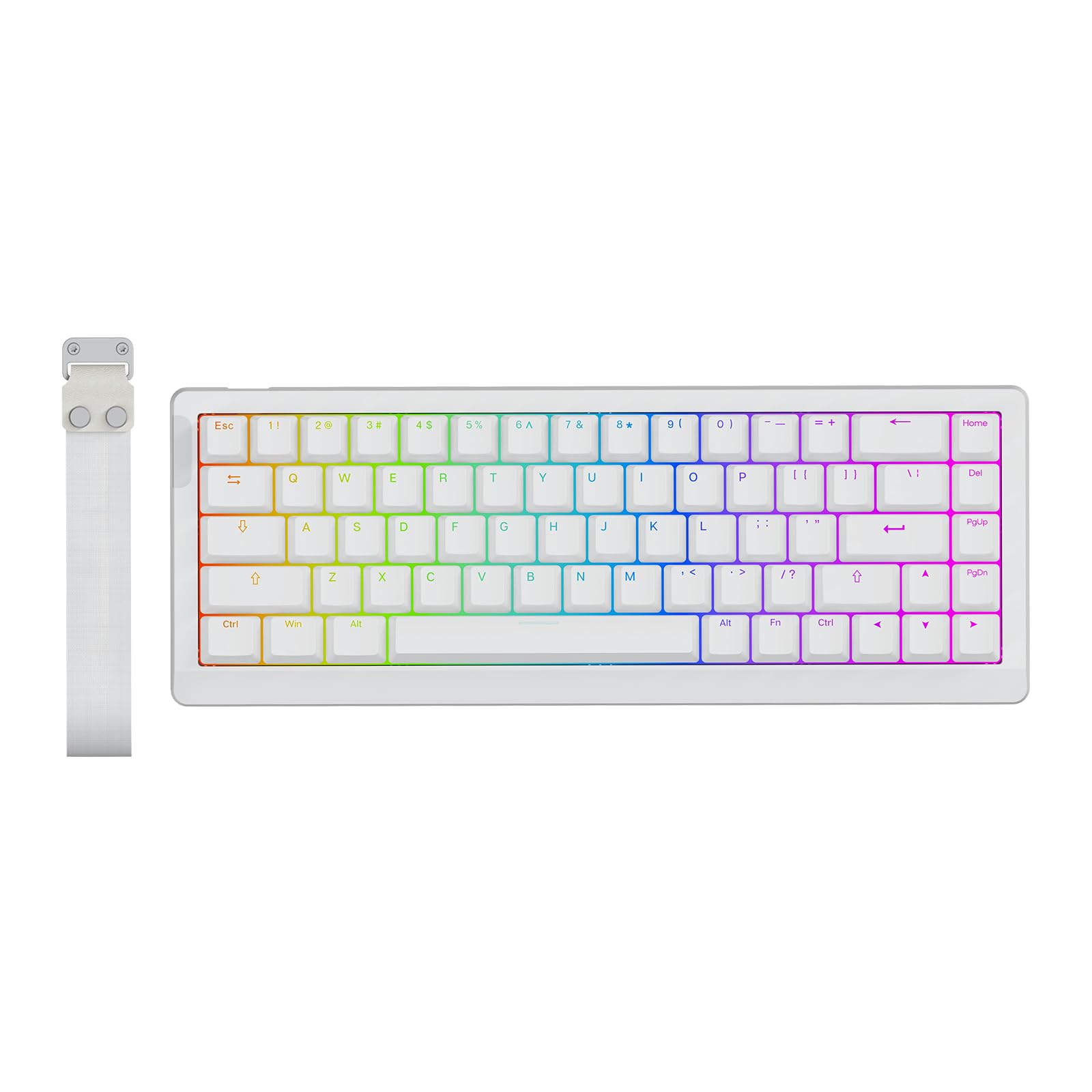
The HE68 Lite brings Hall Effect performance to a budget-friendly price point without cutting critical esports features. The 8kHz polling rate and 128kHz per-key scan rate mean every rapid-fire sequence — whether in Valorant or Osu — is captured with no skipped inputs. The 0.005mm adjustable rapid trigger travel and zero dead zone support allow for actuation at the slightest finger lift, matching the responsiveness of magnetic boards costing several times more. The five-layer sound dampening produces a creamy thock that rivals many higher-tier mechanical boards.
A-RGB backlighting uses a two-layer system that combines a steady under-glow with dynamic key-specific lighting — triggered keys illuminate while the rest of the board maintains ambient color, improving visual feedback during gameplay. The PBT keycaps are grease-resistant and shine-through compatible, keeping legends readable even in low-light sessions. The software, available for both Mac and Windows, supports Snap Key (SOCD), Dynamic Keystroke (DKS), and Mod Tap functions that competitive players rely on for advanced movement tech.
The ABS plastic case feels less premium than the aluminum boards in this list, and the included cable is not braided. The board is wired-only, which is fine for competitive setups but limits desk cable management options. Some users report the software interface requires patience during initial configuration, but once profiles are saved to onboard memory, the board operates independently. For the price, the HE68 Lite offers the fastest magnetic input processing available.
Why it’s great
- 8kHz polling with 128kHz per-key scan
- 0.005mm adjustable rapid trigger with zero dead zone
- Five-layer sound dampening in a budget chassis
Good to know
- Plastic case feels less premium than aluminum alternatives
- Software setup can be unintuitive for first-time users
7. Redragon K631 Gery 65% Wired

The K631 Gery serves as an ideal starting point for anyone new to mechanical keyboards who wants to learn soldering-free customization. The 100% hot-swap socket accepts both 3-pin and 5-pin switches, and the plate-mounted PCB has ample internal space for foam or clay mods that significantly improve the stock acoustic profile. The 68-key layout keeps dedicated arrow keys and a right shift key, avoiding the cramped feel of smaller 60% boards. The included keycap puller, extra keycaps, and four spare switches reduce the initial modding investment.
The stock red linear switches are quiet and require low activation force, but they feel scratchy in the first few weeks of use — a light lube application transforms the smoothness dramatically. The RGB offers 20 presets with adjustable brightness and flow speed, and the music sync mode is a genuine highlight, pulsing accurately to in-game audio. The plastic enclosure is lightweight, which makes the board portable but also prone to sliding on smooth desks without a pad underneath.
Build quality feedback is mixed — some units arrive with tight switch sockets that require extra force to seat switches, and the stabilizers come unlubed, producing noticeable rattle on the spacebar and enter key. The USB-C port is located on the left side of the board, which can conflict with desk cable routing for some setups. At the price, the K631 Gery is not a finished product; it is a modding platform that rewards the time invested. For buyers who want a plug-and-play experience straight out of the box, a higher-tier board will save frustration.
Why it’s great
- Full hot-swap socket compatible with 3-pin and 5-pin switches
- Spacious PCB interior for foam and clay mods
- Music sync RGB mode is genuinely immersive
Good to know
- Stock switches feel scratchy and stabilizers are unlubed
- Plastic case is lightweight and may slide on smooth surfaces
FAQ
Is a 65% keyboard missing the number row?
Is a hot-swappable 65% keyboard worth it?
Can I use a 65% keyboard for programming?
Final Thoughts: The Verdict
For most users, the 65% gaming keyboard winner is the EPOMAKER x Aula F65 because its pre-lubed gasket mount, five-layer foam, and versatile three-way connectivity deliver a premium typing and gaming experience without requiring any aftermarket modding. If you want the absolute fastest magnetic switch response for competitive shooters, grab the ARBITER Polar 65 for its adjustable rapid trigger and CNC aluminum build. And for a budget-friendly entry to Hall Effect technology, nothing beats the EPOMAKER HE68 Lite.