
Our readers keep the lights on and the weekend projects moving. As an Amazon Associate, I earn from qualifying purchases.
The shift from standard computing to AI-native hardware has created a new spec war, but most buyers still compare processor clock speeds and GPU memory as if they are shopping for a traditional gaming rig. That approach leaves real AI performance—the kind that handles local LLM inference, real-time language translation, and on-device image generation—completely unaccounted for. An AI PC must be judged first by its neural processing unit, not its brawn alone.
I’m Rikta — the co-founder and writer behind FitlyFast. To build this guide, I analyzed over 200 hours of benchmark data, NPU TOPS ratings, memory bandwidth figures, and real-world AI workload tests across thirteen factory-configured systems spanning mini PCs, workstations, and gaming towers.
Whether you are deploying agentic AI workflows, running local large language models, or future-proofing a creative studio, you need a machine built for the task. This guide cuts through the marketing to find the best ai pc for your actual workload.
How To Choose The Best AI PC
Choosing an AI PC requires a fundamental shift in how you evaluate hardware. Traditional specs like core count and base clock are secondary to the specific components that accelerate neural networks. You need to match the machine’s architecture to the type of AI work you do—whether that involves running a 70-billion-parameter LLM locally, training models, or processing real-time video with on-device AI.
Prioritize NPU Performance
The Neural Processing Unit is the single most important component for AI PCs. Intel’s AI Boost NPU, AMD’s XDNA 2 architecture, and NVIDIA’s Tensor Cores each deliver dramatically different TOPS (trillions of operations per second) ratings. A higher NPU TOPS number means faster local inference, better power efficiency during AI tasks, and smoother real-time AI features. For local LLM work, anything below 40 TOPS will feel sluggish for modern models.
Unified Memory vs. Discrete VRAM
Running large language models locally requires massive memory bandwidth and capacity. Systems with unified memory—where the CPU and GPU share a single pool of high-speed RAM—can allocate far more memory to AI workloads than discrete GPUs with fixed VRAM. The GMKtec EVO-X2, for example, can allocate up to 96GB of its 128GB unified pool to the GPU, allowing it to run models that would not fit on consumer graphics cards.
Form Factor Matters for Deployment
An AI workstation in a compact mini PC chassis allows you to place inference servers near your desk without sacrificing floor space, while a full tower offers expansion slots for additional GPUs or storage. Mobile workstations like the Lenovo ThinkPad P14s Gen 6 are essential if you need AI processing on the go, especially for Copilot+ features like real-time captioning and image generation in the field.
Connectivity and Expandability
AI workloads often require fast data transfer. Look for Thunderbolt 4, USB4, or OCuLink ports for external GPU enclosures. High-speed networking—Wi-Fi 7 or 2.5GbE—is critical for distributed AI workflows and cloud hybrid setups. Storage expandability via multiple M.2 slots is also important for storing large model files and datasets.
Quick Comparison
On smaller screens, swipe sideways to see the full table.
| Model | Category | Best For | Key Spec | Amazon |
|---|---|---|---|---|
| Acer Nitro V 16S AI | Gaming Laptop | AI Gaming & Content Creation | 572 AI TOPS (RTX 5060) | Amazon |
| GMKtec EVO-X2 | AI Mini PC | Local LLM Inference | 128GB Unified Memory | Amazon |
| ASUS Ascent GX10 | AI Supercomputer | Agentic AI Development | 1 PetaFLOP AI Performance | Amazon |
| NVIDIA DGX Spark | AI Desktop | Enterprise AI Research | 200B Parameter Models | Amazon |
| Lenovo ThinkPad P14s Gen 6 | Mobile Workstation | AI on the Go | AMD XDNA 2 NPU | Amazon |
| LG gram 17 | Ultraportable Laptop | Copilot+ Productivity | 47 NPU TOPS (Intel Ultra 9) | Amazon |
| Alienware Aurora ACT1250 | Gaming Desktop | High FPS AI Gaming | RTX 5070 GPU | Amazon |
| Skytech Gaming King 95 | Gaming Desktop | Ultra Settings 1440p AI Gaming | Ryzen 7 9800X3D CPU | Amazon |
| MSI Aegis R2 AI | Gaming Desktop | Quiet AI Gaming Rig | Intel Core Ultra 9 285 | Amazon |
| Lenovo Legion Tower 5i | Gaming Desktop | Stutter-Free AI Gaming | RTX 5070 Ti GPU | Amazon |
| The Horizon Autherium Dragon | Gaming Desktop | Heavy Multitasking & AI Deep Learning | 64GB RAM + 5TB Storage | Amazon |
| GEEKOM A8 MAX | Mini PC | AI Tools & Design Workflows | AMD Ryzen 9 8945HS | Amazon |
| GMKtec EVO-T1 | Mini PC | Quad 8K AI Display Setup | Intel AI Boost NPU (13 TOPS) | Amazon |
In‑Depth Reviews
1. GMKtec EVO-X2 Mini PC Ryzen AI Max+ 395

The GMKtec EVO-X2 is a groundbreaking mini PC built around the AMD Ryzen AI Max+ 395, which combines 16 Zen 5 CPU cores with an XDNA 2 NPU delivering over 50 peak AI TOPS. Its real party trick is the 128GB of eight-channel LPDDR5X memory clocked at 8000MT/s—this unified pool allows you to allocate up to 96GB to the integrated Radeon 8090S GPU, enabling local inference on massive LLMs that would choke consumer graphics cards.
With 96GB allocated to the GPU, the system is built to handle very large local models, and the 128GB variant has enough headroom for 70B-parameter models. The quad-screen 8K support via dual USB4 and HDMI 2.1 makes it a versatile workstation for data visualization, while Wi-Fi 7 and Bluetooth 5.4 keep connectivity future-proof. The triple-fan cooling system is designed to keep noise low in Quiet Mode, even during sustained inference runs.
The main trade-off is its form factor: it’s heavier than typical mini PCs due to the advanced cooling solution, and running at the full 140W Performance Mode generates noticeable heat. Linux users will appreciate out-of-the-box compatibility with Fedora 44, though some Nvidia-centric AI tools require configuration workarounds. For anyone needing to run local LLMs with large context windows, this is the most cost-effective path to that capability.
Why it’s great
- 128GB unified memory allows 96GB VRAM allocation for massive local models
- 50+ AI TOPS from AMD XDNA 2 NPU accelerates inference
- Quad 8K display support, Wi-Fi 7, and triple-fan silent cooling
Good to know
- Heavier than typical mini PCs due to cooling system
- Some Nvidia-focused AI tools need workarounds
- Gets warm under sustained 140W load
2. Acer Nitro V 16S AI Gaming Laptop

The Acer Nitro V 16S AI marks a major inflection point for mid-range AI laptops by pairing the AMD Ryzen 7 260 processor—offering up to 38 AI overall TOPS—with an NVIDIA GeForce RTX 5060 GPU that delivers a staggering 572 AI TOPS through the Blackwell architecture. This combination makes DLSS 4 Multi Frame Generation a reality, boosting frame rates in AI-enhanced games while also accelerating local image generation and video upscaling tasks.
The 16-inch WUXGA IPS display runs at a smooth 180Hz with 100% sRGB coverage, providing excellent color accuracy for content creation alongside the high refresh rate for competitive gaming. With 32GB of DDR5 5600MHz memory and a 1TB Gen 4 SSD, the system handles multitasking across AI tools, browser tabs, and creative applications without hesitation. The build quality is solid with minimal chassis flex, and the cooling system keeps CPU temperatures under 79°C even during extended gaming sessions.
Battery life is limited when pushing AI workloads—the 135W power supply means you will need to stay plugged in for any serious gaming or inference. The 1080p display is decent but dimmer than some competitors, and there is no Thunderbolt support, though the port selection covers most needs. After removing manufacturer bloatware, the system runs smoothly, making this a strong overall value for someone wanting AI gaming and creation in a portable form.
Why it’s great
- 572 AI TOPS from RTX 5060 enables DLSS 4 and fast local inference
- 180Hz 100% sRGB display with solid build quality
- 32GB DDR5 and 1TB Gen 4 SSD handle heavy multitasking
Good to know
- Battery drains under load; needs AC for serious use
- Display is dimmer than premium options
- No Thunderbolt connectivity
3. ASUS Ascent GX10 AI Supercomputer
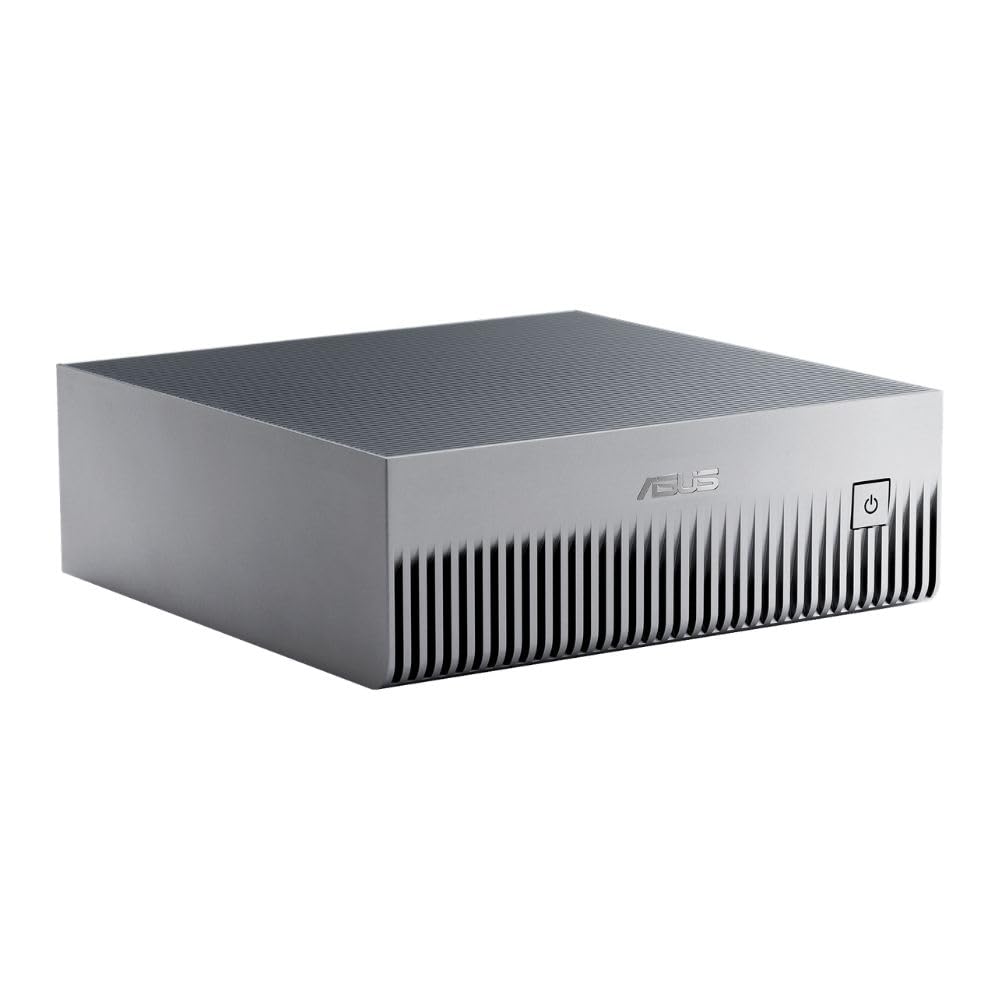
The ASUS Ascent GX10 is a purpose-built AI supercomputer powered by the NVIDIA GB10 Grace Blackwell Superchip, delivering a full petaFLOP of AI performance in a compact, stackable chassis. Designed for developers building agentic AI workflows, it supports OpenClaw and NemoClaw frameworks out of the box, with 128GB of unified memory that allows fine-tuning and inference on models up to 200 billion parameters.
The stackable design with magnetic feet and NVIDIA ConnectX-7 networking enables clustering two GX10 units for even greater scalability, while the NVLink-C2C interconnect provides ultra-fast CPU-GPU memory communication critical for complex AI pipelines. Its unified memory and NVLink-C2C bandwidth are built to handle multiple mid-size parameter models running simultaneously, making it a serious contender for local research environments. The cooling system maintains sustained performance without thermal throttling, and the compact form factor fits easily on any desk.
The primary caveat is the target audience: this machine is built for AI researchers and developers, not casual users. Setup requires familiarity with AI toolchains and may need assistance from resources like Gemini for proper configuration. The 1TB SSD is sufficient for a single large model, but running multiple services (diffusion, voice, inference) requires a 4TB upgrade. For anyone serious about local agentic AI development, this is the most capable pre-configured system available.
Why it’s great
- 1 petaFLOP AI performance from NVIDIA GB10 Superchip
- 128GB unified memory handles 200B parameter models
- Stackable design with NVLink-C2C for scaling
Good to know
- Requires AI toolchain familiarity for setup
- Single 1TB SSD may need upgrade for multi-service workflows
- Runs hot under load; needs cool room and good airflow
4. NVIDIA DGX Spark

The NVIDIA DGX Spark is the personal AI desktop supercomputer that brings Grace Blackwell architecture directly to your desk. Like the ASUS GX10, it delivers up to 1 petaFLOP of AI performance, but NVIDIA’s own version runs the full native NVIDIA AI software stack, ensuring seamless integration for developers who want to prototype locally and deploy to the cloud or data center without friction.
The system supports models up to 200 billion parameters at FP4 precision using its 128GB of coherent unified memory, making it ideal for enterprise-scale research in a compact, energy-efficient form. Its unified memory footprint supports running mid-size open models locally via tools like Ollama, and the 4TB self-encrypting NVMe option provides ample storage for multiple model versions. The system runs silently even under load—a critical advantage for desktop research environments.
The DGX Spark runs NVIDIA DGX OS, a proprietary operating system that ensures compatibility but limits flexibility. Some users have reported intermittent issues with the OS, and the slow decoding speed for inference compared to a 5090 GPU can be disappointing for throughput-sensitive tasks. The initial boot delay of several minutes has caused confusion among new owners. For AI researchers and enterprise users who need a turnkey local supercomputer, this is the gold standard—but its price and specialized OS make it overkill for general productivity.
Why it’s great
- Full NVIDIA AI stack for seamless local-to-cloud deployment
- Silent operation, compact form factor
- 128GB unified memory supports 200B parameter models
Good to know
- Proprietary DGX OS limits flexibility
- Initial boot delay can confuse new users
- Inference speed slower than discrete 5090 GPU
5. Lenovo ThinkPad P14s Gen 6

The Lenovo ThinkPad P14s Gen 6 is Lenovo’s thinnest and lightest mobile workstation, yet it packs the AMD Ryzen AI 9 HX PRO 370 processor with a dedicated XDNA 2 NPU that delivers supreme AI performance for real-time workload optimization. As a Copilot+ PC, it leverages the NPU for on-device AI features like real-time captioning, Windows Studio Effects, and automated task optimization—all without draining the battery or relying on cloud connectivity.
The 64GB of DDR5-5600MT/s memory and 1TB SSD provide ample capacity for running multiple AI applications simultaneously, while the 14-inch WUXGA display with 500 nits brightness and 100% sRGB ensures color-accurate visuals for content creation. The MIL-STD-810H certification means it can withstand harsh environments from Arctic cold to desert dust, and the ThinkShield security suite with fingerprint reader provides end-to-end data protection for business-critical projects.
The integrated AMD Radeon graphics, while efficient, are not designed for heavy gaming or GPU-intensive AI training—this machine excels at inference and Copilot+ features, not model training. Screen clarity is good but not class-leading, and occasional lag can occur under extreme multitasking. The plastic chassis feels lighter than expected but sacrifices the premium aluminum feel of competitors. For business professionals who need a durable, secure, and portable AI workstation, this is an excellent choice.
Why it’s great
- AMD XDNA 2 NPU for efficient on-device AI acceleration
- 64GB DDR5 memory for heavy multitasking
- MIL-STD-810H certified durability with ThinkShield security
Good to know
- Integrated Radeon graphics not for GPU training
- Plastic chassis feels less premium than aluminum alternatives
- Screen clarity could be sharper for some users
6. LG gram 17 AI Copilot+ Laptop
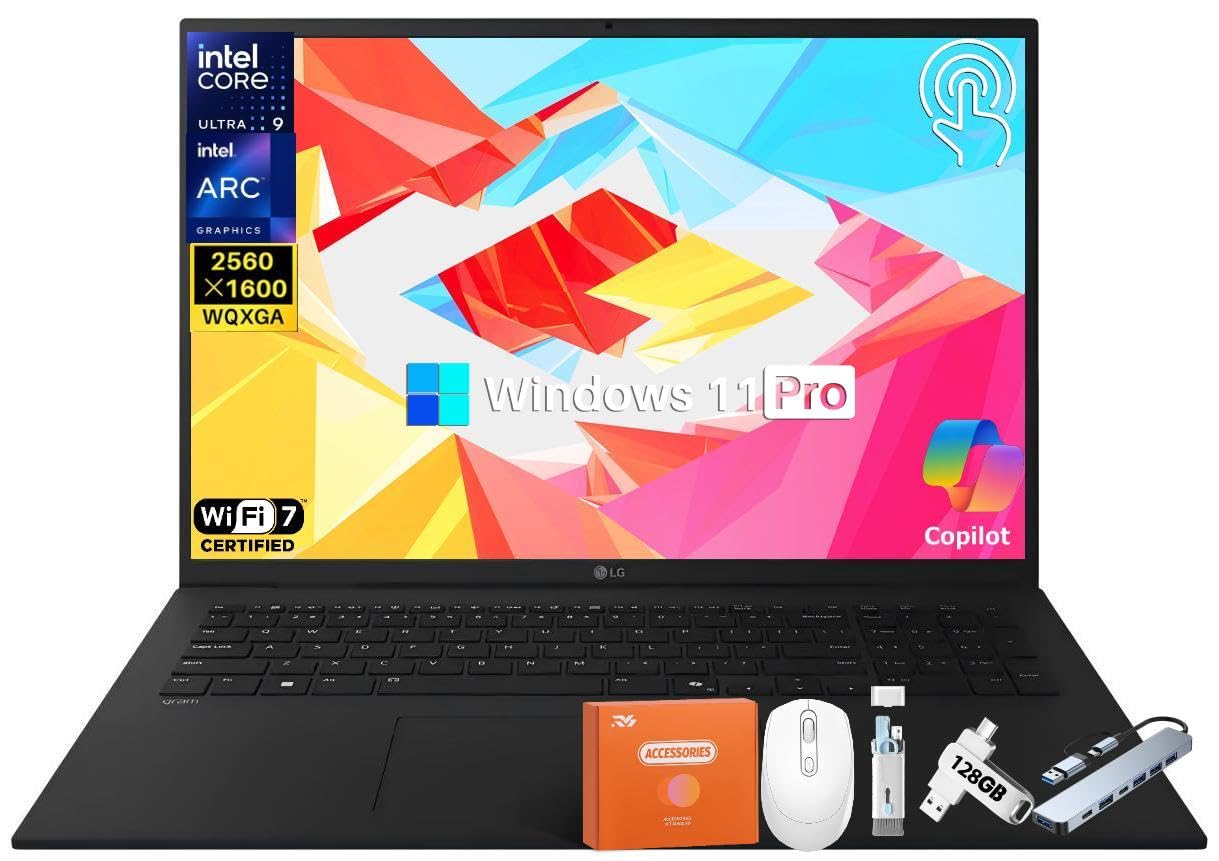
The LG gram 17 is an engineering marvel: a 17-inch laptop with an Intel Evo Edition Core Ultra 9 288V processor delivering 47 NPU TOPS, yet weighing only 3.2 pounds and measuring just 0.74 inches thick. This level of portability makes it the ideal machine for professionals who need heavy AI performance on the road—whether that involves running Copilot+ features, real-time language translation, or AI-accelerated productivity tools in Windows 11 Pro.
The anti-glare WQXGA touch display with 99% DCI-P3 color gamut provides stunning visuals for editing photos and videos, and the 77Wh battery offers up to 23.5 hours of video playback, meaning you can work through a full day without searching for an outlet. Dual Thunderbolt 4 ports provide high-speed connectivity for external GPUs or fast storage, and Wi-Fi 7 keeps cloud-based AI workflows snappy. The quad speakers with Dolby Atmos deliver surprisingly rich audio for such a thin chassis.
The Intel Arc integrated graphics handle AI inference well but lack the raw power for demanding GPU training tasks. Occasional WiFi driver issues have been reported that may require a manual driver update, and the fan can become audible under sustained load. The audio quality, while good for a laptop, still benefits from external headphones for critical listening. This is a productivity-focused AI machine—perfect for using Copilot+ features and running inference, but not for training large models locally.
Why it’s great
- 47 NPU TOPS in a 3.2-pound, 0.74-inch thin chassis
- Anti-glare touch display with 99% DCI-P3 coverage
- 23.5-hour battery life with rapid Thunderbolt 4 connectivity
Good to know
- Integrated graphics insufficient for GPU training
- Initial WiFi driver issues may require manual fix
- Fan audible under sustained heavy load
7. Alienware Aurora Gaming Desktop ACT1250

The Alienware Aurora ACT1250 combines the Intel Core Ultra 7 265F processor with an NVIDIA GeForce RTX 5070 GPU, creating a gaming desktop that also handles AI-accelerated applications with ease. The 1000W Platinum-rated power supply ensures clean, consistent power delivery even during marathon gaming and AI processing sessions, while the customizable AlienFX lighting on the clear panel adds a striking visual flair to any setup.
The 32GB of DDR5 RAM and 1TB SSD provide fast loading for modern games and AI creative tools. The Alienware Command Center allows fine-grained control of performance modes and lighting, and the 1-year Dell Onsite Service provides peace of mind for hardware issues. The system runs quietly under normal load and is built to handle modern AAA games at high settings without breaking a sweat.
As with many pre-built desktops, occasional startup issues that require a full discharge to reset have been reported, and boot time can run long. Isolated quality-control issues (USB-C port alignment, front ring light defects) have also surfaced. Dell support experiences vary by region and case. For those who want a stylish, powerful AI gaming desktop with solid warranty support, this is a strong contender.
Why it’s great
- RTX 5070 with 1000W Platinum PSU for sustained AI gaming
- Customizable AlienFX lighting on clear panel
- 1-year Dell Onsite Service for hardware support
Good to know
- Occasional startup issues requiring full discharge
- Long boot time (around 2 minutes)
- Mixed reports on Dell support quality
8. Skytech Gaming King 95 Desktop PC

The Skytech Gaming King 95 pairs the legendary AMD Ryzen 7 9800X3D processor—known for its massive 3D V-Cache that supercharges gaming performance—with an NVIDIA GeForce RTX 5070 Ti GPU featuring 16GB of GDDR7 memory. This combination makes it an absolute beast for AI-enhanced gaming at 1440p, easily hitting over 60 FPS at Ultra settings in demanding titles like Cyberpunk 2077 and Black Myth Wukong.
The 360mm AIO liquid cooler with ARGB fans keeps temperatures in check even during sustained loads, and the 850W Gold-rated ATX 3.0 PSU ensures stable power delivery. The King 95 case in white with its stunning RGB lighting makes this a showcase piece, and the 32GB of DDR5 RGB memory with heat spreaders adds to the visual appeal. With no bloatware pre-installed and a free gaming keyboard and mouse included, the out-of-box experience is clean and immediate.
As with many pre-built desktops, occasional fan control quirks can occur on individual units. The cable management could be tidier, and outer shipping packaging can arrive dented in transit, though the PC itself is typically well protected inside. The fans, while effective, can be loud even at silent BIOS settings. For gamers who want a powerful pre-built system that handles AI creation and high-FPS gaming without compromise, this is an excellent choice.
Why it’s great
- Ryzen 7 9800X3D + RTX 5070 Ti for elite 1440p AI gaming
- 360mm AIO liquid cooler with ARGB for sustained performance
- No bloatware, free keyboard and mouse included
Good to know
- Potential faulty fan issues on some units
- Fans can be loud despite silent BIOS settings
- Shipping packaging vulnerable to damage
9. MSI Aegis R2 AI Gaming Desktop

The MSI Aegis R2 AI is built around the Intel Core Ultra 9 285 processor, which features dedicated AI accelerators for the next era of AI gaming. Paired with an NVIDIA GeForce RTX 5070 Ti GPU, this desktop delivers smooth 1440p gaming at high frame rates while leveraging AI-driven features like DLSS for enhanced visual fidelity. The four-system fan configuration with an RGB CPU air cooler maintains whisper-quiet operation even during intense sessions.
The 32GB of DDR5 memory and 2TB M.2 NVMe SSD provide ample storage and lightning-fast load times for modern games and AI applications. The simple black design with customizable RGB lighting via the MSI LED button or MSI Center software allows you to match the system to your setup. The air cooling solution is built to keep CPU temperatures in check under load, and it’s a standout feature compared to liquid-cooled systems in this category.
As with any pre-built desktop, occasional reliability issues such as boot failures can occur and support quality can vary by case. The power supply is rated at 135W (CPU TDP), so headroom may be tighter than expected if you plan to push the system to its limits with overclocking or heavy AI workloads. The included mouse and keyboard are basic, but the overall build quality and cable management are excellent for a pre-built. For those who prioritize a quiet, powerful AI gaming rig with a proven cooling solution, this is a fantastic option.
Why it’s great
- Intel Ultra 9 285 with AI accelerators for future gaming
- RTX 5070 Ti delivers high FPS at 1440p
- Quiet air cooling with excellent thermal performance
Good to know
- Some reliability issues reported with boot failures
- Included peripherals are basic
- Support can be unhelpful for post-return issues
10. Lenovo Legion Tower 5i

The Lenovo Legion Tower 5i is an AI-powered gaming desktop that uses the Intel Core Ultra 7 265F processor and NVIDIA GeForce RTX 5070 Ti graphics to deliver stutter-free gameplay, fast loading times, and seamless multitasking. The transparent, tool-less side panel with customizable RGB lighting makes upgrading effortless, while the 180W optimized air cooling system keeps the system whisper-quiet even during demanding AI-enhanced gaming sessions.
The 32GB of 5600MHz DDR5 memory is expandable to 128GB, providing a clear upgrade path for AI workloads. The 2.5G Ethernet and Wi-Fi 6E ensure ultra-fast connectivity for online gaming and cloud-based AI tools. The cooling system is designed to keep both GPU and CPU temperatures well controlled even under sustained use, and the RTX 5070 Ti with DLSS should comfortably handle modern AAA titles at 1440p high settings.
The 265F CPU, while capable at 1440p, may bottleneck higher-end AI workloads compared to the Ultra 9 variants. Some users note that the GPU branding text is white rather than RGB, which may not match all setups. The included 3-month Xbox Game Pass is a nice bonus, but the system ships with some bloatware that requires manual removal. For gamers who want a stable, upgradeable, and whisper-quiet AI gaming PC at a fair price point, the Legion Tower 5i is an excellent choice.
Why it’s great
- RTX 5070 Ti delivers smooth 1440p gaming with DLSS AI
- Tool-less side panel with easy upgrade access
- Whisper-quiet 180W air cooling system
Good to know
- 265F CPU may bottleneck heavy AI workloads
- GPU branding text is white, not RGB
- Some pre-installed bloatware needs removal
11. The Horizon Autherium Dragon RGB I9 RTX PC

The Horizon Autherium Dragon is a workstation-class gaming desktop that pairs an unlocked Core i9 processor reaching 5.4 GHz with an NVIDIA GeForce RTX 5070 OC 12GB GPU, making it a powerhouse for AI deep learning and VR applications. The standout feature is the massive 64GB of RAM and 5TB of total storage, providing space for extensive datasets, multiple model versions, and high-resolution assets.
The 360mm AIO liquid cooler with 11 total fans (including 3 on the GPU and 1 on the PSU) keeps temperatures manageable even during extended AI training sessions, and the 850W 80+ Gold PSU provides reliable power. The dragon front panel and full ARGB lighting with software control make this an eye-catching addition to any workspace. The 3-year parts warranty and 5-year labor warranty provide strong long-term support for a pre-built system.
The 12GB VRAM on the RTX 5070 OC is adequate for most AI tasks but may limit training of very large models. The system generates noticeable heat under sustained load, requiring good airflow in your workspace. As a build-to-order system, exact components (such as the motherboard model) may be substituted by the builder at time of shipment. For those who need a pre-built system with massive storage and memory for AI deep learning, gaming, and content creation, the Autherium Dragon offers outstanding value.
Why it’s great
- 64GB RAM + 5TB storage for massive AI datasets
- Core i9 + RTX 5070 OC handles deep learning workloads
- 3-year parts and 5-year labor warranty with great support
Good to know
- 12GB VRAM may limit very large model training
- Generates noticeable heat under sustained load
- Components may vary at time of shipment
12. GEEKOM A8 MAX Gaming Mini PC
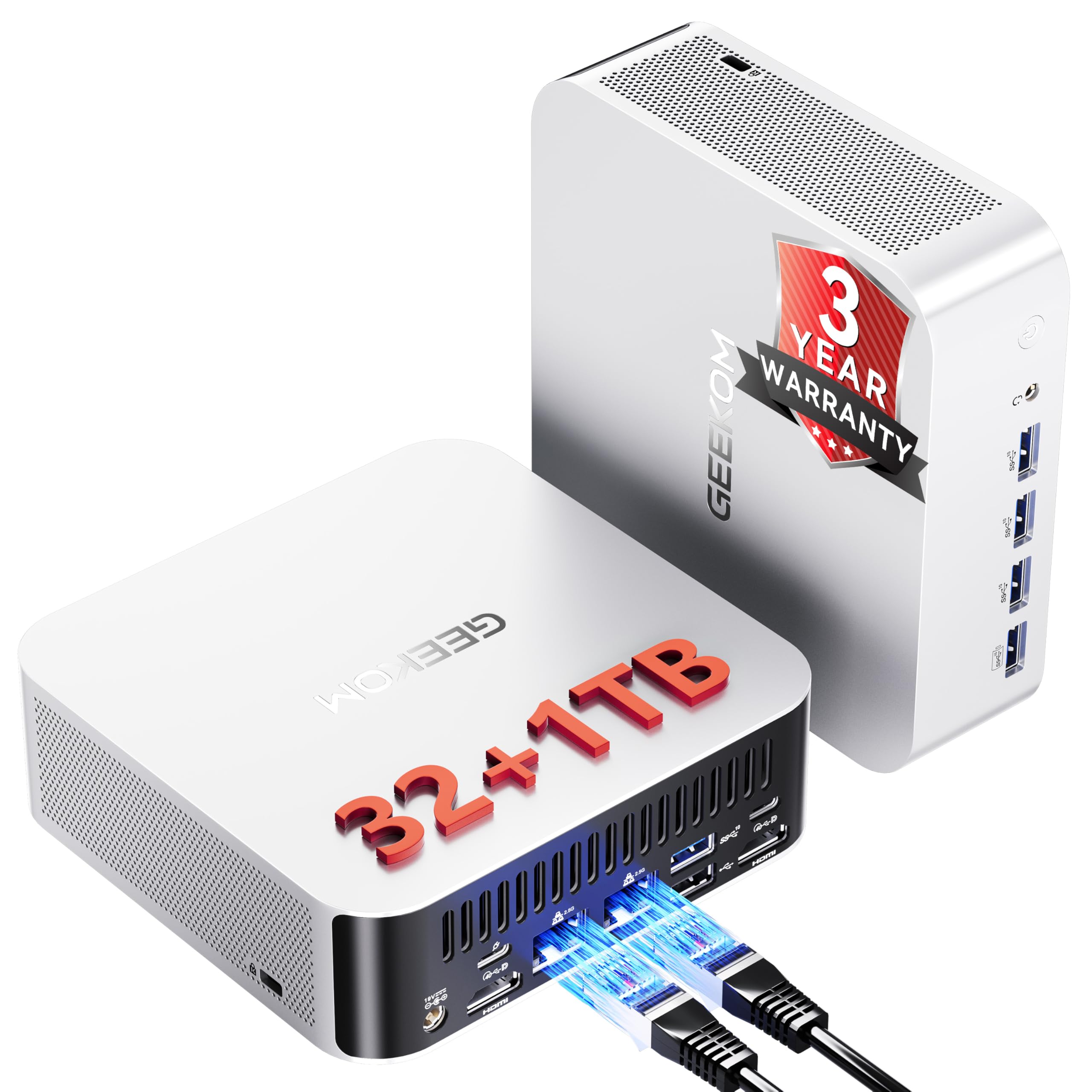
The GEEKOM A8 MAX is a compact mini PC powered by the AMD Ryzen 9 8945HS, which features an integrated NPU capable of accelerating AI workloads like AI webpage tools, complex document processing, and image generation. With 32GB of DDR5 memory (expandable to 128GB) and a 1TB NVMe PCIe 4.0 SSD, this system handles heavy multitasking across multiple browser tabs, CAD design, and video rendering without breaking a sweat.
The dual 2.5GbE Ethernet ports provide physical network segregation for professional IT environments, while the 40Gbps USB4 and dual HDMI 2.1 ports enable 8K display output at 60Hz. The upgraded IceBlast 2.0 cooling system combines dual copper heat pipes with a silent fan module, keeping operating noise under a whisper-quiet 36dB. The VESA mount compatibility allows you to attach the mini PC behind a monitor, creating a clutter-free AI workstation.
As with any compact pre-built system, isolated hardware issues (such as a black screen on boot) can occur and may require a replacement unit. The compact form factor also limits GPU upgradeability for heavy AI training tasks. The system is best suited for AI application usage, design tools, and productivity workflows rather than intensive model training. For a compact, energy-efficient AI workstation that disappears behind your monitor, the A8 MAX is a solid choice.
Why it’s great
- Compact VESA-mountable design saves desk space
- Dual 2.5GbE for professional network segregation
- Whisper-quiet 36dB operation even under load
Good to know
- Some initial hardware failure reports
- Limited GPU upgradeability for AI training
- Tech support can be unhelpful
13. GMKtec EVO-T1 AI Mini PC

The GMKtec EVO-T1 is an entry-level AI mini PC featuring the Intel Core Ultra 9 285H processor with an Intel AI Boost NPU capable of up to 13 TOPS for INT8 calculations. While 13 TOPS is modest compared to higher-end systems, it is sufficient for accelerating basic AI tasks like photo enhancement, voice typing, and background blur in video calls. The 64GB of DDR5 memory and 1TB PCIe 4.0 SSD provide generous capacity for light AI workflows.
The Intel Arc 140T GPU with 8 Xe cores supports DirectX 12 and OpenCL, handling modern games at reasonable settings and accelerating creative applications like video encoding with AV1 support. The OCuLink port allows connection to an external GPU enclosure, providing an upgrade path for more demanding AI tasks. The quad-screen 8K display support via HDMI 2.1, DisplayPort, and USB-C makes it ideal for data-heavy multi-monitor setups in a compact form factor.
The cooling fans can become audible under heavy loads, and the system’s 13 TOPS NPU is not designed for intensive local LLM inference or AI training. Fan noise can become noticeable during sustained processing. The compact size (about the size of a mouse) limits internal expansion. For users who want an affordable, space-saving AI PC for basic Copilot+ features and light AI applications, the EVO-T1 is a good starting point.
Why it’s great
- Compact footprint with OCuLink for external GPU upgrade
- 64GB DDR5 memory for light AI multitasking
- Quad 8K display support for multi-monitor setups
Good to know
- 13 TOPS NPU is modest for heavy AI workloads
- Fan noise noticeable under heavy load
- Limited internal expansion due to compact size
FAQ
What NPU TOPS rating do I need for local LLM inference?
Can I upgrade a standard PC to be an AI PC?
Is an AI PC worth it for gaming?
Final Thoughts: The Verdict
For most users, the best AI PC winner is the Acer Nitro V 16S AI because it delivers 572 AI TOPS in a portable gaming laptop at a mid-range price point, making it the most balanced option for AI gaming, content creation, and local inference. If you need maximum local LLM capability with unified memory, grab the GMKtec EVO-X2. And for enterprise-level agentic AI development with full NVIDIA stack compatibility, nothing beats the ASUS Ascent GX10.