
Our readers keep the lights on and the weekend projects moving. As an Amazon Associate, I earn from qualifying purchases.
A Blu Ray drive is not a casual add-on — it is the single component that decides whether you can archive your disc library, author a 50GB BD-R project, or finally digitize that shelf of old Blu-ray movies. The difference between a drive that works and one that frustrates comes down to interface selection, read-speed consistency, and whether the unit matches the physical build of your machine. Without those specs locked in, you risk buying a drive that either doesn’t fit, drops speed mid-burn, or cannot handle dual-layer BD-XL media at all.
I’m Rikta — the co-founder and writer behind FitlyFast. I have spent hundreds of hours comparing SATA burn rates, USB bridge-chip reliability, and tray-mechanism durability across the current Blu Ray drive market to find builds that actually hold up under repeated use.
Whether you need an internal slot-loader for a laptop upgrade or an external USB burner for a desktop without a bay, this guide walks through the real trade-offs so you land on the right blu ray drive for your workflow and budget.
How To Choose The Best Blu Ray Drive
The right drive depends on whether you need a permanent internal install or a flexible external unit that moves between machines. Every decision starts with the interface — SATA for direct motherboard connection and lower latency, USB for portability and easy swapping between laptops and desktops. From there, check the write-speed spec against your media type (BD-R, BD-RE, or BD-XL), confirm the form factor fits your bay size (5.25-inch desktop or 12.7mm slim laptop), and verify that your operating system has Blu-ray playback software ready.
Interface and Form Factor
Internal SATA drives offer the most consistent burn speeds because they bypass any USB bridge-chip bottleneck. They also sit securely in a 5.25-inch desktop bay, meaning no cable clutter on your desk. Slim SATA drives (12.7mm height) are designed for laptop upgrades — they require transferring the original bezel and bracket from your old drive. External USB drives, on the other hand, trade some raw speed for convenience. A USB 3.0 or USB-C external Blu Ray drive delivers up to 5Gbps bandwidth, which is enough for 6X BD-R writes, but check that the unit includes a dedicated power adapter if you plan to burn discs regularly — USB bus power alone may cause dropouts on high-speed writes.
Write Speeds and Media Compatibility
Look for a drive that supports BD-R write speeds of at least 6X — that translates to a full 25GB single-layer burn in roughly 10–12 minutes. If you work with dual-layer BD-R discs (50GB or 100GB BD-XL), confirm the drive explicitly lists those formats as readable or writable. Not all portable externals handle 100GB media without stuttering. M-Disc support is another critical checkbox if long-term archival matters: M-Discs claim a 1,000-year lifespan, and only drives with explicit M-Disc burn capability can write them correctly.
Connector Bundles and Expansion Ports
Many modern laptops and mini PCs omit USB-A ports entirely, so an external Blu Ray Drive with a Type-C connector (or a bundled USB-C cable) saves the hassle of adapter dongles. Some multi-function drives also include SD/TF card readers and extra USB hub ports, which turn the drive into a mini docking station for your desk. That extra utility matters if your computer has a limited number of ports — but verify the drive’s power budget can handle both burning and charging a connected device simultaneously without introducing read errors.
Blu-ray Playback Software Requirement
No Blu Ray drive — internal or external — ships with licensed Blu-ray playback software in the box. To watch commercial Blu-ray movies on a PC, you need third-party software such as PowerDVD, Leawo Blu-ray Player, or VLC with AACS decryption libraries (VLC may require manual configuration). If ripping is your goal, MakeMKV is the standard tool for converting discs to digital files. Factor the software cost or setup time into your total purchase decision.
Quick Comparison
On smaller screens, swipe sideways to see the full table.
| Model | Category | Best For | Key Spec | Amazon |
|---|---|---|---|---|
| Plextor PX-891SAF | Internal SATA | Reliable SATA burning with M-Disc | 24X DVD / 1.5MB cache | Amazon |
| Cenmate 5.25-Enclosure | Enclosure | Salvage internal drive to USB | USB 3.0 / Aluminum alloy | Amazon |
| Vantec NexStar DX2 | Enclosure | Sturdy enclosure for full-depth drives | USB 3.0 / Fits 185mm depth | Amazon |
| GODBPNYMU 8-in-1 | External USB | Portable all-in-one with card reader | 6X BD-R / USB-C + USB 3.0 | Amazon |
| aelrsoch External Drive | External USB | Dual-power stable Blu-ray burning | 8X BD-R / USB 3.0 + Type-C | Amazon |
| BUNUD 5-in-1 | External USB | Slim travel drive with hub ports | 6X BD-R / 2MB cache | Amazon |
| Panasonic UJ240 | Internal Slim SATA | Laptop Blu-ray burner upgrade | 6X BD-R / 12.7mm height | Amazon |
In‑Depth Reviews
1. Plextor PX-891SAF 24X SATA DVD/RW Dual Layer Burner Drive Writer – Black (Bulk)

The Plextor PX-891SAF is a half-height SATA internal burner that hits 24X DVD writes and includes full M-Disc support — meaning you can burn archival-grade discs expected to last 1,000 years. Its Secure Media Speed Stability system pulls from an extensive media database to match burn speed to disc quality, which reduces coasters when using lesser-known brands of BD-R or DVD-RW media. The 1.5MB cache is modest by current standards, but for DVD and CD workloads it is more than adequate, and the drive’s noise-reduction firmware keeps the tray quiet during long ripping sessions.
Setup is straightforward: slide the drive into a 5.25-inch desktop bay, connect a SATA data cable and a SATA power lead from the PSU, and the system recognizes it immediately under Windows, Linux, or older XP/Vista builds. The bulk packaging means no retail box or bundled software — you supply the SATA cable and burning application yourself. Customer reports confirm that it reads dual-layer DVDs and standard Blu-ray discs without hesitation, though note that the drive’s native Blu-ray read support means you still need separate playback software for commercial movie discs.
For anyone building or refurbishing a desktop that needs a capable optical burner, the Plextor offers a proven Pioneer-derived mechanism with strong community documentation. It is not the cheapest bare SATA drive on the market, but the M-Disc certification and Stable Recording Control make it a reliable daily driver for both data backups and media playback. If your workflow involves regularly burning archival M-Discs, this drive earns its place at the top of the list.
Why it’s great
- Certified for M-Disc archival burning
- 24X DVD write with Secure Speed Stability
- Quiet operation with noise reduction firmware
Good to know
- No SATA cable or software included (bulk package)
- Limited to 1.5MB cache — may lag on very large single files
- Blu-ray read is data-only; playback requires separate software
2. Vantec NexStar DX2 USB 3.0 External Enclosure for 5.25″ Blu-Ray/CD/DVD SATA Drive

The NexStar DX2 is a second-generation USB 3.0 enclosure designed to accept any 5.25-inch SATA optical drive up to 185mm in depth — including full-size Blu-ray burners from Pioneer, LG, and ASUS. Its aluminum-alloy and ABS casing dissipates heat effectively, and the included 12V/3A AC adapter ensures the drive receives steady power for consistent BD-R writes. The internal flexible SATA cable accommodates drives with the interface port at different positions, so you are not forced to buy a specific brand to fit the enclosure.
Installation takes about five minutes: slide the optical drive into the tray, secure it with the four included screws, connect the internal SATA cable, and close the lid. Windows 11 and Ubuntu detect the enclosure as a standard optical drive without extra drivers, and the USB 3.0 interface delivers up to 5Gbps — enough headroom for 6X Blu-ray burning without buffer underruns. The unit also supports hot swapping, so you can plug it into a different computer mid-session without powering down the drive first. A few users noted that the rubber feet can detach over time, but that is a minor annoyance compared to the build quality at this price tier.
This is an ideal solution if you already own an internal SATA Blu-ray drive that you want to repurpose as an external unit, or if you prefer to buy a bare drive and enclosure separately to control component quality. The DX2’s power-saving feature shuts the drive off when the host computer enters sleep mode, which extends the life of both the enclosure and the installed drive. For anyone building a clean external setup without a permanent internal bay, this enclosure hits the sweet spot of compatibility and durability.
Why it’s great
- Fits any SATA optical drive up to 185mm depth
- Aluminum alloy construction reduces vibration and noise
- True plug-and-play on Windows, macOS, and Linux
Good to know
- Rubber feet may loosen with frequent moving
- Disassembly requires patience — tight internal fit
- Does not include the optical drive itself
3. 8-in-1 External Blu-ray Drive by GODBPNYMU
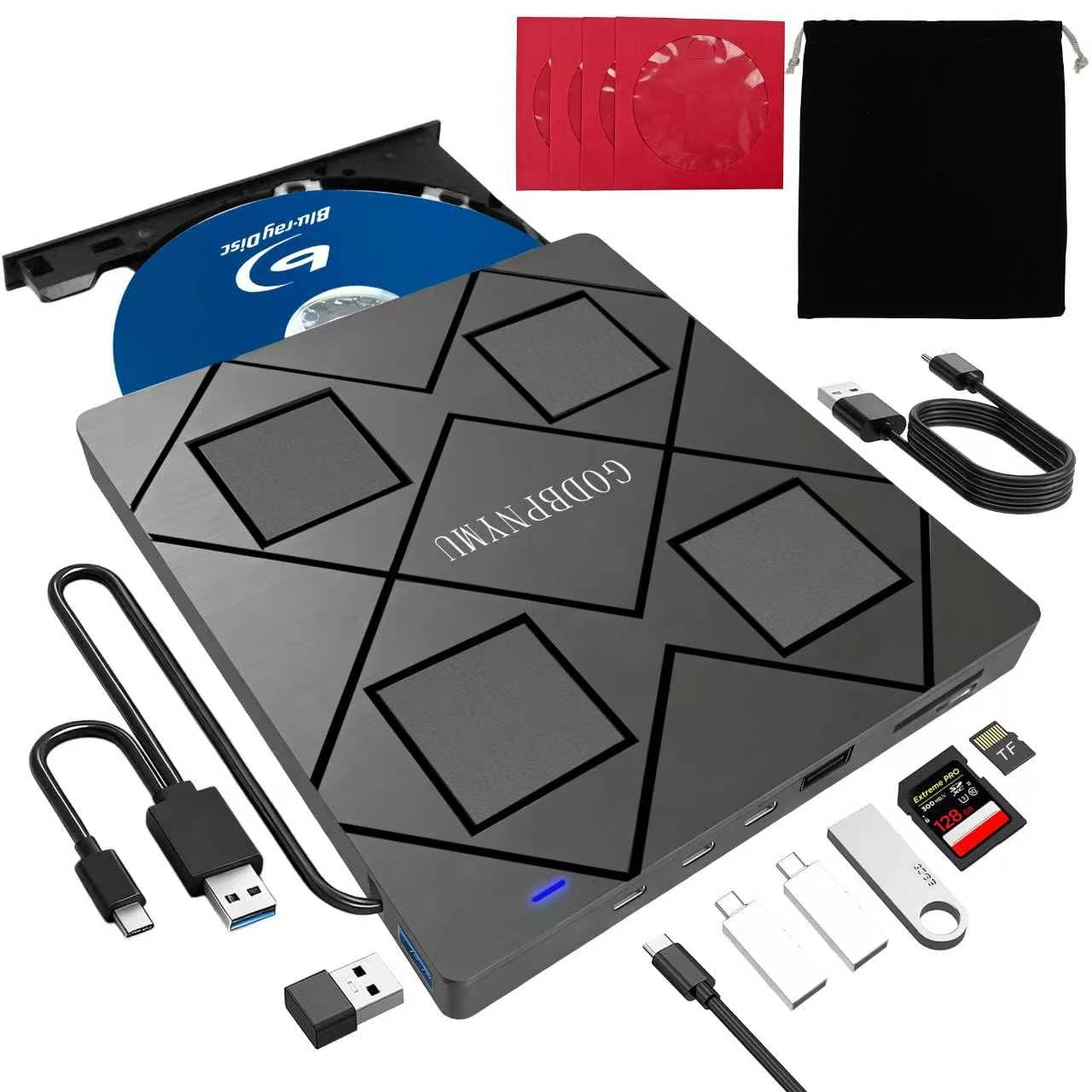
The GODBPNYMU 8-in-1 drive packs a Blu-ray burner, a USB hub, and an SD/TF card reader into a slim ABS chassis that weighs just 300 grams. It reads and writes BD-R at 6X, DVD±R at 8X, and CD-R at 24X, and it supports dual-layer BD-R discs up to 50GB (BD-XL 100GB is read-only). The unit ships with both a USB-A cable and a separate USB-C connection, plus a 5V/2A power cable for stable operation when your laptop’s USB port cannot supply enough current. Included in the package: a zippered carrying case and four disc sleeves to keep media organized during travel.
On the connectivity side, the drive offers two USB-C ports, one USB 3.0 port, one USB 2.0 port, and separate SD and TF card slots. This makes it a genuine all-in-one peripheral for a modern laptop that lacks both an optical bay and dedicated card reader. Plug it into a MacBook Air or a Windows ultrabook via USB-C, and it acts as a hub for a mouse, a flash drive, and SD card imports simultaneously. The narrow caveat is that the TF and SD slots cannot be used at the same time, and the drive is not compatible with TVs, tablets, or in-car systems — it is strictly a computer accessory.
For users who need both Blu-ray burning and extra ports in a single compact device, this drive delivers unmatched convenience per cubic inch. The included storage case and disc sleeves add real value for travelers. Just be aware that 4K Ultra HD Blu-ray playback is not supported, and you will need to supply your own BD playback software for movie discs. If portability and multi-function utility are your priorities, this is the most space-efficient Blu Ray drive on the list.
Why it’s great
- Built-in SD/TF card reader and 2 USB hub ports
- Works with USB-A and USB-C out of the box
- Ultra-slim design with included carrying case
Good to know
- BD-XL 100GB is read-only — no 100GB writes
- Does not support 4K UHD Blu-ray playback
- Incompatible with TVs, tablets, and car systems
4. aelrsoch External Blu Ray Drive (USB 3.0 / Type-C)
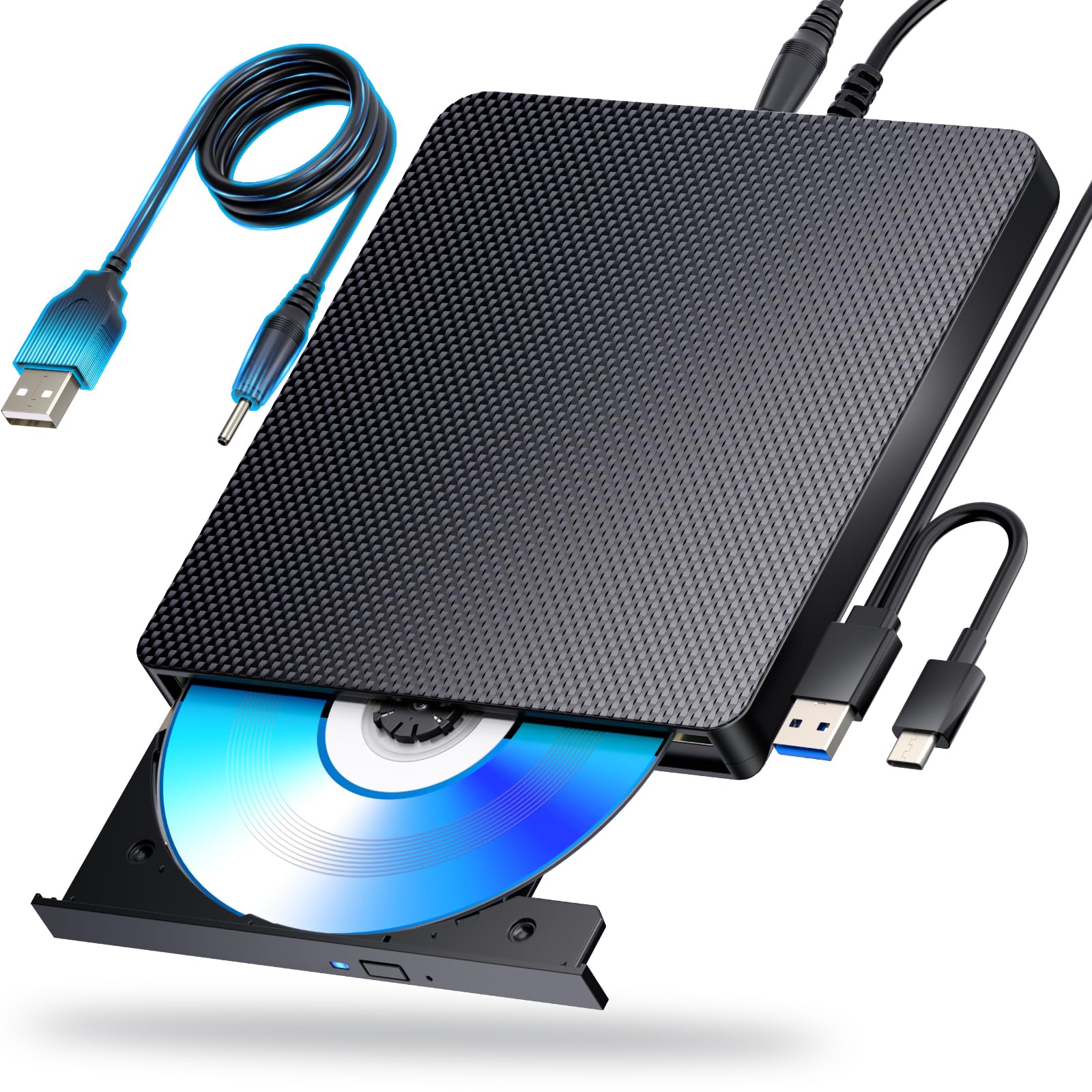
The aelrsoch drive takes a different approach to the external Blu-ray market by including a dedicated secondary USB power cable to supplement bus power during high-speed burns. This dual-power design reduces the risk of buffer underruns when writing 50GB dual-layer discs — a common failure point on single-cable USB drives that rely entirely on the laptop’s port current. The drive reads BD-R at 8X, DVD at 16X, and CD at 24X over a USB 3.0 or Type-C interface, and it supports up to 100GB BD-XL discs for data reading.
Compatibility spans Windows 7 through 11, macOS, and Linux, and the drive is recognized immediately without driver installation for CD/DVD reading and writing. Blu-ray movie playback requires separate software (PowerDVD, Leawo, or MakeMKV for ripping), which is standard across the category. The drive body is compact and lightweight, and the combined USB cable design reduces tangles. One buyer reported intermittent read issues with older scratched discs, but the majority of verified reviews praise the drive’s quiet operation and error-free burning across hundreds of discs.
This is the right choice for anyone who needs consistent Blu-ray writing performance on a laptop that may not deliver full USB power — the dual-cable approach is a real reliability boost. The 8X BD-R read speed is among the highest on this list, so ripping a full 25GB movie takes roughly 12–14 minutes. If you prioritize burn stability over portability gimmicks, the aelrsoch delivers where many cheaper externals stumble.
Why it’s great
- Dual USB power cable prevents underruns on high-speed burns
- 8X BD-R read — among the fastest external drives tested
- Works across Windows, macOS, and Linux without drivers
Good to know
- No bundled Blu-ray playback software included
- Older or heavily scratched discs may cause read noise
- Not compatible with TVs, tablets, or game consoles
5. Cenmate 5.25″ Blu-Ray/CD/DVD SATA Drive Enclosure (USB 3.0)
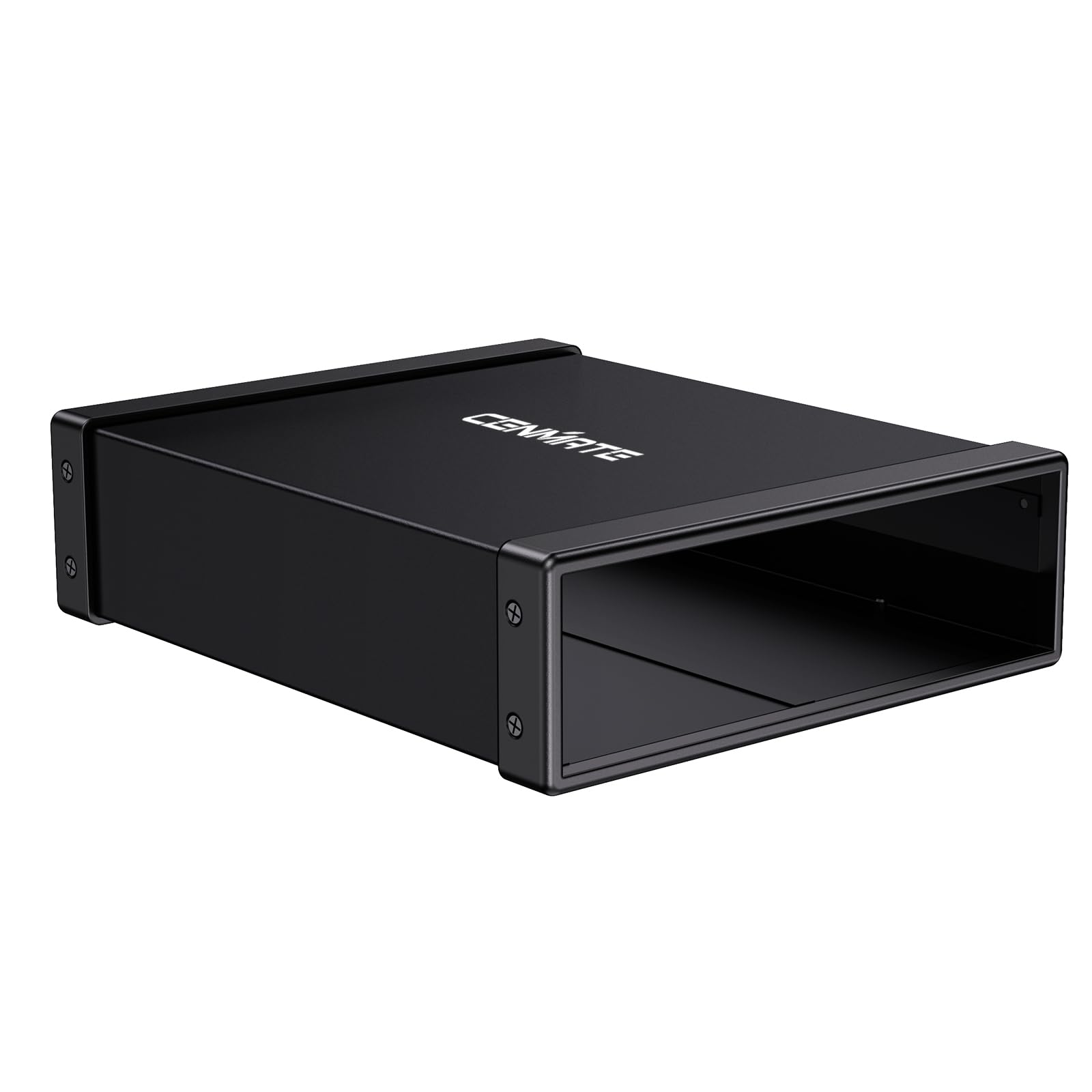
The Cenmate enclosure offers a low-cost way to convert a surplus internal 5.25-inch SATA optical drive into a USB 3.0 external unit. Its aluminum alloy shell helps dissipate heat from the drive and dampens vibration noise, and the USB 3.0 interface supports transfer rates up to 5Gbps — enough for smooth Blu-ray data reading and 6X burning if the installed drive is capable. The enclosure accepts any SATA optical drive up to 171mm in depth, which covers most standard DVD and Blu-ray burners but may leave a quarter-inch gap for longer drives like some Pioneers.
Setup is plug-and-play: install the drive, close the case, and connect via USB. Windows 11, macOS, and Linux all see the enclosure as a standard optical drive without extra drivers. The hot-swap support means you can detach it from one machine and connect it to another without power-cycling the drive. A few users noted that the included screws are small and that aligning them during assembly requires patience — check the product video on the listing page if the screw holes do not line up immediately. The enclosure also lacks a power switch, so the drive powers on whenever the USB cable is connected.
If you already own a compatible internal drive and need a simple external housing at the lowest possible cost, this enclosure gets the job done. The aluminum build feels substantial for the price, and the USB 3.0 speed is adequate for most everyday DVD and Blu-ray tasks. Just verify your drive’s depth before ordering — longer drives may protrude slightly from the front bezel.
Why it’s great
- Budget-friendly way to repurpose an internal SATA drive
- Aluminum alloy shell reduces heat and vibration
- True plug-and-play with no driver installation needed
Good to know
- Maximum drive depth is 171mm — longer drives may stick out
- Screw alignment during assembly can be fiddly
- No power switch; drive activates on USB connection
6. BUNUD 5-in-1 External Blu Ray CD DVD Drive (USB 3.0 Type-C)

The BUNUD 5-in-1 drive is a slim, portable Blu-ray burner that packs two USB-A hub ports and an SD/TF card reader into a grey chassis with an embedded cable design — no loose wires to misplace during travel. It reads and writes BD-R at 6X, DVD±R at 8X, and CD-R at 24X over a USB 3.0 or Type-C connection, and the 2MB buffer helps maintain steady data flow during burns. The drive supports dual-layer BD-R up to 50GB, though BD-XL 100GB is not mentioned in the media compatibility list, so plan for standard 25GB and 50GB media.
Compatibility covers Windows 11/10, macOS (including MacBook Pro and iMac), and Linux — no driver installation required for CD/DVD functionality. Blu-ray playback and ripping still require third-party software. The drive’s embedded USB cable clips neatly into a recess on the underside, which keeps the unit tidy inside a laptop bag. One reviewer noted that the second cable (the power supplement) was hidden under the drive in the packaging, so check the box thoroughly before assuming a missing cable. Build quality feels solid for the weight, with a smooth tray mechanism and quiet spindle operation during extended ripping sessions.
This is a fine mid-range external drive for users who want Blu-ray capability without the bulk of a full-size desktop burner. The integrated USB hub and card reader reduce the number of dongles you need to carry. If your travel workflow involves both disc work and file transfers from camera cards, the BUNUD is a sensible single-device solution that saves space and cable clutter.
Why it’s great
- Built-in USB hub and SD/TF card reader
- Embedded cable design for tangle-free travel
- Plug-and-play on Windows, macOS, and Linux
Good to know
- BD-XL 100GB media not supported for writing
- Second power cable may be hidden in packaging
- Not compatible with TVs, tablets, or game consoles
7. Panasonic UJ240 6x Blu-ray Burner BD-RE/8x DVD±RW DL SATA Drive (Black)

The Panasonic UJ240 is a slimline SATA Blu-ray burner designed for laptop upgrades — it measures 12.7mm in height and fits the standard optical bay found in many Dell Inspiron, Acer Aspire, and ASUS laptops. It writes BD-R at 6X, DVD±R at 8X, and CD-R at 24X, with a 2MB buffer to smooth write operations. The drive supports BD-RE rewritable discs and dual-layer DVD±R media, and it has proven reliable over years of continuous use according to multiple long-term owner reports. Note that this is a bare drive — no bezel, mounting bracket, screws, cables, or software are included.
Installation requires transferring the bezel and side bracket from the original laptop drive, a process that takes about 10 minutes with a small screwdriver. After installation, the BIOS detects the drive automatically, and Windows or Linux recognizes it as a standard optical device. For desktop use, the slim SATA connection needs a slimline-to-standard SATA adapter plus a 5.25-inch bay adapter. Several buyers reported that the drive works flawlessly with PowerDVD and MakeMKV for Blu-ray movie playback and ripping. The only recurring note is that the drive runs audibly at full speed — a common trait among slim laptop burners.
If your laptop still has a working SATA bay and you need Blu-ray writing on the go, the UJ240 is the most reliable slim-form-factor option on the market. Panasonic’s optical mechanism has a strong track record for consistent burns and longevity. Just budget extra time and parts for the bezel transfer and adapter cables if you plan to install it in a desktop. For laptop users who want internal Blu-ray without compromising battery life or portability, this drive remains the benchmark.
Why it’s great
- Proven Panasonic mechanism with years of positive user reports
- 12.7mm slim form fits most laptop optical bays
- Supports BD-RE rewritable and dual-layer media
Good to know
- Bare drive only — no bezel, bracket, cables, or software
- Requires bezel transfer from original laptop drive
- Audible at full spindle speed during burns
FAQ
Do I need separate software to watch Blu-ray movies on my PC?
Can any external Blu-ray drive read or burn 100GB BD-XL discs?
What is the difference between a 12.7mm and a 9.5mm slim drive?
Does an external Blu-ray drive need its own power supply?
Can I use an internal Blu-ray drive externally through a SATA-to-USB adapter?
Final Thoughts: The Verdict
For most users, the blu ray drive winner is the Plextor PX-891SAF because it combines M-Disc archival support, 24X DVD writes, and a quiet half-height SATA design at a price that undercuts most retail burners. If you own an internal drive you want to convert to external, the Vantec NexStar DX2 delivers a rock-solid aluminum enclosure with true plug-and-play simplicity. And for a portable all-in-one that packs a card reader and USB hub into a slim package, the GODBPNYMU 8-in-1 is the most versatile travel companion on the list.