
Our readers keep the lights on and the weekend projects moving. As an Amazon Associate, I earn from qualifying purchases.
For anyone who has picked up a 3D pen, the first few minutes are a mix of excitement and a quiet battle with a clogged nozzle. That moment of frustration, when the filament refuses to feed, is the exact pain point that separates a toy from a tool. A quality 3D pen should deliver a smooth, consistent extrusion from the first press of the button, not a wrestling match with molten plastic.
I’m Rikta — the co-founder and writer behind FitlyFast. For this guide, I’ve spent many hours poring over extrusion tolerances, nozzle material compositions, temperature range sheets, and hundreds of user reports to separate the handful of truly reliable pens from the frustration pile.
Whether you are buying for a budding designer or yourself, you need a pen that feeds cleanly, holds its temperature, and doesn’t turn a creative session into a repair job. My research has narrowed the field to the best 3d pen options that actually deliver on those fundamentals.
How To Choose The Best 3D Pen
The 3D pen market is crowded, but the real differentiators are mechanical, not marketing. You should focus on four core areas: nozzle quality, temperature control, speed adjustability, and material compatibility. Ignoring these leads straight to the clog.
Nozzle Material and Design
The nozzle is the single most critical component. Ceramic nozzles resist heat deformation and are far less prone to clogging than standard brass or steel tips. They also cool down faster, which reduces the risk of plastic dripping when you pause. A replaceable nozzle adds long-term value because you can swap a worn tip instead of replacing the whole pen.
Temperature and Speed Control
Dual temperature presets for PLA and ABS are a baseline feature, but a pen with stepless speed control gives you real precision. Slow speed is essential for fine details and vertical build-up, while a fast mode helps fill larger surface areas without visible layer lines. Look for an LCD screen that shows real-time nozzle temperature, not just a single blinking light.
Filament Diameter and Compatibility
Almost every modern 3D pen uses 1.75mm filament. This standard diameter is shared with most desktop 3D printers, making refills easy to find. Some premium pens also accept FLEXY or wood-infused filaments, which open up different textures and flexibility in your creations. Check the pen’s supported material list before buying.
Quick Comparison
On smaller screens, swipe sideways to see the full table.
| Model | Category | Best For | Key Spec | Amazon |
|---|---|---|---|---|
| MYNT3D Pro Bundle | Premium | Precision & control | Stepless speed + adjustable temp | Amazon |
| 3Doodler Flow | Premium | Reliable all-day use | LCD temp monitor | Amazon |
| 3Doodler Create+ | Premium | Dual-speed workflow | Dual-drive flow control | Amazon |
| SCRIB3D P1 Bundle | Mid-Range | Beginner all-in-one | Ceramic nozzle + stepless speed | Amazon |
| 3Doodler Start+ | Mid-Range | Child-safe creativity | No hot parts, ages 6+ | Amazon |
| LinkSpoX 07pro | Value | Budget entry with LCD | USB-powered + ceramic nozzle | Amazon |
| 3Dmate Filament Kit | Accessories | Refill + mat bundle | 360 ft PLA + silicone mat | Amazon |
In‑Depth Reviews
1. MYNT3D Pro 3D Pen + 10 Color PLA + DesignPad Mat Kit
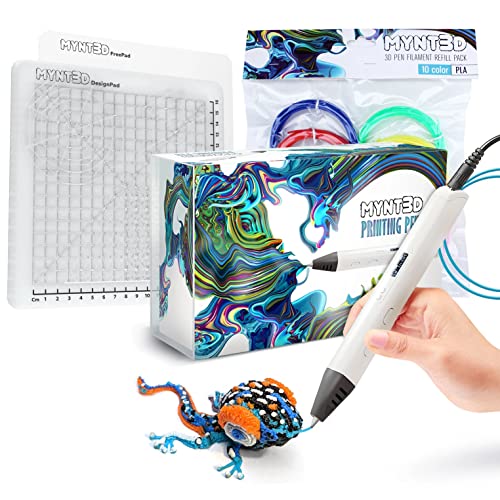
The MYNT3D Pro bundle is the most complete premium package on this list. The pen itself features a replaceable sealed nozzle design, which is a major advantage over sealed-tip pens — when the nozzle eventually wears, you swap it rather than trash the entire unit. The stepless speed control is genuinely variable, not just three fixed steps, giving you fine-grained flow regulation for thin traces versus heavy fills. A discrete temperature adjustability system also lets you dial in exactly the right heat for different PLA blends, not just a one-setting-fits-all approach.
The included DesignPad double-sided silicone mat has channels that help you draw straight lines and geometric shapes without a ruler, and the FreePad transparent surface provides ideal adhesion for tracing patterns underneath. The 10-color PLA pack is vacuum-sealed, so moisture hasn’t compromised the filament before you open it. This is a kit designed for someone who wants to create at a higher level from day one, not just doodle.
The power draw is noticebly higher than USB-powered pens — some users have reported melting USB ports on computer desks when plugged directly into a hub. Use the included wall adapter, not a data port. The one-year limited warranty and direct customer support access at MYNT3D add peace of mind for a pen at this investment level.
Why it’s great
- Replaceable nozzle extends the pen’s usable life significantly
- True stepless speed control for both fine detail and rapid fill
- Double-sided DesignPad with channels for precision tracing
Good to know
- Draws higher power — must use wall outlet, not USB data port
- Mastering 3D objects requires practice; not instant perfection
2. 3Doodler Flow 3D Printing Pen

The 3Doodler Flow is the most user-friendly premium pen from the brand that essentially invented the category. Its standout feature is the integrated LCD screen that gives real-time nozzle temperature readouts rather than just a colored LED — you always know exactly what temperature the tip is at, which helps when switching between PLA and ABS. The Flow accepts standard 1.75mm filaments including PLA, ABS, and wood-infused blends, making it one of the most material-versatile pens at this level. The ergonomics are noticeably refined, with a balanced weight distribution that reduces fatigue during longer sessions.
The pen comes with eight spools of colored plastic totaling 80 feet, plus a comprehensive activity guide that walks you through foundational techniques. The setup is genuinely plug-and-play — no software, no calibration. The dual-speed system lets you toggle between a slower detail mode and a faster fill mode, and the extrusion is consistent with minimal stringing when you lift the nozzle between strokes.
Build quality has been inconsistent across some units. A subset of users report heating element failures or motor burnout within the first month, though 3Doodler’s customer service generally responds quickly with replacements. The USB power method is finicky — the pen may cut out after a few seconds of being connected to a phone charger, so using the included wall adapter is recommended for stable operation. Off-brand filament thinner than 1.75mm may also cause feeding issues, so stick with 3Doodler refills for best results.
Why it’s great
- Real-time LCD temperature monitoring for precise control
- Accepts PLA, ABS, and wood filament for varied textures
- Excellent ergonomic design for extended creative sessions
Good to know
- Heating element defects reported in some early units
- Performs best with official 3Doodler filament refills
3. 3Doodler Create+ 3D Printing Pen, Steel Blue

The 3Doodler Create+ is built around dual-drive technology, which uses two gears to push filament through the nozzle instead of one. This gives you much finer control over the flow rate — slow mode is genuinely slow enough for tiny details like jewelry links and tiny model parts, while fast mode covers larger surfaces without the visible layer lines that single-speed pens produce. The pen is compatible with 3Doodler’s own PLA, ABS, and FLEXY filaments in the 3mm diameter format, which is the thicker standard used by the Create line.
The included Ultimate Guide to Doodling provides five structured projects that teach you how to build upwards rather than just drawing flat shapes. The steel blue finish is a nice aesthetic touch, and the weight at 1.3 pounds gives it a solid, substantial feel. The kit includes two packs of plastic refills in 15 colors plus a power adapter and tool set, so it’s ready out of the box for serious work.
Quality control has been a concern — there are multiple reports of pens arriving with rust on the metal nozzle or failing to heat up at all. The 3mm filament format also means you are locked into 3Doodler’s ecosystem for refills, which are less widely available than the standard 1.75mm spools used by most other pens. Execution takes practice; expect a learning curve before your freehand lines look steady.
Why it’s great
- Dual-drive gearing delivers exceptional fine-flow control
- Compatible with PLA, ABS, and flexible FLEXY filaments
- Structured project guide helps develop real 3D skills
Good to know
- Uses 3mm filament — less available than standard 1.75mm
- Some units arrive with cosmetic or functional defects
4. SCRIB3D P1 3D Printing Pen with PLA Refill Pack

The SCRIB3D P1 bundle offers the strongest value proposition in the mid-range tier. It features a ceramic nozzle, which resists clogging far better than brass tips and runs cooler to the touch, and a stepless speed slider that lets you vary extrusion rate continuously rather than picking from a few presets. The all-in-one bundle includes the pen, three starter colors of filament totaling 30 feet, and a separate 328-foot assortment of 20 additional colors — giving you more than 350 feet of material to work with right out of the box.
The round body with soft grip makes it comfortable to hold for extended periods, and the intuitive controls mean most users can produce decent lines within the first few minutes. The 1.75mm PLA filament feeds smoothly thanks to the premium motor, and the anti-clogging design reduces one of the biggest frustrations beginners face. The yellow color makes the pen easy to spot on a messy desk, which is a small but appreciated detail.
The learning curve is real — the manual is essential reading because feed speed and temperature need to be dialed in for each filament color. Some users mention that the soft grip attracts dust and lint over time. While the stepless slider is great in theory, the mechanical feel is slightly loose, making it hard to hold an exact speed setting without occasional drift.
Why it’s great
- Ceramic nozzle resists jams better than metal alternatives
- Incredible filament volume included — over 350 feet
- Stepless slider allows continuous speed adjustments
Good to know
- Speed slider can drift from its set position during use
- Filament colors may require tweaking temperature per spool
5. 3Doodler Start+ Essentials 3D Pen Set for Kids
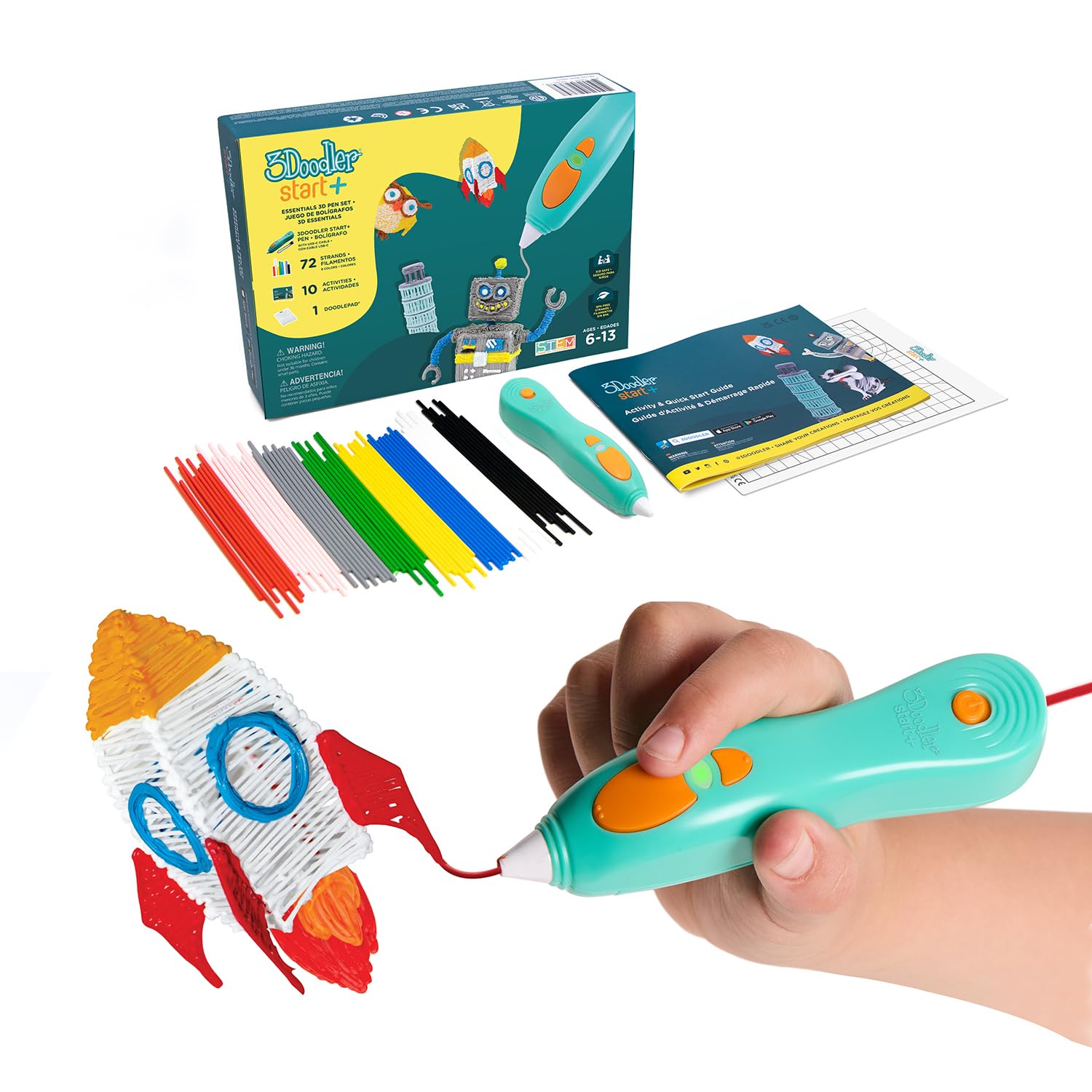
The 3Doodler Start+ is the only pen on this list designed specifically for children ages six and up, and it earns that designation honestly: the nozzle and plastic never get hot enough to burn skin. This is not a temperature-limited version of an adult pen — it uses a completely different low-temperature plastic system that extrudes at a safe warmth while still hardening quickly enough to build 3D structures. The upgraded version charges 50% faster than the original Start and includes 50% more filament strands, plus ten new stencils.
The set includes the pen, two packs of mixed-color plastic strands (72 strands total), a DoodlePad work surface, a USB-C charging cable, and an activity guide. The slimmer grip is easier for small hands to hold, and the automatic standby mode extends battery life between uses. The safety record is excellent — parents report that even preschool-age children can use it safely under supervision, though the official age rating is six-plus.
The filament runs out faster than most kids expect, so buying extra Start plastic packs is almost mandatory for any significant project. The battery holds a charge for about 45 minutes of continuous use, which is on the shorter side for multi-session projects. The plastic is proprietary to the 3Doodler Start system and will not fit standard 1.75mm pens, so you are locked into the 3Doodler refill ecosystem. The tip stays warm after use, so keep it away from very young children during cooldown.
Why it’s great
- Completely safe nozzle — no burn risk for children
- Faster charging and more filament than previous Start models
- Screen-free STEM activity that builds spatial reasoning
Good to know
- Battery life is roughly 45 minutes per charge
- Proprietary plastic — only 3Doodler Start refills work
6. LinkSpoX 07pro 3D Printing Pen Kit
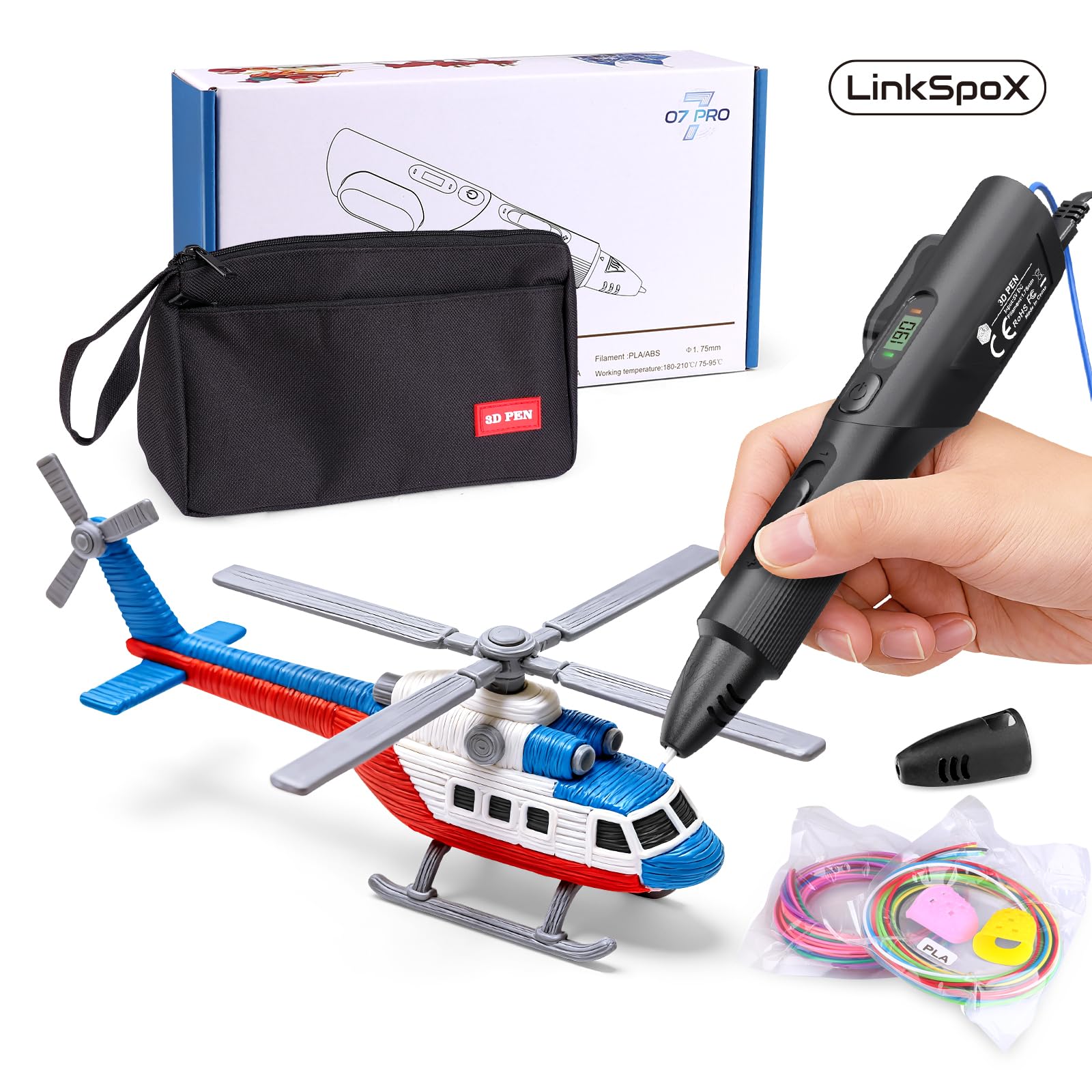
The LinkSpoX 07pro brings features usually found in higher-priced pens — a ceramic nozzle, an LCD screen, and dual preset temperatures for PLA and ABS — to a very accessible price point. The LCD display shows both temperature and filament data in real time, which is rare at this level. The USB power delivery makes it easy to use with a portable battery pack or laptop, though wall power is more reliable for consistent heat. The kit includes 12 colors of PLA filament totaling 80 feet, a set of stencils, a pen stand, heat-resistant sleeves, and a storage bag.
The PLA filament included is plant-based, made from corn stover rather than petroleum — a genuine environmental plus. The ceramic nozzle resists clogs well, and the automatic standby and filament retraction features help prevent jams when you set the pen down. The 07pro is a solid entry-level tool for a maker who wants an LCD readout without spending premium money.
The feeding mechanism has a notable quirk — it tends to unload filament automatically unless you hold the feed button just right, which can be frustrating until you learn the pen’s rhythm. The ergonomic shape is a bit unusual; some users find it awkward to hold for extended periods. Quality control is inconsistent — a few units arrive damaged or stop extruding randomly, though customer support has a good track record of sending replacements.
Why it’s great
- LCD display with real-time temperature and filament data
- Plant-based PLA reduces environmental footprint
- Ceramic nozzle plus auto-retraction reduces clog risk
Good to know
- Feeding mechanism can auto-unload filament unexpectedly
- Ergonomics feel odd for some hand sizes
7. 3Dmate Filament Kit with Silicone Mat and Stencils

While this is a filament and accessory bundle rather than a pen itself, it deserves a spot on this list because the quality of the refill material directly determines how well any pen performs. The 3Dmate kit includes 36 vibrant colors of 1.75mm PLA filament totaling 360 feet, each color individually vacuum-sealed to prevent moisture absorption — a critical detail that many budget refill packs ignore. Moisture-laden filament causes bubbling, discoloration, and nozzle clogs, so sealed packaging matters.
The included 3Dmate starter mat is a 7×9-inch heat-resistant silicone sheet with a smooth side for free drawing and a grooved side for precision tracing. The transparent design lets you place stencils underneath for accurate tracing, and the flexibility means you simply bend the mat to pop off cooled creations without scraping. The stencil book includes 11 templates that are useful for beginners learning to trace shapes. Four finger protectors are also included, which are a nice safety addition for children or first-time users.
This kit is a perfect companion for anyone who already owns a 3D pen and wants to expand their color palette with a reliable, low-jam filament. The 360-foot total is enough for many small-to-medium projects. The mat does have a slight chemical smell when first unpackaged that fades after a few hours of airing out.
Why it’s great
- 36 colors individually vacuum-sealed to prevent moisture damage
- Double-sided silicone mat protects surfaces and aids precision
- Stencil book with 11 templates helps beginners get started
Good to know
- This is a filament and accessory kit — no pen included
- Mat may have a temporary chemical odor on first use
FAQ
What is the difference between PLA and ABS filament for 3D pens?
Why does my 3D pen keep clogging mid-draw?
Can I use any 1.75mm filament in any 3D pen?
Final Thoughts: The Verdict
For most users, the best 3d pen winner is the MYNT3D Pro Bundle because it combines a replaceable nozzle, true stepless speed control, and a complete kit of quality filament and drawing mats in one package. If you want a child-safe option for younger creators, grab the 3Doodler Start+ with its no-burn nozzle and proprietary low-temp plastic. And for the best value mid-range pen, nothing beats the SCRIB3D P1 Bundle, which packs a ceramic nozzle and over 350 feet of filament at a price that leaves room for extra refills.