
Our readers keep the lights on and the weekend projects moving. As an Amazon Associate, I earn from qualifying purchases.
Choosing a wrong 5G router can mean daily dropouts, throttled streaming, and a network that chokes on a dozen devices. Whether you are cutting the cord, equipping an RV, or demanding low-latency gaming, the cellular gateway you pick determines your entire experience.
I’m Rikta — the co-founder and writer behind FitlyFast. I’ve spent countless hours dissecting cellular modem chipsets, Wi-Fi standards, port configurations, and operator compatibility to separate the truly capable 5G routers from the overpriced duds.
After filtering dozens of models through real-world specs and user benchmarks, I have built a definitive guide to finding the best 5g router for your specific home, travel, or professional setup.
How To Choose The Best 5G Router
A 5G router is not a simple Wi-Fi upgrade. It is a cellular modem fused with a wireless access point. The wrong choice can leave you with a device that refuses to bond to your carrier’s bands or throttles your fiber-replacement speeds. Focus on these factors first.
Modem Chipset and Carrier Aggregation
The underlying cellular modem determines peak speed, signal sensitivity, and carrier lock success. High-end routers use Qualcomm Snapdragon X62 or X65 chips that support 5G sub-6 GHz and mmWave, plus multi-carrier aggregation. Budget routers often cut carrier aggregation to one or two bands, forcing you into slower fallback speeds during congestion. Verify your carrier’s primary bands and look for a modem that combines at least three.
Wi-Fi Standard and Multi-Link Operation
Wi-Fi 7 delivers Multi-Link Operation (MLO), which bonds 2.4 GHz, 5 GHz, and 6 GHz bands into a single, resilient stream. This is critical if your router sits in a high-density apartment or you run AR/VR headsets. Wi-Fi 6 routers remain adequate for streaming and work, but lack MLO’s seamless roaming. Match the Wi-Fi generation to the devices you actually own — a Wi-Fi 7 router only helps if your phone and laptop support it.
WAN Port Config and Multi-Gig Support
A 2.5 Gbps or 10 Gbps WAN/LAN port future-proofs your wired backhaul. If your 5G plan exceeds 1 Gbps, a standard gigabit port becomes a bottleneck. Look for at least one 2.5 Gbps port for high-speed workstations or gaming consoles. Dual 10 Gbps ports are overkill for most homes but essential for prosumer setups with NAS servers and video production workflows.
Dual-SIM and Failover Behavior
A true 5G router should handle two SIMs with automatic failover. This feature prevents downtime when one carrier’s tower goes into maintenance or congestion. Some premium models let you prioritize which carrier gets primary traffic and which acts as a backup. If you rely on cellular as your only internet source, dual-SIM failover is non-negotiable.
Antenna Design and External Support
Fixed internal antennas work well in urban centers with strong towers. For rural sites, RV use, or metal-frame buildings, detachable antennas with external mounting options dramatically improve signal-to-noise ratio. Look for routers with RP-SMA connectors that let you swap in high-gain directional or omnidirectional antennas.
Quick Comparison
On smaller screens, swipe sideways to see the full table.
| Model | Category | Best For | Key Spec | Amazon |
|---|---|---|---|---|
| ASUS ROG Rapture GT-BE98 PRO | Quad-Band Wi-Fi 7 | High-end gaming & prosumer | 30 Gbps / dual 10G ports | Amazon |
| NETGEAR Nighthawk RS700S | Tri-Band Wi-Fi 7 | Large home coverage | 19 Gbps / 3,500 sq ft | Amazon |
| GL.iNet GL-X3000 (Spitz AX) | 5G + Wi-Fi 6 | Rural/RV cellular internet | Qualcomm SDX62 / dual-SIM | Amazon |
| Cudy P5 | 5G + Wi-Fi 6 | Dual-SIM business failover | 3.4 Gbps / detachable antennas | Amazon |
| GlocalMe Red Numen Air | Mobile Hotspot | Global travel internet | CloudSIM / 2.5 Gbps / 16 devices | Amazon |
| TP-Link Archer BE600 (BE9700) | Tri-Band Wi-Fi 7 | Future-proofed home network | 10G port / 2,600 sq ft | Amazon |
| GL.iNet GL-BE6500 (Flint 3e) | Dual-Band Wi-Fi 7 | OpenWrt power users | 6.5 Gbps / VPN 680 Mbps | Amazon |
| ASUS RT-BE58U | Dual-Band Wi-Fi 7 | Entry-level Wi-Fi 7 upgrade | 3.6 Gbps / AiProtection Pro | Amazon |
| NETGEAR Nighthawk RS140 | Dual-Band Wi-Fi 7 | Affordable Wi-Fi 7 starter | 5.0 Gbps / 2,250 sq ft | Amazon |
In‑Depth Reviews
1. ASUS ROG Rapture GT-BE98 PRO

The ASUS ROG Rapture GT-BE98 PRO is the absolute ceiling for consumer 5G-attached routing. Its quad-band Wi-Fi 7 implementation with 320 MHz channels on the 6 GHz band, combined with dual 10 Gbps ports and quad 2.5 Gbps LAN ports, means zero wired bottlenecks even with a multi-gig fiber backup. Triple-Level Game Acceleration prioritizes PC gaming traffic from the port all the way to the game server, reducing ping by roughly two milliseconds under load.
Early hardware revisions had 2.4 GHz IoT stability issues, but the current HW 3.0 paired with firmware 39262 has resolved those dropouts. Users report consistent 2,000 Mbps Wi-Fi speeds at three feet and 1,700 Mbps at fifteen feet on Wi-Fi 7 clients. The dual-feeding external antennas deliver outstanding coverage through brick walls and across large homes. The GT-BE98 PRO easily handles over 90 simultaneous devices without choking.
VPN Fusion setup remains fragile — a misconfiguration can black out the entire LAN. You need to disable “Apply to all devices” for VPN rules and enable Smart Connect to keep things stable. The lack of a built-in modem means you must pair it with a separate 5G gateway if you are cutting the cord. This router is for the enthusiast who demands the absolute fastest wired and wireless throughput and has the ecosystem to justify it.
Why it’s great
- Quad-band Wi-Fi 7 with 320 MHz channel support
- Dual 10G ports for NAS and gaming rigs
- Handles 90+ devices without performance loss
Good to know
- VPN Fusion configuration is complex and fragile
- Requires external 5G modem for cellular-only setups
- Large footprint may not fit small shelves
2. NETGEAR Nighthawk RS700S

The NETGEAR Nighthawk RS700S is the standalone coverage king among Wi-Fi 7 routers. Its tri-band BE19000 speed rating and proprietary high-performance antenna design push 360-degree coverage to 3,500 square feet. Real-world reports show full gigabit throughput on the 6 GHz band even through a brick three-story home, outperforming competing flagships like the TP-Link BE800 and ASUS RT-BE96U in wall penetration.
The 10 Gig internet port ensures your wired backhaul never bottlenecks, even if your 5G plan hits 2 Gbps. Four 1 Gig LAN ports cover basic home wired needs. Setup through the Nighthawk app takes under 15 minutes, though the “Smart Connect” feature has caused intermittent disconnects on some Apple devices — disabling it solved the issue entirely. The router manages 33+ active Wi-Fi clients with no throughput degradation.
A firmware issue on version 1.0.7.86 caused 6 GHz dropouts when devices moved just fifteen feet away through one wall. NETGEAR has acknowledged the bug, and later firmware revisions have improved stability. The RS700S does not include a built-in cable or 5G modem, so you must pair it with a separate 5G gateway. If raw coverage range and tri-band speed are your priorities, this is the best standalone option.
Why it’s great
- Exceptional 3,500 sq ft coverage through walls
- 10 Gig port for true multi-gig wired connections
- Stable with 33+ simultaneous clients
Good to know
- Firmware required updates to fix 6 GHz dropouts
- No built-in 5G or cable modem
- “Smart Connect” may conflict with Apple devices
3. GL.iNet GL-X3000 (Spitz AX)

The GL.iNet GL-X3000 is the ultimate cellular-first router for rural homes, RVs, and locations where wired internet never arrives. It packs a Qualcomm Snapdragon SDX62 modem with dual-SIM slots, supporting automatic failover and carrier aggregation for AT&T, T-Mobile, and Verizon. Six detachable antennas (four cellular, two Wi-Fi) let you swap in high-gain directional models to lock onto distant towers.
Real-world performance over three years of continuous use shows stable 230 Mbps down and 70 Mbps up on T-Mobile via Calyx. The OpenWrt-based firmware gives you deep configurability — band locking, VPN cascading with WireGuard up to 300 Mbps, DNS over TLS, and multi-WAN load balancing between cellular, Ethernet, and repeater connections. The physical eSIM card slot simplifies international profile switching without juggling physical SIMs.
There are limitations. The modem only supports 2-band carrier aggregation, which limits peak speeds compared to newer 4-band modems. The Wi-Fi 6 implementation lacks MLO, and users report occasional packet loss when serving smart home devices on the 2.4 GHz band. The unit runs warm, and its price sits at a premium level. For those who need a rugged, portable, OpenWrt-powered 5G gateway with carrier flexibility, the Spitz AX is the proven workhorse.
Why it’s great
- Qualcomm SDX62 modem with dual-SIM failover
- 6 detachable antennas for weak signal areas
- OpenWrt firmware with advanced VPN and band lock
Good to know
- Only 2-band carrier aggregation limits peak speed
- Wi-Fi 6 lacks MLO and smart home packet losses
- Higher price for a Wi-Fi 6 device
4. Cudy P5

The Cudy P5 delivers enterprise-level dual-SIM redundancy at a price that undercuts most business-class routers. Its Qualcomm Snapdragon SDX62 modem supports 5G NR downlink up to 3.4 Gbps in NSA mode and 2.4 Gbps in SA mode. The AX3000 Wi-Fi 6 radio covers the 5 GHz and 2.4 GHz bands with MU-MIMO, providing strong coverage across medium offices or homes.
The standout features are the advanced controls rarely seen at this price: TTL manipulation, band locking, and a full suite of VPN clients including OpenVPN, WireGuard, IPsec, and Zerotier. The four detachable cellular antennas allow external mounting for signal optimization. Users report stable daily 5G speeds through T-Mobile and U.S. Cellular, with the dual-SIM failover switching seamlessly when the primary carrier’s signal degrades.
Compatibility is not universal. T-Mobile SIMs do not work with this unit, and Verizon support has been inconsistent without specific APN configuration. Cudy’s US tech support is email-only with no phone hotline, making troubleshooting slow. The router runs hot and requires adequate ventilation. For an experienced user who needs dual-SIM failover and advanced band control on a budget, the Cudy P5 is a capable but imperfect tool.
Why it’s great
- Snapdragon SDX62 with 3.4 Gbps downlink
- Band lock + TTL controls for carrier tuning
- Dual-SIM with automatic failover
Good to know
- T-Mobile SIM not compatible with this model
- No phone-based US tech support
- Runs hot under continuous load
5. GlocalMe Red Numen Air
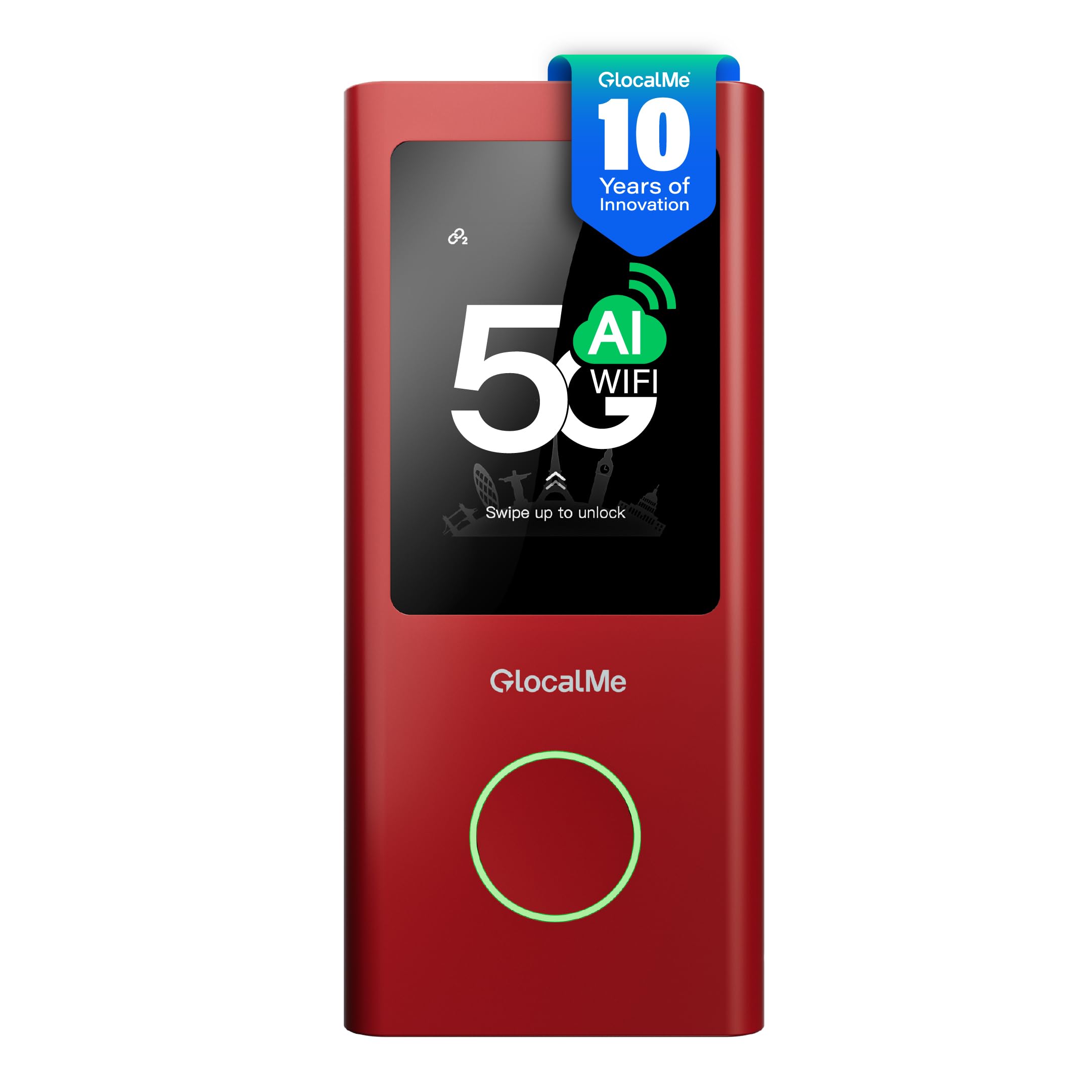
The GlocalMe Red Numen Air is a global travel hotspot that bypasses traditional carrier locks through CloudSIM technology. It connects to over 390 operator networks across 200+ countries without requiring a physical SIM, intelligently selecting the strongest available signal. The 2.4-inch LCD touchscreen gives you real-time data usage, signal strength, and connected device monitoring without opening an app.
Speeds reach up to 2.5 Gbps on supported 5G networks, and real-world tests in Japan and the US show consistent 80-110 Mbps outdoors with strong latencies for video calls and navigation. The unit supports both 2.4 GHz and 5 GHz Wi-Fi bands and can serve up to 16 devices simultaneously. A physical SIM slot is included if you prefer using a local carrier’s data plan, and the USB-C port doubles as a power bank for charging phones.
Data packages from GlocalMe are priced at a premium compared to local SIMs — daily, monthly, and per-GB options add recurring costs that can stack quickly for heavy users. Battery life hovers around six hours of continuous use, enough for a workday but not for extended field trips without a power bank. The Numen Air is purpose-built for frequent international travelers who want one device that works everywhere with zero configuration.
Why it’s great
- CloudSIM for 200+ countries without physical SIM
- 2.5 Gbps 5G speeds with strong real-world performance
- LCD touchscreen for monitoring and settings
Good to know
- GlocalMe data plans are expensive for heavy users
- Battery lasts ~6 hours under load
- Not a full home router — limited to 16 devices
6. TP-Link Archer BE600 (BE9700)

The TP-Link Archer BE600 brings tri-band Wi-Fi 7 with MLO and 320 MHz channel support to a price that undercuts most premium routers. Its BE9700 speed rating breaks down to 5,765 Mbps on the 6 GHz band, 2,882 Mbps on 5 GHz, and 1,032 Mbps on 2.4 GHz. The 10 Gbps WAN/LAN port plus a 2.5 Gbps WAN/LAN port and three additional 2.5 Gbps LAN ports give you immense flexibility for multi-gig wired backbones.
Real-world users report a significant speed improvement — roughly 100 Mbps more down and lower latency — compared to older Wi-Fi 5 and Wi-Fi 6 routers. The six internal antennas with Beamforming technology cover up to 2,600 square feet, reaching hard-to-cover corners without needing a mesh satellite. The Tether app handles setup in under ten minutes, and the router supports VPN clients and servers simultaneously.
The web administration interface has drawn criticism for oversized icons and persistent ads for TP-Link’s Tether app, which feels intrusive during serious network configuration. A small percentage of units have exhibited constant rebooting under Wi-Fi traffic load, a behavior that required lowering bandwidth on all bands to temporarily stabilize. If you get a stable unit, the BE600 delivers future-proof tri-band specs at a mid-range price point.
Why it’s great
- Tri-band Wi-Fi 7 with 320 MHz and MLO
- 10 Gbps + 2.5 Gbps port configuration
- Strong 2,600 sq ft coverage with Beamforming
Good to know
- Web UI has persistent Tether ads
- Some units experience WiFi-triggered reboots
- No built-in 5G modem
7. GL.iNet GL-BE6500 (Flint 3e)

The GL.iNet GL-BE6500 Flint 3e is the dual-band Wi-Fi 7 champion for OpenWrt enthusiasts who demand custom firmware control without losing hardware acceleration. Its Wi-Fi 7 implementation with MLO and 4K-QAM delivers up to 6.5 Gbps aggregate speed, while the four 2.5 Gbps Ethernet ports ensure wired devices never bottleneck. The 1 GB DDR4 RAM keeps plugins and concurrent connections snappy.
The big differentiator is VPN performance: WireGuard and OpenVPN both sustain up to 680 Mbps, which is exceptional for a router in this price tier. Built-in AdGuard Home support lets you block tracking and ads at the network level without third-party subscriptions. The Tailscale integration and USB 4G/5G modem failover make this a versatile edge router for homelabs and remote work setups that cannot tolerate downtime.
Configuration is not beginner-friendly. The web admin panel offers deep tuning options, but users who skip the initial setup video risk Ethernet port misconfiguration. Customer support is email-based with slow response times — one user reported a phone appointment being scheduled for 11:30 PM the following day. The lack of step-by-step onboarding in the box is the main purchase barrier for non-technical users. If you are comfortable with open-source networking, the Flint 3e is a powerful and affordable Wi-Fi 7 gateway.
Why it’s great
- WireGuard / OpenVPN at 680 Mbps
- AdGuard Home and Tailscale built-in
- Four 2.5 Gbps Ethernet ports
Good to know
- Setup not beginner-friendly — requires video guide
- Slow email-based customer support
- Dual-band only, no 6 GHz dedicated radio
8. ASUS RT-BE58U

The ASUS RT-BE58U is the entry-level Wi-Fi 7 router that brings MLO, 4K-QAM, and 160 MHz channel support to a mainstream price. Dual-band BE3600 speeds deliver up to 3.6 Gbps aggregate, enough to saturate most gigabit fiber and cable plans. The quad-core CPU and 1 GB RAM handle heavy multi-device loads without stuttering. Setup through the ASUS Router app is fast — under two minutes for experienced users.
The inclusion of AiProtection Pro powered by Trend Micro gives you commercial-grade network security, one-tap security scans, and Safe Browsing without a subscription. Smart Home Master lets you create up to three separate SSIDs for IoT devices, guests, and primary traffic. The AI WAN detection auto-configures failover between Ethernet, USB tethering, and 4G LTE, making it suitable for homes needing basic backup connectivity.
Parental controls have notable gaps. URL blocking does not function reliably, and DNS filtering blocks entire device categories rather than specific sites, frustrating families who want granular content filtering. Some users report defective units with unusable WAN ports and Wi-Fi capped at 3-27 Mbps on a 120 Mbps plan — a variance that suggests inconsistent quality control. If you want the lowest-cost path to Wi-Fi 7 with good basic security, the RT-BE58U delivers, but check for early defects.
Why it’s great
- Quad-core CPU + 1 GB RAM for heavy loads
- Free AiProtection Pro network security
- Fast setup with no account requirement
Good to know
- Parental controls have broken URL blocking
- Quality control issues with WAN port defects
- Dual-band only — lacks dedicated 6 GHz
9. NETGEAR Nighthawk RS140

The NETGEAR Nighthawk RS140 is the most affordable Wi-Fi 7 router in this guide, designed for users who want the latest standard without the premium price tag. BE5000 speeds reach up to 5.0 Gbps on the 5 GHz band, delivering 1.2 times faster throughput than Wi-Fi 6 for everyday streaming, gaming, and video calls. Coverage reaches up to 2,250 square feet, handling 80 devices without major congestion in typical homes.
The 2.5 Gig internet port allows you to leverage multi-gig cable or fiber plans from providers like Spectrum, Xfinity, or fiber ISPs, provided you pair it with a separate compatible modem. Setup via the Nighthawk app is genuinely straightforward — multiple verified reviews note it took under five minutes. The smaller footprint and integrated antenna design make it much less obtrusive than previous Nighthawk models.
There is no built-in cable or 5G modem, so this is strictly a wired ISP router. The dual-band design lacks a dedicated 6 GHz radio, meaning you do not get the full tri-band experience that defines premium Wi-Fi 7. For those on a budget who need a simple, reliable Wi-Fi 7 upgrade for their existing cable or fiber service, the RS140 is the most cost-effective entry point with a reputable brand behind it.
Why it’s great
- Lowest-cost path to Wi-Fi 7 from a major brand
- 2.5 Gig port supports multi-gig ISP plans
- Compact design with easy five-minute setup
Good to know
- No built-in modem — requires separate cable/5G modem
- Dual-band only, no 6 GHz radio
- Not for users needing advanced OpenWrt features
FAQ
Can I use a 5G router with my existing cable or fiber modem?
Do I need a special SIM card for a 5G router?
Will a 5G router work in rural areas with weak signals?
How many devices can a 5G router handle?
Final Thoughts: The Verdict
For most users, the best 5g router winner is the GL.iNet GL-X3000 (Spitz AX) because it combines a proven Qualcomm SDX62 modem, dual-SIM failover, and OpenWrt flexibility into a single rugged package that works in homes, RVs, and remote offices. If you want maximum Wi-Fi 7 speed with a 10G backbone for your wired devices, grab the ASUS ROG Rapture GT-BE98 PRO. And for the best value dual-band Wi-Fi 7 entry point with solid security, nothing beats the NETGEAR Nighthawk RS140.