
Our readers keep the lights on and the weekend projects moving. As an Amazon Associate, I earn from qualifying purchases.
Compact 75% layouts cut the unnecessary width without sacrificing the arrow keys or function row you rely on daily. The difference between a cramped desk and a clean, efficient setup often comes down to shaving off those extra columns of seldom-used keys. A well-chosen 70% keyboard delivers a premium typing feel while reclaiming precious mouse space for gaming or productivity.
I’m Rikta — the co-founder and writer behind FitlyFast. I’ve spent hours analyzing switch types, gasket mount designs, battery capacities, and build materials to find the models that offer the best balance of performance and longevity in this specific layout.
Whether you need a quiet creamy sound for late-night work or a rapid-trigger magnetic switch for competitive gaming, this guide to the best 70% keyboard covers seven distinct options to help you match the right features to your daily workflow.
How To Choose The Best 70% Keyboard
A 70% keyboard bridges the gap between ultra-compact 60% boards and full-sized workstations. You keep the F‑row, arrow cluster, and navigation keys while saving about 20‑30% desk width compared to a tenkeyless. Focus on switch type, mounting structure, and connectivity to match your primary use case — whether that is typing, gaming, or switching between multiple devices.
Switch Type and Hot‑Swap Flexibility
The switch determines both the feel and sound of every keystroke. Linear switches like the Cream or Milk V2 offer a smooth, quiet travel ideal for shared workspaces. Tactile browns provide a gentle bump for typing feedback. Magnetic Hall‑effect switches allow adjustable actuation points from 0.2 to 3.8 mm, giving gamers instant response customization. A hot‑swappable PCB (3‑pin and 5‑pin compatible) lets you change switches later without soldering — protect your investment if you enjoy experimenting.
Gasket Mount vs. Tray Mount Build
Gasket mount keyboards suspend the PCB and plate between silicone or poron gaskets, softening the bottom‑out impact and reducing hollow echo. The result is a deeper, creamier sound profile and more forgiving keystrokes. Tray‑mounted boards are stiffer but often cheaper. If sound refinement and typing comfort matter, prioritize a board with a genuine gasket structure and multiple layers of sound‑dampening foam.
Battery Capacity and Connection Modes
Wireless 70% boards range from 2000 mAh to 8000 mAh. A higher capacity cell supports weeks of use with RGB off; with full brightness, expect 15‑30 hours. Triple‑mode connectivity (Bluetooth, 2.4 GHz, USB‑C) ensures you can switch between a desktop, laptop, and tablet seamlessly. For gaming, a 1000 Hz polling rate over 2.4 GHz or wired mode eliminates perceived lag. Check that the board saves onboard profiles so your custom bindings work across all devices.
Quick Comparison
On smaller screens, swipe sideways to see the full table.
| Model | Category | Best For | Key Spec | Amazon |
|---|---|---|---|---|
| RK ROYAL KLUDGE R75 | 75% Wireless | Best Overall Balance | 4000 mAh battery | Amazon |
| AULA S75 PRO | 75% with Screen | Customizable GIF Display | 1.14″ LCD screen | Amazon |
| YUNZII C75 | Cute 75% Design | Aesthetic Desk Setup | 5500 mAh battery | Amazon |
| AULA F99 Pro | 96% Layout | Long Battery Life | 8000 mAh battery | Amazon |
| NuPhy Air75 V3 | Low Profile | Ultra‑thin Portability | 13.2 mm height | Amazon |
| Keychron K2 HE | Magnetic Switch | Competitive Gaming | 0.2‑3.8 mm actuation | Amazon |
| RK ROYAL KLUDGE M65 | 65% Wireless | Budget Entry‑Point | 240 h battery (RGB off) | Amazon |
In‑Depth Reviews
1. RK ROYAL KLUDGE R75

The RK R75 delivers a 75% layout with a genuine gasket mount and five layers of sound-dampening material, producing a creamy, muffled typing tone right out of the box. Pre-lubed Cream switches feel smooth and consistent, and the hot-swap PCB accepts both 3-pin and 5-pin switches for easy customization later. The CNC metal volume knob and south‑facing RGB add practical polish without inflating the price.
Battery life is strong at 4000 mAh, supporting roughly a week of mixed use with RGB on. Triple‑mode connectivity (Bluetooth, 2.4 GHz, USB‑C) lets you pair up to three devices, and the QMK/VIA compatibility means you can remap layers and macros without proprietary software. Reviewers consistently praise the sound profile and solid build for the price tier.
The plastic case feels dense and exhibits minimal flex thanks to the poron gasket cushioning. Some users note the keycap legends lack backlight pass‑through, and the included cable is short for desk routing. For a mid‑range 75% board, the R75 offers the best fusion of refined acoustics, wireless flexibility, and hot‑swap support.
Why it’s great
- Thocky gasket-mount sound with multi-layer foam
- 4000 mAh battery lasts days on a charge
- QMK/VIA compatible for deep customization
Good to know
- Keycaps are opaque — no shine-through legends
- Cable is too short for some desk setups
- Software requires Windows for full macro editing
2. AULA S75 PRO
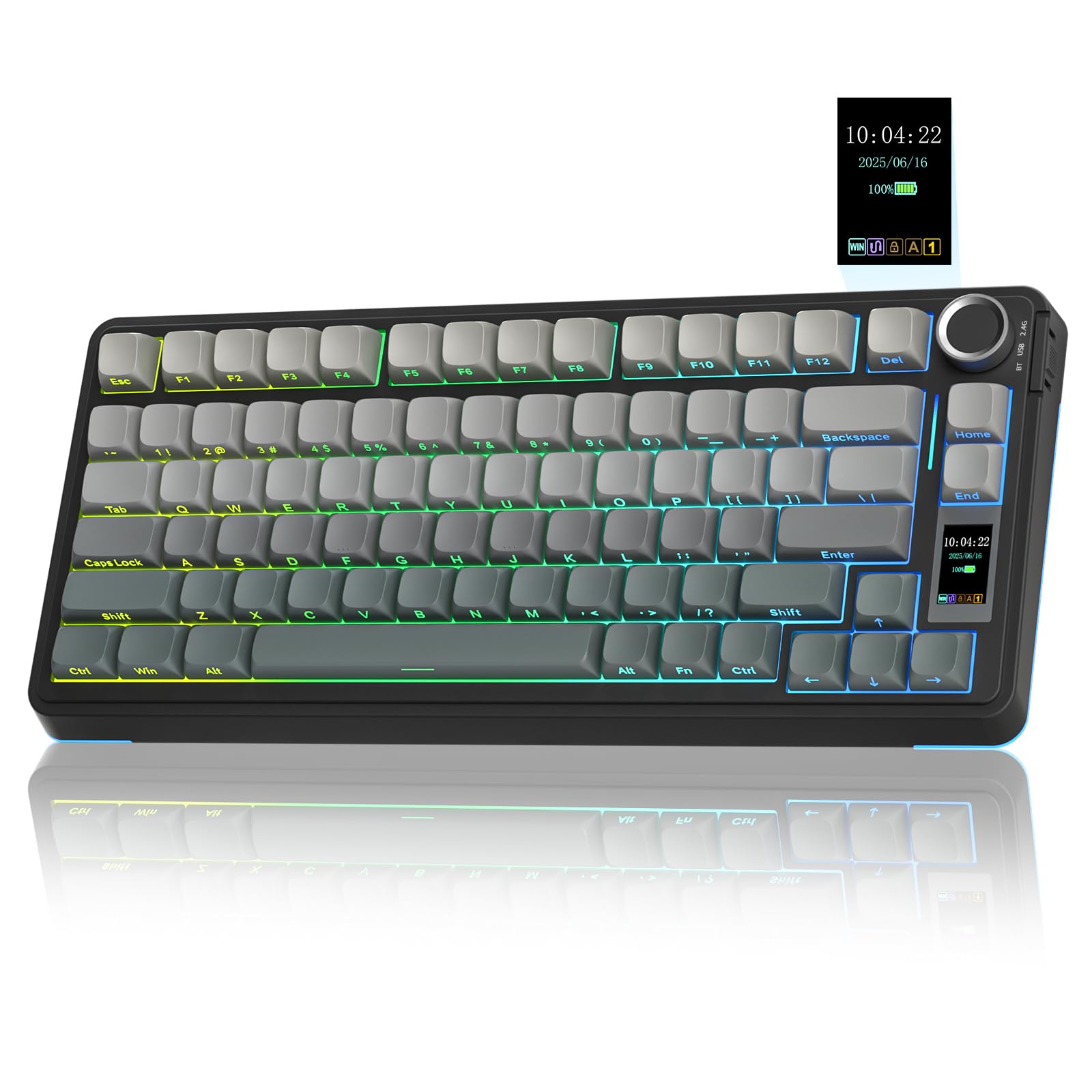
The AULA S75 Pro stands out with a built-in LCD screen that displays battery level, date, time, and custom GIF images — a rare feature at this price level. Combined with a multifunction knob, you can cycle RGB effects, adjust volume, or toggle connectivity modes without opening software. The side‑printed PBT keycaps keep the top surface clean while the south‑facing RGB illuminates each legend clearly in the dark.
The gasket mount and five‑layer filler stack eliminate hollow cavity noise, giving a pronounced thocky sound that reviewers describe as crisp and satisfying. Pre‑lubed linear switches feel factory‑ready, and the hot‑swap PCB supports both 3‑pin and 5‑pin replacements. Battery life sits around 20 hours with full RGB, or much longer with the backlight off.
Screen setup requires the Windows‑only software in wired mode, and Bluetooth latency is noticeable for fast‑paced gaming — stick to 2.4 GHz or wired for competitive titles. The plastic build feels surprisingly sturdy, and the gradient black finish resists fingerprints. For desk setups where personality matters, the S75 Pro delivers a premium visual and audio experience.
Why it’s great
- LCD screen shows battery, date, and custom GIFs
- Deep thocky sound from multi-layer gasket damping
- Side‑printed PBT keycaps with clean top surface
Good to know
- Screen customization only works in Windows wired mode
- Bluetooth has noticeable input delay
- Software interface is clunky and uninspiring
3. YUNZII C75
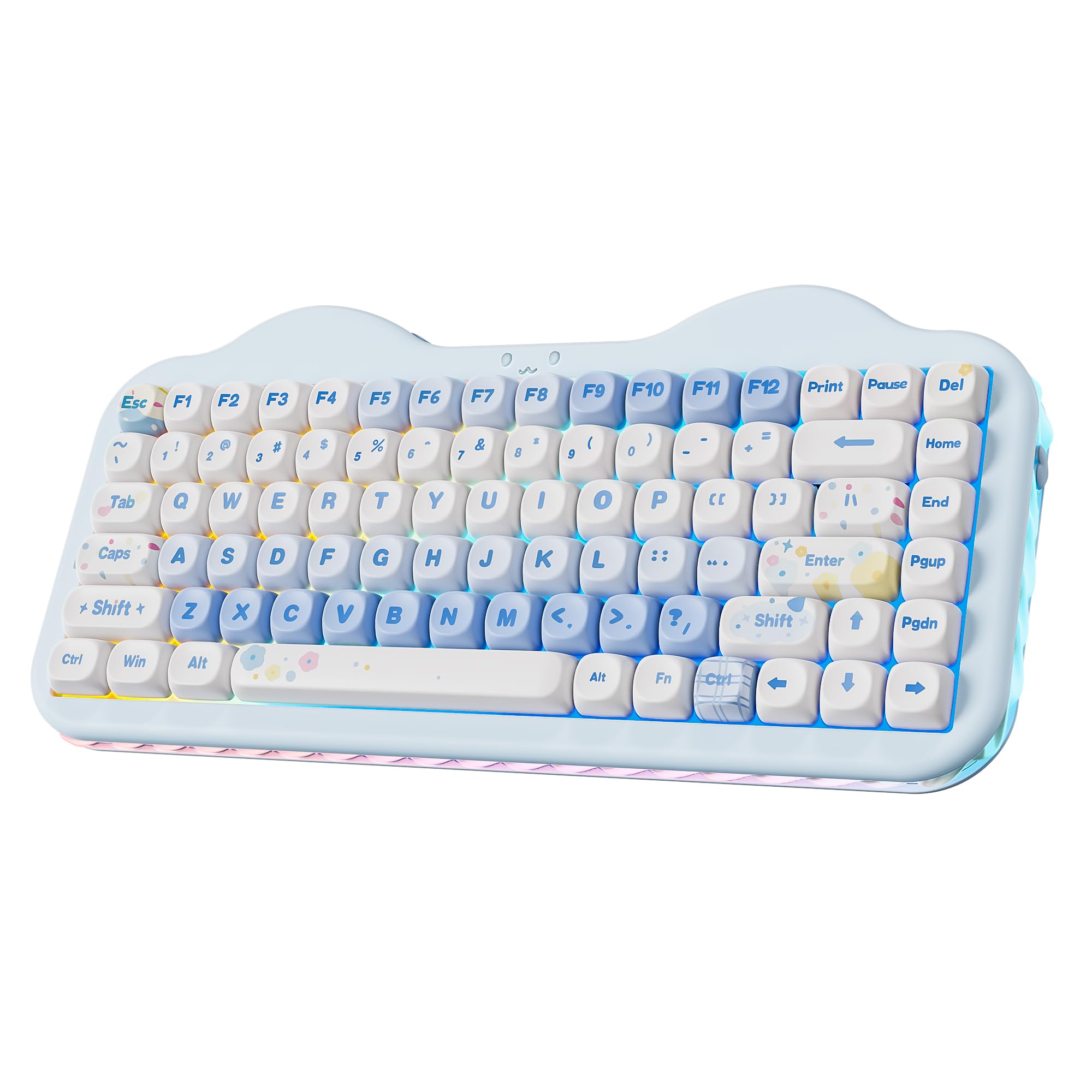
The YUNZII C75 brings a playful cake-inspired aesthetic to the 75% segment without skimping on core specs. Its gasket mount and multiple sound-absorbing fillings produce a creamy, quiet keystroke that reviewers find soothing for extended typing sessions. Pre‑lubed Milk V2 linear switches are smooth and light, reducing finger fatigue during long workdays.
Connectivity covers Bluetooth 5.0, 2.4 GHz, and USB‑C with support for up to five paired devices. The 5500 mAh battery is one of the largest in this group, easily powering through a work week with RGB on moderate brightness. The hot‑swap PCB accepts both 3‑pin and 5‑pin switches, and the included MOA profile PBT keycaps offer a unique spherical feel that differs from standard cherry or OEM profiles.
The playful design includes a cat‑face emblem, removable paw‑shaped risers (with one hiding the 2.4 GHz dongle), and three‑zone RGB that separates keys, emblem, and side glow. There is no dedicated volume knob, and the smooth keycaps can scratch if removed frequently. For users who want a functional keyboard that doubles as a desk decoration, the C75 delivers charm and substance.
Why it’s great
- 5500 mAh battery for extended wireless use
- Unique cake design with removable paw risers
- Three‑zone RGB with separate side underglow
Good to know
- No dedicated volume knob
- Smooth keycaps scratch easily when removed
- Key sound can be slightly loud for some
4. AULA F99 Pro

The AULA F99 Pro stretches the 96% layout to include a full number pad while keeping a compact footprint — closer to a 75% width than a traditional full‑size board. Its defining feature is the 8000 mAh battery, the largest in this lineup, providing weeks of usage with RGB off and days with moderate backlighting. The gasket structure and five‑layer foam fillers produce the same creamy, velvety sound that AULA boards are known for.
Hot‑swappable PCB supports both 3‑pin and 5‑pin switches, and the included pre‑lubed linear switches feel smooth out of the box. The multifunction knob toggles between backlight brightness and volume control, with a long‑press to switch modes. Reviews highlight the heavy, sturdy build and the satisfying weight that keeps the board planted during intense gaming sessions.
The side‑printed PBT keycaps look clean but lack shine‑through legends, making the board harder to use in dim lighting without the south‑facing RGB. Some users report Bluetooth pairing hiccups, but the 2.4 GHz dongle resolves stability. If battery anxiety is your main concern, the F99 Pro is the most forgiving option available.
Why it’s great
- Enormous 8000 mAh battery for ultra‑long life
- Heavy, sturdy build with no deck flex
- Multi‑function knob with mode switching
Good to know
- Keycaps are side‑printed — not shine‑through
- Bluetooth can be finicky; stick to 2.4 GHz
- Setup guide is sparse; online resources help
5. NuPhy Air75 V3
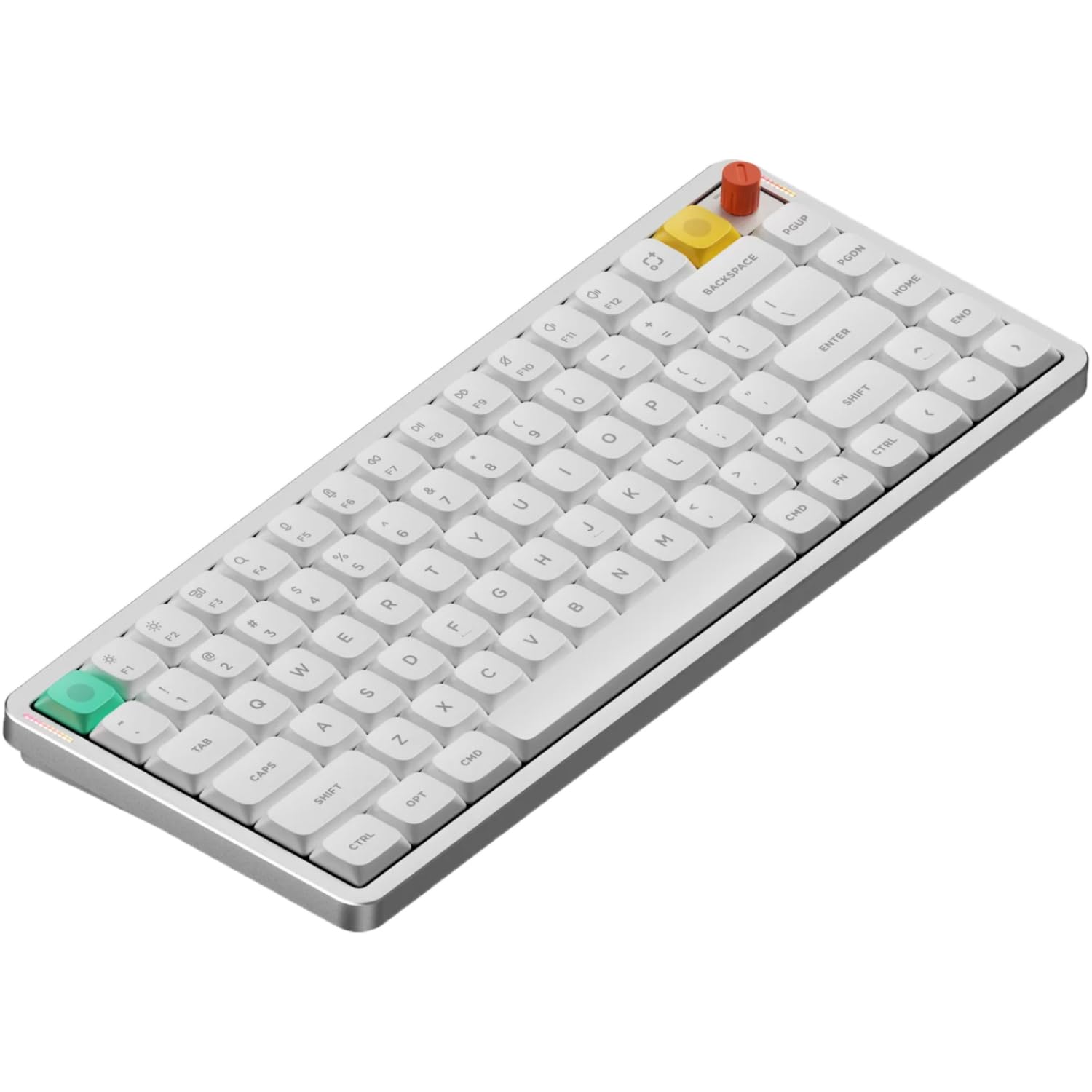
The NuPhy Air75 V3 redefines what a mechanical keyboard can feel like at just 13.2 mm thick. Its low‑profile gasket mount uses silicone gaskets to absorb shock and reduce vibration, producing a refined, quiet sound that works well in open offices. The included low‑profile and high‑profile knob modules let you switch between a flush look and tactile control — both fully programmable via NuPhyIO software.
Connectivity spans Bluetooth, 2.4 GHz, and USB‑C with a 1000 Hz polling rate in wired and 2.4 GHz modes, ensuring no perceptible lag for gaming. The 4000 mAh battery provides solid endurance given the slim frame. Doubleshot PBT keycaps resist shine and keep legends crisp. Reviewers consistently praise the build quality, the satisfying “chonky” sound despite the low height, and the two‑level angle adjusters.
Some units have reported switch or stabilizer failures under heavy gaming use, and support response has been inconsistent. The included Windows keycap count is mismatched for Mac users who need both command keys swapped immediately. For portable setups where every millimeter counts, the Air75 V3 is the thinnest high‑performance 75% board available.
Why it’s great
- Ultra‑thin 13.2 mm profile for easy transport
- Interchangeable low and high knob modules
- 1000 Hz polling on 2.4 GHz and wired modes
Good to know
- Reports of switch failure under heavy gaming use
- Only one Windows keycap included; Mac needed two
- Bluetooth pairing can require a few attempts
6. Keychron K2 HE

The Keychron K2 HE introduces Hall‑effect Gateron Double‑Rail magnetic switches, enabling adjustable actuation from 0.2 mm to 3.8 mm in 0.1 mm increments. This gives gamers rapid‑trigger functionality where keystrokes reset based on real‑time travel distance — ideal for strafing and building in fast‑paced titles. The 75% layout keeps a dedicated function row and arrow keys while the aluminum and rosewood frame adds weight and a sophisticated aesthetic.
Wireless performance is top‑tier with 2.4 GHz and Bluetooth 5.2, both delivering 1000 Hz polling. The web‑based Launcher (no software install required) handles key remapping, macro creation, actuation adjustment, and rapid trigger setup — all saved onboard for use across any device. The doubleshot PBT keycaps resist wear, though the legends are not shine‑through, making the board harder to read in low light without the backlight.
The magnetic switches feel similar to linear reds but with more resistance, and reviewers report fewer typos thanks to the precise actuation customization. Battery life at around two days with moderate use is average for the price tier, but the wired mode bypasses power concerns entirely. For competitive gamers who want every millisecond advantage, the K2 HE is the most advanced switch platform in this list.
Why it’s great
- Adjustable actuation 0.2‑3.8 mm with rapid trigger
- Stunning aluminum and rosewood frame
- Web‑based Launcher, no bloatware needed
Good to know
- Non‑shine‑through keycaps hard to read in dim light
- Battery lasts roughly 2 days with moderate use
- Only compatible with Gateron Double‑Rail magnetic switches
7. RK ROYAL KLUDGE M65
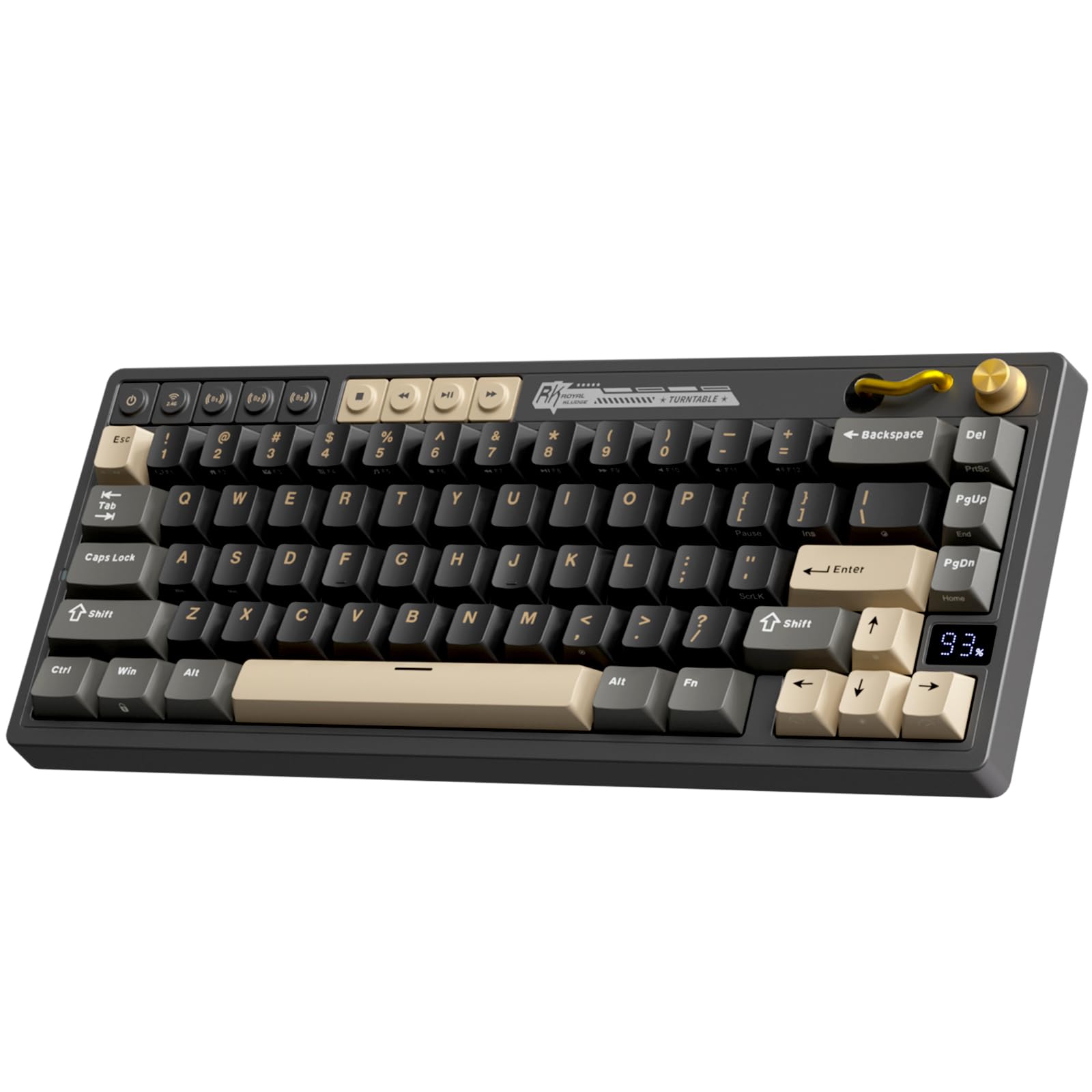
The RK ROYAL KLUDGE M65 is a 65% board that includes dedicated arrow keys and a premium aluminum volume knob, offering the smallest footprint in this lineup. Its gasket mount design incorporates sound‑damping layers for a quiet, crisp typing experience. The hot‑swappable PCB supports 3‑pin and 5‑pin switches, and the included Cream switches deliver a satisfying tactile feel with a softer sound signature.
Wireless triple‑mode support covers Bluetooth, 2.4 GHz, and USB‑C, with up to 240 hours of battery life with RGB off — the best endurance per charge in the group. The PBT keycaps resist yellowing and maintain texture far longer than ABS caps. Reviewers note the multi‑device knob is responsive, the plastic feels high quality, and the overall value is exceptional for an entry‑level mechanical keyboard.
The M65 lacks a dedicated function row, which may frustrate users who rely on F‑keys for shortcuts. The gasket mount is stiff with minimal bounce, and the rubber feet hide screws that make disassembly difficult. For budget‑conscious shoppers who prioritize battery life and a compact layout, the M65 delivers reliable performance without breaking the bank.
Why it’s great
- Excellent 240‑hour battery life with RGB off
- Dedicated volume knob and arrow keys in 65%
- Hot‑swappable PCB with Cream switches included
Good to know
- No function row — F‑key shortcuts require layers
- Stiff gasket mount with minimal deck flex
- Rubber feet hide screws; difficult to tinker with
FAQ
What exactly is the difference between 65%, 75%, and 70% keyboard layouts?
Can I use a 75% keyboard on a Mac without losing function keys?
How long does the battery typically last on a wireless 75% keyboard with RGB on?
Do I need to worry about input lag with 2.4 GHz wireless for gaming?
Final Thoughts: The Verdict
For most users, the best 70% keyboard winner is the RK ROYAL KLUDGE R75 because it combines a genuine gasket mount with creamy pre‑lubed switches, a functional volume knob, and excellent battery life at a mid‑range price that doesn’t compromise on sound or feel. If you want a customizable LCD screen and deep thocky acoustics, grab the AULA S75 Pro. And for competitive gaming with adjustable magnetic actuation, nothing beats the Keychron K2 HE.