
Our readers keep the lights on and the weekend projects moving. As an Amazon Associate, I earn from qualifying purchases.
The chase for the perfect gaming keyboard often ends in a compromise: either you get the wireless freedom but suffer mushy membrane keys, or you get the mechanical clack but remain tethered by a cable. A strong Bluetooth connection with low latency and a satisfying tactile feel shouldn’t be a myth. The market has quietly matured, delivering boards that pair effortlessly, respond instantly, and sound genuinely premium—without requiring you to remortgage your setup.
I’m Rikta — the co-founder and writer behind FitlyFast. I’ve spent hundreds of hours combing through raw customer feedback, switch specifications, and real-world usage reports to identify the Bluetooth gaming keyboards that actually deliver on their promises.
Whether you prioritize a creamy, pre-lubed linear switch or a hot-swappable PCB for endless customization, the right bluetooth keyboard for gaming will transform your play without the wire hassle.
How To Choose The Best Bluetooth Keyboard For Gaming
Navigating the Bluetooth gaming keyboard market requires more than just looking at the price tag. You need to weigh wireless stability against switch feel, and battery life against build quality. The following factors will help you cut through the noise and find a board that genuinely improves your gaming experience.
Switch Selection: Linear vs. Tactile vs. Clicky
Your switch choice determines both the feel and the sound of every keystroke. Linear switches, like the pre-lubed milk or red switches found on many mid-range boards, offer a smooth, uninterrupted press—ideal for rapid double-taps in fighting games or FPS titles. Tactile switches provide a subtle bump at the actuation point, giving you physical confirmation without the noise, which suits both typing and strategy games. Clicky switches, often blue, deliver an audible and tactile click, but they can be fatiguing during long sessions and are generally louder than roommates or teammates will tolerate.
Connection Tri-Mode & Latency
True tri-mode connectivity—Bluetooth, 2.4 GHz via dongle, and USB-C wired—offers the flexibility to switch between low-latency wireless for competitive gaming and Bluetooth for casual use or productivity. The 2.4 GHz mode typically delivers a latency under 1 ms, matching wired performance. Bluetooth 5.0 or higher provides reliable connections for slower-paced games, but you should always use the 2.4 GHz dongle for shooters or fighting games where every millisecond counts.
Build Quality and Sound Dampening
The internal construction separates a cheap board from a premium one. Look for models with a gasket mount structure, which isolates the PCB and plate from the case using silicone or foam pads. This design absorbs shock and produces a deeper, more satisfying “thocky” sound. A five-layer noise reduction setup—including EVA foam, IXPE switch pads, and case foam—eliminates the hollow “ping” that plagues lower-end keyboards, giving you a creamy typing experience out of the box.
Quick Comparison
On smaller screens, swipe sideways to see the full table.
| Model | Category | Best For | Key Spec | Amazon |
|---|---|---|---|---|
| AULA S98 Pro | Premium | Ultimate Creamy Thock | Gasket Mount / 5-Layer Dampening | Amazon |
| SOLAKAKA KI99 Pro | Premium | 96% Layout with Huge Battery | 10,000mAh Battery | Amazon |
| Logitech G515 | Premium | Low-Profile & Speed | Low-Profile Tactile Brown | Amazon |
| YUNZII B75 PRO | Mid-Range | Creamy Sound on a Budget | Pre-Lubed Milk Switches | Amazon |
| Redragon K580 PRO | Mid-Range | Full-Size with Macro Keys | 5 Onboard Macro Keys | Amazon |
| Womier Retro M87 Pro | Mid-Range | Retro Aesthetic with OLED | OLED Display & Knob | Amazon |
| Redragon K552-KRS | Budget | Entry-Level Modding | Hot-Swap 3-Pin Sockets | Amazon |
In‑Depth Reviews
1. AULA S98 Pro

The AULA S98 Pro is the gold standard for out-of-the-box thock. Its gasket-mount structure combined with five layers of sound-dampening material delivers a creamy, deep sound profile that rivals custom builds costing twice as much. The pre-lubed linear switches are smooth and responsive, making rapid key presses in fast-paced shooters feel effortless.
The multi-function aluminum knob provides precise volume control and RGB mode switching without needing to break your flow. The side-printed PBT keycaps resist wear and look sharp with south-facing LEDs that illuminate the legends perfectly in a dark room.
Tri-mode connectivity (BT 5.0, 2.4 GHz, and USB-C) ensures you have a lag-free option for every scenario, while the 5000mAh battery keeps you gaming for weeks between charges. The programmable software allows for deep customization of macros and lighting effects. For anyone seeking a premium wireless gaming experience, this is the board to beat.
Why it’s great
- Incredible creamy thock sound right out of the box
- 5000mAh battery lasts weeks with moderate use
- Handy LCD screen with GIF support (wired mode)
Good to know
- Driver software required for full customization
- Time sync requires wired connection
2. SOLAKAKA KI99 Pro

The SOLAKAKA KI99 Pro is a marvel of battery engineering. With a massive 10,000mAh battery, this board can run for 20-30 days on a single charge even with RGB enabled. The 96% layout crams a full numpad and navigation cluster into a compact frame, saving desk space without sacrificing functionality—a huge win for MMO players who need all the binds they can get.
The gasket structure with five-layer noise reduction produces a creamy, satisfying typing sound. The pre-lubed switches are smooth, and the hot-swappable PCB supports both 3-pin and 5-pin switches, letting you experiment with different feels down the road. The multi-function knob handles volume and lighting adjustments with ease, while the RGB light bar on the front edge adds a subtle glow to your desk.
Bluetooth 5.0 pairs seamlessly with multiple devices, including a PS5, and the 2.4 GHz dongle ensures near-zero latency for competitive gaming. The PBT keycaps are thick and wear-resistant, holding up to heavy daily use. For someone who needs a full-size layout without wires and hates plugging in every other day, the KI99 Pro is a phenomenal choice.
Why it’s great
- Massive 10,000mAh battery for weeks of use
- Compact 96% layout with full key functionality
- Tri-mode connectivity with fast 2.4 GHz dongle
Good to know
- Plastic case may feel less premium vs. metal
- Software is available but not essential
3. Logitech G515
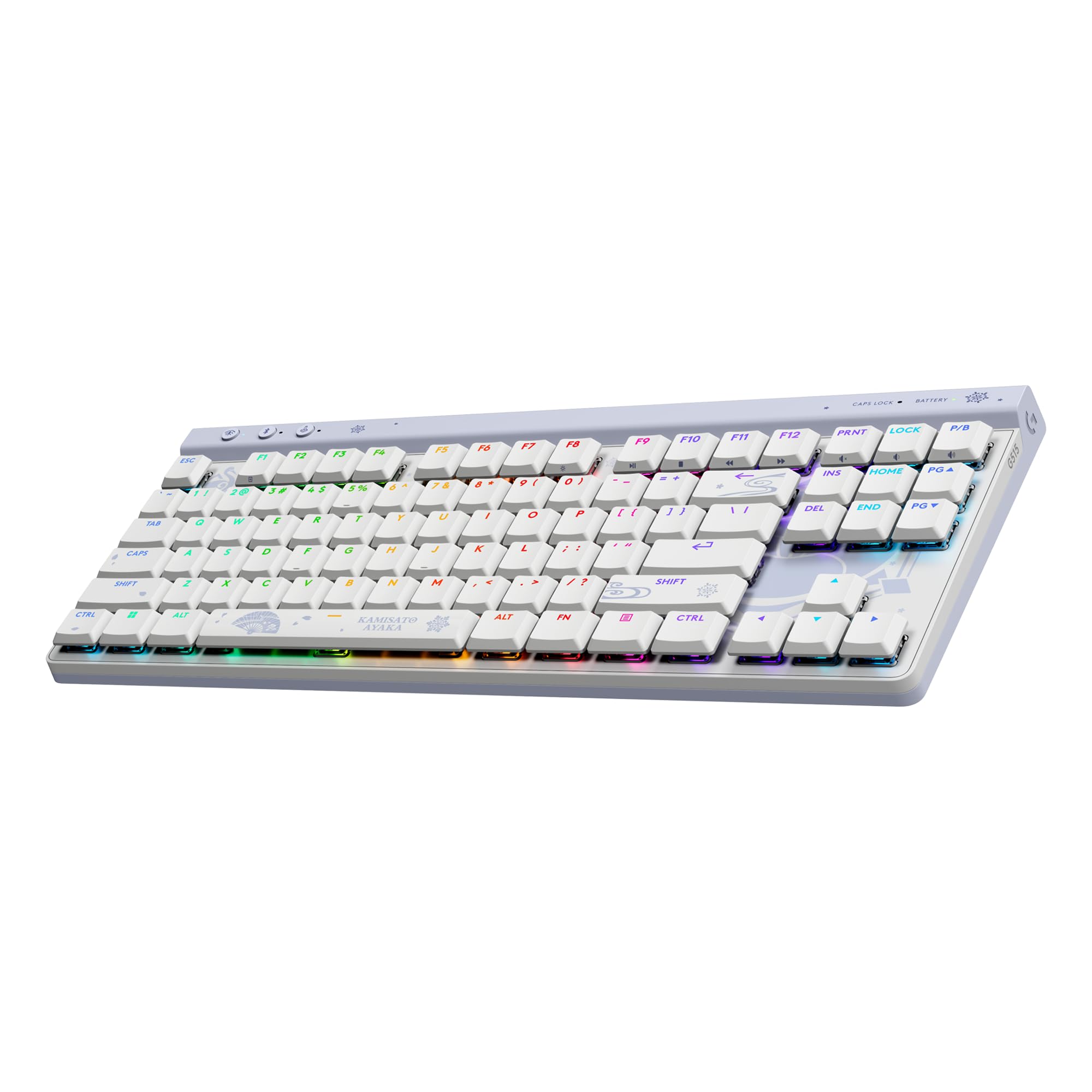
The Logitech G515 is a revelation for those who prefer a low-profile keyboard without sacrificing mechanical feel. Its ultra-slim 22 mm profile and tenkeyless layout reduce wrist strain during long gaming sessions, and the factory-lubed low-profile tactile brown switches deliver a snappy, precise keystroke with a satisfying bump. The sound is low, thocky, and far superior to the ticky noise of older low-profile boards.
The LIGHTSPEED wireless connection is legendary for its speed—many users report it feels faster than standard wired keyboards. The double-shot PBT keycaps resist oil buildup and shine, a significant upgrade over the ABS caps found on the previous G915 series. The Kamisato Ayaka special edition adds a subtle, elegant aesthetic that doesn’t scream “gamer.”
The all-plastic chassis is dense and weighty, giving the board a premium feel without the cold touch of metal. The lack of a dedicated volume roller is a minor trade-off, but the function key controls are intuitive enough. For competitive gamers who want a portable, low-latency board that types beautifully, the G515 is a top-tier option.
Why it’s great
- Best-in-class LIGHTSPEED wireless latency
- Replaceable double-shot PBT keycaps
- Comfortable low-profile design for long gaming sessions
Good to know
- No dedicated media keys or volume roller
- Plastic build feels less premium than metal boards
4. YUNZII B75 PRO
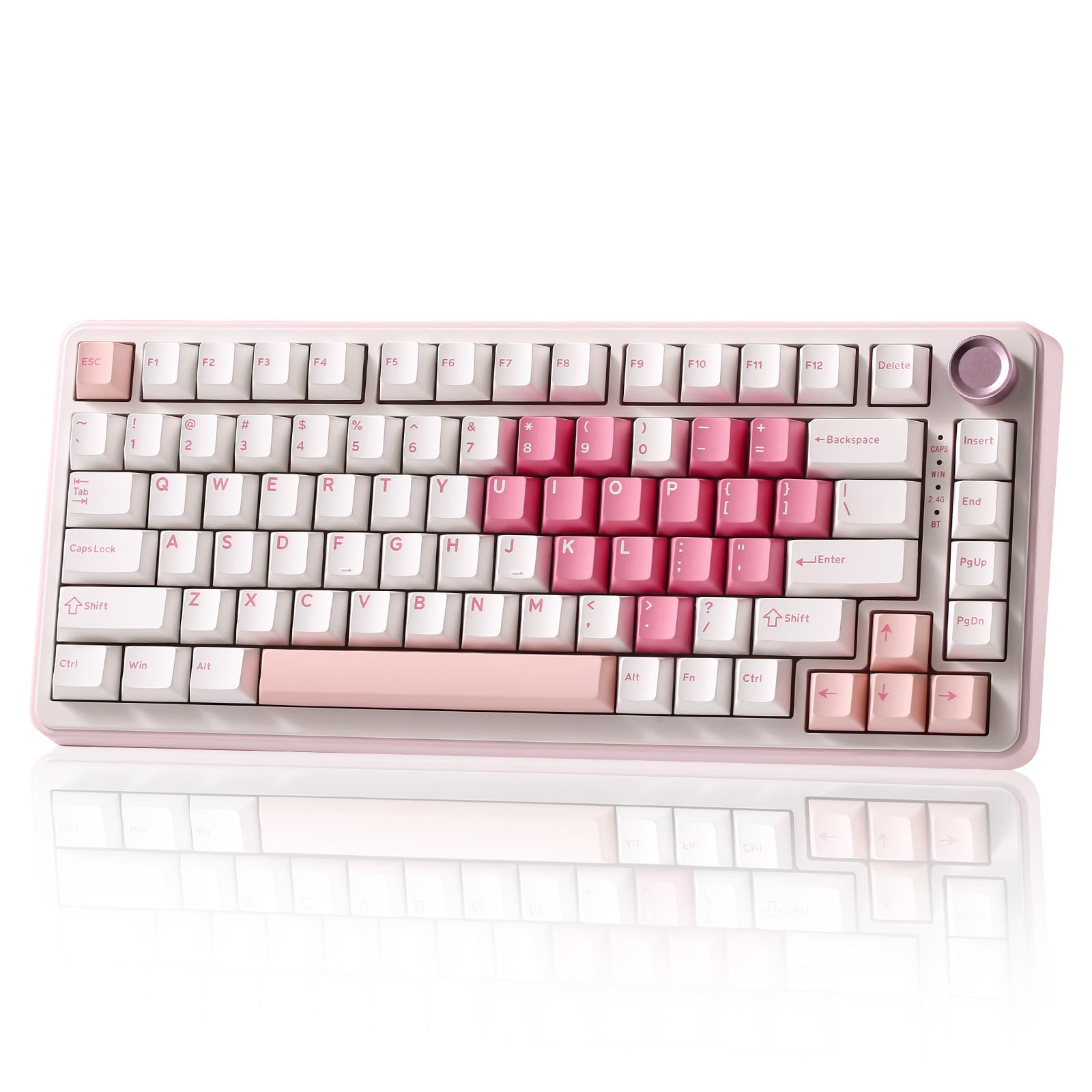
The YUNZII B75 PRO proves you don’t need to spend a fortune to get a genuinely creamy typing experience. Its gasket-mount structure and five-layer padding deliver a deep, satisfying sound profile that rivals boards at double the price. The pre-lubed milk switches are exceptionally smooth with a light actuation force, making them ideal for both rapid gaming inputs and long typing sessions.
The 75% layout with a multi-function knob strikes a perfect balance between desk space and functionality. The knob adjusts volume and lighting effects with a satisfying rotation, and long-pressing switches between gaming and office modes. The south-facing RGB LEDs provide vibrant, glare-free illumination that shows through the keycaps beautifully.
With tri-mode connectivity, a 4000mAh battery, and a full set of accessories including a dust cover and extra keycaps, this keyboard is ready for daily driving straight out of the box. The hot-swappable PCB supports both 3-pin and 5-pin switches, so you can customize the feel later. If you want that premium sound on a budget, the B75 PRO delivers.
Why it’s great
- Excellent gasket-mounted creamy sound for the price
- Includes dust cover, extra keycaps, and pullers
- Large 4000mAh battery
Good to know
- Default sleep timer is too quick (30-45 seconds)
- Driver software feels slightly unpolished
5. Redragon K580 PRO

The Redragon K580 PRO is built for gamers who need dedicated macro keys without breaking the bank. The five G1-G5 programmable macro keys on the left side allow you to bind complex sequences on the fly without any software—just record and play. The full-size layout includes a numpad, making it equally suitable for MMO gaming and spreadsheet work.
The red linear switches are quiet and smooth, with a light actuation that feels responsive for fast-paced gaming. The metal volume wheel on the top right is a standout feature, letting you adjust audio or backlight brightness with a satisfying tactile click. The RGB passthrough is clean, with minimal light bleed around the keycaps.
Tri-mode connectivity includes Bluetooth 5.0, 2.4 GHz, and USB-C, and the keyboard works while charging. The hot-swappable sockets are compatible with most 3-pin and 5-pin switches, giving you room to experiment later. Some users have reported battery degradation over a long period, but for the price, the feature set is hard to beat.
Why it’s great
- Five dedicated onboard macro keys for complex binds
- Satisfying metal volume/lighting wheel
- Full-size layout with numpad for versatility
Good to know
- Key actuation is very sensitive, can cause accidental presses
- No wrist rest included
6. Womier Retro M87 Pro

The Womier Retro M87 Pro stands out with its dedicated OLED color display, which shows custom GIFs, connection status, and battery level in crisp detail. The retro design, combined with Outemu White switches, produces a satisfying thunky sound that’s audible but not obnoxious. The three-mode connectivity (USB-C, BT 5.1, and 2.4 GHz) keeps you connected across devices.
The triple absorption layers—EVA foam, IXPE switch pad, and case foam—significantly reduce hollowness, giving the board a solid, premium feel. The multi-function knob allows quick adjustment of volume, RGB brightness, speed, and even system switching. The hot-swappable PCB supports almost all 3-pin and 5-pin switches, so you can customize the feel to your preference.
The RGB backlighting offers 19 modes with 9 color options, though the keycaps are not transparent, so the light is most visible around the sides. The battery life is decent—about 2-2.5 days with max brightness—but you’ll want to keep it plugged in for heavy use. If you value aesthetics and a built-in screen, this is a unique and fun board.
Why it’s great
- Built-in OLED display for GIFs and system info
- Unique retro aesthetic with great build quality
- Hot-swappable with triple-layer sound dampening
Good to know
- Battery drains fast with max brightness
- No tilt stand for angle adjustment
7. Redragon K552-KRS

The Redragon K552-KRS is the perfect entry point for someone who wants to dip their toes into mechanical keyboards without a big investment. Its 75% TKL layout saves desk space and improves mouse placement ergonomics, while the hot-swappable 3-pin sockets let you experiment with different switches down the line. The classic red switches provide a smooth, linear feel that’s a huge step up from membrane boards.
The metal panel construction gives the board a sturdy, weighty feel that belies its budget price. The 19 backlight modes with adjustable brightness and speed are more than adequate for gaming in a dark room. The tri-mode connectivity allows you to switch between Bluetooth, 2.4 GHz, and wired mode for a stable connection, though the software programming is only supported in wired mode.
Out of the box, the clicky blue switch variant is extremely loud, but the linear red option is much more manageable. The build quality is surprisingly solid, with a reliable PCB that holds up well over time. This board is a fantastic canvas for modding—adding foam, swapping switches, and replacing keycaps can transform it into a premium-feeling custom.
Why it’s great
- Excellent entry-level hot-swappable platform for modding
- Solid metal panel construction for the price
- Compact TKL layout improves ergonomics
Good to know
- Clicky switch variant is very loud out of the box
- Software programming not available in Bluetooth mode
FAQ
Does Bluetooth 5.0 have enough latency for competitive gaming?
What is the difference between linear, tactile, and clicky switches in gaming?
How long should the battery last on a Bluetooth gaming keyboard?
Can I use a Bluetooth gaming keyboard on a PS5 or Xbox?
Final Thoughts: The Verdict
For most users, the bluetooth keyboard for gaming winner is the AULA S98 Pro because it delivers the best out-of-the-box creamy sound profile, tri-mode connectivity, and a generous 5000mAh battery at a reasonable price. If you want the absolute longest battery life and a full 96% layout, grab the SOLAKAKA KI99 Pro. And for competitive players who need the lowest latency and a slim, portable form factor, nothing beats the Logitech G515.