
Our readers keep the lights on and the weekend projects moving. As an Amazon Associate, I earn from qualifying purchases.
Every Excel cell, email thread, and code window looks better when you’re not squinting at subpar pixel density. For office work, the 24-inch size hits a true sweet spot: it fits on a standard desk, works flawlessly in dual-monitor setups, and delivers sharp text without the scaling headaches that plague larger 4K panels. The trick is picking the right panel technology, connectivity, and ergonomics for your specific workflow.
I’m Rikta — the co-founder and writer behind FitlyFast. I’ve spent weeks analyzing the speck sheets and user experiences of the current 24-inch office monitor market to find models that actually reduce eye strain and improve daily productivity.
From high-density QHD panels that make text razor-sharp to models with integrated webcams that simplify video conferencing, this guide breaks down the best 24 inch monitor for office work across every price tier.
How To Choose The Best 24 Inch Monitor For Office Work
Picking an office monitor is about more than just screen size. You need to balance pixel density for sharp text, panel technology for wide viewing angles, and ergonomic flexibility to avoid neck strain over long days. Here are the key factors that separate a truly productive monitor from a frustrating one.
Resolution: 1080p vs 1440p on a 24-Inch Screen
On a 24-inch panel, Full HD (1920 x 1080) delivers a pixel density of about 92 PPI, which is perfectly readable but shows pixelation on small fonts. Stepping up to QHD (2560 x 1440) yields roughly 122 PPI, making text exceptionally crisp and giving you more screen real estate for side-by-side documents. This is the same pixel density as a 27-inch 4K monitor, but without the scaling issues. For office work involving spreadsheets, coding, or long-form reading, 1440p is the clear winner.
Panel Technology: IPS for Color and Viewing Angles
IPS panels offer superior color consistency and wide 178-degree viewing angles compared to VA or TN alternatives. This matters in an office because you shift position throughout the day—leaning back, turning to a colleague, or adjusting your chair. With IPS, colors and brightness stay accurate from nearly any angle. Look for monitors with at least 99% sRGB coverage for natural color reproduction.
Ergonomics and Connectivity Speck Checks
A fully adjustable stand—height, tilt, swivel, and pivot—is non-negotiable for long-term comfort. A monitor that lacks height adjustment forces you to prop it on books or a riser, which is unreliable. For connectivity, prioritize models with USB-C with Power Delivery (60W or more) if you use a modern laptop, as it lets you charge and drive the display with one cable. A built-in USB hub also helps reduce desk clutter by connecting peripherals directly to the monitor.
Quick Comparison
On smaller screens, swipe sideways to see the full table.
| Model | Category | Best For | Key Spec | Amazon |
|---|---|---|---|---|
| KTC H24T27 | QHD Value | Budget 1440p clarity | 2560×1440 @ 100Hz | Amazon |
| BenQ GW2490T | Ergonomic FHD | Eye-care tech for all-day use | 1920×1080 @ 100Hz | Amazon |
| Dell S2425HSM | Multimedia FHD | Built-in speakers and 144Hz | 1920×1080 @ 144Hz | Amazon |
| ASUS BE24EQK | All-in-One WFH | Integrated webcam and mic array | 1920×1080 @ 60Hz | Amazon |
| ViewSonic VG2440 | VA Contrast | High contrast for reading | 1920×1080 @ 60Hz | Amazon |
| HP 24mh | Premium FHD | Solid build and ergonomic stand | 1920×1080 @ 75Hz | Amazon |
| ASUS ProArt PA247CV | Color Accurate | Calibrated color for design work | 1920×1080 @ 75Hz | Amazon |
| Dell P2425H | Business Pro | Enterprise-grade ergonomics and USB hub | 1920×1080 @ 100Hz | Amazon |
| ViewSonic VG2455-2K | QHD USB-C | 1440p with 60W USB-C charging | 2560×1440 @ 100Hz | Amazon |
In‑Depth Reviews
1. ViewSonic VG2455-2K

The ViewSonic VG2455-2K offers the ideal combination of high pixel density and modern connectivity for serious office work. Its 2560×1440 IPS panel delivers 122 PPI — the same crispness as a 27-inch 4K display — making long text documents and code lines exceptionally sharp without Windows scaling complications. The 100Hz refresh rate also provides noticeably smoother cursor movement and scrolling compared to standard 60Hz office monitors.
Connectivity is the real star here. USB-C with 60W Power Delivery lets you charge your laptop and drive the display with a single cable, effectively replacing a separate docking station for many users. The fully adjustable stand offers 40 degrees of tilt, swivel, rotation, and height adjustment, plus a quick-release mechanism and carrying handle for easy repositioning.
Built-in speakers are thin and flat, so you will want external desktop speakers or a headset for voice calls. A small number of users report rare “no input” glitches that require a power cycle. For a clean desk setup with top-tier text clarity, this is the 24-inch office monitor to beat.
Why it’s great
- Sharp QHD resolution on a 24-inch panel
- USB-C with 60W Power Delivery
- Full ergonomic stand with tool-free assembly
Good to know
- Built-in speakers are underwhelming
- Occasional “no input” issue requires power cycling for some units
2. KTC H24T27

The KTC H24T27 punches well above its asking price by cramming a 1440p IPS panel into a 24-inch frame. That resolution means dense text, more spreadsheet columns, and significantly crisper rendering than any 1080p competitor near its price point. The anti-blue light and flicker-free features also help with extended use.
The 100Hz refresh rate, FreeSync, and G-Sync compatibility add smooth motion for occasional gaming or video, but the core appeal here is the pixel density. The 1300:1 contrast ratio is slightly better than typical IPS panels, helping dark text stand out against white backgrounds. Available tilt adjustment covers basic ergonomic needs, though you won’t get height or swivel adjustments at this price.
The on-screen menu joystick is functional but the presets are limited, and some users note the image quality isn’t suited for professional photo editing. For pure office productivity on a tight budget where screen real estate and sharp text matter, this is a fantastic option.
Why it’s great
- Outstanding 1440p text clarity for the price
- 100Hz refresh rate with adaptive sync
- Anti-blue light technology included
Good to know
- Limited ergonomic adjustments (tilt only)
- Color presets are restrictive for professional use
3. Dell P2425H
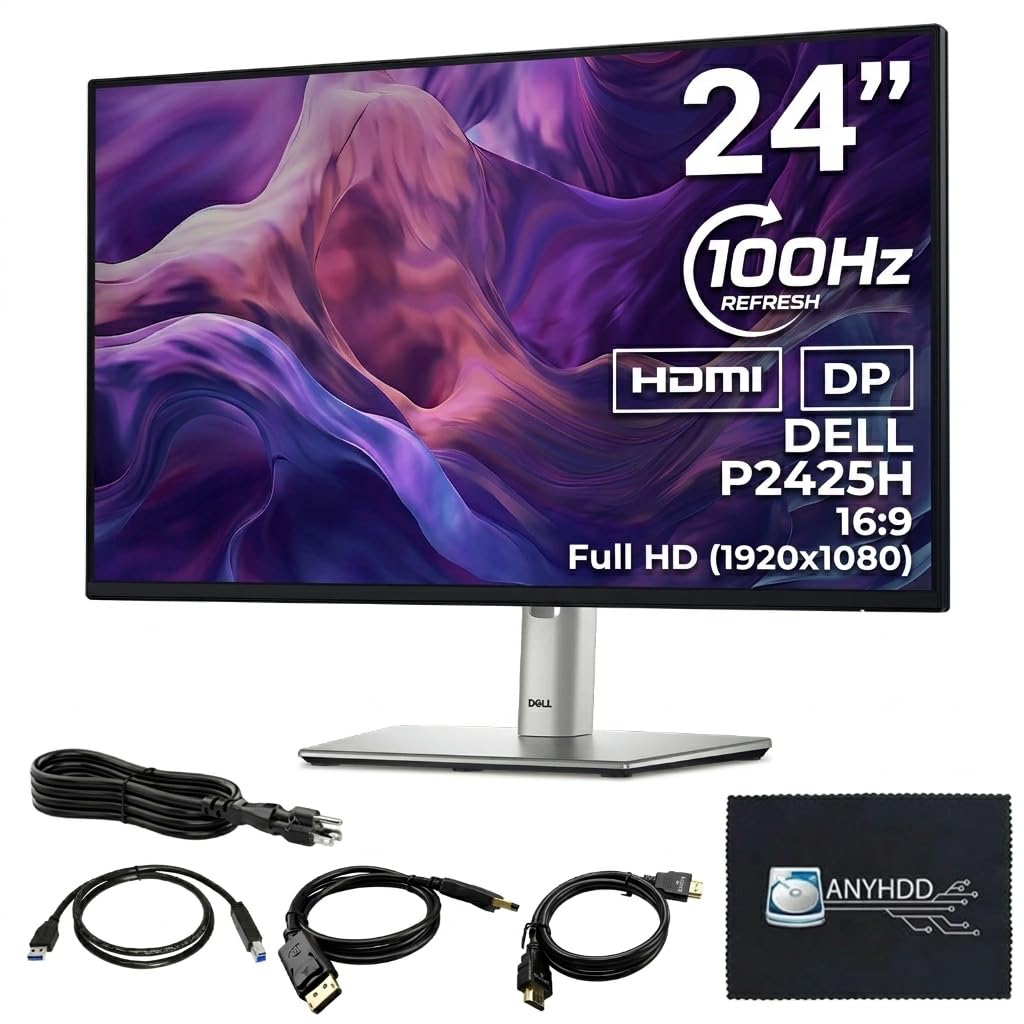
The Dell P2425H is built for enterprise environments where reliability and multi-functional ergonomics are the baseline. This 24-inch Full HD IPS monitor offers a 100Hz refresh rate, which makes desktop navigation feel more responsive than the standard office 60Hz panel. The 250 cd/m² brightness is acceptable for typical indoor office lighting, though it won’t compete with brighter displays in sunlit rooms.
The stand is the P2425H’s strongest asset. It offers height adjustment, pivot for portrait mode, swivel, and tilt — the full package for comfortable viewing across different desk setups. Dell also includes a built-in 4-port USB Type-A hub, which keeps your mouse, keyboard, and drive connections close at hand. Slim bezels make multi-monitor arrays look seamless.
Note that this unit ships with VGA, HDMI, and DisplayPort, but not USB-C. If you need USB-C with power delivery, you’ll want the more expensive P2425HE model. The base platform is rock-solid and backed by Dell’s warranty, but the lack of a single-cable solution for modern laptops is a notable omission at this price.
Why it’s great
- Full ergonomic stand with pivot and height adjustment
- Built-in 4-port USB hub for peripherals
- Reliable Dell build quality and warranty
Good to know
- No USB-C Power Delivery (requires P2425HE variant)
- Brightness is modest at 250 cd/m²
4. ASUS ProArt PA247CV

The ASUS ProArt PA247CV is the monitor you buy when color accuracy matters. It ships factory-calibrated with a Delta E < 2 rating and covers 100% of both sRGB and Rec. 709, making it a reliable tool for photo editing, print proofing, or any office work where on-screen color needs to match output. The 24-inch Full HD IPS panel is flanked by extremely slim bezels.
Connectivity is well thought out for creative professionals. USB-C delivers 65W Power Delivery and video signal over a single cable, plus there are HDMI and DisplayPort inputs and a USB 3.1 hub with four downstream ports. The stand supports height, tilt, swivel, and pivot adjustment. ASUS backs it with a 5-year warranty if you register online.
The 75Hz refresh rate and 250 cd/m² brightness are fine for office work, but the panel is not designed for high-end HDR content. Note that ASUS no longer provides a free calibration software tool, so you may need a third-party hardware calibrator like a Spyder X to maintain color accuracy over time. For a color-conscious office, this is a strong contender.
Why it’s great
- Factory-calibrated ΔE < 2 color accuracy
- UUSB-C with 65W Power Delivery
- Comprehensive ergonomic stand
Good to know
- No bundled calibration software
- Brightness capped at 250 cd/m²
5. HP 24mh

The HP 24mh is one of the most reliable all-rounders for a traditional office setup. The 23.8-inch Full HD IPS panel offers a 75Hz refresh rate and a micro-edge bezel that makes dual-monitor configurations almost seamless. The low blue light mode shifts the color temperature to a warmer spectrum, reducing eye fatigue during long sessions without washing out colors.
The ergonomic stand offers height adjustment with 100mm of travel and tilt from 5 degrees forward to 23 degrees backward. Built-in dual 2W speakers are adequate for video calls and system sounds, though users note you need to turn the volume up in the monitor menu for decent loudness. Connectivity includes HDMI, DisplayPort, and VGA, covering older and newer systems.
Some units show minimal backlight bleed in dark corners, which is common with IPS panels at this price point. The stand also lacks swivel and pivot rotation, so you cannot easily use it in portrait mode. For a straightforward, comfortable work monitor that does not cost a premium, the HP 24mh is an excellent choice.
Why it’s great
- Robust height-adjustable stand with tilt
- Low blue light mode reduces eye strain
- Virtually bezel-less for multi-monitor setups
Good to know
- No swivel or pivot adjustment
- Some backlight bleed in dark scenes reported
6. ASUS BE24EQK

The ASUS BE24EQK addresses a pain point unique to work-from-home setups: integrated video conferencing hardware. This 24-inch Full HD IPS monitor includes a 2MP adjustable webcam, a mic array with beamforming and echo cancellation, and built-in stereo speakers. You can skip the separate USB webcam and external microphone for most team calls.
The frameless IPS panel provides clear 1080p visuals with 178-degree viewing angles. TÜV-certified flicker-free and low blue light technology help with extended viewing comfort. The monitor includes HDMI, DisplayPort, and a USB cable for the webcam. The ergonomic stand offers tilt, swivel, pivot, and height adjustments.
The webcam and mic array are functional but not premium — the camera feels cheap compared to a dedicated Logitech webcam, and the speakers are tinny. A few users report sporadic screen flickering during video calls after several months of use. If a clean, all-in-one desktop for daily Zoom calls matters more than top-tier image quality, this monitor saves desk space and cable clutter.
Why it’s great
- Built-in adjustable 2MP webcam and mic array
- Full ergonomic stand with swivel and pivot
- Flicker-free and low blue light certification
Good to know
- Speakers are tinny and low volume
- Some users report screen flickering after months on Zoom
7. Dell S2425HSM

The Dell S2425HSM brings a 144Hz refresh rate to the 24-inch office monitor space, making everyday desktop interactions feel exceptionally fluid. The Full HD resolution on this 23.8-inch IPS panel delivers clear text and a 1500:1 contrast ratio that produces deeper blacks than the typical IPS 1000:1 standard. AMD FreeSync support keeps scrolling and video playback free of tearing.
The built-in dual 3W speakers are genuinely above average for a monitor — they offer a wider frequency range than most competitors and are loud enough for conference calls and background music without external speakers. The stand offers full height, tilt, pivot, and swivel adjustments, plus the ash white color scheme matches modern home office aesthetics.
The main limitation is connectivity. The single HDMI 1.4 port and lack of DisplayPort or USB-C may be restrictive if you need to connect multiple sources. The stand also lacks rotation for portrait mode. For a user who wants smooth motion and good built-in audio in a single-monitor, single-source setup, this is an appealing choice.
Why it’s great
- 144Hz refresh rate for smooth scrolling
- 1500:1 contrast ratio for richer blacks
- Excellent 3W dual speakers for its class
Good to know
- Limited to one HDMI 1.4 input only
- Stand lacks portrait rotation
8. BenQ GW2490T

The BenQ GW2490T is built around BenQ’s proprietary Brightness Intelligence technology, which automatically adjusts brightness and color temperature based on the ambient lighting in your room. This adaptive approach helps reduce eye strain without forcing you to manually tweak settings throughout the day. The 24-inch Full HD IPS panel also features a low blue light mode and flicker-free operation.
The stand is fully height adjustable and offers tilt, which is essential for comfortable long-term viewing. The 100Hz refresh rate makes scrolling through documents noticeably smoother than standard 60Hz office monitors. Connectivity is flexible with HDMI and DisplayPort inputs, plus a headphone jack for private listening.
The base stand takes up an unusually large amount of desk space, which can be a problem on smaller work surfaces. The built-in speakers are weak and the monitor has been reported to occasionally lose signal when waking from sleep on certain PC configurations. For users who prioritize eye comfort and automated brightness adjustment, this is a good, specialized option.
Why it’s great
- Brightness Intelligence auto-adjusts to ambient light
- 100Hz refresh rate for smooth scrolling
- Height-adjustable stand for ergonomic comfort
Good to know
- Stand base is bulky and consumes desk space
- Weak built-in speakers
9. ViewSonic VG2440

The ViewSonic VG2440 uses a VA panel rather than IPS, giving it a standout 3000:1 contrast ratio. This makes black text against white documents look deeper and more defined, which can reduce eye strain for users who spend hours reading. The 24-inch Full HD display refreshes at 60Hz, which is the standard baseline for office work.
The ergonomic stand is exceptionally good for this price tier. It offers 40 degrees of tilt, a full swivel range, 90-degree pivot for portrait mode, and height adjustment — matching monitors that cost considerably more. The built-in USB hub includes two side and two rear ports for connecting peripherals. Connectivity spans HDMI, DisplayPort, VGA, and USB.
At 60Hz, motion is not as smooth as the 100Hz or 144Hz models on this list, and the 250 cd/m² brightness is adequate for indoor lighting but not bright for sunlit rooms. There is no built-in speaker with HDMI audio support, so you need a separate audio connection or external speakers. For a budget-focused workspace that needs a premium stand, this is a practical option.
Why it’s great
- High 3000:1 contrast ratio for deep blacks
- Full ergonomic stand with tilt, swivel, pivot, and height
- Built-in 4-port USB hub
Good to know
- Only 60Hz refresh rate
- No speakers with HDMI audio passthrough
FAQ
Should I choose 1080p or 1440p for a 24 inch office monitor?
Does refresh rate matter for office work?
Is USB-C Power Delivery important for a work monitor?
Final Thoughts: The Verdict
For most users, the best 24 inch monitor for office work winner is the ViewSonic VG2455-2K because it combines QHD text clarity with USB-C 60W charging in a fully ergonomic package that handles daily productivity. If you want factory-calibrated color accuracy for design or photo editing, grab the ASUS ProArt PA247CV. And for a budget-friendly 1440p screen that still delivers sharp text, nothing beats the KTC H24T27.