
Our readers keep the lights on and the weekend projects moving. As an Amazon Associate, I earn from qualifying purchases.
A cluttered desk with tangled cables and a noisy keyboard that draws stares in a quiet office — that is the daily reality a good combo solves. You need a wireless setup that pairs instantly, types silently, and moves seamlessly between your laptop, tablet, and phone without sacrificing a full-size layout or a comfortable mouse.
I’m Rikta — the co-founder and writer behind FitlyFast. I’ve spent hundreds of hours researching wireless peripherals, cross-referencing battery specs, multi-device switching logic, and real-world durability reports to separate the daily drivers from the desk clutter.
This guide compares seven leading sets to help you find the right bluetooth keyboard and mouse combo for your workflow, whether you need whisper-quiet keys, ergonomic support, or a budget-friendly upgrade.
How To Choose The Best Bluetooth Keyboard And Mouse Combo
The right combo hinges on three factors that dictate your daily experience: how many devices you need to control, how much noise your environment tolerates, and how often you want to think about charging. A setup that works for a dedicated desktop may frustrate someone who switches between a MacBook, an iPad, and a PC four times a day.
Connectivity and Multi-Device Switching
Not all wireless combos handle multiple devices the same way. Some use a single 2.4GHz dongle for one PC and rely on Bluetooth for additional connections. The best combos let you pair both the keyboard and mouse to three devices and switch with a single keystroke or button press. Verify that the mouse remembers the same three paired devices as the keyboard — otherwise you have to re-pair the mouse each time you switch.
Battery Philosophy: Built-In vs. Replaceable
Rechargeable combos with USB-C connectors eliminate the need to buy or stock AA/AAA batteries. They are more environmentally friendly over the long haul, but if the internal battery degrades after a few years, the entire unit may need replacement. Combos powered by replaceable batteries — like the Logitech MK270 — can outlast the device itself but require you to keep batteries on hand. For most users, a rechargeable set with a 90-day or longer battery life hits the sweet spot between convenience and sustainability.
Ergonomics and Desk Space
A full-size keyboard with a numeric keypad is non-negotiable for data entry or finance work, but it eats up desk real estate. Combo sets that include a cushioned palm rest, adjustable tilt legs, or a split curved design (like the ProtoArc EKM01 Plus) can dramatically reduce wrist strain during all-day sessions. Budget-friendly sets often skip the wrist rest and offer only one tilt angle — fine for short use but fatiguing over eight hours.
Quick Comparison
On smaller screens, swipe sideways to see the full table.
| Model | Category | Best For | Key Spec | Amazon |
|---|---|---|---|---|
| ProtoArc KM60 | Premium | Multi-device comfort with wrist rest | 500mAh keyboard / 300mAh mouse | Amazon |
| Logitech MK955 | Premium | Larger hands, quiet office | SilentTouch, 90% less click noise | Amazon |
| ProtoArc EKM01 Plus | Premium | Ergonomic split design, wrist pain relief | Split/curved keyframe, palm rest | Amazon |
| Samsers Dual-Mode | Mid-Range | Slim, rechargeable, three-device switching | 280mAh keyboard / 300mAh mouse | Amazon |
| Seenda COE401 | Mid-Range | Dual OS layout, USB-C rechargeable | 4 DPI levels up to 2400 | Amazon |
| SABLUTE MA41 | Value | Quiet ergonomic wave with leather wrist rest | 30dB noise reduction | Amazon |
| Logitech MK270 | Budget | Reliable 2.4GHz, long battery life | 36-month keyboard battery life | Amazon |
In‑Depth Reviews
1. ProtoArc KM60

The ProtoArc KM60 delivers a rare combination of a cushioned leather-textured wrist rest, scissor-switch quiet keys, and a 63-gram ultra-light mouse that reduces hand fatigue during long work sessions. The integrated wrist rest is not a removable add-on — it is sewn into the keyboard frame, providing continuous support without a gap that collects crumbs.
Multi-device switching works via a single button press between 2.4GHz and Bluetooth, supporting up to three devices. The keyboard houses a 500mAh battery while the mouse holds 300mAh, both rechargeable via Type-C. Auto sleep kicks in after 60 minutes of inactivity, which contributes to a standby life of roughly 150 to 200 days according to user reports.
The 12 multimedia shortcut keys handle volume, homepage access, and app switching without needing software. The only compromise is the lack of backlighting — a deliberate choice to extend battery life and reduce glare. For a well-lit home office, this is a non-issue and actually improves focus.
Why it’s great
- Integrated leather wrist rest reduces fatigue during long typing
- Scissor-switch keys are quiet with satisfying feedback
- Ultra-light mouse at 63g prevents hand strain
- Rechargeable batteries eliminate disposable battery waste
Good to know
- No backlighting
- 2.4GHz channel only supports Windows
- Mouse device-switch button is on the bottom
2. Logitech MK955 Signature Slim

The Logitech MK955 is built for users with larger hands who need a full-size layout without the clunky, deep-travel keys of a traditional desktop keyboard. The K950 Signature Slim keyboard uses a laptop-style scissor mechanism that feels crisp and quiet, while the M750 L mouse adds SilentTouch technology to reduce click noise by 90 percent — crucial for shared office spaces.
SmartWheel scrolling on the mouse flips between ratchet-style line-by-line scrolling and free-spin mode for flying through long documents. The combo connects via Bluetooth or the included Logi Bolt USB receiver and remembers up to three paired devices. Switching between a work laptop, a personal Mac, and a tablet takes one tap on the keyboard and one press on the mouse.
Customization runs through Logi Options+ software, where you can remap keys, assign shortcuts, and adjust pointer speed. The keyboard and mouse both use recycled plastic in their construction, with a minimum of 48 percent post-consumer recycled material in the keyboard. The only recurring cost is batteries — the keyboard uses two AAA cells and the mouse one AA, which Logitech rates for up to 36 months and 24 months respectively.
Why it’s great
- SilentTouch reduces click noise drastically
- SmartWheel scrolls line-by-line or free-spin
- Full-size keyboard with laptop-style quiet keys for larger hands
- Logi Options+ allows deep customization
Good to know
- Requires AAA/AA batteries, not rechargeable
- Mouse is right-handed only
- Setup of additional devices via Logi Bolt can be confusing
3. ProtoArc EKM01 Plus

The ProtoArc EKM01 Plus takes ergonomics seriously with a full-size split curved keyframe that positions your wrists and forearms in a more natural, less pronated posture. The cushioned palm rest uses soft memory foam instead of hard plastic, and four adjustable tilt legs let you find the perfect angle whether you are sitting or standing.
Connectivity covers three devices via Bluetooth or the included USB receiver, with seamless switching via a single button. The contoured mouse includes a palm and thumb rest plus forward/back buttons for faster web browsing. The 2000 DPI optical sensor provides precise tracking on most surfaces, and the entire combo is rechargeable — 500mAh battery in the keyboard and a matching capacity in the mouse, both charged via Type-C.
Battery life is rated at 250 hours of usage after a two-hour charge, with auto-sleep after 30 minutes of inactivity. The keyboard measures 20.75 inches wide, which is significantly larger than standard full-size boards — measure your desk before buying. The only reported annoyance is that the forward/back mouse buttons sit right above the thumb and can be pressed accidentally during normal use, with no official way to disable them.
Why it’s great
- Split curved design reduces wrist pronation and strain
- Memory foam palm rest is comfortable for all-day typing
- Rechargeable with good battery life
- Easy multi-device switching
Good to know
- Very wide — requires ample desk space
- Mouse forward/back buttons can be accidentally pressed
- No backlight
4. Samsers Dual-Mode

The Samsers Dual-Mode combo stands out for its ultra-thin gray matte design that looks clean on any desk. The keyboard uses low-profile scissor-switch keys with sufficient travel for accurate feedback without the bulk of mechanical switches. The 280mAh keyboard battery and 300mAh mouse battery charge fully in about two hours via Type-C and deliver 90 hours of continuous keyboard use or 60 hours of mouse use.
Connectivity spans two Bluetooth 5.0 channels plus a 2.4GHz connection, supporting three devices simultaneously. The keyboard and mouse each have their own switch buttons — you must press the keyboard button and the mouse button separately to move both to a new device. This is a minor extra step compared to combos that sync the switch across both peripherals automatically.
The mouse includes four adjustable DPI levels (800, 1200, 1600, 2400) and a built-in phone holder slot, though the slot requires removing your phone case on most modern smartphones. Users report reliable Bluetooth pairing with Windows, macOS, iOS, and Android, with standby times of up to 190 days for the keyboard and 330 days for the mouse. A single Type-C cable is included, but no charging block.
Why it’s great
- Ultra-slim design saves desk space and looks premium
- Three connection options (2x BT 5.0 + 2.4G)
- Adjustable DPI mouse for different sensitivity needs
- Rechargeable with long standby times
Good to know
- Keyboard and mouse switch devices independently
- Phone slot requires removing case
- No adjustable tilt legs or backlight
5. Seenda COE401
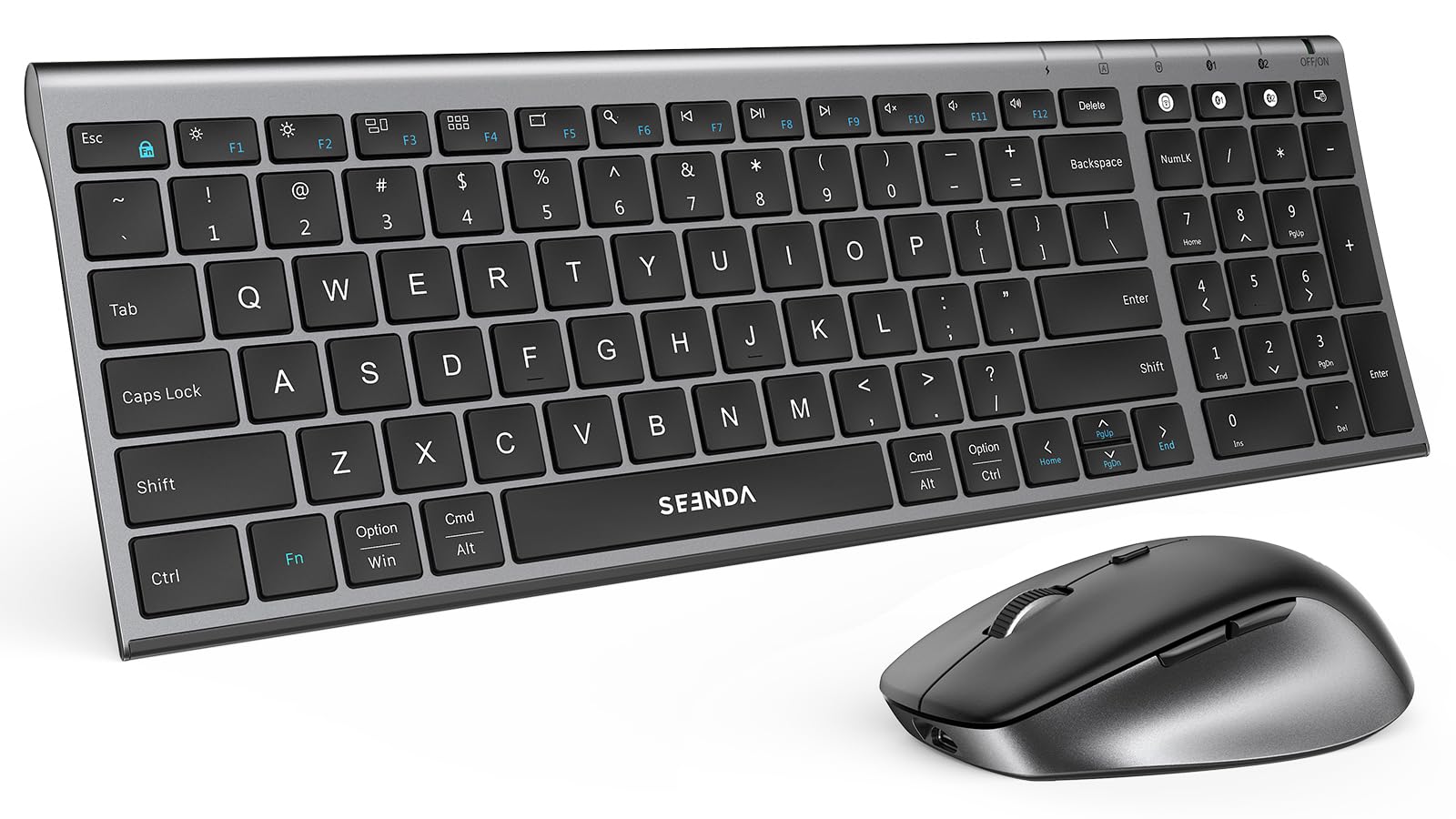
The Seenda COE401 is one of the few combos in this mid-range tier that ships with both Windows and Apple key legends printed on the keycaps, making it a true dual-OS companion for users who switch between a PC and a Mac. The low-profile full-size keyboard includes a numeric keypad and uses scissor-switch keys that deliver a quiet, laptop-like typing experience.
Connectivity options include a single 2.4GHz USB receiver (Windows only) and dual Bluetooth channels that support macOS, iPadOS, iOS, and Android. You can pair up to three devices, though the keyboard and mouse each have separate switch buttons — press the keyboard button and the mouse button individually to move both. The mouse offers four DPI levels from 800 to 2400, giving you control over cursor speed for different screen sizes.
The USB-C rechargeable battery is rated for up to 90 days of typical use, with auto-sleep activating after 10 minutes of mouse inactivity and 30 minutes of keyboard inactivity. The slim metal top plate gives the keyboard a solid, premium feel that belies its price point. Some users note that the arrow keys feel slightly cramped due to the compact full-size layout, and the keyboard lacks backlighting entirely.
Why it’s great
- Dual OS key legends work with Windows and Mac out of the box
- Metal top plate gives a premium feel
- USB-C rechargeable with 90-day battery life
- Quiet scissor-switch keys
Good to know
- 2.4G mode works only on Windows
- Arrow keys are slightly cramped
- No backlight
6. SABLUTE MA41
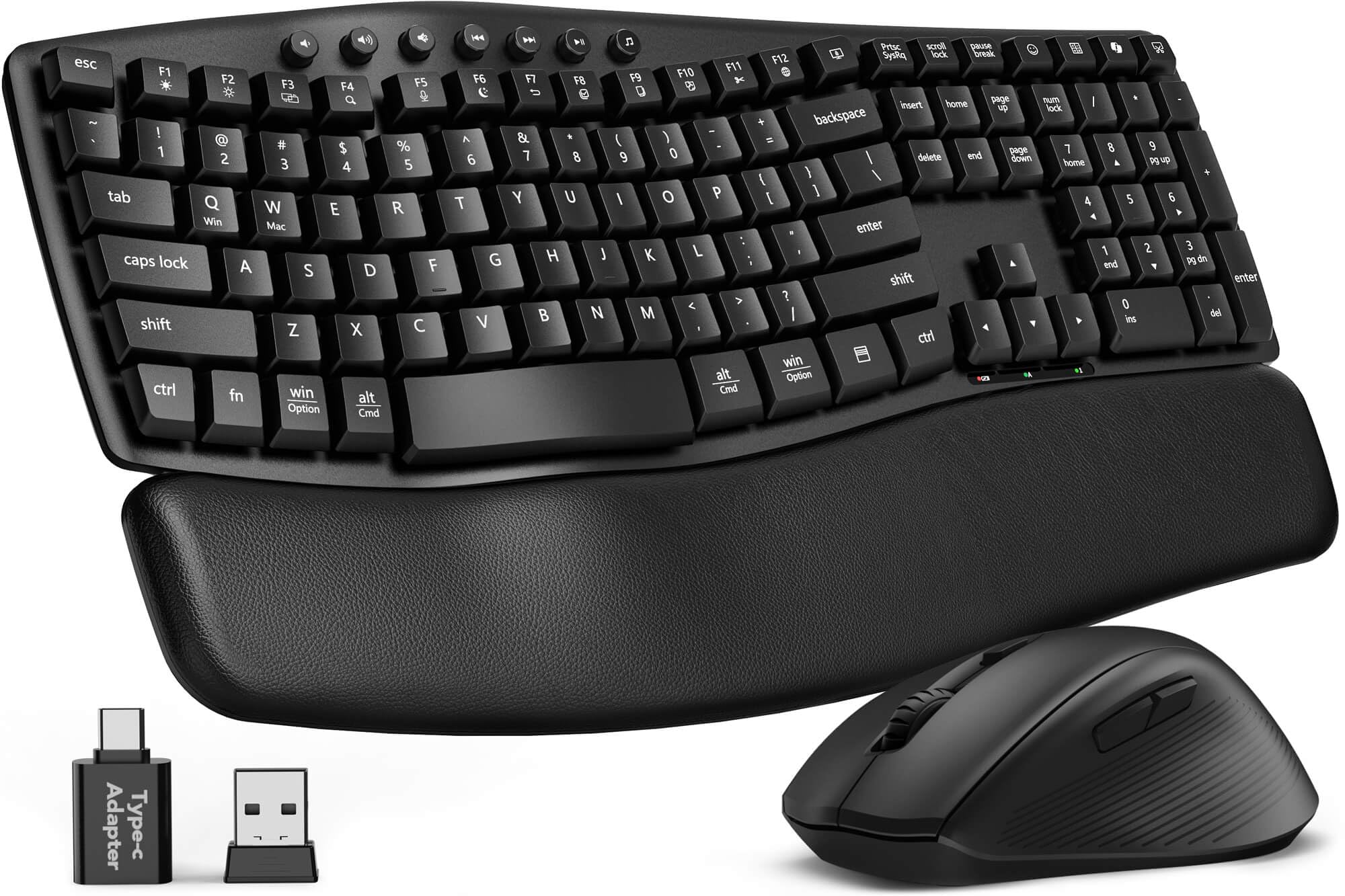
The SABLUTE MA41 brings ergonomic wave styling to the budget-friendly tier without skimping on comfort. The keyboard uses a gently curved wave layout that mimics a natural typing arc, and it includes a cushioned leather wrist rest — a feature usually reserved for more expensive sets. The 30dB noise reduction rating means keystrokes and mouse clicks are barely audible, ideal for shared workspaces or late-night sessions.
A single 2.4GHz USB receiver handles both the keyboard and mouse, saving a USB port. An included USB-C adapter extends compatibility to modern laptops. The keyboard offers 12 productivity shortcut keys for instant access to screenshots, media controls, calculator, and AI tools on Windows, though some shortcuts are unavailable on macOS.
Battery life is rated for 6 to 12 months using two AAA batteries for the keyboard and one AA for the mouse, though batteries are not included. The laser-etched keycaps resist fading and are tested for up to 10 million keystrokes. Spill-resistant construction adds a layer of protection against accidental coffee spills. The mouse is right-handed only, which is a limitation for left-handed users.
Why it’s great
- Ergonomic wave design reduces wrist fatigue
- Leather palm rest is soft and easy to clean
- 30dB quiet typing is genuinely silent
- Laser-etched keys resist wear
Good to know
- Mouse is right-handed only
- Batteries not included
- Some macOS shortcuts are unavailable
7. Logitech MK270

The Logitech MK270 is the budget anchor of this list for a reason — it has been a reliable workhorse for years. The full-size keyboard includes a numeric keypad, eight multimedia hotkeys, and a spill-resistant design. The compact mouse is ambidextrous and tracks smoothly on most surfaces via the 2.4GHz USB receiver, which provides a stable connection up to 33 feet.
Battery life is the headline spec: 36 months for the keyboard and 12 months for the mouse using the included AA and AAA batteries. On/off switches on both devices prevent drain when not in use. The keyboard uses membrane switches rather than scissor mechanisms, so the key feel is softer and slightly mushier compared to the scissor-switch combos above — but it is perfectly functional for everyday typing and data entry.
The MK270 is a 2.4GHz-only set with no Bluetooth connectivity, so it does not support multi-device switching or tablet pairing. That limitation keeps the price low and the setup dead simple — plug the receiver and go. Users report the keyboard lasting five years or more before any key failure, making it one of the best long-term values in wireless peripherals despite the lack of Bluetooth.
Why it’s great
- Industry-leading battery life — 36 months keyboard, 12 months mouse
- Spill-resistant design protects against accidents
- Plug-and-play simplicity with 2.4GHz receiver
- Includes batteries out of the box
Good to know
- No Bluetooth — single-device only
- Membrane keys feel softer than scissor-switch
- No rechargeable batteries
FAQ
Can I use a Bluetooth keyboard and mouse combo with my iPad or Android tablet?
Why does my mouse not switch devices when I switch my keyboard?
How do I know if a keyboard and mouse combo supports both Windows and Mac key layouts?
Final Thoughts: The Verdict
For most users, the bluetooth keyboard and mouse combo winner is the ProtoArc KM60 because it combines a comfortable leather wrist rest, quiet scissor-switch keys, and true multi-device Bluetooth switching at a mid-range price that does not force compromises. If you need an ergonomic split design to relieve wrist pain, grab the ProtoArc EKM01 Plus. And for a budget-friendly no-fuss setup with legendary battery life, nothing beats the Logitech MK270.